> ## Documentation Index
> Fetch the complete documentation index at: https://docs.dodopayments.com/llms.txt
> Use this file to discover all available pages before exploring further.
# Customer.io
> Invia eventi di Dodo Payments a Customer.io per attivare automazioni email e percorsi cliente.
## Introduzione
Attiva campagne email personalizzate e percorsi cliente basati su eventi di pagamento. Invia automaticamente email di benvenuto per nuovi clienti, aggiornamenti di abbonamento e notifiche di errore di pagamento tramite Customer.io.
Questa integrazione richiede il tuo Site ID e API Key di Customer.io.
## Iniziare
Nel tuo pannello di controllo di Dodo Payments, vai a Webhook → + Aggiungi Endpoint ed espandi il menu a tendina delle integrazioni.
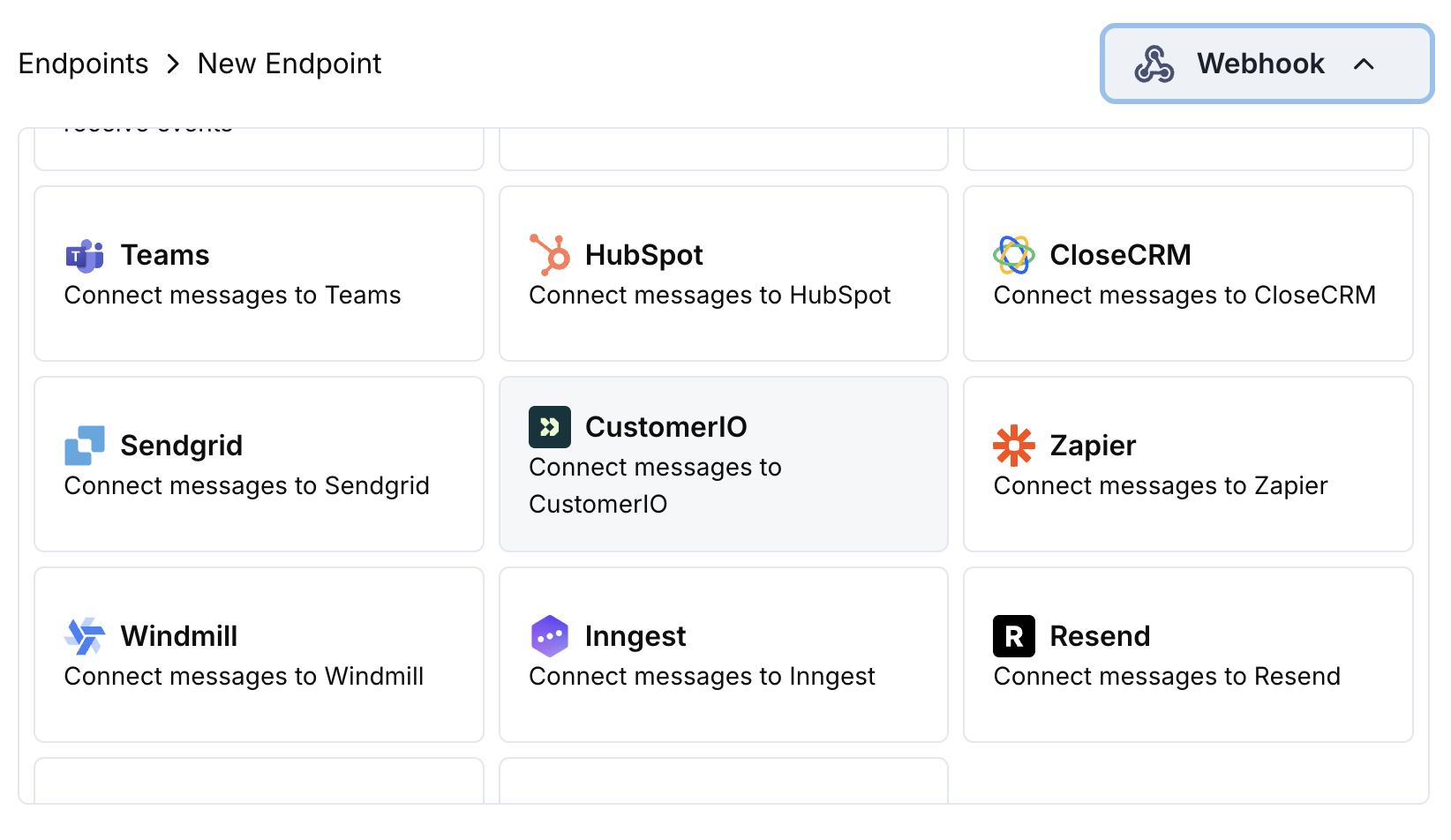 Seleziona la scheda di integrazione Customer.io.
Inserisci il tuo Site ID e API Key di Customer.io nella configurazione.
Modifica il codice di trasformazione per formattare gli eventi per l'API Track di Customer.io.
Testa con payload di esempio e clicca Crea per attivare la sincronizzazione.
🎉 Gli eventi di pagamento attiveranno ora le automazioni email di Customer.io.
## Esempi di Codice di Trasformazione
### Traccia Eventi di Pagamento
```javascript track_payments.js icon="js" expandable theme={null}
function handler(webhook) {
if (webhook.eventType === "payment.succeeded") {
const p = webhook.payload.data;
webhook.url = "https://track.customer.io/api/v2/entity";
webhook.payload = {
type: "person",
identifiers: {
id: p.customer.customer_id
},
action: "payment_completed",
name: "Payment Completed",
attributes: {
email: p.customer.email,
name: p.customer.name,
payment_amount: (p.total_amount / 100).toFixed(2),
payment_method: p.payment_method || "unknown",
payment_id: p.payment_id,
currency: p.currency || "USD"
}
};
}
return webhook;
}
```
### Traccia Ciclo di Vita dell'Abbonamento
```javascript track_subscriptions.js icon="js" expandable theme={null}
function handler(webhook) {
const s = webhook.payload.data;
switch (webhook.eventType) {
case "subscription.active":
webhook.url = "https://track.customer.io/api/v2/entity";
webhook.payload = {
type: "person",
identifiers: {
id: s.customer.customer_id
},
action: "subscription_started",
name: "Subscription Started",
attributes: {
email: s.customer.email,
subscription_id: s.subscription_id,
product_id: s.product_id,
amount: (s.recurring_pre_tax_amount / 100).toFixed(2),
frequency: s.payment_frequency_interval,
next_billing: s.next_billing_date
}
};
break;
case "subscription.cancelled":
webhook.url = "https://track.customer.io/api/v2/entity";
webhook.payload = {
type: "person",
identifiers: {
id: s.customer.customer_id
},
action: "subscription_cancelled",
name: "Subscription Cancelled",
attributes: {
email: s.customer.email,
subscription_id: s.subscription_id,
cancelled_at: s.cancelled_at,
cancel_at_next_billing: s.cancel_at_next_billing_date
}
};
break;
}
return webhook;
}
```
### Traccia Attributi del Cliente
```javascript track_attributes.js icon="js" expandable theme={null}
function handler(webhook) {
if (webhook.eventType === "payment.succeeded") {
const p = webhook.payload.data;
webhook.url = "https://track.customer.io/api/v2/entity";
webhook.payload = {
type: "person",
identifiers: {
id: p.customer.customer_id
},
action: "identify",
name: "Customer Identified",
attributes: {
email: p.customer.email,
name: p.customer.name,
total_spent: (p.total_amount / 100).toFixed(2),
payment_method: p.payment_method || "unknown",
last_payment_date: webhook.payload.timestamp,
customer_since: webhook.payload.timestamp
}
};
}
return webhook;
}
```
## Suggerimenti
* Usa nomi di eventi coerenti che corrispondano alle tue campagne di Customer.io
* Includi attributi rilevanti per la personalizzazione
* Imposta identificatori cliente appropriati per un tracciamento accurato
* Usa nomi di eventi significativi per i trigger delle campagne
## Risoluzione dei Problemi
* Verifica che Site ID e API Key siano corretti
* Controlla che i nomi degli eventi corrispondano alle campagne di Customer.io
* Assicurati che gli identificatori dei clienti siano impostati correttamente
* Revisiona i limiti di velocità dell'API di Customer.io
* Valida che la struttura JSON corrisponda al formato dell'API di Customer.io
* Controlla che tutti i campi obbligatori siano presenti
* Assicurati che nomi di eventi e attributi siano formattati correttamente
Seleziona la scheda di integrazione Customer.io.
Inserisci il tuo Site ID e API Key di Customer.io nella configurazione.
Modifica il codice di trasformazione per formattare gli eventi per l'API Track di Customer.io.
Testa con payload di esempio e clicca Crea per attivare la sincronizzazione.
🎉 Gli eventi di pagamento attiveranno ora le automazioni email di Customer.io.
## Esempi di Codice di Trasformazione
### Traccia Eventi di Pagamento
```javascript track_payments.js icon="js" expandable theme={null}
function handler(webhook) {
if (webhook.eventType === "payment.succeeded") {
const p = webhook.payload.data;
webhook.url = "https://track.customer.io/api/v2/entity";
webhook.payload = {
type: "person",
identifiers: {
id: p.customer.customer_id
},
action: "payment_completed",
name: "Payment Completed",
attributes: {
email: p.customer.email,
name: p.customer.name,
payment_amount: (p.total_amount / 100).toFixed(2),
payment_method: p.payment_method || "unknown",
payment_id: p.payment_id,
currency: p.currency || "USD"
}
};
}
return webhook;
}
```
### Traccia Ciclo di Vita dell'Abbonamento
```javascript track_subscriptions.js icon="js" expandable theme={null}
function handler(webhook) {
const s = webhook.payload.data;
switch (webhook.eventType) {
case "subscription.active":
webhook.url = "https://track.customer.io/api/v2/entity";
webhook.payload = {
type: "person",
identifiers: {
id: s.customer.customer_id
},
action: "subscription_started",
name: "Subscription Started",
attributes: {
email: s.customer.email,
subscription_id: s.subscription_id,
product_id: s.product_id,
amount: (s.recurring_pre_tax_amount / 100).toFixed(2),
frequency: s.payment_frequency_interval,
next_billing: s.next_billing_date
}
};
break;
case "subscription.cancelled":
webhook.url = "https://track.customer.io/api/v2/entity";
webhook.payload = {
type: "person",
identifiers: {
id: s.customer.customer_id
},
action: "subscription_cancelled",
name: "Subscription Cancelled",
attributes: {
email: s.customer.email,
subscription_id: s.subscription_id,
cancelled_at: s.cancelled_at,
cancel_at_next_billing: s.cancel_at_next_billing_date
}
};
break;
}
return webhook;
}
```
### Traccia Attributi del Cliente
```javascript track_attributes.js icon="js" expandable theme={null}
function handler(webhook) {
if (webhook.eventType === "payment.succeeded") {
const p = webhook.payload.data;
webhook.url = "https://track.customer.io/api/v2/entity";
webhook.payload = {
type: "person",
identifiers: {
id: p.customer.customer_id
},
action: "identify",
name: "Customer Identified",
attributes: {
email: p.customer.email,
name: p.customer.name,
total_spent: (p.total_amount / 100).toFixed(2),
payment_method: p.payment_method || "unknown",
last_payment_date: webhook.payload.timestamp,
customer_since: webhook.payload.timestamp
}
};
}
return webhook;
}
```
## Suggerimenti
* Usa nomi di eventi coerenti che corrispondano alle tue campagne di Customer.io
* Includi attributi rilevanti per la personalizzazione
* Imposta identificatori cliente appropriati per un tracciamento accurato
* Usa nomi di eventi significativi per i trigger delle campagne
## Risoluzione dei Problemi
* Verifica che Site ID e API Key siano corretti
* Controlla che i nomi degli eventi corrispondano alle campagne di Customer.io
* Assicurati che gli identificatori dei clienti siano impostati correttamente
* Revisiona i limiti di velocità dell'API di Customer.io
* Valida che la struttura JSON corrisponda al formato dell'API di Customer.io
* Controlla che tutti i campi obbligatori siano presenti
* Assicurati che nomi di eventi e attributi siano formattati correttamente