> ## Documentation Index
> Fetch the complete documentation index at: https://docs.dodopayments.com/llms.txt
> Use this file to discover all available pages before exploring further.
# Customer Management
> Manage customer relationships, track purchase history, and provide self-service options through the Dodo Payments dashboard and API.
## Overview
La funzionalità Customers in Dodo Payments fornisce un hub centralizzato per gestire tutte le relazioni con i clienti. Monitora ogni interazione con il cliente, visualizza la cronologia degli acquisti, gestisci gli abbonamenti, accedi ai registri delle transazioni del wallet e abilita opzioni self-service, tutto da un’unica dashboard.
View and manage all customers in one place with search and filtering capabilities.
Gestisci saldi monetari prepagati, ricarica wallet e traccia la cronologia delle transazioni.
Empower customers to self-manage subscriptions, invoices, and license keys.
Programmatically create, update, and retrieve customer data via API.
## Accessing the Customers Page
From the dashboard, click on **Sales > Customers** in the navigation menu.
The Customers Page will display a list of all current and past customers who have interacted with your business.
 ## Customer Information
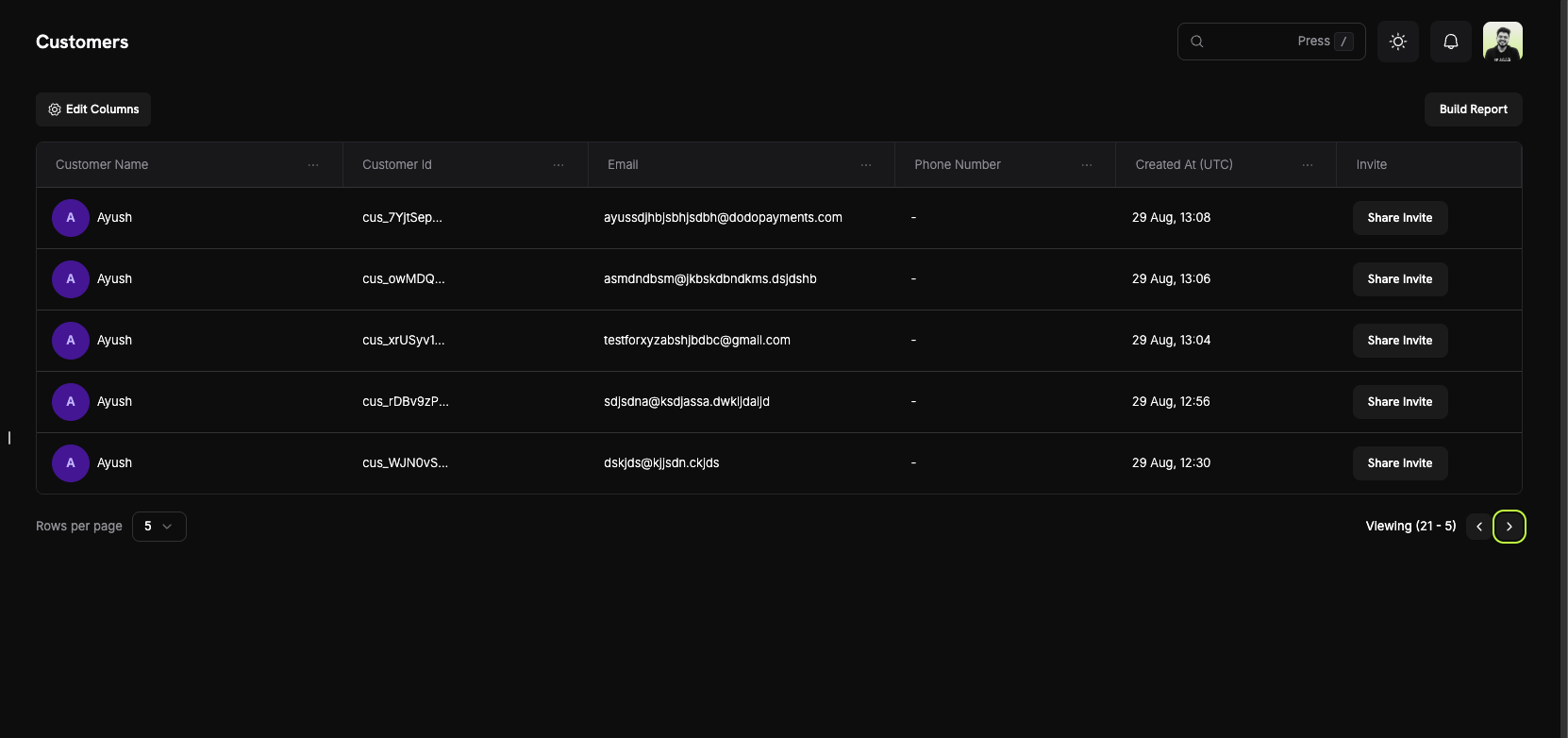
On the **Customers Page**, you can see a comprehensive overview of your entire customer base. The table displays all customers with the following information:
### Customer List Columns
* **Customer Name**: The full name of the customer with an avatar indicator.
* **Customer Id**: A unique identifier (e.g., `cus_5fpsWAa...`) for each customer.
* **Email**: The customer's email address for communication and portal access.
* **Phone Number**: The customer's phone number (if provided).
* **Created At (UTC)**: The date and time when the customer account was created.
* **Invite**: Quick action button to share Customer Portal invites.
### Page Features
* **Edit Columns**: Customize which columns are displayed in the customer table.
* **Build Report**: Generate custom reports based on your customer data.
* **Search**: Quickly find specific customers by name, email, or customer ID.
* **Pagination**: Navigate through your customer list with adjustable rows per page.
Use the "Edit Columns" feature to customize your view and show only the information most relevant to your workflow.
## Customer Details Page
Click on any customer to view their detailed information page, which includes:
## Customer Information
On the **Customers Page**, you can see a comprehensive overview of your entire customer base. The table displays all customers with the following information:
### Customer List Columns
* **Customer Name**: The full name of the customer with an avatar indicator.
* **Customer Id**: A unique identifier (e.g., `cus_5fpsWAa...`) for each customer.
* **Email**: The customer's email address for communication and portal access.
* **Phone Number**: The customer's phone number (if provided).
* **Created At (UTC)**: The date and time when the customer account was created.
* **Invite**: Quick action button to share Customer Portal invites.
### Page Features
* **Edit Columns**: Customize which columns are displayed in the customer table.
* **Build Report**: Generate custom reports based on your customer data.
* **Search**: Quickly find specific customers by name, email, or customer ID.
* **Pagination**: Navigate through your customer list with adjustable rows per page.
Use the "Edit Columns" feature to customize your view and show only the information most relevant to your workflow.
## Customer Details Page
Click on any customer to view their detailed information page, which includes:
 ### About Section
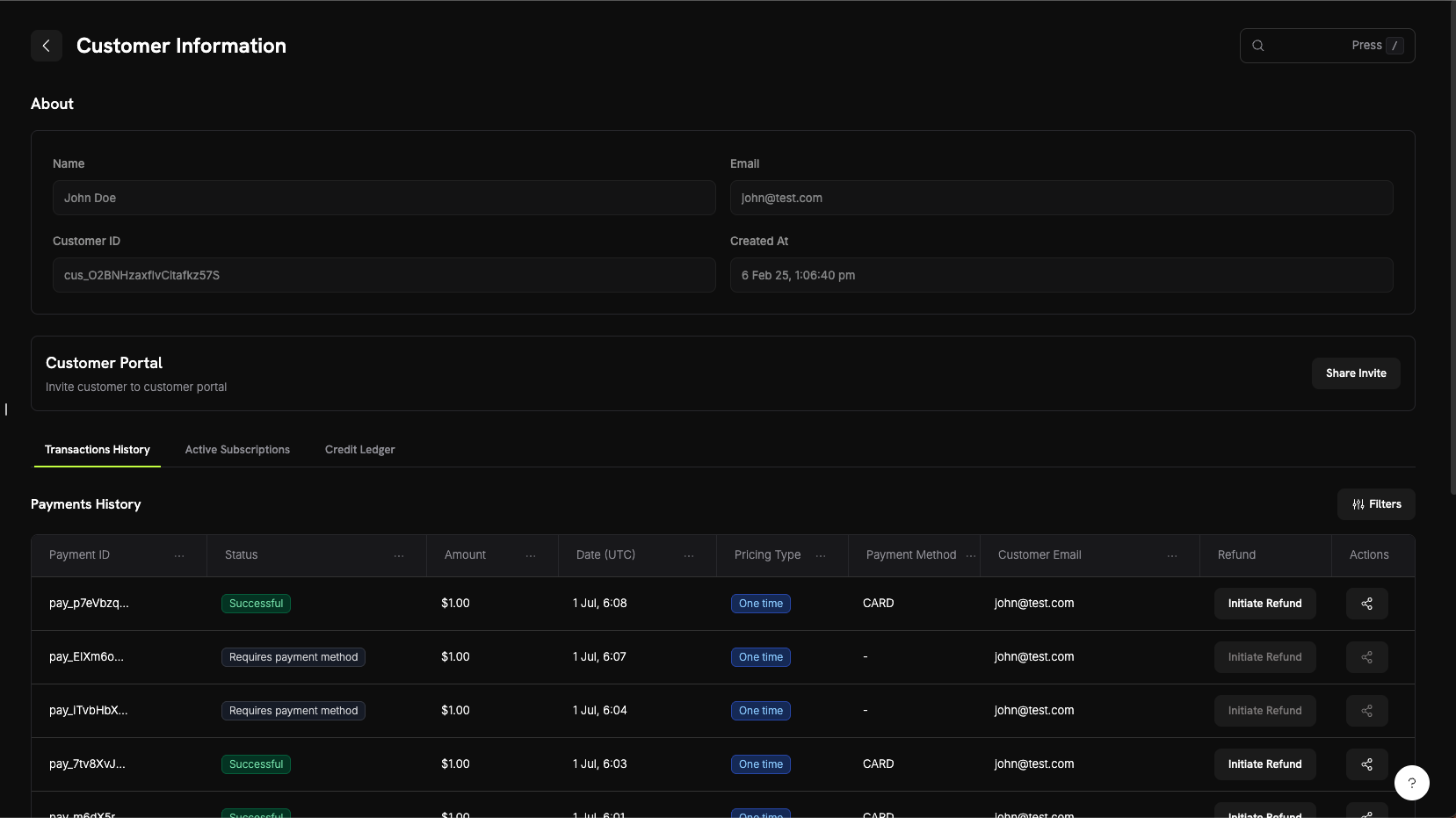
The About section displays core customer information:
* **Name**: Customer's full name
* **Email**: Customer's email address
* **Customer ID**: Unique identifier for API and tracking purposes
* **Created At**: Timestamp of when the customer account was created
### Customer Activity Tabs
The customer details page includes three tabs for viewing different aspects of customer activity:
View all payment transactions for this customer including:
* **Payment ID**: Unique transaction identifier
* **Status**: Payment status (Successful, Failed, Pending, Refunded)
* **Amount**: Transaction amount
* **Date (UTC)**: When the transaction occurred
* **Pricing Type**: Whether it's a one-time purchase or subscription
* **Payment Method**: Payment method used (Card, UPI, etc.)
* **Customer Email**: Email associated with the transaction
* **Refund**: Quick action to initiate refunds
* **Actions**: Additional options for managing the transaction
View all active subscriptions for this customer:
* Subscription plan details
* Billing cycle and next renewal date
* Subscription status
* Options to manage or cancel subscriptions
Visualizza il registro delle transazioni del wallet del cliente mostrando:
* Tutti gli aggiustamenti e gli addebiti di fondi
* Saldo corrente del wallet per ogni valuta (USD, INR)
* Motivi delle transazioni e timestamp
* Cronologia dettagliata delle transazioni per la riconciliazione
Visualizza il registro dei crediti del wallet del cliente mostrando:
* Tutte le transazioni di credito e debito
* Saldo corrente del wallet per ogni valuta
* Motivi delle transazioni e timestamp
* Cronologia dettagliata delle transazioni per la riconciliazione
La scheda Wallet Ledger offre completa trasparenza sulle transazioni del wallet del cliente, rendendo semplice tracciare aggiunte di fondi, deduzioni e saldi monetari correnti.
## Portale del Cliente
Il Portale del Cliente è un’area self-service ospitata e sicura dove i tuoi clienti possono gestire i loro abbonamenti, visualizzare la cronologia di fatturazione, accedere alle chiavi di licenza e aggiornare il loro profilo — senza contattare il supporto.
### Funzionalità del Portale
I clienti possono accedere al portale per:
* **Visualizzare la cronologia di fatturazione**: vedere tutte le transazioni passate e scaricare le fatture.
* **Gestire gli abbonamenti**: annullare o visualizzare i dettagli dell’abbonamento.
* **Recuperare le chiavi di licenza**: accedere a tutte le chiavi di licenza collegate ai loro acquisti.
* **Aggiornare il profilo**: modificare nome, email o numero di telefono.
Esplora documentazione dettagliata sulle funzionalità del portale, i metodi di accesso e gli esempi di integrazione.
## Wallet dei Clienti
I Wallet dei Clienti sono conti di saldo monetario prepagati per i tuoi clienti. Ogni cliente riceve automaticamente un wallet che può contenere fondi reali in più valute (USD e INR), che possono essere applicati alle fatture di abbonamento, utilizzati per rimborsi o finanziati con bonus promozionali.
### Funzionalità principali
* **Supporto multivaluta**: tieni traccia separatamente dei saldi monetari in USD e INR.
* **Saldi prepagati**: i clienti possono detenere fondi che vengono applicati alle fatture future e ai pagamenti degli abbonamenti.
* **Cronologia delle transazioni**: visualizza il registro completo di tutti gli aggiustamenti e le deduzioni di fondi.
* **Design API-first**: aggiungi, deduci e verifica i saldi dei wallet in modo programmato.
* **Fatturazione basata su crediti**: consenti ai clienti di acquistare crediti anticipati e spenderli sui tuoi servizi.
* **Cronologia delle transazioni**: visualizza il registro completo di tutti i crediti e i debiti.
* **Design API-first**: aggiungi, rimuovi e verifica i saldi dei wallet in modo programmato.
Esplora documentazione dettagliata, esempi di codice e best practice per gestire i saldi dei wallet dei clienti.
## Gestione API
Dodo Payments fornisce un’API REST completa per la gestione programmatica dei clienti. Puoi creare, recuperare, aggiornare e gestire i clienti interamente tramite l’API.
### Endpoint API disponibili
Crea un nuovo cliente nel tuo account Dodo Payments con i suoi dati.
Recupera un elenco paginato di tutti i clienti associati al tuo account.
Ottieni informazioni dettagliate su un cliente specifico tramite il suo ID.
Aggiorna le informazioni di un cliente come nome, email o metadata.
Rimuovere un metodo di pagamento salvato dall'account di un cliente.
Generare un link di sessione sicuro per il Customer Portal di un cliente specifico.
Tutti gli endpoint API richiedono l'autenticazione con la tua chiave API. Usa sempre la tua chiave segreta sul lato server e non esporla mai nel codice lato client.
### About Section
The About section displays core customer information:
* **Name**: Customer's full name
* **Email**: Customer's email address
* **Customer ID**: Unique identifier for API and tracking purposes
* **Created At**: Timestamp of when the customer account was created
### Customer Activity Tabs
The customer details page includes three tabs for viewing different aspects of customer activity:
View all payment transactions for this customer including:
* **Payment ID**: Unique transaction identifier
* **Status**: Payment status (Successful, Failed, Pending, Refunded)
* **Amount**: Transaction amount
* **Date (UTC)**: When the transaction occurred
* **Pricing Type**: Whether it's a one-time purchase or subscription
* **Payment Method**: Payment method used (Card, UPI, etc.)
* **Customer Email**: Email associated with the transaction
* **Refund**: Quick action to initiate refunds
* **Actions**: Additional options for managing the transaction
View all active subscriptions for this customer:
* Subscription plan details
* Billing cycle and next renewal date
* Subscription status
* Options to manage or cancel subscriptions
Visualizza il registro delle transazioni del wallet del cliente mostrando:
* Tutti gli aggiustamenti e gli addebiti di fondi
* Saldo corrente del wallet per ogni valuta (USD, INR)
* Motivi delle transazioni e timestamp
* Cronologia dettagliata delle transazioni per la riconciliazione
Visualizza il registro dei crediti del wallet del cliente mostrando:
* Tutte le transazioni di credito e debito
* Saldo corrente del wallet per ogni valuta
* Motivi delle transazioni e timestamp
* Cronologia dettagliata delle transazioni per la riconciliazione
La scheda Wallet Ledger offre completa trasparenza sulle transazioni del wallet del cliente, rendendo semplice tracciare aggiunte di fondi, deduzioni e saldi monetari correnti.
## Portale del Cliente
Il Portale del Cliente è un’area self-service ospitata e sicura dove i tuoi clienti possono gestire i loro abbonamenti, visualizzare la cronologia di fatturazione, accedere alle chiavi di licenza e aggiornare il loro profilo — senza contattare il supporto.
### Funzionalità del Portale
I clienti possono accedere al portale per:
* **Visualizzare la cronologia di fatturazione**: vedere tutte le transazioni passate e scaricare le fatture.
* **Gestire gli abbonamenti**: annullare o visualizzare i dettagli dell’abbonamento.
* **Recuperare le chiavi di licenza**: accedere a tutte le chiavi di licenza collegate ai loro acquisti.
* **Aggiornare il profilo**: modificare nome, email o numero di telefono.
Esplora documentazione dettagliata sulle funzionalità del portale, i metodi di accesso e gli esempi di integrazione.
## Wallet dei Clienti
I Wallet dei Clienti sono conti di saldo monetario prepagati per i tuoi clienti. Ogni cliente riceve automaticamente un wallet che può contenere fondi reali in più valute (USD e INR), che possono essere applicati alle fatture di abbonamento, utilizzati per rimborsi o finanziati con bonus promozionali.
### Funzionalità principali
* **Supporto multivaluta**: tieni traccia separatamente dei saldi monetari in USD e INR.
* **Saldi prepagati**: i clienti possono detenere fondi che vengono applicati alle fatture future e ai pagamenti degli abbonamenti.
* **Cronologia delle transazioni**: visualizza il registro completo di tutti gli aggiustamenti e le deduzioni di fondi.
* **Design API-first**: aggiungi, deduci e verifica i saldi dei wallet in modo programmato.
* **Fatturazione basata su crediti**: consenti ai clienti di acquistare crediti anticipati e spenderli sui tuoi servizi.
* **Cronologia delle transazioni**: visualizza il registro completo di tutti i crediti e i debiti.
* **Design API-first**: aggiungi, rimuovi e verifica i saldi dei wallet in modo programmato.
Esplora documentazione dettagliata, esempi di codice e best practice per gestire i saldi dei wallet dei clienti.
## Gestione API
Dodo Payments fornisce un’API REST completa per la gestione programmatica dei clienti. Puoi creare, recuperare, aggiornare e gestire i clienti interamente tramite l’API.
### Endpoint API disponibili
Crea un nuovo cliente nel tuo account Dodo Payments con i suoi dati.
Recupera un elenco paginato di tutti i clienti associati al tuo account.
Ottieni informazioni dettagliate su un cliente specifico tramite il suo ID.
Aggiorna le informazioni di un cliente come nome, email o metadata.
Rimuovere un metodo di pagamento salvato dall'account di un cliente.
Generare un link di sessione sicuro per il Customer Portal di un cliente specifico.
Tutti gli endpoint API richiedono l'autenticazione con la tua chiave API. Usa sempre la tua chiave segreta sul lato server e non esporla mai nel codice lato client.