> ## Documentation Index
> Fetch the complete documentation index at: https://docs.dodopayments.com/llms.txt
> Use this file to discover all available pages before exploring further.
# Rekomi
> Run an affiliate program on your Dodo Payments store with Rekomi. One pasted API key connects the two, and Rekomi tracks sales and pays your affiliates.
## Introduction
[Rekomi](https://rekomi.com) is an affiliate tracking and management platform with a native Dodo Payments integration. Someone shares an affiliate link, Rekomi records the click, and when that visitor buys, the sale arrives from Dodo Payments and the right affiliate is credited automatically. Rekomi calculates the commission and also pays your affiliates for you, in 150+ countries, tax forms included.
The connection is a single paste: you give Rekomi a Dodo Payments API key with write access enabled, and Rekomi validates it, creates the webhook endpoint in your Dodo Payments account itself, and fetches the signing secret directly. There is no webhook form to fill in and nothing to paste back into Dodo Payments.
A "sale" is credited to an affiliate when a referred customer completes a one-time payment, starts a paid subscription, or pays a renewal. Refunds and disputes claw the commission back automatically.
## How It Works
Dodo Payments hosts checkout on its own domain, so the affiliate referral travels into the sale as checkout metadata:
1. A visitor clicks an affiliate link and lands on your site, where the Rekomi script stores the referral in their browser.
2. They go to checkout, and you attach that referral to the payment as `rekomi_ref` metadata.
3. Dodo Payments processes the payment and delivers a signed `payment.succeeded` webhook to the endpoint Rekomi created.
4. Rekomi matches the referral to the affiliate, calculates the commission on the pre-tax sale amount, and records it.
Subscription renewals arrive the same way, so recurring commissions need no extra work, and refunds and disputes flow through the same endpoint.
## Prerequisites
Before setting up this integration, ensure you have:
1. A [Dodo Payments account](https://app.dodopayments.com) in live mode
2. A [Rekomi account](https://app.rekomi.com/sign-up)
3. A Dodo Payments API key with **write access** enabled (read-only keys cannot create webhooks)
## Getting Started
In your Dodo Payments dashboard, go to **Developer → API Keys** and create a key (name it "Rekomi") with **Enable write access** checked. See the [API key guide](/api-reference/introduction#api-key-management-and-authentication) for detailed instructions.
Enable write access on the key: read-only keys pass validation but cannot create the webhook endpoint, so the connection would fail partway.
In Rekomi, open **Setup → Connect payment processor**, choose Dodo Payments, and paste the key. Rekomi validates it live, creates the webhook endpoint in your account, and fetches its signing secret itself.
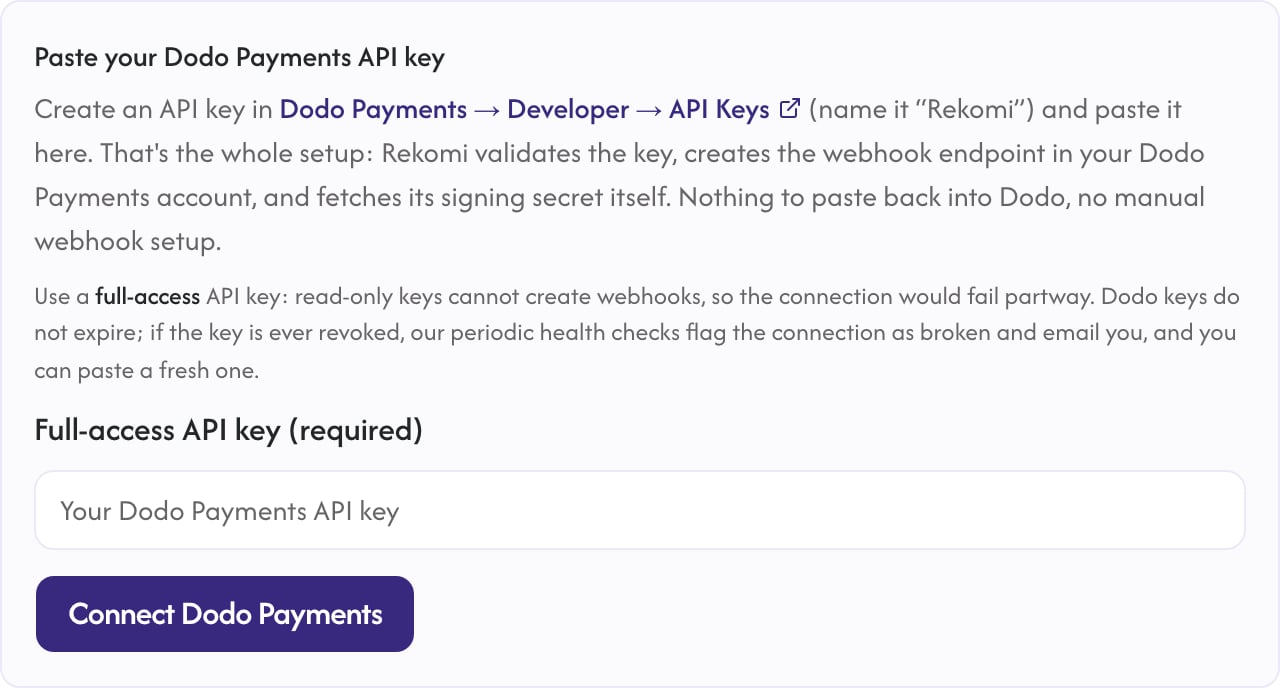 After connecting, the key is only used to manage the webhook endpoint and run periodic health checks. Your sales arrive through the signed webhook, never through the API.
Add the Rekomi tracking script to your marketing site so affiliate clicks are captured. Your snippet with the program ID filled in is under **Setup → Install** in Rekomi.
```html theme={null}
```
Attach the captured referral to each payment as `rekomi_ref` metadata. See the implementation examples below.
Sales, renewals, refunds, and disputes now credit and claw back affiliate commissions automatically, and Rekomi handles paying your affiliates.
## Implementation Guide
### Checkout Sessions via the API
Read the referral on your frontend with `window.Rekomi.getReferral()`, send it to your backend with the checkout request, and set it in `metadata`:
```typescript Node.js theme={null}
import DodoPayments from 'dodopayments';
const client = new DodoPayments();
export async function createCheckout(productId: string, rekomiRef?: string) {
const session = await client.checkoutSessions.create({
product_cart: [{ product_id: productId, quantity: 1 }],
customer: {
email: 'customer@example.com',
name: 'John Doe',
},
return_url: 'https://yoursite.com/success',
metadata: {
...(rekomiRef ? { rekomi_ref: rekomiRef } : {}),
},
});
return session.checkout_url;
}
```
The same `metadata.rekomi_ref` field works on subscription products, so the initial charge and every renewal credit the same affiliate.
### Payments API
The example below uses `POST /payments`, which is **deprecated**. It still works for existing integrations, but new integrations should use [Checkout Sessions](/developer-resources/checkout-session) (`POST /checkouts`) — `metadata` is passed the same way.
```typescript Node.js theme={null}
import DodoPayments from 'dodopayments';
const client = new DodoPayments();
export async function createPayment(productId: string, rekomiRef?: string) {
const payment = await client.payments.create({
billing: {
city: 'New York',
country: 'US',
state: 'NY',
street: '123 Main St',
zipcode: '10001',
},
customer: {
email: 'customer@example.com',
name: 'John Doe',
},
product_cart: [{ product_id: productId, quantity: 1 }],
payment_link: true,
metadata: {
...(rekomiRef ? { rekomi_ref: rekomiRef } : {}),
},
});
return payment;
}
```
### Static Payment Links
Decorate the link with the flat metadata query parameter (not the bracket form):
```javascript theme={null}
const ref = window.Rekomi?.getReferral?.();
let url = 'https://checkout.dodopayments.com/buy/YOUR_PRODUCT_ID';
if (ref) url += `?metadata_rekomi_ref=${encodeURIComponent(ref)}`;
// use url as the href on your Buy button
```
Dodo Payments folds `metadata_*` query parameters into the payment's metadata, where Rekomi reads them.
## What Gets Tracked
| Event | What happens |
| -------------------- | ------------------------------------------------------------------- |
| One-time payment | Commission credited on the pre-tax sale amount |
| Subscription renewal | Recurring commission, every charge arrives as its own payment event |
| Refund | Commission clawed back automatically, never past what was credited |
| Dispute | Commission clawed back the moment the dispute opens |
Commissions are calculated on the pre-tax sale amount: Dodo Payments is a Merchant of Record and collects the tax, so your affiliates earn on the sale itself, never on the tax a buyer's country happened to add.
## Important Notes
* Rekomi registers the webhook endpoint with exactly the events it needs. Avoid editing that endpoint's event list in the Dodo Payments dashboard; Rekomi's health checks will flag the connection if events are removed.
* Trials fire no payment until the trial ends, so no commission exists until the first real charge.
* Disconnecting in Rekomi deletes the webhook endpoint from your Dodo Payments account again.
## Additional Resources
The full setup walkthrough, troubleshooting, and security details on Rekomi's docs.
All affiliate integration options for Dodo Payments.
Need help? Contact Rekomi support at [support@rekomi.com](mailto:support@rekomi.com) or Dodo Payments support at [support@dodopayments.com](mailto:support@dodopayments.com) for assistance with the integration.
After connecting, the key is only used to manage the webhook endpoint and run periodic health checks. Your sales arrive through the signed webhook, never through the API.
Add the Rekomi tracking script to your marketing site so affiliate clicks are captured. Your snippet with the program ID filled in is under **Setup → Install** in Rekomi.
```html theme={null}
```
Attach the captured referral to each payment as `rekomi_ref` metadata. See the implementation examples below.
Sales, renewals, refunds, and disputes now credit and claw back affiliate commissions automatically, and Rekomi handles paying your affiliates.
## Implementation Guide
### Checkout Sessions via the API
Read the referral on your frontend with `window.Rekomi.getReferral()`, send it to your backend with the checkout request, and set it in `metadata`:
```typescript Node.js theme={null}
import DodoPayments from 'dodopayments';
const client = new DodoPayments();
export async function createCheckout(productId: string, rekomiRef?: string) {
const session = await client.checkoutSessions.create({
product_cart: [{ product_id: productId, quantity: 1 }],
customer: {
email: 'customer@example.com',
name: 'John Doe',
},
return_url: 'https://yoursite.com/success',
metadata: {
...(rekomiRef ? { rekomi_ref: rekomiRef } : {}),
},
});
return session.checkout_url;
}
```
The same `metadata.rekomi_ref` field works on subscription products, so the initial charge and every renewal credit the same affiliate.
### Payments API
The example below uses `POST /payments`, which is **deprecated**. It still works for existing integrations, but new integrations should use [Checkout Sessions](/developer-resources/checkout-session) (`POST /checkouts`) — `metadata` is passed the same way.
```typescript Node.js theme={null}
import DodoPayments from 'dodopayments';
const client = new DodoPayments();
export async function createPayment(productId: string, rekomiRef?: string) {
const payment = await client.payments.create({
billing: {
city: 'New York',
country: 'US',
state: 'NY',
street: '123 Main St',
zipcode: '10001',
},
customer: {
email: 'customer@example.com',
name: 'John Doe',
},
product_cart: [{ product_id: productId, quantity: 1 }],
payment_link: true,
metadata: {
...(rekomiRef ? { rekomi_ref: rekomiRef } : {}),
},
});
return payment;
}
```
### Static Payment Links
Decorate the link with the flat metadata query parameter (not the bracket form):
```javascript theme={null}
const ref = window.Rekomi?.getReferral?.();
let url = 'https://checkout.dodopayments.com/buy/YOUR_PRODUCT_ID';
if (ref) url += `?metadata_rekomi_ref=${encodeURIComponent(ref)}`;
// use url as the href on your Buy button
```
Dodo Payments folds `metadata_*` query parameters into the payment's metadata, where Rekomi reads them.
## What Gets Tracked
| Event | What happens |
| -------------------- | ------------------------------------------------------------------- |
| One-time payment | Commission credited on the pre-tax sale amount |
| Subscription renewal | Recurring commission, every charge arrives as its own payment event |
| Refund | Commission clawed back automatically, never past what was credited |
| Dispute | Commission clawed back the moment the dispute opens |
Commissions are calculated on the pre-tax sale amount: Dodo Payments is a Merchant of Record and collects the tax, so your affiliates earn on the sale itself, never on the tax a buyer's country happened to add.
## Important Notes
* Rekomi registers the webhook endpoint with exactly the events it needs. Avoid editing that endpoint's event list in the Dodo Payments dashboard; Rekomi's health checks will flag the connection if events are removed.
* Trials fire no payment until the trial ends, so no commission exists until the first real charge.
* Disconnecting in Rekomi deletes the webhook endpoint from your Dodo Payments account again.
## Additional Resources
The full setup walkthrough, troubleshooting, and security details on Rekomi's docs.
All affiliate integration options for Dodo Payments.
Need help? Contact Rekomi support at [support@rekomi.com](mailto:support@rekomi.com) or Dodo Payments support at [support@dodopayments.com](mailto:support@dodopayments.com) for assistance with the integration.