> ## Documentation Index
> Fetch the complete documentation index at: https://docs.dodopayments.com/llms.txt
> Use this file to discover all available pages before exploring further.
# N8N
> Integrate Dodo Payments with N8N to automate workflows and connect with over 5,000 apps using webhooks—power powerful, customizable automation in self-hosted or cloud N8N environments.
## Introduction
Connect Dodo Payments to thousands of apps and services through N8N. Automate workflows by triggering N8N workflows when payment events occur, from sending emails to updating spreadsheets, creating tasks, database operations, and much more.
This integration requires an N8N webhook URL from your workflow configuration.
## Getting Started
In your Dodo Payments dashboard, navigate to Webhooks → + Add Endpoint and expand the integrations dropdown.
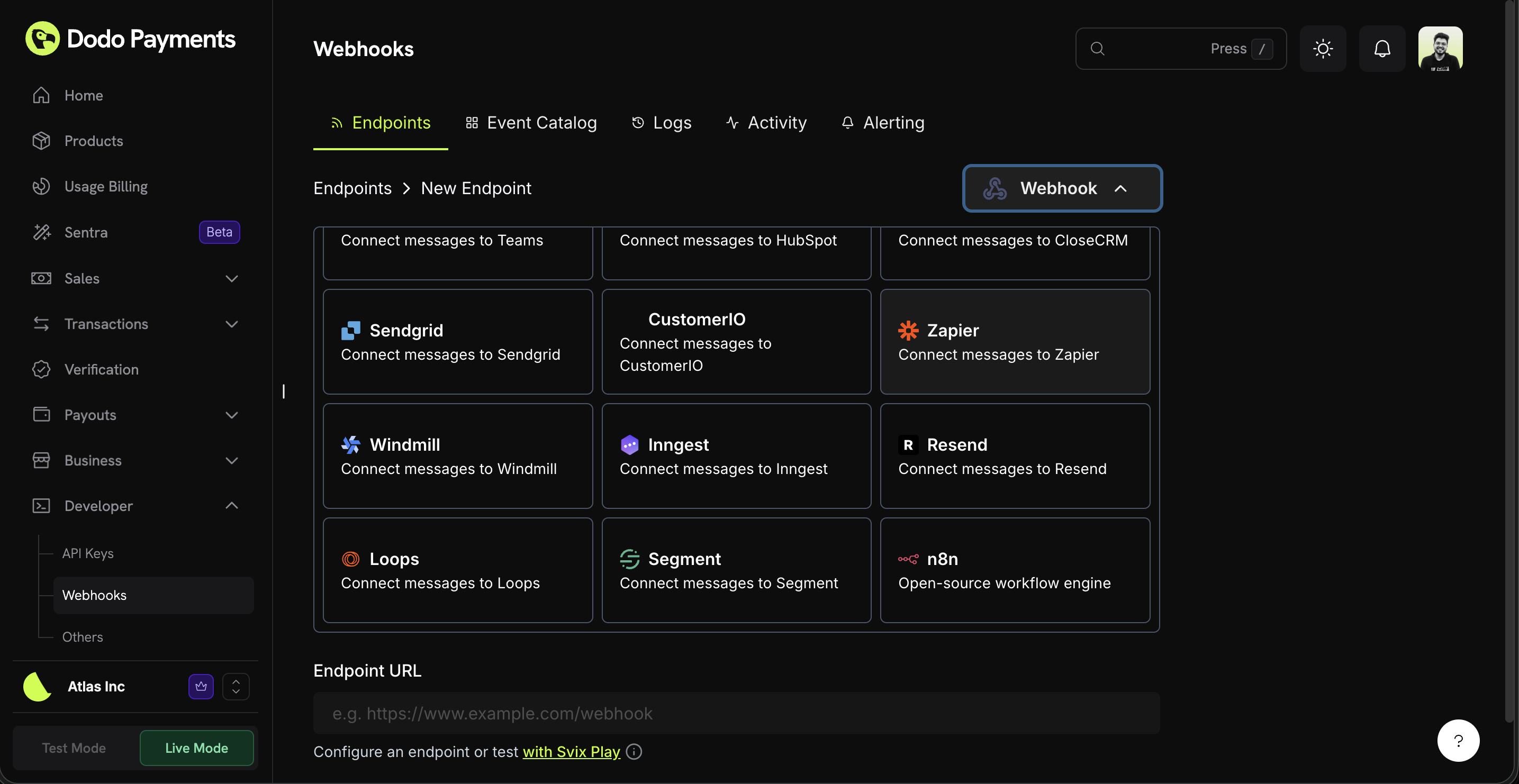 Choose the N8N integration card.
In N8N, create a new workflow and add a Webhook node as the trigger. Configure it as a POST webhook and copy the webhook URL.
Paste the N8N webhook URL into the endpoint configuration.
Edit the transformation code to format data for your N8N workflow.
Test with sample payloads and click Create to activate the integration.
In N8N, activate your workflow to start receiving webhook events.
🎉 Payment events will now trigger your N8N workflows automatically.
## Transformation Code Examples
### Basic Webhook Payload
```javascript basic_webhook.js icon="js" expandable theme={null}
function handler(webhook) {
if (webhook.eventType === "payment.succeeded") {
const p = webhook.payload.data;
webhook.payload = {
event_type: webhook.eventType,
payment_id: p.payment_id,
amount: (p.total_amount / 100).toFixed(2),
currency: p.currency || "USD",
customer_email: p.customer.email,
customer_name: p.customer.name,
payment_method: p.payment_method || "unknown",
timestamp: webhook.payload.timestamp
};
}
return webhook;
}
```
### Subscription Event Handler
```javascript subscription_webhook.js icon="js" expandable theme={null}
function handler(webhook) {
const s = webhook.payload.data;
switch (webhook.eventType) {
case "subscription.active":
webhook.payload = {
event_type: "subscription_started",
subscription_id: s.subscription_id,
customer_email: s.customer.email,
customer_name: s.customer.name,
product_id: s.product_id,
amount: (s.recurring_pre_tax_amount / 100).toFixed(2),
frequency: s.payment_frequency_interval,
next_billing: s.next_billing_date,
timestamp: webhook.payload.timestamp
};
break;
case "subscription.cancelled":
webhook.payload = {
event_type: "subscription_cancelled",
subscription_id: s.subscription_id,
customer_email: s.customer.email,
cancelled_at: s.cancelled_at,
cancel_at_next_billing: s.cancel_at_next_billing_date,
timestamp: webhook.payload.timestamp
};
break;
}
return webhook;
}
```
### Dispute Alert Handler
```javascript dispute_webhook.js icon="js" expandable theme={null}
function handler(webhook) {
if (webhook.eventType.startsWith("dispute.")) {
const d = webhook.payload.data;
webhook.payload = {
event_type: webhook.eventType,
dispute_id: d.dispute_id,
payment_id: d.payment_id,
amount: (d.amount / 100).toFixed(2),
status: d.dispute_status,
stage: d.dispute_stage,
remarks: d.remarks || "",
urgent: webhook.eventType === "dispute.opened",
timestamp: webhook.payload.timestamp
};
}
return webhook;
}
```
## Popular N8N Use Cases
* Send Gmail/Outlook emails for payment confirmations
* Create email sequences in Mailchimp/ConvertKit
* Send Slack/Discord notifications via webhooks
* Create Google Sheets records automatically
* Send Telegram/WhatsApp messages
* Add contacts to HubSpot/Salesforce
* Create deals in Pipedrive/Close
* Update customer records in Airtable
* Log activities in Monday.com
* Sync data to PostgreSQL/MySQL databases
* Create tasks in Asana/Trello
* Add to-do items in Notion
* Create calendar events in Google Calendar
* Send SMS notifications via Twilio
* Create GitHub issues for disputes
* Transform and enrich payment data
* Store events in databases (PostgreSQL, MongoDB)
* Aggregate metrics and analytics
* Generate reports and exports
* Trigger complex multi-step workflows
## Tips
* Keep payload structure simple for easy N8N node parsing
* Use consistent field names across all events
* Include timestamps for workflow timing and scheduling
* Test your workflow with sample data before activating
* Use N8N's IF node for conditional logic and routing
* Leverage N8N's Code node for custom data transformations
* Use the Switch node to route different event types to different paths
* Set up error workflows to handle failed webhook deliveries
## Troubleshooting
* Verify webhook URL is correct and accessible
* Check that workflow is activated in N8N
* Ensure webhook node is configured as POST method
* Test webhook delivery in N8N's execution history
* Verify firewall/network settings allow incoming webhooks
* Check N8N webhook authentication settings if configured
* Check field names in N8N node configurations
* Verify data types match expected formats in nodes
* Use N8N's test feature to inspect incoming data
* Ensure transformation code returns valid JSON
* Check the webhook node's response format settings
* Use the Set node to rename or restructure fields
* Review execution logs in N8N for detailed error messages
* Check node connection settings and credentials
* Verify all required fields are present in the payload
* Test individual nodes with sample data
* Enable error workflows to catch and handle failures
* Check rate limits and API quotas for connected services
Choose the N8N integration card.
In N8N, create a new workflow and add a Webhook node as the trigger. Configure it as a POST webhook and copy the webhook URL.
Paste the N8N webhook URL into the endpoint configuration.
Edit the transformation code to format data for your N8N workflow.
Test with sample payloads and click Create to activate the integration.
In N8N, activate your workflow to start receiving webhook events.
🎉 Payment events will now trigger your N8N workflows automatically.
## Transformation Code Examples
### Basic Webhook Payload
```javascript basic_webhook.js icon="js" expandable theme={null}
function handler(webhook) {
if (webhook.eventType === "payment.succeeded") {
const p = webhook.payload.data;
webhook.payload = {
event_type: webhook.eventType,
payment_id: p.payment_id,
amount: (p.total_amount / 100).toFixed(2),
currency: p.currency || "USD",
customer_email: p.customer.email,
customer_name: p.customer.name,
payment_method: p.payment_method || "unknown",
timestamp: webhook.payload.timestamp
};
}
return webhook;
}
```
### Subscription Event Handler
```javascript subscription_webhook.js icon="js" expandable theme={null}
function handler(webhook) {
const s = webhook.payload.data;
switch (webhook.eventType) {
case "subscription.active":
webhook.payload = {
event_type: "subscription_started",
subscription_id: s.subscription_id,
customer_email: s.customer.email,
customer_name: s.customer.name,
product_id: s.product_id,
amount: (s.recurring_pre_tax_amount / 100).toFixed(2),
frequency: s.payment_frequency_interval,
next_billing: s.next_billing_date,
timestamp: webhook.payload.timestamp
};
break;
case "subscription.cancelled":
webhook.payload = {
event_type: "subscription_cancelled",
subscription_id: s.subscription_id,
customer_email: s.customer.email,
cancelled_at: s.cancelled_at,
cancel_at_next_billing: s.cancel_at_next_billing_date,
timestamp: webhook.payload.timestamp
};
break;
}
return webhook;
}
```
### Dispute Alert Handler
```javascript dispute_webhook.js icon="js" expandable theme={null}
function handler(webhook) {
if (webhook.eventType.startsWith("dispute.")) {
const d = webhook.payload.data;
webhook.payload = {
event_type: webhook.eventType,
dispute_id: d.dispute_id,
payment_id: d.payment_id,
amount: (d.amount / 100).toFixed(2),
status: d.dispute_status,
stage: d.dispute_stage,
remarks: d.remarks || "",
urgent: webhook.eventType === "dispute.opened",
timestamp: webhook.payload.timestamp
};
}
return webhook;
}
```
## Popular N8N Use Cases
* Send Gmail/Outlook emails for payment confirmations
* Create email sequences in Mailchimp/ConvertKit
* Send Slack/Discord notifications via webhooks
* Create Google Sheets records automatically
* Send Telegram/WhatsApp messages
* Add contacts to HubSpot/Salesforce
* Create deals in Pipedrive/Close
* Update customer records in Airtable
* Log activities in Monday.com
* Sync data to PostgreSQL/MySQL databases
* Create tasks in Asana/Trello
* Add to-do items in Notion
* Create calendar events in Google Calendar
* Send SMS notifications via Twilio
* Create GitHub issues for disputes
* Transform and enrich payment data
* Store events in databases (PostgreSQL, MongoDB)
* Aggregate metrics and analytics
* Generate reports and exports
* Trigger complex multi-step workflows
## Tips
* Keep payload structure simple for easy N8N node parsing
* Use consistent field names across all events
* Include timestamps for workflow timing and scheduling
* Test your workflow with sample data before activating
* Use N8N's IF node for conditional logic and routing
* Leverage N8N's Code node for custom data transformations
* Use the Switch node to route different event types to different paths
* Set up error workflows to handle failed webhook deliveries
## Troubleshooting
* Verify webhook URL is correct and accessible
* Check that workflow is activated in N8N
* Ensure webhook node is configured as POST method
* Test webhook delivery in N8N's execution history
* Verify firewall/network settings allow incoming webhooks
* Check N8N webhook authentication settings if configured
* Check field names in N8N node configurations
* Verify data types match expected formats in nodes
* Use N8N's test feature to inspect incoming data
* Ensure transformation code returns valid JSON
* Check the webhook node's response format settings
* Use the Set node to rename or restructure fields
* Review execution logs in N8N for detailed error messages
* Check node connection settings and credentials
* Verify all required fields are present in the payload
* Test individual nodes with sample data
* Enable error workflows to catch and handle failures
* Check rate limits and API quotas for connected services