> ## Documentation Index
> Fetch the complete documentation index at: https://docs.dodopayments.com/llms.txt
> Use this file to discover all available pages before exploring further.
# MailerLite
> Automatically add customers to MailerLite subscriber lists and trigger email automations based on Dodo Payments events.
## Introduction
Automatically sync your paying customers to MailerLite subscriber lists when payment events occur. Add customers to specific groups, trigger automation workflows, and keep your email marketing lists up-to-date with real payment data.
MailerLite is a powerful email marketing platform for newsletters, campaigns, and automations. This integration helps you automatically manage subscribers based on payment activity - perfect for onboarding sequences, customer segmentation, and targeted marketing campaigns.
This integration requires your MailerLite API Key for authentication. You can generate one from your [MailerLite Integrations page](https://dashboard.mailerlite.com/integrations/api).
## Getting Started
In your Dodo Payments dashboard, navigate to Webhooks + Add Endpoint and expand the integrations dropdown.
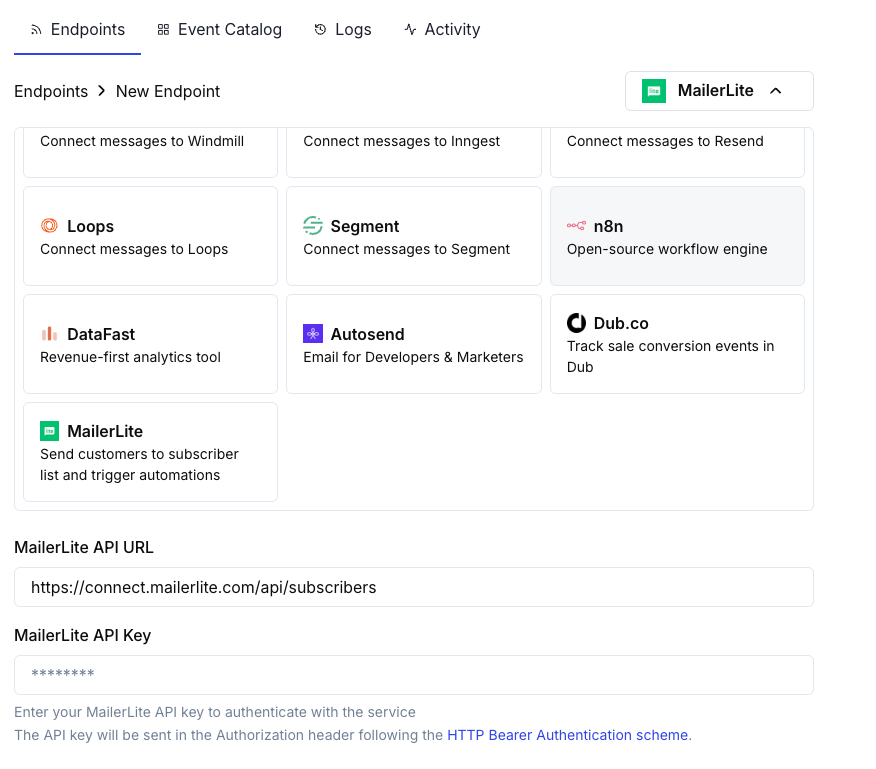 Choose the MailerLite integration card.
Provide your MailerLite API Key in the configuration.
Edit the transformation code to format subscriber data for MailerLite's API.
Test with sample payloads and click Create to activate the subscriber sync.
Payment events will now automatically sync customers to your MailerLite lists.
## Transformation Code Examples
### Add Customer on Successful Payment
```javascript add_customer.js icon="js" expandable theme={null}
function handler(webhook) {
if (webhook.eventType === "payment.succeeded") {
const p = webhook.payload.data;
webhook.url = "https://connect.mailerlite.com/api/subscribers";
webhook.payload = {
email: p.customer.email,
fields: {
name: p.customer.name,
company: p.customer.business_name || "",
last_name: ""
},
groups: ["your-group-id-here"],
status: "active"
};
}
return webhook;
}
```
### Add Subscriber to Multiple Groups Based on Product
```javascript product_segmentation.js icon="js" expandable theme={null}
function handler(webhook) {
if (webhook.eventType === "payment.succeeded") {
const p = webhook.payload.data;
// Determine groups based on product or amount
const groups = ["customers-group-id"];
// Add to premium group if high-value purchase
if (p.total_amount >= 10000) { // $100+
groups.push("premium-customers-group-id");
}
webhook.url = "https://connect.mailerlite.com/api/subscribers";
webhook.payload = {
email: p.customer.email,
fields: {
name: p.customer.name,
last_purchase_amount: (p.total_amount / 100).toFixed(2),
last_purchase_date: new Date(webhook.payload.timestamp).toISOString().split('T')[0],
payment_id: p.payment_id
},
groups: groups,
status: "active"
};
}
return webhook;
}
```
### Add New Subscriber on Subscription Activation
```javascript subscription_subscriber.js icon="js" expandable theme={null}
function handler(webhook) {
if (webhook.eventType === "subscription.active") {
const s = webhook.payload.data;
webhook.url = "https://connect.mailerlite.com/api/subscribers";
webhook.payload = {
email: s.customer.email,
fields: {
name: s.customer.name,
subscription_plan: s.product_id,
subscription_amount: (s.recurring_pre_tax_amount / 100).toFixed(2),
billing_frequency: s.payment_frequency_interval,
subscription_start: new Date().toISOString().split('T')[0]
},
groups: ["subscribers-group-id", "active-subscriptions-group-id"],
status: "active"
};
}
return webhook;
}
```
### Update Subscriber on Subscription Cancellation
```javascript subscription_cancelled.js icon="js" expandable theme={null}
function handler(webhook) {
if (webhook.eventType === "subscription.cancelled") {
const s = webhook.payload.data;
// Use PUT to update existing subscriber
webhook.url = "https://connect.mailerlite.com/api/subscribers/" + encodeURIComponent(s.customer.email);
webhook.method = "PUT";
webhook.payload = {
fields: {
subscription_status: "cancelled",
cancellation_date: new Date().toISOString().split('T')[0]
},
groups: ["churned-customers-group-id"]
};
}
return webhook;
}
```
### Add Customer with Custom Fields
```javascript custom_fields.js icon="js" expandable theme={null}
function handler(webhook) {
if (webhook.eventType === "payment.succeeded") {
const p = webhook.payload.data;
webhook.url = "https://connect.mailerlite.com/api/subscribers";
webhook.payload = {
email: p.customer.email,
fields: {
name: p.customer.name,
company: p.customer.business_name || "",
country: p.customer.country || "",
city: p.customer.city || "",
phone: p.customer.phone || "",
// Custom fields (must be created in MailerLite first)
total_spent: (p.total_amount / 100).toFixed(2),
customer_since: new Date().toISOString().split('T')[0],
payment_method: p.payment_method || "unknown",
currency: p.currency || "USD"
},
groups: ["paying-customers-group-id"],
status: "active",
subscribed_at: new Date().toISOString().replace('T', ' ').split('.')[0]
};
}
return webhook;
}
```
### Trigger Automation via Event
```javascript trigger_automation.js icon="js" expandable theme={null}
function handler(webhook) {
if (webhook.eventType === "payment.succeeded") {
const p = webhook.payload.data;
// First, ensure subscriber exists
webhook.url = "https://connect.mailerlite.com/api/subscribers";
webhook.payload = {
email: p.customer.email,
fields: {
name: p.customer.name,
// Add a trigger field that your automation watches
last_payment_trigger: new Date().toISOString(),
last_payment_amount: (p.total_amount / 100).toFixed(2)
},
status: "active"
};
// Tip: Create an automation in MailerLite that triggers
// when 'last_payment_trigger' field is updated
}
return webhook;
}
```
## Tips
* Create custom fields in MailerLite before using them in your transformations
* Use groups to segment customers by product, plan tier, or purchase behavior
* Set up automation workflows in MailerLite that trigger on field updates
* Use the upsert behavior (POST to /subscribers) to avoid duplicate subscriber errors
* Store payment metadata in custom fields for better customer insights
* Test with a small group before enabling for all payments
## Custom Fields Setup
Before using custom fields, you need to create them in MailerLite:
1. Go to your MailerLite dashboard
2. Navigate to **Subscribers Fields**
3. Click **Create field** and add fields like:
* `total_spent` (Number)
* `customer_since` (Date)
* `subscription_plan` (Text)
* `payment_method` (Text)
* `last_payment_amount` (Number)
## Troubleshooting
* Verify API Key is correct and active
* Check that the email address is valid (RFC 2821 compliant)
* Ensure group IDs are correct and exist in your account
* Note: Unsubscribed, bounced, or junk subscribers cannot be reactivated via API
* Verify custom fields exist in MailerLite before using them
* Check that field names match exactly (case-sensitive)
* Ensure field values match the expected type (text, number, date)
* MailerLite API has a rate limit of 120 requests per minute
* Use batch endpoints if processing many subscribers
* Implement backoff strategies for high-volume scenarios
* Verify group IDs are numeric strings
* Check that groups exist in your MailerLite account
* Note: Using PUT with groups will remove subscriber from unlisted groups
## API Reference
MailerLite Subscribers API accepts the following key parameters:
| Parameter | Type | Required | Description |
| ------------------ | ------ | -------- | -------------------------------------------------------- |
| `email` | string | Yes | Valid email address (RFC 2821) |
| `fields` | object | No | Object with field name/value pairs |
| `fields.name` | string | No | Subscriber's first name |
| `fields.last_name` | string | No | Subscriber's last name |
| `fields.company` | string | No | Company name |
| `fields.country` | string | No | Country |
| `fields.city` | string | No | City |
| `fields.phone` | string | No | Phone number |
| `groups` | array | No | Array of group IDs to add subscriber to |
| `status` | string | No | One of: active, unsubscribed, unconfirmed, bounced, junk |
| `subscribed_at` | string | No | Date in format `yyyy-MM-dd HH:mm:ss` |
| `ip_address` | string | No | Subscriber's IP address |
For complete API documentation, visit [MailerLite Developers](https://developers.mailerlite.com/docs/subscribers.html).
Choose the MailerLite integration card.
Provide your MailerLite API Key in the configuration.
Edit the transformation code to format subscriber data for MailerLite's API.
Test with sample payloads and click Create to activate the subscriber sync.
Payment events will now automatically sync customers to your MailerLite lists.
## Transformation Code Examples
### Add Customer on Successful Payment
```javascript add_customer.js icon="js" expandable theme={null}
function handler(webhook) {
if (webhook.eventType === "payment.succeeded") {
const p = webhook.payload.data;
webhook.url = "https://connect.mailerlite.com/api/subscribers";
webhook.payload = {
email: p.customer.email,
fields: {
name: p.customer.name,
company: p.customer.business_name || "",
last_name: ""
},
groups: ["your-group-id-here"],
status: "active"
};
}
return webhook;
}
```
### Add Subscriber to Multiple Groups Based on Product
```javascript product_segmentation.js icon="js" expandable theme={null}
function handler(webhook) {
if (webhook.eventType === "payment.succeeded") {
const p = webhook.payload.data;
// Determine groups based on product or amount
const groups = ["customers-group-id"];
// Add to premium group if high-value purchase
if (p.total_amount >= 10000) { // $100+
groups.push("premium-customers-group-id");
}
webhook.url = "https://connect.mailerlite.com/api/subscribers";
webhook.payload = {
email: p.customer.email,
fields: {
name: p.customer.name,
last_purchase_amount: (p.total_amount / 100).toFixed(2),
last_purchase_date: new Date(webhook.payload.timestamp).toISOString().split('T')[0],
payment_id: p.payment_id
},
groups: groups,
status: "active"
};
}
return webhook;
}
```
### Add New Subscriber on Subscription Activation
```javascript subscription_subscriber.js icon="js" expandable theme={null}
function handler(webhook) {
if (webhook.eventType === "subscription.active") {
const s = webhook.payload.data;
webhook.url = "https://connect.mailerlite.com/api/subscribers";
webhook.payload = {
email: s.customer.email,
fields: {
name: s.customer.name,
subscription_plan: s.product_id,
subscription_amount: (s.recurring_pre_tax_amount / 100).toFixed(2),
billing_frequency: s.payment_frequency_interval,
subscription_start: new Date().toISOString().split('T')[0]
},
groups: ["subscribers-group-id", "active-subscriptions-group-id"],
status: "active"
};
}
return webhook;
}
```
### Update Subscriber on Subscription Cancellation
```javascript subscription_cancelled.js icon="js" expandable theme={null}
function handler(webhook) {
if (webhook.eventType === "subscription.cancelled") {
const s = webhook.payload.data;
// Use PUT to update existing subscriber
webhook.url = "https://connect.mailerlite.com/api/subscribers/" + encodeURIComponent(s.customer.email);
webhook.method = "PUT";
webhook.payload = {
fields: {
subscription_status: "cancelled",
cancellation_date: new Date().toISOString().split('T')[0]
},
groups: ["churned-customers-group-id"]
};
}
return webhook;
}
```
### Add Customer with Custom Fields
```javascript custom_fields.js icon="js" expandable theme={null}
function handler(webhook) {
if (webhook.eventType === "payment.succeeded") {
const p = webhook.payload.data;
webhook.url = "https://connect.mailerlite.com/api/subscribers";
webhook.payload = {
email: p.customer.email,
fields: {
name: p.customer.name,
company: p.customer.business_name || "",
country: p.customer.country || "",
city: p.customer.city || "",
phone: p.customer.phone || "",
// Custom fields (must be created in MailerLite first)
total_spent: (p.total_amount / 100).toFixed(2),
customer_since: new Date().toISOString().split('T')[0],
payment_method: p.payment_method || "unknown",
currency: p.currency || "USD"
},
groups: ["paying-customers-group-id"],
status: "active",
subscribed_at: new Date().toISOString().replace('T', ' ').split('.')[0]
};
}
return webhook;
}
```
### Trigger Automation via Event
```javascript trigger_automation.js icon="js" expandable theme={null}
function handler(webhook) {
if (webhook.eventType === "payment.succeeded") {
const p = webhook.payload.data;
// First, ensure subscriber exists
webhook.url = "https://connect.mailerlite.com/api/subscribers";
webhook.payload = {
email: p.customer.email,
fields: {
name: p.customer.name,
// Add a trigger field that your automation watches
last_payment_trigger: new Date().toISOString(),
last_payment_amount: (p.total_amount / 100).toFixed(2)
},
status: "active"
};
// Tip: Create an automation in MailerLite that triggers
// when 'last_payment_trigger' field is updated
}
return webhook;
}
```
## Tips
* Create custom fields in MailerLite before using them in your transformations
* Use groups to segment customers by product, plan tier, or purchase behavior
* Set up automation workflows in MailerLite that trigger on field updates
* Use the upsert behavior (POST to /subscribers) to avoid duplicate subscriber errors
* Store payment metadata in custom fields for better customer insights
* Test with a small group before enabling for all payments
## Custom Fields Setup
Before using custom fields, you need to create them in MailerLite:
1. Go to your MailerLite dashboard
2. Navigate to **Subscribers Fields**
3. Click **Create field** and add fields like:
* `total_spent` (Number)
* `customer_since` (Date)
* `subscription_plan` (Text)
* `payment_method` (Text)
* `last_payment_amount` (Number)
## Troubleshooting
* Verify API Key is correct and active
* Check that the email address is valid (RFC 2821 compliant)
* Ensure group IDs are correct and exist in your account
* Note: Unsubscribed, bounced, or junk subscribers cannot be reactivated via API
* Verify custom fields exist in MailerLite before using them
* Check that field names match exactly (case-sensitive)
* Ensure field values match the expected type (text, number, date)
* MailerLite API has a rate limit of 120 requests per minute
* Use batch endpoints if processing many subscribers
* Implement backoff strategies for high-volume scenarios
* Verify group IDs are numeric strings
* Check that groups exist in your MailerLite account
* Note: Using PUT with groups will remove subscriber from unlisted groups
## API Reference
MailerLite Subscribers API accepts the following key parameters:
| Parameter | Type | Required | Description |
| ------------------ | ------ | -------- | -------------------------------------------------------- |
| `email` | string | Yes | Valid email address (RFC 2821) |
| `fields` | object | No | Object with field name/value pairs |
| `fields.name` | string | No | Subscriber's first name |
| `fields.last_name` | string | No | Subscriber's last name |
| `fields.company` | string | No | Company name |
| `fields.country` | string | No | Country |
| `fields.city` | string | No | City |
| `fields.phone` | string | No | Phone number |
| `groups` | array | No | Array of group IDs to add subscriber to |
| `status` | string | No | One of: active, unsubscribed, unconfirmed, bounced, junk |
| `subscribed_at` | string | No | Date in format `yyyy-MM-dd HH:mm:ss` |
| `ip_address` | string | No | Subscriber's IP address |
For complete API documentation, visit [MailerLite Developers](https://developers.mailerlite.com/docs/subscribers.html).