> ## Documentation Index
> Fetch the complete documentation index at: https://docs.dodopayments.com/llms.txt
> Use this file to discover all available pages before exploring further.
# Keplars
> Send transactional emails through Keplars based on Dodo Payments events.
## Introduction
Send professional transactional emails automatically when payment and subscription events occur. Deliver payment confirmations, subscription updates, and failure notifications through Keplars with no middleware server required. Dodo Payments calls the Keplars API directly using a JavaScript transformation handler.
This integration requires your Keplars API Key for authentication. Find it in the Keplars dashboard under **Settings → API Keys**, and verify a sender domain or address under **Domains**.
## Getting Started
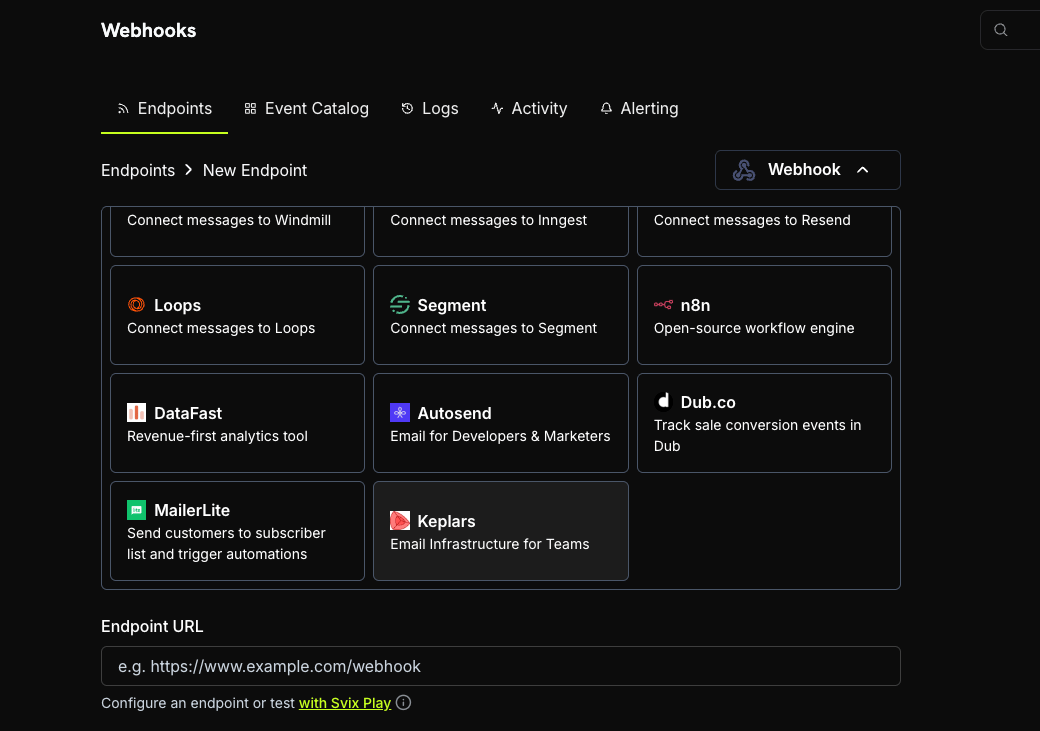
In your Dodo Payments dashboard, navigate to Webhooks → + Add Endpoint and expand the integrations dropdown.
Choose the Keplars integration card.
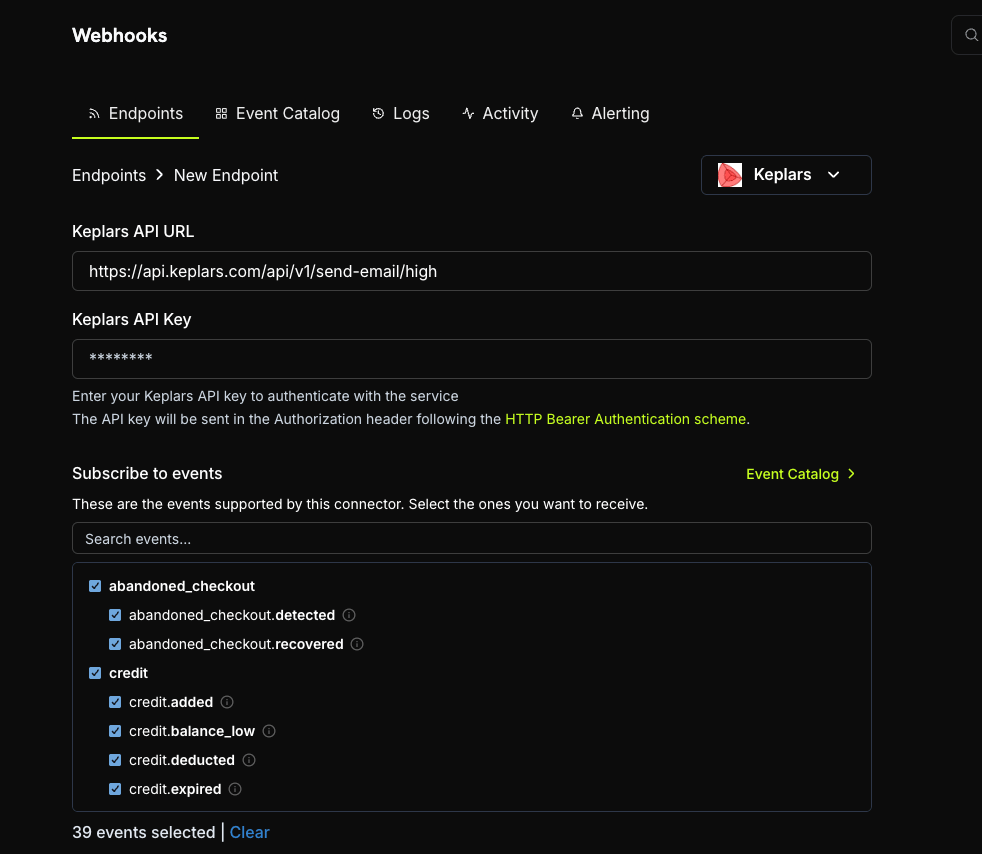
 Provide your Keplars API Key. It is sent as a Bearer token on every request.
 Edit the transformation code to format emails for Keplars. Replace the placeholder sender address and template IDs with your own.
Test with sample payloads and click Create to activate email sending.
🎉 Payment events will now automatically trigger transactional emails via Keplars.
## Transformation Code Examples
Each handler sets `webhook.url` to the Keplars high-priority send endpoint and rewrites `webhook.payload` into a Keplars request (the API key is sent automatically as a Bearer token). Replace `payments@mail.yourdomain.com` with your verified sender and `your-keplars-*-template-id` with your actual template IDs.
`to` must be an **array**, even for a single recipient. When using `template_id`, do **not** also send `subject` or `body`. The template supplies them.
### Payment Confirmation Email
```javascript payment_succeeded.js icon="js" expandable theme={null}
function handler(webhook) {
if (webhook.eventType !== "payment.succeeded") return webhook;
const data = webhook.payload.data || {};
const paymentDate = new Date(webhook.payload.timestamp).toLocaleDateString("en-US", {
year: "numeric", month: "long", day: "numeric",
});
webhook.url = "https://api.keplars.com/api/v1/send-email/high";
webhook.payload = {
to: [data.customer?.email],
from: "payments@mail.yourdomain.com",
template_id: "your-keplars-payment-success-template-id",
params: {
customer_name: data.customer?.name,
amount: ((data.total_amount || 0) / 100).toFixed(2),
currency: data.currency || "USD",
payment_id: data.payment_id,
payment_method: data.payment_method,
payment_date: paymentDate,
},
};
return webhook;
}
```
### Payment Failure Notification
```javascript payment_failed.js icon="js" expandable theme={null}
function handler(webhook) {
if (webhook.eventType !== "payment.failed") return webhook;
const data = webhook.payload.data || {};
const paymentDate = new Date(webhook.payload.timestamp).toLocaleDateString("en-US", {
year: "numeric", month: "long", day: "numeric",
});
webhook.url = "https://api.keplars.com/api/v1/send-email/high";
webhook.payload = {
to: [data.customer?.email],
from: "payments@mail.yourdomain.com",
template_id: "your-keplars-payment-failed-template-id",
params: {
customer_name: data.customer?.name,
amount: ((data.total_amount || 0) / 100).toFixed(2),
currency: data.currency || "USD",
payment_id: data.payment_id,
error_message: data.error_message || "Your payment could not be processed.",
payment_date: paymentDate,
},
};
return webhook;
}
```
### Subscription Welcome Email
```javascript subscription_active.js icon="js" expandable theme={null}
function handler(webhook) {
if (webhook.eventType !== "subscription.active") return webhook;
const data = webhook.payload.data || {};
const nextBilling = data.next_billing_date
? new Date(data.next_billing_date).toLocaleDateString("en-US", {
year: "numeric", month: "long", day: "numeric",
})
: "";
webhook.url = "https://api.keplars.com/api/v1/send-email/high";
webhook.payload = {
to: [data.customer?.email],
from: "payments@mail.yourdomain.com",
template_id: "your-keplars-subscription-active-template-id",
params: {
customer_name: data.customer?.name,
subscription_id: data.subscription_id,
product_id: data.product_id,
amount: ((data.recurring_pre_tax_amount || 0) / 100).toFixed(2),
currency: data.currency || "USD",
billing_interval: data.payment_frequency_interval || "month",
next_billing_date: nextBilling,
},
};
return webhook;
}
```
### Subscription Cancellation Email
```javascript subscription_cancelled.js icon="js" expandable theme={null}
function handler(webhook) {
if (webhook.eventType !== "subscription.cancelled") return webhook;
const data = webhook.payload.data || {};
const cancellationDate = new Date(webhook.payload.timestamp).toLocaleDateString("en-US", {
year: "numeric", month: "long", day: "numeric",
});
webhook.url = "https://api.keplars.com/api/v1/send-email/high";
webhook.payload = {
to: [data.customer?.email],
from: "payments@mail.yourdomain.com",
template_id: "your-keplars-subscription-cancelled-template-id",
params: {
customer_name: data.customer?.name,
subscription_id: data.subscription_id,
cancellation_date: cancellationDate,
},
};
return webhook;
}
```
## Tips
* Use a verified sender domain or address for better deliverability.
* Create a dedicated Keplars template per event type so each email stays on-brand and on-message.
* Personalize each email by passing customer data like name, amount, and payment ID through `params`.
* Test in sandbox mode first. Sandbox sends are captured in the Keplars Test Inbox rather than delivered.
## Troubleshooting
* Verify your API key is correct and active in Keplars under **Settings → API Keys**.
* Verify your sender domain or address is verified.
* Dodo Payments shows the raw Keplars error response in the webhook delivery log. Check it for details.
* The `template_id` in your handler must match an active template in your Keplars account. Verify the ID (and that it's active) in the dashboard.
* Each handler checks `webhook.eventType` and returns early if it does not match. Make sure the correct events are subscribed on the Dodo Payments webhook endpoint.
Edit the transformation code to format emails for Keplars. Replace the placeholder sender address and template IDs with your own.
Test with sample payloads and click Create to activate email sending.
🎉 Payment events will now automatically trigger transactional emails via Keplars.
## Transformation Code Examples
Each handler sets `webhook.url` to the Keplars high-priority send endpoint and rewrites `webhook.payload` into a Keplars request (the API key is sent automatically as a Bearer token). Replace `payments@mail.yourdomain.com` with your verified sender and `your-keplars-*-template-id` with your actual template IDs.
`to` must be an **array**, even for a single recipient. When using `template_id`, do **not** also send `subject` or `body`. The template supplies them.
### Payment Confirmation Email
```javascript payment_succeeded.js icon="js" expandable theme={null}
function handler(webhook) {
if (webhook.eventType !== "payment.succeeded") return webhook;
const data = webhook.payload.data || {};
const paymentDate = new Date(webhook.payload.timestamp).toLocaleDateString("en-US", {
year: "numeric", month: "long", day: "numeric",
});
webhook.url = "https://api.keplars.com/api/v1/send-email/high";
webhook.payload = {
to: [data.customer?.email],
from: "payments@mail.yourdomain.com",
template_id: "your-keplars-payment-success-template-id",
params: {
customer_name: data.customer?.name,
amount: ((data.total_amount || 0) / 100).toFixed(2),
currency: data.currency || "USD",
payment_id: data.payment_id,
payment_method: data.payment_method,
payment_date: paymentDate,
},
};
return webhook;
}
```
### Payment Failure Notification
```javascript payment_failed.js icon="js" expandable theme={null}
function handler(webhook) {
if (webhook.eventType !== "payment.failed") return webhook;
const data = webhook.payload.data || {};
const paymentDate = new Date(webhook.payload.timestamp).toLocaleDateString("en-US", {
year: "numeric", month: "long", day: "numeric",
});
webhook.url = "https://api.keplars.com/api/v1/send-email/high";
webhook.payload = {
to: [data.customer?.email],
from: "payments@mail.yourdomain.com",
template_id: "your-keplars-payment-failed-template-id",
params: {
customer_name: data.customer?.name,
amount: ((data.total_amount || 0) / 100).toFixed(2),
currency: data.currency || "USD",
payment_id: data.payment_id,
error_message: data.error_message || "Your payment could not be processed.",
payment_date: paymentDate,
},
};
return webhook;
}
```
### Subscription Welcome Email
```javascript subscription_active.js icon="js" expandable theme={null}
function handler(webhook) {
if (webhook.eventType !== "subscription.active") return webhook;
const data = webhook.payload.data || {};
const nextBilling = data.next_billing_date
? new Date(data.next_billing_date).toLocaleDateString("en-US", {
year: "numeric", month: "long", day: "numeric",
})
: "";
webhook.url = "https://api.keplars.com/api/v1/send-email/high";
webhook.payload = {
to: [data.customer?.email],
from: "payments@mail.yourdomain.com",
template_id: "your-keplars-subscription-active-template-id",
params: {
customer_name: data.customer?.name,
subscription_id: data.subscription_id,
product_id: data.product_id,
amount: ((data.recurring_pre_tax_amount || 0) / 100).toFixed(2),
currency: data.currency || "USD",
billing_interval: data.payment_frequency_interval || "month",
next_billing_date: nextBilling,
},
};
return webhook;
}
```
### Subscription Cancellation Email
```javascript subscription_cancelled.js icon="js" expandable theme={null}
function handler(webhook) {
if (webhook.eventType !== "subscription.cancelled") return webhook;
const data = webhook.payload.data || {};
const cancellationDate = new Date(webhook.payload.timestamp).toLocaleDateString("en-US", {
year: "numeric", month: "long", day: "numeric",
});
webhook.url = "https://api.keplars.com/api/v1/send-email/high";
webhook.payload = {
to: [data.customer?.email],
from: "payments@mail.yourdomain.com",
template_id: "your-keplars-subscription-cancelled-template-id",
params: {
customer_name: data.customer?.name,
subscription_id: data.subscription_id,
cancellation_date: cancellationDate,
},
};
return webhook;
}
```
## Tips
* Use a verified sender domain or address for better deliverability.
* Create a dedicated Keplars template per event type so each email stays on-brand and on-message.
* Personalize each email by passing customer data like name, amount, and payment ID through `params`.
* Test in sandbox mode first. Sandbox sends are captured in the Keplars Test Inbox rather than delivered.
## Troubleshooting
* Verify your API key is correct and active in Keplars under **Settings → API Keys**.
* Verify your sender domain or address is verified.
* Dodo Payments shows the raw Keplars error response in the webhook delivery log. Check it for details.
* The `template_id` in your handler must match an active template in your Keplars account. Verify the ID (and that it's active) in the dashboard.
* Each handler checks `webhook.eventType` and returns early if it does not match. Make sure the correct events are subscribed on the Dodo Payments webhook endpoint.