> ## Documentation Index
> Fetch the complete documentation index at: https://docs.dodopayments.com/llms.txt
> Use this file to discover all available pages before exploring further.
# Dub
> Track sale conversion events in Dub when customers complete purchases through Dodo Payments.
## Introduction
[Dub](https://dub.co) is a powerful link management platform that helps you create, share, and track short links. By integrating Dodo Payments with Dub, you can automatically track sale conversion events when customers complete purchases, enabling you to measure the ROI of your marketing campaigns and referral programs.
A "sale" event is recorded in Dub when a customer:
* Completes a one-time payment
* Subscribes to a paid plan
* Makes a recurring subscription payment
This integration requires a Dub account with conversion tracking enabled on your links.
**Affiliate Program Integration**: This integration also works seamlessly with **Dub Partners** for tracking affiliate referrals and commissions. Use Dub's conversion tracking to attribute sales to your affiliate links and measure partner performance. Learn more about setting up affiliate programs in our [Affiliates feature guide](/features/affiliates).
## How It Works
Dub tracks visitors through a unique click ID (`dub_id`) stored in a cookie when users click your Dub short links. To attribute sales to your links, you need to:
1. **Capture Dub's click ID** from the `dub_id` cookie when creating checkout sessions
2. **Store the click ID** in your payment metadata along with the customer's external ID
3. **Send sale data to Dub** when payments succeed using their Track API
This allows Dub to match successful sales with the original link click, giving you complete conversion attribution.
## Prerequisites
Before setting up this integration, ensure you have:
1. A [Dub account](https://dub.co) with a workspace
2. Conversion tracking enabled for your links
3. Your Dub API key (available in your Dub dashboard under Settings → API Keys)
## Getting Started
In your Dub dashboard, enable conversion tracking for the links you want to track sales for. This allows Dub to record sale events when customers complete purchases.
Learn more about enabling conversion tracking in the [Dub documentation](https://dub.co/docs/conversions/quickstart).
Navigate to your [Dub dashboard](https://app.dub.co) → Settings → API Keys and create a new API key with `conversions.write` scope.
Keep your API key secure and never expose it in client-side code.
When creating a checkout session, capture the Dub click ID from the cookie and add it to your payment metadata.
Configure a webhook to send sale data to Dub's Track API when payments succeed.
Sale conversion events will now appear in your Dub analytics dashboard with full attribution to your links.
## Implementation Guide
### Step 1: Add Click ID and Customer ID to Checkout Metadata
When creating a checkout session, capture the Dub click ID from the cookie and include it in your payment metadata along with your customer's external ID.
```typescript Next.js theme={null}
import { cookies } from 'next/headers';
import DodoPayments from 'dodopayments';
const client = new DodoPayments();
export async function createCheckout(productId: string, customerId: string) {
// Capture Dub click ID from cookie
const dubClickId = cookies().get('dub_id')?.value;
const payment = await client.payments.create({
billing: {
city: 'New York',
country: 'US',
state: 'NY',
street: '123 Main St',
zipcode: '10001',
},
customer: {
email: 'customer@example.com',
name: 'John Doe',
},
product_cart: [{ product_id: productId, quantity: 1 }],
metadata: {
dub_click_id: dubClickId, // Store Dub click ID
dub_external_id: customerId, // Store your customer's unique ID
},
});
return payment;
}
```
```javascript Express.js theme={null}
const express = require('express');
const DodoPayments = require('dodopayments').default;
const router = express.Router();
const client = new DodoPayments();
router.post('/create-checkout', async (req, res) => {
// Capture Dub click ID from cookie
const dubClickId = req.cookies?.dub_id;
const payment = await client.payments.create({
billing: {
city: 'New York',
country: 'US',
state: 'NY',
street: '123 Main St',
zipcode: '10001',
},
customer: {
email: req.body.email,
name: req.body.name,
},
product_cart: [{ product_id: req.body.productId, quantity: 1 }],
metadata: {
dub_click_id: dubClickId, // Store Dub click ID
dub_external_id: req.body.customerId, // Store your customer's unique ID
},
});
res.json({ payment });
});
```
```python Python (FastAPI) theme={null}
from fastapi import FastAPI, Request
from dodopayments import DodoPayments
app = FastAPI()
client = DodoPayments()
@app.post("/create-checkout")
async def create_checkout(request: Request):
# Capture Dub click ID from cookie
dub_click_id = request.cookies.get("dub_id")
body = await request.json()
payment = client.payments.create(
billing={
"city": "New York",
"country": "US",
"state": "NY",
"street": "123 Main St",
"zipcode": "10001",
},
customer={
"email": body["email"],
"name": body["name"],
},
product_cart=[{"product_id": body["product_id"], "quantity": 1}],
metadata={
"dub_click_id": dub_click_id, # Store Dub click ID
"dub_external_id": body["customer_id"], # Store your customer's unique ID
},
)
return {"payment": payment}
```
```go Go theme={null}
package main
import (
"context"
"github.com/dodopayments/dodopayments-go"
)
func createCheckout(dubClickId, customerId, productId string) (*dodopayments.PaymentNewResponse, error) {
client := dodopayments.NewClient()
payment, err := client.Payments.New(context.Background(), dodopayments.PaymentNewParams{
Billing: dodopayments.F(dodopayments.BillingAddressParam{
City: dodopayments.F("New York"),
Country: dodopayments.F(dodopayments.CountryCodeUs),
State: dodopayments.F("NY"),
Street: dodopayments.F("123 Main St"),
Zipcode: dodopayments.F("10001"),
}),
Customer: dodopayments.F[dodopayments.CustomerRequestUnionParam](
dodopayments.NewCustomerParam{
Email: dodopayments.F("customer@example.com"),
Name: dodopayments.F("John Doe"),
},
),
ProductCart: dodopayments.F([]dodopayments.OneTimeProductCartItemParam{{
ProductID: dodopayments.F(productId),
Quantity: dodopayments.F(int64(1)),
}}),
Metadata: dodopayments.F(map[string]string{
"dub_click_id": dubClickId, // Store Dub click ID
"dub_external_id": customerId, // Store your customer's unique ID
}),
})
return payment, err
}
```
### Step 2: Send Sale Data to Dub
Configure a webhook endpoint to send sale data to Dub's Track API when payments succeed.
In your Dodo Payments dashboard, navigate to **Webhooks → + Add Endpoint** and expand the integrations dropdown.
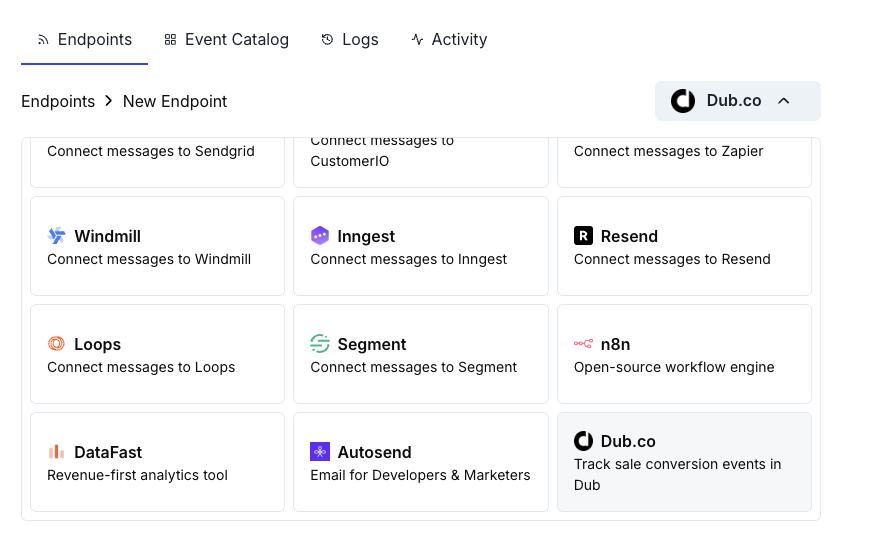 Choose the **Dub** integration card.
Provide your Dub API Key in the configuration field.
Choose the **Dub** integration card.
Provide your Dub API Key in the configuration field.
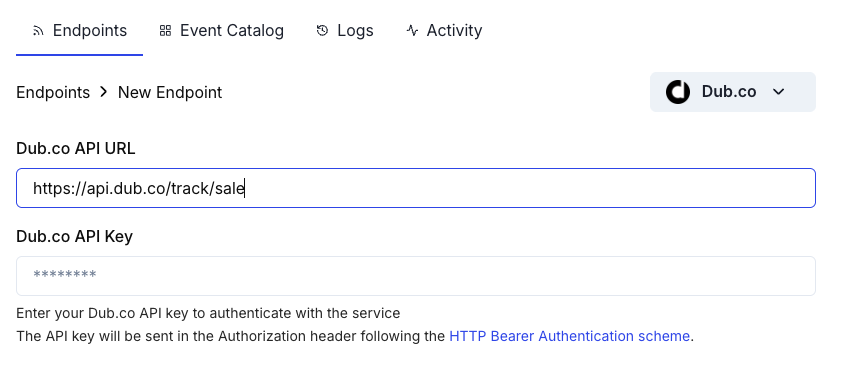 Edit the transformation code to format payment data for Dub's Track Sale API.
Test with sample payloads and click **Create** to activate the integration.
## Transformation Code Examples
### Basic Sale Tracking
Track sales when payments succeed:
```javascript basic_sale.js icon="js" expandable theme={null}
function handler(webhook) {
if (webhook.eventType === "payment.succeeded") {
const payment = webhook.payload.data;
// Only send to Dub if click ID exists in metadata
if (payment.metadata && payment.metadata.dub_click_id) {
webhook.payload = {
clickId: payment.metadata.dub_click_id,
externalId: payment.metadata.dub_external_id || payment.customer.customer_id,
amount: payment.total_amount, // Ensure the amount is in cents
currency: payment.currency || "USD",
paymentProcessor: "dodo",
invoiceId: payment.payment_id,
metadata: {
customer_email: payment.customer.email,
customer_name: payment.customer.name,
product_id: payment.product_cart ? payment.product_cart.map(product => product.product_id).join(', ') : undefined,
},
};
} else {
// Cancel dispatch if no click ID (organic traffic)
webhook.cancel = true;
}
}
return webhook;
}
```
### Track Subscription Sales
Track both initial subscriptions and recurring payments:
```javascript subscription_sale.js icon="js" expandable theme={null}
function handler(webhook) {
const data = webhook.payload.data;
// Track initial subscription activation
if (webhook.eventType === "subscription.active") {
if (data.metadata && data.metadata.dub_click_id) {
webhook.payload = {
clickId: data.metadata.dub_click_id,
externalId: data.metadata.dub_external_id || data.customer.customer_id,
amount: data.recurring_pre_tax_amount, // Amount in cents
currency: data.currency || "USD",
paymentProcessor: "dodo",
invoiceId: data.subscription_id,
eventName: "Subscription Started",
metadata: {
subscription_id: data.subscription_id,
product_id: data.product_id,
billing_interval: data.payment_frequency_interval,
customer_email: data.customer.email,
},
};
} else {
// Cancel dispatch if no click ID (organic traffic)
webhook.cancel = true;
}
}
// Track recurring subscription payments
if (webhook.eventType === "subscription.renewed") {
if (data.metadata && data.metadata.dub_click_id) {
webhook.payload = {
clickId: data.metadata.dub_click_id,
externalId: data.metadata.dub_external_id || data.customer.customer_id,
amount: data.recurring_pre_tax_amount,
currency: data.currency || "USD",
paymentProcessor: "dodo",
invoiceId: `${data.subscription_id}_${Date.now()}`,
eventName: "Subscription Renewed",
metadata: {
subscription_id: data.subscription_id,
product_id: data.product_id,
customer_email: data.customer.email,
},
};
} else {
// Cancel dispatch if no click ID (organic traffic)
webhook.cancel = true;
}
}
return webhook;
}
```
### Track Sales with Tax Exclusion
Send only the pre-tax amount to Dub for accurate revenue tracking:
```javascript sale_without_tax.js icon="js" expandable theme={null}
function handler(webhook) {
if (webhook.eventType === "payment.succeeded") {
const payment = webhook.payload.data;
if (payment.metadata && payment.metadata.dub_click_id) {
// Calculate pre-tax amount (total minus tax)
const preTaxAmount = payment.total_amount - (payment.tax || 0);
webhook.payload = {
clickId: payment.metadata.dub_click_id,
externalId: payment.metadata.dub_external_id || payment.customer.customer_id,
amount: preTaxAmount, // Pre-tax amount in cents
currency: payment.currency || "USD",
paymentProcessor: "dodo",
invoiceId: payment.payment_id,
metadata: {
total_amount: payment.total_amount,
tax_amount: payment.tax || 0,
customer_email: payment.customer.email,
},
};
} else {
// Cancel dispatch if no click ID (organic traffic)
webhook.cancel = true;
}
}
return webhook;
}
```
### Track Sales with Custom Event Names
Use custom event names to categorize different types of sales:
```javascript custom_events.js icon="js" expandable theme={null}
function handler(webhook) {
if (webhook.eventType === "payment.succeeded") {
const payment = webhook.payload.data;
if (payment.metadata && payment.metadata.dub_click_id) {
// Determine event name based on payment type
let eventName = "Purchase";
if (payment.subscription_id) {
eventName = "Subscription Purchase";
} else if (payment.metadata && payment.metadata.is_upgrade) {
eventName = "Plan Upgrade";
}
webhook.payload = {
clickId: payment.metadata.dub_click_id,
externalId: payment.metadata.dub_external_id || payment.customer.customer_id,
amount: payment.total_amount,
currency: payment.currency || "USD",
paymentProcessor: "dodo",
invoiceId: payment.payment_id,
eventName: eventName,
metadata: {
product_id: payment.product_cart ? payment.product_cart.map(product => product.product_id).join(', ') : undefined,
customer_email: payment.customer.email,
},
};
} else {
// Cancel dispatch if no click ID (organic traffic)
webhook.cancel = true;
}
}
return webhook;
}
```
## Alternative: Client-Side Implementation
If you prefer to track sales from your server instead of using webhooks, you can call Dub's Track API directly after a successful payment:
```typescript Next.js (Server Action) theme={null}
'use server';
import { Dub } from 'dub';
const dub = new Dub();
export async function trackSale(
paymentId: string,
clickId: string,
customerId: string,
amount: number,
currency: string
) {
await dub.track.sale({
clickId: clickId,
externalId: customerId,
amount: amount,
currency: currency,
paymentProcessor: 'dodo',
invoiceId: paymentId,
});
}
```
```javascript Node.js theme={null}
const { Dub } = require('dub');
const dub = new Dub();
async function trackSale(payment) {
if (payment.metadata?.dub_click_id) {
await dub.track.sale({
clickId: payment.metadata.dub_click_id,
externalId: payment.metadata.dub_external_id,
amount: payment.total_amount,
currency: payment.currency,
paymentProcessor: 'dodo',
invoiceId: payment.payment_id,
});
}
}
```
## Best Practices
**Capture the click ID early**: Store the Dub click ID as soon as possible in your checkout flow to ensure accurate attribution, even if the user navigates away and returns later.
* **Always include click ID in metadata**: Without the click ID, Dub cannot attribute revenue to your links
* **Use external IDs consistently**: Pass the same customer ID you use in your system for accurate customer-level analytics
* **Handle organic traffic gracefully**: Set `webhook.cancel = true` when there's no click ID to avoid unnecessary API calls
* **Test with sample payments**: Verify the integration works correctly before going live
* **Monitor your Dub dashboard**: Check that sales are appearing correctly with proper attribution
## Important Notes
* **Amount format**: Dub expects amounts in cents (e.g., \$10.00 = 1000)
* **Currency**: Use ISO 4217 currency codes (USD, EUR, GBP, etc.)
* **Free trials**: \$0 payments are not tracked as sales
* **Refunds**: Consider tracking refunds separately if needed for accurate revenue reporting
## Troubleshooting
* Verify your Dub API key is correct and has `conversions.write` scope
* Check that the `dub_click_id` is being captured and stored in payment metadata
* Ensure the webhook transformation is correctly formatting the payload
* Verify the webhook is triggering on `payment.succeeded` events
* Confirm conversion tracking is enabled for your Dub links
* Confirm users are clicking through your Dub short links before checkout
* Verify the `dub_id` cookie is being set correctly on your domain
* Check that click IDs match between checkout creation and payment completion
* Ensure you're capturing the click ID before creating the checkout session
* Validate the JSON structure matches Dub's Track Sale API format
* Check that all required fields (`clickId`, `externalId`, `amount`) are present
* Ensure amount is in cents (integer, not decimal)
* Verify the API endpoint URL is correct: `https://api.dub.co/track/sale`
* Test the transformation with sample webhook payloads
* Ensure you're only tracking on `payment.succeeded` events, not `payment.processing`
* Use unique `invoiceId` values for each sale
* For subscriptions, append timestamps or billing period to prevent duplicates on renewals
## Additional Resources
Learn more about Dub's conversion tracking and analytics features.
View the complete API reference for Dub's Track Sale endpoint.
Access your Dub dashboard to view conversion analytics and attribution data.
Learn about all available Dodo Payments webhook events.
Need help? Contact Dodo Payments support at [support@dodopayments.com](mailto:support@dodopayments.com) for assistance with the integration.
Edit the transformation code to format payment data for Dub's Track Sale API.
Test with sample payloads and click **Create** to activate the integration.
## Transformation Code Examples
### Basic Sale Tracking
Track sales when payments succeed:
```javascript basic_sale.js icon="js" expandable theme={null}
function handler(webhook) {
if (webhook.eventType === "payment.succeeded") {
const payment = webhook.payload.data;
// Only send to Dub if click ID exists in metadata
if (payment.metadata && payment.metadata.dub_click_id) {
webhook.payload = {
clickId: payment.metadata.dub_click_id,
externalId: payment.metadata.dub_external_id || payment.customer.customer_id,
amount: payment.total_amount, // Ensure the amount is in cents
currency: payment.currency || "USD",
paymentProcessor: "dodo",
invoiceId: payment.payment_id,
metadata: {
customer_email: payment.customer.email,
customer_name: payment.customer.name,
product_id: payment.product_cart ? payment.product_cart.map(product => product.product_id).join(', ') : undefined,
},
};
} else {
// Cancel dispatch if no click ID (organic traffic)
webhook.cancel = true;
}
}
return webhook;
}
```
### Track Subscription Sales
Track both initial subscriptions and recurring payments:
```javascript subscription_sale.js icon="js" expandable theme={null}
function handler(webhook) {
const data = webhook.payload.data;
// Track initial subscription activation
if (webhook.eventType === "subscription.active") {
if (data.metadata && data.metadata.dub_click_id) {
webhook.payload = {
clickId: data.metadata.dub_click_id,
externalId: data.metadata.dub_external_id || data.customer.customer_id,
amount: data.recurring_pre_tax_amount, // Amount in cents
currency: data.currency || "USD",
paymentProcessor: "dodo",
invoiceId: data.subscription_id,
eventName: "Subscription Started",
metadata: {
subscription_id: data.subscription_id,
product_id: data.product_id,
billing_interval: data.payment_frequency_interval,
customer_email: data.customer.email,
},
};
} else {
// Cancel dispatch if no click ID (organic traffic)
webhook.cancel = true;
}
}
// Track recurring subscription payments
if (webhook.eventType === "subscription.renewed") {
if (data.metadata && data.metadata.dub_click_id) {
webhook.payload = {
clickId: data.metadata.dub_click_id,
externalId: data.metadata.dub_external_id || data.customer.customer_id,
amount: data.recurring_pre_tax_amount,
currency: data.currency || "USD",
paymentProcessor: "dodo",
invoiceId: `${data.subscription_id}_${Date.now()}`,
eventName: "Subscription Renewed",
metadata: {
subscription_id: data.subscription_id,
product_id: data.product_id,
customer_email: data.customer.email,
},
};
} else {
// Cancel dispatch if no click ID (organic traffic)
webhook.cancel = true;
}
}
return webhook;
}
```
### Track Sales with Tax Exclusion
Send only the pre-tax amount to Dub for accurate revenue tracking:
```javascript sale_without_tax.js icon="js" expandable theme={null}
function handler(webhook) {
if (webhook.eventType === "payment.succeeded") {
const payment = webhook.payload.data;
if (payment.metadata && payment.metadata.dub_click_id) {
// Calculate pre-tax amount (total minus tax)
const preTaxAmount = payment.total_amount - (payment.tax || 0);
webhook.payload = {
clickId: payment.metadata.dub_click_id,
externalId: payment.metadata.dub_external_id || payment.customer.customer_id,
amount: preTaxAmount, // Pre-tax amount in cents
currency: payment.currency || "USD",
paymentProcessor: "dodo",
invoiceId: payment.payment_id,
metadata: {
total_amount: payment.total_amount,
tax_amount: payment.tax || 0,
customer_email: payment.customer.email,
},
};
} else {
// Cancel dispatch if no click ID (organic traffic)
webhook.cancel = true;
}
}
return webhook;
}
```
### Track Sales with Custom Event Names
Use custom event names to categorize different types of sales:
```javascript custom_events.js icon="js" expandable theme={null}
function handler(webhook) {
if (webhook.eventType === "payment.succeeded") {
const payment = webhook.payload.data;
if (payment.metadata && payment.metadata.dub_click_id) {
// Determine event name based on payment type
let eventName = "Purchase";
if (payment.subscription_id) {
eventName = "Subscription Purchase";
} else if (payment.metadata && payment.metadata.is_upgrade) {
eventName = "Plan Upgrade";
}
webhook.payload = {
clickId: payment.metadata.dub_click_id,
externalId: payment.metadata.dub_external_id || payment.customer.customer_id,
amount: payment.total_amount,
currency: payment.currency || "USD",
paymentProcessor: "dodo",
invoiceId: payment.payment_id,
eventName: eventName,
metadata: {
product_id: payment.product_cart ? payment.product_cart.map(product => product.product_id).join(', ') : undefined,
customer_email: payment.customer.email,
},
};
} else {
// Cancel dispatch if no click ID (organic traffic)
webhook.cancel = true;
}
}
return webhook;
}
```
## Alternative: Client-Side Implementation
If you prefer to track sales from your server instead of using webhooks, you can call Dub's Track API directly after a successful payment:
```typescript Next.js (Server Action) theme={null}
'use server';
import { Dub } from 'dub';
const dub = new Dub();
export async function trackSale(
paymentId: string,
clickId: string,
customerId: string,
amount: number,
currency: string
) {
await dub.track.sale({
clickId: clickId,
externalId: customerId,
amount: amount,
currency: currency,
paymentProcessor: 'dodo',
invoiceId: paymentId,
});
}
```
```javascript Node.js theme={null}
const { Dub } = require('dub');
const dub = new Dub();
async function trackSale(payment) {
if (payment.metadata?.dub_click_id) {
await dub.track.sale({
clickId: payment.metadata.dub_click_id,
externalId: payment.metadata.dub_external_id,
amount: payment.total_amount,
currency: payment.currency,
paymentProcessor: 'dodo',
invoiceId: payment.payment_id,
});
}
}
```
## Best Practices
**Capture the click ID early**: Store the Dub click ID as soon as possible in your checkout flow to ensure accurate attribution, even if the user navigates away and returns later.
* **Always include click ID in metadata**: Without the click ID, Dub cannot attribute revenue to your links
* **Use external IDs consistently**: Pass the same customer ID you use in your system for accurate customer-level analytics
* **Handle organic traffic gracefully**: Set `webhook.cancel = true` when there's no click ID to avoid unnecessary API calls
* **Test with sample payments**: Verify the integration works correctly before going live
* **Monitor your Dub dashboard**: Check that sales are appearing correctly with proper attribution
## Important Notes
* **Amount format**: Dub expects amounts in cents (e.g., \$10.00 = 1000)
* **Currency**: Use ISO 4217 currency codes (USD, EUR, GBP, etc.)
* **Free trials**: \$0 payments are not tracked as sales
* **Refunds**: Consider tracking refunds separately if needed for accurate revenue reporting
## Troubleshooting
* Verify your Dub API key is correct and has `conversions.write` scope
* Check that the `dub_click_id` is being captured and stored in payment metadata
* Ensure the webhook transformation is correctly formatting the payload
* Verify the webhook is triggering on `payment.succeeded` events
* Confirm conversion tracking is enabled for your Dub links
* Confirm users are clicking through your Dub short links before checkout
* Verify the `dub_id` cookie is being set correctly on your domain
* Check that click IDs match between checkout creation and payment completion
* Ensure you're capturing the click ID before creating the checkout session
* Validate the JSON structure matches Dub's Track Sale API format
* Check that all required fields (`clickId`, `externalId`, `amount`) are present
* Ensure amount is in cents (integer, not decimal)
* Verify the API endpoint URL is correct: `https://api.dub.co/track/sale`
* Test the transformation with sample webhook payloads
* Ensure you're only tracking on `payment.succeeded` events, not `payment.processing`
* Use unique `invoiceId` values for each sale
* For subscriptions, append timestamps or billing period to prevent duplicates on renewals
## Additional Resources
Learn more about Dub's conversion tracking and analytics features.
View the complete API reference for Dub's Track Sale endpoint.
Access your Dub dashboard to view conversion analytics and attribution data.
Learn about all available Dodo Payments webhook events.
Need help? Contact Dodo Payments support at [support@dodopayments.com](mailto:support@dodopayments.com) for assistance with the integration.