> ## Documentation Index
> Fetch the complete documentation index at: https://docs.dodopayments.com/llms.txt
> Use this file to discover all available pages before exploring further.
# Microsoft Teams
> Kirim notifikasi Dodo Payments ke saluran Microsoft Teams dengan Kartu Adaptif yang kaya.
## Pendahuluan
Jaga tim bisnis Anda tetap terhubung dengan notifikasi pembayaran waktu nyata di Microsoft Teams. Integrasi ini mengirimkan peristiwa pembayaran sebagai Kartu Adaptif yang kaya—sempurna untuk lingkungan perusahaan di mana Teams adalah alat kolaborasi utama.
Panduan ini mengasumsikan Anda memiliki akses admin untuk membuat webhook di ruang kerja Microsoft Teams Anda.
## Memulai
Di dasbor Dodo Payments Anda, buka Webhooks → + Tambah Endpoint dan perluas dropdown integrasi.
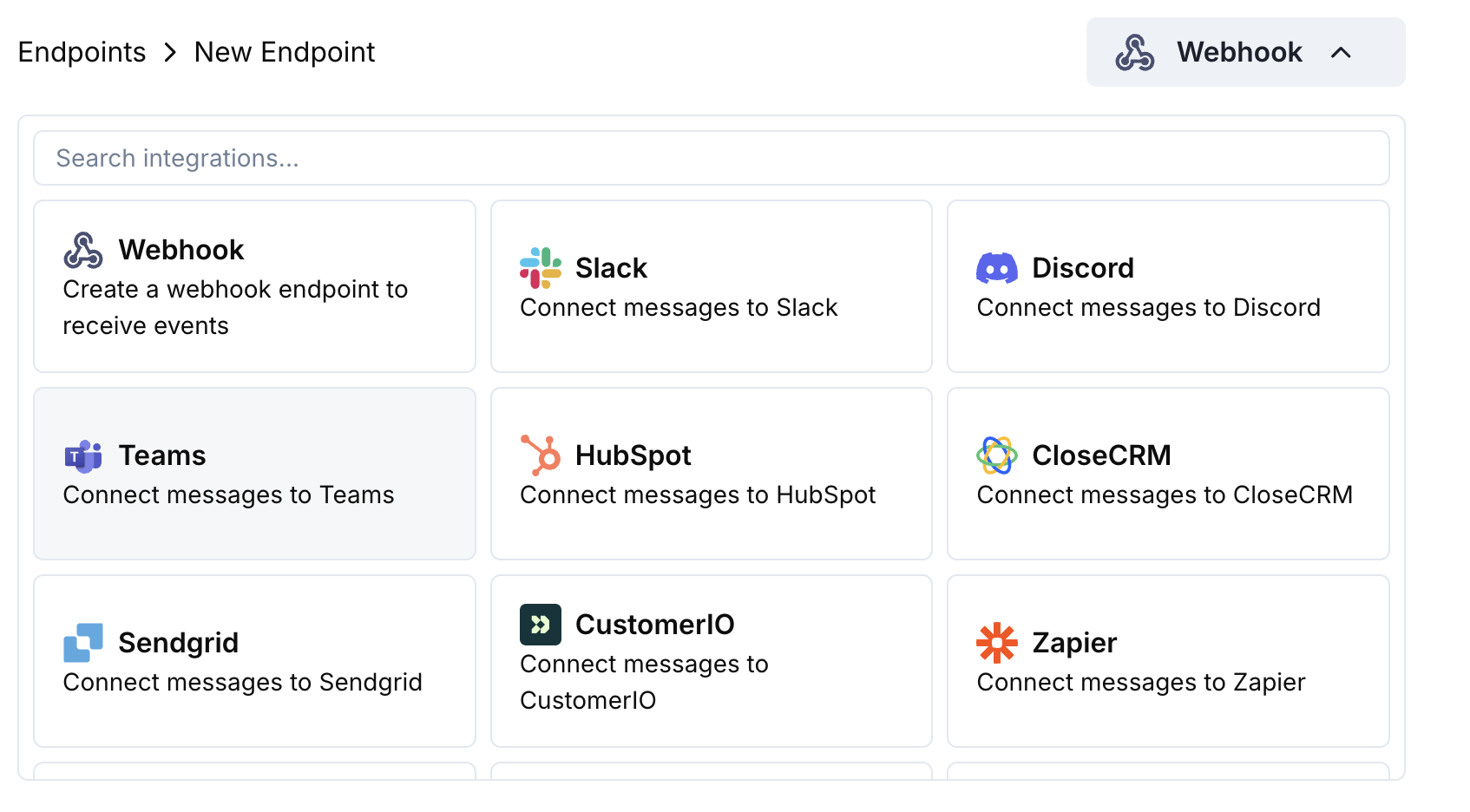 Pilih kartu integrasi Microsoft Teams.
Di Teams, buka saluran Anda → ⋯ → Connectors → Incoming Webhook → Configure. Salin URL webhook.
Tempel URL webhook Teams ke konfigurasi endpoint.
Edit kode transformasi untuk memformat pesan sebagai Adaptive Cards untuk Teams.
Uji dengan payload contoh dan klik Create untuk mengaktifkan.
🎉 Saluran Teams Anda sekarang akan menerima pembaruan Dodo Payments sebagai Adaptive Cards.
## Contoh Kode Transformasi
### Kartu Pembayaran Dasar
```javascript payment_card.js icon="js" expandable theme={null}
function handler(webhook) {
if (webhook.eventType === "payment.succeeded") {
const p = webhook.payload.data;
webhook.payload = {
type: "message",
attachments: [{
contentType: "application/vnd.microsoft.card.adaptive",
content: {
type: "AdaptiveCard",
body: [
{
type: "TextBlock",
text: "✅ Payment Successful",
weight: "Bolder",
size: "Medium"
},
{
type: "FactSet",
facts: [
{ title: "Amount", value: `$${(p.total_amount / 100).toFixed(2)}` },
{ title: "Customer", value: p.customer.email },
{ title: "Payment ID", value: p.payment_id }
]
}
]
}
}]
};
}
return webhook;
}
```
### Manajemen Langganan
```javascript subscription_card.js icon="js" expandable theme={null}
function handler(webhook) {
const s = webhook.payload.data;
switch (webhook.eventType) {
case "subscription.active":
webhook.payload = {
type: "message",
attachments: [{
contentType: "application/vnd.microsoft.card.adaptive",
content: {
type: "AdaptiveCard",
body: [
{
type: "TextBlock",
text: "📄 Subscription Activated",
weight: "Bolder",
color: "Good"
},
{
type: "FactSet",
facts: [
{ title: "Customer", value: s.customer.email },
{ title: "Product", value: s.product_id },
{ title: "Amount", value: `$${(s.recurring_pre_tax_amount / 100).toFixed(2)}/${s.payment_frequency_interval}` },
{ title: "Next Billing", value: new Date(s.next_billing_date).toLocaleDateString() }
]
}
]
}
}]
};
break;
case "subscription.cancelled":
webhook.payload = {
type: "message",
attachments: [{
contentType: "application/vnd.microsoft.card.adaptive",
content: {
type: "AdaptiveCard",
body: [
{
type: "TextBlock",
text: "⚠️ Subscription Cancelled",
weight: "Bolder",
color: "Warning"
},
{
type: "FactSet",
facts: [
{ title: "Customer", value: s.customer.email },
{ title: "Product", value: s.product_id },
{ title: "Cancelled At", value: new Date(s.cancelled_at).toLocaleDateString() }
]
}
]
}
}]
};
break;
}
return webhook;
}
```
### Peringatan Sengketa
```javascript dispute_card.js icon="js" expandable theme={null}
function handler(webhook) {
if (webhook.eventType.startsWith("dispute.")) {
const d = webhook.payload.data;
const color = d.dispute_status === "won" ? "Good" : d.dispute_status === "lost" ? "Attention" : "Warning";
const title = d.dispute_status === "won" ? "🏆 Dispute Won" : d.dispute_status === "lost" ? "❌ Dispute Lost" : "🚨 Dispute Update";
webhook.payload = {
type: "message",
attachments: [{
contentType: "application/vnd.microsoft.card.adaptive",
content: {
type: "AdaptiveCard",
body: [
{
type: "TextBlock",
text: title,
weight: "Bolder",
color: color
},
{
type: "FactSet",
facts: [
{ title: "Payment ID", value: d.payment_id },
{ title: "Amount", value: `$${(d.amount / 100).toFixed(2)}` },
{ title: "Status", value: d.dispute_status },
{ title: "Stage", value: d.dispute_stage }
]
}
]
}
}]
};
}
return webhook;
}
```
## Tips
* Gunakan Kartu Adaptif untuk format yang kaya dan interaktif
* Pilih warna yang sesuai: Baik (hijau), Peringatan (kuning), Perhatian (merah)
* Jaga set fakta tetap ringkas dan mudah dibaca
* Uji dengan penguji webhook Teams sebelum menerapkan
## Pemecahan Masalah
* Verifikasi URL webhook sudah benar dan aktif
* Periksa bahwa transformasi menghasilkan JSON Adaptive Card yang valid
* Pastikan webhook memiliki izin untuk mengirim di saluran tersebut
* Validasi skema Adaptive Card di penguji webhook Teams
* Periksa bahwa semua bidang yang diperlukan hadir
* Pastikan nilai warna valid (Good, Warning, Attention, Default)
Pilih kartu integrasi Microsoft Teams.
Di Teams, buka saluran Anda → ⋯ → Connectors → Incoming Webhook → Configure. Salin URL webhook.
Tempel URL webhook Teams ke konfigurasi endpoint.
Edit kode transformasi untuk memformat pesan sebagai Adaptive Cards untuk Teams.
Uji dengan payload contoh dan klik Create untuk mengaktifkan.
🎉 Saluran Teams Anda sekarang akan menerima pembaruan Dodo Payments sebagai Adaptive Cards.
## Contoh Kode Transformasi
### Kartu Pembayaran Dasar
```javascript payment_card.js icon="js" expandable theme={null}
function handler(webhook) {
if (webhook.eventType === "payment.succeeded") {
const p = webhook.payload.data;
webhook.payload = {
type: "message",
attachments: [{
contentType: "application/vnd.microsoft.card.adaptive",
content: {
type: "AdaptiveCard",
body: [
{
type: "TextBlock",
text: "✅ Payment Successful",
weight: "Bolder",
size: "Medium"
},
{
type: "FactSet",
facts: [
{ title: "Amount", value: `$${(p.total_amount / 100).toFixed(2)}` },
{ title: "Customer", value: p.customer.email },
{ title: "Payment ID", value: p.payment_id }
]
}
]
}
}]
};
}
return webhook;
}
```
### Manajemen Langganan
```javascript subscription_card.js icon="js" expandable theme={null}
function handler(webhook) {
const s = webhook.payload.data;
switch (webhook.eventType) {
case "subscription.active":
webhook.payload = {
type: "message",
attachments: [{
contentType: "application/vnd.microsoft.card.adaptive",
content: {
type: "AdaptiveCard",
body: [
{
type: "TextBlock",
text: "📄 Subscription Activated",
weight: "Bolder",
color: "Good"
},
{
type: "FactSet",
facts: [
{ title: "Customer", value: s.customer.email },
{ title: "Product", value: s.product_id },
{ title: "Amount", value: `$${(s.recurring_pre_tax_amount / 100).toFixed(2)}/${s.payment_frequency_interval}` },
{ title: "Next Billing", value: new Date(s.next_billing_date).toLocaleDateString() }
]
}
]
}
}]
};
break;
case "subscription.cancelled":
webhook.payload = {
type: "message",
attachments: [{
contentType: "application/vnd.microsoft.card.adaptive",
content: {
type: "AdaptiveCard",
body: [
{
type: "TextBlock",
text: "⚠️ Subscription Cancelled",
weight: "Bolder",
color: "Warning"
},
{
type: "FactSet",
facts: [
{ title: "Customer", value: s.customer.email },
{ title: "Product", value: s.product_id },
{ title: "Cancelled At", value: new Date(s.cancelled_at).toLocaleDateString() }
]
}
]
}
}]
};
break;
}
return webhook;
}
```
### Peringatan Sengketa
```javascript dispute_card.js icon="js" expandable theme={null}
function handler(webhook) {
if (webhook.eventType.startsWith("dispute.")) {
const d = webhook.payload.data;
const color = d.dispute_status === "won" ? "Good" : d.dispute_status === "lost" ? "Attention" : "Warning";
const title = d.dispute_status === "won" ? "🏆 Dispute Won" : d.dispute_status === "lost" ? "❌ Dispute Lost" : "🚨 Dispute Update";
webhook.payload = {
type: "message",
attachments: [{
contentType: "application/vnd.microsoft.card.adaptive",
content: {
type: "AdaptiveCard",
body: [
{
type: "TextBlock",
text: title,
weight: "Bolder",
color: color
},
{
type: "FactSet",
facts: [
{ title: "Payment ID", value: d.payment_id },
{ title: "Amount", value: `$${(d.amount / 100).toFixed(2)}` },
{ title: "Status", value: d.dispute_status },
{ title: "Stage", value: d.dispute_stage }
]
}
]
}
}]
};
}
return webhook;
}
```
## Tips
* Gunakan Kartu Adaptif untuk format yang kaya dan interaktif
* Pilih warna yang sesuai: Baik (hijau), Peringatan (kuning), Perhatian (merah)
* Jaga set fakta tetap ringkas dan mudah dibaca
* Uji dengan penguji webhook Teams sebelum menerapkan
## Pemecahan Masalah
* Verifikasi URL webhook sudah benar dan aktif
* Periksa bahwa transformasi menghasilkan JSON Adaptive Card yang valid
* Pastikan webhook memiliki izin untuk mengirim di saluran tersebut
* Validasi skema Adaptive Card di penguji webhook Teams
* Periksa bahwa semua bidang yang diperlukan hadir
* Pastikan nilai warna valid (Good, Warning, Attention, Default)