> ## Documentation Index
> Fetch the complete documentation index at: https://docs.dodopayments.com/llms.txt
> Use this file to discover all available pages before exploring further.
# Slack
> Dodo Payments को Slack के साथ एकीकृत करें ताकि आप अपने भुगतानों के बारे में वास्तविक समय में सूचनाएँ प्राप्त कर सकें।
## परिचय
Dodo Payments Slack एकीकरण आपको अपने Slack कार्यक्षेत्र में सीधे अपने भुगतानों के बारे में वास्तविक समय में सूचनाएँ प्राप्त करने की अनुमति देता है। यह एकीकरण आपको अपने भुगतानों की स्थिति पर अद्यतित रहने, लेनदेन को ट्रैक करने और अपने भुगतानों को अधिक कुशलता से प्रबंधित करने में सक्षम बनाता है।
यह एकीकरण हमारे webhook प्रबंधन पोर्टल का उपयोग करता है ताकि Dodo Payments webhook घटनाओं को स्वचालित रूप से Slack-अनुकूल संदेशों में बदल सके। किसी अतिरिक्त कोडिंग की आवश्यकता नहीं है - बस कनेक्टर कॉन्फ़िगर करें और सूचनाएँ प्राप्त करना शुरू करें।
## प्रारंभ करना
अपने Dodo Payments डैशबोर्ड में Webhook अनुभाग पर जाएं। + Add Endpoint बटन पर क्लिक करें, फिर अन्य इंटीग्रेशन का प्रदर्शन करने के लिए webhook ड्रॉपडाउन खोलें।
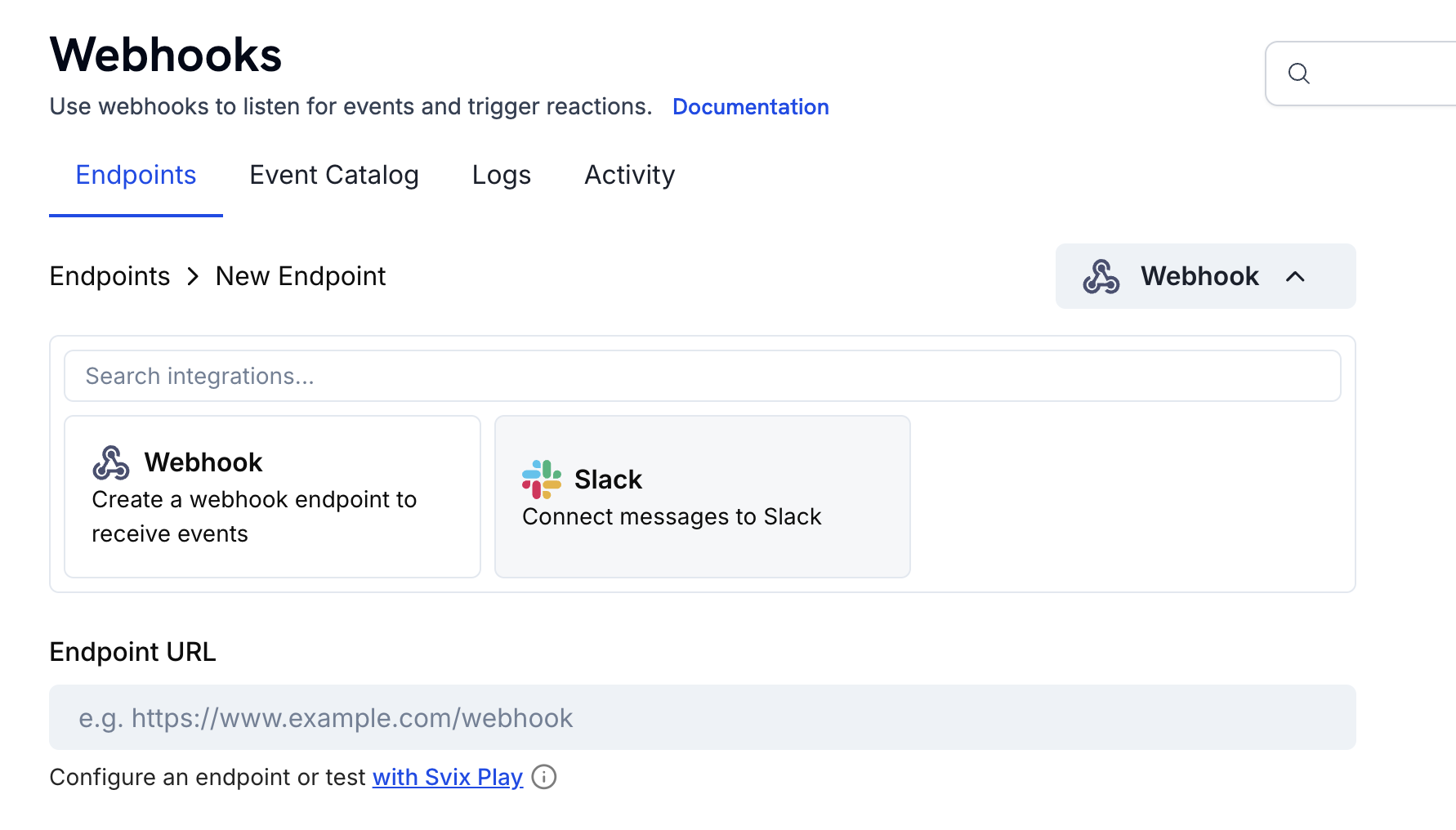 Slack इंटीग्रेशन चुनें और Connect your Slack workspace पर क्लिक करें।
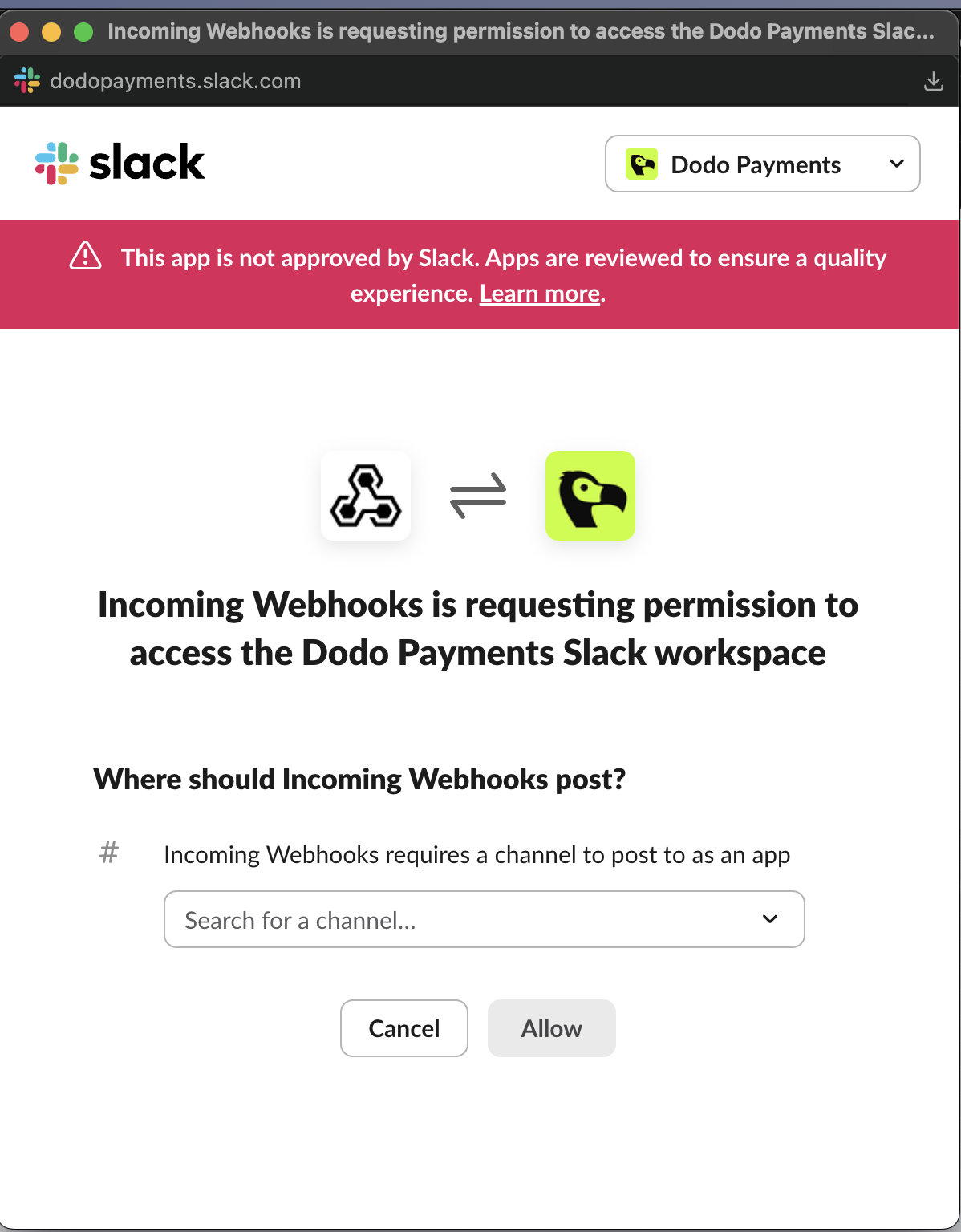
 Incoming Webhooks Slack App के लिए आवश्यक अनुमतियाँ प्रदान करें ताकि वह आपके चुने हुए चैनल में संदेश पोस्ट कर सके।
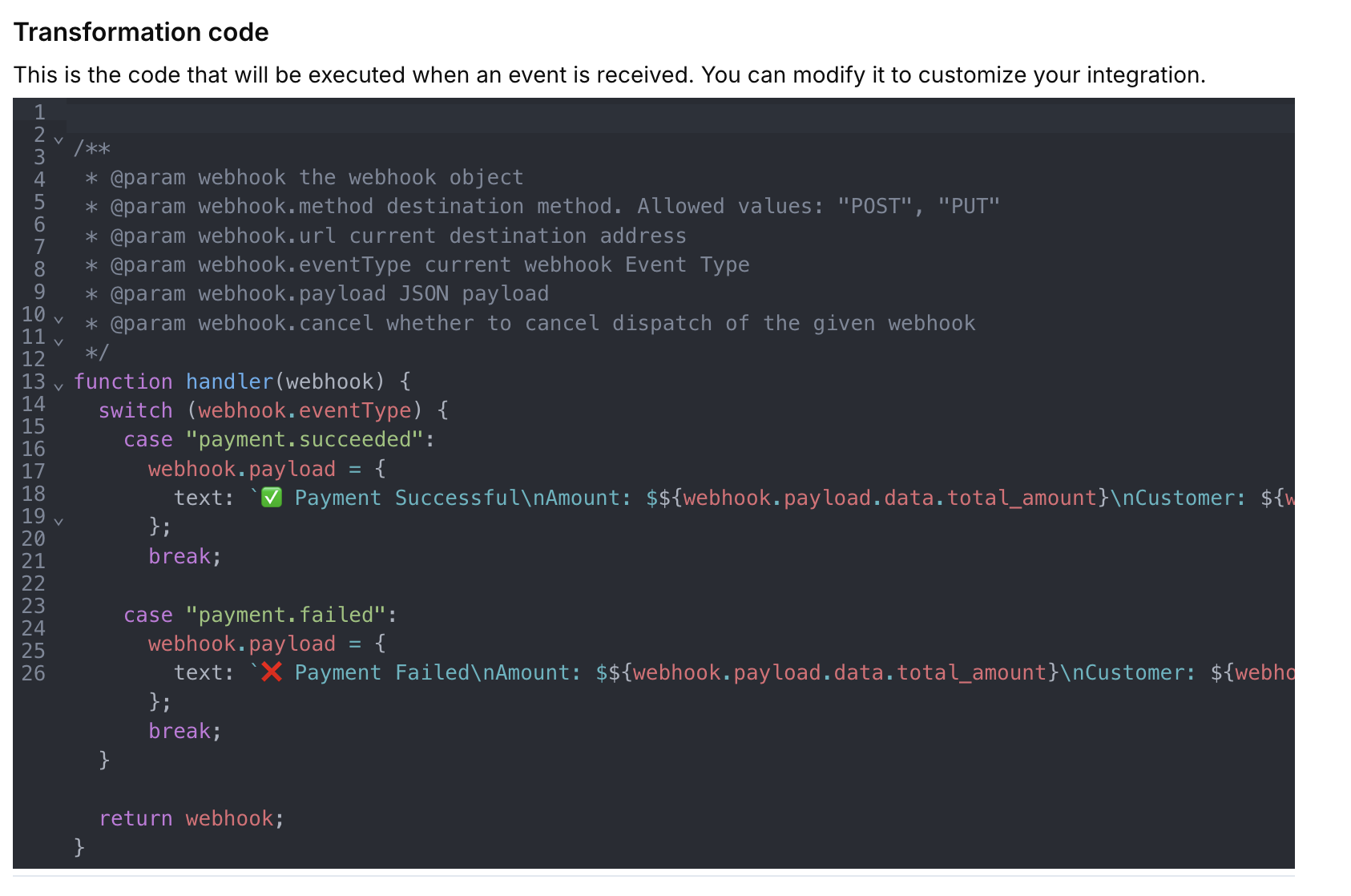
 अपने उपयोग मामले के लिए Slack सूचनाओं को अनुकूलित करने के लिए ट्रांसफॉर्मेशन कोड जोड़ें या संपादित करें। आप प्री-मेड टेम्पलेट्स का उपयोग कर सकते हैं या अपना स्वयं का लॉजिक लिख सकते हैं।
 अपने ट्रांसफॉर्मेशन कोड को कस्टम या प्री-मेड इवेंट पेलोड्स के साथ टेस्ट करें। एक बार जब आप संतुष्ट हो जाते हैं, तो इंटीग्रेशन को सक्रिय करने के लिए Create पर क्लिक करें।
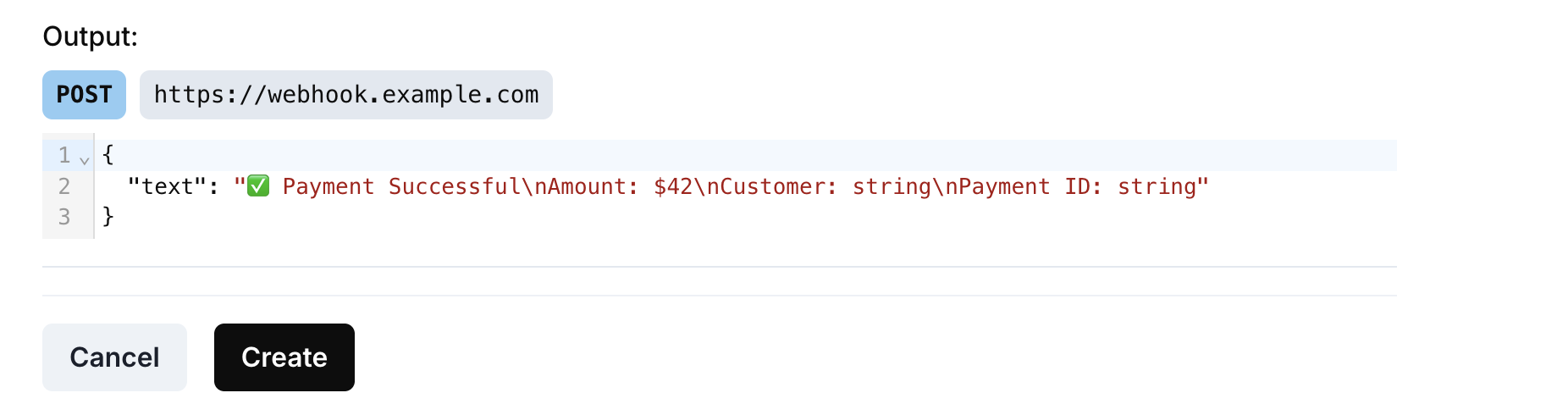 🎉 आपने सफलतापूर्वक Slack एकीकरण बना लिया है! अब आपके Dodo Payments घटनाएँ रियल टाइम में आपके चयनित Slack चैनल में भेजी जाएँगी।
## परिवर्तन कोड उदाहरण
### बुनियादी भुगतान सूचनाएँ
यह परिवर्तन भुगतान घटनाओं के लिए सरल पाठ संदेश भेजता है:
```javascript payment_notifs.js icon="js" expandable theme={null}
function handler(webhook) {
switch (webhook.eventType) {
case "payment.succeeded":
webhook.payload = {
text: `✅ Payment Successful\nAmount: $${(webhook.payload.data.total_amount / 100).toFixed(2)}\nCustomer: ${webhook.payload.data.customer.email}\nPayment ID: ${webhook.payload.data.payment_id}`
};
break;
case "payment.failed":
webhook.payload = {
text: `❌ Payment Failed\nAmount: $${(webhook.payload.data.total_amount / 100).toFixed(2)}\nCustomer: ${webhook.payload.data.customer.email}\nReason: ${webhook.payload.data.error_message || 'Unknown'}`
};
break;
case "payment.processing":
webhook.payload = {
text: `⏳ Payment Processing\nAmount: $${(webhook.payload.data.total_amount / 100).toFixed(2)}\nCustomer: ${webhook.payload.data.customer.email}`
};
break;
}
return webhook;
}
```
### समृद्ध सदस्यता सूचनाएँ
यह परिवर्तन सदस्यता घटनाओं के लिए अटैचमेंट के साथ समृद्ध Slack संदेश बनाता है:
```javascript subscription_notifs.js icon="js" expandable theme={null}
function handler(webhook) {
switch (webhook.eventType) {
case "subscription.active":
webhook.payload = {
attachments: [{
color: "good",
title: "🎉 Subscription Activated",
fields: [
{
title: "Customer",
value: webhook.payload.data.customer.email,
short: true
},
{
title: "Product ID",
value: webhook.payload.data.product_id,
short: true
},
{
title: "Amount",
value: `$${(webhook.payload.data.recurring_pre_tax_amount / 100).toFixed(2)}/${webhook.payload.data.payment_frequency_interval}`,
short: true
},
{
title: "Next Billing",
value: new Date(webhook.payload.data.next_billing_date).toLocaleDateString(),
short: true
}
],
footer: "Dodo Payments",
ts: Math.floor(new Date(webhook.payload.timestamp).getTime() / 1000)
}]
};
break;
case "subscription.cancelled":
webhook.payload = {
attachments: [{
color: "warning",
title: "⚠️ Subscription Cancelled",
fields: [
{
title: "Customer",
value: webhook.payload.data.customer.email,
short: true
},
{
title: "Product ID",
value: webhook.payload.data.product_id,
short: true
},
{
title: "Cancellation Date",
value: new Date(webhook.payload.data.cancelled_at).toLocaleDateString(),
short: true
},
{
title: "Cancel at Next Billing",
value: webhook.payload.data.cancel_at_next_billing_date ? "Yes" : "No",
short: true
}
],
footer: "Dodo Payments",
ts: Math.floor(new Date(webhook.payload.timestamp).getTime() / 1000)
}]
};
break;
case "subscription.renewed":
webhook.payload = {
attachments: [{
color: "good",
title: "🔄 Subscription Renewed",
fields: [
{
title: "Customer",
value: webhook.payload.data.customer.email,
short: true
},
{
title: "Product ID",
value: webhook.payload.data.product_id,
short: true
},
{
title: "Amount",
value: `$${(webhook.payload.data.recurring_pre_tax_amount / 100).toFixed(2)}`,
short: true
},
{
title: "Next Billing",
value: new Date(webhook.payload.data.next_billing_date).toLocaleDateString(),
short: true
}
],
footer: "Dodo Payments",
ts: Math.floor(new Date(webhook.payload.timestamp).getTime() / 1000)
}]
};
break;
}
return webhook;
}
```
### विवाद प्रबंधन सूचनाएँ
यह परिवर्तन विवाद घटनाओं को उचित रंगों और तात्कालिकता के साथ संभालता है:
```javascript dispute_notifs.js icon="js" expandable theme={null}
function handler(webhook) {
switch (webhook.eventType) {
case "dispute.opened":
webhook.payload = {
attachments: [{
color: "danger",
title: "🚨 New Dispute Opened",
fields: [
{
title: "Payment ID",
value: webhook.payload.data.payment_id,
short: true
},
{
title: "Amount",
value: `$${(webhook.payload.data.amount / 100).toFixed(2)}`,
short: true
},
{
title: "Status",
value: webhook.payload.data.dispute_status,
short: true
},
{
title: "Stage",
value: webhook.payload.data.dispute_stage,
short: true
},
{
title: "Remarks",
value: webhook.payload.data.remarks || "No remarks",
short: false
}
],
footer: "Dodo Payments - Action Required",
ts: Math.floor(new Date(webhook.payload.timestamp).getTime() / 1000)
}]
};
break;
case "dispute.won":
webhook.payload = {
attachments: [{
color: "good",
title: "✅ Dispute Won",
fields: [
{
title: "Payment ID",
value: webhook.payload.data.payment_id,
short: true
},
{
title: "Amount",
value: `$${(webhook.payload.data.amount / 100).toFixed(2)}`,
short: true
},
{
title: "Status",
value: webhook.payload.data.dispute_status,
short: true
},
{
title: "Resolution",
value: "Dispute resolved in your favor",
short: false
}
],
footer: "Dodo Payments",
ts: Math.floor(new Date(webhook.payload.timestamp).getTime() / 1000)
}]
};
break;
case "dispute.lost":
webhook.payload = {
attachments: [{
color: "danger",
title: "❌ Dispute Lost",
fields: [
{
title: "Payment ID",
value: webhook.payload.data.payment_id,
short: true
},
{
title: "Amount",
value: `$${(webhook.payload.data.amount / 100).toFixed(2)}`,
short: true
},
{
title: "Status",
value: webhook.payload.data.dispute_status,
short: true
},
{
title: "Impact",
value: "Funds will be debited from your account",
short: false
}
],
footer: "Dodo Payments - Review Required",
ts: Math.floor(new Date(webhook.payload.timestamp).getTime() / 1000)
}]
};
break;
}
return webhook;
}
```
### व्यापक सभी-घटनाएँ हैंडलर
यह परिवर्तन सभी घटना प्रकारों को सुसंगत प्रारूपण के साथ संभालता है:
```javascript all_events_notifs.js icon="js" expandable theme={null}
function handler(webhook) {
const event = webhook.payload.data;
const timestamp = new Date(webhook.payload.timestamp).toLocaleString();
let color, emoji, title, fields = [];
switch (webhook.eventType) {
case "payment.succeeded":
color = "good";
emoji = "✅";
title = "Payment Successful";
fields = [
{ title: "Amount", value: `$${(event.total_amount / 100).toFixed(2)}`, short: true },
{ title: "Customer", value: event.customer.email, short: true },
{ title: "Payment ID", value: event.payment_id, short: true },
{ title: "Method", value: event.payment_method || "Unknown", short: true }
];
break;
case "payment.failed":
color = "danger";
emoji = "❌";
title = "Payment Failed";
fields = [
{ title: "Amount", value: `$${(event.total_amount / 100).toFixed(2)}`, short: true },
{ title: "Customer", value: event.customer.email, short: true },
{ title: "Reason", value: event.error_message || "Unknown", short: false }
];
break;
case "subscription.active":
color = "good";
emoji = "🎉";
title = "Subscription Activated";
fields = [
{ title: "Customer", value: event.customer.email, short: true },
{ title: "Product ID", value: event.product_id, short: true },
{ title: "Amount", value: `$${(event.recurring_pre_tax_amount / 100).toFixed(2)}/${event.payment_frequency_interval}`, short: true },
{ title: "Next Billing", value: new Date(event.next_billing_date).toLocaleDateString(), short: true }
];
break;
case "subscription.cancelled":
color = "warning";
emoji = "⚠️";
title = "Subscription Cancelled";
fields = [
{ title: "Customer", value: event.customer.email, short: true },
{ title: "Product ID", value: event.product_id, short: true },
{ title: "Cancellation Date", value: new Date(event.cancelled_at).toLocaleDateString(), short: true },
{ title: "Cancel at Next Billing", value: event.cancel_at_next_billing_date ? "Yes" : "No", short: true }
];
break;
case "refund.succeeded":
color = "good";
emoji = "💰";
title = "Refund Processed";
fields = [
{ title: "Amount", value: `$${(event.amount / 100).toFixed(2)}`, short: true },
{ title: "Refund ID", value: event.refund_id, short: true },
{ title: "Payment ID", value: event.payment_id, short: true },
{ title: "Reason", value: event.reason || "Not specified", short: true }
];
break;
case "dispute.opened":
color = "danger";
emoji = "🚨";
title = "New Dispute Opened";
fields = [
{ title: "Payment ID", value: event.payment_id, short: true },
{ title: "Amount", value: `$${(event.amount / 100).toFixed(2)}`, short: true },
{ title: "Status", value: event.dispute_status, short: true },
{ title: "Stage", value: event.dispute_stage, short: true },
{ title: "Remarks", value: event.remarks || "No remarks", short: false }
];
break;
case "license_key.created":
color = "good";
emoji = "🔑";
title = "License Key Created";
fields = [
{ title: "License ID", value: event.id, short: true },
{ title: "Product ID", value: event.product_id, short: true },
{ title: "License Key", value: event.key.substring(0, 8) + "...", short: true },
{ title: "Expires", value: event.expires_at ? new Date(event.expires_at).toLocaleDateString() : "Never", short: true }
];
break;
default:
// Handle any other events with a generic format
color = "warning";
emoji = "ℹ️";
title = webhook.eventType.replace(/_/g, ' ').replace(/\b\w/g, l => l.toUpperCase());
fields = [
{ title: "Event Type", value: webhook.eventType, short: true },
{ title: "Timestamp", value: timestamp, short: true }
];
}
webhook.payload = {
attachments: [{
color: color,
title: `${emoji} ${title}`,
fields: fields,
footer: "Dodo Payments",
ts: Math.floor(new Date(webhook.payload.timestamp).getTime() / 1000)
}]
};
return webhook;
}
```
## सर्वोत्तम प्रथाएँ
आपकी Slack अधिसूचनाओं को प्रभावी बनाने के लिए:
* स्पष्टता और कार्रवाई योग्यता के लिए रंगों, फ़ील्ड्स और स्वरूपण के साथ समृद्ध संदेश अटैचमेंट का उपयोग करें।
* तेजी से पहचान के लिए हमेशा प्रमुख डेटा जैसे राशि, ग्राहक ईमेल और आईडी शामिल करें।
* घटनाओं के प्रकार के अनुसार रंग चुनें: सफलता के लिए हरा (`good`), विवाद या विफलताओं के लिए लाल (`danger`), रद्दीकरण के लिए पीला (`warning`), और सूचनात्मक घटनाओं के लिए नीला (`#36a64f`)।
* यह दिखाने के लिए कि प्रत्येक घटना कब हुई थी, टाइमस्टैम्प जोड़ें।
**संवेदनशील डेटा को संभालना**: Slack संदेशों में पूर्ण लाइसेंस कुंजी या व्यक्तिगत डेटा जैसे संवेदनशील जानकारी शामिल न करें। संवेदनशील मानों को छोटा करने या मास्क करने पर विचार करें।
## समस्या निवारण
* सत्यापित करें कि Slack webhook URL सही और सक्रिय है
* जांचें कि रूपांतरण कोड मान्य JavaScript है
* सुनिश्चित करें कि चयनित घटना प्रकार ट्रिगर हो रहे हैं
* सत्यापित करें कि आपकी Slack ऐप के पास आवश्यक अनुमतियाँ हैं
* रूपांतरण त्रुटि लॉग के लिए webhook प्रबंधन पोर्टल की जाँच करें
* सत्यापित करें कि webhook पेलोड संरचना आपके रूपांतरण कोड से मेल खाती है
* नमूना डेटा के साथ अपने रूपांतरण कोड का परीक्षण करें
* सुनिश्चित करें कि webhook पेलोड में सभी आवश्यक फ़ील्ड मौजूद हैं
* पुष्टि करें कि आप जो घटनाएँ प्राप्त करना चाहते हैं, वे आपके Dodo Payments webhook कॉन्फ़िगरेशन में सक्षम हैं
* जांचें कि घटनाओं के प्रकार आपके Slack कनेक्टर कॉन्फ़िगरेशन में चुने गए हैं
* सत्यापित करें कि आपके एंडपॉइंट को घटनाएँ प्राप्त करने के लिए सही ढंग से कॉन्फ़िगर किया गया है
🎉 आपने सफलतापूर्वक Slack एकीकरण बना लिया है! अब आपके Dodo Payments घटनाएँ रियल टाइम में आपके चयनित Slack चैनल में भेजी जाएँगी।
## परिवर्तन कोड उदाहरण
### बुनियादी भुगतान सूचनाएँ
यह परिवर्तन भुगतान घटनाओं के लिए सरल पाठ संदेश भेजता है:
```javascript payment_notifs.js icon="js" expandable theme={null}
function handler(webhook) {
switch (webhook.eventType) {
case "payment.succeeded":
webhook.payload = {
text: `✅ Payment Successful\nAmount: $${(webhook.payload.data.total_amount / 100).toFixed(2)}\nCustomer: ${webhook.payload.data.customer.email}\nPayment ID: ${webhook.payload.data.payment_id}`
};
break;
case "payment.failed":
webhook.payload = {
text: `❌ Payment Failed\nAmount: $${(webhook.payload.data.total_amount / 100).toFixed(2)}\nCustomer: ${webhook.payload.data.customer.email}\nReason: ${webhook.payload.data.error_message || 'Unknown'}`
};
break;
case "payment.processing":
webhook.payload = {
text: `⏳ Payment Processing\nAmount: $${(webhook.payload.data.total_amount / 100).toFixed(2)}\nCustomer: ${webhook.payload.data.customer.email}`
};
break;
}
return webhook;
}
```
### समृद्ध सदस्यता सूचनाएँ
यह परिवर्तन सदस्यता घटनाओं के लिए अटैचमेंट के साथ समृद्ध Slack संदेश बनाता है:
```javascript subscription_notifs.js icon="js" expandable theme={null}
function handler(webhook) {
switch (webhook.eventType) {
case "subscription.active":
webhook.payload = {
attachments: [{
color: "good",
title: "🎉 Subscription Activated",
fields: [
{
title: "Customer",
value: webhook.payload.data.customer.email,
short: true
},
{
title: "Product ID",
value: webhook.payload.data.product_id,
short: true
},
{
title: "Amount",
value: `$${(webhook.payload.data.recurring_pre_tax_amount / 100).toFixed(2)}/${webhook.payload.data.payment_frequency_interval}`,
short: true
},
{
title: "Next Billing",
value: new Date(webhook.payload.data.next_billing_date).toLocaleDateString(),
short: true
}
],
footer: "Dodo Payments",
ts: Math.floor(new Date(webhook.payload.timestamp).getTime() / 1000)
}]
};
break;
case "subscription.cancelled":
webhook.payload = {
attachments: [{
color: "warning",
title: "⚠️ Subscription Cancelled",
fields: [
{
title: "Customer",
value: webhook.payload.data.customer.email,
short: true
},
{
title: "Product ID",
value: webhook.payload.data.product_id,
short: true
},
{
title: "Cancellation Date",
value: new Date(webhook.payload.data.cancelled_at).toLocaleDateString(),
short: true
},
{
title: "Cancel at Next Billing",
value: webhook.payload.data.cancel_at_next_billing_date ? "Yes" : "No",
short: true
}
],
footer: "Dodo Payments",
ts: Math.floor(new Date(webhook.payload.timestamp).getTime() / 1000)
}]
};
break;
case "subscription.renewed":
webhook.payload = {
attachments: [{
color: "good",
title: "🔄 Subscription Renewed",
fields: [
{
title: "Customer",
value: webhook.payload.data.customer.email,
short: true
},
{
title: "Product ID",
value: webhook.payload.data.product_id,
short: true
},
{
title: "Amount",
value: `$${(webhook.payload.data.recurring_pre_tax_amount / 100).toFixed(2)}`,
short: true
},
{
title: "Next Billing",
value: new Date(webhook.payload.data.next_billing_date).toLocaleDateString(),
short: true
}
],
footer: "Dodo Payments",
ts: Math.floor(new Date(webhook.payload.timestamp).getTime() / 1000)
}]
};
break;
}
return webhook;
}
```
### विवाद प्रबंधन सूचनाएँ
यह परिवर्तन विवाद घटनाओं को उचित रंगों और तात्कालिकता के साथ संभालता है:
```javascript dispute_notifs.js icon="js" expandable theme={null}
function handler(webhook) {
switch (webhook.eventType) {
case "dispute.opened":
webhook.payload = {
attachments: [{
color: "danger",
title: "🚨 New Dispute Opened",
fields: [
{
title: "Payment ID",
value: webhook.payload.data.payment_id,
short: true
},
{
title: "Amount",
value: `$${(webhook.payload.data.amount / 100).toFixed(2)}`,
short: true
},
{
title: "Status",
value: webhook.payload.data.dispute_status,
short: true
},
{
title: "Stage",
value: webhook.payload.data.dispute_stage,
short: true
},
{
title: "Remarks",
value: webhook.payload.data.remarks || "No remarks",
short: false
}
],
footer: "Dodo Payments - Action Required",
ts: Math.floor(new Date(webhook.payload.timestamp).getTime() / 1000)
}]
};
break;
case "dispute.won":
webhook.payload = {
attachments: [{
color: "good",
title: "✅ Dispute Won",
fields: [
{
title: "Payment ID",
value: webhook.payload.data.payment_id,
short: true
},
{
title: "Amount",
value: `$${(webhook.payload.data.amount / 100).toFixed(2)}`,
short: true
},
{
title: "Status",
value: webhook.payload.data.dispute_status,
short: true
},
{
title: "Resolution",
value: "Dispute resolved in your favor",
short: false
}
],
footer: "Dodo Payments",
ts: Math.floor(new Date(webhook.payload.timestamp).getTime() / 1000)
}]
};
break;
case "dispute.lost":
webhook.payload = {
attachments: [{
color: "danger",
title: "❌ Dispute Lost",
fields: [
{
title: "Payment ID",
value: webhook.payload.data.payment_id,
short: true
},
{
title: "Amount",
value: `$${(webhook.payload.data.amount / 100).toFixed(2)}`,
short: true
},
{
title: "Status",
value: webhook.payload.data.dispute_status,
short: true
},
{
title: "Impact",
value: "Funds will be debited from your account",
short: false
}
],
footer: "Dodo Payments - Review Required",
ts: Math.floor(new Date(webhook.payload.timestamp).getTime() / 1000)
}]
};
break;
}
return webhook;
}
```
### व्यापक सभी-घटनाएँ हैंडलर
यह परिवर्तन सभी घटना प्रकारों को सुसंगत प्रारूपण के साथ संभालता है:
```javascript all_events_notifs.js icon="js" expandable theme={null}
function handler(webhook) {
const event = webhook.payload.data;
const timestamp = new Date(webhook.payload.timestamp).toLocaleString();
let color, emoji, title, fields = [];
switch (webhook.eventType) {
case "payment.succeeded":
color = "good";
emoji = "✅";
title = "Payment Successful";
fields = [
{ title: "Amount", value: `$${(event.total_amount / 100).toFixed(2)}`, short: true },
{ title: "Customer", value: event.customer.email, short: true },
{ title: "Payment ID", value: event.payment_id, short: true },
{ title: "Method", value: event.payment_method || "Unknown", short: true }
];
break;
case "payment.failed":
color = "danger";
emoji = "❌";
title = "Payment Failed";
fields = [
{ title: "Amount", value: `$${(event.total_amount / 100).toFixed(2)}`, short: true },
{ title: "Customer", value: event.customer.email, short: true },
{ title: "Reason", value: event.error_message || "Unknown", short: false }
];
break;
case "subscription.active":
color = "good";
emoji = "🎉";
title = "Subscription Activated";
fields = [
{ title: "Customer", value: event.customer.email, short: true },
{ title: "Product ID", value: event.product_id, short: true },
{ title: "Amount", value: `$${(event.recurring_pre_tax_amount / 100).toFixed(2)}/${event.payment_frequency_interval}`, short: true },
{ title: "Next Billing", value: new Date(event.next_billing_date).toLocaleDateString(), short: true }
];
break;
case "subscription.cancelled":
color = "warning";
emoji = "⚠️";
title = "Subscription Cancelled";
fields = [
{ title: "Customer", value: event.customer.email, short: true },
{ title: "Product ID", value: event.product_id, short: true },
{ title: "Cancellation Date", value: new Date(event.cancelled_at).toLocaleDateString(), short: true },
{ title: "Cancel at Next Billing", value: event.cancel_at_next_billing_date ? "Yes" : "No", short: true }
];
break;
case "refund.succeeded":
color = "good";
emoji = "💰";
title = "Refund Processed";
fields = [
{ title: "Amount", value: `$${(event.amount / 100).toFixed(2)}`, short: true },
{ title: "Refund ID", value: event.refund_id, short: true },
{ title: "Payment ID", value: event.payment_id, short: true },
{ title: "Reason", value: event.reason || "Not specified", short: true }
];
break;
case "dispute.opened":
color = "danger";
emoji = "🚨";
title = "New Dispute Opened";
fields = [
{ title: "Payment ID", value: event.payment_id, short: true },
{ title: "Amount", value: `$${(event.amount / 100).toFixed(2)}`, short: true },
{ title: "Status", value: event.dispute_status, short: true },
{ title: "Stage", value: event.dispute_stage, short: true },
{ title: "Remarks", value: event.remarks || "No remarks", short: false }
];
break;
case "license_key.created":
color = "good";
emoji = "🔑";
title = "License Key Created";
fields = [
{ title: "License ID", value: event.id, short: true },
{ title: "Product ID", value: event.product_id, short: true },
{ title: "License Key", value: event.key.substring(0, 8) + "...", short: true },
{ title: "Expires", value: event.expires_at ? new Date(event.expires_at).toLocaleDateString() : "Never", short: true }
];
break;
default:
// Handle any other events with a generic format
color = "warning";
emoji = "ℹ️";
title = webhook.eventType.replace(/_/g, ' ').replace(/\b\w/g, l => l.toUpperCase());
fields = [
{ title: "Event Type", value: webhook.eventType, short: true },
{ title: "Timestamp", value: timestamp, short: true }
];
}
webhook.payload = {
attachments: [{
color: color,
title: `${emoji} ${title}`,
fields: fields,
footer: "Dodo Payments",
ts: Math.floor(new Date(webhook.payload.timestamp).getTime() / 1000)
}]
};
return webhook;
}
```
## सर्वोत्तम प्रथाएँ
आपकी Slack अधिसूचनाओं को प्रभावी बनाने के लिए:
* स्पष्टता और कार्रवाई योग्यता के लिए रंगों, फ़ील्ड्स और स्वरूपण के साथ समृद्ध संदेश अटैचमेंट का उपयोग करें।
* तेजी से पहचान के लिए हमेशा प्रमुख डेटा जैसे राशि, ग्राहक ईमेल और आईडी शामिल करें।
* घटनाओं के प्रकार के अनुसार रंग चुनें: सफलता के लिए हरा (`good`), विवाद या विफलताओं के लिए लाल (`danger`), रद्दीकरण के लिए पीला (`warning`), और सूचनात्मक घटनाओं के लिए नीला (`#36a64f`)।
* यह दिखाने के लिए कि प्रत्येक घटना कब हुई थी, टाइमस्टैम्प जोड़ें।
**संवेदनशील डेटा को संभालना**: Slack संदेशों में पूर्ण लाइसेंस कुंजी या व्यक्तिगत डेटा जैसे संवेदनशील जानकारी शामिल न करें। संवेदनशील मानों को छोटा करने या मास्क करने पर विचार करें।
## समस्या निवारण
* सत्यापित करें कि Slack webhook URL सही और सक्रिय है
* जांचें कि रूपांतरण कोड मान्य JavaScript है
* सुनिश्चित करें कि चयनित घटना प्रकार ट्रिगर हो रहे हैं
* सत्यापित करें कि आपकी Slack ऐप के पास आवश्यक अनुमतियाँ हैं
* रूपांतरण त्रुटि लॉग के लिए webhook प्रबंधन पोर्टल की जाँच करें
* सत्यापित करें कि webhook पेलोड संरचना आपके रूपांतरण कोड से मेल खाती है
* नमूना डेटा के साथ अपने रूपांतरण कोड का परीक्षण करें
* सुनिश्चित करें कि webhook पेलोड में सभी आवश्यक फ़ील्ड मौजूद हैं
* पुष्टि करें कि आप जो घटनाएँ प्राप्त करना चाहते हैं, वे आपके Dodo Payments webhook कॉन्फ़िगरेशन में सक्षम हैं
* जांचें कि घटनाओं के प्रकार आपके Slack कनेक्टर कॉन्फ़िगरेशन में चुने गए हैं
* सत्यापित करें कि आपके एंडपॉइंट को घटनाएँ प्राप्त करने के लिए सही ढंग से कॉन्फ़िगर किया गया है