> ## Documentation Index
> Fetch the complete documentation index at: https://docs.dodopayments.com/llms.txt
> Use this file to discover all available pages before exploring further.
# Rekomi
> अपने Dodo Payments स्टोर पर affiliate program चलाएँ। एक बार API key पेस्ट करने से दोनों कनेक्ट हो जाते हैं, और Rekomi बिक्री को ट्रैक करके आपके affiliates को भुगतान करता है।
## परिचय
[Rekomi](https://rekomi.com) एक affiliate tracking और management platform है, जिसमें native Dodo Payments integration मौजूद है। कोई व्यक्ति affiliate link साझा करता है, Rekomi उस click को रिकॉर्ड करता है, और जब वह visitor खरीदारी करता है, तो बिक्री Dodo Payments से आती है और सही affiliate को अपने-आप credit मिल जाता है। Rekomi commission की गणना करता है और आपके affiliates को आपकी ओर से 150+ देशों में भुगतान भी करता है, जिसमें tax forms भी शामिल हैं।
कनेक्शन के लिए केवल एक बार पेस्ट करना होता है: आप Rekomi को write access enabled वाली Dodo Payments API key देते हैं, और Rekomi उसे validate करके आपके Dodo Payments account में webhook endpoint स्वयं बनाता है और signing secret सीधे fetch करता है। webhook form भरने या Dodo Payments में कुछ वापस पेस्ट करने की आवश्यकता नहीं है।
जब referred customer one-time payment पूरा करता है, paid subscription शुरू करता है, या renewal का भुगतान करता है, तब "sale" का credit affiliate को दिया जाता है। Refunds और disputes commission को अपने-आप वापस ले लेते हैं।
## यह कैसे काम करता है
Dodo Payments अपने domain पर checkout host करता है, इसलिए affiliate referral checkout metadata के रूप में sale में पहुँचता है:
1. कोई visitor affiliate link पर click करके आपकी site पर पहुँचता है, जहाँ Rekomi script referral को उसके browser में store करती है।
2. वह checkout पर जाता है, और आप उस referral को payment में `rekomi_ref` metadata के रूप में जोड़ते हैं।
3. Dodo Payments payment process करता है और Rekomi द्वारा बनाए गए endpoint पर signed `payment.succeeded` webhook भेजता है।
4. Rekomi referral को affiliate से match करता है, pre-tax sale amount पर commission की गणना करता है और उसे रिकॉर्ड करता है।
Subscription renewals भी इसी तरह पहुँचते हैं, इसलिए recurring commissions के लिए किसी अतिरिक्त काम की आवश्यकता नहीं होती, और refunds तथा disputes भी उसी endpoint से process होते हैं।
## आवश्यकताएँ
इस integration को set up करने से पहले सुनिश्चित करें कि आपके पास ये मौजूद हों:
1. Live mode में एक [Dodo Payments account](https://app.dodopayments.com)
2. एक [Rekomi account](https://app.rekomi.com/sign-up)
3. **write access** enabled वाली Dodo Payments API key (read-only keys webhook create नहीं कर सकतीं)
## शुरुआत करना
अपने Dodo Payments dashboard में **Developer → API Keys** पर जाएँ और **Enable write access** को checked रखते हुए एक key बनाएँ (इसका नाम "Rekomi" रखें)। विस्तृत निर्देशों के लिए [API key guide](/api-reference/introduction#api-key-management-and-authentication) देखें।
key पर write access enable करें: read-only keys validation pass कर लेती हैं, लेकिन webhook endpoint create नहीं कर सकतीं, इसलिए connection बीच में fail हो जाएगा।
Rekomi में **Setup → Connect payment processor** खोलें, Dodo Payments चुनें और key पेस्ट करें। Rekomi इसे live validate करता है, आपके account में webhook endpoint create करता है और उसका signing secret स्वयं fetch करता है।
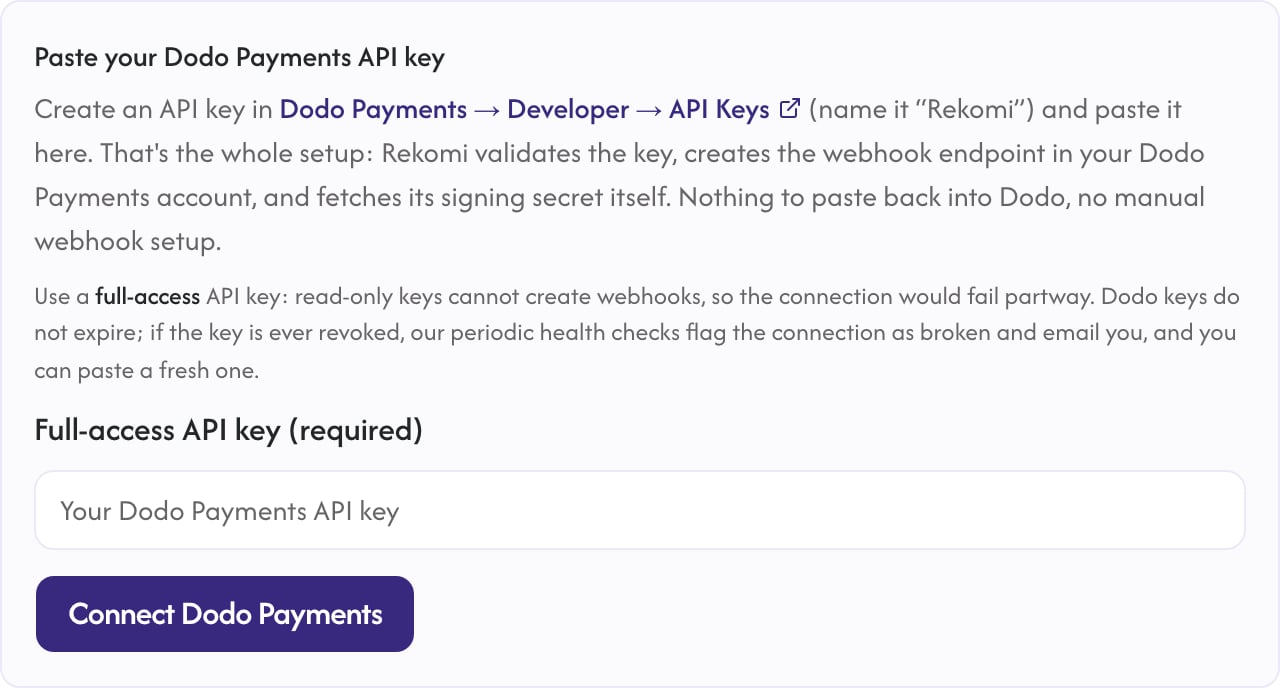 कनेक्ट करने के बाद key का उपयोग केवल webhook endpoint manage करने और periodic health checks चलाने के लिए किया जाता है। आपकी sales signed webhook के ज़रिए आती हैं, API के ज़रिए कभी नहीं।
affiliate clicks capture करने के लिए अपनी marketing site पर Rekomi tracking script जोड़ें। Program ID भरा हुआ आपका snippet Rekomi में **Setup → Install** के अंतर्गत मिलेगा।
```html theme={null}
```
प्रत्येक payment में captured referral को `rekomi_ref` metadata के रूप में जोड़ें। नीचे दिए गए implementation examples देखें।
अब sales, renewals, refunds और disputes affiliate commissions को अपने-आप credit और claw back करते हैं, और Rekomi आपके affiliates को भुगतान करने का काम संभालता है।
## Implementation Guide
### API के ज़रिए Checkout Sessions
अपने frontend पर referral को `window.Rekomi.getReferral()` के साथ पढ़ें, checkout request के साथ इसे अपने backend पर भेजें और इसे `metadata` में set करें:
```typescript Node.js theme={null}
import DodoPayments from 'dodopayments';
const client = new DodoPayments();
export async function createCheckout(productId: string, rekomiRef?: string) {
const session = await client.checkoutSessions.create({
product_cart: [{ product_id: productId, quantity: 1 }],
customer: {
email: 'customer@example.com',
name: 'John Doe',
},
return_url: 'https://yoursite.com/success',
metadata: {
...(rekomiRef ? { rekomi_ref: rekomiRef } : {}),
},
});
return session.checkout_url;
}
```
यही `metadata.rekomi_ref` field subscription products पर भी काम करती है, इसलिए initial charge और हर renewal का credit उसी affiliate को मिलता है।
### Payments API
नीचे दिए गए example में `POST /payments` का उपयोग किया गया है, जो **deprecated** है। यह existing integrations के लिए अभी भी काम करता है, लेकिन new integrations को [Checkout Sessions](/developer-resources/checkout-session) (`POST /checkouts`) का उपयोग करना चाहिए — `metadata` को उसी तरह pass किया जाता है।
```typescript Node.js theme={null}
import DodoPayments from 'dodopayments';
const client = new DodoPayments();
export async function createPayment(productId: string, rekomiRef?: string) {
const payment = await client.payments.create({
billing: {
city: 'New York',
country: 'US',
state: 'NY',
street: '123 Main St',
zipcode: '10001',
},
customer: {
email: 'customer@example.com',
name: 'John Doe',
},
product_cart: [{ product_id: productId, quantity: 1 }],
payment_link: true,
metadata: {
...(rekomiRef ? { rekomi_ref: rekomiRef } : {}),
},
});
return payment;
}
```
### Static Payment Links
link को flat metadata query parameter के साथ decorate करें (bracket form का उपयोग न करें):
```javascript theme={null}
const ref = window.Rekomi?.getReferral?.();
let url = 'https://checkout.dodopayments.com/buy/YOUR_PRODUCT_ID';
if (ref) url += `?metadata_rekomi_ref=${encodeURIComponent(ref)}`;
// use url as the href on your Buy button
```
Dodo Payments `metadata_*` query parameters को payment के metadata में शामिल करता है, जहाँ Rekomi उन्हें पढ़ता है।
## क्या ट्रैक किया जाता है
| Event | क्या होता है |
| -------------------- | ------------------------------------------------------------------------- |
| One-time payment | Pre-tax sale amount पर commission credit किया जाता है |
| Subscription renewal | Recurring commission, हर charge अपने अलग payment event के रूप में आता है |
| Refund | Commission अपने-आप claw back किया जाता है, credited राशि से अधिक कभी नहीं |
| Dispute | Dispute खुलते ही commission claw back किया जाता है |
Commissions की गणना pre-tax sale amount पर की जाती है: Dodo Payments एक Merchant of Record है और tax collect करता है, इसलिए आपके affiliates की कमाई sale पर होती है, उस tax पर कभी नहीं जिसे buyer के देश ने जोड़ा हो।
## महत्वपूर्ण नोट्स
* Rekomi webhook endpoint को केवल आवश्यक events के साथ register करता है। Dodo Payments dashboard में उस endpoint की event list को edit करने से बचें; यदि events हटा दिए जाते हैं, तो Rekomi के health checks connection में समस्या दिखाएँगे।
* Trials के दौरान कोई payment नहीं लिया जाता, इसलिए trial समाप्त होने तक कोई commission नहीं बनता और पहली वास्तविक charge के बाद ही commission शुरू होता है।
* Rekomi में disconnect करने पर आपके Dodo Payments account से webhook endpoint फिर से delete हो जाता है।
## अतिरिक्त संसाधन
Rekomi के docs में पूरा setup walkthrough, troubleshooting और security details।
Dodo Payments के लिए सभी affiliate integration options।
मदद चाहिए? Integration में सहायता के लिए Rekomi support से [support@rekomi.com](mailto:support@rekomi.com) या Dodo Payments support से [support@dodopayments.com](mailto:support@dodopayments.com) पर संपर्क करें।
कनेक्ट करने के बाद key का उपयोग केवल webhook endpoint manage करने और periodic health checks चलाने के लिए किया जाता है। आपकी sales signed webhook के ज़रिए आती हैं, API के ज़रिए कभी नहीं।
affiliate clicks capture करने के लिए अपनी marketing site पर Rekomi tracking script जोड़ें। Program ID भरा हुआ आपका snippet Rekomi में **Setup → Install** के अंतर्गत मिलेगा।
```html theme={null}
```
प्रत्येक payment में captured referral को `rekomi_ref` metadata के रूप में जोड़ें। नीचे दिए गए implementation examples देखें।
अब sales, renewals, refunds और disputes affiliate commissions को अपने-आप credit और claw back करते हैं, और Rekomi आपके affiliates को भुगतान करने का काम संभालता है।
## Implementation Guide
### API के ज़रिए Checkout Sessions
अपने frontend पर referral को `window.Rekomi.getReferral()` के साथ पढ़ें, checkout request के साथ इसे अपने backend पर भेजें और इसे `metadata` में set करें:
```typescript Node.js theme={null}
import DodoPayments from 'dodopayments';
const client = new DodoPayments();
export async function createCheckout(productId: string, rekomiRef?: string) {
const session = await client.checkoutSessions.create({
product_cart: [{ product_id: productId, quantity: 1 }],
customer: {
email: 'customer@example.com',
name: 'John Doe',
},
return_url: 'https://yoursite.com/success',
metadata: {
...(rekomiRef ? { rekomi_ref: rekomiRef } : {}),
},
});
return session.checkout_url;
}
```
यही `metadata.rekomi_ref` field subscription products पर भी काम करती है, इसलिए initial charge और हर renewal का credit उसी affiliate को मिलता है।
### Payments API
नीचे दिए गए example में `POST /payments` का उपयोग किया गया है, जो **deprecated** है। यह existing integrations के लिए अभी भी काम करता है, लेकिन new integrations को [Checkout Sessions](/developer-resources/checkout-session) (`POST /checkouts`) का उपयोग करना चाहिए — `metadata` को उसी तरह pass किया जाता है।
```typescript Node.js theme={null}
import DodoPayments from 'dodopayments';
const client = new DodoPayments();
export async function createPayment(productId: string, rekomiRef?: string) {
const payment = await client.payments.create({
billing: {
city: 'New York',
country: 'US',
state: 'NY',
street: '123 Main St',
zipcode: '10001',
},
customer: {
email: 'customer@example.com',
name: 'John Doe',
},
product_cart: [{ product_id: productId, quantity: 1 }],
payment_link: true,
metadata: {
...(rekomiRef ? { rekomi_ref: rekomiRef } : {}),
},
});
return payment;
}
```
### Static Payment Links
link को flat metadata query parameter के साथ decorate करें (bracket form का उपयोग न करें):
```javascript theme={null}
const ref = window.Rekomi?.getReferral?.();
let url = 'https://checkout.dodopayments.com/buy/YOUR_PRODUCT_ID';
if (ref) url += `?metadata_rekomi_ref=${encodeURIComponent(ref)}`;
// use url as the href on your Buy button
```
Dodo Payments `metadata_*` query parameters को payment के metadata में शामिल करता है, जहाँ Rekomi उन्हें पढ़ता है।
## क्या ट्रैक किया जाता है
| Event | क्या होता है |
| -------------------- | ------------------------------------------------------------------------- |
| One-time payment | Pre-tax sale amount पर commission credit किया जाता है |
| Subscription renewal | Recurring commission, हर charge अपने अलग payment event के रूप में आता है |
| Refund | Commission अपने-आप claw back किया जाता है, credited राशि से अधिक कभी नहीं |
| Dispute | Dispute खुलते ही commission claw back किया जाता है |
Commissions की गणना pre-tax sale amount पर की जाती है: Dodo Payments एक Merchant of Record है और tax collect करता है, इसलिए आपके affiliates की कमाई sale पर होती है, उस tax पर कभी नहीं जिसे buyer के देश ने जोड़ा हो।
## महत्वपूर्ण नोट्स
* Rekomi webhook endpoint को केवल आवश्यक events के साथ register करता है। Dodo Payments dashboard में उस endpoint की event list को edit करने से बचें; यदि events हटा दिए जाते हैं, तो Rekomi के health checks connection में समस्या दिखाएँगे।
* Trials के दौरान कोई payment नहीं लिया जाता, इसलिए trial समाप्त होने तक कोई commission नहीं बनता और पहली वास्तविक charge के बाद ही commission शुरू होता है।
* Rekomi में disconnect करने पर आपके Dodo Payments account से webhook endpoint फिर से delete हो जाता है।
## अतिरिक्त संसाधन
Rekomi के docs में पूरा setup walkthrough, troubleshooting और security details।
Dodo Payments के लिए सभी affiliate integration options।
मदद चाहिए? Integration में सहायता के लिए Rekomi support से [support@rekomi.com](mailto:support@rekomi.com) या Dodo Payments support से [support@dodopayments.com](mailto:support@dodopayments.com) पर संपर्क करें।