> ## Documentation Index
> Fetch the complete documentation index at: https://docs.dodopayments.com/llms.txt
> Use this file to discover all available pages before exploring further.
# Framer अधिकार
> भुगतान करने वाले ग्राहकों के लिए Framer टेम्पलेट रिमिक्स लिंक अनलॉक करें।
Framer अधिकार भुगतान करने वाले ग्राहकों के लिए एक Framer टेम्पलेट रिमिक्स लिंक अनलॉक करता है। आप Dodo Payments में टेम्पलेट अपलोड करते हैं, उत्पाद से अधिकार संलग्न करते हैं, और ग्राहकों को एक रिमिक्स लिंक प्राप्त होता है जो उन्हें अपने Framer खाते में टेम्पलेट क्लोन करने देता है।
## क्या डिलीवर होता है
* आपके द्वारा अपलोड किए गए Framer टेम्पलेट का एक अद्वितीय रिमिक्स लिंक।
* ग्राहक लिंक पर क्लिक करके अपने Framer कार्यक्षेत्र में टेम्पलेट रिमिक्स करता है।
* रद्दीकरण या धनवापसी पर, रिमिक्स लिंक अमान्य हो जाता है।
आम उपयोग में भुगतान किए गए Framer लैंडिंग-पृष्ठ टेम्पलेट, पोर्टफोलियो किट, और घटक पुस्तकालय शामिल हैं।
## Framer कनेक्ट करें
Framer पहली बार जब आप एक टेम्पलेट अधिकार बनाते हैं, स्वचालित रूप से कनेक्ट होता है। इसमें कोई अलग OAuth चरण नहीं है।
अपने Dodo Payments डैशबोर्ड में, **Entitlements** पर जाएं और **+** पर क्लिक करें।
**Framer Template** को इंटीग्रेशन के रूप में चुनें।
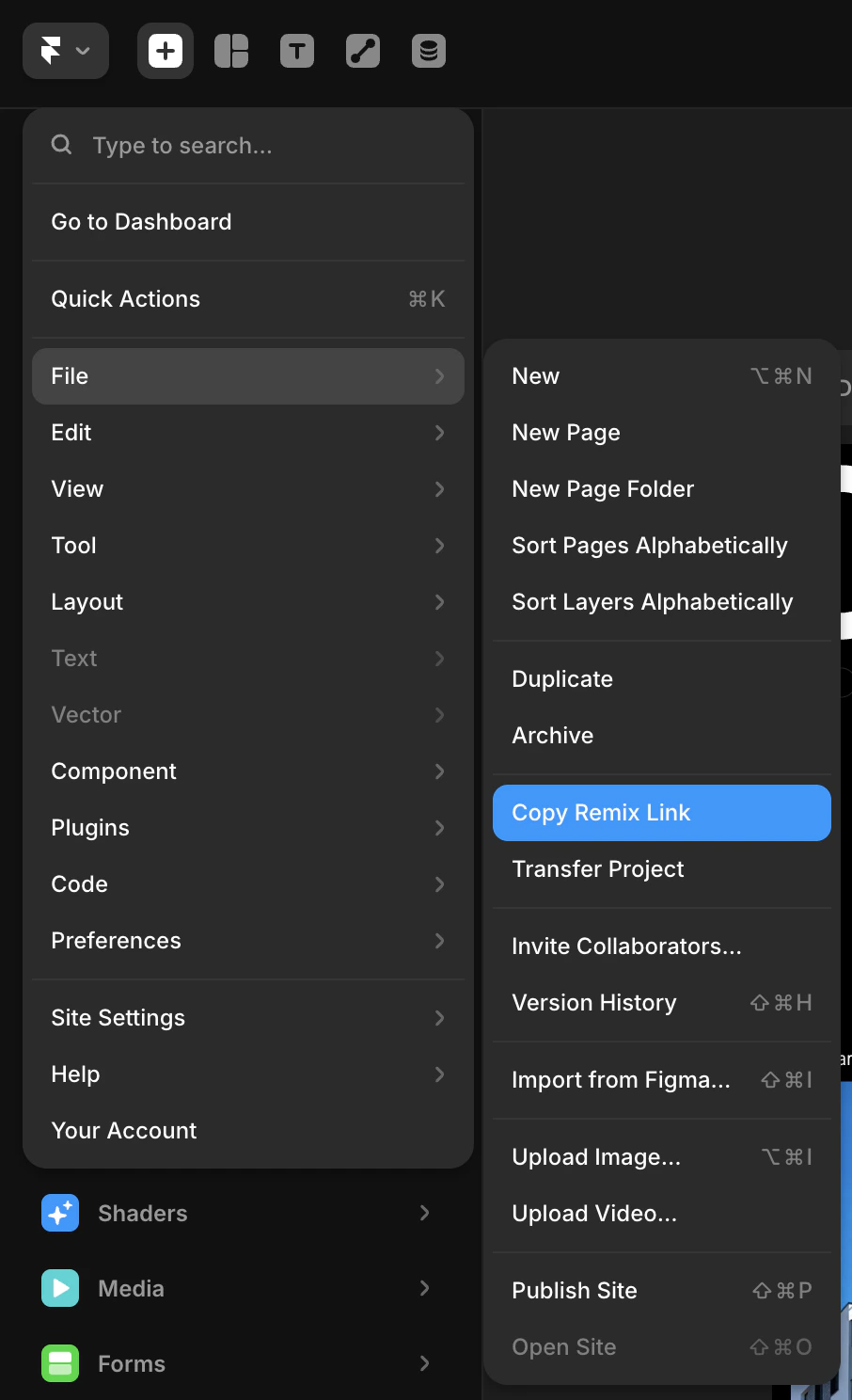
अपने Framer प्रोजेक्ट को खोलें। ऊपरी-बाएँ मेनू से, **File → Copy Remix Link** पर जाएं। यह एक सार्वजनिक रिमिक्स URL उत्पन्न करता है जो किसी को भी प्रोजेक्ट को उनके खुद के Framer खाते में क्लोन करने देता है — वो लिंक जिसे Dodo Payments भुगतान करने वाले ग्राहकों के साथ साझा करेगा।
 वापस Dodo Payments डैशबोर्ड में, **Template** ड्रॉपडाउन से अपने टेम्पलेट का चयन करें। जब आप किसी नए टेम्पलेट के लिए पहली बार यह करते हैं, तो आपने जो रिमिक्स लिंक कॉपी किया था उसे पेस्ट करें ताकि इसे पंजीकृत किया जा सके। अधिकार को एक **नाम** दें और **Create Entitlement** पर क्लिक करें।
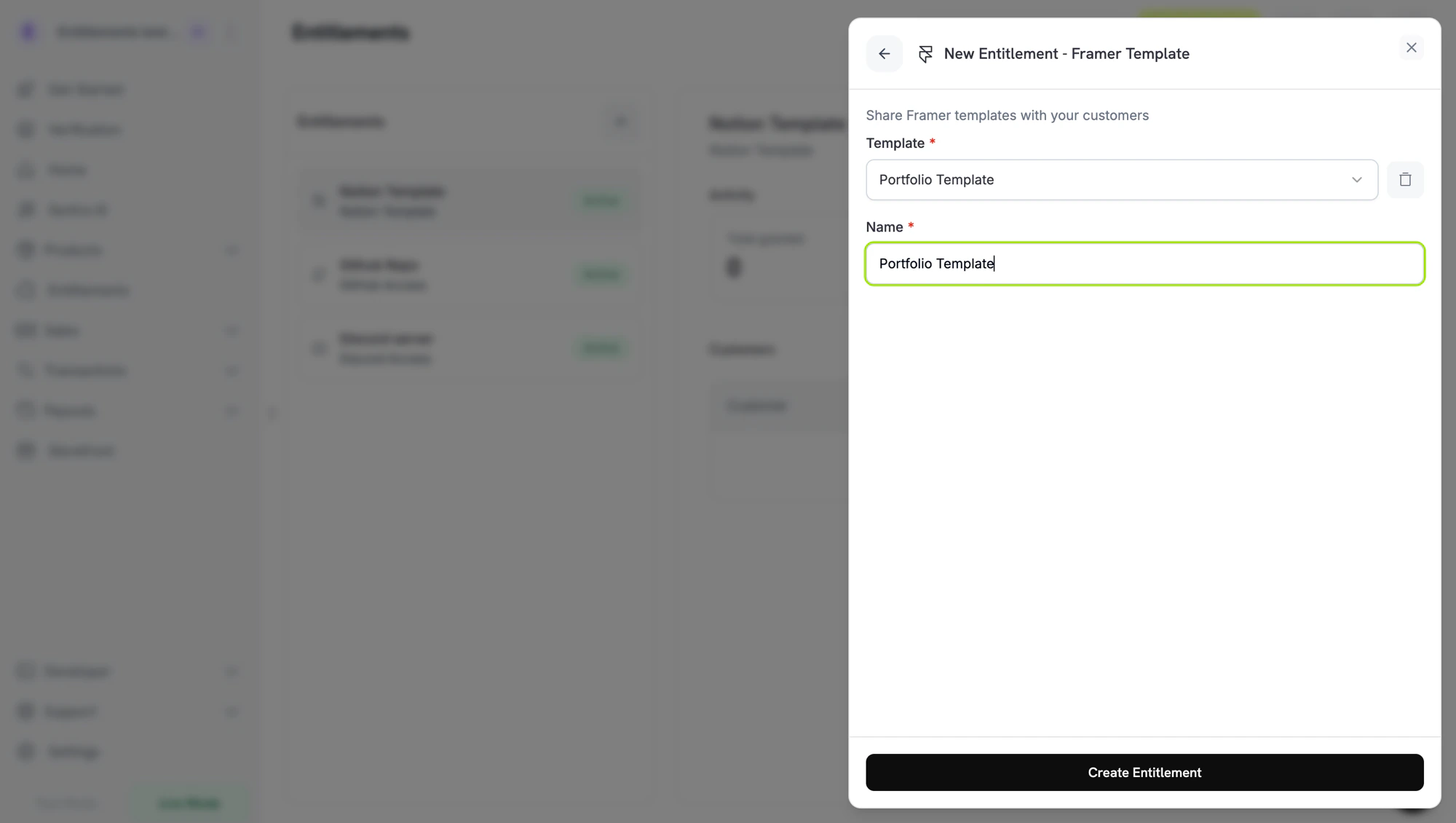 Dodo Payments टेम्पलेट को पंजीकृत करता है और एक `framer_template_id` लौटाता है जिसे आप प्रोग्रामेटिक रूप से संदर्भित कर सकते हैं।
## ग्राहक प्रक्रिया
1. ग्राहक चेकआउट पूरा करता है।
2. Dodo Payments एक `pending` अनुदान बनाता है और उस ग्राहक से जुड़ा एक अद्वितीय रिमिक्स लिंक जारी करता है।
3. जैसे ही रिमिक्स लिंक प्रदत्त होता है, अनुदान `delivered` में परिवर्तित होता है और लिंक ग्राहक के ईमेल और पोर्टल में शामिल होता है।
4. ग्राहक लिंक पर क्लिक करता है, Framer में साइन इन करता है, और टेम्पलेट को रिमिक्स करता है।
5. निरसन पर, रिमिक्स लिंक अमान्य हो जाता है। ग्राहक के Framer खाते में पहले से रिमिक्स की गई कॉपी खाली रहती हैं, क्योंकि Framer उनके निरसन का कोई तरीका प्रकट नहीं करता है।
## आवश्यक कॉन्फ़िगरेशन
| फ़ील्ड | आवश्यक | विवरण |
| -------------------- | ------ | --------------------------------------------------------------- |
| `framer_template_id` | हां | टेम्पलेट ID जो तब लौटाया जाता है जब आप टेम्पलेट अपलोड करते हैं। |
## API के माध्यम से बनाएं
```typescript TypeScript theme={null} theme={null}
const entitlement = await client.entitlements.create({
name: 'Portfolio Kit',
integration_type: 'framer',
integration_config: {
framer_template_id: 'tmpl_abc123',
},
});
```
```python Python theme={null} theme={null}
client.entitlements.create(
name="Portfolio Kit",
integration_type="framer",
integration_config={"framer_template_id": "tmpl_abc123"},
)
```
```go Go theme={null} theme={null}
client.Entitlements.New(ctx, dodopayments.EntitlementNewParams{
Name: dodopayments.F("Portfolio Kit"),
IntegrationType: dodopayments.F(dodopayments.EntitlementIntegrationTypeFramer),
IntegrationConfig: dodopayments.F[dodopayments.IntegrationConfigUnionParam](
dodopayments.IntegrationConfigFramerConfigParam{
FramerTemplateID: dodopayments.F("tmpl_abc123"),
},
),
})
```
## Webhooks
[`entitlement_grant.*` webhook इवेंट्स](/developer-resources/webhooks/intents/entitlement-grant) देखें। Framer अनुदान `pending` से आता है और जैसे ही रिमिक्स लिंक प्रदत्त होता है, `delivered` में परिवर्तित होता है।
## समस्या निवारण
रिमिक्स लिंक एकल-उपयोग है और ग्राहक से संबंधित है। यदि उन्होंने रिमिक्सिंग से पहले लिंक को साफ कर दिया, तो अनुदान को निरस्त करें और पुनः जारी करें।
यह अपेक्षित है। Framer एक रिमिक्स को ग्राहक की अपनी परियोजना के रूप में व्यवहार करता है जब एक बार क्लोन किया गया; Dodo Payments मूल लिंक को अमान्य करता है लेकिन ग्राहक के खाते में प्रतियों को समाप्त नहीं कर सकता।
Dodo Payments टेम्पलेट को पंजीकृत करता है और एक `framer_template_id` लौटाता है जिसे आप प्रोग्रामेटिक रूप से संदर्भित कर सकते हैं।
## ग्राहक प्रक्रिया
1. ग्राहक चेकआउट पूरा करता है।
2. Dodo Payments एक `pending` अनुदान बनाता है और उस ग्राहक से जुड़ा एक अद्वितीय रिमिक्स लिंक जारी करता है।
3. जैसे ही रिमिक्स लिंक प्रदत्त होता है, अनुदान `delivered` में परिवर्तित होता है और लिंक ग्राहक के ईमेल और पोर्टल में शामिल होता है।
4. ग्राहक लिंक पर क्लिक करता है, Framer में साइन इन करता है, और टेम्पलेट को रिमिक्स करता है।
5. निरसन पर, रिमिक्स लिंक अमान्य हो जाता है। ग्राहक के Framer खाते में पहले से रिमिक्स की गई कॉपी खाली रहती हैं, क्योंकि Framer उनके निरसन का कोई तरीका प्रकट नहीं करता है।
## आवश्यक कॉन्फ़िगरेशन
| फ़ील्ड | आवश्यक | विवरण |
| -------------------- | ------ | --------------------------------------------------------------- |
| `framer_template_id` | हां | टेम्पलेट ID जो तब लौटाया जाता है जब आप टेम्पलेट अपलोड करते हैं। |
## API के माध्यम से बनाएं
```typescript TypeScript theme={null} theme={null}
const entitlement = await client.entitlements.create({
name: 'Portfolio Kit',
integration_type: 'framer',
integration_config: {
framer_template_id: 'tmpl_abc123',
},
});
```
```python Python theme={null} theme={null}
client.entitlements.create(
name="Portfolio Kit",
integration_type="framer",
integration_config={"framer_template_id": "tmpl_abc123"},
)
```
```go Go theme={null} theme={null}
client.Entitlements.New(ctx, dodopayments.EntitlementNewParams{
Name: dodopayments.F("Portfolio Kit"),
IntegrationType: dodopayments.F(dodopayments.EntitlementIntegrationTypeFramer),
IntegrationConfig: dodopayments.F[dodopayments.IntegrationConfigUnionParam](
dodopayments.IntegrationConfigFramerConfigParam{
FramerTemplateID: dodopayments.F("tmpl_abc123"),
},
),
})
```
## Webhooks
[`entitlement_grant.*` webhook इवेंट्स](/developer-resources/webhooks/intents/entitlement-grant) देखें। Framer अनुदान `pending` से आता है और जैसे ही रिमिक्स लिंक प्रदत्त होता है, `delivered` में परिवर्तित होता है।
## समस्या निवारण
रिमिक्स लिंक एकल-उपयोग है और ग्राहक से संबंधित है। यदि उन्होंने रिमिक्सिंग से पहले लिंक को साफ कर दिया, तो अनुदान को निरस्त करें और पुनः जारी करें।
यह अपेक्षित है। Framer एक रिमिक्स को ग्राहक की अपनी परियोजना के रूप में व्यवहार करता है जब एक बार क्लोन किया गया; Dodo Payments मूल लिंक को अमान्य करता है लेकिन ग्राहक के खाते में प्रतियों को समाप्त नहीं कर सकता।