> ## Documentation Index
> Fetch the complete documentation index at: https://docs.dodopayments.com/llms.txt
> Use this file to discover all available pages before exploring further.
# v1.113.6 (22 अगस्त 2026)
> status field के माध्यम से Subscription pause और resume, हटाए गए pause field के स्थान पर, साथ ही प्रति-देश प्रतिशतों के साथ native Purchasing Power Parity, Charm Pricing, businesses और brands को archive करना, एक Milestones page और guided setup experience।
## Breaking Changes
**`pause` boolean field on `PATCH /subscriptions/{subscription_id}` को हटा दिया गया है।** अब यह चुपचाप कुछ न करने के बजाय हमेशा `422` के साथ fail होता है, इसलिए इसे अभी भी भेजने वाले integration को ऐसी subscription के बजाय स्पष्ट error मिलता है जो कभी pause नहीं होती।
Pause और resume अब `status` field में हैं: pause करने के लिए `{"status": "paused"}` और resume करने के लिए `{"status": "active"}` भेजें। कोई अलग pause endpoint नहीं है। दोनों में से कोई भी value अकेले भेजनी होगी — इसे किसी अन्य field के साथ मिलाने पर भी `422` के साथ reject कर दिया जाता है।
यदि आपने पहले बताए गए तरीके के अनुसार pause API के साथ integration किया है, तो upgrade करने से पहले उन calls को update करें।
अधिक जानें: [Pausing and Resuming Subscriptions](/features/subscription#pausing-and-resuming-subscriptions)
## नई सुविधाएँ
### 1. **Subscription Pause & Resume**
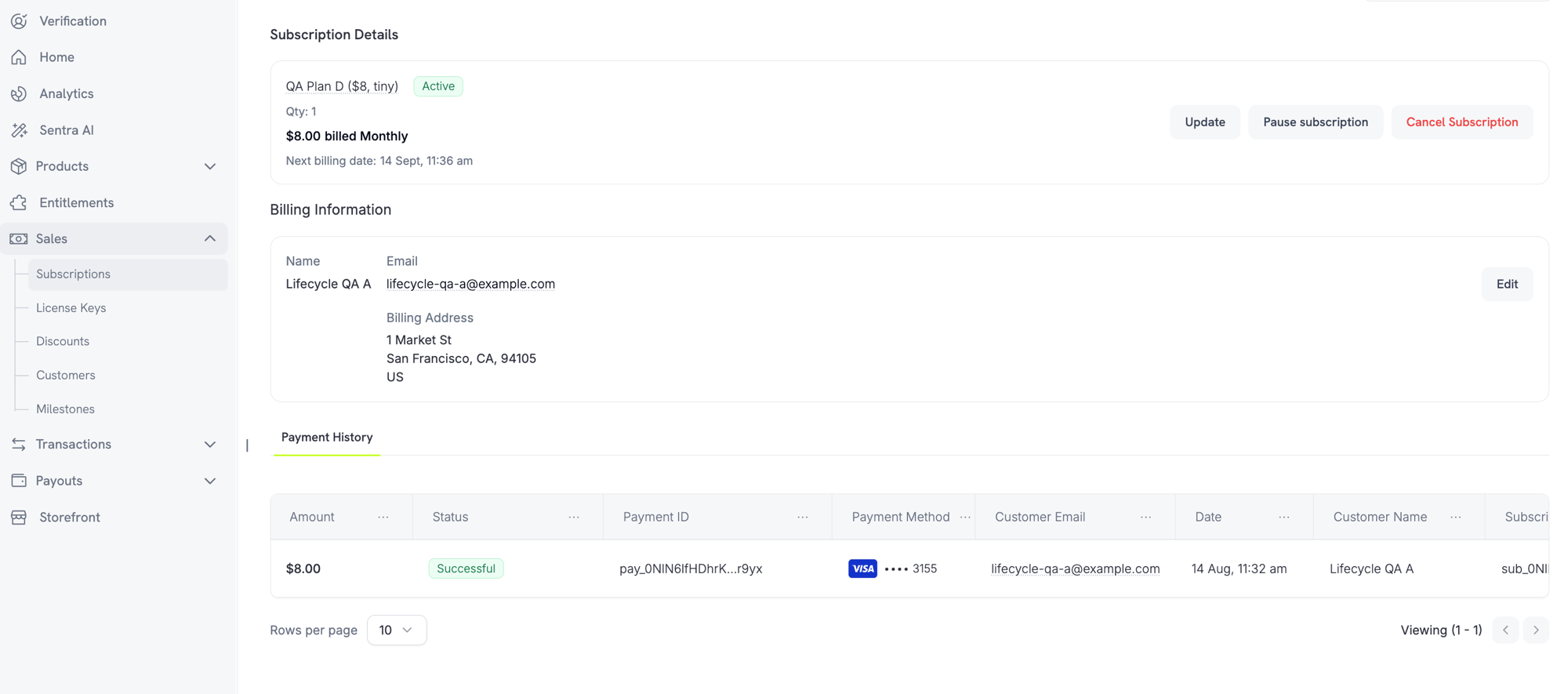
अब Merchants dashboard में subscription detail page से सीधे subscriptions को pause और resume कर सकते हैं। जब आपकी business settings इसकी अनुमति देती हैं, तो Customers Customer Portal से pause कर सकते हैं।
**Merchant controls**
Subscription detail page पर **Pause subscription** या **Resume subscription** button का उपयोग करके किसी subscription को pause या resume करें।
 **Business settings**
**Settings → Subscriptions** के अंतर्गत दो नई settings दिखाई देती हैं:
* **Allow Subscription Pause** — "Customers को customer portal से कभी भी अपनी subscription pause और resume करने दें"
* **Bill Usage at Pause** — "किसी usage-based subscription को pause किए जाने के क्षण उसके बकाया usage के लिए bill करें"
**Customer experience**
जब कोई Customer Customer Portal से pause करता है, तो उसे एक warning दिखाई देती है: pause करने से access तुरंत revoke हो जाता है। Subscription resume होने तक features, downloads और license keys काम करना बंद कर देते हैं।
अधिक जानें: [Subscriptions](/features/subscription) | [Customer Portal](/features/customer-portal)
### 2. **Purchasing Power Parity**
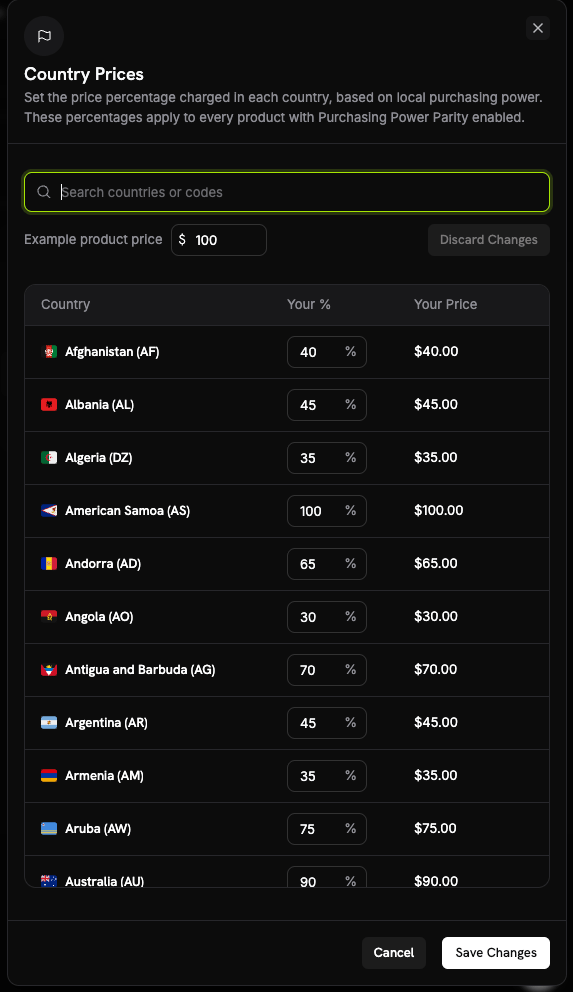
Native PPP अब third-party tools पर निर्भरता को replace करता है। **Business Settings** में **Country Prices** sheet से business-wide, प्रत्येक country के लिए एक percentage set करें। ये percentages PPP enabled वाले हर product पर लागू होते हैं।
**यह कैसे काम करता है**
* प्रत्येक product, product के pricing section में मौजूद **Purchasing Power Parity** checkbox के माध्यम से अलग-अलग opt in करता है।
* PPP के लिए Adaptive Currency enabled होना आवश्यक है। यदि business के लिए Adaptive Currency off है, तो product opt-in reject कर दिया जाता है।
**Business settings**
**Settings → Subscriptions** के अंतर्गत दो नई settings दिखाई देती हैं:
* **Allow Subscription Pause** — "Customers को customer portal से कभी भी अपनी subscription pause और resume करने दें"
* **Bill Usage at Pause** — "किसी usage-based subscription को pause किए जाने के क्षण उसके बकाया usage के लिए bill करें"
**Customer experience**
जब कोई Customer Customer Portal से pause करता है, तो उसे एक warning दिखाई देती है: pause करने से access तुरंत revoke हो जाता है। Subscription resume होने तक features, downloads और license keys काम करना बंद कर देते हैं।
अधिक जानें: [Subscriptions](/features/subscription) | [Customer Portal](/features/customer-portal)
### 2. **Purchasing Power Parity**
Native PPP अब third-party tools पर निर्भरता को replace करता है। **Business Settings** में **Country Prices** sheet से business-wide, प्रत्येक country के लिए एक percentage set करें। ये percentages PPP enabled वाले हर product पर लागू होते हैं।
**यह कैसे काम करता है**
* प्रत्येक product, product के pricing section में मौजूद **Purchasing Power Parity** checkbox के माध्यम से अलग-अलग opt in करता है।
* PPP के लिए Adaptive Currency enabled होना आवश्यक है। यदि business के लिए Adaptive Currency off है, तो product opt-in reject कर दिया जाता है।
 अधिक जानें: [Purchasing Power Parity](/features/purchasing-power-parity)
### 3. **Charm Pricing**
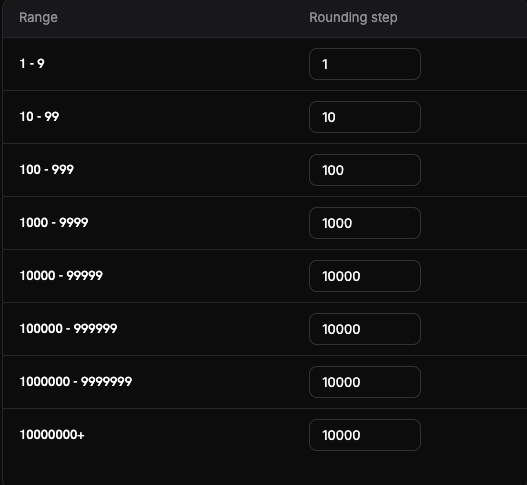
**Business Settings** में **Set up Charm Pricing** sheet से configured psychologically appealing values में converted prices को round करें। प्रत्येक price range (band) के लिए एक rounding step set किया जाता है, इसलिए छोटे और बड़े prices अलग-अलग तरह से round होते हैं।
**Rounding types**
चार rounding types में से चुनें (शुरुआत के लिए Nearest recommended है):
* **Nearest** — nearest step तक round करें
* **Floor** — नीचे की ओर round करें
* **Ceiling** — ऊपर की ओर round करें
* **Whole** — whole numbers तक round करें
Save करने से पहले **Try it** preview दिखाता है कि दिया गया amount कैसे round होगा।
अधिक जानें: [Purchasing Power Parity](/features/purchasing-power-parity)
### 3. **Charm Pricing**
**Business Settings** में **Set up Charm Pricing** sheet से configured psychologically appealing values में converted prices को round करें। प्रत्येक price range (band) के लिए एक rounding step set किया जाता है, इसलिए छोटे और बड़े prices अलग-अलग तरह से round होते हैं।
**Rounding types**
चार rounding types में से चुनें (शुरुआत के लिए Nearest recommended है):
* **Nearest** — nearest step तक round करें
* **Floor** — नीचे की ओर round करें
* **Ceiling** — ऊपर की ओर round करें
* **Whole** — whole numbers तक round करें
Save करने से पहले **Try it** preview दिखाता है कि दिया गया amount कैसे round होगा।
 अधिक जानें: [Charm Pricing](/features/charm-pricing)
### 4. **Archive Businesses & Brands**
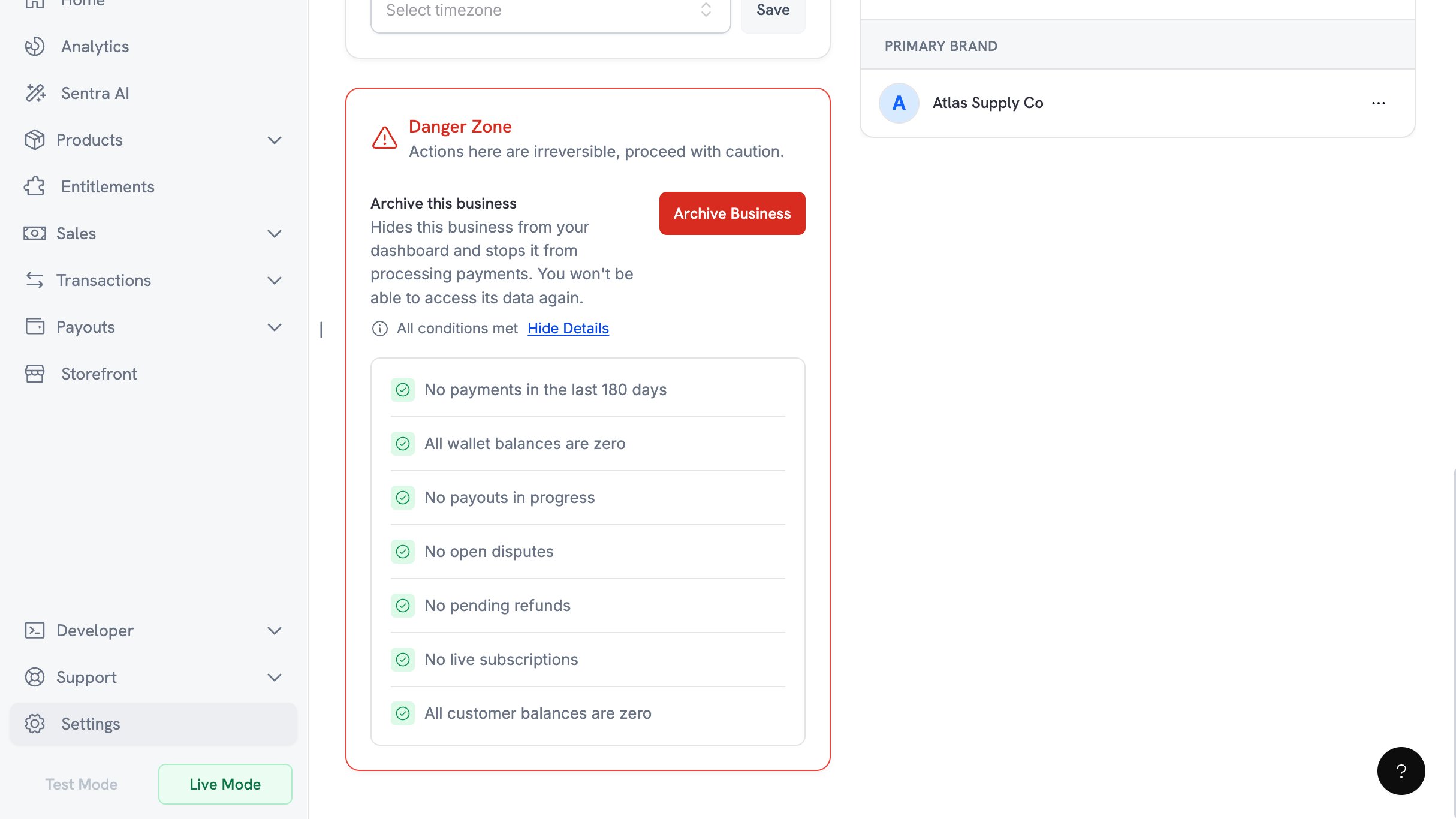
जिस business के अंतर्गत अब आप व्यापार नहीं करते, उसे **Business Settings → Danger Zone → Archive Business** से archive करें। यह action केवल owner कर सकता है और इसे undo नहीं किया जा सकता।
**Eligibility checklist**
Archiving की अनुमति मिलने से पहले सभी सात conditions का pass होना आवश्यक है:
* पिछले 180 दिनों में कोई payments नहीं
* सभी wallet balances शून्य हैं
* कोई payouts progress में नहीं है
* कोई open disputes नहीं हैं
* कोई pending refunds नहीं हैं
* कोई live subscriptions नहीं हैं
* सभी customer balances शून्य हैं
अधिक जानें: [Charm Pricing](/features/charm-pricing)
### 4. **Archive Businesses & Brands**
जिस business के अंतर्गत अब आप व्यापार नहीं करते, उसे **Business Settings → Danger Zone → Archive Business** से archive करें। यह action केवल owner कर सकता है और इसे undo नहीं किया जा सकता।
**Eligibility checklist**
Archiving की अनुमति मिलने से पहले सभी सात conditions का pass होना आवश्यक है:
* पिछले 180 दिनों में कोई payments नहीं
* सभी wallet balances शून्य हैं
* कोई payouts progress में नहीं है
* कोई open disputes नहीं हैं
* कोई pending refunds नहीं हैं
* कोई live subscriptions नहीं हैं
* सभी customer balances शून्य हैं
 **Confirmation flow**
Confirmation के लिए owner को email किया गया 6-digit code आवश्यक है। आपके पास तीन attempts हैं और code 10 मिनट बाद expire हो जाता है।
Brands को businesses से अलग archive किया जा सकता है।
अधिक जानें: [Archive Business](/features/archive-business)
### 5. **Milestones**
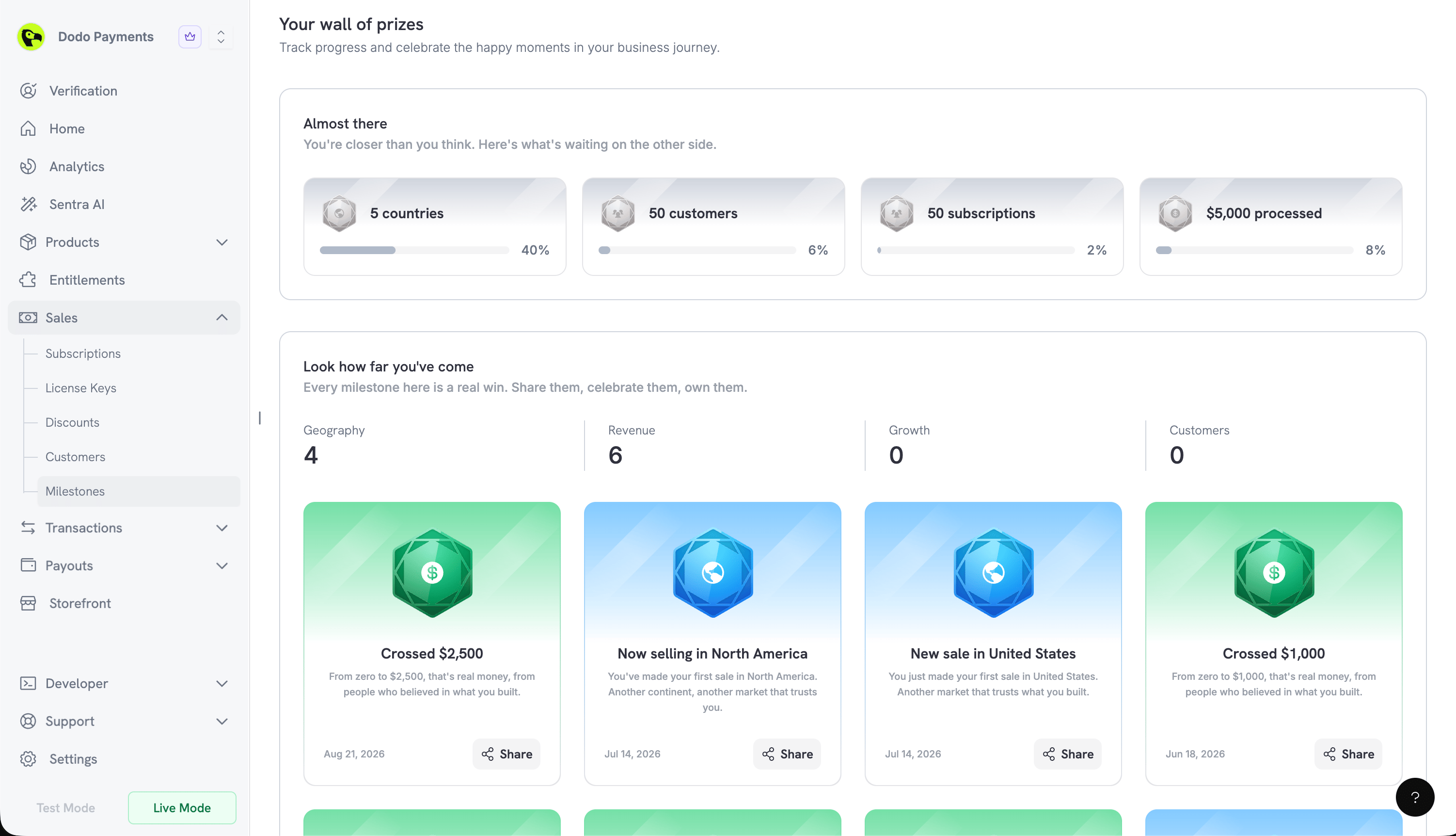
एक नया **Milestones** page dashboard में **Sales → Milestones** पर आपके business की growth का उत्सव मनाता है। चार categories आपकी progress track करती हैं: **Geography**, **Revenue**, **Growth** और **Customers**।
**Progress and achievement cards**
* **Almost there** उन milestones को दिखाता है जो आपकी पहुँच में हैं, और प्रत्येक के लिए percentage complete दिखाता है
* **Look how far you've come** उन milestones का उत्सव मनाता है जिन्हें आपने पहले ही earn कर लिया है
Earn किए गए milestones एक shareable card बनाते हैं। **Share** एक preview खोलता है, जिसमें **Include business & logo** toggle और image के रूप में save करने के लिए **Download** button होता है।
**Confirmation flow**
Confirmation के लिए owner को email किया गया 6-digit code आवश्यक है। आपके पास तीन attempts हैं और code 10 मिनट बाद expire हो जाता है।
Brands को businesses से अलग archive किया जा सकता है।
अधिक जानें: [Archive Business](/features/archive-business)
### 5. **Milestones**
एक नया **Milestones** page dashboard में **Sales → Milestones** पर आपके business की growth का उत्सव मनाता है। चार categories आपकी progress track करती हैं: **Geography**, **Revenue**, **Growth** और **Customers**।
**Progress and achievement cards**
* **Almost there** उन milestones को दिखाता है जो आपकी पहुँच में हैं, और प्रत्येक के लिए percentage complete दिखाता है
* **Look how far you've come** उन milestones का उत्सव मनाता है जिन्हें आपने पहले ही earn कर लिया है
Earn किए गए milestones एक shareable card बनाते हैं। **Share** एक preview खोलता है, जिसमें **Include business & logo** toggle और image के रूप में save करने के लिए **Download** button होता है।
 ### 6. **A Guided Setup Experience**
अब प्रत्येक signup path एक onboarding dialog में जाता है, जिसे बाद में dashboard header में **Setup guide** button से खोला जा सकता है। Progress save की जाती है, इसलिए guide वहीं से resume होती है जहाँ आपने छोड़ा था। Going live को एक celebration screen के साथ mark किया जाता है।
Test mode में बनाए गए Products को Products page पर **Import from Test** के माध्यम से live में copy किया जा सकता है।
### 6. **A Guided Setup Experience**
अब प्रत्येक signup path एक onboarding dialog में जाता है, जिसे बाद में dashboard header में **Setup guide** button से खोला जा सकता है। Progress save की जाती है, इसलिए guide वहीं से resume होती है जहाँ आपने छोड़ा था। Going live को एक celebration screen के साथ mark किया जाता है।
Test mode में बनाए गए Products को Products page पर **Import from Test** के माध्यम से live में copy किया जा सकता है।