> ## Documentation Index
> Fetch the complete documentation index at: https://docs.dodopayments.com/llms.txt
> Use this file to discover all available pages before exploring further.
# v1.112.0 (5 अगस्त, 2026)
> Discount codes में अब Amount discounts, scheduling, customer eligibility rules और per-currency options शामिल हैं। साथ ही, email alerting के साथ native webhooks experience को फिर से बनाया गया है — इसके अलावा subscriptions के लिए Cash App Pay, one-time EUR payments के लिए SEPA Direct Debit, customer-friendly payment failure messages, payout webhooks, self-service login email change, customers को अपनी subscriptions रद्द करने की अनुमति देने वाली setting और list payments पर currency filter भी उपलब्ध हैं।
## नई सुविधाएँ
### 1. **Discount Codes: Amount Discounts, Scheduling और Eligibility Rules**
Discount codes अब केवल percentage तक सीमित नहीं हैं। अब कोई code एक fixed amount घटा सकता है, schedule के अनुसार शुरू हो सकता है, प्रत्येक currency के लिए अलग price रख सकता है और यह सीमित कर सकता है कि इसे कौन redeem कर सकता है।
**Amount discounts**
`type` को `flat` पर सेट करें, ताकि percentage के बजाय एक fixed amount घटाया जा सके। यह deduction प्रत्येक line item पर लागू होने के बजाय पूरे cart में pooled होता है।
| Type | API value | Behavior |
| ---------- | ------------ | ------------------------------------------------------------------------------------------------------ |
| Percentage | `percentage` | price को percent के अनुसार घटाता है, जिसे प्रत्येक currency के लिए वैकल्पिक रूप से cap किया जा सकता है |
| Amount | `flat` | एक fixed amount घटाता है, जो पूरे cart में pooled होता है |
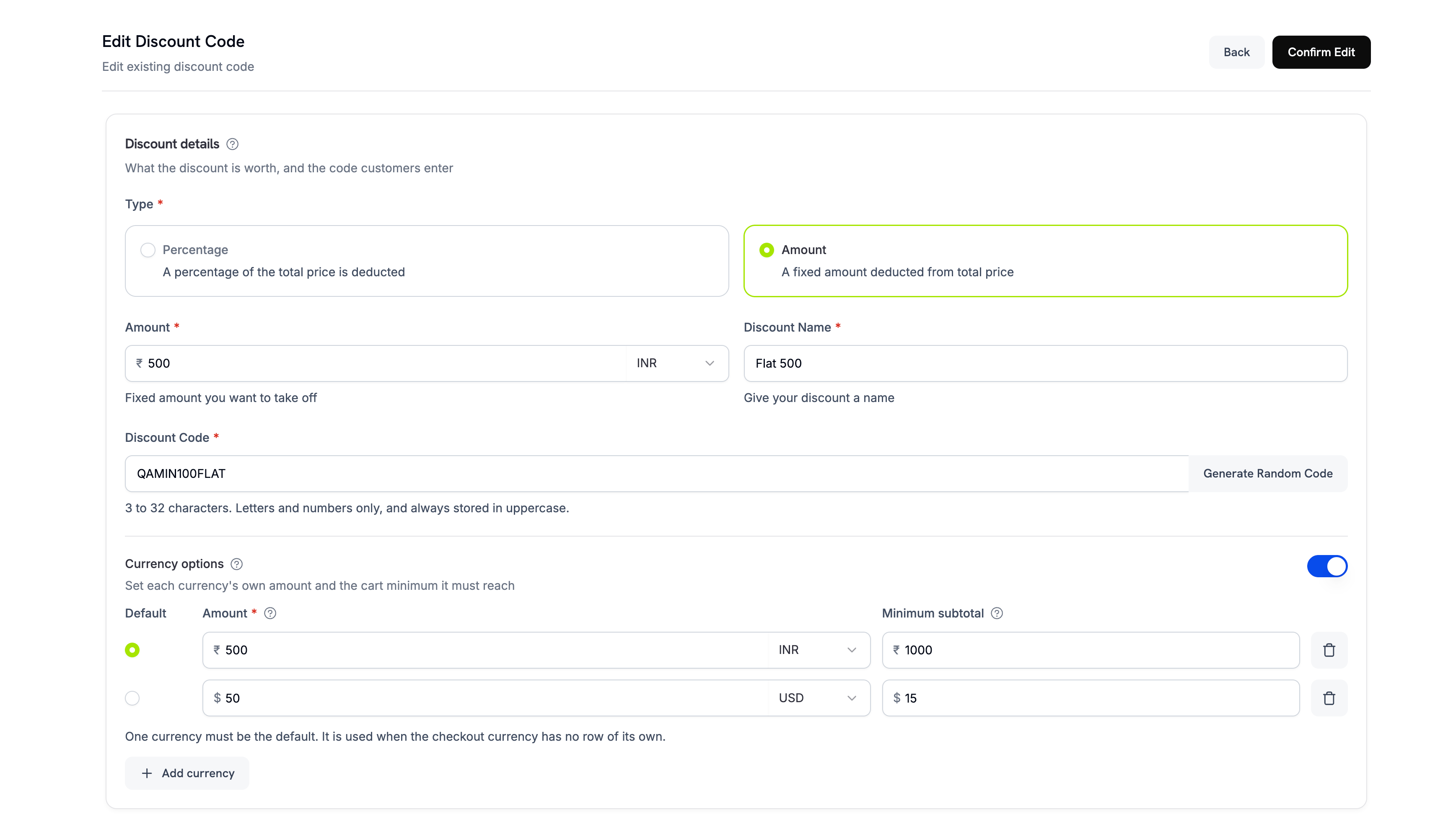 **Per-currency options**
`currency_options` एक ही code को आपके द्वारा बेची जाने वाली हर currency में सही तरीके से काम करने देता है। प्रत्येक entry किसी एक currency के लिए maximum discount (Amount code के लिए deduction स्वयं, Percentage code के लिए cap) और minimum cart value सेट करती है। Amount discount के लिए कम से कम एक currency option में resolvable default होना आवश्यक है; Percentage discounts के लिए currency options वैकल्पिक रहती हैं।
**Customer eligibility**
`customer_eligibility` यह नियंत्रित करता है कि कौन code redeem कर सकता है:
| Value | Who can redeem |
| ------------ | --------------------------------------------------------------- |
| `any` | कोई भी customer। यह default है। |
| `first_time` | वे customers जिन्होंने आपसे पहले purchase नहीं किया है। |
| `existing` | वे customers जिन्होंने आपसे पहले purchase किया है। |
| `specific` | केवल वे customers जिन्हें आप code की allow list में जोड़ते हैं। |
**Per-currency options**
`currency_options` एक ही code को आपके द्वारा बेची जाने वाली हर currency में सही तरीके से काम करने देता है। प्रत्येक entry किसी एक currency के लिए maximum discount (Amount code के लिए deduction स्वयं, Percentage code के लिए cap) और minimum cart value सेट करती है। Amount discount के लिए कम से कम एक currency option में resolvable default होना आवश्यक है; Percentage discounts के लिए currency options वैकल्पिक रहती हैं।
**Customer eligibility**
`customer_eligibility` यह नियंत्रित करता है कि कौन code redeem कर सकता है:
| Value | Who can redeem |
| ------------ | --------------------------------------------------------------- |
| `any` | कोई भी customer। यह default है। |
| `first_time` | वे customers जिन्होंने आपसे पहले purchase नहीं किया है। |
| `existing` | वे customers जिन्होंने आपसे पहले purchase किया है। |
| `specific` | केवल वे customers जिन्हें आप code की allow list में जोड़ते हैं। |
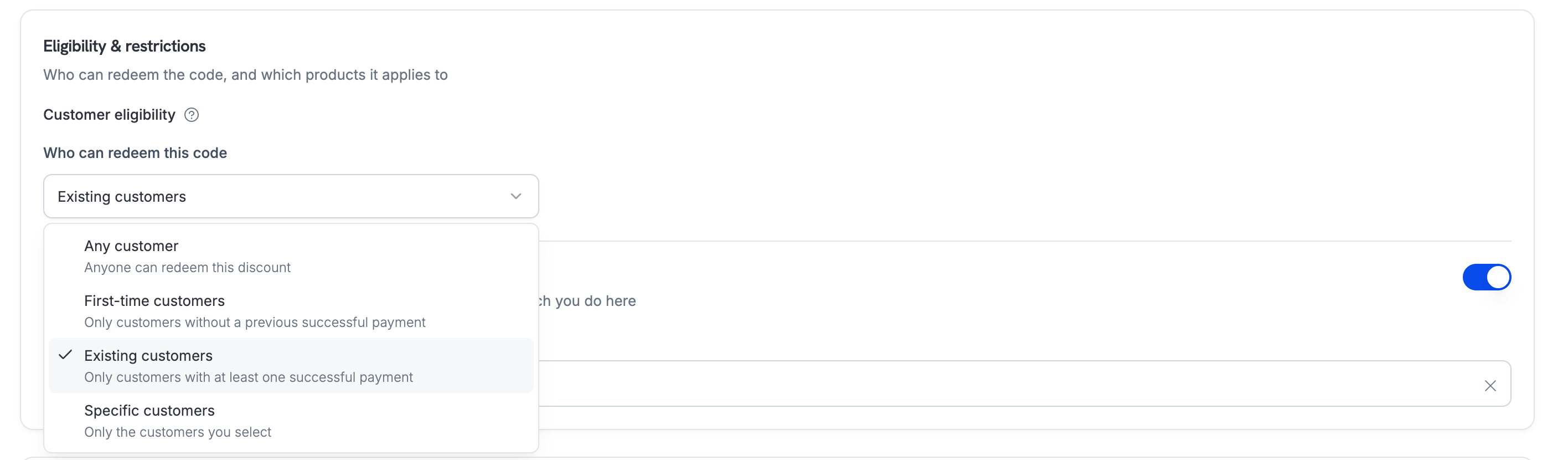 Dashboard से या नए endpoints के माध्यम से allow list manage करें: जुड़े हुए customers की list के लिए `GET /discounts/{discount_id}/customers`, उन्हें जोड़ने के लिए `POST /discounts/{discount_id}/customers` और किसी एक को हटाने के लिए `DELETE /discounts/{discount_id}/customers/{customer_id}` का उपयोग करें।
एक `specific` code की शुरुआत **zero** eligible customers के साथ होती है और जब तक आप उसमें customers को जोड़ नहीं देते, तब तक यह हर redemption को reject करता है।
**Scheduling और per-customer limits**
भविष्य में launch के लिए code schedule करने हेतु `starts_at` सेट करें — इसे unset छोड़ने पर code तुरंत active रहता है और इसे `expires_at` से strictly पहले होना चाहिए। एक customer कितनी बार code redeem कर सकता है, इसकी सीमा तय करने के लिए `per_customer_usage_limit` का उपयोग करें। यह एक अलग cap है, जो overall `usage_limit` से अधिक नहीं हो सकता।
Minimum cart value हमेशा cart की original prices के आधार पर मापी जाती है, stack के बीच में running total के आधार पर नहीं। इसलिए stacking order से यह कभी नहीं बदलता कि minimum पूरा हुआ है या नहीं।
और जानें: [Discounts](/features/discount-codes) | [Create Discount](/api-reference/discounts/create-discount)
### 2. **Rebuilt Webhooks Experience**
Dashboard का webhooks section native experience के रूप में फिर से बनाया गया है और embedded portal को हटा दिया गया है। अब सब कुछ dashboard के अंदर consistent tables, filters और navigation के साथ उपलब्ध है और mobile पर भी सही तरीके से काम करता है।
* **Endpoints** — side sheet में endpoints create और edit करें, searchable tree से event types चुनें और पिछले 24 घंटों की error rate एक नज़र में देखें।
* **Activity and logs** — **Delivery activity** chart पर समय के साथ delivery attempts देखें, delivered messages browse करें और payload तथा हर delivery attempt का response code और duration inspect करने के लिए **message detail** page खोलें। हर attempt को वहीं से replay किया जा सकता है।
* **Event catalog** — Dodo Payments द्वारा भेजे जाने वाले हर event type को उसके schema और example payload के साथ browse करें।
* **Endpoint overview** — पिछले 24 घंटों के delivery stats, view या rotate करने के लिए signing secret और **Replay history**।
* **Testing** — live जाने से पहले receiver verify करने के लिए किसी endpoint को example event भेजें।
* **Advanced** — delivery throttle करें, उस endpoint को भेजे जाने वाले हर request के साथ custom headers manage करें और उसका transformation edit करें।
* **Bulk replay** — किसी endpoint पर failed messages recover करें, कभी dispatch न किए गए messages replay करें या filtered range replay करें।
* **Email alerting** — नया **Settings** tab, जहाँ आप उन addresses की list बना सकते हैं जिन्हें किसी endpoint पर deliveries fail होने पर email भेजा जाना चाहिए। कई addresses को commas से अलग करें और alerts बंद करने के लिए इसे empty छोड़ दें।
यह केवल dashboard में किया गया बदलाव है। आपके मौजूदा endpoints, signing secrets, signature verification, event names और payloads में कोई बदलाव नहीं हुआ है — किसी integration work की आवश्यकता नहीं है।
और जानें: [Webhooks](/developer-resources/webhooks) | [Webhook Events](/developer-resources/webhooks/intents/webhook-events-guide)
### 3. **Subscriptions के लिए Cash App Pay**
अब Cash App Pay केवल one-time payment के बजाय recurring subscription को भी support कर सकता है। यह USD में billed US checkouts पर मौजूदा card options के साथ उपलब्ध है।
और जानें: [Digital Wallets](/features/payment-methods/digital-wallets)
### 4. **SEPA Direct Debit**
SEPA Direct Debit अब पूरे Eurozone में उपलब्ध है, जिससे customers card का उपयोग करने के बजाय सीधे अपने bank account से payment कर सकते हैं। यह one-time payments के लिए EUR checkouts पर उपलब्ध है।
SEPA Direct Debit instant नहीं है। किसी payment की पुष्टि होने में **6 business days** लगते हैं, इसलिए authorization को settlement न मानें — payment के succeeded state में पहुँचने के बाद ही fulfillment करें।
और जानें: [European Payment Methods](/features/payment-methods/europe)
### 5. **अधिक स्पष्ट Payment Failure Messages**
जब कोई payment fail होता है, तो अब आपको और आपके customer को raw processor text के बजाय उद्देश्य के अनुसार लिखा गया copy दिखाई देता है। हर failure **46 unified error codes** की taxonomy के माध्यम से resolve होता है, जिनमें से हर code दो audiences के लिए mapped है:
* **आपको** payment पर headline और recommended action दिखाई देता है, ताकि आपको पता रहे कि customer से retry करने, अपने bank से contact करने या किसी अन्य card का उपयोग करने के लिए कहना है। Payment object पर `error_message` में अब यह copy रहती है, जब भी `error_code` कोई recognized unified code हो।
* **आपके customer को** checkout failure screen, Customer Portal और dunning emails में सरल भाषा में explanation दिखाई देता है — उदाहरण के लिए, *"आपके card का security code (CVC) सही नहीं लग रहा है। कृपया इसे फिर से दर्ज करके दोबारा प्रयास करें।"*
Fraud-sensitive declines — `FRAUDULENT`, `LOST_CARD`, `STOLEN_CARD` और `PICKUP_CARD` — के लिए customer को हमेशा generic message दिखाई देता है, ताकि वास्तविक कारण कभी उजागर न हो। आपको वास्तविक कारण warning के साथ दिखाई देता है कि इसे share न करें।
और जानें: [Transaction Failures](/api-reference/transaction-failures) | [Payments](/features/transactions/payments) | [Get Payment Detail](/api-reference/payments/get-payments-1)
### 6. **Customers को अपनी Subscriptions रद्द करने दें**
**Allow Subscription Cancellation** अब dashboard settings में **Subscriptions** tab के अंतर्गत एक first-class setting है और इसे end to end लागू किया गया है। इसे बंद करने पर Customer Portal cancel button को disable कर देता है और API customer-initiated cancellation को `403` के साथ reject कर देता है — immediate cancel और "cancel at next billing date" दोनों flows में। पहले यह setting केवल button को छिपाती थी, इसलिए कोई determined customer API के माध्यम से फिर भी cancel कर सकता था।
यह setting **default रूप से enabled** है। Merchant API और dashboard के माध्यम से आपके अपने cancellations पर इसका कोई प्रभाव नहीं पड़ता और customer हमेशा पहले से scheduled cancellation को revoke कर सकता है।
और जानें: [Customer Portal](/features/customer-portal) | [Subscriptions](/features/subscription)
### 7. **Payout Webhooks**
अब आपको अपने payouts के लिए webhooks भी मिलते हैं, जिससे polling किए बिना उन्हें अपने accounting systems में reconcile कर सकते हैं।
| Event | Fires when |
| -------------------- | ------------------------------------------------------------------------------- |
| `payout.created` | automatic payout cycle या off-cycle के माध्यम से payout create होने पर |
| `payout.in_progress` | payout की due date आने और processing शुरू होने पर |
| `payout.on_hold` | payout pause होने या review के अंतर्गत रखे जाने पर |
| `payout.success` | आपके bank account में payout settle होने पर |
| `payout.failed` | payout fail होने पर, और amount तथा fees आपके wallet में वापस credit किए जाने पर |
`payout.created` पहले `payout.not_initiated` के रूप में emitted होता था। यदि कोई existing endpoint `payout.not_initiated` पर filter करता है, तो filter को `payout.created` पर update करें, ताकि matching जारी रहे। Payload में `status` field इस stage पर भी `not_initiated` report करती है।
और जानें: [Payout Webhooks](/developer-resources/webhooks/intents/payout) | [Payouts Process](/features/payouts/payout-structure)
### 8. **Dashboard से अपना Login Email बदलें**
अब आप support से contact किए बिना उस email address को बदल सकते हैं जिससे आप sign in करते हैं। Account tab को redesign किया गया है और इसमें नया **Change Email** section शामिल है, जिसमें **Change email** button से flow शुरू होता है।
Verification दो steps में होती है: पहले हम आपके **current** address पर code email करते हैं ताकि पुष्टि हो सके कि यह आप हैं, फिर आपके **new** address पर दूसरा code भेजते हैं ताकि यह confirm हो सके कि उसका control आपके पास है। दोनों के verify होने के बाद:
* इसके बाद नए address से sign in करें। पिछला address passwords, magic links और emailed codes के लिए काम करना बंद कर देता है।
* Google या GitHub sign-in जैसे linked identity providers unlink हो जाते हैं और उन्हें फिर से connect करना पड़ता है।
* आपका password, businesses, team access और verification status अपरिवर्तित रहते हैं।
* आपके पिछले address पर notification भेजा जाता है, ताकि कोई unexpected change कभी silent न रहे।
और जानें: [My Account](/miscellaneous/accounts)
### 9. **Analytics: नए Widgets और Refinements**
Analytics v3 rebuild पर आधारित यह release नए visualizations जोड़ती है और मौजूदा visualizations को बेहतर बनाती है।
* **Revenue by country अब full-width choropleth map है**, जिसके साथ ranked country list दिखाई देती है और यह card भी बाकी cards की तरह shareable है।
* **Redrawn trend charts**, जिनमें crosshair hover, x-axis पर rolling date pill और compact tooltip शामिल हैं।
* **New date presets** — **Last 30 days**, Last 4 weeks की जगह लेता है और **Last 6 months** भी list में शामिल हो गया है।
* **आपके filters बने रहते हैं।** Date preset और comparison mode अब प्रत्येक business के लिए persist होते हैं और devices के बीच आपका साथ देते हैं, बजाय इसके कि हर session में defaults पर reset हो जाएँ।
* **Top customers की पहचान name से होती है**, और name उपलब्ध न होने पर email का उपयोग किया जाता है।
* Revenue by country अब अधिकतम **top 150** countries लौटाता है।
और जानें: [Dashboard Analytics](/features/analytics-and-reporting)
## Improvements और Bug Fixes
### 10. **Currency के आधार पर Payments Filter करें**
`GET /payments` अब एक optional **`currency`** query parameter स्वीकार करता है, जिससे आप केवल किसी दी गई currency में settled payments की list बना सकते हैं — उदाहरण के लिए `GET /payments?currency=EUR`। यही filter dashboard में Payments table पर भी उपलब्ध है।
और जानें: [List Payments](/api-reference/payments/get-payments)
### 11. **Dispute Response Window बढ़ाकर 10 Days किया गया**
अब dispute create होने के बाद आपके पास respond करने के लिए **10 days** हैं, जो पहले 4 थे। Dashboard में dispute पर दिखाई देने वाला countdown और API द्वारा लौटाई गई response deadline, दोनों लंबी window को दर्शाते हैं।
और जानें: [Disputes](/features/transactions/disputes)
### 12. **अधिक स्पष्ट Payout Bank Account Forms**
Payout bank account जोड़ना अब कम अस्पष्ट है। Field labels, descriptions और tooltips अब आपके business type के अनुसार adapt होते हैं, इसलिए sole proprietors के लिए account holder और beneficiary name duplicate जैसे नहीं दिखते। अपने bank के रूप में **Other** चुनने पर आप name freely type कर सकते हैं, China domestic bank code को **CNAPS** के रूप में label किया गया है और payouts page test mode में भी visible रहता है, ताकि आप किसी भी mode से अपने linked accounts तक पहुँच सकें।
और जानें: [Payouts Process](/features/payouts/payout-structure)
### अन्य Fixes और Improvements
* **Payment fail होने पर plan-change credits reverse हो जाते हैं।** Subscription plan change के दौरान जारी किए गए proration credits अब resulting payment के सफल न होने पर पीछे नहीं छूटते।
* **Paid-trial invoices में trial charge दिखाई देता है**, न कि regular recurring price।
* **Percentage discounts minimum cart value का सम्मान करते हैं**, जिसे running total के बजाय base price के आधार पर मापा जाता है, और discount lock timeout अब generic `503` के बजाय distinct error code लौटाता है।
* **पहले से हटाए गए payment method को delete करना अब सफल होता है**, error लौटाने के बजाय, जिससे call safely idempotent बनती है।
* **Subscription के payment method को update करते समय India mandate floor के लिए उपयोग की जाने वाली currency ठीक की गई।**
* **Allowed bounds से बाहर के credit ledger entries** अब typed `400` के साथ reject होती हैं, बाद में fail होने के बजाय।
* **Pay-what-you-want products shared checkout links में fixed amount support करते हैं**, और entitlement IDs अब entitlement detail panel में दिखाई देती हैं।
* Analytics fixes: lifetime-value series, MRR में शामिल add-ons, all-time ranges पर period comparison हटाना, current bucket पर रुकने वाली series और अधिक स्पष्ट range तथा comparison labels।
* पूरे platform में minor bug fixes और stability improvements।
Dashboard से या नए endpoints के माध्यम से allow list manage करें: जुड़े हुए customers की list के लिए `GET /discounts/{discount_id}/customers`, उन्हें जोड़ने के लिए `POST /discounts/{discount_id}/customers` और किसी एक को हटाने के लिए `DELETE /discounts/{discount_id}/customers/{customer_id}` का उपयोग करें।
एक `specific` code की शुरुआत **zero** eligible customers के साथ होती है और जब तक आप उसमें customers को जोड़ नहीं देते, तब तक यह हर redemption को reject करता है।
**Scheduling और per-customer limits**
भविष्य में launch के लिए code schedule करने हेतु `starts_at` सेट करें — इसे unset छोड़ने पर code तुरंत active रहता है और इसे `expires_at` से strictly पहले होना चाहिए। एक customer कितनी बार code redeem कर सकता है, इसकी सीमा तय करने के लिए `per_customer_usage_limit` का उपयोग करें। यह एक अलग cap है, जो overall `usage_limit` से अधिक नहीं हो सकता।
Minimum cart value हमेशा cart की original prices के आधार पर मापी जाती है, stack के बीच में running total के आधार पर नहीं। इसलिए stacking order से यह कभी नहीं बदलता कि minimum पूरा हुआ है या नहीं।
और जानें: [Discounts](/features/discount-codes) | [Create Discount](/api-reference/discounts/create-discount)
### 2. **Rebuilt Webhooks Experience**
Dashboard का webhooks section native experience के रूप में फिर से बनाया गया है और embedded portal को हटा दिया गया है। अब सब कुछ dashboard के अंदर consistent tables, filters और navigation के साथ उपलब्ध है और mobile पर भी सही तरीके से काम करता है।
* **Endpoints** — side sheet में endpoints create और edit करें, searchable tree से event types चुनें और पिछले 24 घंटों की error rate एक नज़र में देखें।
* **Activity and logs** — **Delivery activity** chart पर समय के साथ delivery attempts देखें, delivered messages browse करें और payload तथा हर delivery attempt का response code और duration inspect करने के लिए **message detail** page खोलें। हर attempt को वहीं से replay किया जा सकता है।
* **Event catalog** — Dodo Payments द्वारा भेजे जाने वाले हर event type को उसके schema और example payload के साथ browse करें।
* **Endpoint overview** — पिछले 24 घंटों के delivery stats, view या rotate करने के लिए signing secret और **Replay history**।
* **Testing** — live जाने से पहले receiver verify करने के लिए किसी endpoint को example event भेजें।
* **Advanced** — delivery throttle करें, उस endpoint को भेजे जाने वाले हर request के साथ custom headers manage करें और उसका transformation edit करें।
* **Bulk replay** — किसी endpoint पर failed messages recover करें, कभी dispatch न किए गए messages replay करें या filtered range replay करें।
* **Email alerting** — नया **Settings** tab, जहाँ आप उन addresses की list बना सकते हैं जिन्हें किसी endpoint पर deliveries fail होने पर email भेजा जाना चाहिए। कई addresses को commas से अलग करें और alerts बंद करने के लिए इसे empty छोड़ दें।
यह केवल dashboard में किया गया बदलाव है। आपके मौजूदा endpoints, signing secrets, signature verification, event names और payloads में कोई बदलाव नहीं हुआ है — किसी integration work की आवश्यकता नहीं है।
और जानें: [Webhooks](/developer-resources/webhooks) | [Webhook Events](/developer-resources/webhooks/intents/webhook-events-guide)
### 3. **Subscriptions के लिए Cash App Pay**
अब Cash App Pay केवल one-time payment के बजाय recurring subscription को भी support कर सकता है। यह USD में billed US checkouts पर मौजूदा card options के साथ उपलब्ध है।
और जानें: [Digital Wallets](/features/payment-methods/digital-wallets)
### 4. **SEPA Direct Debit**
SEPA Direct Debit अब पूरे Eurozone में उपलब्ध है, जिससे customers card का उपयोग करने के बजाय सीधे अपने bank account से payment कर सकते हैं। यह one-time payments के लिए EUR checkouts पर उपलब्ध है।
SEPA Direct Debit instant नहीं है। किसी payment की पुष्टि होने में **6 business days** लगते हैं, इसलिए authorization को settlement न मानें — payment के succeeded state में पहुँचने के बाद ही fulfillment करें।
और जानें: [European Payment Methods](/features/payment-methods/europe)
### 5. **अधिक स्पष्ट Payment Failure Messages**
जब कोई payment fail होता है, तो अब आपको और आपके customer को raw processor text के बजाय उद्देश्य के अनुसार लिखा गया copy दिखाई देता है। हर failure **46 unified error codes** की taxonomy के माध्यम से resolve होता है, जिनमें से हर code दो audiences के लिए mapped है:
* **आपको** payment पर headline और recommended action दिखाई देता है, ताकि आपको पता रहे कि customer से retry करने, अपने bank से contact करने या किसी अन्य card का उपयोग करने के लिए कहना है। Payment object पर `error_message` में अब यह copy रहती है, जब भी `error_code` कोई recognized unified code हो।
* **आपके customer को** checkout failure screen, Customer Portal और dunning emails में सरल भाषा में explanation दिखाई देता है — उदाहरण के लिए, *"आपके card का security code (CVC) सही नहीं लग रहा है। कृपया इसे फिर से दर्ज करके दोबारा प्रयास करें।"*
Fraud-sensitive declines — `FRAUDULENT`, `LOST_CARD`, `STOLEN_CARD` और `PICKUP_CARD` — के लिए customer को हमेशा generic message दिखाई देता है, ताकि वास्तविक कारण कभी उजागर न हो। आपको वास्तविक कारण warning के साथ दिखाई देता है कि इसे share न करें।
और जानें: [Transaction Failures](/api-reference/transaction-failures) | [Payments](/features/transactions/payments) | [Get Payment Detail](/api-reference/payments/get-payments-1)
### 6. **Customers को अपनी Subscriptions रद्द करने दें**
**Allow Subscription Cancellation** अब dashboard settings में **Subscriptions** tab के अंतर्गत एक first-class setting है और इसे end to end लागू किया गया है। इसे बंद करने पर Customer Portal cancel button को disable कर देता है और API customer-initiated cancellation को `403` के साथ reject कर देता है — immediate cancel और "cancel at next billing date" दोनों flows में। पहले यह setting केवल button को छिपाती थी, इसलिए कोई determined customer API के माध्यम से फिर भी cancel कर सकता था।
यह setting **default रूप से enabled** है। Merchant API और dashboard के माध्यम से आपके अपने cancellations पर इसका कोई प्रभाव नहीं पड़ता और customer हमेशा पहले से scheduled cancellation को revoke कर सकता है।
और जानें: [Customer Portal](/features/customer-portal) | [Subscriptions](/features/subscription)
### 7. **Payout Webhooks**
अब आपको अपने payouts के लिए webhooks भी मिलते हैं, जिससे polling किए बिना उन्हें अपने accounting systems में reconcile कर सकते हैं।
| Event | Fires when |
| -------------------- | ------------------------------------------------------------------------------- |
| `payout.created` | automatic payout cycle या off-cycle के माध्यम से payout create होने पर |
| `payout.in_progress` | payout की due date आने और processing शुरू होने पर |
| `payout.on_hold` | payout pause होने या review के अंतर्गत रखे जाने पर |
| `payout.success` | आपके bank account में payout settle होने पर |
| `payout.failed` | payout fail होने पर, और amount तथा fees आपके wallet में वापस credit किए जाने पर |
`payout.created` पहले `payout.not_initiated` के रूप में emitted होता था। यदि कोई existing endpoint `payout.not_initiated` पर filter करता है, तो filter को `payout.created` पर update करें, ताकि matching जारी रहे। Payload में `status` field इस stage पर भी `not_initiated` report करती है।
और जानें: [Payout Webhooks](/developer-resources/webhooks/intents/payout) | [Payouts Process](/features/payouts/payout-structure)
### 8. **Dashboard से अपना Login Email बदलें**
अब आप support से contact किए बिना उस email address को बदल सकते हैं जिससे आप sign in करते हैं। Account tab को redesign किया गया है और इसमें नया **Change Email** section शामिल है, जिसमें **Change email** button से flow शुरू होता है।
Verification दो steps में होती है: पहले हम आपके **current** address पर code email करते हैं ताकि पुष्टि हो सके कि यह आप हैं, फिर आपके **new** address पर दूसरा code भेजते हैं ताकि यह confirm हो सके कि उसका control आपके पास है। दोनों के verify होने के बाद:
* इसके बाद नए address से sign in करें। पिछला address passwords, magic links और emailed codes के लिए काम करना बंद कर देता है।
* Google या GitHub sign-in जैसे linked identity providers unlink हो जाते हैं और उन्हें फिर से connect करना पड़ता है।
* आपका password, businesses, team access और verification status अपरिवर्तित रहते हैं।
* आपके पिछले address पर notification भेजा जाता है, ताकि कोई unexpected change कभी silent न रहे।
और जानें: [My Account](/miscellaneous/accounts)
### 9. **Analytics: नए Widgets और Refinements**
Analytics v3 rebuild पर आधारित यह release नए visualizations जोड़ती है और मौजूदा visualizations को बेहतर बनाती है।
* **Revenue by country अब full-width choropleth map है**, जिसके साथ ranked country list दिखाई देती है और यह card भी बाकी cards की तरह shareable है।
* **Redrawn trend charts**, जिनमें crosshair hover, x-axis पर rolling date pill और compact tooltip शामिल हैं।
* **New date presets** — **Last 30 days**, Last 4 weeks की जगह लेता है और **Last 6 months** भी list में शामिल हो गया है।
* **आपके filters बने रहते हैं।** Date preset और comparison mode अब प्रत्येक business के लिए persist होते हैं और devices के बीच आपका साथ देते हैं, बजाय इसके कि हर session में defaults पर reset हो जाएँ।
* **Top customers की पहचान name से होती है**, और name उपलब्ध न होने पर email का उपयोग किया जाता है।
* Revenue by country अब अधिकतम **top 150** countries लौटाता है।
और जानें: [Dashboard Analytics](/features/analytics-and-reporting)
## Improvements और Bug Fixes
### 10. **Currency के आधार पर Payments Filter करें**
`GET /payments` अब एक optional **`currency`** query parameter स्वीकार करता है, जिससे आप केवल किसी दी गई currency में settled payments की list बना सकते हैं — उदाहरण के लिए `GET /payments?currency=EUR`। यही filter dashboard में Payments table पर भी उपलब्ध है।
और जानें: [List Payments](/api-reference/payments/get-payments)
### 11. **Dispute Response Window बढ़ाकर 10 Days किया गया**
अब dispute create होने के बाद आपके पास respond करने के लिए **10 days** हैं, जो पहले 4 थे। Dashboard में dispute पर दिखाई देने वाला countdown और API द्वारा लौटाई गई response deadline, दोनों लंबी window को दर्शाते हैं।
और जानें: [Disputes](/features/transactions/disputes)
### 12. **अधिक स्पष्ट Payout Bank Account Forms**
Payout bank account जोड़ना अब कम अस्पष्ट है। Field labels, descriptions और tooltips अब आपके business type के अनुसार adapt होते हैं, इसलिए sole proprietors के लिए account holder और beneficiary name duplicate जैसे नहीं दिखते। अपने bank के रूप में **Other** चुनने पर आप name freely type कर सकते हैं, China domestic bank code को **CNAPS** के रूप में label किया गया है और payouts page test mode में भी visible रहता है, ताकि आप किसी भी mode से अपने linked accounts तक पहुँच सकें।
और जानें: [Payouts Process](/features/payouts/payout-structure)
### अन्य Fixes और Improvements
* **Payment fail होने पर plan-change credits reverse हो जाते हैं।** Subscription plan change के दौरान जारी किए गए proration credits अब resulting payment के सफल न होने पर पीछे नहीं छूटते।
* **Paid-trial invoices में trial charge दिखाई देता है**, न कि regular recurring price।
* **Percentage discounts minimum cart value का सम्मान करते हैं**, जिसे running total के बजाय base price के आधार पर मापा जाता है, और discount lock timeout अब generic `503` के बजाय distinct error code लौटाता है।
* **पहले से हटाए गए payment method को delete करना अब सफल होता है**, error लौटाने के बजाय, जिससे call safely idempotent बनती है।
* **Subscription के payment method को update करते समय India mandate floor के लिए उपयोग की जाने वाली currency ठीक की गई।**
* **Allowed bounds से बाहर के credit ledger entries** अब typed `400` के साथ reject होती हैं, बाद में fail होने के बजाय।
* **Pay-what-you-want products shared checkout links में fixed amount support करते हैं**, और entitlement IDs अब entitlement detail panel में दिखाई देती हैं।
* Analytics fixes: lifetime-value series, MRR में शामिल add-ons, all-time ranges पर period comparison हटाना, current bucket पर रुकने वाली series और अधिक स्पष्ट range तथा comparison labels।
* पूरे platform में minor bug fixes और stability improvements।