> ## Documentation Index
> Fetch the complete documentation index at: https://docs.dodopayments.com/llms.txt
> Use this file to discover all available pages before exploring further.
# Subscription Dunning
> Automatically send email sequences to recover lapsed or cancelled subscriptions by prompting customers to update their payment method.
Subscription Dunning automatically sends email sequences to customers whose subscriptions have lapsed due to payment failure or customer cancellation, prompting them to update their payment method and reactivate.
## What Is Subscription Dunning?
Dunning automatically detects when a subscription enters a recoverable state and sends a sequence of emails prompting the customer to take action:
* **On Hold subscriptions**: Renewal payment failed (insufficient funds, expired card, etc.)
* **Cancelled subscriptions**: Customer cancelled from the customer portal
## How Dunning Works
Dunning is triggered when a subscription enters one of two states:
* **On Hold**: A renewal payment failed (insufficient funds, expired card, etc.)
* **Cancelled**: The customer cancelled their subscription from the customer portal
Based on the trigger state, the system sends up to 4 dunning emails at
configured intervals. Each email includes a link to the customer portal where
the customer can update their payment method or re-purchase the subscription.
When the customer updates their payment method through the customer portal, a charge is automatically created for remaining dues. If the payment succeeds, the subscription is reactivated and the dunning attempt is marked as recovered.
## Status Lifecycle
| Status | Description |
| ------------ | ---------------------------------------------------------------------------- |
| `recovering` | Dunning attempt is active; emails are being sent |
| `recovered` | Customer updated payment method and payment succeeded |
| `exhausted` | All emails sent with no recovery, or subscription state changed unexpectedly |
When a dunning attempt is marked as `exhausted`, the subscription state is not modified. The subscription remains in its current state (on hold or cancelled).
## Configuring Dunning
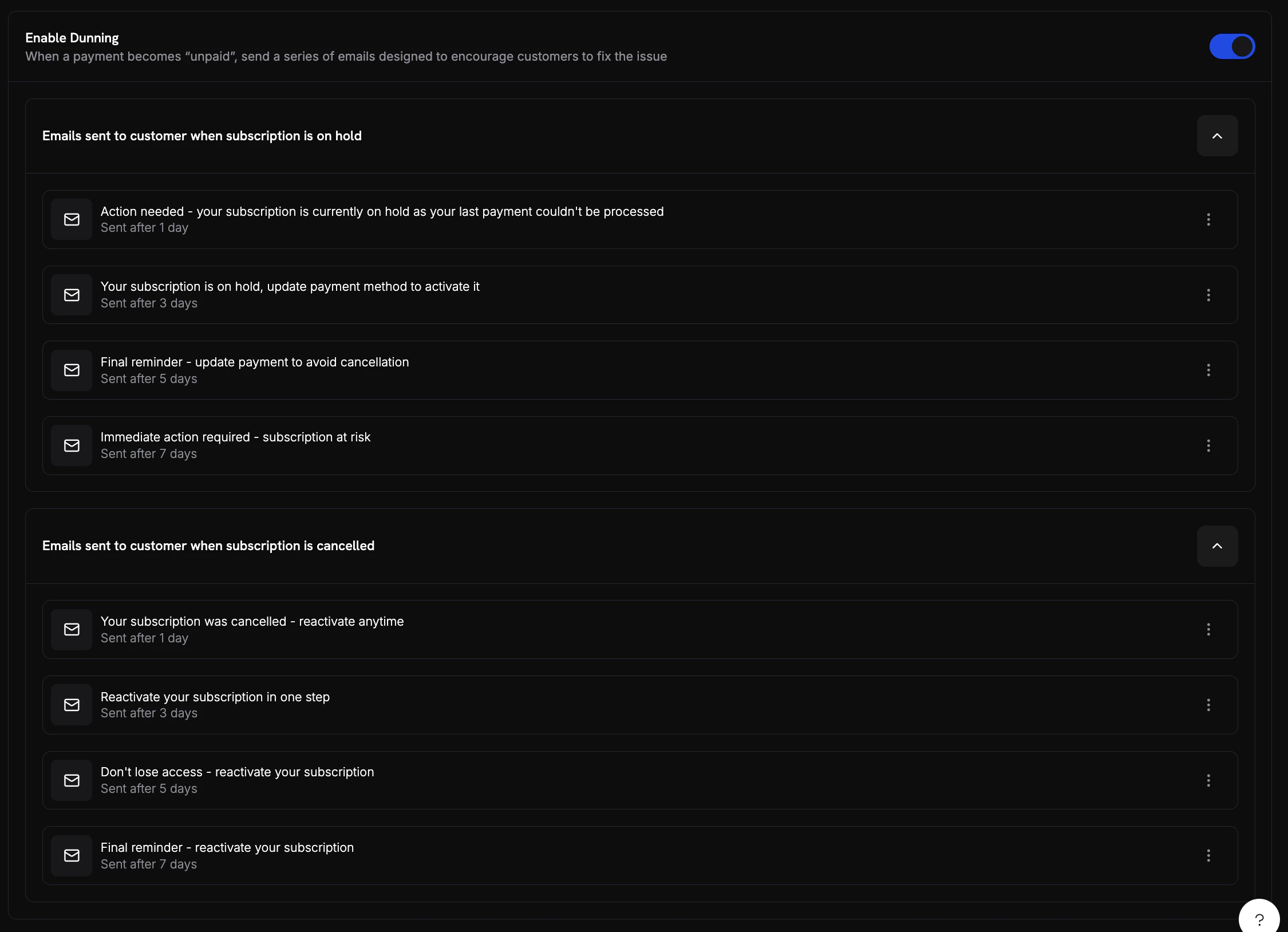
Enable and configure Dunning from **Settings** in your dashboard.
 ### Email Sequences
Dunning supports two email sequences — **On Hold** and **Cancelled** — each with up to 4 configurable emails.
Each email has the following configurable fields:
| Setting | Description |
| ------------ | -------------------------------------------------------- |
| **Enabled** | Toggle individual emails on or off without deleting them |
| **Delay** | How long after the trigger event to send this email |
| **Subject** | Email subject line with variable placeholders |
| **Body** | HTML email body with variable placeholders |
| **Reply-To** | Email address for customer replies |
**Default email timing:**
| Sequence | Email # | Default Delay |
| --------- | ------- | ------------- |
| On Hold | 1 | 1 day |
| On Hold | 2 | 3 days |
| On Hold | 3 | 5 days |
| On Hold | 4 | 7 days |
| Cancelled | 1 | 1 day |
| Cancelled | 2 | 3 days |
| Cancelled | 3 | 5 days |
| Cancelled | 4 | 7 days |
### Example Dunning Emails
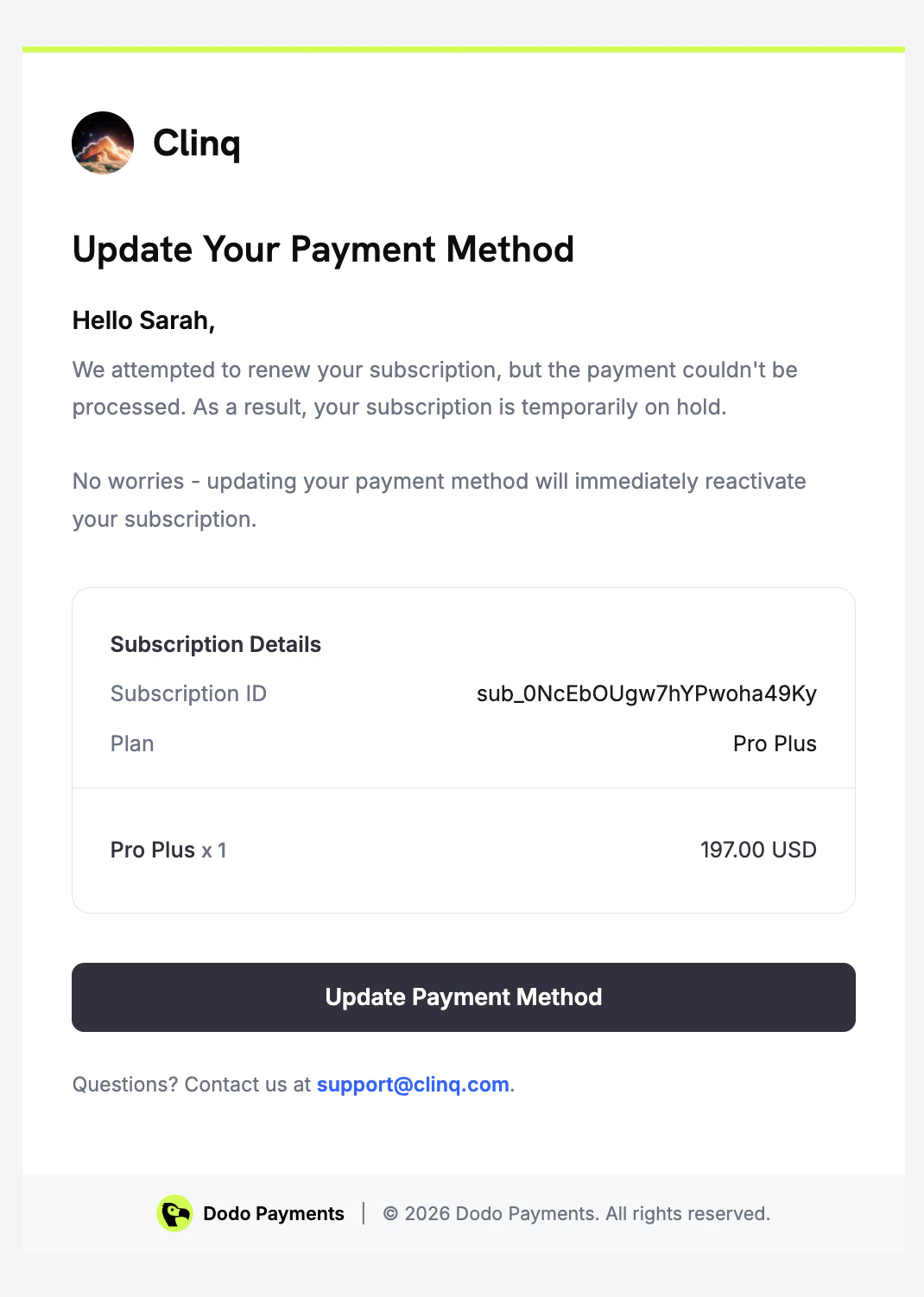
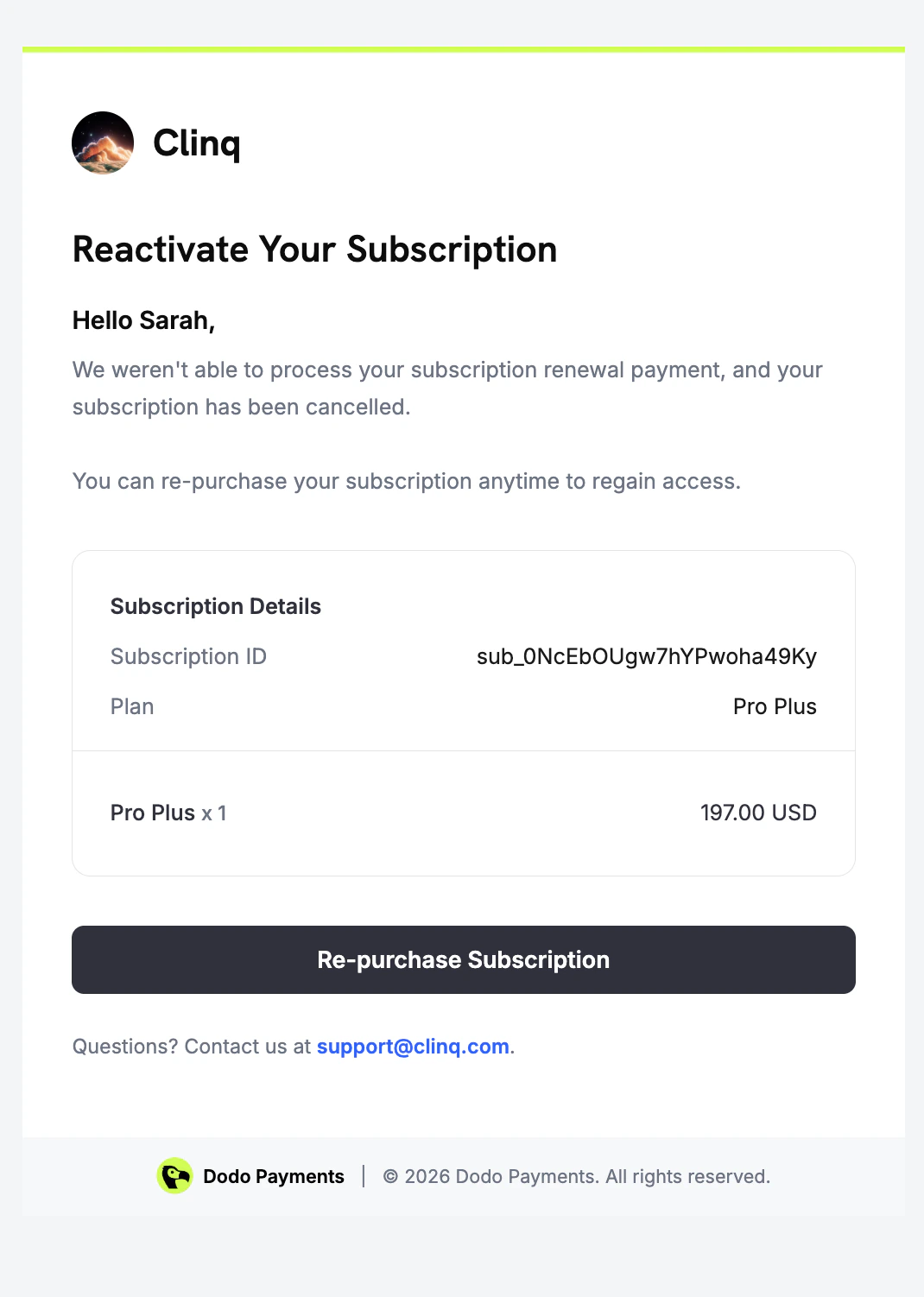
Dunning sends different emails depending on the subscription state. Below are examples of each type as seen by the customer.
### Email Sequences
Dunning supports two email sequences — **On Hold** and **Cancelled** — each with up to 4 configurable emails.
Each email has the following configurable fields:
| Setting | Description |
| ------------ | -------------------------------------------------------- |
| **Enabled** | Toggle individual emails on or off without deleting them |
| **Delay** | How long after the trigger event to send this email |
| **Subject** | Email subject line with variable placeholders |
| **Body** | HTML email body with variable placeholders |
| **Reply-To** | Email address for customer replies |
**Default email timing:**
| Sequence | Email # | Default Delay |
| --------- | ------- | ------------- |
| On Hold | 1 | 1 day |
| On Hold | 2 | 3 days |
| On Hold | 3 | 5 days |
| On Hold | 4 | 7 days |
| Cancelled | 1 | 1 day |
| Cancelled | 2 | 3 days |
| Cancelled | 3 | 5 days |
| Cancelled | 4 | 7 days |
### Example Dunning Emails
Dunning sends different emails depending on the subscription state. Below are examples of each type as seen by the customer.
 ## Customer Recovery Experience
When a customer clicks the link in a dunning email, they are taken to the customer portal where they can see their subscription status and update their payment method.
## Customer Recovery Experience
When a customer clicks the link in a dunning email, they are taken to the customer portal where they can see their subscription status and update their payment method.
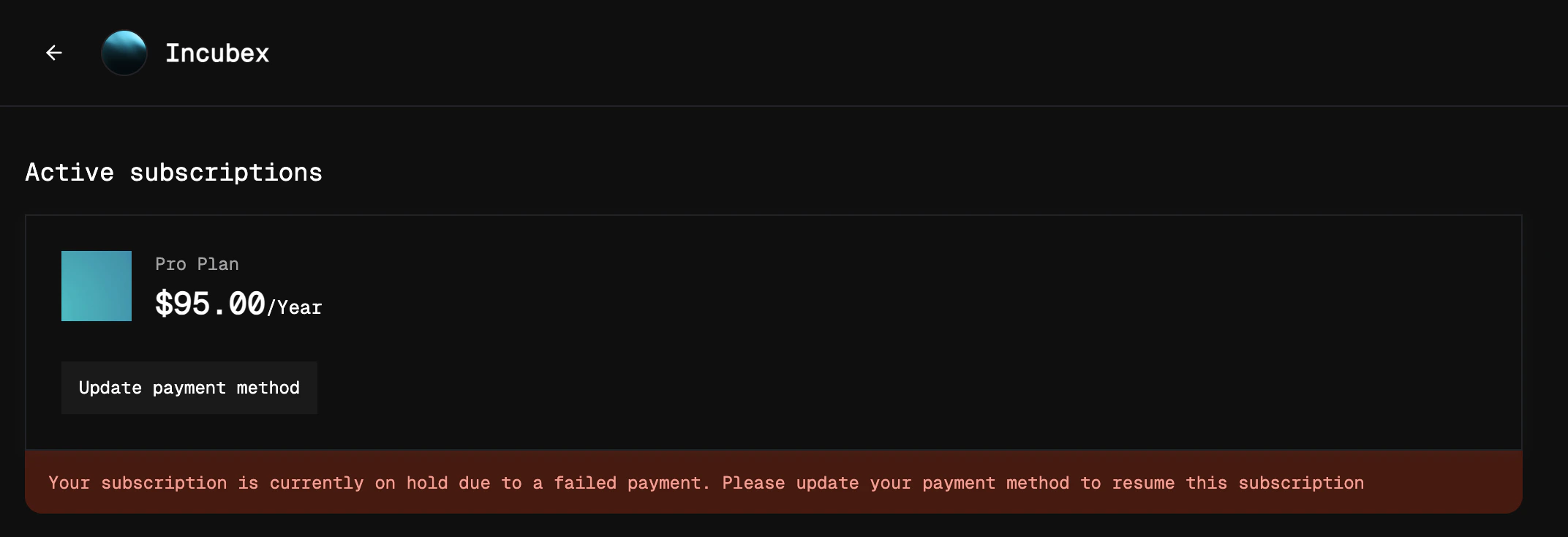 After the customer updates their payment method, a charge is automatically created for any outstanding dues. If the payment succeeds, the subscription is reactivated immediately.
For a cancelled subscription, customer is taken to a checkout page that already has the subscription added as the product.
## Analytics
Track the performance of Dunning from the **Recovery** tab in the **Analytics** section of your dashboard.
After the customer updates their payment method, a charge is automatically created for any outstanding dues. If the payment succeeds, the subscription is reactivated immediately.
For a cancelled subscription, customer is taken to a checkout page that already has the subscription added as the product.
## Analytics
Track the performance of Dunning from the **Recovery** tab in the **Analytics** section of your dashboard.
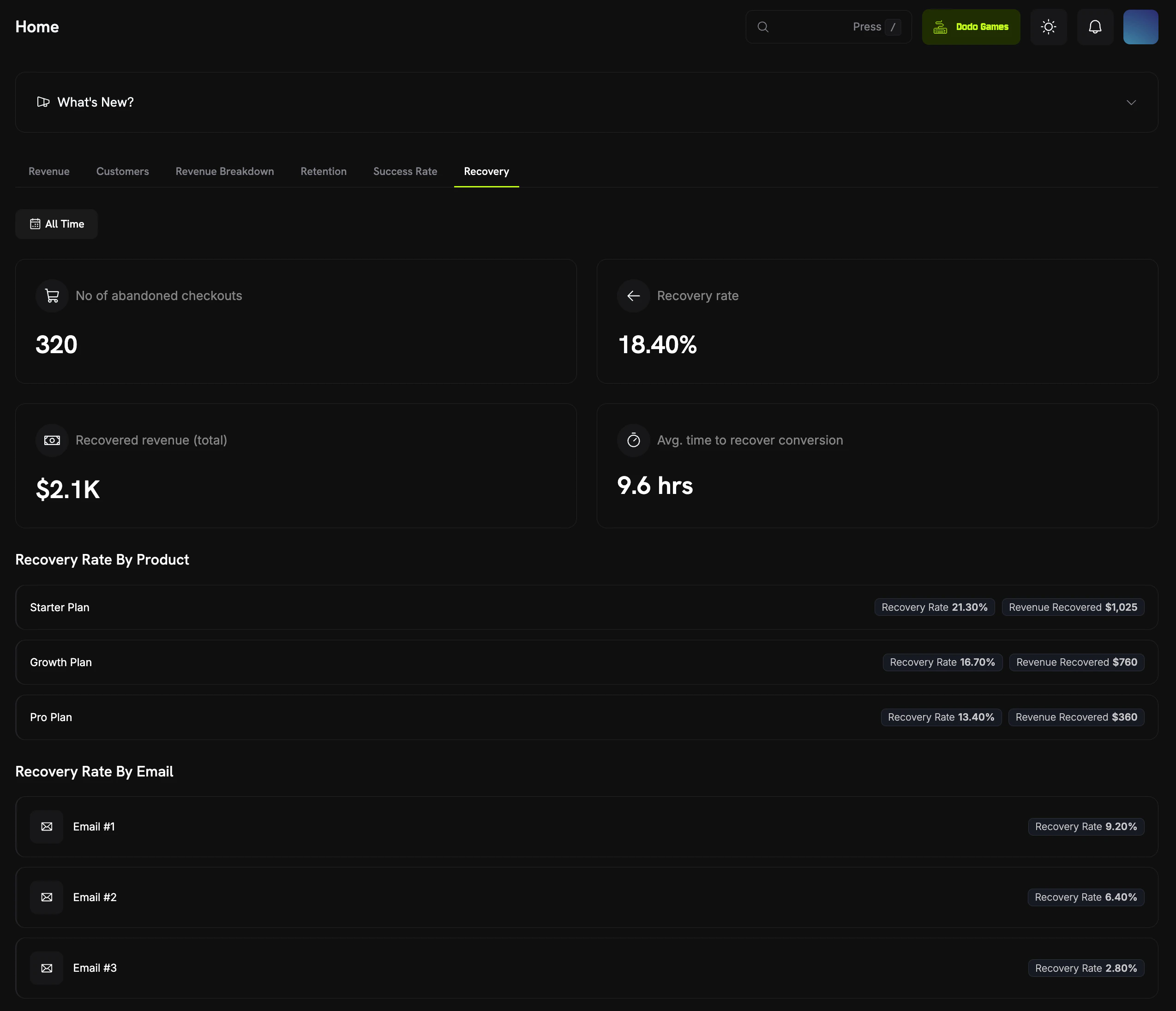 | Metric | Description |
| ----------------------- | ----------------------------------------------------------- |
| **Dunning Entries** | Total number of dunning attempts created |
| **Success Rate** | Percentage of dunning attempts that led to recovery |
| **Recovered Revenue** | Total revenue recovered through dunning |
| **Recovery by Attempt** | Breakdown of which email in the sequence drove the recovery |
## Webhook Events
| Event | Description |
| ------------------- | ----------------------------------------------------- |
| `dunning.started` | A dunning attempt has been started for a subscription |
| `dunning.recovered` | A subscription has been recovered through dunning |
View the full webhook payload schemas for dunning events.
## Edge Cases
| Scenario | Behavior |
| ---------------------------------------------------------- | -------------------------------------------------------------------------- |
| Customer updates payment method before any email | Recovery is detected; dunning attempt is marked as recovered |
| Customer purchases another subscription from same business | Dunning attempt is marked as exhausted |
| All dunning emails exhausted | Dunning attempt is marked as exhausted; subscription state is not modified |
## Best Practices
* **Start with defaults**: The default email timing is designed with reasonable spacing (1, 3, 5 and, 7 days) to avoid overwhelming customers while maintaining urgency.
* **Monitor success rates**: Track which email in the sequence drives the most recoveries. If later emails have near-zero conversion, consider disabling them.
* **Coordinate with support**: Ensure your support team knows that dunning emails are being sent, so they can assist customers who reach out.
* **Review subscription states**: Pair dunning with `subscription.on_hold` and `subscription.cancelled` webhooks for comprehensive lifecycle tracking.
Dunning works alongside the existing subscription on-hold and reactivation flows in the customer portal. Once enabled, it runs automatically with no additional integration required.
## Related
React to `dunning.started` and `dunning.recovered` events.
Recover incomplete or failed one-time checkouts with targeted emails.
Customers update payment methods through the customer portal.
Understand subscription states that trigger dunning workflows.
| Metric | Description |
| ----------------------- | ----------------------------------------------------------- |
| **Dunning Entries** | Total number of dunning attempts created |
| **Success Rate** | Percentage of dunning attempts that led to recovery |
| **Recovered Revenue** | Total revenue recovered through dunning |
| **Recovery by Attempt** | Breakdown of which email in the sequence drove the recovery |
## Webhook Events
| Event | Description |
| ------------------- | ----------------------------------------------------- |
| `dunning.started` | A dunning attempt has been started for a subscription |
| `dunning.recovered` | A subscription has been recovered through dunning |
View the full webhook payload schemas for dunning events.
## Edge Cases
| Scenario | Behavior |
| ---------------------------------------------------------- | -------------------------------------------------------------------------- |
| Customer updates payment method before any email | Recovery is detected; dunning attempt is marked as recovered |
| Customer purchases another subscription from same business | Dunning attempt is marked as exhausted |
| All dunning emails exhausted | Dunning attempt is marked as exhausted; subscription state is not modified |
## Best Practices
* **Start with defaults**: The default email timing is designed with reasonable spacing (1, 3, 5 and, 7 days) to avoid overwhelming customers while maintaining urgency.
* **Monitor success rates**: Track which email in the sequence drives the most recoveries. If later emails have near-zero conversion, consider disabling them.
* **Coordinate with support**: Ensure your support team knows that dunning emails are being sent, so they can assist customers who reach out.
* **Review subscription states**: Pair dunning with `subscription.on_hold` and `subscription.cancelled` webhooks for comprehensive lifecycle tracking.
Dunning works alongside the existing subscription on-hold and reactivation flows in the customer portal. Once enabled, it runs automatically with no additional integration required.
## Related
React to `dunning.started` and `dunning.recovered` events.
Recover incomplete or failed one-time checkouts with targeted emails.
Customers update payment methods through the customer portal.
Understand subscription states that trigger dunning workflows.