> ## Documentation Index
> Fetch the complete documentation index at: https://docs.dodopayments.com/llms.txt
> Use this file to discover all available pages before exploring further.
# Subscription Payment Retries
> Automatically retry failed subscription renewal payments on a smart back-off schedule to recover revenue with no integration work.
Payment Retries automatically re-attempt failed subscription **renewal** payments on a progressive back-off schedule. When a retry succeeds, the subscription is reactivated automatically — no customer action or integration work required.
## What Are Payment Retries?
When a subscription renewal payment fails, the subscription is placed **on hold**. With Payment Retries enabled, Dodo Payments automatically re-charges the customer's existing payment method on a smart schedule until the payment succeeds or the recovery window closes.
This recovers revenue lost to temporary failures — expired card holds, insufficient funds that get topped up, transient network errors — without emailing the customer or asking them to update anything.
Payment Retries only apply to subscription **renewal** payments. First payments (mandate setup), one-time payments, plan-change charges, and on-demand charges are not retried by this feature.
## How Payment Retries Work
A subscription renewal payment fails and the subscription moves to the `on_hold` state.
The failure's error code is checked. **Soft declines** (insufficient funds, generic decline, processing or network errors, etc.) are retryable. **Hard declines** end the retry chain immediately, since retrying won't change the outcome.
If the decline is retryable and the recovery window allows it, the next attempt is scheduled. Retries fire off-session against the customer's existing payment method on a progressive back-off schedule.
On the first successful retry, the subscription returns to `active` and the next billing date is advanced as normal. If the window closes before any retry succeeds, retries stop and the subscription remains on hold.
## Configuring Payment Retries
Enable and configure Payment Retries from **Settings → Recovery** in your dashboard.
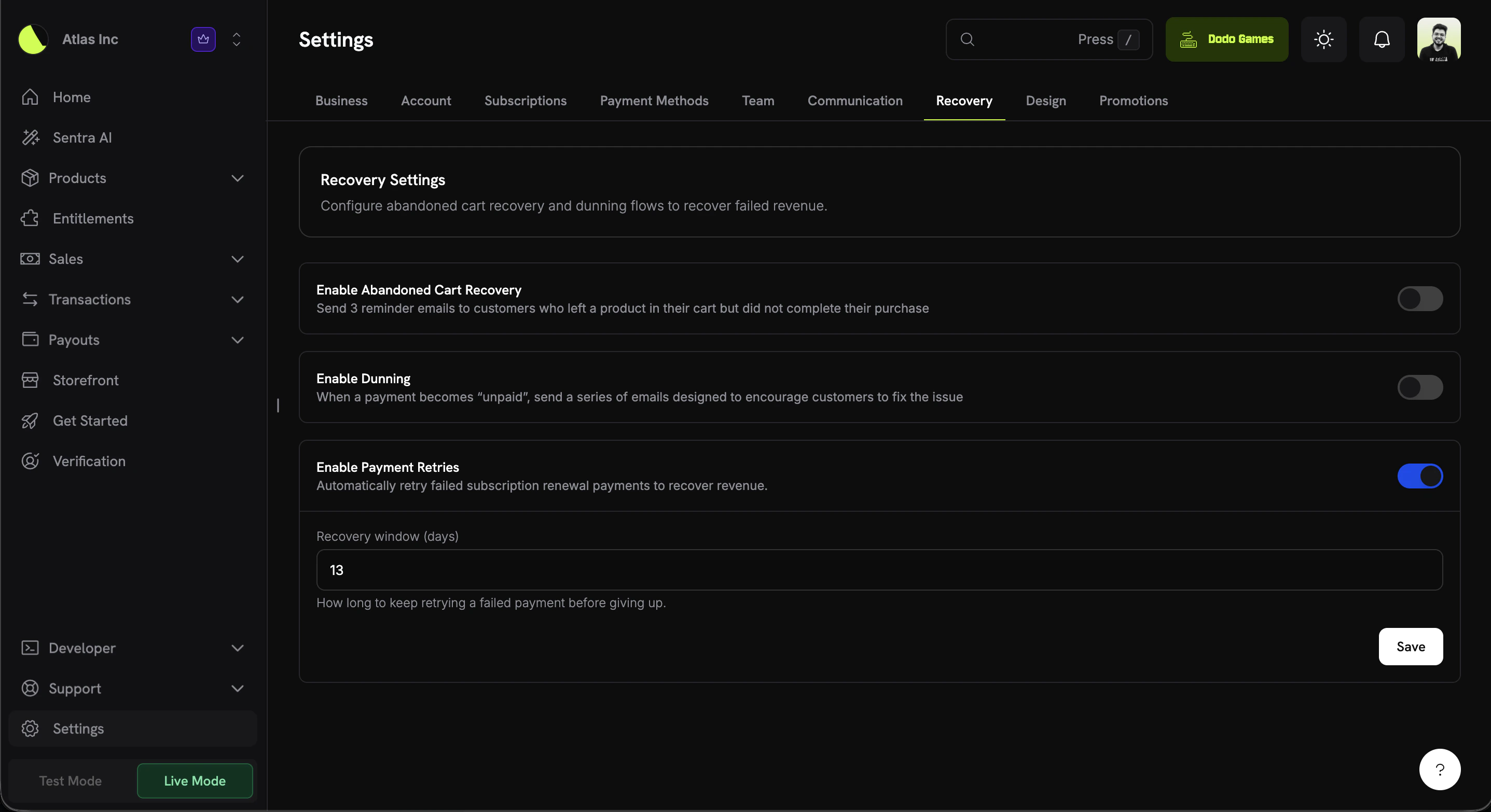 | Setting | Description | Default |
| -------------------------- | ------------------------------------------------------------------------------------------ | ------------ |
| **Enable Payment Retries** | Automatically retry failed subscription renewal payments to recover revenue. | Off (opt-in) |
| **Recovery window (days)** | How long to keep retrying a failed payment before giving up. Must be between **1 and 30**. | 13 |
The **recovery window** is anchored to the time the failed renewal invoice was created. Retries are only scheduled while the cumulative back-off delay still fits inside the window.
## Retry Schedule
Retries back off progressively. Up to **8 attempts** are made, as long as each one fits within your recovery window:
| Attempt | Delay after previous attempt | Approx. time since failure |
| ------- | ---------------------------- | -------------------------- |
| 1 | 12 hours | 12 hours |
| 2 | 24 hours | 36 hours |
| 3 | 48 hours | \~3.5 days |
| 4 | 72 hours | \~6.5 days |
| 5 | 96 hours | \~10.5 days |
| 6 | 120 hours | \~15.5 days |
| 7 | 7 days | \~22.5 days |
| 8 | 7 days | \~29.5 days |
A recovery window of **13 days** (the default) covers attempts 1 through 5 (attempt 5 fires \~10.5 days after the failure). Increase the window toward the 30-day maximum if you want the later, more widely-spaced attempts (6 through 8) to run.
## Subscription Status Transitions
| Event | Subscription status |
| ------------------------- | ------------------------------------------------------------------- |
| Renewal payment fails | `active` → `on_hold` |
| Retry attempt fails | stays `on_hold` (next retry scheduled if window allows) |
| Retry attempt succeeds | `on_hold` → `active`, next billing date advanced |
| Recovery window exhausted | stays `on_hold` |
| Subscription cancelled | scheduled retries stop immediately (terminal — no further attempts) |
If a subscription is cancelled while retries are still scheduled, the retry chain ends immediately and no further attempts are made. Other non-active statuses (`on_hold`, `expired`, `pending`, `failed`) keep retrying, because their open renewal invoices represent debt for periods the customer has already consumed.
These transitions emit the standard subscription webhook events, so you can drive entitlement logic from them with no special retry handling:
| Event | Fires when |
| ---------------------- | ------------------------------------------------------ |
| `subscription.on_hold` | A renewal fails and the subscription is placed on hold |
| `subscription.active` | A retry succeeds and the subscription is reactivated |
View the full webhook payload schemas for subscription lifecycle events.
## Retryable vs. Non-Retryable Failures
| Failure type | Examples | Retried? |
| ---------------- | --------------------------------------------------------------------------------------------------------------------- | --------------------------- |
| **Soft decline** | Insufficient funds, generic decline, card velocity exceeded, processing error, network error/timeout, try again later | Yes |
| **Hard decline** | Stolen/lost card, invalid card, do-not-honor, account closed, and other terminal declines | No — chain ends immediately |
Retrying a hard decline won't change the outcome, so the retry chain terminates as soon as a hard decline is observed. Pair Payment Retries with [Subscription Dunning](/features/recovery/subscription-dunning) to prompt the customer to update their payment method in those cases.
## Payment Retries vs. Dunning
Payment Retries and [Subscription Dunning](/features/recovery/subscription-dunning) are complementary recovery tools:
| | Payment Retries | Subscription Dunning |
| ------------------- | ------------------------------------------------- | -------------------------------------------------- |
| **Mechanism** | Silently re-charges the existing payment method | Emails the customer to update their payment method |
| **Customer action** | None required | Customer updates payment method in the portal |
| **Best for** | Temporary/soft declines that resolve on their own | Expired or invalid cards that need replacing |
Enabling both gives you the widest recovery coverage: automatic retries catch transient failures, while dunning brings back customers whose payment method genuinely needs updating.
## Related
Email sequences that prompt customers to update their payment method.
Recover incomplete or failed one-time checkouts with targeted emails.
Understand the subscription states involved in recovery flows.
React to `subscription.on_hold` and `subscription.active` events.
| Setting | Description | Default |
| -------------------------- | ------------------------------------------------------------------------------------------ | ------------ |
| **Enable Payment Retries** | Automatically retry failed subscription renewal payments to recover revenue. | Off (opt-in) |
| **Recovery window (days)** | How long to keep retrying a failed payment before giving up. Must be between **1 and 30**. | 13 |
The **recovery window** is anchored to the time the failed renewal invoice was created. Retries are only scheduled while the cumulative back-off delay still fits inside the window.
## Retry Schedule
Retries back off progressively. Up to **8 attempts** are made, as long as each one fits within your recovery window:
| Attempt | Delay after previous attempt | Approx. time since failure |
| ------- | ---------------------------- | -------------------------- |
| 1 | 12 hours | 12 hours |
| 2 | 24 hours | 36 hours |
| 3 | 48 hours | \~3.5 days |
| 4 | 72 hours | \~6.5 days |
| 5 | 96 hours | \~10.5 days |
| 6 | 120 hours | \~15.5 days |
| 7 | 7 days | \~22.5 days |
| 8 | 7 days | \~29.5 days |
A recovery window of **13 days** (the default) covers attempts 1 through 5 (attempt 5 fires \~10.5 days after the failure). Increase the window toward the 30-day maximum if you want the later, more widely-spaced attempts (6 through 8) to run.
## Subscription Status Transitions
| Event | Subscription status |
| ------------------------- | ------------------------------------------------------------------- |
| Renewal payment fails | `active` → `on_hold` |
| Retry attempt fails | stays `on_hold` (next retry scheduled if window allows) |
| Retry attempt succeeds | `on_hold` → `active`, next billing date advanced |
| Recovery window exhausted | stays `on_hold` |
| Subscription cancelled | scheduled retries stop immediately (terminal — no further attempts) |
If a subscription is cancelled while retries are still scheduled, the retry chain ends immediately and no further attempts are made. Other non-active statuses (`on_hold`, `expired`, `pending`, `failed`) keep retrying, because their open renewal invoices represent debt for periods the customer has already consumed.
These transitions emit the standard subscription webhook events, so you can drive entitlement logic from them with no special retry handling:
| Event | Fires when |
| ---------------------- | ------------------------------------------------------ |
| `subscription.on_hold` | A renewal fails and the subscription is placed on hold |
| `subscription.active` | A retry succeeds and the subscription is reactivated |
View the full webhook payload schemas for subscription lifecycle events.
## Retryable vs. Non-Retryable Failures
| Failure type | Examples | Retried? |
| ---------------- | --------------------------------------------------------------------------------------------------------------------- | --------------------------- |
| **Soft decline** | Insufficient funds, generic decline, card velocity exceeded, processing error, network error/timeout, try again later | Yes |
| **Hard decline** | Stolen/lost card, invalid card, do-not-honor, account closed, and other terminal declines | No — chain ends immediately |
Retrying a hard decline won't change the outcome, so the retry chain terminates as soon as a hard decline is observed. Pair Payment Retries with [Subscription Dunning](/features/recovery/subscription-dunning) to prompt the customer to update their payment method in those cases.
## Payment Retries vs. Dunning
Payment Retries and [Subscription Dunning](/features/recovery/subscription-dunning) are complementary recovery tools:
| | Payment Retries | Subscription Dunning |
| ------------------- | ------------------------------------------------- | -------------------------------------------------- |
| **Mechanism** | Silently re-charges the existing payment method | Emails the customer to update their payment method |
| **Customer action** | None required | Customer updates payment method in the portal |
| **Best for** | Temporary/soft declines that resolve on their own | Expired or invalid cards that need replacing |
Enabling both gives you the widest recovery coverage: automatic retries catch transient failures, while dunning brings back customers whose payment method genuinely needs updating.
## Related
Email sequences that prompt customers to update their payment method.
Recover incomplete or failed one-time checkouts with targeted emails.
Understand the subscription states involved in recovery flows.
React to `subscription.on_hold` and `subscription.active` events.