> ## Documentation Index
> Fetch the complete documentation index at: https://docs.dodopayments.com/llms.txt
> Use this file to discover all available pages before exploring further.
# Abandoned Cart Recovery
> Automatically detect incomplete or failed checkouts and send targeted email sequences to bring customers back to complete their purchase.
Abandoned Cart Recovery (ACR) detects incomplete or failed checkouts and sends automated email sequences to bring customers back. Combine with optional discount incentives to maximize recovery rates.
## What Is Abandoned Cart Recovery?
ACR automatically identifies customers who started but didn't complete a checkout — whether the payment failed or they left before paying — and sends a sequence of recovery emails to bring them back.
* **Failed payments**: Customer attempted payment but it was declined or errored
* **Incomplete checkouts**: Customer visited checkout but never attempted payment
## How ACR Works
We scan for payments that are 60+ minutes old and haven't succeeded. This includes failed payments and checkouts where the customer never attempted payment.
Each abandoned checkout is classified by reason:
* **Payment Failed**: The customer attempted payment but it failed
* **Checkout Incomplete**: The customer visited checkout but never attempted payment
Based on the classification, the system sends up to 3 recovery emails at configured intervals. Each email contains a unique recovery link.
When the customer clicks the recovery link, they are taken to a recovery page showing their original cart. They can complete payment with a fresh checkout session.
## Status Lifecycle
Each abandoned checkout progresses through these states:
| Status | Description |
| ------------ | ------------------------------------------------------------------------- |
| `abandoned` | Checkout detected as abandoned, no emails sent yet |
| `recovering` | At least one recovery email has been sent |
| `recovered` | Customer completed payment via the recovery link |
| `exhausted` | All emails sent with no recovery, or a newer checkout superseded this one |
| `opted_out` | Customer unsubscribed from recovery emails |
## Configuring ACR
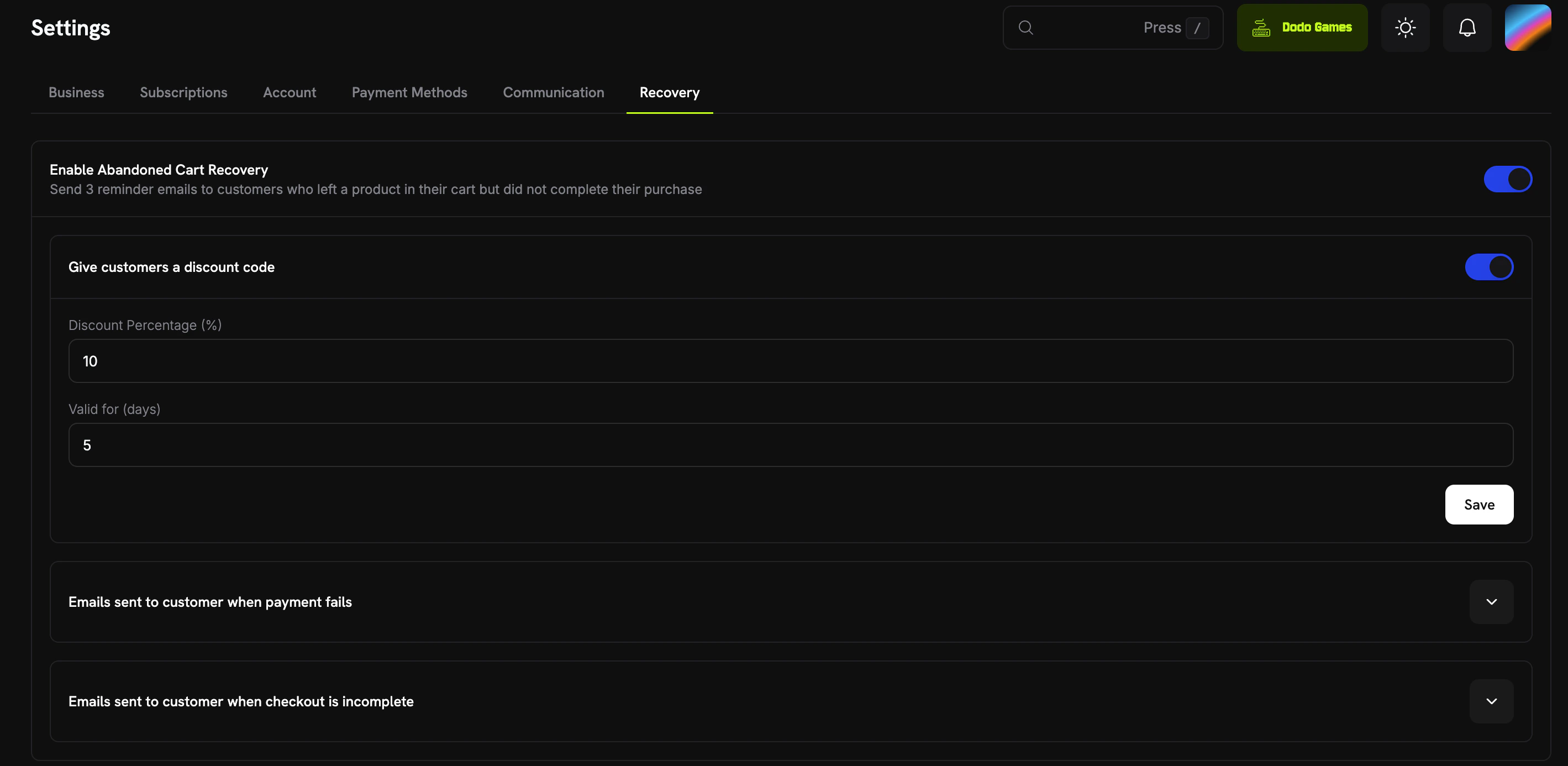
Enable and configure ACR from **Settings** in your dashboard.
 ### Global Settings
| Setting | Description | Default |
| ----------------------- | -------------------------------------------------------------------------- | ------- |
| **Enabled** | Master toggle for ACR | Off |
| **Discount Enabled** | Auto-generate a discount code for recovery emails | Off |
| **Discount Percentage** | Percentage discount that will be applied to the checkout for this customer | 0 |
| **Discount Valid Days** | How many days the auto-generated discount code remains valid | 5 |
### Email Sequences
ACR supports two email sequences — **Payment Failed** and **Checkout Incomplete** — each with up to 3 configurable emails.
### Global Settings
| Setting | Description | Default |
| ----------------------- | -------------------------------------------------------------------------- | ------- |
| **Enabled** | Master toggle for ACR | Off |
| **Discount Enabled** | Auto-generate a discount code for recovery emails | Off |
| **Discount Percentage** | Percentage discount that will be applied to the checkout for this customer | 0 |
| **Discount Valid Days** | How many days the auto-generated discount code remains valid | 5 |
### Email Sequences
ACR supports two email sequences — **Payment Failed** and **Checkout Incomplete** — each with up to 3 configurable emails.
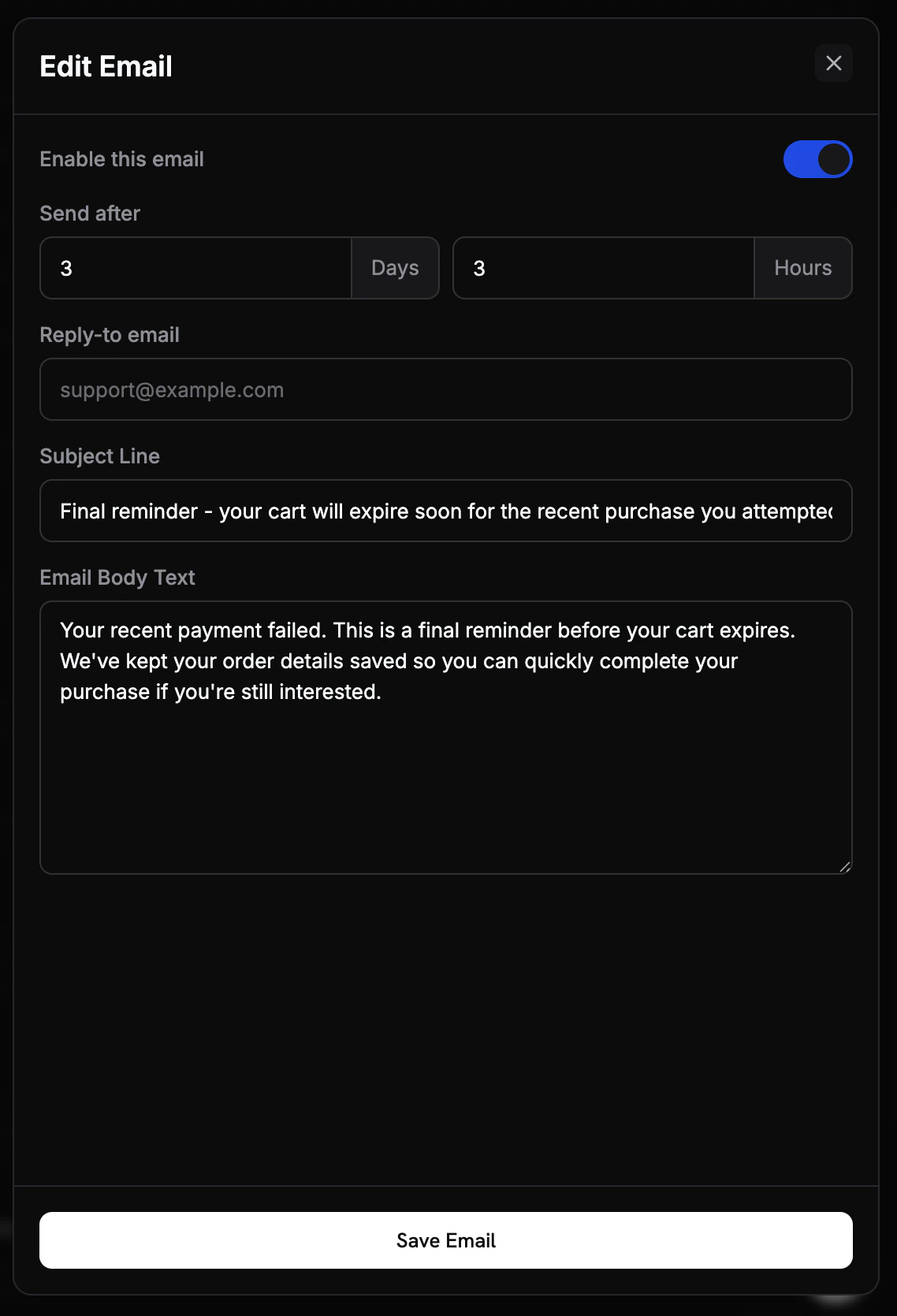 | Setting | Description |
| ------------ | -------------------------------------------------------- |
| **Enabled** | Toggle individual emails on or off without deleting them |
| **Delay** | How long after abandonment detection to send this email |
| **Subject** | Email subject line with variable placeholders |
| **Body** | HTML email body with variable placeholders |
| **Reply-To** | Email address for customer replies |
**Default email timing:**
| Email # | Default Delay |
| ------- | ------------- |
| 1 | 1 hour |
| 2 | 24 hours |
| 3 | 72 hours |
### Example Recovery Emails
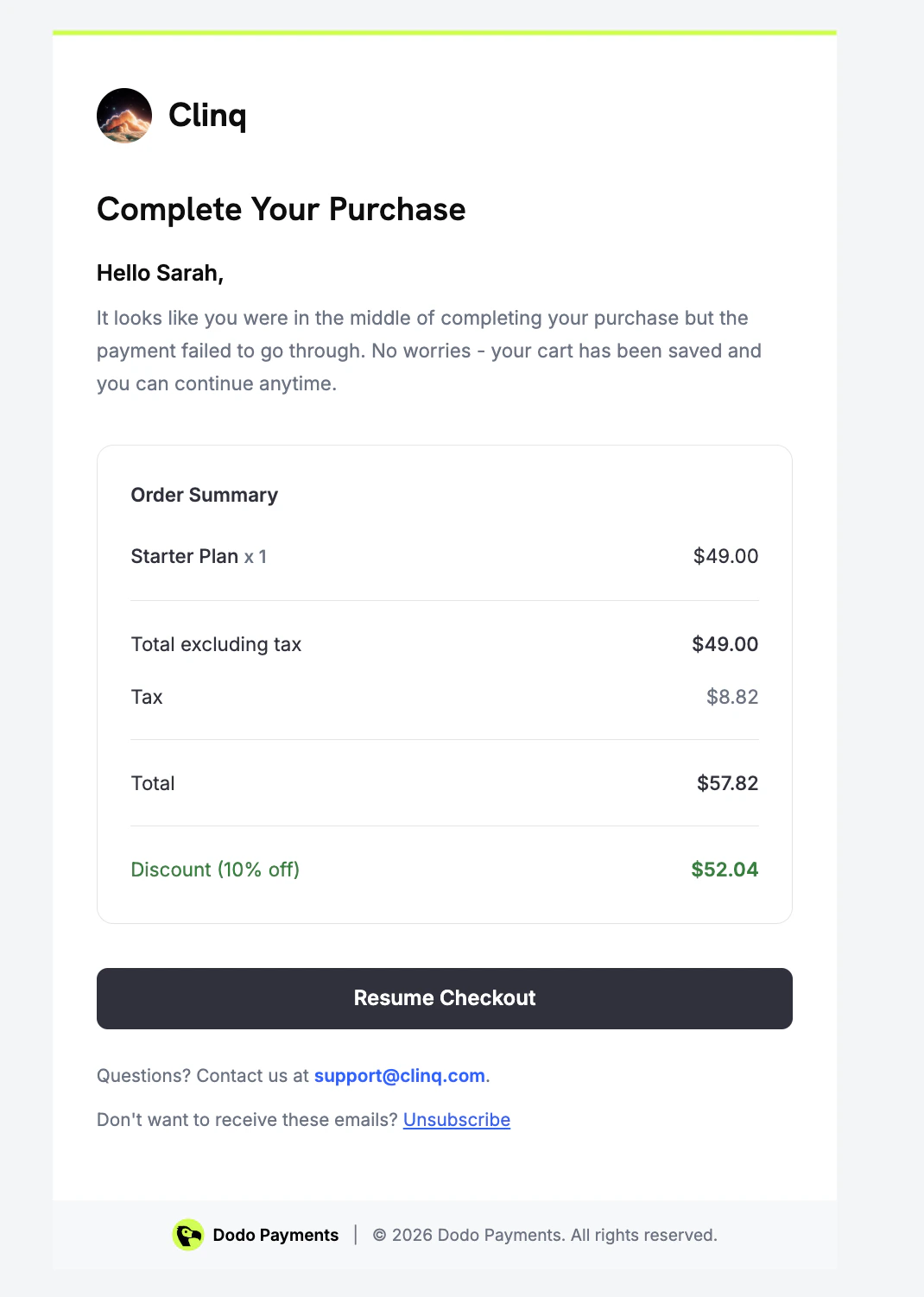
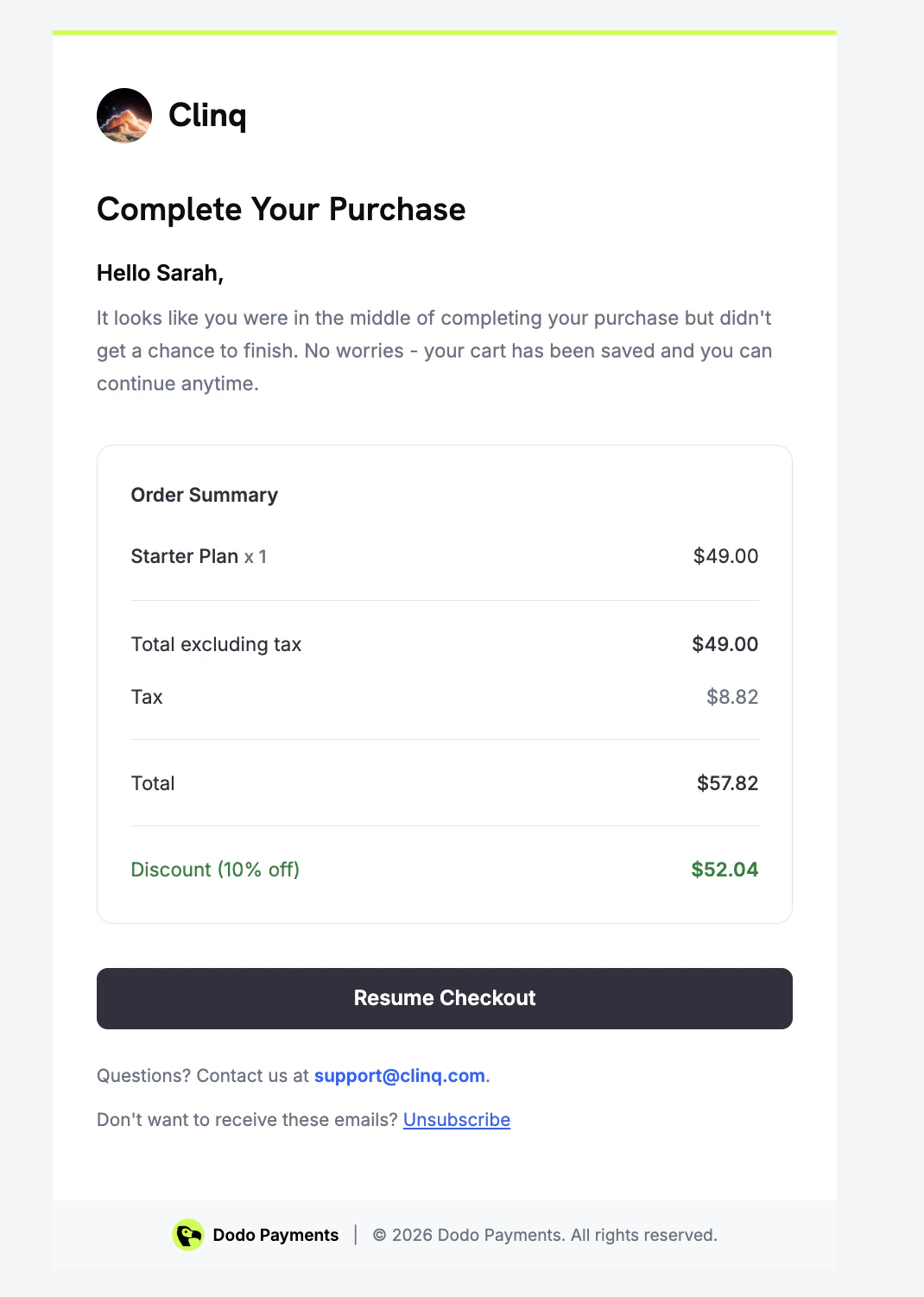
ACR sends different emails depending on the abandonment reason. Below are examples of each type as seen by the customer.
| Setting | Description |
| ------------ | -------------------------------------------------------- |
| **Enabled** | Toggle individual emails on or off without deleting them |
| **Delay** | How long after abandonment detection to send this email |
| **Subject** | Email subject line with variable placeholders |
| **Body** | HTML email body with variable placeholders |
| **Reply-To** | Email address for customer replies |
**Default email timing:**
| Email # | Default Delay |
| ------- | ------------- |
| 1 | 1 hour |
| 2 | 24 hours |
| 3 | 72 hours |
### Example Recovery Emails
ACR sends different emails depending on the abandonment reason. Below are examples of each type as seen by the customer.
 ## Recovery Discounts
When discount is enabled, ACR automatically generates a unique, single-use discount code for each abandoned checkout. The discount:
* Is restricted to the product(s) from the original checkout
* Has a configurable expiration period
* Is limited to one redemption
* Is hidden from your dashboard discount list (internal use only)
Start with a modest discount (5-10%) to test conversion impact before increasing. Even a small incentive can significantly improve recovery rates.
## Customer Recovery Experience
When a customer clicks the recovery link in an email, they're taken back to
their original checkout session. The page displays the product they left
behind, along with a discount code if one has been configured.
## Analytics
Track the performance of ACR from the **Analytics** section of your dashboard.
## Recovery Discounts
When discount is enabled, ACR automatically generates a unique, single-use discount code for each abandoned checkout. The discount:
* Is restricted to the product(s) from the original checkout
* Has a configurable expiration period
* Is limited to one redemption
* Is hidden from your dashboard discount list (internal use only)
Start with a modest discount (5-10%) to test conversion impact before increasing. Even a small incentive can significantly improve recovery rates.
## Customer Recovery Experience
When a customer clicks the recovery link in an email, they're taken back to
their original checkout session. The page displays the product they left
behind, along with a discount code if one has been configured.
## Analytics
Track the performance of ACR from the **Analytics** section of your dashboard.
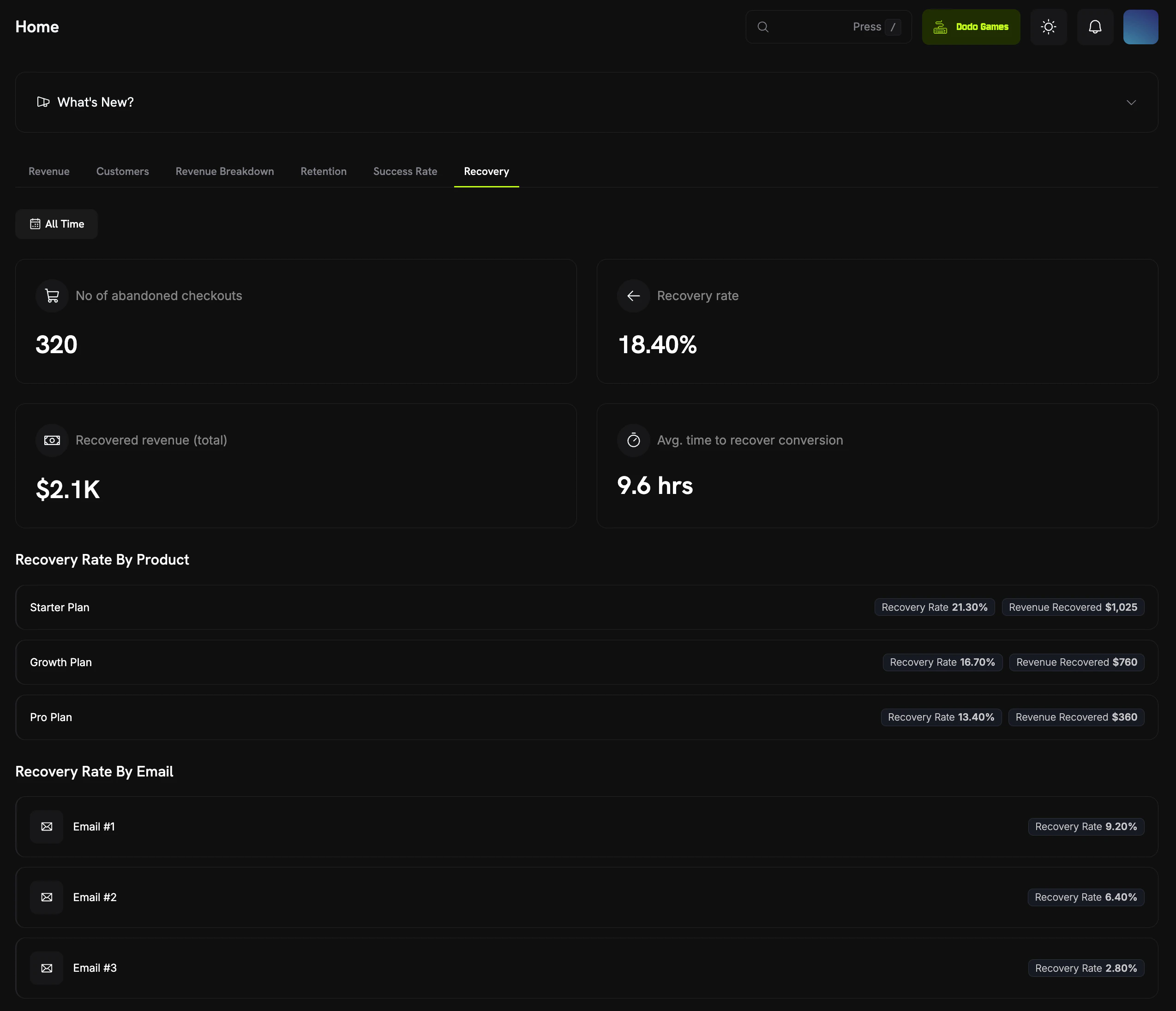 | Metric | Description |
| ----------------------- | ----------------------------------------------------------- |
| **Abandoned Checkouts** | Total number of detected abandoned checkouts |
| **Recovery Rate** | Percentage of abandoned checkouts that were recovered |
| **Recovered Revenue** | Total revenue recovered through ACR |
| **Avg. Recovery Time** | Average time from abandonment to recovery |
| **Recovery by Email** | Breakdown of which email in the sequence drove the recovery |
| **Recovery by Product** | Which products have the highest recovery rates |
## Webhook Events
| Event | Description |
| ------------------------------ | -------------------------------------------------------------- |
| `abandoned_checkout.detected` | An abandoned checkout has been detected and recovery has begun |
| `abandoned_checkout.recovered` | A customer completed payment through the recovery flow |
View the full webhook payload schemas for ACR events.
## Edge Cases
| Scenario | Behavior |
| ---------------------------------------------- | ------------------------------------------------------------------------------ |
| Customer completes purchase before next email | Recovery is detected at send time; checkout is marked as recovered if eligible |
| Customer starts a new checkout | Old abandoned checkout is marked as `exhausted` |
| Customer clicks "Pay" after already recovering | Recovery page shows a confirmation that payment was already completed |
| Customer unsubscribes | Abandoned Checkout is marked as `opted_out`; no further emails are sent |
## Best Practices
* **Start with defaults**: The default email timing and subjects are optimized for common recovery patterns. Customize after you have baseline data.
* **Personalize emails**: Use template variables to make emails feel personal and relevant to the customer.
* **Monitor analytics**: Track recovery rates by email to identify which messages drive the most conversions. Disable underperforming emails.
* **Use discounts strategically**: Start small (5-10%) to protect margins while testing conversion impact.
* **Keep emails concise**: Recovery emails should be short and action-oriented. A clear call-to-action drives better results than lengthy explanations.
ACR is designed to work automatically once enabled. Start with the default settings, monitor your analytics, and iterate based on performance data.
## Related
React to `abandoned_checkout.detected` and `abandoned_checkout.recovered` events.
Recover lapsed subscriptions with automated dunning emails.
Customers complete recovery actions through the customer portal.
ACR can auto-generate discount codes to incentivize recovery.
| Metric | Description |
| ----------------------- | ----------------------------------------------------------- |
| **Abandoned Checkouts** | Total number of detected abandoned checkouts |
| **Recovery Rate** | Percentage of abandoned checkouts that were recovered |
| **Recovered Revenue** | Total revenue recovered through ACR |
| **Avg. Recovery Time** | Average time from abandonment to recovery |
| **Recovery by Email** | Breakdown of which email in the sequence drove the recovery |
| **Recovery by Product** | Which products have the highest recovery rates |
## Webhook Events
| Event | Description |
| ------------------------------ | -------------------------------------------------------------- |
| `abandoned_checkout.detected` | An abandoned checkout has been detected and recovery has begun |
| `abandoned_checkout.recovered` | A customer completed payment through the recovery flow |
View the full webhook payload schemas for ACR events.
## Edge Cases
| Scenario | Behavior |
| ---------------------------------------------- | ------------------------------------------------------------------------------ |
| Customer completes purchase before next email | Recovery is detected at send time; checkout is marked as recovered if eligible |
| Customer starts a new checkout | Old abandoned checkout is marked as `exhausted` |
| Customer clicks "Pay" after already recovering | Recovery page shows a confirmation that payment was already completed |
| Customer unsubscribes | Abandoned Checkout is marked as `opted_out`; no further emails are sent |
## Best Practices
* **Start with defaults**: The default email timing and subjects are optimized for common recovery patterns. Customize after you have baseline data.
* **Personalize emails**: Use template variables to make emails feel personal and relevant to the customer.
* **Monitor analytics**: Track recovery rates by email to identify which messages drive the most conversions. Disable underperforming emails.
* **Use discounts strategically**: Start small (5-10%) to protect margins while testing conversion impact.
* **Keep emails concise**: Recovery emails should be short and action-oriented. A clear call-to-action drives better results than lengthy explanations.
ACR is designed to work automatically once enabled. Start with the default settings, monitor your analytics, and iterate based on performance data.
## Related
React to `abandoned_checkout.detected` and `abandoned_checkout.recovered` events.
Recover lapsed subscriptions with automated dunning emails.
Customers complete recovery actions through the customer portal.
ACR can auto-generate discount codes to incentivize recovery.