> ## Documentation Index
> Fetch the complete documentation index at: https://docs.dodopayments.com/llms.txt
> Use this file to discover all available pages before exploring further.
# Telegram Entitlement
> Add paying customers to a private Telegram chat or channel automatically when they subscribe or purchase.
The Telegram entitlement gives paying customers access to a private chat or channel. The Dodo Payments Telegram bot generates a one-time invite link for each customer and removes them on cancellation.
## What gets delivered
* The grant is created in `pending` while the bot prepares the invite, then transitions to `delivered` once the link is ready.
* The customer receives a one-time Telegram invite link in their delivery email and customer portal.
* They tap the link and the bot adds them to the configured chat.
* On cancellation, refund, or manual revoke, the bot removes them from the chat.
Common uses include private alpha channels, paid signal groups, and community-tier perks.
## Connect Telegram
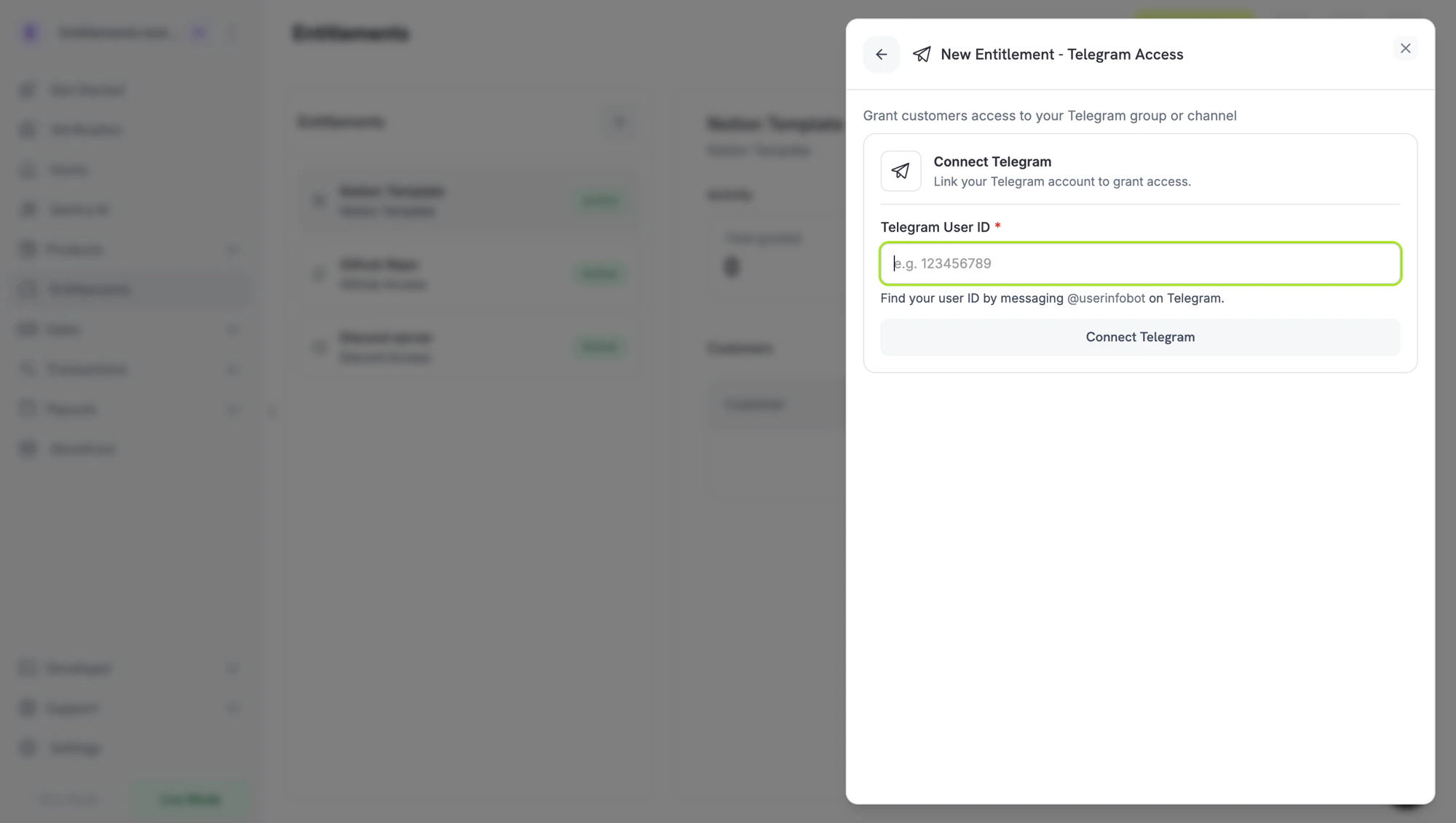
In your Dodo Payments dashboard, go to **Entitlements** and click **+**, then choose **Telegram Access** as the integration. The dashboard asks for your Telegram user ID so the bot can verify ownership of the chats it manages.
 The next two steps are set-up tasks on Telegram and can be completed in either order — get your user ID and add the bot to your chat as admin. Once both are done, return to the dashboard for the final step.
On Telegram, message **`/start`** to:
* **`@dodo_payments_bot`** if you're using **Live Mode**
* **`@DodoPaymentsTestBot`** if you're using **Test Mode**
The bot replies with your numeric Telegram user ID. Copy it — you'll paste it into the dashboard in the last step.
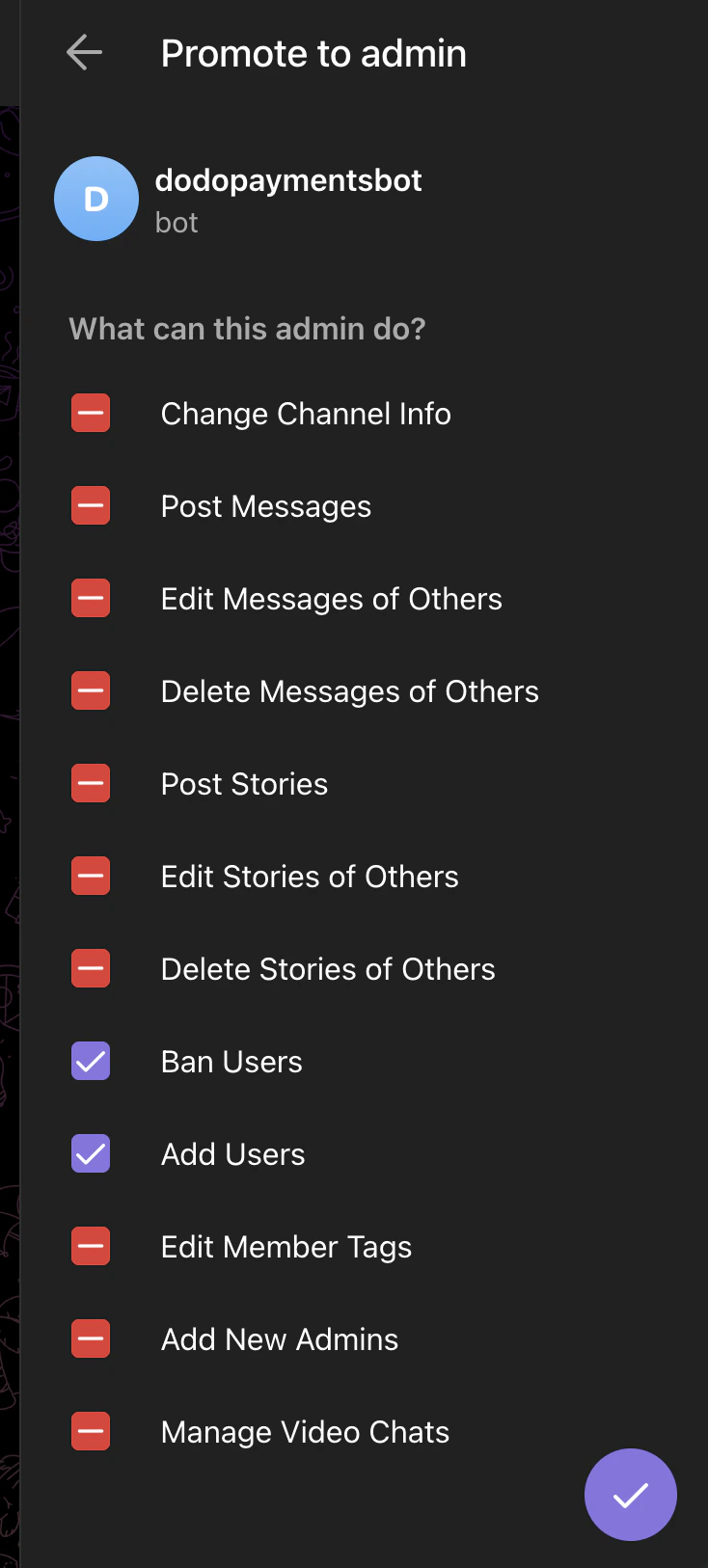
In the Telegram group or channel you want to gate, open the members list and **add the same bot as admin** (`@dodo_payments_bot` for live, `@DodoPaymentsTestBot` for test) with these two permissions enabled:
* **Ban Users** — required to remove members on revocation
* **Add Users** — required to invite paying customers
Leave every other admin permission off.
The next two steps are set-up tasks on Telegram and can be completed in either order — get your user ID and add the bot to your chat as admin. Once both are done, return to the dashboard for the final step.
On Telegram, message **`/start`** to:
* **`@dodo_payments_bot`** if you're using **Live Mode**
* **`@DodoPaymentsTestBot`** if you're using **Test Mode**
The bot replies with your numeric Telegram user ID. Copy it — you'll paste it into the dashboard in the last step.
In the Telegram group or channel you want to gate, open the members list and **add the same bot as admin** (`@dodo_payments_bot` for live, `@DodoPaymentsTestBot` for test) with these two permissions enabled:
* **Ban Users** — required to remove members on revocation
* **Add Users** — required to invite paying customers
Leave every other admin permission off.
 Back in the dashboard, paste the user ID from step 2 into **Telegram User ID** and click **Connect Telegram**. The chat picker now lists every group and channel where the bot is an admin — pick the one you want to gate, give the entitlement a name, and click **Create Entitlement**.
## Customer flow
1. The customer completes checkout.
2. Dodo Payments creates a `pending` grant and asks the bot to generate a one-time invite link to the configured chat.
3. Once the link is ready, the grant moves to `delivered` and the link is included in the delivery email and customer portal.
4. The customer taps the link and is added to the chat.
5. On revocation, the bot removes the customer from the chat.
The invite link is single-use and expires after the customer joins. If they lose the link before joining, regenerate it by re-sending the delivery email or revoking and recreating the grant from the dashboard.
## Required configuration
| Field | Required | Description |
| --------- | -------- | --------------------------------------------------------------------------------------------------------------- |
| `chat_id` | Yes | The Telegram chat ID (numeric, often negative for groups/channels). The dashboard picker fills this in for you. |
## Create via API
```typescript TypeScript theme={null} theme={null}
const entitlement = await client.entitlements.create({
name: 'Premium Signals Group',
integration_type: 'telegram',
integration_config: {
chat_id: '-1001234567890',
},
});
```
```python Python theme={null} theme={null}
client.entitlements.create(
name="Premium Signals Group",
integration_type="telegram",
integration_config={"chat_id": "-1001234567890"},
)
```
```go Go theme={null} theme={null}
client.Entitlements.New(ctx, dodopayments.EntitlementNewParams{
Name: dodopayments.F("Premium Signals Group"),
IntegrationType: dodopayments.F(dodopayments.EntitlementIntegrationTypeTelegram),
IntegrationConfig: dodopayments.F[dodopayments.IntegrationConfigUnionParam](
dodopayments.IntegrationConfigTelegramConfigParam{
ChatID: dodopayments.F("-1001234567890"),
},
),
})
```
## Webhooks
See [`entitlement_grant.*` webhook events](/developer-resources/webhooks/intents/entitlement-grant). Telegram grants arrive `pending` and transition to `delivered` once the bot has issued the invite link.
## Troubleshooting
The Dodo Payments bot must be added to the chat **as an admin** with **Add Users** enabled. The picker reads live state, so the chat appears as soon as the bot is an admin.
Telegram one-time links expire after first use. If the customer tapped it on a logged-out device or lost the link, revoke the grant and reissue.
The bot needs the **Ban Users** admin permission to remove members. Open the chat settings and confirm both **Ban Users** and **Add Users** are checked on the Dodo Payments bot.
Back in the dashboard, paste the user ID from step 2 into **Telegram User ID** and click **Connect Telegram**. The chat picker now lists every group and channel where the bot is an admin — pick the one you want to gate, give the entitlement a name, and click **Create Entitlement**.
## Customer flow
1. The customer completes checkout.
2. Dodo Payments creates a `pending` grant and asks the bot to generate a one-time invite link to the configured chat.
3. Once the link is ready, the grant moves to `delivered` and the link is included in the delivery email and customer portal.
4. The customer taps the link and is added to the chat.
5. On revocation, the bot removes the customer from the chat.
The invite link is single-use and expires after the customer joins. If they lose the link before joining, regenerate it by re-sending the delivery email or revoking and recreating the grant from the dashboard.
## Required configuration
| Field | Required | Description |
| --------- | -------- | --------------------------------------------------------------------------------------------------------------- |
| `chat_id` | Yes | The Telegram chat ID (numeric, often negative for groups/channels). The dashboard picker fills this in for you. |
## Create via API
```typescript TypeScript theme={null} theme={null}
const entitlement = await client.entitlements.create({
name: 'Premium Signals Group',
integration_type: 'telegram',
integration_config: {
chat_id: '-1001234567890',
},
});
```
```python Python theme={null} theme={null}
client.entitlements.create(
name="Premium Signals Group",
integration_type="telegram",
integration_config={"chat_id": "-1001234567890"},
)
```
```go Go theme={null} theme={null}
client.Entitlements.New(ctx, dodopayments.EntitlementNewParams{
Name: dodopayments.F("Premium Signals Group"),
IntegrationType: dodopayments.F(dodopayments.EntitlementIntegrationTypeTelegram),
IntegrationConfig: dodopayments.F[dodopayments.IntegrationConfigUnionParam](
dodopayments.IntegrationConfigTelegramConfigParam{
ChatID: dodopayments.F("-1001234567890"),
},
),
})
```
## Webhooks
See [`entitlement_grant.*` webhook events](/developer-resources/webhooks/intents/entitlement-grant). Telegram grants arrive `pending` and transition to `delivered` once the bot has issued the invite link.
## Troubleshooting
The Dodo Payments bot must be added to the chat **as an admin** with **Add Users** enabled. The picker reads live state, so the chat appears as soon as the bot is an admin.
Telegram one-time links expire after first use. If the customer tapped it on a logged-out device or lost the link, revoke the grant and reissue.
The bot needs the **Ban Users** admin permission to remove members. Open the chat settings and confirm both **Ban Users** and **Add Users** are checked on the Dodo Payments bot.