> ## Documentation Index
> Fetch the complete documentation index at: https://docs.dodopayments.com/llms.txt
> Use this file to discover all available pages before exploring further.
# Introduction
> Automatically deliver license keys, downloadable files, feature flags, and access to platforms like Discord, GitHub, Telegram, Framer, and Notion when customers pay.
Entitlements turn a successful payment or active subscription into real access: a license key in your customer's inbox, a feature flag your app checks, a Discord role, a GitHub repository, a Notion template, a Framer remix link, a Telegram chat invite, or a downloadable file bundle. Dodo Payments issues, tracks, and revokes that access automatically as the payment lifecycle changes.
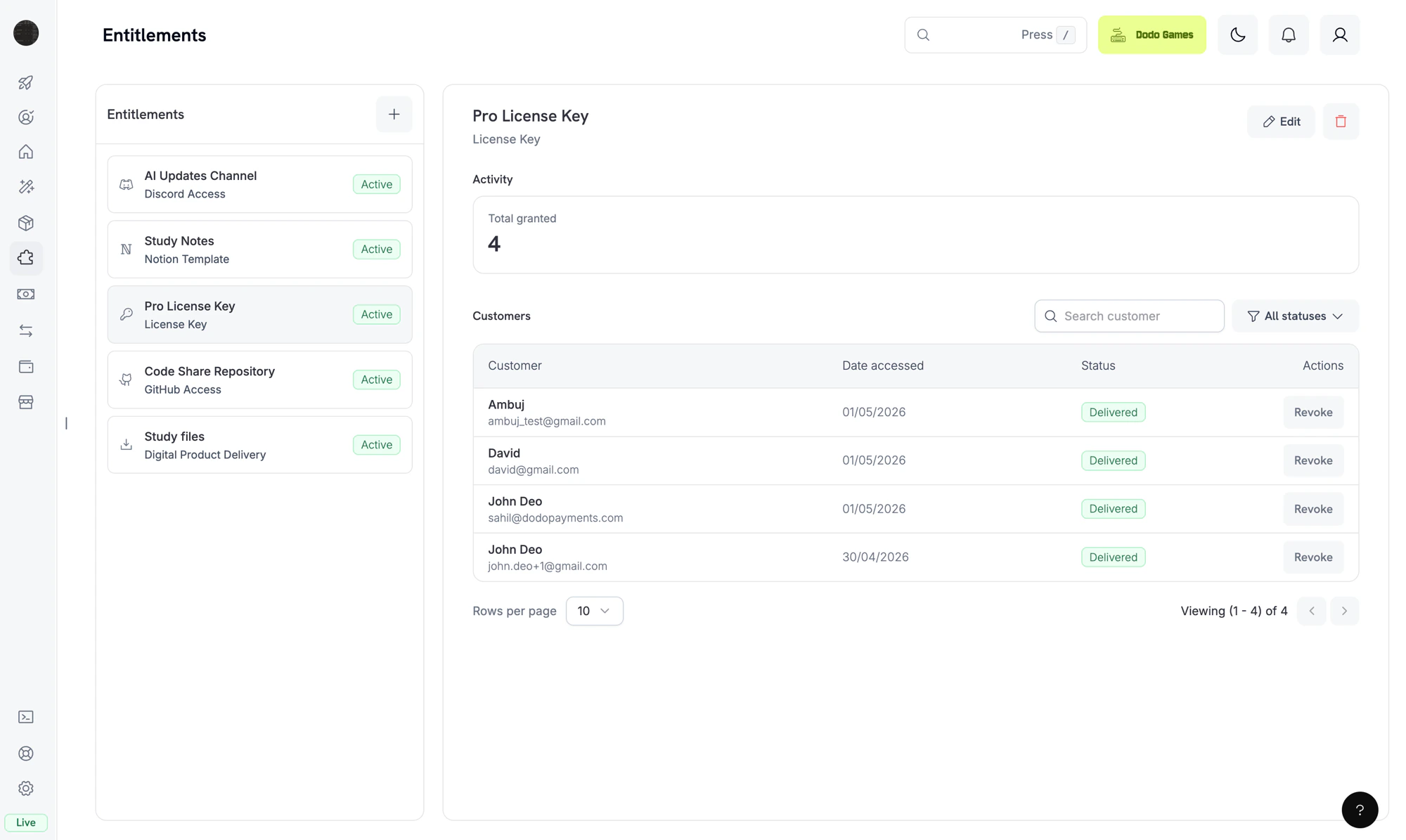 ## What are Entitlements?
An **entitlement** is a reusable definition of something you deliver to a customer: a Pro license key, a "Patrons" Discord role, access to your private GitHub repository, a downloadable e-book bundle. You attach entitlements to products, and Dodo Payments handles the rest.
When a customer purchases the product, Dodo Payments creates a **grant**, a single customer's issuance of that entitlement. Grants move through a small set of statuses: `pending` while delivery is in progress, `delivered` once the customer has access, `failed` if delivery could not complete, and `revoked` when access is withdrawn.
Entitlements gate **fulfillment** (does the customer have access?). Credits gate **consumption** (how much of it can they use?). Both can be attached to the same product. See [Credit-Based Billing](/features/credit-based-billing) for credits.
## Available Integrations
Dodo Payments delivers each entitlement through a dedicated integration. Pick the integration that matches what you sell.
Generate unique license keys with activation limits and expiry. Best for software, plugins, and CLIs.
Deliver downloadable files (e-books, templates, media) with presigned download URLs and optional instructions.
Gate features in your own app off a purchase. Delivered instantly, checked via API, revoked on cancellation.
Grant a customer a role in your Discord server when they purchase. Revoke automatically on cancellation.
Add customers as collaborators to a private repository at the permission level you choose.
Add customers to a private Telegram chat or channel after purchase.
Unlock a Framer template remix link for paying customers.
Duplicate a Notion template into the customer's workspace on purchase.
***
## How Grants Work
Grants are driven by the same payment and subscription events you already receive as webhooks. You don't need to call the grant API yourself for purchases. Dodo Payments creates and revokes grants automatically based on the underlying payment lifecycle.
### Grant Lifecycle
A grant is created when a payment completes or a subscription becomes active. License keys and feature flags jump straight to `delivered`. Every other integration starts in `pending`. OAuth-based integrations (Discord, GitHub, Notion) include an `oauth_url` the customer must visit to complete consent. Platform-direct integrations (Telegram, Framer, Digital Files) sit in `pending` only briefly while delivery is provisioned, then transition to `delivered`.
Once delivery completes (license key generated, role assigned, repository access granted, file links resolved, OAuth completed), the grant moves to `delivered` and `delivered_at` is set.
If the integration call returns a non-retryable error (revoked OAuth token, denied permission, file no longer exists), the grant moves to `failed`. The `error_code` and `error_message` fields capture the reason.
When access is withdrawn (subscription cancelled, refund issued, or merchant-initiated revoke), the grant moves to `revoked`. The `revocation_reason` field records the trigger.
### Grant Behavior by Event
| Event | Behavior |
| ------------------------------------------------- | -------------------------------------------------------------------------------------------------------------------------------------------------------------------------------------------------------------------------------------------------------------------------------------------------------------------------------------------------------- |
| `payment.succeeded` (one-time payment) | Issue one grant per attached entitlement. |
| `payment.succeeded` (subscription-linked payment) | No-op. Grants are driven by the subscription event below. |
| `subscription.active` | Issue grants for any attached entitlements that don't already have one. Re-grant any grants previously revoked for the same subscription. |
| `subscription.renewed` | No-op. Existing grants persist across renewals. |
| `subscription.on_hold` | Revoke all delivered and pending grants. `revocation_reason: subscription_on_hold`. |
| `subscription.cancelled` | Revoke all. `revocation_reason: subscription_cancelled`. |
| `subscription.expired` | Revoke all. `revocation_reason: subscription_expired`. |
| `subscription.plan_changed` | Revoke all current grants, then issue grants for the new plan's entitlements. `revocation_reason: plan_changed`. |
| `refund.succeeded` (one-time payment) | Revoke grants for that payment. `revocation_reason: refund`. |
| Manual API revoke | Revoke with `revocation_reason: manual`. Manual revokes are not auto-regranted on subscription renewal. |
| License key disabled | For license-key grants, disabling the underlying key revokes the grant with `revocation_reason: license_key_disabled`. The grant is re-activated automatically if the key is re-enabled. |
| Platform drift detected | If the platform side of an integration drifts out of sync (a Discord role removed manually, the GitHub App losing repository access, or a reconciliation pass detecting a missing target), the grant is revoked with `revocation_reason: platform_external`. Not auto-regranted on subscription renewal until the underlying platform issue is resolved. |
Subscription-driven grants are idempotent per `(entitlement, customer, subscription)`; renewals and re-activations do not create duplicate grants. One-time grants are idempotent per `(entitlement, customer, payment)`.
***
## Create your first entitlement
Go to **Entitlements** in your Dodo Payments dashboard and click **+** to create a new entitlement.
Choose the integration type: License Key, Digital Files, Feature Flag, Discord, GitHub, Telegram, Framer, or Notion. For platform integrations, connect your account first if you haven't already.
Fill in the integration-specific fields. For example, GitHub asks for a repository and a permission level; Discord asks for a server and an optional role; License Key asks for activation limits and expiry.
## What are Entitlements?
An **entitlement** is a reusable definition of something you deliver to a customer: a Pro license key, a "Patrons" Discord role, access to your private GitHub repository, a downloadable e-book bundle. You attach entitlements to products, and Dodo Payments handles the rest.
When a customer purchases the product, Dodo Payments creates a **grant**, a single customer's issuance of that entitlement. Grants move through a small set of statuses: `pending` while delivery is in progress, `delivered` once the customer has access, `failed` if delivery could not complete, and `revoked` when access is withdrawn.
Entitlements gate **fulfillment** (does the customer have access?). Credits gate **consumption** (how much of it can they use?). Both can be attached to the same product. See [Credit-Based Billing](/features/credit-based-billing) for credits.
## Available Integrations
Dodo Payments delivers each entitlement through a dedicated integration. Pick the integration that matches what you sell.
Generate unique license keys with activation limits and expiry. Best for software, plugins, and CLIs.
Deliver downloadable files (e-books, templates, media) with presigned download URLs and optional instructions.
Gate features in your own app off a purchase. Delivered instantly, checked via API, revoked on cancellation.
Grant a customer a role in your Discord server when they purchase. Revoke automatically on cancellation.
Add customers as collaborators to a private repository at the permission level you choose.
Add customers to a private Telegram chat or channel after purchase.
Unlock a Framer template remix link for paying customers.
Duplicate a Notion template into the customer's workspace on purchase.
***
## How Grants Work
Grants are driven by the same payment and subscription events you already receive as webhooks. You don't need to call the grant API yourself for purchases. Dodo Payments creates and revokes grants automatically based on the underlying payment lifecycle.
### Grant Lifecycle
A grant is created when a payment completes or a subscription becomes active. License keys and feature flags jump straight to `delivered`. Every other integration starts in `pending`. OAuth-based integrations (Discord, GitHub, Notion) include an `oauth_url` the customer must visit to complete consent. Platform-direct integrations (Telegram, Framer, Digital Files) sit in `pending` only briefly while delivery is provisioned, then transition to `delivered`.
Once delivery completes (license key generated, role assigned, repository access granted, file links resolved, OAuth completed), the grant moves to `delivered` and `delivered_at` is set.
If the integration call returns a non-retryable error (revoked OAuth token, denied permission, file no longer exists), the grant moves to `failed`. The `error_code` and `error_message` fields capture the reason.
When access is withdrawn (subscription cancelled, refund issued, or merchant-initiated revoke), the grant moves to `revoked`. The `revocation_reason` field records the trigger.
### Grant Behavior by Event
| Event | Behavior |
| ------------------------------------------------- | -------------------------------------------------------------------------------------------------------------------------------------------------------------------------------------------------------------------------------------------------------------------------------------------------------------------------------------------------------- |
| `payment.succeeded` (one-time payment) | Issue one grant per attached entitlement. |
| `payment.succeeded` (subscription-linked payment) | No-op. Grants are driven by the subscription event below. |
| `subscription.active` | Issue grants for any attached entitlements that don't already have one. Re-grant any grants previously revoked for the same subscription. |
| `subscription.renewed` | No-op. Existing grants persist across renewals. |
| `subscription.on_hold` | Revoke all delivered and pending grants. `revocation_reason: subscription_on_hold`. |
| `subscription.cancelled` | Revoke all. `revocation_reason: subscription_cancelled`. |
| `subscription.expired` | Revoke all. `revocation_reason: subscription_expired`. |
| `subscription.plan_changed` | Revoke all current grants, then issue grants for the new plan's entitlements. `revocation_reason: plan_changed`. |
| `refund.succeeded` (one-time payment) | Revoke grants for that payment. `revocation_reason: refund`. |
| Manual API revoke | Revoke with `revocation_reason: manual`. Manual revokes are not auto-regranted on subscription renewal. |
| License key disabled | For license-key grants, disabling the underlying key revokes the grant with `revocation_reason: license_key_disabled`. The grant is re-activated automatically if the key is re-enabled. |
| Platform drift detected | If the platform side of an integration drifts out of sync (a Discord role removed manually, the GitHub App losing repository access, or a reconciliation pass detecting a missing target), the grant is revoked with `revocation_reason: platform_external`. Not auto-regranted on subscription renewal until the underlying platform issue is resolved. |
Subscription-driven grants are idempotent per `(entitlement, customer, subscription)`; renewals and re-activations do not create duplicate grants. One-time grants are idempotent per `(entitlement, customer, payment)`.
***
## Create your first entitlement
Go to **Entitlements** in your Dodo Payments dashboard and click **+** to create a new entitlement.
Choose the integration type: License Key, Digital Files, Feature Flag, Discord, GitHub, Telegram, Framer, or Notion. For platform integrations, connect your account first if you haven't already.
Fill in the integration-specific fields. For example, GitHub asks for a repository and a permission level; Discord asks for a server and an optional role; License Key asks for activation limits and expiry.
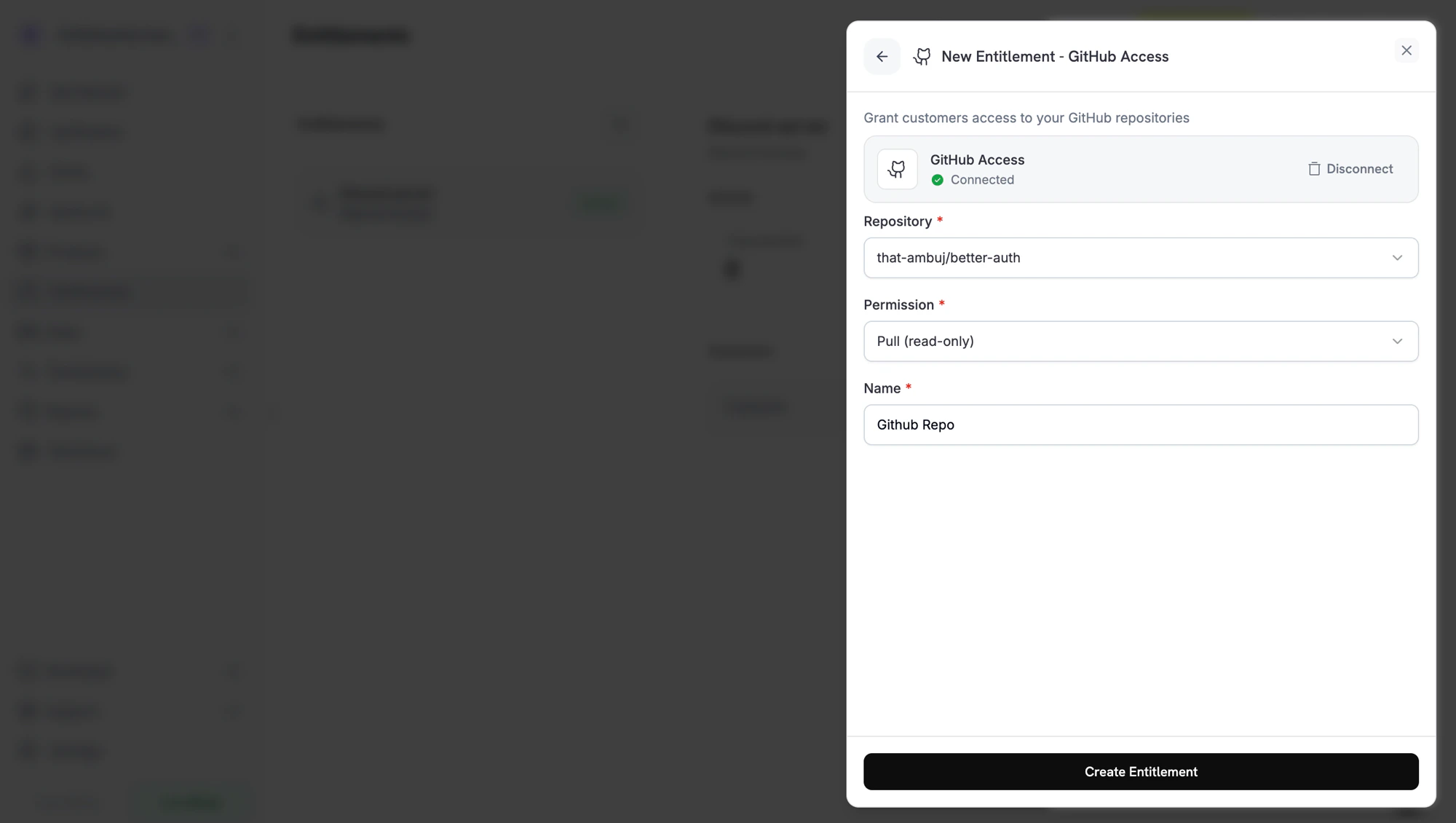 Save the entitlement. You can now attach it to any product.
## Attach Entitlements to Products
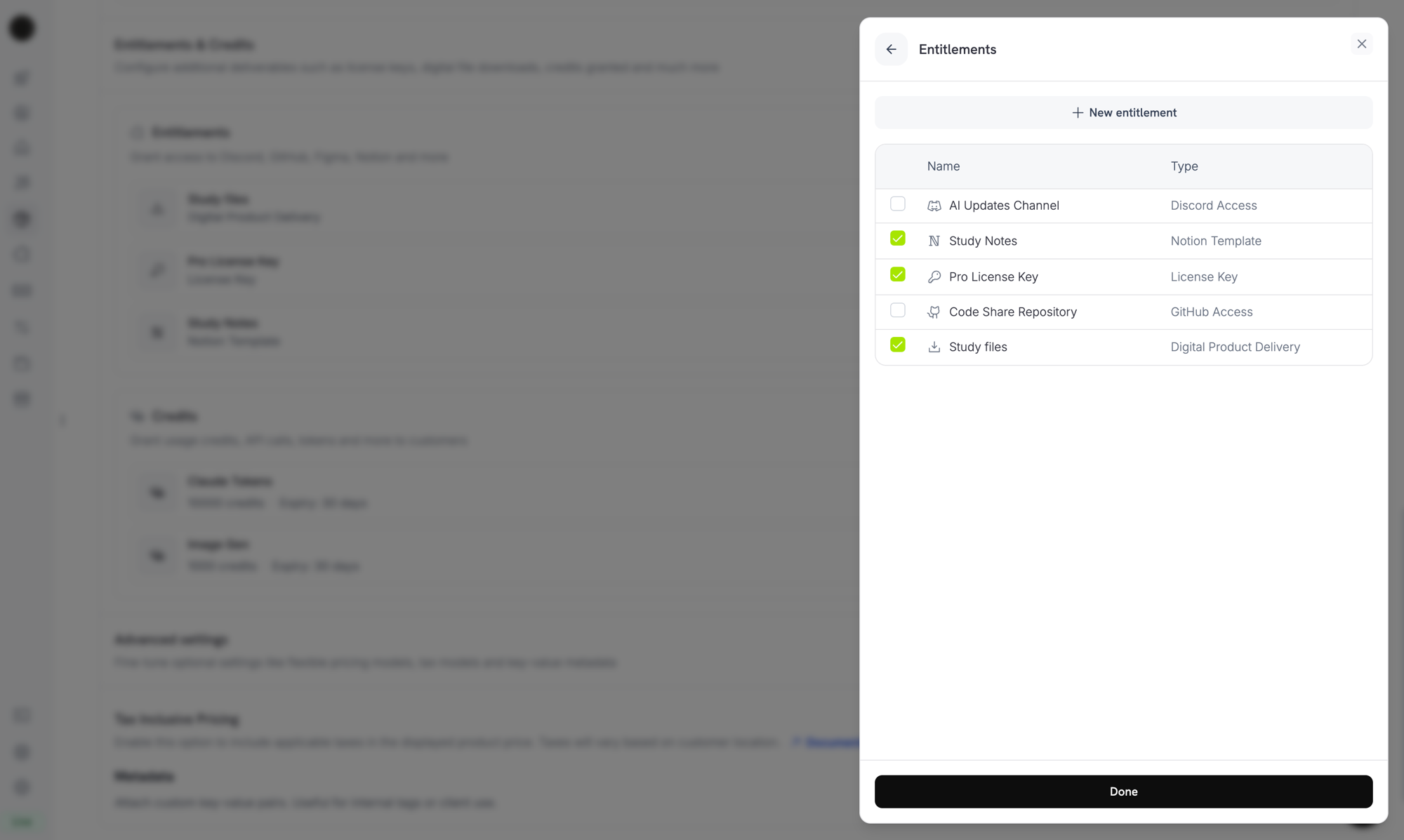
Open a product, expand **Advanced Settings → Entitlements & Credits**, and select the entitlements that should be delivered when the product is purchased. A single product can deliver multiple entitlements at once. For example, a Pro plan can include a license key, GitHub access, and a Discord role.
Save the entitlement. You can now attach it to any product.
## Attach Entitlements to Products
Open a product, expand **Advanced Settings → Entitlements & Credits**, and select the entitlements that should be delivered when the product is purchased. A single product can deliver multiple entitlements at once. For example, a Pro plan can include a license key, GitHub access, and a Discord role.
 ***
## Customer Experience
### Email and customer portal
Customers receive a delivery email after purchase containing the license key, download links, OAuth invitation links, or platform invite, whichever applies to the entitlements on the product. The same details remain available indefinitely from the [Customer Portal](/features/customer-portal) under their order history.
### OAuth-based delivery
Discord, GitHub, and Notion subscriber access require the customer to authorize Dodo Payments to grant them access. These grants stay in `pending` status until the customer completes the OAuth flow using the link from their email or customer portal. Once they authorize, the grant moves to `delivered` and the platform access is provisioned immediately.
### Revocation
Revoked grants are removed at the platform level: the Discord role is removed, the GitHub collaborator is removed, the license key is disabled. Customers see the change reflected in the customer portal.
For Digital Files, revocation removes access to the presigned URLs going forward but does not invalidate copies a customer has already downloaded. Plan content gating accordingly.
***
## Manage Grants
Open any entitlement from the dashboard to see its grants. The grant detail panel shows total grants, status filters, customer information, delivery dates, and a revoke action.
You can also manage grants programmatically:
```typescript TypeScript theme={null} theme={null}
import DodoPayments from 'dodopayments';
const client = new DodoPayments({
bearerToken: process.env['DODO_PAYMENTS_API_KEY'],
});
// List grants for an entitlement
const grants = await client.entitlements.grants.list('ent_abc123', {
status: 'Delivered',
});
// Revoke a single grant
await client.entitlements.grants.revoke('grant_xyz789', {
id: 'ent_abc123',
});
```
```python Python theme={null} theme={null}
client.entitlements.grants.list(
"ent_abc123",
status="Delivered",
)
client.entitlements.grants.revoke(
"grant_xyz789",
id="ent_abc123",
)
```
```go Go theme={null} theme={null}
grants, _ := client.Entitlements.Grants.List(
ctx, "ent_abc123",
dodopayments.EntitlementGrantListParams{Status: dodopayments.F("delivered")},
)
_, _ = client.Entitlements.Grants.Revoke(ctx, "grant_xyz789", "ent_abc123")
```
***
## API Management
Create a new entitlement of any integration type.
List entitlements with filtering by integration type.
Retrieve an entitlement and its resolved configuration.
Update name, description, or integration configuration.
Soft-delete an entitlement; existing grants are unaffected.
Upload a file to a Digital Files entitlement (up to 500 MiB).
List all grants for an entitlement with status and customer filters.
Manually revoke a single grant.
***
## Webhooks
Dodo Payments fires four webhook events for the grant lifecycle. Subscribe to these events to keep your application in sync with what each customer can access.
| Event | Fires when |
| ----------------------------- | ----------------------------------------------------------------------------------------------------------------------------------------------------------------------------------------------------------------------------------------- |
| `entitlement_grant.created` | A new grant is created. License-key grants arrive `delivered`; every other integration arrives `pending` and transitions to `delivered` once the platform call succeeds (or, for OAuth-based integrations, once the customer authorizes). |
| `entitlement_grant.delivered` | The grant transitions to delivered. The customer now has access. |
| `entitlement_grant.failed` | The grant could not be delivered. Inspect `error_code` and `error_message`. |
| `entitlement_grant.revoked` | Access has been withdrawn. Inspect `revocation_reason`. |
View the full payload schema, sample events, and `revocation_reason` reference.
***
## Best Practices
* **Use one entitlement per delivery channel.** Don't share a single Discord entitlement across products with different role intentions; create one per role for clean revocation.
* **Test in test mode first.** Create the entitlement, attach it to a test product, run a checkout, and watch the grant transition through `pending → delivered`. Confirm that cancelling the test subscription revokes the grant.
* **Listen to `entitlement_grant.delivered`, not `payment.succeeded`.** A payment can succeed before fulfilment finishes (especially for OAuth flows). Wait for the delivered event before unlocking dependent features in your own systems.
* **Treat `entitlement_grant.failed` as actionable.** A failed grant means a customer paid but didn't get access. Surface these to your support team or trigger a regrant.
* **Map `revocation_reason` to your retention flows.** A `subscription_on_hold` revoke is recoverable (the customer may update their card). A `manual` revoke is intentional. Treat them differently in customer comms.
***
## Customer Experience
### Email and customer portal
Customers receive a delivery email after purchase containing the license key, download links, OAuth invitation links, or platform invite, whichever applies to the entitlements on the product. The same details remain available indefinitely from the [Customer Portal](/features/customer-portal) under their order history.
### OAuth-based delivery
Discord, GitHub, and Notion subscriber access require the customer to authorize Dodo Payments to grant them access. These grants stay in `pending` status until the customer completes the OAuth flow using the link from their email or customer portal. Once they authorize, the grant moves to `delivered` and the platform access is provisioned immediately.
### Revocation
Revoked grants are removed at the platform level: the Discord role is removed, the GitHub collaborator is removed, the license key is disabled. Customers see the change reflected in the customer portal.
For Digital Files, revocation removes access to the presigned URLs going forward but does not invalidate copies a customer has already downloaded. Plan content gating accordingly.
***
## Manage Grants
Open any entitlement from the dashboard to see its grants. The grant detail panel shows total grants, status filters, customer information, delivery dates, and a revoke action.
You can also manage grants programmatically:
```typescript TypeScript theme={null} theme={null}
import DodoPayments from 'dodopayments';
const client = new DodoPayments({
bearerToken: process.env['DODO_PAYMENTS_API_KEY'],
});
// List grants for an entitlement
const grants = await client.entitlements.grants.list('ent_abc123', {
status: 'Delivered',
});
// Revoke a single grant
await client.entitlements.grants.revoke('grant_xyz789', {
id: 'ent_abc123',
});
```
```python Python theme={null} theme={null}
client.entitlements.grants.list(
"ent_abc123",
status="Delivered",
)
client.entitlements.grants.revoke(
"grant_xyz789",
id="ent_abc123",
)
```
```go Go theme={null} theme={null}
grants, _ := client.Entitlements.Grants.List(
ctx, "ent_abc123",
dodopayments.EntitlementGrantListParams{Status: dodopayments.F("delivered")},
)
_, _ = client.Entitlements.Grants.Revoke(ctx, "grant_xyz789", "ent_abc123")
```
***
## API Management
Create a new entitlement of any integration type.
List entitlements with filtering by integration type.
Retrieve an entitlement and its resolved configuration.
Update name, description, or integration configuration.
Soft-delete an entitlement; existing grants are unaffected.
Upload a file to a Digital Files entitlement (up to 500 MiB).
List all grants for an entitlement with status and customer filters.
Manually revoke a single grant.
***
## Webhooks
Dodo Payments fires four webhook events for the grant lifecycle. Subscribe to these events to keep your application in sync with what each customer can access.
| Event | Fires when |
| ----------------------------- | ----------------------------------------------------------------------------------------------------------------------------------------------------------------------------------------------------------------------------------------- |
| `entitlement_grant.created` | A new grant is created. License-key grants arrive `delivered`; every other integration arrives `pending` and transitions to `delivered` once the platform call succeeds (or, for OAuth-based integrations, once the customer authorizes). |
| `entitlement_grant.delivered` | The grant transitions to delivered. The customer now has access. |
| `entitlement_grant.failed` | The grant could not be delivered. Inspect `error_code` and `error_message`. |
| `entitlement_grant.revoked` | Access has been withdrawn. Inspect `revocation_reason`. |
View the full payload schema, sample events, and `revocation_reason` reference.
***
## Best Practices
* **Use one entitlement per delivery channel.** Don't share a single Discord entitlement across products with different role intentions; create one per role for clean revocation.
* **Test in test mode first.** Create the entitlement, attach it to a test product, run a checkout, and watch the grant transition through `pending → delivered`. Confirm that cancelling the test subscription revokes the grant.
* **Listen to `entitlement_grant.delivered`, not `payment.succeeded`.** A payment can succeed before fulfilment finishes (especially for OAuth flows). Wait for the delivered event before unlocking dependent features in your own systems.
* **Treat `entitlement_grant.failed` as actionable.** A failed grant means a customer paid but didn't get access. Surface these to your support team or trigger a regrant.
* **Map `revocation_reason` to your retention flows.** A `subscription_on_hold` revoke is recoverable (the customer may update their card). A `manual` revoke is intentional. Treat them differently in customer comms.