> ## Documentation Index
> Fetch the complete documentation index at: https://docs.dodopayments.com/llms.txt
> Use this file to discover all available pages before exploring further.
# GitHub Entitlement
> Grant customers collaborator access to a private GitHub repository at the permission level you choose, and revoke automatically on cancellation.
The GitHub entitlement adds a paying customer as a collaborator on a private repository. You choose the permission level (`pull`, `push`, `triage`, `maintain`, or `admin`) and Dodo Payments handles invitation, acceptance tracking, and removal on cancellation.
## What gets delivered
* The customer is invited to your GitHub repository through an OAuth flow that links their GitHub account to the purchase.
* Once they accept, GitHub grants them collaborator access at the configured permission level.
* Cancellation, refund, or manual revoke removes the collaborator.
Common uses include source-available products, paid templates, course code repos, and gated client SDKs.
## Connect GitHub
In your Dodo Payments dashboard, go to **Entitlements** and click **+** to start a new entitlement.
Choose **GitHub Access** as the integration. If GitHub is not yet connected, you'll be prompted to **Connect GitHub**.
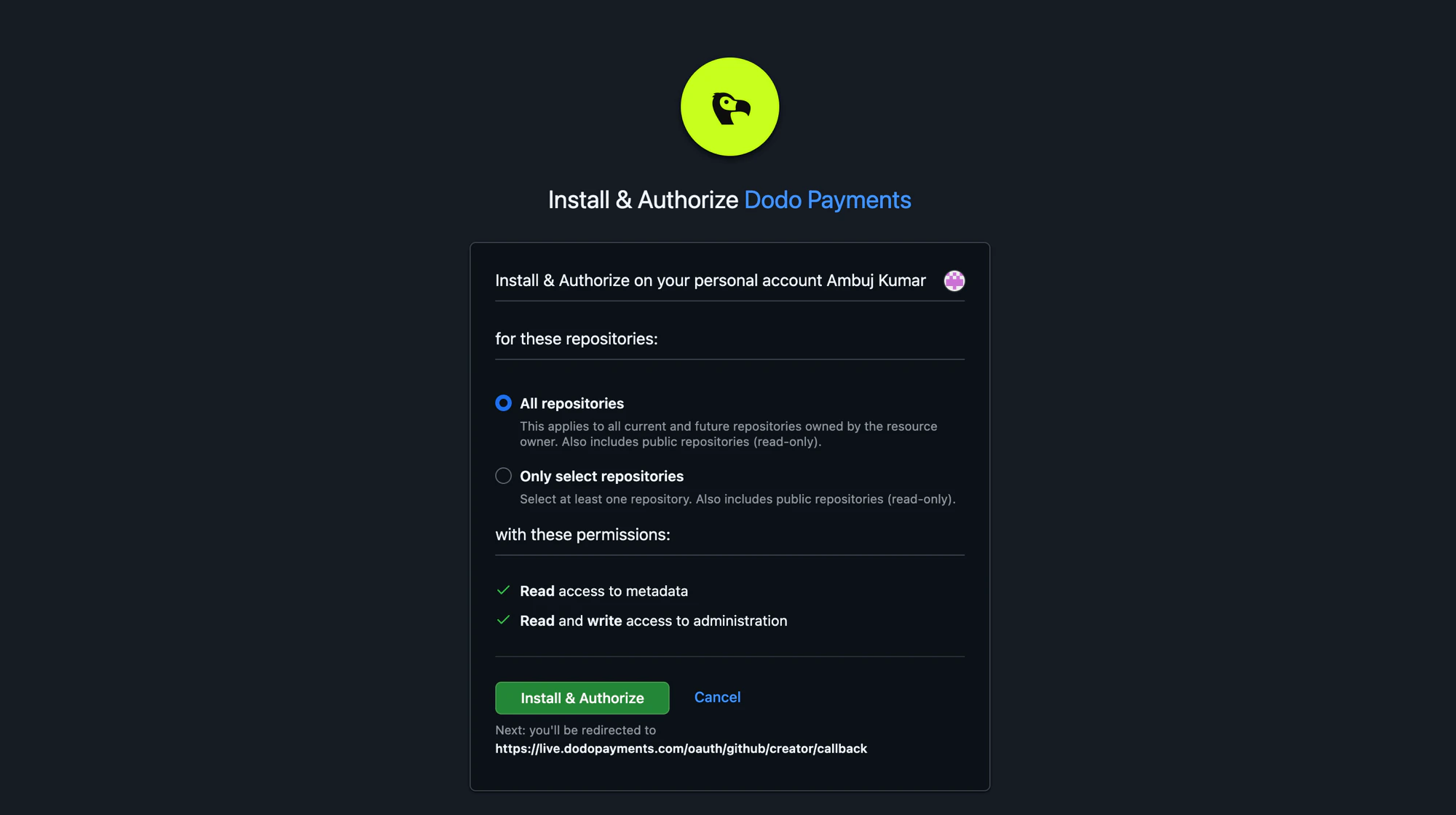
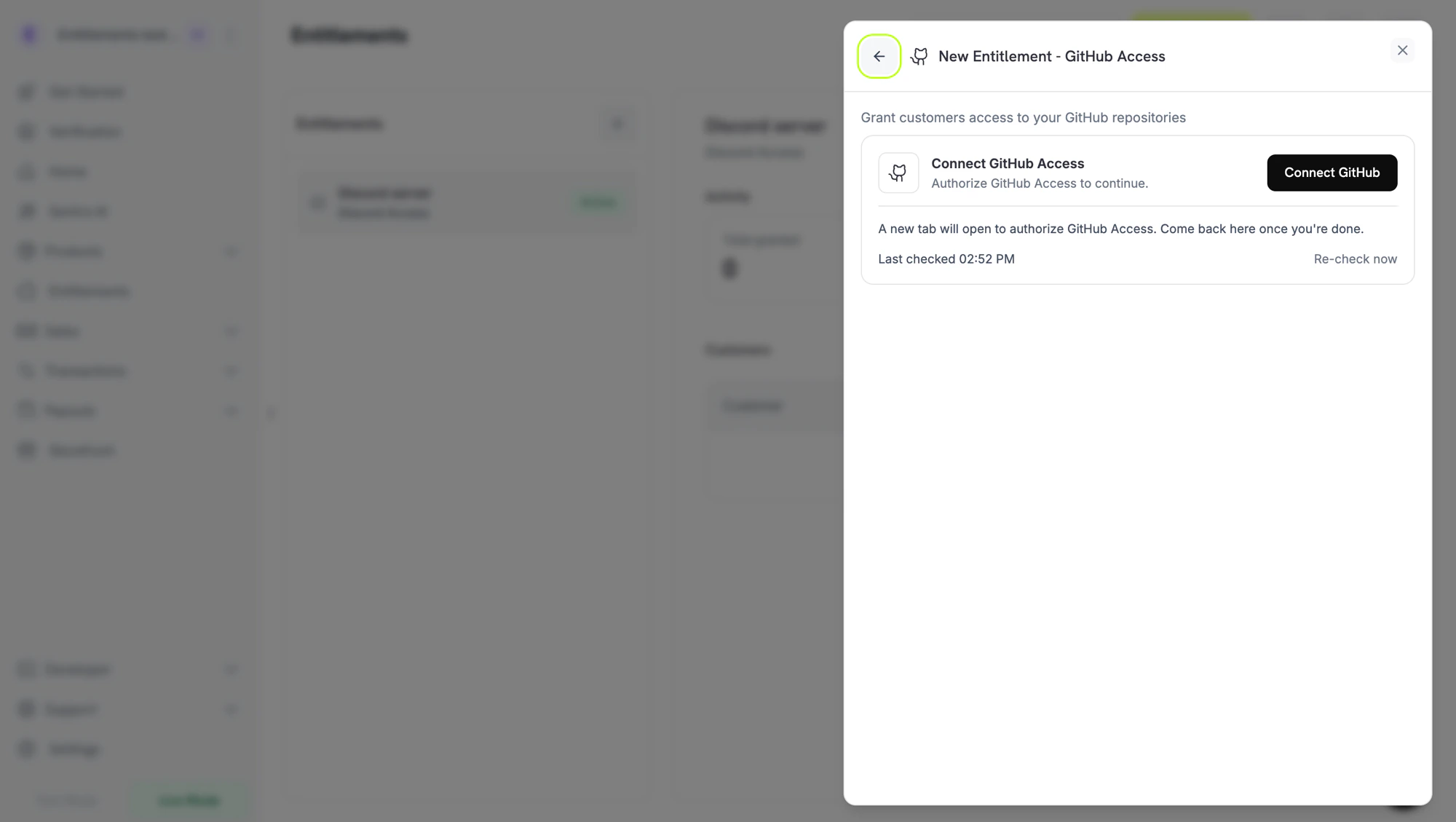 Clicking through opens GitHub in a new tab. Sign in, then install the Dodo Payments GitHub App on the organization or user account that owns the repository. You can grant access to **all repositories** or only the ones you intend to gate.
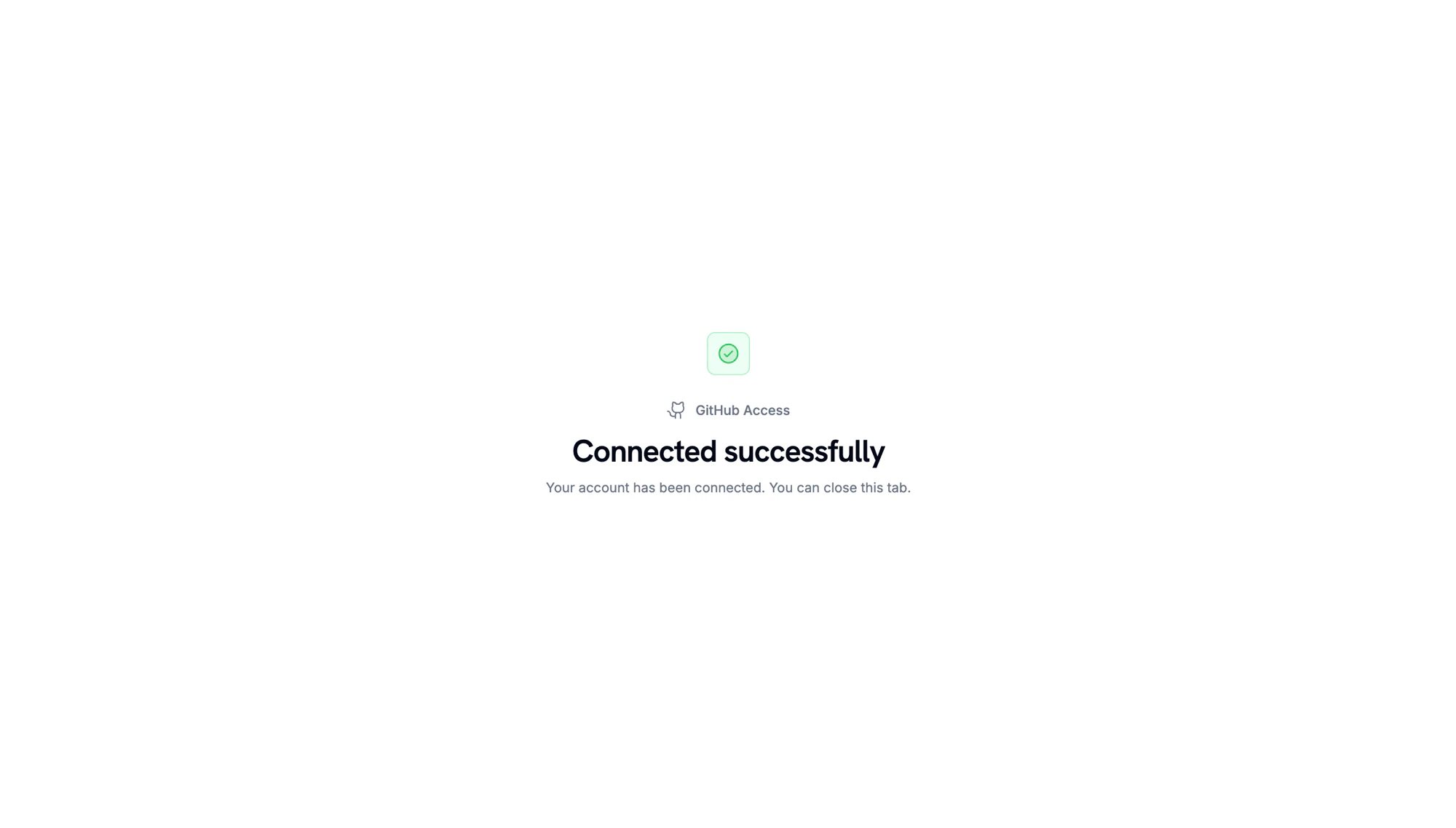
 When GitHub redirects back, you'll see a confirmation that the account is connected.
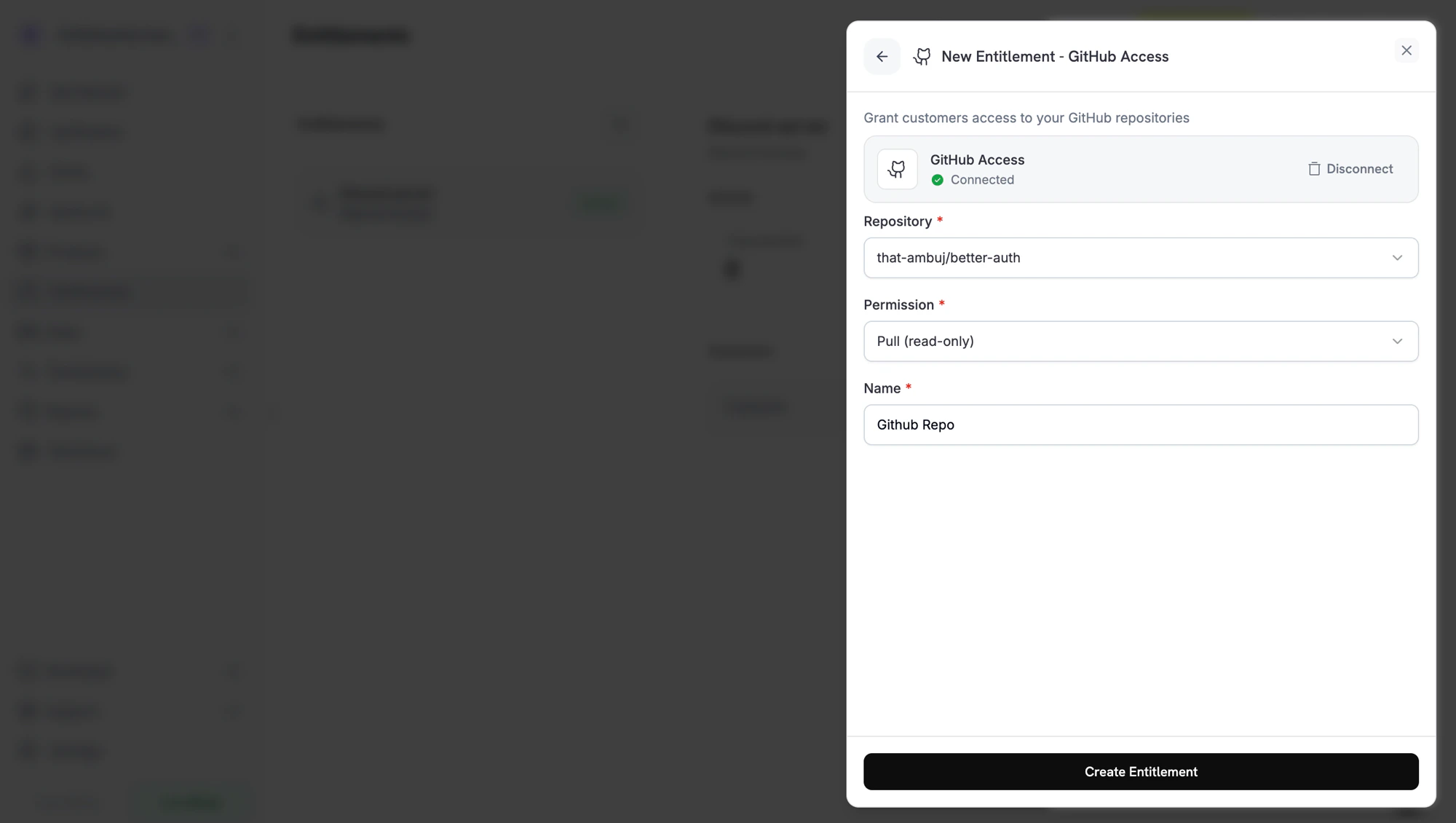
 Back in the dashboard, choose the **repository** the entitlement should grant access to and pick the **permission** level. The repository picker only shows repositories the GitHub App has access to. Give the entitlement a **name** and click **Create Entitlement**.
 Save and attach the entitlement to any product. Customers who buy that product receive a GitHub invite on delivery.
## Permission levels
GitHub's standard repository permissions apply:
| Permission | Best for |
| ---------- | ------------------------------------------------------------------------------ |
| `pull` | Read-only access. Customers can clone, fetch, and view the repo. |
| `triage` | Read access plus the ability to manage issues and pull requests. |
| `push` | Read + write access. Customers can push branches and open pull requests. |
| `maintain` | Push access plus management of repository settings (excluding sensitive ones). |
| `admin` | Full control of the repository. Use with caution. |
Grant the **least privilege** that fits your use case. Most paid-content scenarios only need `pull`.
## Customer flow
1. The customer completes checkout.
2. Dodo Payments creates a grant in `pending` status with an `oauth_url` for the customer to link their GitHub account.
3. The customer authorizes through the link in their email or customer portal.
4. Dodo Payments invites the customer's GitHub account to the repository at the configured permission. The grant moves to `delivered` once the invitation is created.
5. If the subscription is cancelled, refunded, or revoked, the customer is removed as a collaborator.
## Required configuration
| Field | Required | Description |
| ------------ | -------- | -------------------------------------------------------------------------------------------------- |
| `target_id` | Yes | The repository to invite the customer to. The dashboard's repository picker fills this in for you. |
| `permission` | Yes | One of `pull`, `push`, `triage`, `maintain`, `admin`. |
## Create via API
```typescript TypeScript theme={null} theme={null}
const entitlement = await client.entitlements.create({
name: 'Code Share Repository',
integration_type: 'github',
integration_config: {
target_id: 'acme/private-sdk',
permission: 'pull',
},
});
```
```python Python theme={null} theme={null}
client.entitlements.create(
name="Code Share Repository",
integration_type="github",
integration_config={
"target_id": "acme/private-sdk",
"permission": "pull",
},
)
```
```go Go theme={null} theme={null}
client.Entitlements.New(ctx, dodopayments.EntitlementNewParams{
Name: dodopayments.F("Code Share Repository"),
IntegrationType: dodopayments.F(dodopayments.EntitlementIntegrationTypeGithub),
IntegrationConfig: dodopayments.F[dodopayments.IntegrationConfigUnionParam](
dodopayments.IntegrationConfigGitHubConfigParam{
TargetID: dodopayments.F("acme/private-sdk"),
Permission: dodopayments.F("pull"),
},
),
})
```
## Webhooks
The standard [`entitlement_grant.*` webhook events](/developer-resources/webhooks/intents/entitlement-grant) cover the GitHub flow:
* `entitlement_grant.created` includes the `oauth_url` for GitHub authorization.
* `entitlement_grant.delivered` fires once the collaborator invitation is created.
* `entitlement_grant.failed` fires with `error_code: "github_permission_denied"` (or similar) if the GitHub App lost access to the repository.
## Troubleshooting
The Dodo Payments GitHub App must be installed on the org or user that owns the repository. Open **Entitlements → Integrations → GitHub** and reinstall the app, making sure to grant access to the relevant repositories.
The GitHub App's installation no longer has access to the repository, or the repository was renamed/transferred. Re-grant access to the app and the next regrant will succeed.
Customers must accept the GitHub invitation from their notifications page or by clicking the link in their email. Until they accept, they remain "invited" but cannot clone the repo. The grant is still `delivered` from Dodo Payments' perspective; the invitation is what we issue.
Save and attach the entitlement to any product. Customers who buy that product receive a GitHub invite on delivery.
## Permission levels
GitHub's standard repository permissions apply:
| Permission | Best for |
| ---------- | ------------------------------------------------------------------------------ |
| `pull` | Read-only access. Customers can clone, fetch, and view the repo. |
| `triage` | Read access plus the ability to manage issues and pull requests. |
| `push` | Read + write access. Customers can push branches and open pull requests. |
| `maintain` | Push access plus management of repository settings (excluding sensitive ones). |
| `admin` | Full control of the repository. Use with caution. |
Grant the **least privilege** that fits your use case. Most paid-content scenarios only need `pull`.
## Customer flow
1. The customer completes checkout.
2. Dodo Payments creates a grant in `pending` status with an `oauth_url` for the customer to link their GitHub account.
3. The customer authorizes through the link in their email or customer portal.
4. Dodo Payments invites the customer's GitHub account to the repository at the configured permission. The grant moves to `delivered` once the invitation is created.
5. If the subscription is cancelled, refunded, or revoked, the customer is removed as a collaborator.
## Required configuration
| Field | Required | Description |
| ------------ | -------- | -------------------------------------------------------------------------------------------------- |
| `target_id` | Yes | The repository to invite the customer to. The dashboard's repository picker fills this in for you. |
| `permission` | Yes | One of `pull`, `push`, `triage`, `maintain`, `admin`. |
## Create via API
```typescript TypeScript theme={null} theme={null}
const entitlement = await client.entitlements.create({
name: 'Code Share Repository',
integration_type: 'github',
integration_config: {
target_id: 'acme/private-sdk',
permission: 'pull',
},
});
```
```python Python theme={null} theme={null}
client.entitlements.create(
name="Code Share Repository",
integration_type="github",
integration_config={
"target_id": "acme/private-sdk",
"permission": "pull",
},
)
```
```go Go theme={null} theme={null}
client.Entitlements.New(ctx, dodopayments.EntitlementNewParams{
Name: dodopayments.F("Code Share Repository"),
IntegrationType: dodopayments.F(dodopayments.EntitlementIntegrationTypeGithub),
IntegrationConfig: dodopayments.F[dodopayments.IntegrationConfigUnionParam](
dodopayments.IntegrationConfigGitHubConfigParam{
TargetID: dodopayments.F("acme/private-sdk"),
Permission: dodopayments.F("pull"),
},
),
})
```
## Webhooks
The standard [`entitlement_grant.*` webhook events](/developer-resources/webhooks/intents/entitlement-grant) cover the GitHub flow:
* `entitlement_grant.created` includes the `oauth_url` for GitHub authorization.
* `entitlement_grant.delivered` fires once the collaborator invitation is created.
* `entitlement_grant.failed` fires with `error_code: "github_permission_denied"` (or similar) if the GitHub App lost access to the repository.
## Troubleshooting
The Dodo Payments GitHub App must be installed on the org or user that owns the repository. Open **Entitlements → Integrations → GitHub** and reinstall the app, making sure to grant access to the relevant repositories.
The GitHub App's installation no longer has access to the repository, or the repository was renamed/transferred. Re-grant access to the app and the next regrant will succeed.
Customers must accept the GitHub invitation from their notifications page or by clicking the link in their email. Until they accept, they remain "invited" but cannot clone the repo. The grant is still `delivered` from Dodo Payments' perspective; the invitation is what we issue.