> ## Documentation Index
> Fetch the complete documentation index at: https://docs.dodopayments.com/llms.txt
> Use this file to discover all available pages before exploring further.
# Feature Flag Entitlement
> Gate features in your own application off a purchase. Feature flag entitlements deliver a boolean capability instantly on payment and revoke it automatically on cancellation.
A feature flag entitlement turns Dodo Payments into a billing-aware feature-flag store. Attach a flag like `advanced_reports` to a product, and every paying customer gets a grant your application can check via API or keep in sync with webhooks. No external platform, no OAuth, no delivery step — the grant itself is the capability.
## What gets delivered
Nothing leaves Dodo Payments — the grant **is** the deliverable:
* On purchase, the grant is created and moves straight to `delivered`. There is no `pending` phase, no customer action, and no way for delivery to fail.
* The grant carries a typed `feature` payload: `{ "feature_type": "boolean", "feature_id": "advanced_reports" }`. Your application reads `feature_id` to decide what to unlock.
* Cancellation, refund, or manual revoke moves the grant to `revoked`, and your application sees the flag disappear.
Common uses include plan-based feature gating (Pro unlocks analytics), add-on capabilities (an "API access" upgrade), and early-access programs sold as one-time purchases.
`feature_id` is a merchant-chosen identifier, not unique across entitlements. Two entitlements can confer the same `feature_id` — for example, a monthly and a yearly Pro plan both granting `advanced_reports`.
## Create a feature flag
In your Dodo Payments dashboard, go to **Entitlements** and click **+** to start a new entitlement, then choose **Feature Flags**.
Give the flag a **Display Name** for your dashboard, a **Feature ID** your application will check (the dashboard suggests one from the name), and a **Description** so your team knows what it controls.
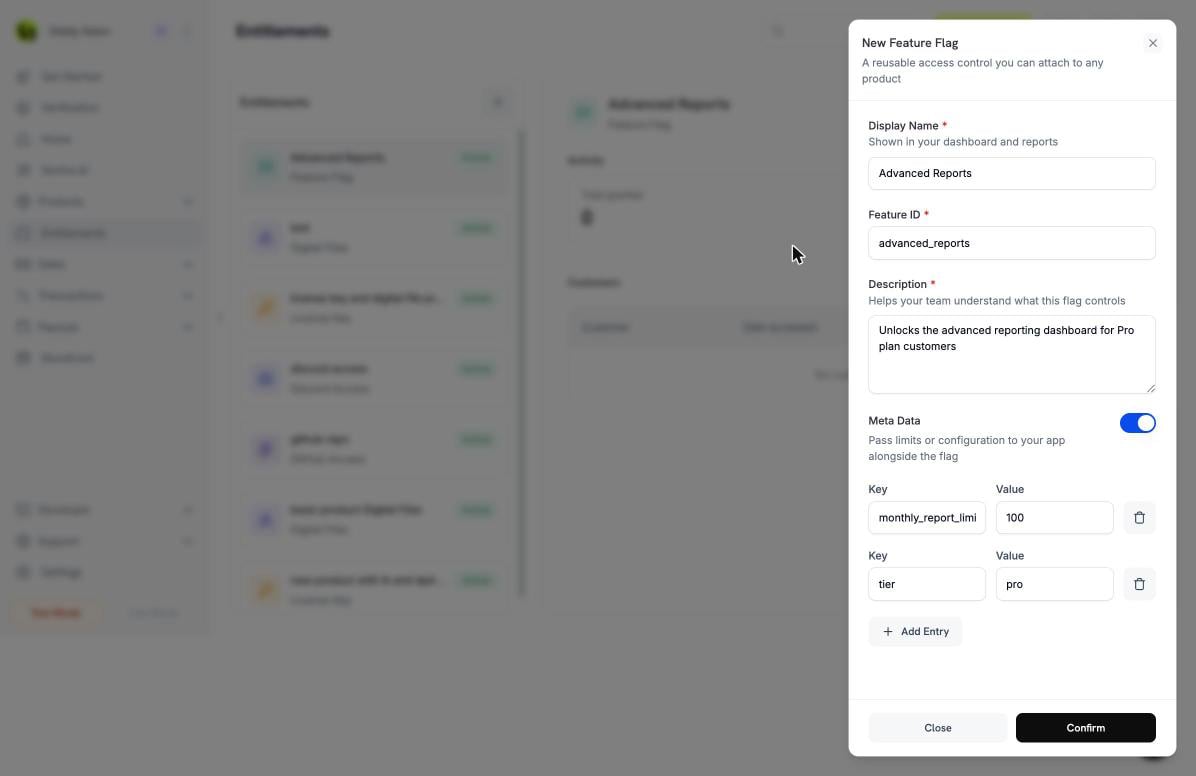 Toggle **Meta Data** to attach key-value configuration — limits, tier names, quotas — that is delivered to your application alongside the flag. See [Attach limits with metadata](#attach-limits-with-metadata).
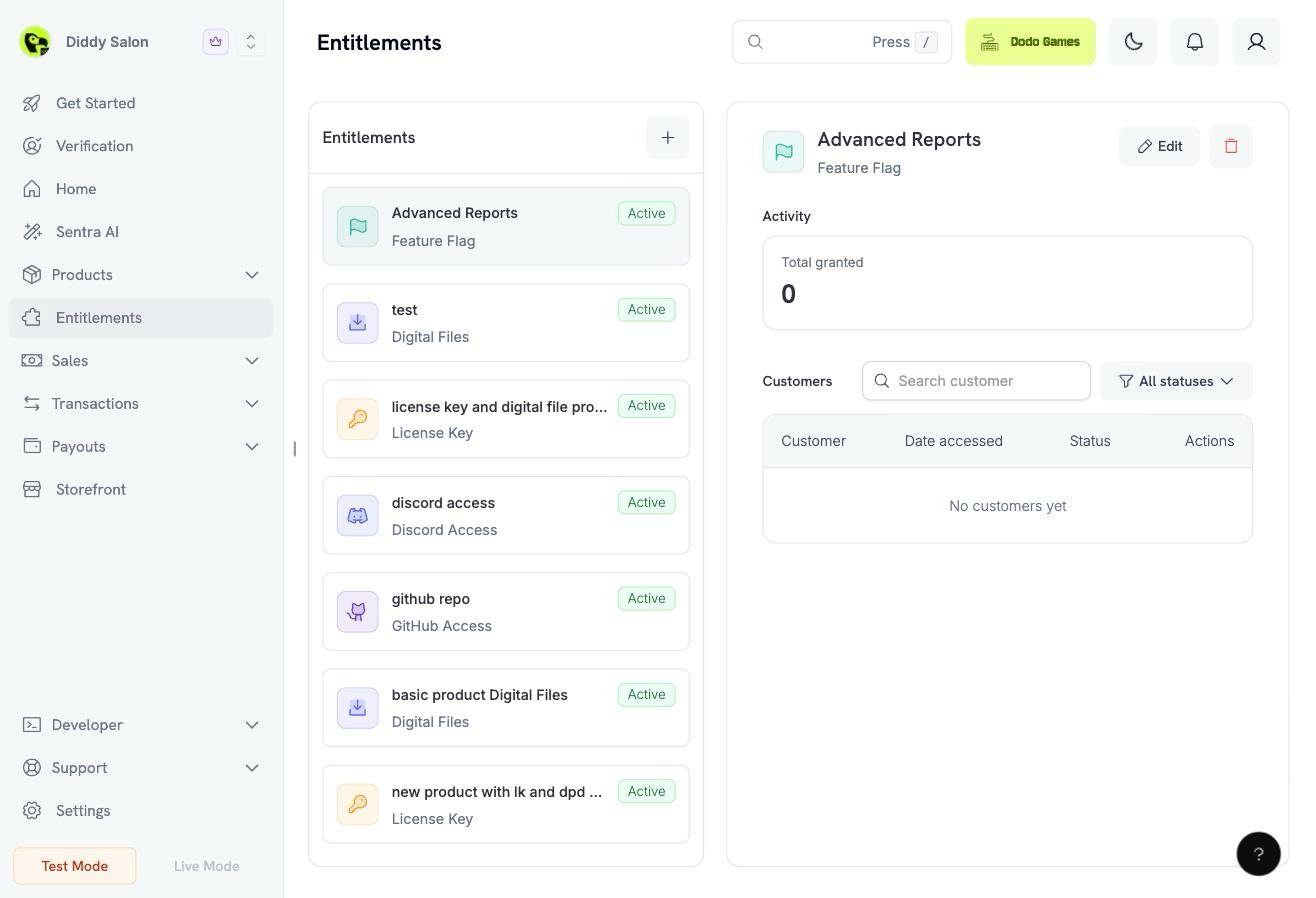
Click **Confirm**. The flag appears in your entitlements list, ready to attach to products.
Toggle **Meta Data** to attach key-value configuration — limits, tier names, quotas — that is delivered to your application alongside the flag. See [Attach limits with metadata](#attach-limits-with-metadata).
Click **Confirm**. The flag appears in your entitlements list, ready to attach to products.
 ## Attach to a product
Open a product (or create one), find the **Entitlements** card, and click **+** to attach existing entitlements. Select your feature flag and click **Done**.
## Attach to a product
Open a product (or create one), find the **Entitlements** card, and click **+** to attach existing entitlements. Select your feature flag and click **Done**.
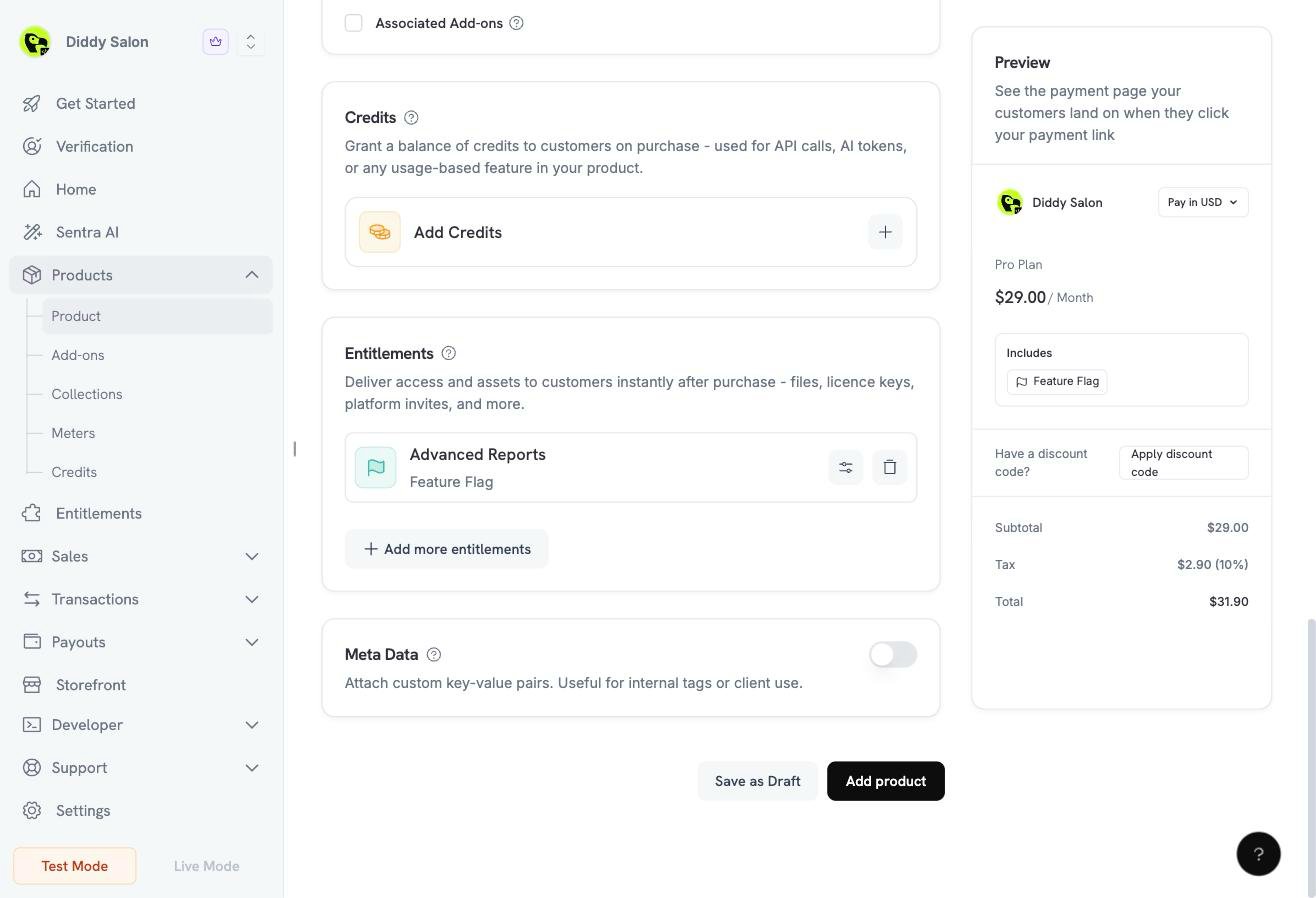
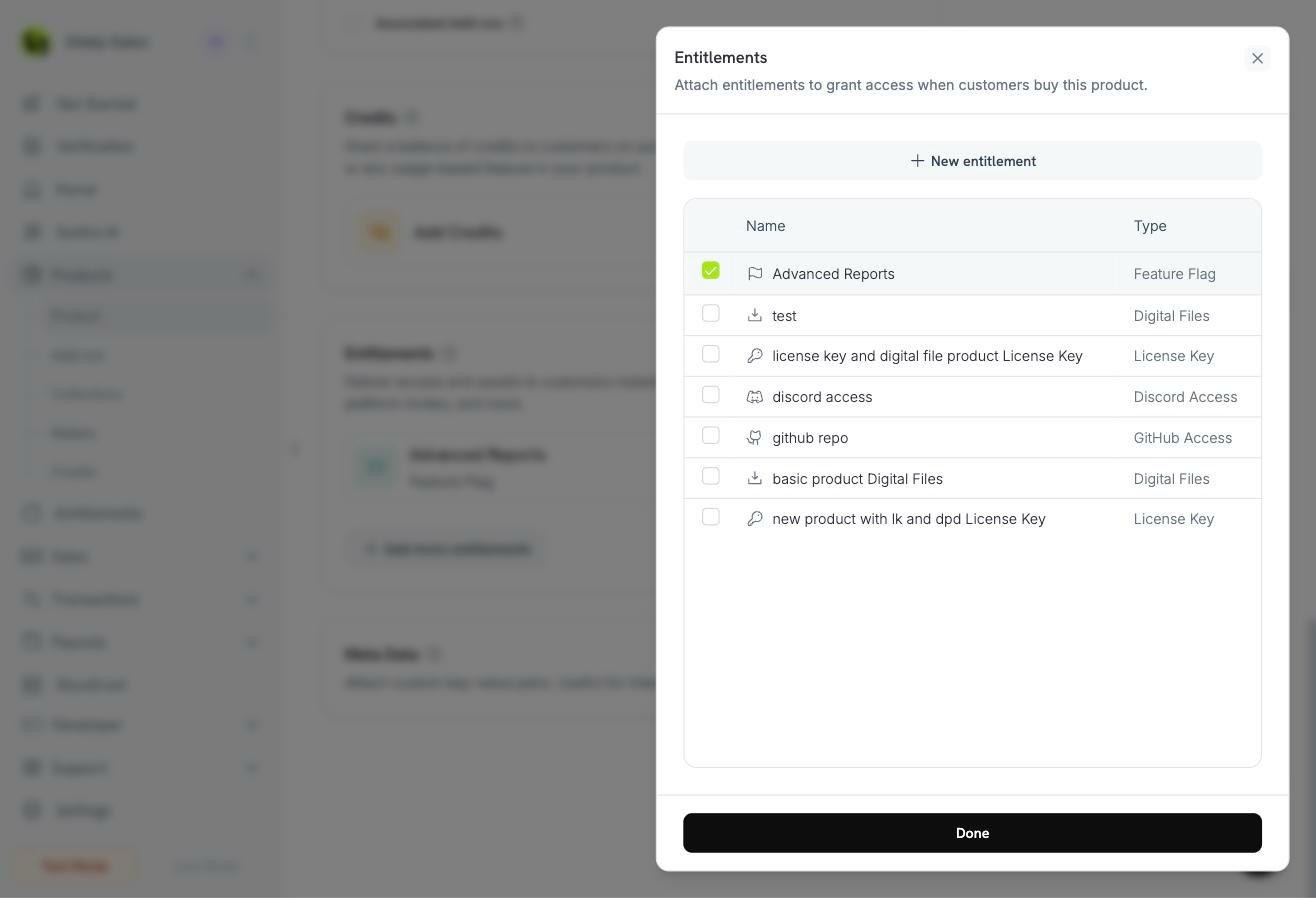 The attached flag shows on the product form, and the checkout preview lists it under **Includes**.
 ## Required configuration
| Field | Required | Description |
| -------------- | -------- | -------------------------------------------------------------------------------------------- |
| `feature_id` | Yes | Identifier your application checks, e.g. `advanced_reports`. Not unique across entitlements. |
| `feature_type` | Yes | Type of capability conferred. Only `boolean` is supported today. |
### Create via API
```typescript TypeScript theme={null} theme={null}
import DodoPayments from 'dodopayments';
const client = new DodoPayments({
bearerToken: process.env['DODO_PAYMENTS_API_KEY'],
environment: 'test_mode',
});
const entitlement = await client.entitlements.create({
name: 'Advanced Reports',
integration_type: 'feature_flag',
integration_config: {
feature_type: 'boolean',
feature_id: 'advanced_reports',
},
metadata: {
tier: 'pro',
monthly_report_limit: 100,
},
});
```
```python Python theme={null} theme={null}
client.entitlements.create(
name="Advanced Reports",
integration_type="feature_flag",
integration_config={
"feature_type": "boolean",
"feature_id": "advanced_reports",
},
metadata={
"tier": "pro",
"monthly_report_limit": 100,
},
)
```
```go Go theme={null} theme={null}
client.Entitlements.New(ctx, dodopayments.EntitlementNewParams{
Name: dodopayments.F("Advanced Reports"),
IntegrationType: dodopayments.F(dodopayments.EntitlementIntegrationTypeFeatureFlag),
IntegrationConfig: dodopayments.F[dodopayments.IntegrationConfigUnionParam](
dodopayments.IntegrationConfigFeatureFlagConfigParam{
FeatureType: dodopayments.F(dodopayments.FeatureTypeBoolean),
FeatureID: dodopayments.F("advanced_reports"),
},
),
})
```
***
## Attach limits with metadata
A boolean flag answers "does this customer have the feature?". Metadata answers "with what configuration?". Entitlement metadata accepts string, integer, number, and boolean values, and every grant takes a **frozen snapshot** of the entitlement's metadata at the moment it is created.
That snapshot behavior is what makes metadata safe to use for plan limits:
* Editing the entitlement's metadata later only affects **future** grants. Customers keep the limits they purchased under.
* The snapshot is returned on each grant as its `metadata` field, so one API call gives you both the flag and its configuration.
For example, an `advanced_reports` flag with `{ "tier": "pro", "monthly_report_limit": 100 }` lets your application unlock the dashboard *and* enforce the 100-report quota without a second lookup. If you later raise the limit to 250, existing customers stay at 100 until they receive a new grant (for example, after a plan change).
Use metadata for limits and configuration; use `feature_id` only for identity. Encoding limits in the id (`advanced_reports_100`) forces a new flag for every limit change and breaks your application's checks.
***
## Check a customer's features
List a customer's delivered feature-flag grants and build the set of enabled features. The endpoint returns one row per grant across all entitlements, filterable by `integration_type` and `status`.
```typescript TypeScript theme={null} theme={null}
const features = new Map>();
for await (const grant of client.customers.listEntitlementGrants('cus_abc123', {
integration_type: 'feature_flag',
status: 'Delivered',
})) {
if (grant.feature) {
features.set(grant.feature.feature_id, grant.metadata ?? {});
}
}
if (features.has('advanced_reports')) {
const limit = features.get('advanced_reports')?.monthly_report_limit;
// unlock the dashboard, enforce the limit
}
```
```python Python theme={null} theme={null}
page = client.customers.list_entitlement_grants(
customer_id="cus_abc123",
integration_type="feature_flag",
status="Delivered",
)
features = {
grant.feature.feature_id: grant.metadata
for grant in page.items
if grant.feature
}
if "advanced_reports" in features:
limit = features["advanced_reports"].get("monthly_report_limit")
```
```go Go theme={null} theme={null}
page, _ := client.Customers.ListEntitlementGrants(
ctx, "cus_abc123",
dodopayments.CustomerListEntitlementGrantsParams{
IntegrationType: dodopayments.F("feature_flag"),
Status: dodopayments.F("Delivered"),
},
)
features := map[string]bool{}
for _, grant := range page.Items {
if grant.Feature.FeatureID != "" {
features[grant.Feature.FeatureID] = true
}
}
```
The `feature` payload is populated only on `feature_flag` grants; it is `null` for every other integration type. See the [List Customer Grants](/api-reference/entitlements/list-customer-grants) API reference for the full response shape.
Checking the API on every request adds latency to your hot path. Cache the feature set per customer with a short TTL (minutes, not hours), and invalidate the cache from your webhook handler when a grant changes state — that combination keeps checks fast and revocations near-instant.
***
## Lifecycle
Feature flag grants follow the standard [grant lifecycle](/features/entitlements/introduction#how-grants-work) with one simplification: there is no delivery step, so grants never sit in `pending` and never move to `failed`.
| Trigger | Effect |
| ------------------------------------------------------- | ------------------------------------------------------------------------------------------ |
| One-time payment succeeds / subscription becomes active | Grant created with `status: delivered` and `delivered_at` set. |
| Subscription put on hold, cancelled, or expired | Grant revoked with the matching `revocation_reason`. |
| Refund on a one-time payment | Grant revoked with `revocation_reason: refund`. |
| Subscription recovers (for example, dunning succeeds) | The revoked grant is restored to `delivered` — same grant `id`, revocation fields cleared. |
| Manual API revoke | Grant revoked with `revocation_reason: manual`. Not auto-restored on renewal. |
Grants are idempotent per entitlement and customer: while a customer has a non-revoked grant for a flag, repeat purchases and renewals do not create duplicates.
***
## Webhooks
Subscribe to the [`entitlement_grant.*` events](/developer-resources/webhooks/intents/entitlement-grant) to mirror flags into your own database instead of polling:
* `entitlement_grant.created` — arrives already `delivered` with the `feature` payload. Enable the feature.
* `entitlement_grant.delivered` — fires when a previously revoked grant is restored. Re-enable the feature.
* `entitlement_grant.revoked` — access withdrawn. Disable the feature and check `revocation_reason` to decide your messaging.
```typescript TypeScript theme={null} theme={null}
app.post('/webhooks/dodo', async (req, res) => {
const event = req.body;
if (event.type.startsWith('entitlement_grant.') && event.data.feature) {
const { customer_id, feature } = event.data;
const enabled = event.type !== 'entitlement_grant.revoked';
await db.customerFeatures.upsert({
customerId: customer_id,
featureId: feature.feature_id,
enabled,
config: event.data.metadata ?? {},
});
}
res.sendStatus(200);
});
```
There is no `entitlement_grant.failed` for feature flags — delivery happens entirely inside Dodo Payments and cannot fail.
***
## Example: Pro plan unlocks advanced reports
1. **Create the flag.** `feature_id: advanced_reports` with metadata `{ "tier": "pro", "monthly_report_limit": 100 }`.
2. **Attach it** to your Pro Plan subscription product.
3. **A customer subscribes.** Dodo Payments creates a `delivered` grant and fires `entitlement_grant.created`; your webhook handler enables `advanced_reports` for the customer with a limit of 100.
4. **Your app gates the feature.** On dashboard load, check the cached feature set (or call `listEntitlementGrants`) and render the reports tab only when `advanced_reports` is present.
5. **The customer cancels.** Dodo Payments revokes the grant and fires `entitlement_grant.revoked`; your handler disables the feature. If the customer later recovers via dunning, `entitlement_grant.delivered` restores it — no code changes needed.
***
## Best practices
* **Use stable, snake\_case feature ids.** Your application code checks these strings; renaming one is a breaking change on both sides.
* **One flag per capability.** Prefer `advanced_reports` + `api_access` as two entitlements over a single `pro_bundle` — revocation and plan mixes stay clean.
* **Drive state from webhooks, verify with the API.** Webhooks keep your database current; the list endpoint is the source of truth for reconciliation jobs and cache misses.
* **Treat `revoked` as immediate.** A revoked flag means the customer is no longer paying for the feature. Gate on the next request, not the next session.
* **Put limits in metadata, not in code.** Changing a quota then only requires editing the entitlement — new customers pick it up automatically while existing grants keep their purchased snapshot.
## Required configuration
| Field | Required | Description |
| -------------- | -------- | -------------------------------------------------------------------------------------------- |
| `feature_id` | Yes | Identifier your application checks, e.g. `advanced_reports`. Not unique across entitlements. |
| `feature_type` | Yes | Type of capability conferred. Only `boolean` is supported today. |
### Create via API
```typescript TypeScript theme={null} theme={null}
import DodoPayments from 'dodopayments';
const client = new DodoPayments({
bearerToken: process.env['DODO_PAYMENTS_API_KEY'],
environment: 'test_mode',
});
const entitlement = await client.entitlements.create({
name: 'Advanced Reports',
integration_type: 'feature_flag',
integration_config: {
feature_type: 'boolean',
feature_id: 'advanced_reports',
},
metadata: {
tier: 'pro',
monthly_report_limit: 100,
},
});
```
```python Python theme={null} theme={null}
client.entitlements.create(
name="Advanced Reports",
integration_type="feature_flag",
integration_config={
"feature_type": "boolean",
"feature_id": "advanced_reports",
},
metadata={
"tier": "pro",
"monthly_report_limit": 100,
},
)
```
```go Go theme={null} theme={null}
client.Entitlements.New(ctx, dodopayments.EntitlementNewParams{
Name: dodopayments.F("Advanced Reports"),
IntegrationType: dodopayments.F(dodopayments.EntitlementIntegrationTypeFeatureFlag),
IntegrationConfig: dodopayments.F[dodopayments.IntegrationConfigUnionParam](
dodopayments.IntegrationConfigFeatureFlagConfigParam{
FeatureType: dodopayments.F(dodopayments.FeatureTypeBoolean),
FeatureID: dodopayments.F("advanced_reports"),
},
),
})
```
***
## Attach limits with metadata
A boolean flag answers "does this customer have the feature?". Metadata answers "with what configuration?". Entitlement metadata accepts string, integer, number, and boolean values, and every grant takes a **frozen snapshot** of the entitlement's metadata at the moment it is created.
That snapshot behavior is what makes metadata safe to use for plan limits:
* Editing the entitlement's metadata later only affects **future** grants. Customers keep the limits they purchased under.
* The snapshot is returned on each grant as its `metadata` field, so one API call gives you both the flag and its configuration.
For example, an `advanced_reports` flag with `{ "tier": "pro", "monthly_report_limit": 100 }` lets your application unlock the dashboard *and* enforce the 100-report quota without a second lookup. If you later raise the limit to 250, existing customers stay at 100 until they receive a new grant (for example, after a plan change).
Use metadata for limits and configuration; use `feature_id` only for identity. Encoding limits in the id (`advanced_reports_100`) forces a new flag for every limit change and breaks your application's checks.
***
## Check a customer's features
List a customer's delivered feature-flag grants and build the set of enabled features. The endpoint returns one row per grant across all entitlements, filterable by `integration_type` and `status`.
```typescript TypeScript theme={null} theme={null}
const features = new Map>();
for await (const grant of client.customers.listEntitlementGrants('cus_abc123', {
integration_type: 'feature_flag',
status: 'Delivered',
})) {
if (grant.feature) {
features.set(grant.feature.feature_id, grant.metadata ?? {});
}
}
if (features.has('advanced_reports')) {
const limit = features.get('advanced_reports')?.monthly_report_limit;
// unlock the dashboard, enforce the limit
}
```
```python Python theme={null} theme={null}
page = client.customers.list_entitlement_grants(
customer_id="cus_abc123",
integration_type="feature_flag",
status="Delivered",
)
features = {
grant.feature.feature_id: grant.metadata
for grant in page.items
if grant.feature
}
if "advanced_reports" in features:
limit = features["advanced_reports"].get("monthly_report_limit")
```
```go Go theme={null} theme={null}
page, _ := client.Customers.ListEntitlementGrants(
ctx, "cus_abc123",
dodopayments.CustomerListEntitlementGrantsParams{
IntegrationType: dodopayments.F("feature_flag"),
Status: dodopayments.F("Delivered"),
},
)
features := map[string]bool{}
for _, grant := range page.Items {
if grant.Feature.FeatureID != "" {
features[grant.Feature.FeatureID] = true
}
}
```
The `feature` payload is populated only on `feature_flag` grants; it is `null` for every other integration type. See the [List Customer Grants](/api-reference/entitlements/list-customer-grants) API reference for the full response shape.
Checking the API on every request adds latency to your hot path. Cache the feature set per customer with a short TTL (minutes, not hours), and invalidate the cache from your webhook handler when a grant changes state — that combination keeps checks fast and revocations near-instant.
***
## Lifecycle
Feature flag grants follow the standard [grant lifecycle](/features/entitlements/introduction#how-grants-work) with one simplification: there is no delivery step, so grants never sit in `pending` and never move to `failed`.
| Trigger | Effect |
| ------------------------------------------------------- | ------------------------------------------------------------------------------------------ |
| One-time payment succeeds / subscription becomes active | Grant created with `status: delivered` and `delivered_at` set. |
| Subscription put on hold, cancelled, or expired | Grant revoked with the matching `revocation_reason`. |
| Refund on a one-time payment | Grant revoked with `revocation_reason: refund`. |
| Subscription recovers (for example, dunning succeeds) | The revoked grant is restored to `delivered` — same grant `id`, revocation fields cleared. |
| Manual API revoke | Grant revoked with `revocation_reason: manual`. Not auto-restored on renewal. |
Grants are idempotent per entitlement and customer: while a customer has a non-revoked grant for a flag, repeat purchases and renewals do not create duplicates.
***
## Webhooks
Subscribe to the [`entitlement_grant.*` events](/developer-resources/webhooks/intents/entitlement-grant) to mirror flags into your own database instead of polling:
* `entitlement_grant.created` — arrives already `delivered` with the `feature` payload. Enable the feature.
* `entitlement_grant.delivered` — fires when a previously revoked grant is restored. Re-enable the feature.
* `entitlement_grant.revoked` — access withdrawn. Disable the feature and check `revocation_reason` to decide your messaging.
```typescript TypeScript theme={null} theme={null}
app.post('/webhooks/dodo', async (req, res) => {
const event = req.body;
if (event.type.startsWith('entitlement_grant.') && event.data.feature) {
const { customer_id, feature } = event.data;
const enabled = event.type !== 'entitlement_grant.revoked';
await db.customerFeatures.upsert({
customerId: customer_id,
featureId: feature.feature_id,
enabled,
config: event.data.metadata ?? {},
});
}
res.sendStatus(200);
});
```
There is no `entitlement_grant.failed` for feature flags — delivery happens entirely inside Dodo Payments and cannot fail.
***
## Example: Pro plan unlocks advanced reports
1. **Create the flag.** `feature_id: advanced_reports` with metadata `{ "tier": "pro", "monthly_report_limit": 100 }`.
2. **Attach it** to your Pro Plan subscription product.
3. **A customer subscribes.** Dodo Payments creates a `delivered` grant and fires `entitlement_grant.created`; your webhook handler enables `advanced_reports` for the customer with a limit of 100.
4. **Your app gates the feature.** On dashboard load, check the cached feature set (or call `listEntitlementGrants`) and render the reports tab only when `advanced_reports` is present.
5. **The customer cancels.** Dodo Payments revokes the grant and fires `entitlement_grant.revoked`; your handler disables the feature. If the customer later recovers via dunning, `entitlement_grant.delivered` restores it — no code changes needed.
***
## Best practices
* **Use stable, snake\_case feature ids.** Your application code checks these strings; renaming one is a breaking change on both sides.
* **One flag per capability.** Prefer `advanced_reports` + `api_access` as two entitlements over a single `pro_bundle` — revocation and plan mixes stay clean.
* **Drive state from webhooks, verify with the API.** Webhooks keep your database current; the list endpoint is the source of truth for reconciliation jobs and cache misses.
* **Treat `revoked` as immediate.** A revoked flag means the customer is no longer paying for the feature. Gate on the next request, not the next session.
* **Put limits in metadata, not in code.** Changing a quota then only requires editing the entitlement — new customers pick it up automatically while existing grants keep their purchased snapshot.