> ## Documentation Index
> Fetch the complete documentation index at: https://docs.dodopayments.com/llms.txt
> Use this file to discover all available pages before exploring further.
# Digital Product Delivery
> Deliver downloadable files, external links, and download instructions automatically when customers purchase. Digital Product Delivery is the Digital Files entitlement type. Files are issued with presigned download URLs on every grant and revoked when access is withdrawn.
## Overview
Digital Product Delivery is the **Digital Files** entitlement type. You upload your files once to a Digital Files entitlement, attach the entitlement to a product, and Dodo Payments delivers presigned download links to every paying customer through email and the customer portal.
The entitlement supports:
* **Hosted file uploads**: store files on Dodo Payments and serve them via short-lived presigned URLs.
* **External download links**: link to files hosted on Dropbox, Google Drive, S3, or any URL.
* **Download instructions**: free-form text shown to the customer on their order page and in the delivery email.
You can mix all three on a single entitlement.
## Key Features
Upload files (PDF, ZIP, images, videos, etc.) up to 500 MiB. Files are streamed and stored efficiently.
Attach as many files as you need to a single entitlement.
Provide external download links (Dropbox, Google Drive, signed S3 URLs) as an alternative or addition.
Hosted files are served via short-lived presigned URLs. Each download URL expires automatically after roughly 15 minutes.
***
## Set up Digital Product Delivery
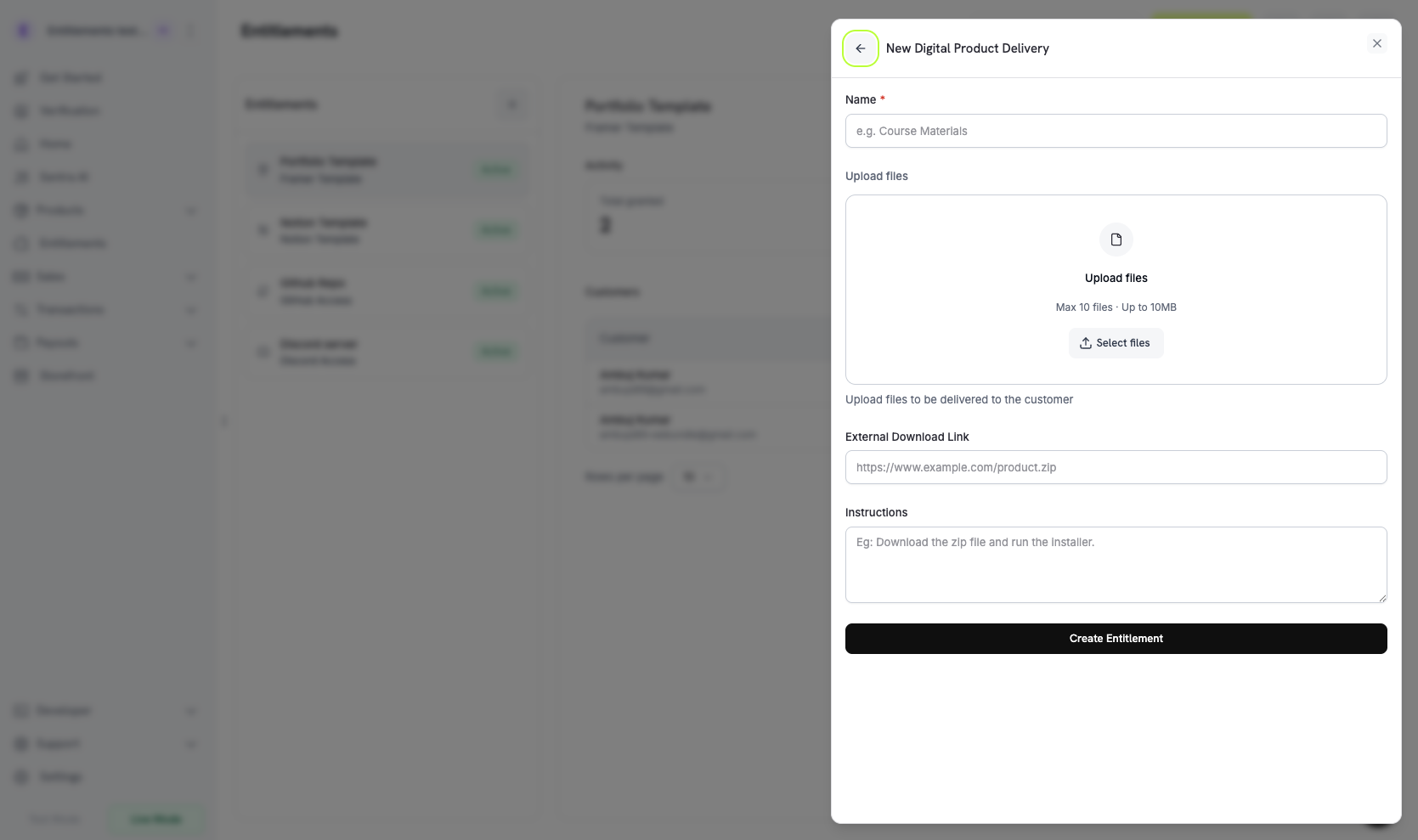
Go to **Entitlements** in your Dodo Payments dashboard and click **+** to create a new entitlement.
Select **Digital Product Delivery** as the integration.
Configure any combination of:
* **Files**: upload one or more files. Each upload returns a `file_id` that's appended to the entitlement.
* **External URL**: a publicly reachable HTTPS link delivered alongside hosted files.
* **Instructions**: free-form text shown to the customer (e.g., "Unzip and run setup.sh").
 Save. The entitlement is now available to attach to any product.
## Attach to Products
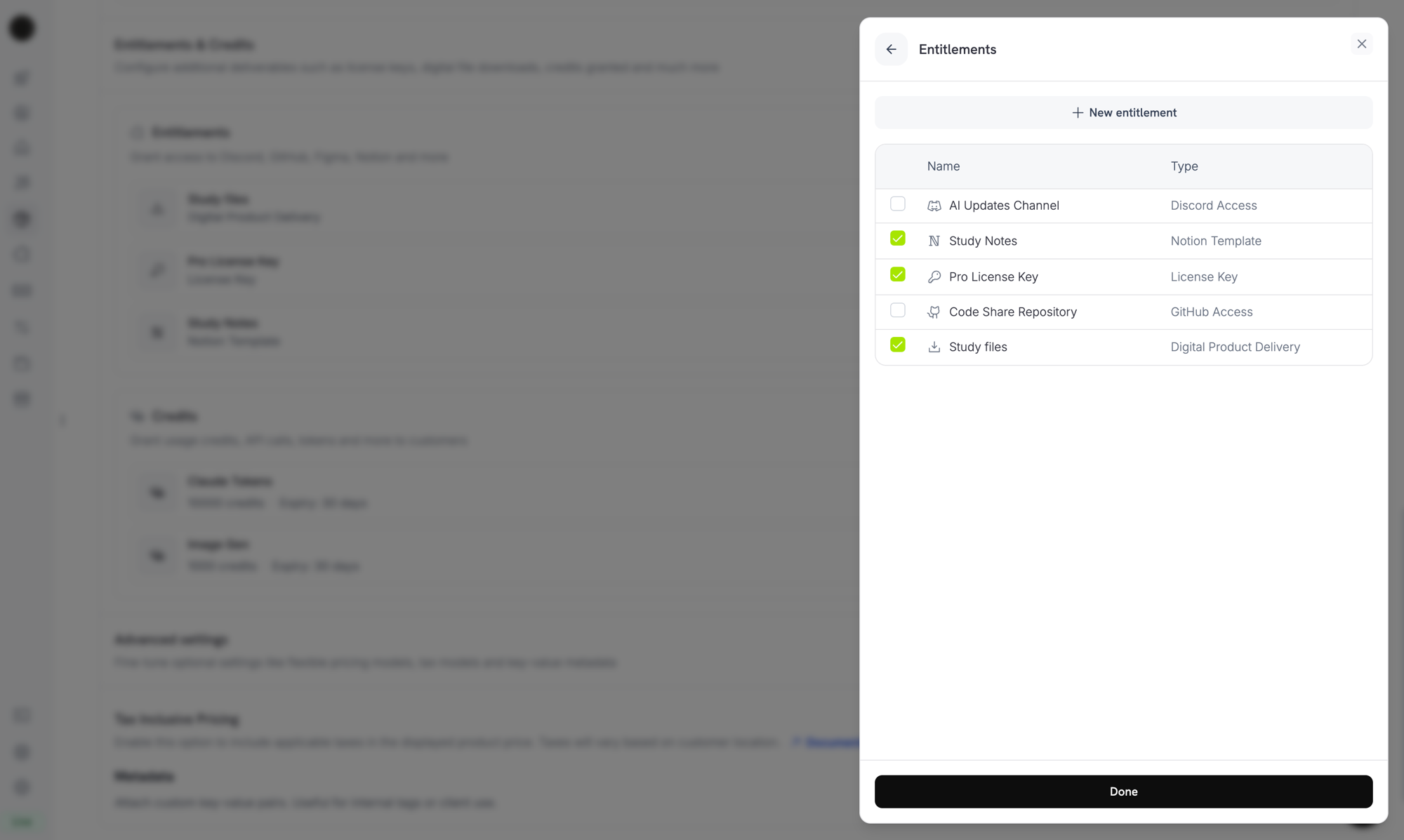
Open a product, expand **Advanced Settings → Entitlements & Credits**, and select your Digital Files entitlement. The entitlement is delivered on every successful purchase or active subscription tied to that product.
Save. The entitlement is now available to attach to any product.
## Attach to Products
Open a product, expand **Advanced Settings → Entitlements & Credits**, and select your Digital Files entitlement. The entitlement is delivered on every successful purchase or active subscription tied to that product.
 ***
## How Delivery Works
Digital Files delivery follows the standard [grant lifecycle](/features/entitlements/introduction#how-grants-work):
| Event | Behavior |
| ------------------------------------------------ | -------------------------------------------------------------------------------------------------------------------------------------------------------------------- |
| `payment.succeeded` (one-time) | Issue a grant. The grant carries presigned download URLs valid for \~15 minutes; customers can refresh them by reopening the email link or the customer portal page. |
| `subscription.active` | Issue a grant. Files remain accessible while the subscription is active. |
| `subscription.renewed` | No-op. The same grant continues; new presigned URLs are minted on every fetch. |
| `subscription.on_hold` / `cancelled` / `expired` | Revoke the grant. New presigned URLs are no longer issued. |
| `subscription.plan_changed` | Revoke the old grant; issue a new one for the new plan's entitlement. |
| `refund.succeeded` (one-time) | Revoke the grant. |
| Manual revoke | Revoke with `revocation_reason: manual`. |
Revocation stops Dodo Payments from issuing new download URLs, but it does **not** invalidate copies a customer has already downloaded. Treat hosted file downloads as "delivered once read."
***
## Customer Experience
### Purchase Confirmation
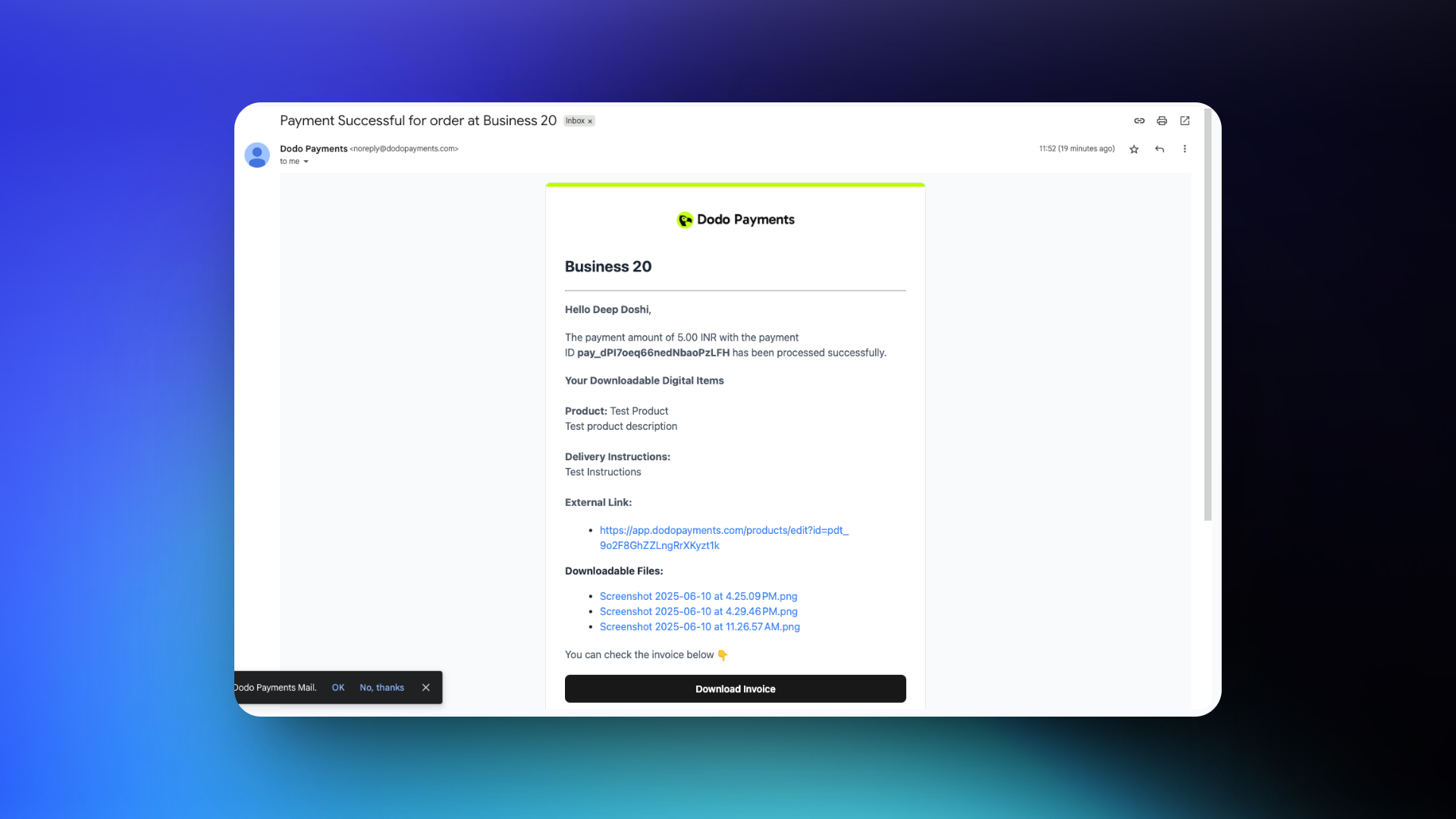
After a successful transaction, the customer receives an email with download links and any instructions you configured.
***
## How Delivery Works
Digital Files delivery follows the standard [grant lifecycle](/features/entitlements/introduction#how-grants-work):
| Event | Behavior |
| ------------------------------------------------ | -------------------------------------------------------------------------------------------------------------------------------------------------------------------- |
| `payment.succeeded` (one-time) | Issue a grant. The grant carries presigned download URLs valid for \~15 minutes; customers can refresh them by reopening the email link or the customer portal page. |
| `subscription.active` | Issue a grant. Files remain accessible while the subscription is active. |
| `subscription.renewed` | No-op. The same grant continues; new presigned URLs are minted on every fetch. |
| `subscription.on_hold` / `cancelled` / `expired` | Revoke the grant. New presigned URLs are no longer issued. |
| `subscription.plan_changed` | Revoke the old grant; issue a new one for the new plan's entitlement. |
| `refund.succeeded` (one-time) | Revoke the grant. |
| Manual revoke | Revoke with `revocation_reason: manual`. |
Revocation stops Dodo Payments from issuing new download URLs, but it does **not** invalidate copies a customer has already downloaded. Treat hosted file downloads as "delivered once read."
***
## Customer Experience
### Purchase Confirmation
After a successful transaction, the customer receives an email with download links and any instructions you configured.
 ### Customer Portal Access
Customers can re-fetch download links anytime from the [Customer Portal](/features/customer-portal). The portal page generates fresh presigned URLs on demand, so the same purchase keeps working even after the email's links have expired.
### Customer Portal Access
Customers can re-fetch download links anytime from the [Customer Portal](/features/customer-portal). The portal page generates fresh presigned URLs on demand, so the same purchase keeps working even after the email's links have expired.
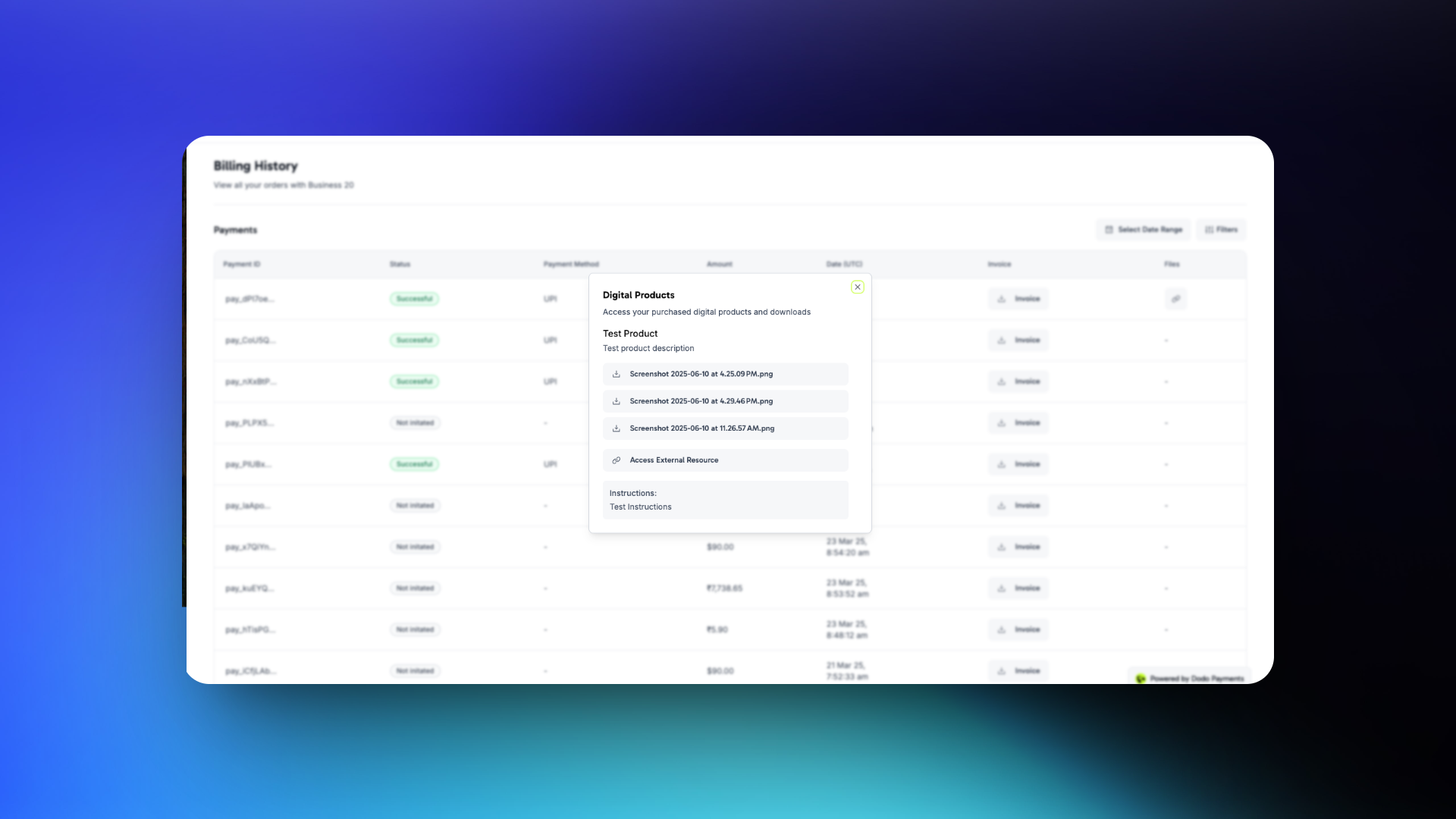 Customers can download files directly from confirmation emails or access them anytime through their portal.
***
## Manage Files Programmatically
### Upload a file to an entitlement
```typescript TypeScript theme={null} theme={null}
import DodoPayments from 'dodopayments';
import fs from 'node:fs';
const client = new DodoPayments({
bearerToken: process.env['DODO_PAYMENTS_API_KEY'],
environment: 'test_mode',
});
await client.entitlements.files.upload('ent_files_abc', {
file: fs.createReadStream('./pro-bundle.zip'),
filename: 'pro-bundle.zip',
});
```
```bash cURL theme={null} theme={null}
curl -X POST "https://test.dodopayments.com/entitlements/ent_files_abc/files" \
-H "Authorization: Bearer YOUR_API_KEY" \
-F "file=@./pro-bundle.zip" \
-F "filename=pro-bundle.zip"
```
### List grants and resolve download URLs
```typescript theme={null} theme={null}
const grants = await client.entitlements.grants.list('ent_files_abc', {
customer_id: 'cus_abc123',
});
for (const grant of grants.items) {
for (const file of grant.digital_product_delivery.files) {
console.log(file.filename, file.download_url, `expires in ${file.expires_in}s`);
}
}
```
### Remove a file from an entitlement
```typescript theme={null} theme={null}
await client.entitlements.files.delete('ent_files_abc', 'df_a4f6c1de');
```
***
## Important Considerations
* **Presigned URLs expire quickly.** Download URLs returned in grant payloads or webhook events are valid for \~15 minutes. Don't store them; re-fetch them when the customer needs to download again.
* **Updating files affects future purchases only.** Replacing or removing a file does not retroactively change downloads already issued. Past customers can still re-fetch the version that was current when their grant was created.
* **Refunds don't invalidate downloaded copies.** A customer who already downloaded a file keeps that copy. For revocable content (license-restricted media, time-limited access), pair Digital Files with [License Keys](/features/license-keys) and validate at runtime.
* **For sensitive content, prefer external URLs with their own auth.** Dodo Payments' presigned URLs are short-lived but unauthenticated within their window; anyone with the URL can download in that window. Externally hosted, account-gated content provides stronger guarantees.
***
## API Management
Create a Digital Files entitlement with optional external URL and instructions.
Upload a file (up to 500 MiB) and append it to the entitlement.
Remove a file from the entitlement.
List grants and read the resolved download URLs.
Update instructions, external URL, or replace files.
Manually revoke a customer's access.
***
## Webhooks
Digital file delivery and revocation fire the four [`entitlement_grant.*` webhook events](/developer-resources/webhooks/intents/entitlement-grant). For Digital Files grants, the payload includes a `digital_product_delivery` object with the resolved file list (presigned URLs, filenames, sizes), the optional `instructions`, and the optional `external_url`.
```json theme={null} theme={null}
"digital_product_delivery": {
"files": [
{
"file_id": "df_a4f6c1de",
"download_url": "https://files.dodopayments.com/.../pro-bundle.zip?Signature=...",
"filename": "pro-bundle.zip",
"content_type": "application/zip",
"file_size": 18742390,
"expires_in": 900
}
],
"instructions": "Unzip and run setup.sh from the project root.",
"external_url": null
}
```
***
## Legacy Digital Product Delivery
Products configured with the older `digital_product_delivery` block on the product itself have been **automatically migrated** to a Digital Files entitlement. Existing files uploaded under the legacy product file API are preserved; they continue to be downloadable and appear in grant payloads tagged with `source: "legacy"`. Future updates (adding files, changing instructions, replacing the external URL) should be made by editing the migrated Digital Files entitlement under **Entitlements**.
The legacy product-level fields (`digital_product_delivery.external_url`, `digital_product_delivery.instructions`) continue to be populated on product responses for backwards compatibility, but the entitlement is the source of truth going forward.
***
## Best Practices
* **Treat downloads as one-shot.** Customers will share or lose links, so design your product around the assumption that anything they download is theirs to keep.
* **Use instructions to set expectations.** For multi-file bundles, add an `instructions` line explaining what to install first or how to combine the files.
* **Watch the 500 MiB cap.** Larger artifacts (multi-GB datasets, video courses) should be hosted externally and linked via `external_url` instead of uploaded.
* **Combine with License Keys for revocable access.** If you need to revoke access to in-product features after a refund, pair the Digital Files entitlement with a License Key entitlement and validate the key at runtime.
* **Test the customer-portal refresh flow.** Confirm a customer can return to the portal a week later and still get a working download link. This is the primary recovery path when email links expire.
Customers can download files directly from confirmation emails or access them anytime through their portal.
***
## Manage Files Programmatically
### Upload a file to an entitlement
```typescript TypeScript theme={null} theme={null}
import DodoPayments from 'dodopayments';
import fs from 'node:fs';
const client = new DodoPayments({
bearerToken: process.env['DODO_PAYMENTS_API_KEY'],
environment: 'test_mode',
});
await client.entitlements.files.upload('ent_files_abc', {
file: fs.createReadStream('./pro-bundle.zip'),
filename: 'pro-bundle.zip',
});
```
```bash cURL theme={null} theme={null}
curl -X POST "https://test.dodopayments.com/entitlements/ent_files_abc/files" \
-H "Authorization: Bearer YOUR_API_KEY" \
-F "file=@./pro-bundle.zip" \
-F "filename=pro-bundle.zip"
```
### List grants and resolve download URLs
```typescript theme={null} theme={null}
const grants = await client.entitlements.grants.list('ent_files_abc', {
customer_id: 'cus_abc123',
});
for (const grant of grants.items) {
for (const file of grant.digital_product_delivery.files) {
console.log(file.filename, file.download_url, `expires in ${file.expires_in}s`);
}
}
```
### Remove a file from an entitlement
```typescript theme={null} theme={null}
await client.entitlements.files.delete('ent_files_abc', 'df_a4f6c1de');
```
***
## Important Considerations
* **Presigned URLs expire quickly.** Download URLs returned in grant payloads or webhook events are valid for \~15 minutes. Don't store them; re-fetch them when the customer needs to download again.
* **Updating files affects future purchases only.** Replacing or removing a file does not retroactively change downloads already issued. Past customers can still re-fetch the version that was current when their grant was created.
* **Refunds don't invalidate downloaded copies.** A customer who already downloaded a file keeps that copy. For revocable content (license-restricted media, time-limited access), pair Digital Files with [License Keys](/features/license-keys) and validate at runtime.
* **For sensitive content, prefer external URLs with their own auth.** Dodo Payments' presigned URLs are short-lived but unauthenticated within their window; anyone with the URL can download in that window. Externally hosted, account-gated content provides stronger guarantees.
***
## API Management
Create a Digital Files entitlement with optional external URL and instructions.
Upload a file (up to 500 MiB) and append it to the entitlement.
Remove a file from the entitlement.
List grants and read the resolved download URLs.
Update instructions, external URL, or replace files.
Manually revoke a customer's access.
***
## Webhooks
Digital file delivery and revocation fire the four [`entitlement_grant.*` webhook events](/developer-resources/webhooks/intents/entitlement-grant). For Digital Files grants, the payload includes a `digital_product_delivery` object with the resolved file list (presigned URLs, filenames, sizes), the optional `instructions`, and the optional `external_url`.
```json theme={null} theme={null}
"digital_product_delivery": {
"files": [
{
"file_id": "df_a4f6c1de",
"download_url": "https://files.dodopayments.com/.../pro-bundle.zip?Signature=...",
"filename": "pro-bundle.zip",
"content_type": "application/zip",
"file_size": 18742390,
"expires_in": 900
}
],
"instructions": "Unzip and run setup.sh from the project root.",
"external_url": null
}
```
***
## Legacy Digital Product Delivery
Products configured with the older `digital_product_delivery` block on the product itself have been **automatically migrated** to a Digital Files entitlement. Existing files uploaded under the legacy product file API are preserved; they continue to be downloadable and appear in grant payloads tagged with `source: "legacy"`. Future updates (adding files, changing instructions, replacing the external URL) should be made by editing the migrated Digital Files entitlement under **Entitlements**.
The legacy product-level fields (`digital_product_delivery.external_url`, `digital_product_delivery.instructions`) continue to be populated on product responses for backwards compatibility, but the entitlement is the source of truth going forward.
***
## Best Practices
* **Treat downloads as one-shot.** Customers will share or lose links, so design your product around the assumption that anything they download is theirs to keep.
* **Use instructions to set expectations.** For multi-file bundles, add an `instructions` line explaining what to install first or how to combine the files.
* **Watch the 500 MiB cap.** Larger artifacts (multi-GB datasets, video courses) should be hosted externally and linked via `external_url` instead of uploaded.
* **Combine with License Keys for revocable access.** If you need to revoke access to in-product features after a refund, pair the Digital Files entitlement with a License Key entitlement and validate the key at runtime.
* **Test the customer-portal refresh flow.** Confirm a customer can return to the portal a week later and still get a working download link. This is the primary recovery path when email links expire.