> ## Documentation Index
> Fetch the complete documentation index at: https://docs.dodopayments.com/llms.txt
> Use this file to discover all available pages before exploring further.
# Customer Management
> Manage customer relationships, track purchase history, and provide self-service options through the Dodo Payments dashboard and API.
## Overview
The Customers feature in Dodo Payments provides a centralized hub for managing all your customer relationships. Track every customer interaction, view purchase history, manage subscriptions, access wallet transaction ledgers, and enable self-service options - all from a single dashboard.
View and manage all customers in one place with search and filtering capabilities.
Manage prepaid monetary balances, fund wallets, and track transaction history.
Empower customers to self-manage subscriptions, invoices, and license keys.
Programmatically create, update, and retrieve customer data via API.
## Accessing the Customers Page
From the dashboard, click on **Sales > Customers** in the navigation menu.
The Customers Page will display a list of all current and past customers who have interacted with your business.
 ## Customer Information
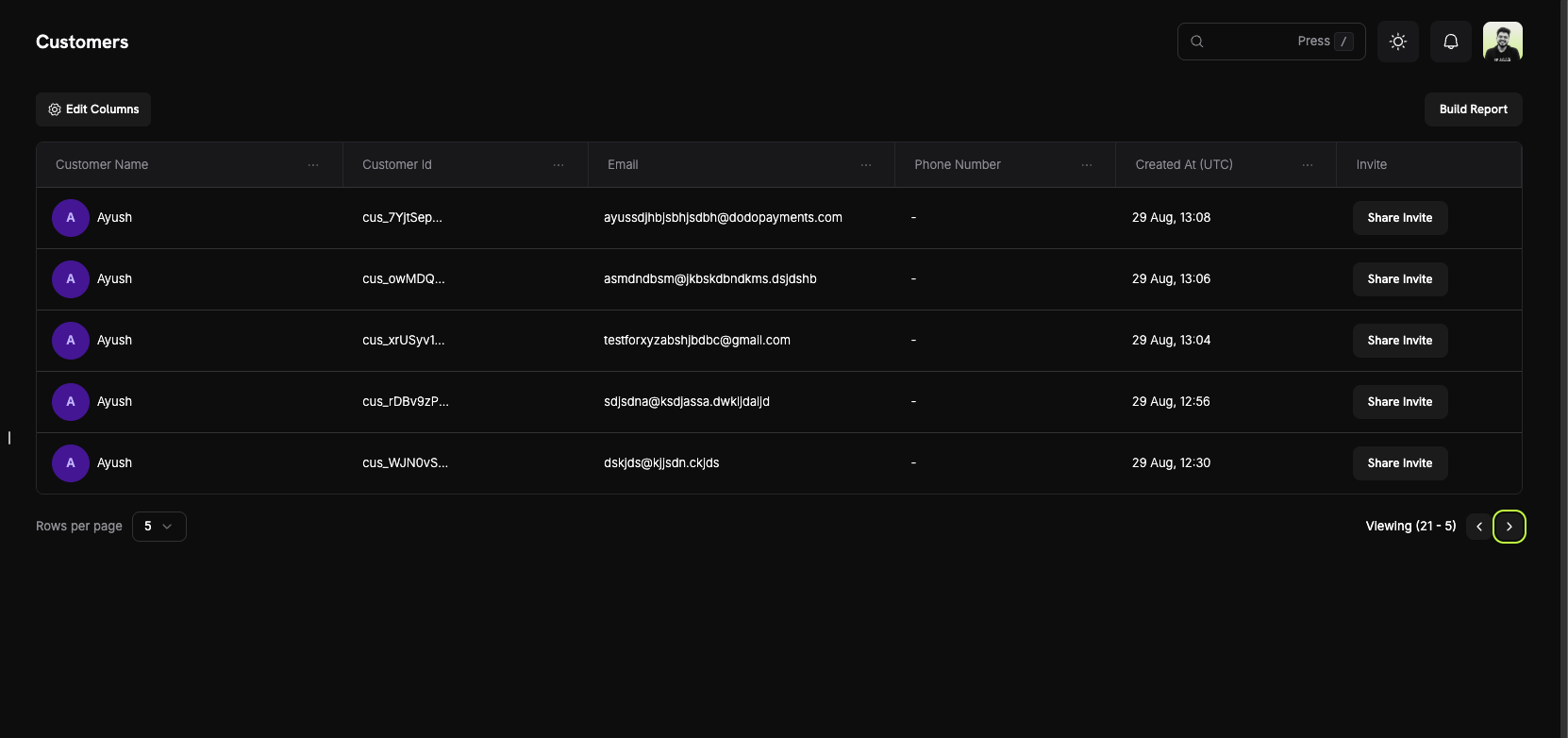
On the **Customers Page**, you can see a comprehensive overview of your entire customer base. The table displays all customers with the following information:
### Customer List Columns
* **Customer Name**: The full name of the customer with an avatar indicator.
* **Customer Id**: A unique identifier (e.g., `cus_5fpsWAa...`) for each customer.
* **Email**: The customer's email address for communication and portal access.
* **Phone Number**: The customer's phone number (if provided).
* **Created At (UTC)**: The date and time when the customer account was created.
* **Invite**: Quick action button to share Customer Portal invites.
### Page Features
* **Edit Columns**: Customize which columns are displayed in the customer table.
* **Build Report**: Generate custom reports based on your customer data.
* **Search**: Quickly find specific customers by name, email, or customer ID.
* **Pagination**: Navigate through your customer list with adjustable rows per page.
Use the "Edit Columns" feature to customize your view and show only the information most relevant to your workflow.
## Customer Details Page
Click on any customer to view their detailed information page, which includes:
## Customer Information
On the **Customers Page**, you can see a comprehensive overview of your entire customer base. The table displays all customers with the following information:
### Customer List Columns
* **Customer Name**: The full name of the customer with an avatar indicator.
* **Customer Id**: A unique identifier (e.g., `cus_5fpsWAa...`) for each customer.
* **Email**: The customer's email address for communication and portal access.
* **Phone Number**: The customer's phone number (if provided).
* **Created At (UTC)**: The date and time when the customer account was created.
* **Invite**: Quick action button to share Customer Portal invites.
### Page Features
* **Edit Columns**: Customize which columns are displayed in the customer table.
* **Build Report**: Generate custom reports based on your customer data.
* **Search**: Quickly find specific customers by name, email, or customer ID.
* **Pagination**: Navigate through your customer list with adjustable rows per page.
Use the "Edit Columns" feature to customize your view and show only the information most relevant to your workflow.
## Customer Details Page
Click on any customer to view their detailed information page, which includes:
 ### About Section
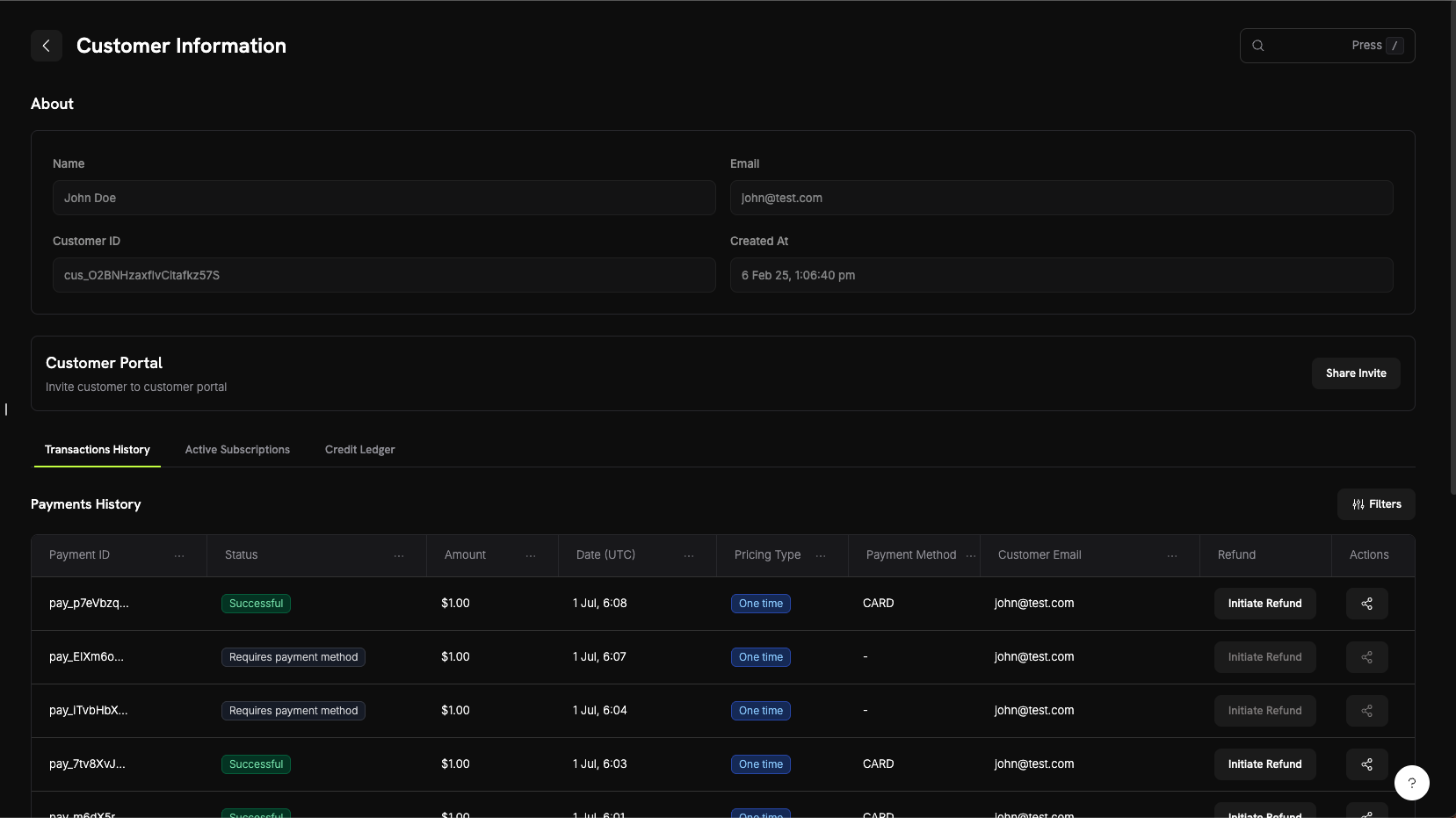
The About section displays core customer information:
* **Name**: Customer's full name
* **Email**: Customer's email address
* **Customer ID**: Unique identifier for API and tracking purposes
* **Created At**: Timestamp of when the customer account was created
### Customer Activity Tabs
The customer details page includes three tabs for viewing different aspects of customer activity:
View all payment transactions for this customer including:
* **Payment ID**: Unique transaction identifier
* **Status**: Payment status (Successful, Failed, Pending, Refunded)
* **Amount**: Transaction amount
* **Date (UTC)**: When the transaction occurred
* **Pricing Type**: Whether it's a one-time purchase or subscription
* **Payment Method**: Payment method used (Card, UPI, etc.)
* **Customer Email**: Email associated with the transaction
* **Refund**: Quick action to initiate refunds
* **Actions**: Additional options for managing the transaction
View all active subscriptions for this customer:
* Subscription plan details
* Billing cycle and next renewal date
* Subscription status
* Options to manage or cancel subscriptions
View the customer's wallet transaction ledger showing:
* All fund additions and deductions
* Current wallet balance in each currency (USD, INR)
* Transaction reasons and timestamps
* Detailed transaction history for reconciliation
View the customer's wallet credit ledger showing:
* All credit and debit transactions
* Current wallet balance in each currency
* Transaction reasons and timestamps
* Detailed transaction history for reconciliation
The Wallet Ledger tab provides complete transparency into customer wallet transactions, making it easy to track fund additions, deductions, and current monetary balances.
## Customer Portal
The Customer Portal is a secure, hosted self-service area where your customers can manage their subscriptions, view billing history, access license keys, and update their profile—without contacting support.
### Portal Capabilities
Customers can access the portal to:
* **View Billing History**: See all past transactions and download invoices.
* **Manage Subscriptions**: Cancel or view subscription details.
* **Retrieve License Keys**: Access all license keys tied to their purchases.
* **Update Profile**: Change name, email, or phone number.
Explore detailed documentation on portal features, access methods, and integration examples.
## Customer Wallets
Customer Wallets are prepaid monetary balance accounts for your customers. Each customer automatically receives a wallet that can hold real funds in multiple currencies (USD and INR), which can be applied to subscription invoices, used for refund balances, or funded with promotional bonuses.
### Key Features
* **Multi-Currency Support**: Track monetary balances in USD and INR separately.
* **Prepaid Balances**: Customers can hold funds that get applied to future invoices and subscription payments.
* **Transaction History**: View complete ledger of all fund additions and deductions.
* **API-First Design**: Programmatically add, deduct, and check wallet balances.
* **Credit-Based Billing**: Allow customers to purchase credits upfront and spend them on your services.
* **Transaction History**: View complete ledger of all credits and debits.
* **API-First Design**: Programmatically add, remove, and check wallet balances.
Explore detailed documentation, code examples, and best practices for managing customer wallet balances.
## API Management
Dodo Payments provides a comprehensive REST API for programmatic customer management. You can create, retrieve, update, and manage customers entirely through the API.
### Available API Endpoints
Create a new customer in your Dodo Payments account with their details.
Retrieve a paginated list of all customers associated with your account.
Get detailed information about a specific customer by their ID.
Update a customer's information such as name, email, or metadata.
Remove a saved payment method from a customer's account.
Generate a secure Customer Portal session link for a specific customer.
All API endpoints require authentication using your API key. Always use your secret key on the server-side and never expose it in client-side code.
### About Section
The About section displays core customer information:
* **Name**: Customer's full name
* **Email**: Customer's email address
* **Customer ID**: Unique identifier for API and tracking purposes
* **Created At**: Timestamp of when the customer account was created
### Customer Activity Tabs
The customer details page includes three tabs for viewing different aspects of customer activity:
View all payment transactions for this customer including:
* **Payment ID**: Unique transaction identifier
* **Status**: Payment status (Successful, Failed, Pending, Refunded)
* **Amount**: Transaction amount
* **Date (UTC)**: When the transaction occurred
* **Pricing Type**: Whether it's a one-time purchase or subscription
* **Payment Method**: Payment method used (Card, UPI, etc.)
* **Customer Email**: Email associated with the transaction
* **Refund**: Quick action to initiate refunds
* **Actions**: Additional options for managing the transaction
View all active subscriptions for this customer:
* Subscription plan details
* Billing cycle and next renewal date
* Subscription status
* Options to manage or cancel subscriptions
View the customer's wallet transaction ledger showing:
* All fund additions and deductions
* Current wallet balance in each currency (USD, INR)
* Transaction reasons and timestamps
* Detailed transaction history for reconciliation
View the customer's wallet credit ledger showing:
* All credit and debit transactions
* Current wallet balance in each currency
* Transaction reasons and timestamps
* Detailed transaction history for reconciliation
The Wallet Ledger tab provides complete transparency into customer wallet transactions, making it easy to track fund additions, deductions, and current monetary balances.
## Customer Portal
The Customer Portal is a secure, hosted self-service area where your customers can manage their subscriptions, view billing history, access license keys, and update their profile—without contacting support.
### Portal Capabilities
Customers can access the portal to:
* **View Billing History**: See all past transactions and download invoices.
* **Manage Subscriptions**: Cancel or view subscription details.
* **Retrieve License Keys**: Access all license keys tied to their purchases.
* **Update Profile**: Change name, email, or phone number.
Explore detailed documentation on portal features, access methods, and integration examples.
## Customer Wallets
Customer Wallets are prepaid monetary balance accounts for your customers. Each customer automatically receives a wallet that can hold real funds in multiple currencies (USD and INR), which can be applied to subscription invoices, used for refund balances, or funded with promotional bonuses.
### Key Features
* **Multi-Currency Support**: Track monetary balances in USD and INR separately.
* **Prepaid Balances**: Customers can hold funds that get applied to future invoices and subscription payments.
* **Transaction History**: View complete ledger of all fund additions and deductions.
* **API-First Design**: Programmatically add, deduct, and check wallet balances.
* **Credit-Based Billing**: Allow customers to purchase credits upfront and spend them on your services.
* **Transaction History**: View complete ledger of all credits and debits.
* **API-First Design**: Programmatically add, remove, and check wallet balances.
Explore detailed documentation, code examples, and best practices for managing customer wallet balances.
## API Management
Dodo Payments provides a comprehensive REST API for programmatic customer management. You can create, retrieve, update, and manage customers entirely through the API.
### Available API Endpoints
Create a new customer in your Dodo Payments account with their details.
Retrieve a paginated list of all customers associated with your account.
Get detailed information about a specific customer by their ID.
Update a customer's information such as name, email, or metadata.
Remove a saved payment method from a customer's account.
Generate a secure Customer Portal session link for a specific customer.
All API endpoints require authentication using your API key. Always use your secret key on the server-side and never expose it in client-side code.