> ## Documentation Index
> Fetch the complete documentation index at: https://docs.dodopayments.com/llms.txt
> Use this file to discover all available pages before exploring further.
# Customer Wallets
> Manage prepaid monetary balances for your customers. Fund wallets, apply balances to subscription invoices, handle refunds as wallet funds, and track transaction history.
Check customer monetary balances across currencies.
Add or deduct funds from customer wallets.
View complete transaction history with pagination.
## What are Customer Wallets?
Customer wallets are monetary balance accounts that hold real funds for your users. Every customer gets one automatically when you create their account. You can use these wallets to:
* **Store prepaid funds** for future subscription payments
* **Handle refunds** as wallet balance instead of card refunds
* **Issue promotional balances** like welcome bonuses or loyalty rewards
* **Apply wallet funds to invoices** automatically during billing
* **Track monetary transactions** with a detailed ledger history
Every customer automatically gets a wallet when you create their account. Wallets support USD and INR currencies with separate monetary balances for each.
**Customer Wallets ≠ Credit-Based Billing**
Customer Wallets hold **real monetary balances** (USD, INR) that can be applied to invoices and subscription payments.
If you're looking to track virtual usage units (API calls, tokens, compute hours), see [Credit-Based Billing](/features/credit-based-billing) instead.
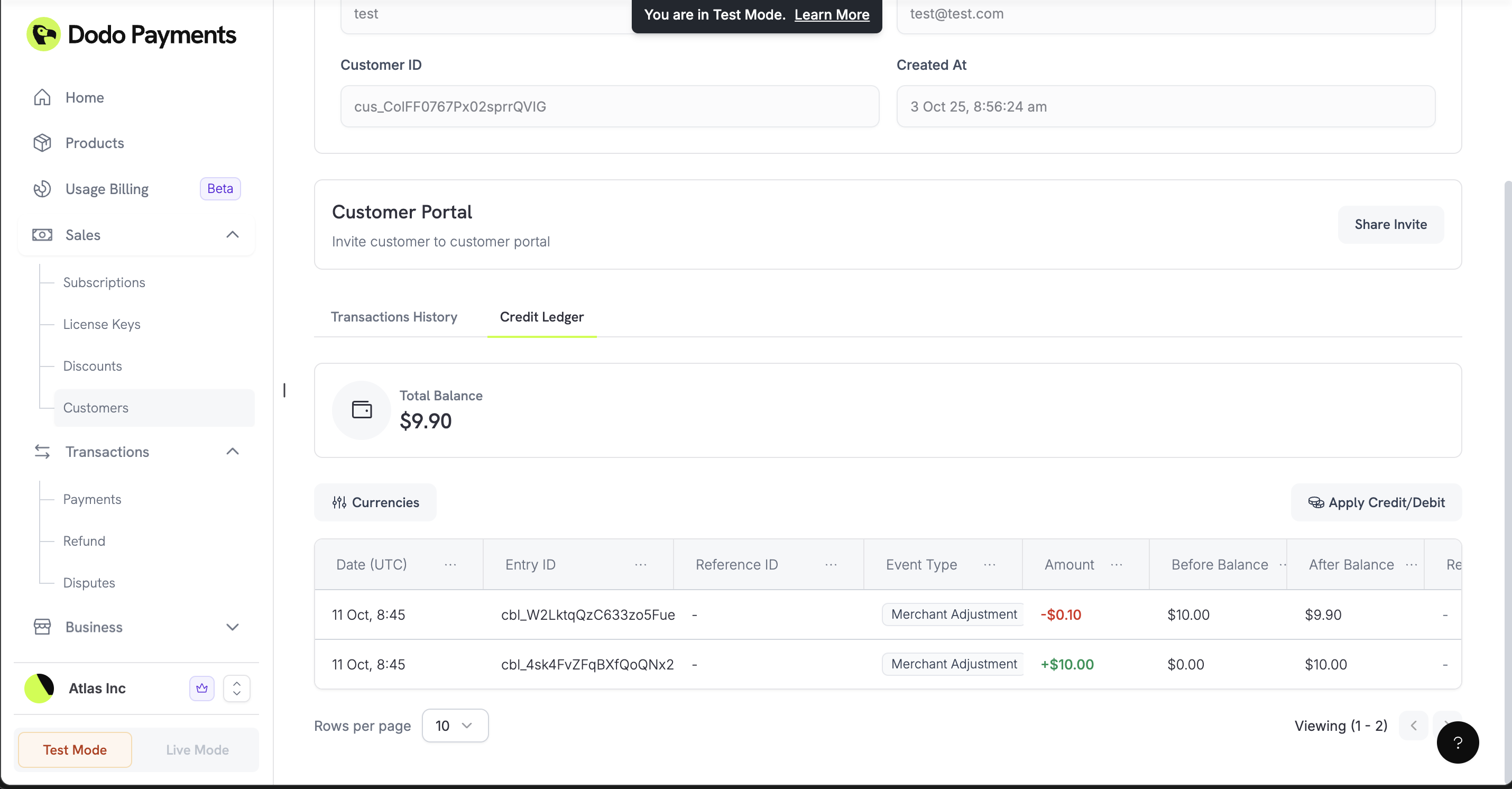 ## How It Works
Customer wallets hold funds that customers can apply to their purchases. When a customer has an invoice or a recurring subscription charge, their wallet balance is checked first. Any available funds are automatically applied to the invoice before charging their primary payment method.
### Automatic Setup
When you create a new customer, Dodo Payments automatically creates a wallet with a zero balance. It's ready to receive funds immediately through our API.
### Multi-Currency Support
Each wallet can hold balances in different currencies:
Balance in US Dollars (stored in cents)
Balance in Indian Rupees (stored in paise)
Currently, only **USD** and **INR** balances are available. More currencies coming soon.
## Working with Wallets
### Check Customer Balances
See how much funds a customer has across all currencies. This is useful for verifying available balance before processing a purchase or showing the balance in your application UI.
Check a customer’s wallet monetary balances in all supported currencies.
### Add or Deduct Funds
Fund customer wallets (like welcome bonuses or refund balances) or deduct funds (like subscription charges). You can provide reasons for each transaction to maintain a clear audit trail.
The `entry_type` field uses `'credit'` to add funds to the wallet and `'debit'` to subtract funds from the wallet.
Add or deduct funds from a customer’s wallet.
### View Transaction History
See every credit and debit transaction for a customer. This detailed ledger helps you reconcile accounts and provides transparency for your customers.
View every monetary transaction for a customer.
## Real-World Examples
### Refund to Wallet
When a customer requests a refund, you can add the amount to their wallet balance instead of performing a traditional card refund. This keeps the funds within your ecosystem for future purchases.
```javascript theme={null}
async function refundToWallet(customerId, refundAmount, originalPaymentId) {
await client.customers.wallets.ledgerEntries.create(customerId, {
amount: refundAmount, // Amount in cents
currency: 'USD',
entry_type: 'credit',
reason: `Refund for payment ${originalPaymentId}`,
idempotency_key: `refund_${originalPaymentId}`
});
}
```
### Welcome Bonus / Promotional Balance
Give new customers a monetary welcome bonus to encourage their first purchase.
```javascript theme={null}
async function addWelcomeBonus(customerId) {
await client.customers.wallets.ledgerEntries.create(customerId, {
amount: 1000, // $10.00 promotional balance
currency: 'USD',
entry_type: 'credit',
reason: 'Welcome bonus - $10 promotional balance',
idempotency_key: `welcome_${customerId}`
});
}
```
### Subscription Payment from Wallet
Deduct funds from a wallet to cover a subscription charge or a manual purchase.
```javascript theme={null}
async function deductForPurchase(customerId, purchaseAmount, purchaseId) {
try {
await client.customers.wallets.ledgerEntries.create(customerId, {
amount: purchaseAmount,
currency: 'USD',
entry_type: 'debit',
reason: `Subscription charge - monthly billing`,
idempotency_key: `charge_${purchaseId}`
});
} catch (error) {
if (error.status === 400) {
console.log('Insufficient wallet balance');
}
}
}
```
### Prepaid Billing System
Allow customers to fund their accounts upfront and draw down from that balance over time.
Add funds to the customer's wallet when they make a deposit.
```javascript theme={null}
await client.customers.wallets.ledgerEntries.create(customerId, {
amount: 5000, // $50.00 deposit
currency: 'USD',
entry_type: 'credit',
reason: 'Account funding - prepaid deposit',
idempotency_key: `deposit_${paymentId}`
});
```
Deduct from the balance as the customer uses your services or renews subscriptions.
```javascript theme={null}
await client.customers.wallets.ledgerEntries.create(customerId, {
amount: 1500, // $15.00 charge
currency: 'USD',
entry_type: 'debit',
reason: 'Service purchase - monthly subscription',
idempotency_key: `purchase_${purchaseId}`
});
```
Check if customers are running low on funds to prompt a top-up.
```javascript theme={null}
const wallets = await client.customers.wallets.list(customerId);
const usdWallet = wallets.items.find(w => w.currency === 'USD');
const balance = usdWallet.balance;
if (balance < 1000) { // Less than $10.00
// Send low balance notification
await sendLowBalanceNotification(customerId, balance);
}
```
### Multi-Currency Support
Manage separate monetary balances for customers in different regions.
Manage USD funds for US-based customers.
```javascript theme={null}
await client.customers.wallets.ledgerEntries.create(customerId, {
amount: 20000, // $200.00 in cents
currency: 'USD',
entry_type: 'credit',
reason: 'USD account funding',
idempotency_key: `usd_deposit_${paymentId}`
});
```
Manage INR funds for Indian customers.
```javascript theme={null}
await client.customers.wallets.ledgerEntries.create(customerId, {
amount: 1500000, // Rs 15,000 in paise
currency: 'INR',
entry_type: 'credit',
reason: 'INR account funding',
idempotency_key: `inr_deposit_${paymentId}`
});
```
## Best Practices
### Prevent Duplicate Transactions
Use idempotency keys to ensure you don't accidentally add or deduct funds twice for the same event.
```javascript theme={null}
async function addFundsSafely(customerId, amount, reason) {
const idempotencyKey = `${reason}_${customerId}_${Date.now()}`;
try {
const result = await client.customers.wallets.ledgerEntries.create(customerId, {
amount: amount,
currency: 'USD',
entry_type: 'credit',
reason: reason,
idempotency_key: idempotencyKey
});
return { success: true, wallet: result };
} catch (error) {
if (error.status === 409) {
// Transaction already processed
return { success: true, wallet: null, duplicate: true };
}
throw error;
}
}
```
### Check Balances Before Charging
Verify customers have sufficient funds before attempting to process large transactions from the wallet.
```javascript theme={null}
async function checkBalanceBeforeOperation(customerId, requiredAmount) {
const wallets = await client.customers.wallets.list(customerId);
const usdWallet = wallets.items.find(w => w.currency === 'USD');
if (!usdWallet || usdWallet.balance < requiredAmount) {
throw new Error('Insufficient funds for this operation');
}
return usdWallet.balance;
}
```
## What's Coming Next
These features are planned for future releases:
* **Balance Expiration**: Set funds to expire after a certain period
* **Better Analytics**: Detailed spending reports and balance trends
* **More Webhooks**: Real-time notifications for balance changes and low balance alerts
Start with basic funding and deduction operations, then integrate more complex automated billing workflows as your business grows.
## How It Works
Customer wallets hold funds that customers can apply to their purchases. When a customer has an invoice or a recurring subscription charge, their wallet balance is checked first. Any available funds are automatically applied to the invoice before charging their primary payment method.
### Automatic Setup
When you create a new customer, Dodo Payments automatically creates a wallet with a zero balance. It's ready to receive funds immediately through our API.
### Multi-Currency Support
Each wallet can hold balances in different currencies:
Balance in US Dollars (stored in cents)
Balance in Indian Rupees (stored in paise)
Currently, only **USD** and **INR** balances are available. More currencies coming soon.
## Working with Wallets
### Check Customer Balances
See how much funds a customer has across all currencies. This is useful for verifying available balance before processing a purchase or showing the balance in your application UI.
Check a customer’s wallet monetary balances in all supported currencies.
### Add or Deduct Funds
Fund customer wallets (like welcome bonuses or refund balances) or deduct funds (like subscription charges). You can provide reasons for each transaction to maintain a clear audit trail.
The `entry_type` field uses `'credit'` to add funds to the wallet and `'debit'` to subtract funds from the wallet.
Add or deduct funds from a customer’s wallet.
### View Transaction History
See every credit and debit transaction for a customer. This detailed ledger helps you reconcile accounts and provides transparency for your customers.
View every monetary transaction for a customer.
## Real-World Examples
### Refund to Wallet
When a customer requests a refund, you can add the amount to their wallet balance instead of performing a traditional card refund. This keeps the funds within your ecosystem for future purchases.
```javascript theme={null}
async function refundToWallet(customerId, refundAmount, originalPaymentId) {
await client.customers.wallets.ledgerEntries.create(customerId, {
amount: refundAmount, // Amount in cents
currency: 'USD',
entry_type: 'credit',
reason: `Refund for payment ${originalPaymentId}`,
idempotency_key: `refund_${originalPaymentId}`
});
}
```
### Welcome Bonus / Promotional Balance
Give new customers a monetary welcome bonus to encourage their first purchase.
```javascript theme={null}
async function addWelcomeBonus(customerId) {
await client.customers.wallets.ledgerEntries.create(customerId, {
amount: 1000, // $10.00 promotional balance
currency: 'USD',
entry_type: 'credit',
reason: 'Welcome bonus - $10 promotional balance',
idempotency_key: `welcome_${customerId}`
});
}
```
### Subscription Payment from Wallet
Deduct funds from a wallet to cover a subscription charge or a manual purchase.
```javascript theme={null}
async function deductForPurchase(customerId, purchaseAmount, purchaseId) {
try {
await client.customers.wallets.ledgerEntries.create(customerId, {
amount: purchaseAmount,
currency: 'USD',
entry_type: 'debit',
reason: `Subscription charge - monthly billing`,
idempotency_key: `charge_${purchaseId}`
});
} catch (error) {
if (error.status === 400) {
console.log('Insufficient wallet balance');
}
}
}
```
### Prepaid Billing System
Allow customers to fund their accounts upfront and draw down from that balance over time.
Add funds to the customer's wallet when they make a deposit.
```javascript theme={null}
await client.customers.wallets.ledgerEntries.create(customerId, {
amount: 5000, // $50.00 deposit
currency: 'USD',
entry_type: 'credit',
reason: 'Account funding - prepaid deposit',
idempotency_key: `deposit_${paymentId}`
});
```
Deduct from the balance as the customer uses your services or renews subscriptions.
```javascript theme={null}
await client.customers.wallets.ledgerEntries.create(customerId, {
amount: 1500, // $15.00 charge
currency: 'USD',
entry_type: 'debit',
reason: 'Service purchase - monthly subscription',
idempotency_key: `purchase_${purchaseId}`
});
```
Check if customers are running low on funds to prompt a top-up.
```javascript theme={null}
const wallets = await client.customers.wallets.list(customerId);
const usdWallet = wallets.items.find(w => w.currency === 'USD');
const balance = usdWallet.balance;
if (balance < 1000) { // Less than $10.00
// Send low balance notification
await sendLowBalanceNotification(customerId, balance);
}
```
### Multi-Currency Support
Manage separate monetary balances for customers in different regions.
Manage USD funds for US-based customers.
```javascript theme={null}
await client.customers.wallets.ledgerEntries.create(customerId, {
amount: 20000, // $200.00 in cents
currency: 'USD',
entry_type: 'credit',
reason: 'USD account funding',
idempotency_key: `usd_deposit_${paymentId}`
});
```
Manage INR funds for Indian customers.
```javascript theme={null}
await client.customers.wallets.ledgerEntries.create(customerId, {
amount: 1500000, // Rs 15,000 in paise
currency: 'INR',
entry_type: 'credit',
reason: 'INR account funding',
idempotency_key: `inr_deposit_${paymentId}`
});
```
## Best Practices
### Prevent Duplicate Transactions
Use idempotency keys to ensure you don't accidentally add or deduct funds twice for the same event.
```javascript theme={null}
async function addFundsSafely(customerId, amount, reason) {
const idempotencyKey = `${reason}_${customerId}_${Date.now()}`;
try {
const result = await client.customers.wallets.ledgerEntries.create(customerId, {
amount: amount,
currency: 'USD',
entry_type: 'credit',
reason: reason,
idempotency_key: idempotencyKey
});
return { success: true, wallet: result };
} catch (error) {
if (error.status === 409) {
// Transaction already processed
return { success: true, wallet: null, duplicate: true };
}
throw error;
}
}
```
### Check Balances Before Charging
Verify customers have sufficient funds before attempting to process large transactions from the wallet.
```javascript theme={null}
async function checkBalanceBeforeOperation(customerId, requiredAmount) {
const wallets = await client.customers.wallets.list(customerId);
const usdWallet = wallets.items.find(w => w.currency === 'USD');
if (!usdWallet || usdWallet.balance < requiredAmount) {
throw new Error('Insufficient funds for this operation');
}
return usdWallet.balance;
}
```
## What's Coming Next
These features are planned for future releases:
* **Balance Expiration**: Set funds to expire after a certain period
* **Better Analytics**: Detailed spending reports and balance trends
* **More Webhooks**: Real-time notifications for balance changes and low balance alerts
Start with basic funding and deduction operations, then integrate more complex automated billing workflows as your business grows.