> ## Documentation Index
> Fetch the complete documentation index at: https://docs.dodopayments.com/llms.txt
> Use this file to discover all available pages before exploring further.
# B2B Payments
> The B2B Payments feature ensures that merchants processing B2B transactions have their customer’s Tax IDs verified during checkout, ensuring accurate tax application based on the customer's country and applicable regulations. This validation helps determine whether input tax collection applies or if the transaction falls under a reverse charge mechanism.
## **Tax ID Validation for B2B Transactions**
* If a **valid Tax ID** is provided during checkout, the invoice will include:
* The **customer’s Tax ID**.
* Tax deductions will be determined based on the applicable regulations for the customer’s country.
* The invoice will include **Dodo Payments’ tax details**, along with the tax applied to the transaction.
## Collecting a Business Name for B2B Invoices
For B2B purchases, you can have the customer's **legal business name** rendered on the invoice instead of the buyer's personal name. This is collected alongside the Tax ID via the `customer_business_name` field.
When the customer selects **Purchasing as a business** at checkout, they're prompted for both a **Business Name** and a **Tax ID Number**.
The Tax ID is validated live as the customer types. For EU member states, Great Britain, and Australia, checkout performs both format/checksum validation **and** a live registry lookup (VIES, HMRC, and ABR respectively) and autofills the registered legal business name when a match is found. For all other countries, only format/checksum validation is performed.
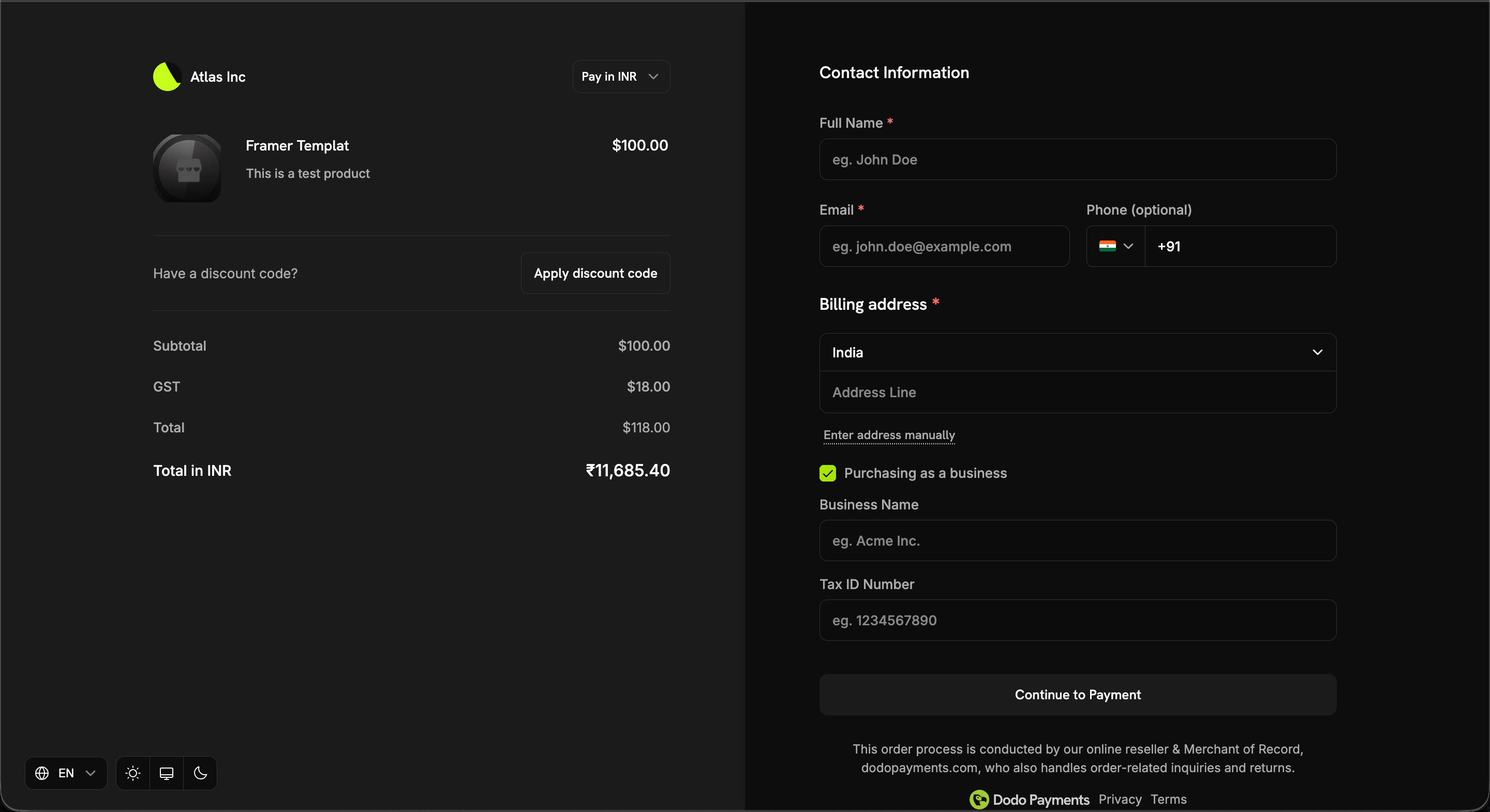 The business name appears on the invoice only when **all three** conditions are met:
1. The transaction is B2B (`b2b = true`)
2. A `tax_id` is present
3. A non-empty `customer_business_name` is supplied
If any condition is not met, the customer's personal name is used instead.
### Setting it at checkout
Pass `customer_business_name` directly, and/or enable `allow_customer_editing_business_name` to let the customer enter or edit it on the checkout page next to their Tax ID:
```typescript theme={null}
const session = await client.checkoutSessions.create({
product_cart: [{ product_id: 'prod_abc', quantity: 1 }],
customer: { email: 'buyer@acme.com' },
tax_id: 'GB123456789',
customer_business_name: 'Acme Corp Ltd',
feature_flags: {
allow_tax_id: true,
allow_customer_editing_business_name: true // optional: let the customer edit it
},
return_url: 'https://yoursite.com/return'
});
```
| Surface | Field | Notes |
| ----------------- | ------------------------------------------------------------------------------ | -------------------------------------------- |
| Checkout Sessions | `customer_business_name`, `feature_flags.allow_customer_editing_business_name` | Max 250 chars; flag defaults to `false` |
| Payments | `customer_business_name` | Max 250 chars |
| Subscriptions | `customer_business_name` | Set or clear via `PATCH /subscriptions/{id}` |
`customer_business_name` cannot be set without a `tax_id` — the request is rejected. Clearing the `tax_id` also clears the business name, since the two are coupled on the invoice. Surrounding whitespace is trimmed, and whitespace-only values are treated as an explicit clear.
## **Tax Treatment for B2C Transactions**
* Transactions where a valid Tax ID is **not provided** will be treated as **B2C transactions**, and tax will be deducted as per the applicable tax regulations in the customer’s country.
* The invoice will include **Dodo Payments’ tax details**, along with the tax applied to the transaction.
## Reverse Charge Mechanism
Generally, the supplier of goods or services is liable to pay VAT/Service Tax/GST.
However, in specified cases like imports and other notified supplies, the liability is on the recipient (customer) under the reverse charge mechanism. Reverse Charge means the liability to pay tax is on the recipient of supply of goods or services instead of the supplier of such goods or services in respect of notified categories of supply.
## **Reverse Charge Applicability**
* In certain cases, where applicable by law, tax will **not be deducted** at checkout and the transaction will be subject to a **reverse charge mechanism**.
* The invoice will clearly indicate when a reverse charge applies, as per regulatory requirements.
The business name appears on the invoice only when **all three** conditions are met:
1. The transaction is B2B (`b2b = true`)
2. A `tax_id` is present
3. A non-empty `customer_business_name` is supplied
If any condition is not met, the customer's personal name is used instead.
### Setting it at checkout
Pass `customer_business_name` directly, and/or enable `allow_customer_editing_business_name` to let the customer enter or edit it on the checkout page next to their Tax ID:
```typescript theme={null}
const session = await client.checkoutSessions.create({
product_cart: [{ product_id: 'prod_abc', quantity: 1 }],
customer: { email: 'buyer@acme.com' },
tax_id: 'GB123456789',
customer_business_name: 'Acme Corp Ltd',
feature_flags: {
allow_tax_id: true,
allow_customer_editing_business_name: true // optional: let the customer edit it
},
return_url: 'https://yoursite.com/return'
});
```
| Surface | Field | Notes |
| ----------------- | ------------------------------------------------------------------------------ | -------------------------------------------- |
| Checkout Sessions | `customer_business_name`, `feature_flags.allow_customer_editing_business_name` | Max 250 chars; flag defaults to `false` |
| Payments | `customer_business_name` | Max 250 chars |
| Subscriptions | `customer_business_name` | Set or clear via `PATCH /subscriptions/{id}` |
`customer_business_name` cannot be set without a `tax_id` — the request is rejected. Clearing the `tax_id` also clears the business name, since the two are coupled on the invoice. Surrounding whitespace is trimmed, and whitespace-only values are treated as an explicit clear.
## **Tax Treatment for B2C Transactions**
* Transactions where a valid Tax ID is **not provided** will be treated as **B2C transactions**, and tax will be deducted as per the applicable tax regulations in the customer’s country.
* The invoice will include **Dodo Payments’ tax details**, along with the tax applied to the transaction.
## Reverse Charge Mechanism
Generally, the supplier of goods or services is liable to pay VAT/Service Tax/GST.
However, in specified cases like imports and other notified supplies, the liability is on the recipient (customer) under the reverse charge mechanism. Reverse Charge means the liability to pay tax is on the recipient of supply of goods or services instead of the supplier of such goods or services in respect of notified categories of supply.
## **Reverse Charge Applicability**
* In certain cases, where applicable by law, tax will **not be deducted** at checkout and the transaction will be subject to a **reverse charge mechanism**.
* The invoice will clearly indicate when a reverse charge applies, as per regulatory requirements.