> ## Documentation Index
> Fetch the complete documentation index at: https://docs.dodopayments.com/llms.txt
> Use this file to discover all available pages before exploring further.
# Add-ons for Subscriptions
> Enhance your subscription products with flexible add-ons for seat-based billing, feature upgrades, and creative pricing models
Add-ons are additional products that can be attached to your main subscription products, enabling flexible pricing models and enhanced customer experiences. Whether you need seat-based billing, feature upgrades, or custom pricing structures, add-ons give you the power to create sophisticated subscription offerings.
Create add-ons for additional team seats, user licenses, or capacity upgrades with per-seat pricing.
Extend usage limits, API calls, or data allowances with flexible add-on pricing.
## What Are Add-ons?
Add-ons are supplementary products that customers can purchase alongside their main subscription. They're perfect for:
* **Seat-based billing**: Additional team members, user licenses, or concurrent users
* **Feature upgrades**: Premium features, advanced analytics, or priority support
* **Usage extensions**: Extra storage, API calls, or bandwidth allowances
* **Service add-ons**: Professional services, training, or consultation hours
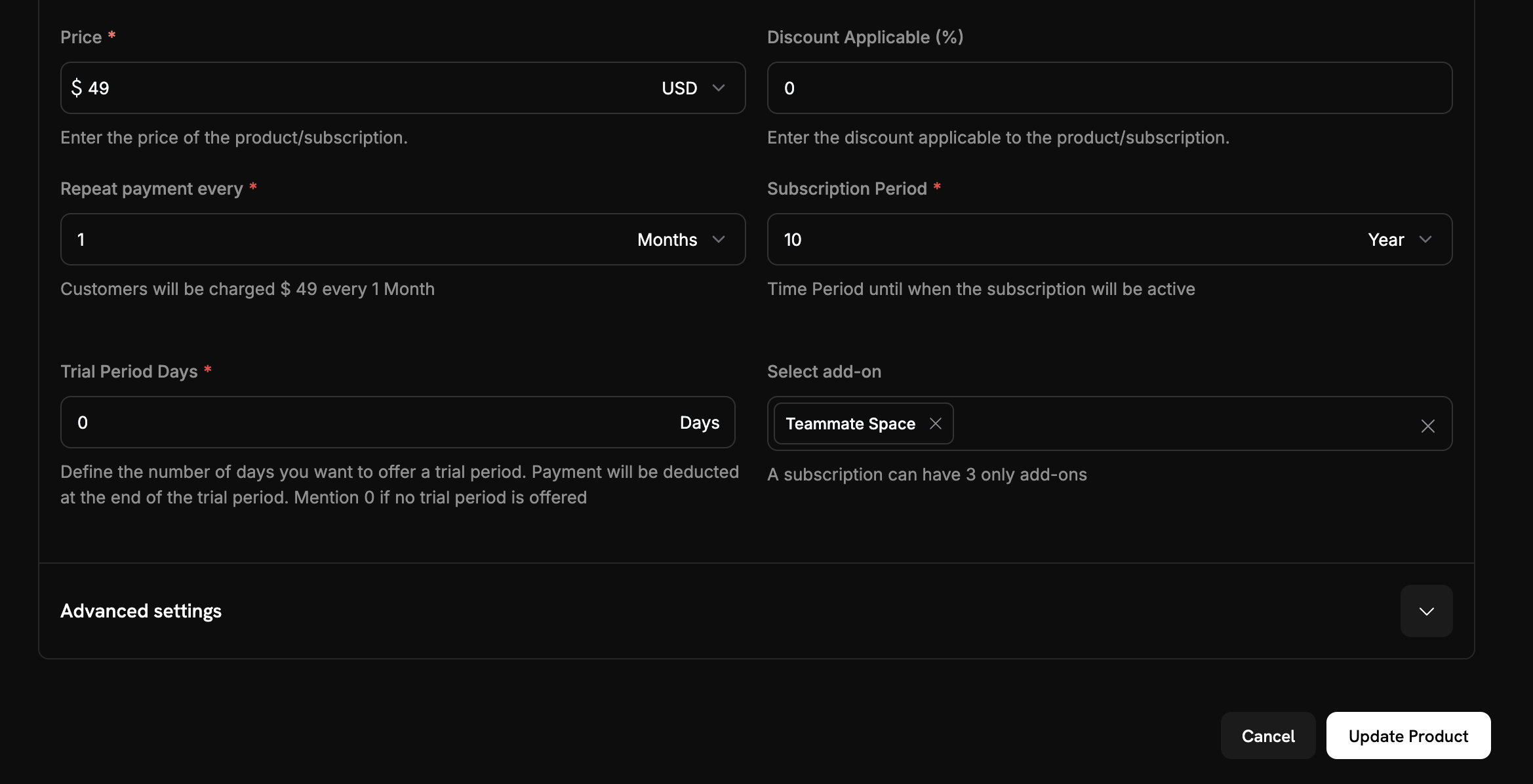 ## Key Benefits
* **Flexible Pricing Models**: Offer base plans with optional add-ons to create sophisticated pricing structures. You can address diverse customer segments with upgrades that grow as your customers' needs change.
* **Revenue Optimization**: Boost your average revenue per user (ARPU) by presenting relevant add-ons. This enables natural upsell opportunities as customers add features over time.
* **Simplified Management**: Manage all pricing components from one dashboard. Add-ons are automatically included in both checkout sessions and subscription management.
* **Customer Choice**: Allow customers to customize their subscriptions by selecting only the add-ons they need, which enhances satisfaction and reduces churn.
## Creating Add-ons
Add-ons are created as separate products in your Dodo Payments dashboard and then attached to your main subscription products. This separation allows you to:
* Reuse add-ons across multiple subscription products
* Manage pricing independently
* Track add-on performance separately
* Update add-ons without affecting base subscriptions
## Key Benefits
* **Flexible Pricing Models**: Offer base plans with optional add-ons to create sophisticated pricing structures. You can address diverse customer segments with upgrades that grow as your customers' needs change.
* **Revenue Optimization**: Boost your average revenue per user (ARPU) by presenting relevant add-ons. This enables natural upsell opportunities as customers add features over time.
* **Simplified Management**: Manage all pricing components from one dashboard. Add-ons are automatically included in both checkout sessions and subscription management.
* **Customer Choice**: Allow customers to customize their subscriptions by selecting only the add-ons they need, which enhances satisfaction and reduces churn.
## Creating Add-ons
Add-ons are created as separate products in your Dodo Payments dashboard and then attached to your main subscription products. This separation allows you to:
* Reuse add-ons across multiple subscription products
* Manage pricing independently
* Track add-on performance separately
* Update add-ons without affecting base subscriptions
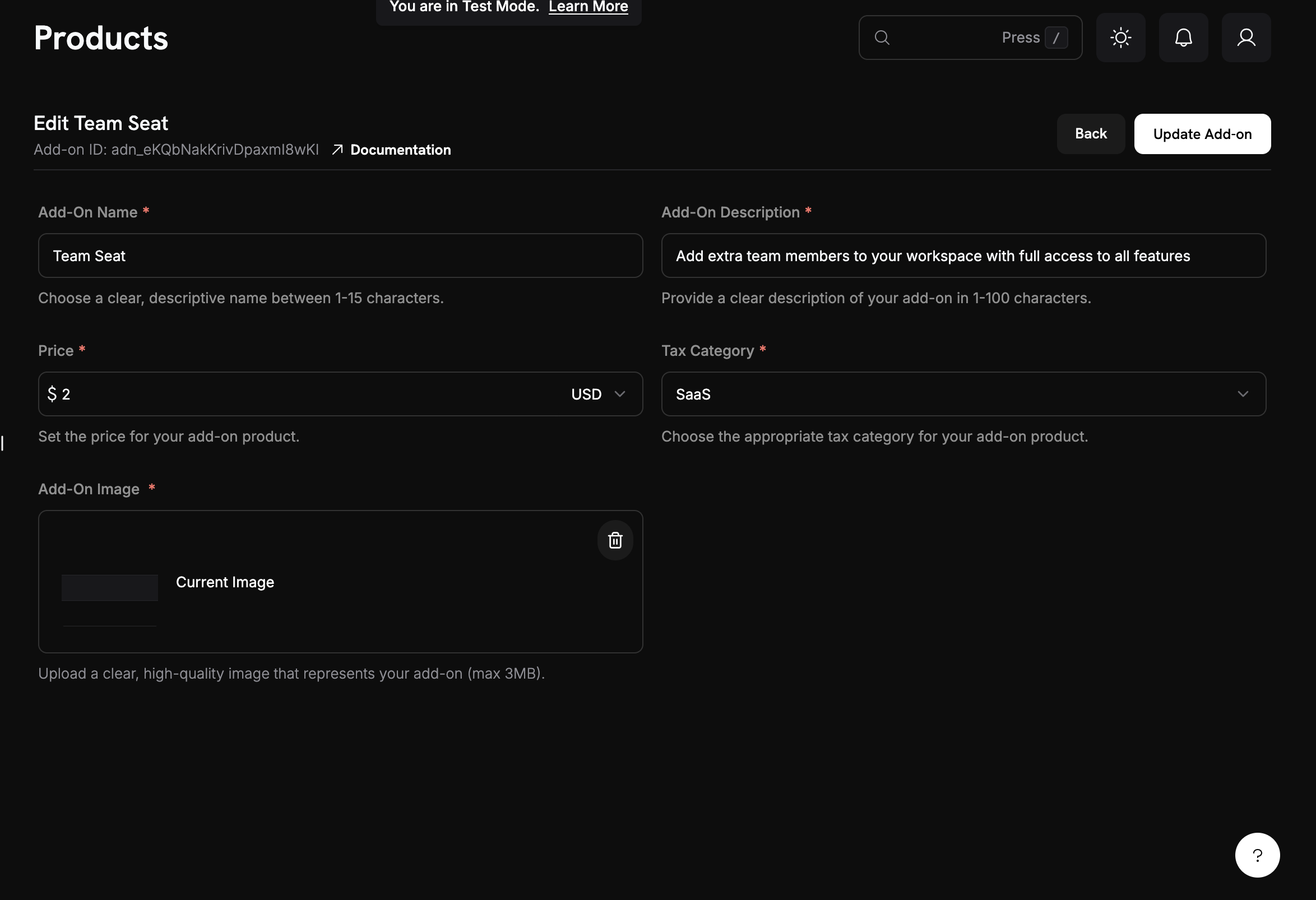 ### Add-on Configuration
When creating add-ons, you can configure:
* **Pricing**: Set one-time or recurring pricing for the add-on
* **Billing cycle**: Must match your subscription's billing cycle
* **Quantity limits**: Set minimum and maximum quantities per customer
* **Availability**: Control which subscription products can use the add-on
* **Tax settings**: Configure appropriate tax categories
### Getting Started
Ready to implement add-ons in your subscription business? Here's how to get started:
Identify the additional features, services, or capacity that would benefit your customers as add-ons.
Consider:
* What do customers frequently request?
* What features could be monetized separately?
* What would create natural upgrade paths?
Use the Dodo Payments dashboard or API to create your first add-on product.
Follow our step-by-step guide to create add-ons in the dashboard.
Connect your add-ons to the appropriate subscription products where they should be available.
Create test checkout sessions with different add-on combinations to ensure everything works correctly.
Track add-on adoption rates and revenue impact to optimize your pricing strategy.
## API Management
Dodo Payments provides a comprehensive API for managing add-ons programmatically:
Use the `POST /addons` endpoint to create new add-ons with custom pricing, descriptions, and configuration options.
View the complete API documentation for creating add-ons.
Modify existing add-ons using the `PATCH /addons/{id}` endpoint to update pricing, descriptions, or availability.
Learn how to update add-on details programmatically.
Use `GET /addons` to list all add-ons or `GET /addons/{id}` to retrieve specific add-on details.
Access the complete listing and retrieval API documentation.
Update add-on images using the `PUT /addons/{id}/images` endpoint for better product presentation.
Learn how to manage add-on images via API.
## Common Use Cases
* **Seat-Based Billing**: Additional team members, user licenses, or concurrent users
* **Feature Upgrades**: Premium features, advanced analytics, or priority support
* **Usage Extensions**: Extra storage, API calls, or bandwidth allowances
* **Service Add-ons**: Professional services, training, or consultation hours
## Integration Examples
### Checkout Sessions with Add-ons
When creating checkout sessions, you can include add-ons with custom quantities:
```typescript theme={null}
const session = await client.checkoutSessions.create({
product_cart: [
{
product_id: 'your_subscription_id',
quantity: 1,
addons: [
{
addon_id: 'your_addon_id',
quantity: 3 // 3 additional seats
}
]
}
],
// ... other checkout options
});
```
To let customers add or remove add-ons themselves on the checkout page, set the [`allow_editing_addons`](/developer-resources/checkout-session#optional-fields) feature flag to `true` when creating the session. It defaults to `false` and applies only to subscription products.
```typescript theme={null}
const session = await client.checkoutSessions.create({
product_cart: [{ product_id: 'your_subscription_id', quantity: 1 }],
feature_flags: {
allow_editing_addons: true // customers can edit add-ons at checkout
},
});
```
### Plan Changes with Add-ons
Modify existing subscriptions to add, remove, or update add-ons:
```typescript theme={null}
// Add add-ons to existing subscription
await client.subscriptions.changePlan('sub_123', {
product_id: 'prod_new',
quantity: 1,
proration_billing_mode: 'difference_immediately',
addons: [
{ addon_id: 'addon_123', quantity: 2 }
]
});
// Remove all existing add-ons
await client.subscriptions.changePlan('sub_123', {
product_id: 'prod_new',
quantity: 1,
proration_billing_mode: 'difference_immediately',
addons: [] // Empty array removes all existing add-ons
});
```
### Dynamic Pricing
Calculate total costs dynamically based on add-on selections:
```typescript theme={null}
function calculateTotalCost(basePrice: number, addons: AddonSelection[]) {
const addonTotal = addons.reduce((sum, addon) =>
sum + (addon.price * addon.quantity), 0
);
return basePrice + addonTotal;
}
```
## Best Practices
* **Start simple**: Launch with 2-3 core add-ons and expand options based on customer feedback and usage.
* **Maintain pricing clarity**: Clearly communicate add-on pricing and value, so customers understand what they're getting for the extra cost.
* **Test thoroughly**: Validate add-on combinations to ensure pricing calculations remain accurate and checkout flows function smoothly.
### Design Considerations
* **Clear Value Proposition**: Each add-on should have a clear benefit that customers can easily understand
* **Logical Grouping**: Group related add-ons together in your checkout flow
* **Flexible Quantities**: Allow customers to adjust quantities of add-ons as needed
* **Transparent Pricing**: Show total costs clearly throughout the checkout process
Add-ons are a powerful way to create flexible, scalable pricing models that grow with your customers. Start with simple use cases and expand as you learn what works best for your business and customers.
### Add-on Configuration
When creating add-ons, you can configure:
* **Pricing**: Set one-time or recurring pricing for the add-on
* **Billing cycle**: Must match your subscription's billing cycle
* **Quantity limits**: Set minimum and maximum quantities per customer
* **Availability**: Control which subscription products can use the add-on
* **Tax settings**: Configure appropriate tax categories
### Getting Started
Ready to implement add-ons in your subscription business? Here's how to get started:
Identify the additional features, services, or capacity that would benefit your customers as add-ons.
Consider:
* What do customers frequently request?
* What features could be monetized separately?
* What would create natural upgrade paths?
Use the Dodo Payments dashboard or API to create your first add-on product.
Follow our step-by-step guide to create add-ons in the dashboard.
Connect your add-ons to the appropriate subscription products where they should be available.
Create test checkout sessions with different add-on combinations to ensure everything works correctly.
Track add-on adoption rates and revenue impact to optimize your pricing strategy.
## API Management
Dodo Payments provides a comprehensive API for managing add-ons programmatically:
Use the `POST /addons` endpoint to create new add-ons with custom pricing, descriptions, and configuration options.
View the complete API documentation for creating add-ons.
Modify existing add-ons using the `PATCH /addons/{id}` endpoint to update pricing, descriptions, or availability.
Learn how to update add-on details programmatically.
Use `GET /addons` to list all add-ons or `GET /addons/{id}` to retrieve specific add-on details.
Access the complete listing and retrieval API documentation.
Update add-on images using the `PUT /addons/{id}/images` endpoint for better product presentation.
Learn how to manage add-on images via API.
## Common Use Cases
* **Seat-Based Billing**: Additional team members, user licenses, or concurrent users
* **Feature Upgrades**: Premium features, advanced analytics, or priority support
* **Usage Extensions**: Extra storage, API calls, or bandwidth allowances
* **Service Add-ons**: Professional services, training, or consultation hours
## Integration Examples
### Checkout Sessions with Add-ons
When creating checkout sessions, you can include add-ons with custom quantities:
```typescript theme={null}
const session = await client.checkoutSessions.create({
product_cart: [
{
product_id: 'your_subscription_id',
quantity: 1,
addons: [
{
addon_id: 'your_addon_id',
quantity: 3 // 3 additional seats
}
]
}
],
// ... other checkout options
});
```
To let customers add or remove add-ons themselves on the checkout page, set the [`allow_editing_addons`](/developer-resources/checkout-session#optional-fields) feature flag to `true` when creating the session. It defaults to `false` and applies only to subscription products.
```typescript theme={null}
const session = await client.checkoutSessions.create({
product_cart: [{ product_id: 'your_subscription_id', quantity: 1 }],
feature_flags: {
allow_editing_addons: true // customers can edit add-ons at checkout
},
});
```
### Plan Changes with Add-ons
Modify existing subscriptions to add, remove, or update add-ons:
```typescript theme={null}
// Add add-ons to existing subscription
await client.subscriptions.changePlan('sub_123', {
product_id: 'prod_new',
quantity: 1,
proration_billing_mode: 'difference_immediately',
addons: [
{ addon_id: 'addon_123', quantity: 2 }
]
});
// Remove all existing add-ons
await client.subscriptions.changePlan('sub_123', {
product_id: 'prod_new',
quantity: 1,
proration_billing_mode: 'difference_immediately',
addons: [] // Empty array removes all existing add-ons
});
```
### Dynamic Pricing
Calculate total costs dynamically based on add-on selections:
```typescript theme={null}
function calculateTotalCost(basePrice: number, addons: AddonSelection[]) {
const addonTotal = addons.reduce((sum, addon) =>
sum + (addon.price * addon.quantity), 0
);
return basePrice + addonTotal;
}
```
## Best Practices
* **Start simple**: Launch with 2-3 core add-ons and expand options based on customer feedback and usage.
* **Maintain pricing clarity**: Clearly communicate add-on pricing and value, so customers understand what they're getting for the extra cost.
* **Test thoroughly**: Validate add-on combinations to ensure pricing calculations remain accurate and checkout flows function smoothly.
### Design Considerations
* **Clear Value Proposition**: Each add-on should have a clear benefit that customers can easily understand
* **Logical Grouping**: Group related add-ons together in your checkout flow
* **Flexible Quantities**: Allow customers to adjust quantities of add-ons as needed
* **Transparent Pricing**: Show total costs clearly throughout the checkout process
Add-ons are a powerful way to create flexible, scalable pricing models that grow with your customers. Start with simple use cases and expand as you learn what works best for your business and customers.