> ## Documentation Index
> Fetch the complete documentation index at: https://docs.dodopayments.com/llms.txt
> Use this file to discover all available pages before exploring further.
# Balances
> Track your financial activity across multi-currency wallets with comprehensive transaction ledgers, including payments, refunds, fees, and payouts in USD, GBP, and EUR.
## Introduction
The **Balances** section provides merchants with a comprehensive overview of their financial activity across all currencies. It includes every transaction type - payments, refunds, fees, taxes, and payouts - ensuring full visibility into both earnings and deductions.
## Key Details
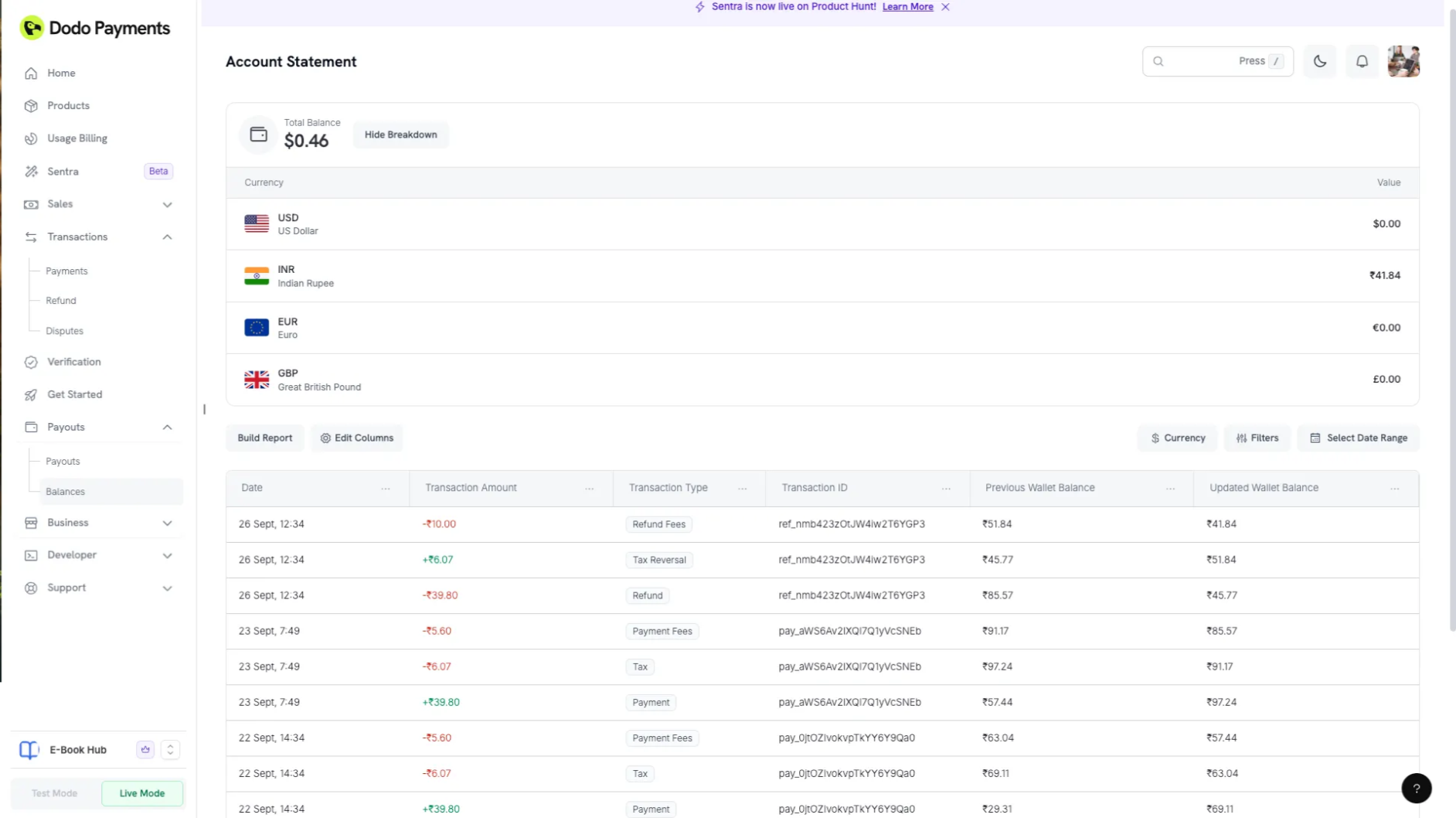 ## Wallet Structure
Each business account maintains **three native wallets** based on supported payout currencies:
| Wallet | Currency Code |
| ---------- | ------------- |
| USD Wallet | USD |
| GBP Wallet | GBP |
| EUR Wallet | EUR |
### Wallet Logic
* Merchant sales are **credited to the appropriate wallet** based on the **customer's payment currency** and **geographic location**.
* This system optimizes for **payment processor efficiency**, **reduced transaction fees** and **lower currency conversion charges**.
## Balance Ledger
Each wallet has an **independent ledger** recording all related financial activity - payments, refunds, fees, and payouts - in that specific wallet's currency.
A **Consolidated Ledger** combines all wallet data, offering a unified view of the merchant's entire financial history.
### Filters and Navigation
* **Currency Filter:** Allows merchants to view transactions by specific wallet (USD, GBP, EUR).
* **All Transactions View:** Provides an aggregated view across all wallets with unified sorting, filtering, and search capabilities.
### Transaction Types
The following transaction types are recorded in the Balance ledger:
| Transaction Type | Symbol | Description |
| -------------------- | ---------- | ------------------------------------------------- |
| **Payment** | Credit (+) | Successful customer payment |
| **Refund** | Debit (-) | Returned amount to the customer |
| **Transaction Fees** | Debit (-) | Processing fees applied to payments |
| **Refund Fees** | Debit (-) | Fees deducted for processing refunds |
| **Sales Tax** | Debit (-) | Tax amount charged on payments |
| **Sales Tax Refund** | Credit (+) | Refunded portion of sales tax on refunds |
| **Payout** | Debit (-) | Amount transferred to the merchant's bank account |
| **Payout Fees** | Debit (-) | Transaction fees deducted from payouts |
#### Additional Fields
* **Transaction Amount:** Total value associated with the transaction.
* **Transaction Timestamp:** Date and time of transaction completion.
* **Transaction ID:** Unique identifier for tracking and support purposes.
## Total Balance
The **Total Balance** section shows a **consolidated indicative amount** of all wallet balances - **USD, GBP, and EUR** - after conversion to USD.
**Indicative Display:** The displayed amount is **for reference only**. Final payout amounts may vary based on the actual exchange rate at the time of transfer.
## Conclusion
The **Balances** aims to deliver **transparency, accuracy, and flexibility** in managing multi-currency funds.
By maintaining separate native wallets, providing currency-based filters, and enabling indicative consolidated views, Dodo Payments ensures merchants always have a clear understanding of their earnings and payout readiness.
For any discrepancies or clarifications, please reach out to **[support@dodopayments.com](mailto:support@dodopayments.com)** with your **Transaction ID** and issue details.
## Wallet Structure
Each business account maintains **three native wallets** based on supported payout currencies:
| Wallet | Currency Code |
| ---------- | ------------- |
| USD Wallet | USD |
| GBP Wallet | GBP |
| EUR Wallet | EUR |
### Wallet Logic
* Merchant sales are **credited to the appropriate wallet** based on the **customer's payment currency** and **geographic location**.
* This system optimizes for **payment processor efficiency**, **reduced transaction fees** and **lower currency conversion charges**.
## Balance Ledger
Each wallet has an **independent ledger** recording all related financial activity - payments, refunds, fees, and payouts - in that specific wallet's currency.
A **Consolidated Ledger** combines all wallet data, offering a unified view of the merchant's entire financial history.
### Filters and Navigation
* **Currency Filter:** Allows merchants to view transactions by specific wallet (USD, GBP, EUR).
* **All Transactions View:** Provides an aggregated view across all wallets with unified sorting, filtering, and search capabilities.
### Transaction Types
The following transaction types are recorded in the Balance ledger:
| Transaction Type | Symbol | Description |
| -------------------- | ---------- | ------------------------------------------------- |
| **Payment** | Credit (+) | Successful customer payment |
| **Refund** | Debit (-) | Returned amount to the customer |
| **Transaction Fees** | Debit (-) | Processing fees applied to payments |
| **Refund Fees** | Debit (-) | Fees deducted for processing refunds |
| **Sales Tax** | Debit (-) | Tax amount charged on payments |
| **Sales Tax Refund** | Credit (+) | Refunded portion of sales tax on refunds |
| **Payout** | Debit (-) | Amount transferred to the merchant's bank account |
| **Payout Fees** | Debit (-) | Transaction fees deducted from payouts |
#### Additional Fields
* **Transaction Amount:** Total value associated with the transaction.
* **Transaction Timestamp:** Date and time of transaction completion.
* **Transaction ID:** Unique identifier for tracking and support purposes.
## Total Balance
The **Total Balance** section shows a **consolidated indicative amount** of all wallet balances - **USD, GBP, and EUR** - after conversion to USD.
**Indicative Display:** The displayed amount is **for reference only**. Final payout amounts may vary based on the actual exchange rate at the time of transfer.
## Conclusion
The **Balances** aims to deliver **transparency, accuracy, and flexibility** in managing multi-currency funds.
By maintaining separate native wallets, providing currency-based filters, and enabling indicative consolidated views, Dodo Payments ensures merchants always have a clear understanding of their earnings and payout readiness.
For any discrepancies or clarifications, please reach out to **[support@dodopayments.com](mailto:support@dodopayments.com)** with your **Transaction ID** and issue details.