> ## Documentation Index
> Fetch the complete documentation index at: https://docs.dodopayments.com/llms.txt
> Use this file to discover all available pages before exploring further.
# Microsoft Teams
> Envía notificaciones de Dodo Payments a los canales de Microsoft Teams con tarjetas adaptativas ricas.
## Introducción
Mantén a tu equipo empresarial informado con notificaciones de pago en tiempo real en Microsoft Teams. La integración entrega eventos de pago como tarjetas adaptativas ricas, perfectas para entornos empresariales donde Teams es la herramienta principal de colaboración.
Esta guía asume que tienes acceso de administrador para crear webhooks en tu espacio de trabajo de Microsoft Teams.
## Comenzando
En tu panel de Dodo Payments, navega a Webhooks → + Agregar Endpoint y expande el menú desplegable de integraciones.
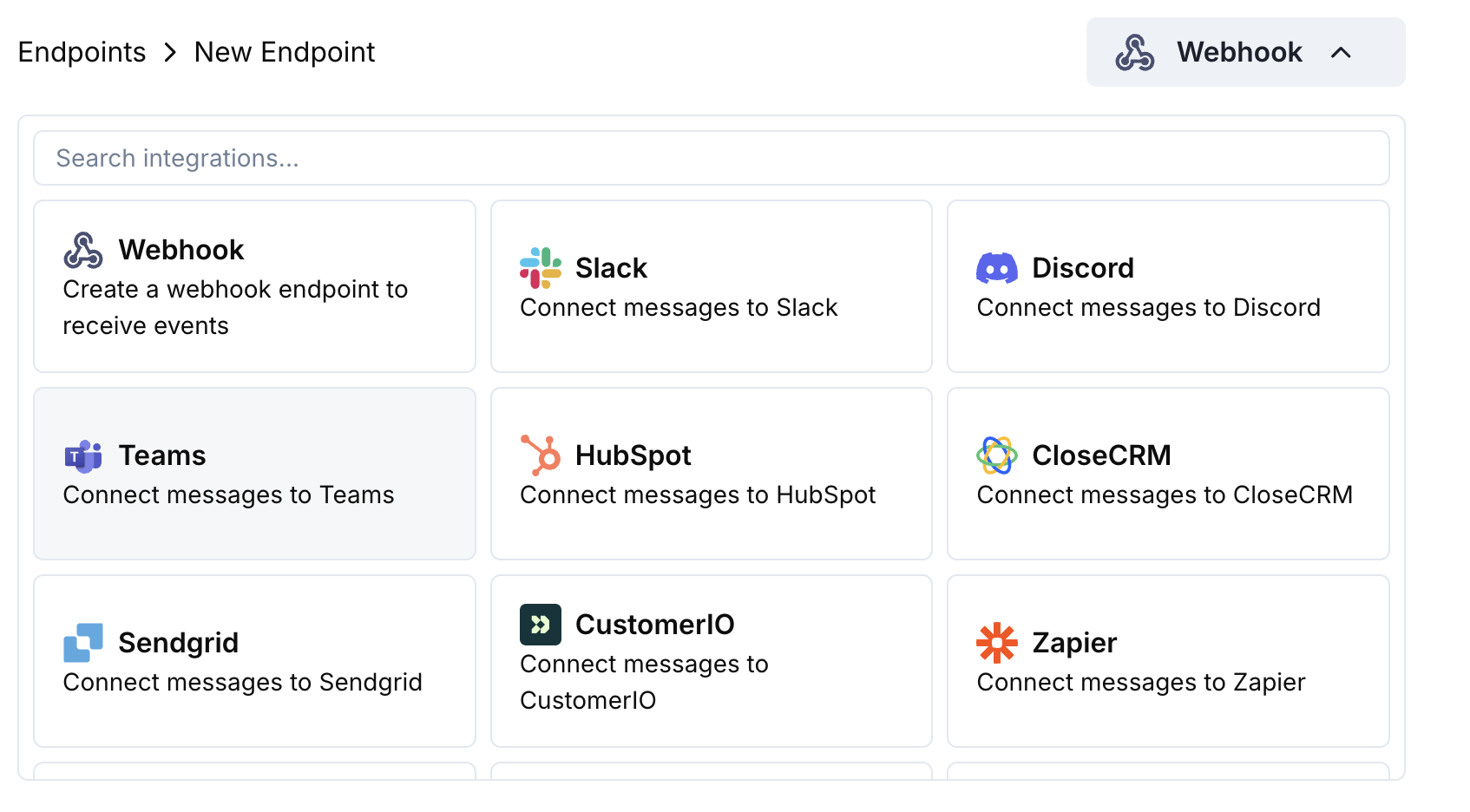 Elige la tarjeta de integración Microsoft Teams.
En Teams, ve a tu canal → ⋯ → Connectors → Incoming Webhook → Configure. Copia la URL del webhook.
Pega la URL del webhook de Teams en la configuración del endpoint.
Edita el código de transformación para formatear mensajes como Adaptive Cards para Teams.
Prueba con cargas útiles de ejemplo y haz clic en Create para activar.
🎉 Tu canal de Teams ahora recibirá actualizaciones de Dodo Payments como Adaptive Cards.
## Ejemplos de Código de Transformación
### Tarjeta de Pago Básica
```javascript payment_card.js icon="js" expandable theme={null}
function handler(webhook) {
if (webhook.eventType === "payment.succeeded") {
const p = webhook.payload.data;
webhook.payload = {
type: "message",
attachments: [{
contentType: "application/vnd.microsoft.card.adaptive",
content: {
type: "AdaptiveCard",
body: [
{
type: "TextBlock",
text: "✅ Payment Successful",
weight: "Bolder",
size: "Medium"
},
{
type: "FactSet",
facts: [
{ title: "Amount", value: `$${(p.total_amount / 100).toFixed(2)}` },
{ title: "Customer", value: p.customer.email },
{ title: "Payment ID", value: p.payment_id }
]
}
]
}
}]
};
}
return webhook;
}
```
### Gestión de Suscripciones
```javascript subscription_card.js icon="js" expandable theme={null}
function handler(webhook) {
const s = webhook.payload.data;
switch (webhook.eventType) {
case "subscription.active":
webhook.payload = {
type: "message",
attachments: [{
contentType: "application/vnd.microsoft.card.adaptive",
content: {
type: "AdaptiveCard",
body: [
{
type: "TextBlock",
text: "📄 Subscription Activated",
weight: "Bolder",
color: "Good"
},
{
type: "FactSet",
facts: [
{ title: "Customer", value: s.customer.email },
{ title: "Product", value: s.product_id },
{ title: "Amount", value: `$${(s.recurring_pre_tax_amount / 100).toFixed(2)}/${s.payment_frequency_interval}` },
{ title: "Next Billing", value: new Date(s.next_billing_date).toLocaleDateString() }
]
}
]
}
}]
};
break;
case "subscription.cancelled":
webhook.payload = {
type: "message",
attachments: [{
contentType: "application/vnd.microsoft.card.adaptive",
content: {
type: "AdaptiveCard",
body: [
{
type: "TextBlock",
text: "⚠️ Subscription Cancelled",
weight: "Bolder",
color: "Warning"
},
{
type: "FactSet",
facts: [
{ title: "Customer", value: s.customer.email },
{ title: "Product", value: s.product_id },
{ title: "Cancelled At", value: new Date(s.cancelled_at).toLocaleDateString() }
]
}
]
}
}]
};
break;
}
return webhook;
}
```
### Alertas de Disputa
```javascript dispute_card.js icon="js" expandable theme={null}
function handler(webhook) {
if (webhook.eventType.startsWith("dispute.")) {
const d = webhook.payload.data;
const color = d.dispute_status === "won" ? "Good" : d.dispute_status === "lost" ? "Attention" : "Warning";
const title = d.dispute_status === "won" ? "🏆 Dispute Won" : d.dispute_status === "lost" ? "❌ Dispute Lost" : "🚨 Dispute Update";
webhook.payload = {
type: "message",
attachments: [{
contentType: "application/vnd.microsoft.card.adaptive",
content: {
type: "AdaptiveCard",
body: [
{
type: "TextBlock",
text: title,
weight: "Bolder",
color: color
},
{
type: "FactSet",
facts: [
{ title: "Payment ID", value: d.payment_id },
{ title: "Amount", value: `$${(d.amount / 100).toFixed(2)}` },
{ title: "Status", value: d.dispute_status },
{ title: "Stage", value: d.dispute_stage }
]
}
]
}
}]
};
}
return webhook;
}
```
## Consejos
* Usa tarjetas adaptativas para un formato rico e interactivo
* Elige colores apropiados: Bueno (verde), Advertencia (amarillo), Atención (rojo)
* Mantén los conjuntos de hechos concisos y legibles
* Prueba con el probador de webhook de Teams antes de implementar
## Solución de Problemas
* Verifica que la URL del webhook sea correcta y esté activa
* Comprueba que la transformación devuelva JSON válido de Adaptive Card
* Asegúrate de que el webhook tenga permiso para publicar en el canal
* Valida el esquema de Adaptive Card en la herramienta de prueba de webhook de Teams
* Comprueba que todos los campos requeridos estén presentes
* Asegura que los valores de color sean válidos (Good, Warning, Attention, Default)
Elige la tarjeta de integración Microsoft Teams.
En Teams, ve a tu canal → ⋯ → Connectors → Incoming Webhook → Configure. Copia la URL del webhook.
Pega la URL del webhook de Teams en la configuración del endpoint.
Edita el código de transformación para formatear mensajes como Adaptive Cards para Teams.
Prueba con cargas útiles de ejemplo y haz clic en Create para activar.
🎉 Tu canal de Teams ahora recibirá actualizaciones de Dodo Payments como Adaptive Cards.
## Ejemplos de Código de Transformación
### Tarjeta de Pago Básica
```javascript payment_card.js icon="js" expandable theme={null}
function handler(webhook) {
if (webhook.eventType === "payment.succeeded") {
const p = webhook.payload.data;
webhook.payload = {
type: "message",
attachments: [{
contentType: "application/vnd.microsoft.card.adaptive",
content: {
type: "AdaptiveCard",
body: [
{
type: "TextBlock",
text: "✅ Payment Successful",
weight: "Bolder",
size: "Medium"
},
{
type: "FactSet",
facts: [
{ title: "Amount", value: `$${(p.total_amount / 100).toFixed(2)}` },
{ title: "Customer", value: p.customer.email },
{ title: "Payment ID", value: p.payment_id }
]
}
]
}
}]
};
}
return webhook;
}
```
### Gestión de Suscripciones
```javascript subscription_card.js icon="js" expandable theme={null}
function handler(webhook) {
const s = webhook.payload.data;
switch (webhook.eventType) {
case "subscription.active":
webhook.payload = {
type: "message",
attachments: [{
contentType: "application/vnd.microsoft.card.adaptive",
content: {
type: "AdaptiveCard",
body: [
{
type: "TextBlock",
text: "📄 Subscription Activated",
weight: "Bolder",
color: "Good"
},
{
type: "FactSet",
facts: [
{ title: "Customer", value: s.customer.email },
{ title: "Product", value: s.product_id },
{ title: "Amount", value: `$${(s.recurring_pre_tax_amount / 100).toFixed(2)}/${s.payment_frequency_interval}` },
{ title: "Next Billing", value: new Date(s.next_billing_date).toLocaleDateString() }
]
}
]
}
}]
};
break;
case "subscription.cancelled":
webhook.payload = {
type: "message",
attachments: [{
contentType: "application/vnd.microsoft.card.adaptive",
content: {
type: "AdaptiveCard",
body: [
{
type: "TextBlock",
text: "⚠️ Subscription Cancelled",
weight: "Bolder",
color: "Warning"
},
{
type: "FactSet",
facts: [
{ title: "Customer", value: s.customer.email },
{ title: "Product", value: s.product_id },
{ title: "Cancelled At", value: new Date(s.cancelled_at).toLocaleDateString() }
]
}
]
}
}]
};
break;
}
return webhook;
}
```
### Alertas de Disputa
```javascript dispute_card.js icon="js" expandable theme={null}
function handler(webhook) {
if (webhook.eventType.startsWith("dispute.")) {
const d = webhook.payload.data;
const color = d.dispute_status === "won" ? "Good" : d.dispute_status === "lost" ? "Attention" : "Warning";
const title = d.dispute_status === "won" ? "🏆 Dispute Won" : d.dispute_status === "lost" ? "❌ Dispute Lost" : "🚨 Dispute Update";
webhook.payload = {
type: "message",
attachments: [{
contentType: "application/vnd.microsoft.card.adaptive",
content: {
type: "AdaptiveCard",
body: [
{
type: "TextBlock",
text: title,
weight: "Bolder",
color: color
},
{
type: "FactSet",
facts: [
{ title: "Payment ID", value: d.payment_id },
{ title: "Amount", value: `$${(d.amount / 100).toFixed(2)}` },
{ title: "Status", value: d.dispute_status },
{ title: "Stage", value: d.dispute_stage }
]
}
]
}
}]
};
}
return webhook;
}
```
## Consejos
* Usa tarjetas adaptativas para un formato rico e interactivo
* Elige colores apropiados: Bueno (verde), Advertencia (amarillo), Atención (rojo)
* Mantén los conjuntos de hechos concisos y legibles
* Prueba con el probador de webhook de Teams antes de implementar
## Solución de Problemas
* Verifica que la URL del webhook sea correcta y esté activa
* Comprueba que la transformación devuelva JSON válido de Adaptive Card
* Asegúrate de que el webhook tenga permiso para publicar en el canal
* Valida el esquema de Adaptive Card en la herramienta de prueba de webhook de Teams
* Comprueba que todos los campos requeridos estén presentes
* Asegura que los valores de color sean válidos (Good, Warning, Attention, Default)