> ## Documentation Index
> Fetch the complete documentation index at: https://docs.dodopayments.com/llms.txt
> Use this file to discover all available pages before exploring further.

# Build an AI API Platform with Credit-Based Billing

> Build a tiered AI API service with token credits — issue credits via subscription plans and one-time top-up packs, and auto-deduct as customers call your API.

<Tip>
  <strong>Let Sentra write your integration code for you.</strong><br />
  Use our AI assistant in VS Code, Cursor, or Windsurf to generate SDK/API code, webhook handlers, credit grants, and more — just by describing what you want.

  <a href="https://dodopayments.com/sentra" target="_blank" rel="noopener noreferrer">
    Try Sentra: AI-Powered Integration →
  </a>
</Tip>

In this tutorial, you'll build **NeuralAPI** — a tiered AI platform where each subscription plan comes with a monthly token credit allowance, customers can buy top-up packs when they run low, and your backend automatically deducts credits as requests are processed by OpenAI.

<Note>
  This tutorial uses Node.js/Express + the OpenAI SDK. The Dodo Payments concepts (credits, meters, webhooks) apply to any framework or AI provider — adapt freely.
</Note>

By the end of this tutorial, you'll know how to:

* Create a custom credit entitlement (tokens) and a meter that auto-deducts from it
* Attach credits to subscription plans (with and without overage) and a one-time top-up product
* Wire a real OpenAI completion endpoint that bills tokens through Dodo Payments
* Query a customer's live credit balance via the SDK
* Verify webhook signatures and route Dodo Payments credit events

## What We're Building

Here's the pricing model for NeuralAPI:

| Product           | Price         | Tokens                  | Overage               |
| ----------------- | ------------- | ----------------------- | --------------------- |
| Starter Plan      | \$29/month    | 10,000,000 tokens/cycle | Blocked at zero       |
| Pro Plan          | \$99/month    | 40,000,000 tokens/cycle | \$0.005 per 1K tokens |
| Token Top-Up Pack | \$19 one-time | +5,000,000 tokens       | —                     |

<Info>
  Before you start, make sure you have:

  * A Dodo Payments account (test mode is fine)
  * An OpenAI API key
  * Node.js 18+
  * Basic familiarity with TypeScript/Node.js
</Info>

## Step 1: Create Your Token Credit Entitlement

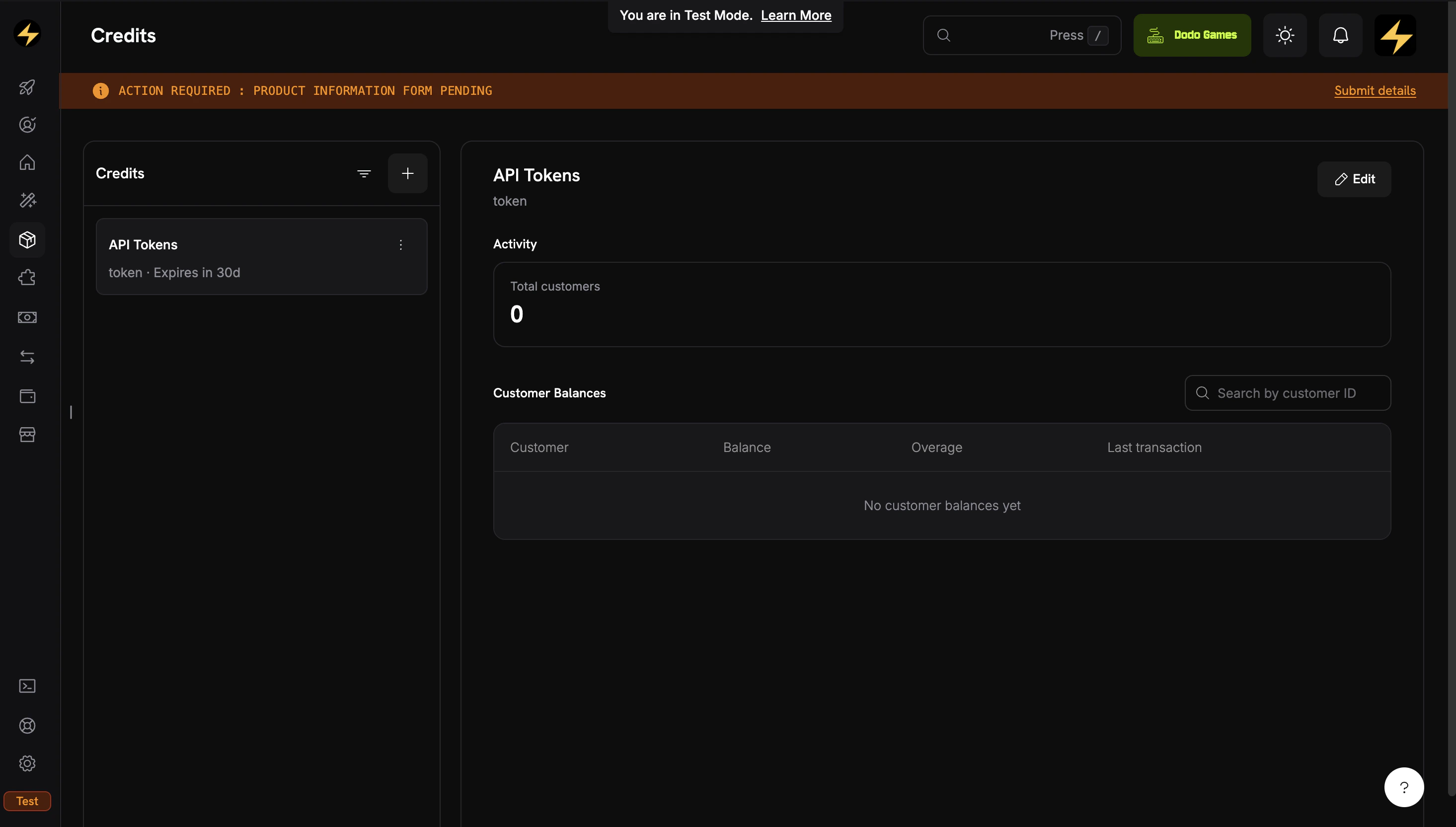
First, create the credit entitlement that both subscription plans and the top-up pack will share. Think of this as defining the "token" unit your platform uses.

<Frame caption="The Credits tab under Products shows all your credit entitlements.">
  <img src="https://mintcdn.com/dodopayments/eU6ZCQ885P3550bK/images/CBB/Desktop%20-%20Cookbook%20-%20NeuralAPI%20-%20Credit.png?fit=max&auto=format&n=eU6ZCQ885P3550bK&q=85&s=6c34ed3755c78534dcd6012680e98e40" alt="Credits listing page showing created credit entitlements" style={{ maxHeight: '500px', width: 'auto' }} width="2931" height="1665" data-path="images/CBB/Desktop - Cookbook - NeuralAPI - Credit.png" />
</Frame>

<Steps>
  <Step title="Navigate to Credits">
    1. Log into your Dodo Payments dashboard
    2. Click **Products** in the left sidebar
    3. Select the **Credits** tab
    4. Click **Create Credit**
  </Step>

  <Step title="Configure the credit unit">
    Fill in the basic details for your token credit:

    **Credit Name**: `API Tokens`

    **Credit Type**: Select **Custom Unit**

    **Unit Name**: `token`

    **Precision**: `0` (tokens are always whole numbers)

    **Credit Expiry**: `30 days` (credits reset each billing cycle)

    <Warning>
      Precision cannot be changed after a credit is created. For token counts, `0` (whole numbers) is almost always correct.
    </Warning>
  </Step>

  <Step title="Skip overage at the credit level">
    Leave overage **disabled** here — you'll configure it per-plan when attaching the credit to products. This lets the Starter plan block usage at zero while the Pro plan allows overage.

    <Tip>
      Overage settings configured here are *defaults*. Each product attachment can override them — which is exactly what we'll do in Step 3.
    </Tip>
  </Step>

  <Step title="Save and copy the credit ID">
    Click **Create Credit**. Once saved, open the credit and copy its ID — it looks like `cent_xxxxxxxxxxxx`.

    <Check>
      Your `API Tokens` credit entitlement is ready. Next, create a meter so usage events can drive deductions automatically.
    </Check>
  </Step>
</Steps>

## Step 2: Create a Meter for Token Usage

A meter aggregates incoming usage events and converts them into credit deductions. You need this *before* creating the plan products, since you'll attach it during product creation in Step 3.

<Steps>
  <Step title="Open the Meters section">
    1. In the dashboard sidebar, go to **Products** → **Meters**
    2. Click **Create Meter**
  </Step>

  <Step title="Configure the meter">
    Fill in:

    **Meter Name**: `Token Usage Meter`

    **Event Name**: `api.tokens_used` *(this must match exactly what your app sends)*

    **Aggregation Type**: `Sum` — we sum the token count from each event

    **Over Property**: `tokens` — the metadata key on each event whose value will be summed

    **Measurement Unit**: `tokens`

    <Warning>
      Event names are case-sensitive. `api.tokens_used` ≠ `Api.Tokens.Used` — pick one and stick to it.
    </Warning>

    Save the meter and copy its ID — you'll reference it when attaching to products.

    <Check>
      Meter is created. Now we can wire it to the credit when we configure products.
    </Check>
  </Step>
</Steps>

## Step 3: Create the Plan Products

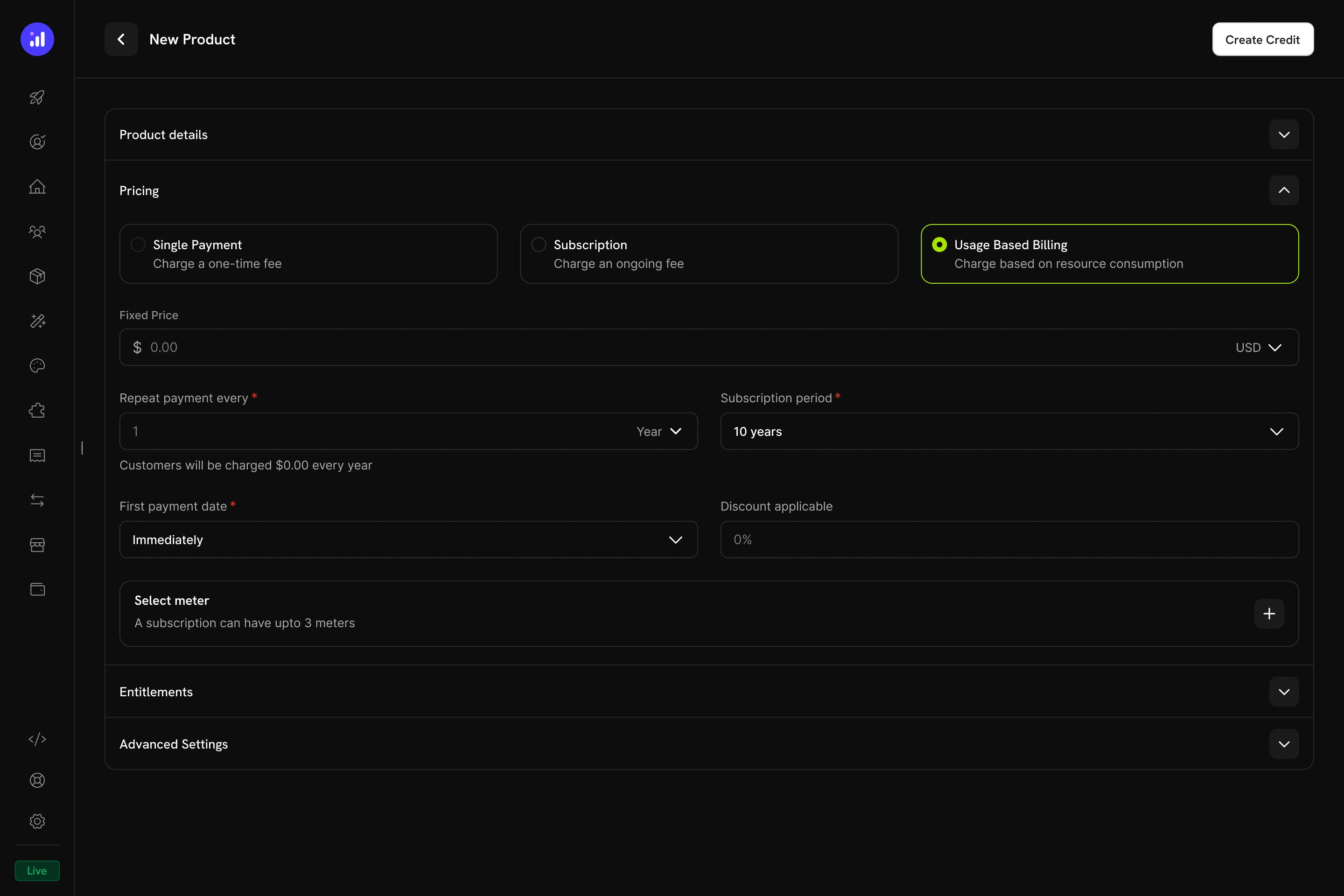
Both plans need to be **Usage Based Billing** products, not plain Subscriptions — meters can only attach to UBB products, and you need the meter to auto-deduct credits as customers call your API. UBB products still support a recurring base fee (the `$29` / `$99`); usage on top of that gets billed in credits.

<Frame caption="Usage Based Billing pricing type with meter configuration.">
  <img src="https://mintcdn.com/dodopayments/ibNfoFRyCIGyt3pO/images/CBB/Desktop%20-%20Attach%20Credit%20-%20UBB.jpg?fit=max&auto=format&n=ibNfoFRyCIGyt3pO&q=85&s=41b2862c12d126e7843098307e27e137" alt="Usage Based Billing pricing configuration" style={{ maxHeight: '500px', width: 'auto' }} width="2880" height="1920" data-path="images/CBB/Desktop - Attach Credit - UBB.jpg" />
</Frame>

### Starter Plan (\$29/month — 10M tokens, no overage)

<Steps>
  <Step title="Create the Starter UBB product">
    1. Go to **Products → Create Product**
    2. Select **Usage Based Billing** as the pricing type
    3. Fill in:

    **Product Name**: `NeuralAPI Starter`

    **Description**: `10 million API tokens per month. Perfect for individual developers and small projects.`

    **Fixed Price**: `29.00` (the recurring base fee — billed monthly even before any usage)

    **Billing Cycle**: `Monthly`

    **Currency**: `USD`
  </Step>

  <Step title="Attach the meter">
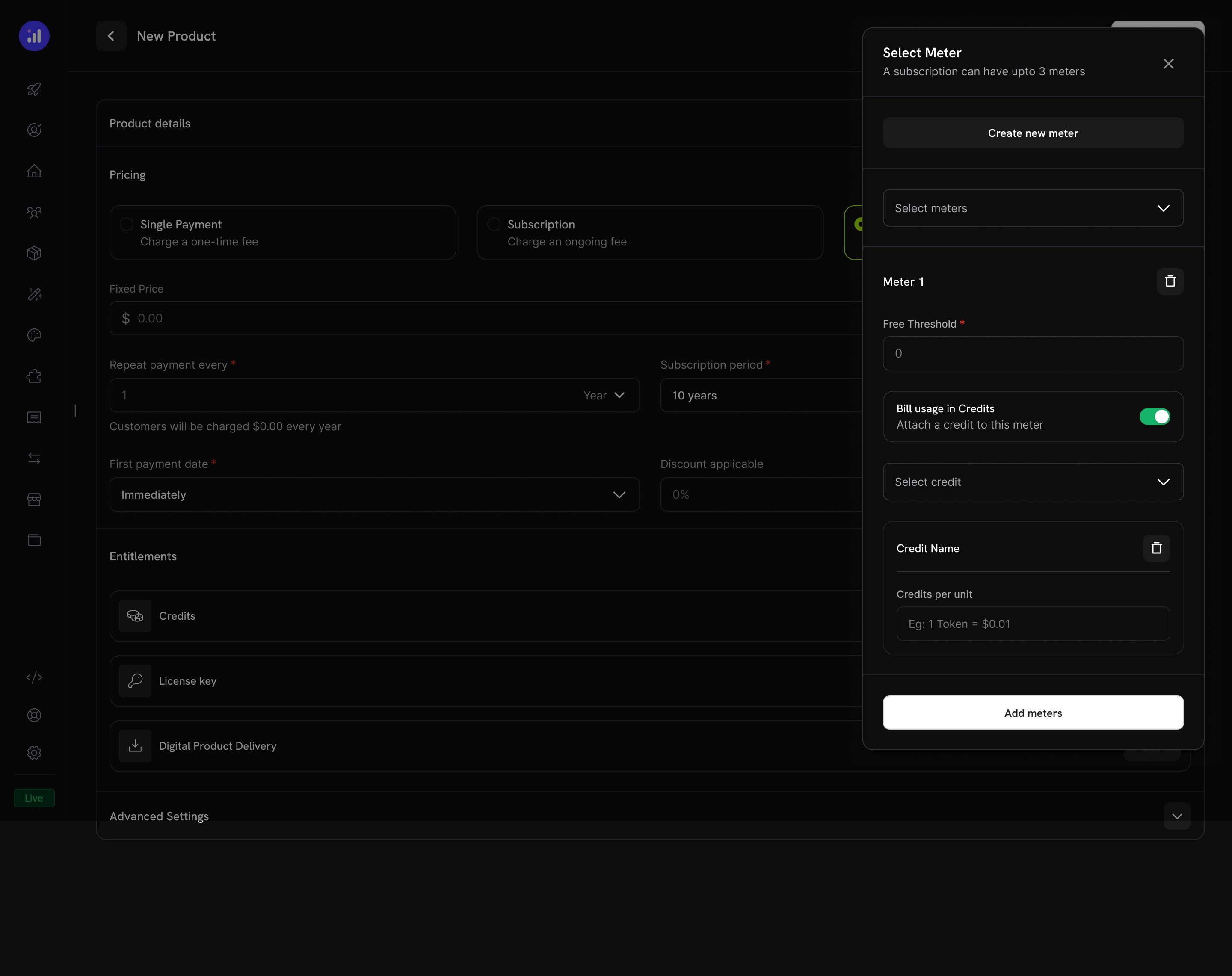
    In the **Select meter** section, click **+** and add `Token Usage Meter`. Then on the meter:

    1. Toggle **Bill usage in Credits** on
    2. **Credit Entitlement**: select `API Tokens`
    3. **Meter units per credit**: `1` — each token in the event maps to 1 credit deducted
    4. **Free Threshold**: `0` — the credit allocation itself is the customer's "free tier"; we don't need an extra free band

    <Frame caption="Toggle 'Bill usage in Credits' on the meter and pick the credit entitlement.">
      <img src="https://mintcdn.com/dodopayments/ibNfoFRyCIGyt3pO/images/CBB/Desktop%20-%20Attach%20Credit%20-%20UBB-5.jpg?fit=max&auto=format&n=ibNfoFRyCIGyt3pO&q=85&s=b4ef2fe5079cbf3bb39eb3814f101cbd" alt="Meter with Bill usage in Credits enabled and API Tokens selected" style={{ maxHeight: '500px', width: 'auto' }} width="2880" height="2282" data-path="images/CBB/Desktop - Attach Credit - UBB-5.jpg" />
    </Frame>

    This is the wiring that makes incoming `api.tokens_used` events actually deduct from the customer's balance.
  </Step>

  <Step title="Configure credit issuance for Starter">
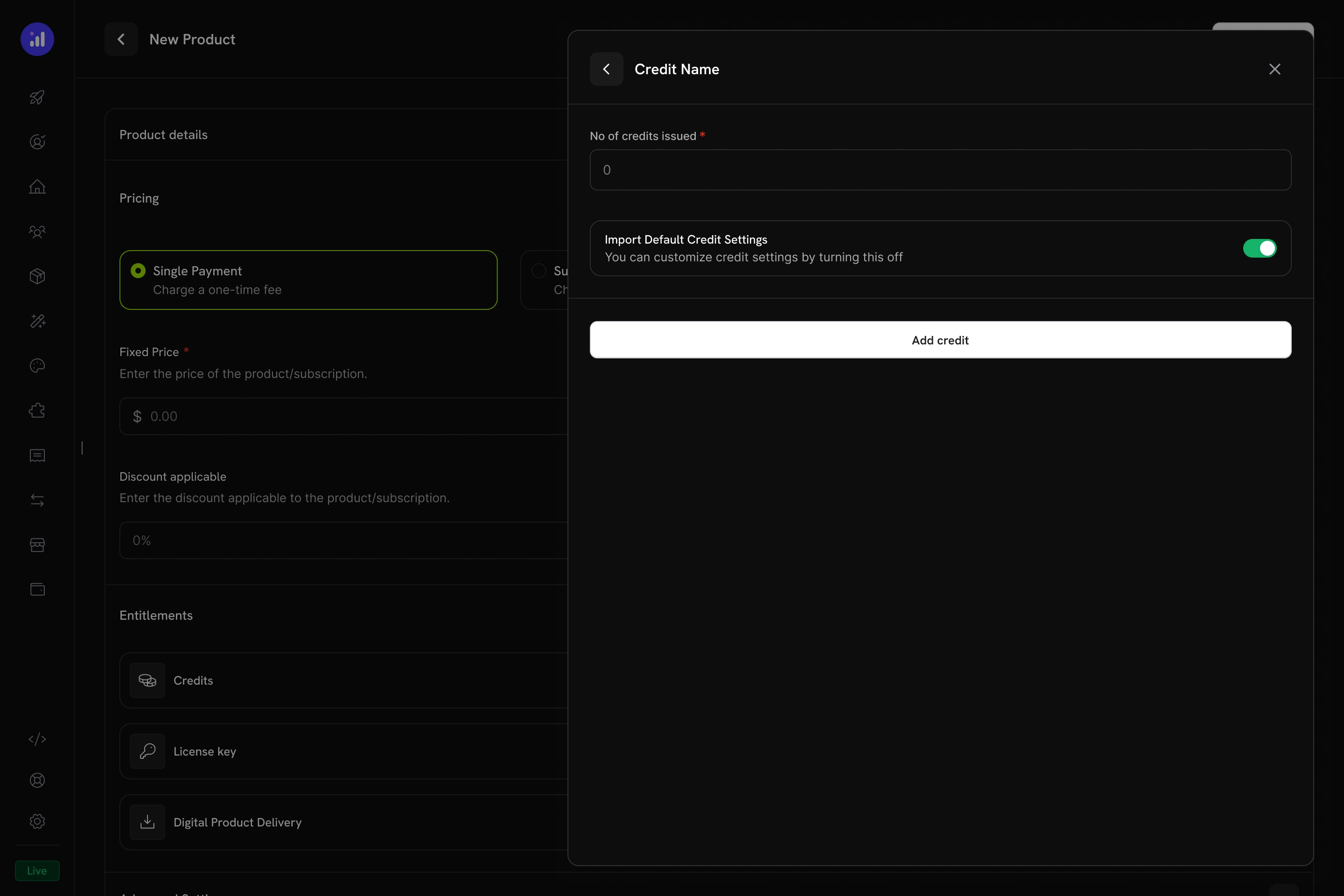
    Still on the product, scroll to the credit configuration section that appears once a credit-billed meter is attached:

    **Credits issued per billing cycle**: `10000000`

    **Allow Overage**: **Disabled** — Starter customers are blocked when tokens run out

    **Import Default Credit Settings**: Enabled — use the 30-day expiry from the credit entitlement

    <Frame caption="Configure credit issuance per cycle on the UBB product.">
      <img src="https://mintcdn.com/dodopayments/ibNfoFRyCIGyt3pO/images/CBB/Desktop%20-%20Attach%20Credit%20-%20UBB-6.jpg?fit=max&auto=format&n=ibNfoFRyCIGyt3pO&q=85&s=22e99c54f11305a24d63c77e09a4650c" alt="Credit configuration form with per-cycle amount and overage settings" style={{ maxHeight: '500px', width: 'auto' }} width="2880" height="1920" data-path="images/CBB/Desktop - Attach Credit - UBB-6.jpg" />
    </Frame>

    Click **Save** and copy the product ID.
    <Check>
      Starter Plan: \$29/month base fee, 10M tokens/cycle, blocked at zero, auto-deducts via meter.
    </Check>
  </Step>
</Steps>

### Pro Plan (\$99/month — 40M tokens, overage enabled)

<Steps>
  <Step title="Create the Pro UBB product">
    Same flow as Starter, with bigger numbers:

    **Product Name**: `NeuralAPI Pro`

    **Description**: `40 million API tokens per month with overage. Built for production applications.`

    **Fixed Price**: `99.00`

    **Billing Cycle**: `Monthly`

    **Currency**: `USD`
  </Step>

  <Step title="Attach the meter">
    Identical to Starter: add `Token Usage Meter`, toggle **Bill usage in Credits** on, select `API Tokens`, **Meter units per credit** `1`, **Free Threshold** `0`.
  </Step>

  <Step title="Configure credit issuance with overage">
    Configure the credit issuance, this time enabling overage:

    **Credits issued per billing cycle**: `40000000`

    **Import Default Credit Settings**: **Disable** — we need to customize overage settings per product

    **Allow Overage**: **Enabled**

    **Price Per Unit**: `0.000005` USD per token (i.e., $0.005 per 1K tokens, or $5 per 1M tokens — above the plan's effective per-token rate to discourage spillover)

    **Overage Behavior**: `Bill overage at billing` — overage is charged on the next invoice, then the balance resets

    Save the product and copy the product ID.

    <Check>
      Pro Plan: $99/month base fee, 40M tokens/cycle, overage at $0.005/1K tokens, auto-deducts via meter.
    </Check>
  </Step>
</Steps>

## Step 4: Create the Token Top-Up Pack

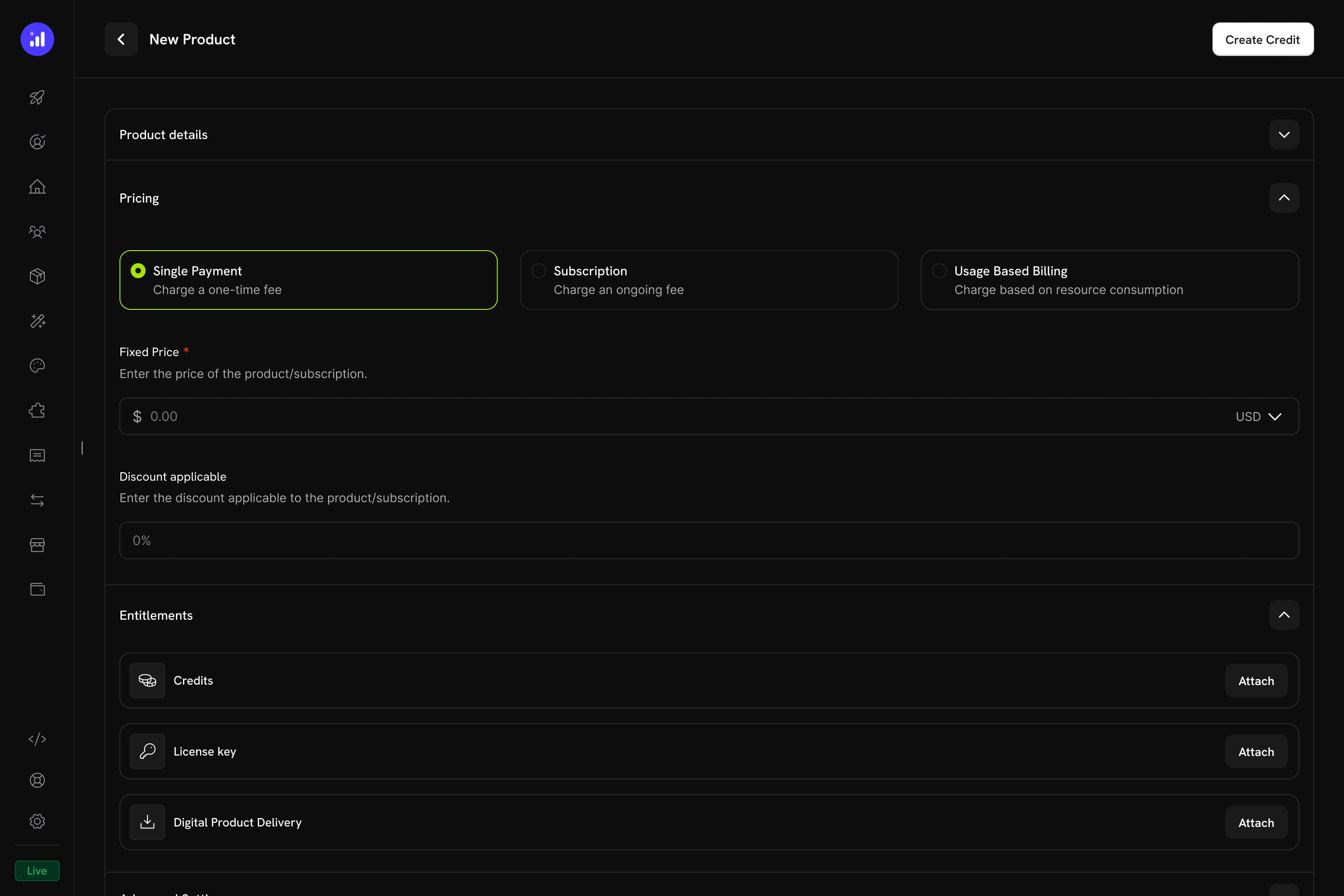
The top-up pack is a one-time purchase that grants 5,000,000 tokens to an existing customer's balance.

<Frame caption="Single Payment pricing selected for a one-time credit product.">
  <img src="https://mintcdn.com/dodopayments/ibNfoFRyCIGyt3pO/images/CBB/Desktop%20-%20Attach%20Credit%20-%20OTP.jpg?fit=max&auto=format&n=ibNfoFRyCIGyt3pO&q=85&s=1743cb3e515952f9d4b1b2782cebac8b" alt="Product pricing section with Single Payment selected" style={{ maxHeight: '500px', width: 'auto' }} width="2880" height="1920" data-path="images/CBB/Desktop - Attach Credit - OTP.jpg" />
</Frame>

<Steps>
  <Step title="Create a one-time product">
    1. Go to **Products → Create Product**
    2. Select **Single Payment** as the pricing type
    3. Fill in:

    **Product Name**: `Token Top-Up Pack`

    **Description**: `Instantly add 5 million tokens to your NeuralAPI balance.`

    **Price**: `19.00`

    **Currency**: `USD`
  </Step>

  <Step title="Attach the token credit">
    1. In the **Entitlements** section, click **Attach** next to **Credits**
    2. Select `API Tokens`
    3. Set **Credits issued**: `5000000`
    4. **Disable** *Import Default Credit Settings* — we want to override the default 30-day expiry
    5. Set **Credit Expiry**: `365 days`
    6. Save the product

    Copy the product ID.

    <Tip>
      Why a longer expiry on top-ups? Subscription credits reset every 30 days because that's the cycle. Top-ups are *prepaid purchases* — the customer paid \$19 upfront and reasonably expects those tokens to last beyond a month. 365 days matches how real prepaid credits work at OpenAI, AWS, and Anthropic, while still capping your liability so customers can't stockpile indefinitely.
    </Tip>

    <Check>
      Top-Up Pack configured — purchasing it grants 5,000,000 tokens that remain valid for 365 days.
    </Check>
  </Step>
</Steps>

## Step 5: Build the Backend

Now let's build the Express server that handles subscription checkout, top-up checkout, real OpenAI completions with token billing, balance queries, and credit webhook events.

<Steps>
  <Step title="Set up your project">
    ```bash theme={null}
    mkdir neural-api-billing
    cd neural-api-billing
    npm init -y
    npm install dodopayments openai express dotenv
    npm install -D @types/node @types/express typescript tsx
    ```

    Create a `tsconfig.json`:

    ```json tsconfig.json theme={null}
    {
      "compilerOptions": {
        "target": "ES2022",
        "module": "commonjs",
        "outDir": "./dist",
        "rootDir": "./src",
        "strict": true,
        "esModuleInterop": true,
        "skipLibCheck": true
      }
    }
    ```

    Update `package.json` scripts:

    ```json package.json theme={null}
    {
      "scripts": {
        "dev": "tsx watch src/server.ts",
        "build": "tsc",
        "start": "node dist/server.js"
      }
    }
    ```
  </Step>

  <Step title="Set up environment variables">
    Create `.env` with your credentials and IDs from the previous steps:

    ```bash .env theme={null}
    DODO_PAYMENTS_API_KEY=your_dodo_api_key_here
    DODO_PAYMENTS_WEBHOOK_KEY=your_webhook_signing_secret_here
    DODO_ENVIRONMENT=test_mode
    OPENAI_API_KEY=sk-...
    CREDIT_ENTITLEMENT_ID=cent_xxxxxxxxxxxx
    STARTER_PLAN_PRODUCT_ID=pdt_xxxxxxxxxxxx
    PRO_PLAN_PRODUCT_ID=pdt_xxxxxxxxxxxx
    TOPUP_PRODUCT_ID=pdt_xxxxxxxxxxxx
    BASE_URL=http://localhost:3000
    ```

    <Warning>
      Never commit `.env` to version control. Add it to `.gitignore` immediately.
    </Warning>

    You'll fill in `DODO_PAYMENTS_WEBHOOK_KEY` in Step 7 after registering your webhook endpoint.
  </Step>

  <Step title="Implement the server">
    Create `src/server.ts`:

    <CodeGroup>
      ```typescript src/server.ts expandable theme={null}
      import 'dotenv/config';
      import DodoPayments from 'dodopayments';
      import OpenAI from 'openai';
      import express, { Request, Response } from 'express';

      const app = express();

      // IMPORTANT: webhook route needs the raw body for signature verification.
      // We register the raw parser ONLY on /webhooks/dodo, then JSON for everything else.
      app.use('/webhooks/dodo', express.raw({ type: 'application/json' }));
      app.use(express.json());
      app.use(express.static('public'));

      const dodo = new DodoPayments({
        bearerToken: process.env.DODO_PAYMENTS_API_KEY!,
        webhookKey: process.env.DODO_PAYMENTS_WEBHOOK_KEY,
        environment: (process.env.DODO_ENVIRONMENT as 'test_mode' | 'live_mode') ?? 'test_mode',
      });

      const openai = new OpenAI({ apiKey: process.env.OPENAI_API_KEY! });

      const CREDIT_ENTITLEMENT_ID = process.env.CREDIT_ENTITLEMENT_ID!;
      const BASE_URL = process.env.BASE_URL!;
      const PLAN_PRODUCTS: Record<string, string> = {
        starter: process.env.STARTER_PLAN_PRODUCT_ID!,
        pro: process.env.PRO_PLAN_PRODUCT_ID!,
      };

      // ────────────────────────────────────────────────────────────────────────────
      // Subscription checkout
      // Body: { plan: 'starter' | 'pro', email: string, name: string }
      // ────────────────────────────────────────────────────────────────────────────
      app.post('/checkout/subscribe', async (req: Request, res: Response) => {
        const { plan, email, name } = req.body;
        if (!PLAN_PRODUCTS[plan]) {
          return res.status(400).json({ error: `Unknown plan: ${plan}` });
        }
        try {
          const session = await dodo.checkoutSessions.create({
            product_cart: [{ product_id: PLAN_PRODUCTS[plan], quantity: 1 }],
            customer: { email, name },
            return_url: `${BASE_URL}/?subscribed=1`,
          });
          res.json({ checkout_url: session.checkout_url, session_id: session.session_id });
        } catch (err) {
          console.error('Subscription checkout error:', err);
          res.status(500).json({ error: 'Failed to create subscription checkout' });
        }
      });

      // ────────────────────────────────────────────────────────────────────────────
      // Top-up checkout — buyer must already be a customer
      // Body: { customer_id: string }
      // ────────────────────────────────────────────────────────────────────────────
      app.post('/checkout/topup', async (req: Request, res: Response) => {
        const { customer_id } = req.body;
        if (!customer_id) return res.status(400).json({ error: 'customer_id required' });
        try {
          const session = await dodo.checkoutSessions.create({
            product_cart: [{ product_id: process.env.TOPUP_PRODUCT_ID!, quantity: 1 }],
            customer: { customer_id },
            return_url: `${BASE_URL}/?topup=1`,
          });
          res.json({ checkout_url: session.checkout_url });
        } catch (err) {
          console.error('Top-up checkout error:', err);
          res.status(500).json({ error: 'Failed to create top-up checkout' });
        }
      });

      // ────────────────────────────────────────────────────────────────────────────
      // Live token balance for a customer
      // ────────────────────────────────────────────────────────────────────────────
      app.get('/credits/:customerId', async (req: Request, res: Response) => {
        try {
          const result = await dodo.creditEntitlements.balances.retrieve(req.params.customerId, {
            credit_entitlement_id: CREDIT_ENTITLEMENT_ID,
          });
          res.json({
            balance: result.balance,
            overage: result.overage,
            last_transaction_at: result.last_transaction_at,
          });
        } catch (err) {
          console.error('Balance fetch error:', err);
          res.status(500).json({ error: 'Failed to fetch credit balance' });
        }
      });

      // ────────────────────────────────────────────────────────────────────────────
      // AI completion — calls OpenAI, then ingests a usage event with the real
      // token count. The meter aggregates these and deducts credits automatically.
      // Body: { customer_id: string, prompt: string }
      // ────────────────────────────────────────────────────────────────────────────
      app.post('/api/generate', async (req: Request, res: Response) => {
        const { customer_id, prompt } = req.body;
        if (!customer_id || !prompt) {
          return res.status(400).json({ error: 'customer_id and prompt required' });
        }

        // Best-effort balance gate for Starter (no overage). Note: balance updates
        // are eventually consistent (~1 min lag from event ingestion), so a Starter
        // customer can technically squeeze through a few extra requests right after
        // running out. Use a stricter rate-limiter on top if you need hard cutoffs.
        try {
          const balance = await dodo.creditEntitlements.balances.retrieve(customer_id, {
            credit_entitlement_id: CREDIT_ENTITLEMENT_ID,
          });
          if (Number(balance.balance) <= 0 && Number(balance.overage) <= 0) {
            return res.status(402).json({
              error: 'Out of tokens. Top up or upgrade to continue.',
            });
          }
        } catch {
          // Fall through — if the balance lookup fails, don't block; rely on metering.
        }

        let completion;
        try {
          completion = await openai.chat.completions.create({
            model: 'gpt-5-mini',
            messages: [{ role: 'user', content: prompt }],
          });
        } catch (err) {
          console.error('OpenAI error:', err);
          return res.status(502).json({ error: 'Upstream AI provider failed' });
        }

        const tokensUsed = completion.usage?.total_tokens ?? 0;

        // Fire-and-forget — don't block the response on metering.
        ingestTokenUsage(customer_id, tokensUsed, completion.model).catch((err) =>
          console.error('Usage ingest failed:', err),
        );

        res.json({
          text: completion.choices[0]?.message?.content ?? '',
          tokens_used: tokensUsed,
          model: completion.model,
        });
      });

      async function ingestTokenUsage(customerId: string, tokens: number, model: string) {
        await dodo.usageEvents.ingest({
          events: [
            {
              // event_id is the idempotency key. Use a stable, unique value per request.
              event_id: `req_${Date.now()}_${Math.random().toString(36).slice(2, 10)}`,
              customer_id: customerId,
              event_name: 'api.tokens_used',
              timestamp: new Date().toISOString(),
              metadata: { tokens, model },
            },
          ],
        });
      }

      // ────────────────────────────────────────────────────────────────────────────
      // Webhook handler — verifies signature using the SDK, then routes events.
      // ────────────────────────────────────────────────────────────────────────────
      app.post('/webhooks/dodo', async (req: Request, res: Response) => {
        const rawBody = (req.body as Buffer).toString('utf8');
        const headers = {
          'webhook-id': req.header('webhook-id') ?? '',
          'webhook-signature': req.header('webhook-signature') ?? '',
          'webhook-timestamp': req.header('webhook-timestamp') ?? '',
        };

        let event: { type: string; data: any };
        try {
          event = dodo.webhooks.unwrap(rawBody, { headers }) as any;
        } catch (err) {
          console.error('Webhook verification failed:', err);
          return res.status(401).json({ error: 'Invalid signature' });
        }

        switch (event.type) {
          case 'credit.added':
            console.log(`[credit.added] customer=${event.data.customer_id} amount=${event.data.amount}`);
            break;
          case 'credit.deducted':
            console.log(`[credit.deducted] customer=${event.data.customer_id} amount=${event.data.amount}`);
            break;
          case 'credit.overage_charged':
            console.log(`[credit.overage_charged] customer=${event.data.customer_id}`);
            break;
          default:
            // Ignore other event types
            break;
        }

        res.json({ received: true });
      });

      app.listen(3000, () => {
        console.log('NeuralAPI billing server running on http://localhost:3000');
      });
      ```

      ```json package.json theme={null}
      {
        "name": "neural-api-billing",
        "version": "1.0.0",
        "scripts": {
          "dev": "tsx watch src/server.ts",
          "build": "tsc",
          "start": "node dist/server.js"
        },
        "dependencies": {
          "dodopayments": "latest",
          "openai": "^4.0.0",
          "express": "^4.18.0",
          "dotenv": "^16.0.0"
        },
        "devDependencies": {
          "@types/node": "^20.0.0",
          "@types/express": "^4.17.0",
          "typescript": "^5.0.0",
          "tsx": "^4.0.0"
        }
      }
      ```
    </CodeGroup>

    <Check>
      Backend done: subscription checkout, top-up checkout, OpenAI completion with metered token billing, balance query, and a verified webhook handler.
    </Check>

    <Tip>
      [`@dodopayments/ingestion-blueprints`](/features/usage-based-billing/ingestion-blueprints) provides drop-in trackers that automate the `usageEvents.ingest` call for you — including the [LLM Blueprint](/developer-resources/ingestion-blueprints/llm), [API gateway](/developer-resources/ingestion-blueprints/api-gateway), [object storage](/developer-resources/ingestion-blueprints/object-storage), [streams](/developer-resources/ingestion-blueprints/stream), and [time-range](/developer-resources/ingestion-blueprints/time-range) usage.
    </Tip>
  </Step>

  <Step title="A note on how deductions actually happen">
    You may have noticed there's no explicit "deduct N credits" call. That's by design:

    1. Your handler calls OpenAI and gets back `usage.total_tokens` (e.g., 1532).
    2. You ingest a single usage event: `event_name: api.tokens_used`, `metadata: { tokens: 1532 }`.
    3. The `Token Usage Meter` aggregates events by customer.
    4. Because the meter is wired to the `API Tokens` credit with **Bill usage in Credits**, Dodo Payments deducts 1532 credits from the customer's oldest non-expired grant (FIFO).
    5. If overage is enabled and the customer goes below zero, the deficit is tracked and billed on the next invoice.

    The meter handles all of that. Your code only ingests events.
  </Step>
</Steps>

## Step 6: Add a Demo Frontend

Create `public/index.html` to test all the flows in your browser. We persist the customer ID to `localStorage` so subscribe → generate → top-up all share the same identity, mimicking a logged-in app:

<CodeGroup>
  ```html public/index.html expandable theme={null}
  <!DOCTYPE html>
  <html>
  <head>
    <title>NeuralAPI Demo</title>
    <style>
      body { font-family: system-ui, sans-serif; max-width: 760px; margin: 40px auto; padding: 20px; color: #1a1a2e; }
      h1 { font-size: 24px; }
      h2 { margin-top: 36px; border-bottom: 1px solid #eee; padding-bottom: 8px; font-size: 18px; }
      .panel { padding: 16px; background: #fafafe; border: 1px solid #e6e6f0; border-radius: 8px; margin: 12px 0; }
      .form-group { margin: 12px 0; }
      label { display: block; margin-bottom: 4px; font-weight: 600; font-size: 13px; }
      input, select, textarea { width: 100%; padding: 10px; border: 1px solid #ddd; border-radius: 6px; box-sizing: border-box; font-family: inherit; font-size: 14px; }
      textarea { min-height: 80px; resize: vertical; }
      button { background: #6366f1; color: white; padding: 10px 18px; border: none; border-radius: 6px; cursor: pointer; font-size: 14px; font-weight: 600; }
      button:hover { background: #4f46e5; }
      button:disabled { background: #c7c7d4; cursor: not-allowed; }
      .balance { font-size: 32px; font-weight: 700; color: #6366f1; }
      .muted { color: #777; font-size: 13px; margin-top: 4px; }
      .result { margin-top: 12px; padding: 12px; background: #fff; border: 1px solid #e6e6f0; border-radius: 6px; font-size: 14px; white-space: pre-wrap; }
      .row { display: flex; gap: 12px; align-items: center; }
      .row > * { flex: 1; }
    </style>
  </head>
  <body>
    <h1>NeuralAPI Demo</h1>

    <div class="panel">
      <label>Logged-in customer ID (paste once after subscribing)</label>
      <div class="row">
        <input id="customerId" placeholder="cus_xxxxxxxxxxxx" />
        <button onclick="saveCustomerId()" style="flex:0">Save</button>
      </div>
      <div class="muted">After completing checkout, copy the customer ID from your Dodo Payments dashboard (Customers → most recent) and paste here.</div>
    </div>

    <h2>1. Subscribe to a Plan</h2>
    <div class="form-group"><label>Plan</label>
      <select id="plan">
        <option value="starter">Starter — $29/mo, 10M tokens</option>
        <option value="pro">Pro — $99/mo, 40M tokens + overage</option>
      </select>
    </div>
    <div class="form-group"><label>Email</label><input type="email" id="email" placeholder="you@example.com" /></div>
    <div class="form-group"><label>Name</label><input id="name" placeholder="Your name" /></div>
    <button onclick="subscribe(event)">Get Checkout Link</button>
    <div id="subscribeResult" class="result" style="display:none"></div>

    <h2>2. Generate AI Response (deducts tokens)</h2>
    <div class="form-group"><label>Prompt</label><textarea id="prompt" placeholder="Explain quantum computing in one sentence"></textarea></div>
    <button onclick="generate(event)">Generate</button>
    <div id="generateResult" class="result" style="display:none"></div>

    <h2>3. Live Token Balance</h2>
    <button onclick="checkBalance(event)">Refresh Balance</button>
    <div id="balanceResult" class="result" style="display:none"></div>

    <h2>4. Buy a Top-Up Pack</h2>
    <button onclick="topup(event)">Buy 5M Tokens — $19</button>
    <div id="topupResult" class="result" style="display:none"></div>

    <script>
      const $ = (id) => document.getElementById(id);
      document.addEventListener('DOMContentLoaded', () => {
        $('customerId').value = localStorage.getItem('customerId') || '';
      });

      function getCustomerId() {
        const id = $('customerId').value.trim();
        if (!id) { alert('Save a customer ID first'); throw new Error('no customer'); }
        return id;
      }

      function saveCustomerId() {
        localStorage.setItem('customerId', $('customerId').value.trim());
        alert('Saved');
      }

      async function withLoading(btn, loadingLabel, fn) {
        const original = btn.textContent;
        btn.disabled = true;
        btn.textContent = loadingLabel;
        try { await fn(); } finally {
          btn.disabled = false;
          btn.textContent = original;
        }
      }

      async function subscribe(ev) {
        await withLoading(ev.target, 'Loading…', async () => {
          const res = await fetch('/checkout/subscribe', {
            method: 'POST',
            headers: { 'Content-Type': 'application/json' },
            body: JSON.stringify({ plan: $('plan').value, email: $('email').value, name: $('name').value }),
          });
          const data = await res.json();
          const el = $('subscribeResult');
          el.style.display = 'block';
          el.innerHTML = res.ok
            ? `<a href="${data.checkout_url}" target="_blank">Open Checkout →</a>`
            : `Error: ${data.error}`;
        });
      }

      async function generate(ev) {
        const customer_id = getCustomerId();
        await withLoading(ev.target, 'Generating…', async () => {
          const res = await fetch('/api/generate', {
            method: 'POST',
            headers: { 'Content-Type': 'application/json' },
            body: JSON.stringify({ customer_id, prompt: $('prompt').value }),
          });
          const data = await res.json();
          const el = $('generateResult');
          el.style.display = 'block';
          el.innerHTML = res.ok
            ? `<strong>Response:</strong>\n${data.text}\n\n<em>Tokens used: ${data.tokens_used} (${data.model})</em>`
            : `Error: ${data.error}`;
          if (res.ok) refreshBalanceSilently();
        });
      }

      async function checkBalance(ev) {
        const customer_id = getCustomerId();
        await withLoading(ev.target, 'Refreshing…', async () => {
          const res = await fetch('/credits/' + customer_id);
          const data = await res.json();
          const el = $('balanceResult');
          el.style.display = 'block';
          el.innerHTML = res.ok
            ? `<div class="balance">${Number(data.balance).toLocaleString()} tokens</div>
               <div class="muted">Overage used: ${Number(data.overage).toLocaleString()} · Last activity: ${data.last_transaction_at ?? 'never'}</div>`
            : `Error: ${data.error}`;
        });
      }

      async function refreshBalanceSilently() {
        const customer_id = $('customerId').value.trim();
        if (!customer_id) return;
        const res = await fetch('/credits/' + customer_id);
        const data = await res.json();
        const el = $('balanceResult');
        el.style.display = 'block';
        el.innerHTML = res.ok
          ? `<div class="balance">${Number(data.balance).toLocaleString()} tokens</div>
             <div class="muted">Overage used: ${Number(data.overage).toLocaleString()} · Last activity: ${data.last_transaction_at ?? 'never'}</div>`
          : `Error: ${data.error}`;
      }

      async function topup(ev) {
        const customer_id = getCustomerId();
        await withLoading(ev.target, 'Loading…', async () => {
          const res = await fetch('/checkout/topup', {
            method: 'POST',
            headers: { 'Content-Type': 'application/json' },
            body: JSON.stringify({ customer_id }),
          });
          const data = await res.json();
          const el = $('topupResult');
          el.style.display = 'block';
          el.innerHTML = res.ok
            ? `<a href="${data.checkout_url}" target="_blank">Open Top-Up Checkout →</a>`
            : `Error: ${data.error}`;
        });
      }
    </script>
  </body>
  </html>
  ```
</CodeGroup>

## Step 7: Wire Up the Webhook

Webhooks let your server react to balance changes — you'll use them to send "running low" emails before customers hit zero.

<Steps>
  <Step title="Expose your local server">
    Webhooks need a public URL. For local development, use [ngrok](https://ngrok.com) or any tunnel:

    ```bash theme={null}
    ngrok http 3000
    ```

    Copy the `https://...ngrok-free.app` URL.
  </Step>

  <Step title="Register the webhook in Dodo Payments">
    1. In the dashboard, go to **Developers → Webhooks → Add Endpoint**
    2. **URL**: `https://your-tunnel.ngrok-free.app/webhooks/dodo`
    3. Subscribe to (at minimum):
       * `credit.added`
       * `credit.deducted`
       * `credit.overage_charged`
    4. Save and copy the **Signing Secret**
    5. Paste it into `.env` as `DODO_PAYMENTS_WEBHOOK_KEY`, then restart `npm run dev`

    <Tip>
      The SDK's `dodo.webhooks.unwrap()` validates the `webhook-id`, `webhook-timestamp`, and `webhook-signature` headers using your signing secret. You don't need to hand-roll HMAC verification — and you shouldn't, because Dodo Payments uses [Standard Webhooks](https://www.standardwebhooks.com/), which signs `id.timestamp.body` rather than just the body.
    </Tip>
  </Step>
</Steps>

## Step 8: Test the Full Flow

<Steps>
  <Step title="Subscribe a test customer">
    1. Run `npm run dev`
    2. Open `http://localhost:3000`
    3. Pick **Pro Plan**, enter a test email + name, click **Get Checkout Link**, complete checkout with [test card details](/miscellaneous/testing-process)
    4. In the dashboard, go to **Customers → most recent** and copy the `cus_...` ID
    5. Paste it into the "Logged-in customer ID" field on the demo and click **Save**

    <Check>
      The customer should have 40,000,000 tokens. Click **Refresh Balance** to confirm.
    </Check>
  </Step>

  <Step title="Generate a real AI response">
    Type a prompt and click **Generate**. The server calls OpenAI, gets back the actual `total_tokens`, ingests a usage event, and returns the response.

    <Info>
      Usage events are processed by a background worker every \~minute. The balance won't tick down instantly — wait 30–90 seconds and click **Refresh Balance** again. Don't conclude it's broken if the first refresh doesn't show movement.
    </Info>
  </Step>

  <Step title="Test the top-up flow">
    Click **Buy 5M Tokens — \$19** and complete checkout. After the payment succeeds, refresh the balance — it should jump by 5,000,000 tokens. Your server log should show a `credit.added` event.
  </Step>
</Steps>

## Troubleshooting

<AccordionGroup>
  <Accordion title="Credits not deducting after usage events">
    **Possible causes:**

    * The meter's event name doesn't match the `event_name` you're sending (`api.tokens_used` is case-sensitive)
    * The meter isn't linked to the `API Tokens` credit on the product — go to the product's meter configuration and confirm **Bill usage in Credits** is on
    * The `metadata.tokens` key doesn't match the meter's "Over Property" field
    * The customer's grant has expired (check the customer's credit history)

    **What to check:**

    1. **Products → Meters**: open the meter and confirm it shows the linked credit name on the product attachment
    2. The **Events** tab on the meter — ingested events should appear there even before deduction
    3. **Customers → \[Customer] → Credits**: ledger entries should appear within a minute or two
  </Accordion>

  <Accordion title="Balance always shows 0 or 'customer not found'">
    **Possible causes:**

    * The customer hasn't completed checkout yet — credits are only issued after a successful payment
    * You're querying with the wrong `customer_id` (use the `cus_...` ID from the dashboard, not your own DB ID)
    * The `CREDIT_ENTITLEMENT_ID` in `.env` doesn't match the credit attached to the product

    **What to check:**
    Open **Customers → \[Customer] → Credits**. If no credits appear there, the product entitlement wasn't attached or the payment didn't complete.
  </Accordion>

  <Accordion title="Overage not working for Pro plan customers">
    **Possible causes:**

    * Overage wasn't enabled on the **Pro product's credit attachment** (the credit-level setting is just a default)
    * The customer is actually on Starter, not Pro
    * Overage limit was set to 0

    **What to check:**
    Edit Pro → Entitlements → Credits → confirm **Allow Overage** is on and **Price Per Unit** is `0.000005` (= \$5 per million tokens; double-check the leading zeros — the field takes per-token price, not per-1K).
  </Accordion>

  <Accordion title="`Webhook verification failed` in logs">
    **Possible causes:**

    * Body parsing order: `express.json()` was applied to `/webhooks/dodo` before `express.raw()` — the SDK needs the **raw bytes** of the request, not parsed JSON
    * Wrong signing secret in `DODO_PAYMENTS_WEBHOOK_KEY`
    * Reverse proxy is rewriting headers

    **What to check:**
    Confirm the `app.use('/webhooks/dodo', express.raw(...))` line comes *before* `app.use(express.json())` in `server.ts`.
  </Accordion>
</AccordionGroup>

## Need help?

* [Discord Community](https://discord.gg/bYqAp4ayYh)
* [support@dodopayments.com](mailto:support@dodopayments.com)

## Congratulations! You've Built Credit-Based Billing for NeuralAPI

Your platform now has a complete, production-ready credit billing system:

<CardGroup cols={2}>
  <Card title="Token Credit Entitlement" icon="coins">
    A reusable `API Tokens` credit with 30-day expiry, shared across all plans and the top-up pack
  </Card>

  <Card title="Tiered Plans, One Credit" icon="layer-group">
    Starter (10M, hard limit) and Pro (40M + overage) configured per-product without duplicating the credit
  </Card>

  <Card title="One-Time Top-Up Pack" icon="circle-plus">
    Customers add 5M tokens for \$19 without changing their subscription
  </Card>

  <Card title="Auto-Deduction via Meter" icon="bolt">
    Real OpenAI token counts ingested as events; the meter deducts credits FIFO with no manual tracking
  </Card>

  <Card title="Live Balance API" icon="gauge">
    Real-time balance via the SDK to gate access, display usage, or warn customers in-app
  </Card>

  <Card title="Verified Webhook Pipeline" icon="bell">
    Credit ledger events (`credit.added`, `credit.deducted`, `credit.overage_charged`) routed through a signature-verified handler using the SDK's Standard Webhooks helper
  </Card>
</CardGroup>

<Info>
  **Going to production?** Tighten these:

  * **Auth on `/credits/:customerId` and `/api/generate`** — currently anyone can hit these with any customer ID. Authenticate users and look up *their* customer ID server-side.
  * **Stable `event_id`s** — the example uses `Date.now() + random`. In production, use your request ID so retries are idempotent (Dodo Payments deduplicates by `event_id`).
  * **Persist the customer↔user mapping** — store `customer_id` in your DB after the first checkout so you don't need a manual paste step.
  * **Decide what happens when a subscription ends.** Plan credits remain in the customer's ledger until their natural expiry (30 days from issuance) and top-up credits stay valid for 365 days — but the cookbook's `/api/generate` only checks *balance*, not subscription status. So a cancelled customer can still consume their remaining tokens. That's the consumer-friendly default. If you want stricter access control, either (a) listen to the `subscription.cancelled` webhook and gate `/api/generate` on subscription status, or (b) call Dodo's ledger API to debit unused plan credits on cancel while leaving top-up credits intact.
  * **Monitor the Usage Billing dashboard** to catch metering anomalies early.
</Info>

<CardGroup cols={2}>
  <Card title="Credit-Based Billing Reference" icon="book" href="/features/credit-based-billing">
    Full CBB documentation: rollover, overage modes, ledger management, all API endpoints.
  </Card>

  <Card title="Credit Webhook Events" icon="bell" href="/developer-resources/webhooks/intents/credit">
    Payload schemas for every credit event your server might receive.
  </Card>
</CardGroup>