> ## Documentation Index
> Fetch the complete documentation index at: https://docs.dodopayments.com/llms.txt
> Use this file to discover all available pages before exploring further.
# Build a Prepaid Email Service with Credit-Based Billing
> Build MailKit, a transactional email platform with prepaid email credits. A monthly subscription plan, one-time top-up packs, instant credit deduction on every send, and proactive low-balance alerts powered by Resend and Dodo Payments.
Let Sentra write your integration code for you.
Use our AI assistant in VS Code, Cursor, or Windsurf to generate SDK/API code, webhook handlers, and more, just by describing what you want.
Try Sentra: AI-Powered Integration →
In this tutorial, you'll build **MailKit**, a transactional email platform where customers pay upfront for a pool of email credits. The plan grants a monthly email allowance; when customers run low, they can buy a top-up pack instead of waiting for the next cycle. Every send deducts one credit automatically.
This tutorial uses [Resend](https://resend.com) as the email provider. Its free tier (3,000 emails/month) is enough to build and test the entire flow without a paid account. The pattern works with any provider; swap `resend.emails.send` for SendGrid, Postmark, SES, or your own SMTP relay.
By the end of this tutorial, you'll know how to:
* Create a custom credit entitlement (emails) in your dashboard
* Attach credits to a subscription plan and a one-time top-up product
* Send real emails via Resend and debit one credit per send via a ledger entry
* Query a live credit balance from your frontend
* Verify Dodo webhooks correctly and handle `credit.balance_low` to nudge customers before they hit zero
## What We're Building
Here's the pricing model for MailKit:
| Product | Price | Emails |
| ------------ | ------------ | ------------------ |
| MailKit Plan | \$19/month | 5,000 emails/cycle |
| Top-Up Pack | \$9 one-time | +5,000 emails |
The unit is **one email = one credit**. Customers don't have to think about tokens, batches, or weighted units. They just see "you have 4,231 emails left this month."
Before you start, make sure you have:
* A Dodo Payments account (test mode is fine)
* A free [Resend](https://resend.com) account and API key
* Node.js 18+ and basic TypeScript familiarity
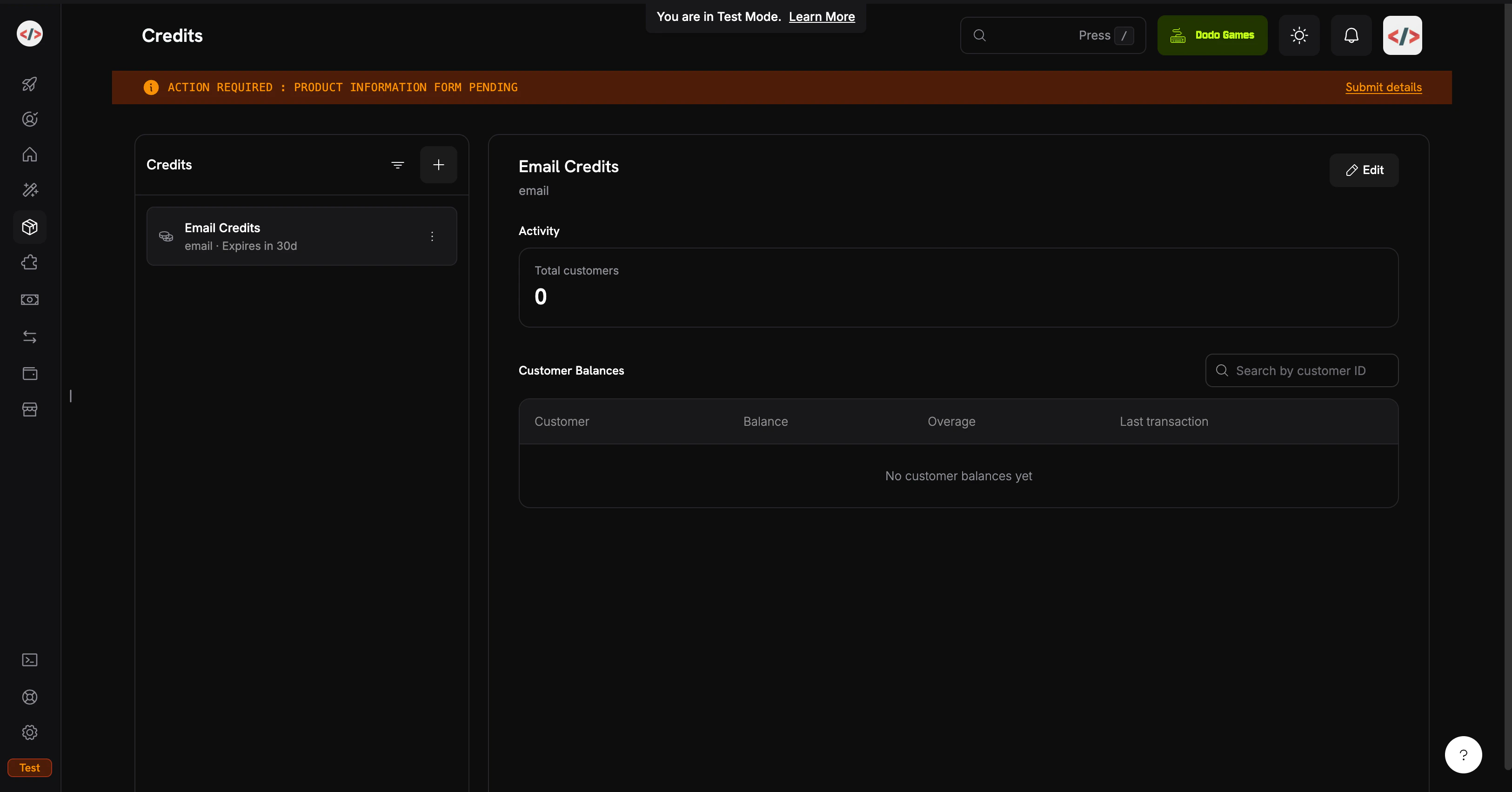
## Step 1: Create Your Email Credit Entitlement
The credit entitlement defines the unit your platform sells: in this case, one email send.
1. Log into your Dodo Payments dashboard
2. Click **Products** in the left sidebar
3. Select the **Credits** tab
4. Click **Create Credit**
Fill in the credit details:
**Credit Name**: `Email Credits`
**Credit Type**: Select **Custom Unit**
**Unit Name**: `email`
**Precision**: `0` (an email is always a whole unit; you can't send half an email)
**Credit Expiry**: `30 days` (each cycle's allowance resets)
Precision cannot be changed after creation. For discrete units like emails, messages, or sessions, `0` is correct.
We won't enable rollover or overage in this cookbook; the goal is the simplest possible CBB flow. You can revisit these on the credit attachment later.
Click **Create Credit**. Open the credit and copy its ID. You'll need it for backend balance queries. It looks like `cent_xxxxxxxxxxxx`.
Your `Email Credits` entitlement is ready. Next: the products that grant credits to customers.
## Step 2: Create the Plan and Top-Up Pack
You'll create two products: a recurring **Subscription** plan and a **Single Payment** top-up. The plan grants 5,000 emails each cycle; the top-up adds another 5,000 on demand. Both attach the same `Email Credits` entitlement.
This cookbook deducts credits with direct ledger entries instead of usage-based meters. Ledger entries are immediate (the balance updates in milliseconds), need no extra setup, and are the right fit when one user action equals exactly one credit. If you'd prefer auto-deduction from ingested usage events (handy for weighted units like "tokens" or "MB processed"), see [Credit-Based Billing → Usage Billing with Credits](/features/credit-based-billing) for the meter-based pattern.
### MailKit Plan (\$19/month, 5,000 emails)
1. Go to **Products → Create Product**
2. Fill in the product details:
**Product Name**: `MailKit Plan`
**Description**: `5,000 transactional emails per month.`
3. Select **Subscription** as the product type
4. Set the recurring price:
**Recurring Price**: `19.00`
**Billing Cycle**: `Monthly`
**Currency**: `USD`
Scroll to **Entitlements → Credits → Attach** and configure:
**Credit Entitlement**: `Email Credits`
**Credits issued per billing cycle**: `5000`
**Low Balance Threshold**: `20` (percent; fires `credit.balance_low` when the balance drops below 20% of the cycle allowance, i.e. 1,000 emails)
**Import Default Credit Settings**: enabled (uses the 30-day expiry from Step 1)
Click **Add to Product**, then **Save** the product. Copy the product ID (`pdt_xxxxxxxxxxxx`).
Plan: \$19/month → 5,000 emails refreshed each cycle.
### Top-Up Pack (\$9 one-time, 5,000 emails)
1. Go to **Products → Create Product**
2. Fill in the product details:
**Product Name**: `Email Top-Up Pack`
**Description**: `Add 5,000 emails to your MailKit balance instantly.`
3. Select **Single Payment** as the product type
4. Set the pricing:
**Price**: `9.00`
**Currency**: `USD`
In **Entitlements → Credits → Attach**:
* Credit Entitlement: `Email Credits`
* Credits issued: `5000`
One-time products grant credits with their own expiry (30 days from purchase, per Step 1). Top-ups stack on top of subscription credits; they don't replace them.
Save and copy the product ID.
Top-Up Pack: \$9 → +5,000 emails, available immediately.
## Step 3: Set Up the Backend
Now build the Express server that handles checkout, sending, balance queries, and webhooks.
```bash theme={null}
mkdir mailkit && cd mailkit
npm init -y
npm install dodopayments resend express dotenv
npm install -D tsx @types/node @types/express
```
Add a dev script to `package.json`:
```json theme={null}
{
"scripts": {
"dev": "tsx watch server.ts"
}
}
```
[`tsx`](https://tsx.is) runs TypeScript directly without a build step or `tsconfig.json`, which is perfect for a tutorial. For production, add a `tsconfig.json` and a `build` script.
Create `.env`:
```bash .env theme={null}
# Dodo Payments
DODO_PAYMENTS_API_KEY=your_dodo_test_api_key
DODO_WEBHOOK_KEY=your_dodo_webhook_signing_key
CREDIT_ENTITLEMENT_ID=cent_xxxxxxxxxxxx
PLAN_PRODUCT_ID=pdt_xxxxxxxxxxxx
TOPUP_PRODUCT_ID=pdt_xxxxxxxxxxxx
# Resend
RESEND_API_KEY=re_xxxxxxxxxxxx
# App
BASE_URL=http://localhost:3000
PORT=3000
```
You'll fill in the `DODO_WEBHOOK_KEY` in Step 4 after creating the endpoint. The Resend API key comes from [resend.com/api-keys](https://resend.com/api-keys).
Add `.env` to `.gitignore` immediately. Never commit API keys.
Create `server.ts` in the project root:
```typescript server.ts expandable theme={null}
import 'dotenv/config';
import express, { Request, Response } from 'express';
import DodoPayments from 'dodopayments';
import { Resend } from 'resend';
const app = express();
const dodo = new DodoPayments({
bearerToken: process.env.DODO_PAYMENTS_API_KEY!,
webhookKey: process.env.DODO_WEBHOOK_KEY!,
environment: 'test_mode',
});
const resend = new Resend(process.env.RESEND_API_KEY!);
const CREDIT_ENTITLEMENT_ID = process.env.CREDIT_ENTITLEMENT_ID!;
const BASE_URL = process.env.BASE_URL!;
// ---------------------------------------------------------------
// Webhook endpoint MUST receive the raw body for signature
// verification. Register it BEFORE express.json().
// ---------------------------------------------------------------
app.post(
'/webhooks/dodo',
express.raw({ type: 'application/json' }),
async (req: Request, res: Response) => {
const headers = {
'webhook-id': req.headers['webhook-id'] as string,
'webhook-signature': req.headers['webhook-signature'] as string,
'webhook-timestamp': req.headers['webhook-timestamp'] as string,
};
let event: any;
try {
event = await dodo.webhooks.unwrap(req.body.toString('utf8'), { headers });
} catch (err) {
console.error('Webhook signature verification failed:', err);
return res.status(401).json({ error: 'invalid signature' });
}
switch (event.type) {
case 'credit.balance_low': {
const { customer_id, credit_entitlement_name, available_balance, threshold_percent } =
event.data;
console.log(
`[low-balance] ${customer_id} has ${available_balance} ${credit_entitlement_name} ` +
`left (under ${threshold_percent}%)`
);
await notifyCustomerLowBalance(customer_id, Number(available_balance));
break;
}
case 'credit.added':
console.log('[credit.added]', event.data);
break;
case 'credit.rolled_over':
console.log('[rolled_over]', event.data);
break;
}
res.json({ received: true });
}
);
// JSON parsing for everything else.
app.use(express.json());
// ---------------------------------------------------------------
// POST /checkout/subscribe → start the MailKit subscription.
// ---------------------------------------------------------------
app.post('/checkout/subscribe', async (req, res) => {
const { email, name } = req.body as { email: string; name: string };
const session = await dodo.checkoutSessions.create({
product_cart: [{ product_id: process.env.PLAN_PRODUCT_ID!, quantity: 1 }],
customer: { email, name },
return_url: `${BASE_URL}/?subscribed=1`,
});
res.json({ checkout_url: session.checkout_url });
});
// ---------------------------------------------------------------
// POST /checkout/topup → buy a 5,000-email top-up for an existing
// customer. In a real app, customer_id is resolved from the
// authenticated session, never trusted from request input.
// ---------------------------------------------------------------
app.post('/checkout/topup', async (req, res) => {
const { customer_id } = req.body as { customer_id: string };
const session = await dodo.checkoutSessions.create({
product_cart: [{ product_id: process.env.TOPUP_PRODUCT_ID!, quantity: 1 }],
customer: { customer_id },
return_url: `${BASE_URL}/?topped_up=1`,
});
res.json({ checkout_url: session.checkout_url });
});
// ---------------------------------------------------------------
// GET /credits/:customerId → live balance for the dashboard widget.
// ---------------------------------------------------------------
app.get('/credits/:customerId', async (req, res) => {
const balance = await dodo.creditEntitlements.balances.retrieve(req.params.customerId, {
credit_entitlement_id: CREDIT_ENTITLEMENT_ID,
});
res.json({ balance: balance.balance });
});
// ---------------------------------------------------------------
// POST /send → send an email via Resend, then write a ledger entry
// to debit 1 credit from the customer's balance. The deduction is
// instant; the next /credits call reflects it.
// ---------------------------------------------------------------
app.post('/send', async (req, res) => {
const { customer_id, to, subject, html } = req.body as {
customer_id: string;
to: string;
subject: string;
html: string;
};
// 1. Pre-flight balance check: refuse to send if the balance is at zero.
const balance = await dodo.creditEntitlements.balances.retrieve(customer_id, {
credit_entitlement_id: CREDIT_ENTITLEMENT_ID,
});
if (Number(balance.balance) <= 0) {
return res.status(402).json({
error: 'No email credits remaining. Buy a top-up pack or upgrade your plan.',
});
}
// 2. Send via Resend.
const { data, error } = await resend.emails.send({
from: 'MailKit ', // swap for your verified domain
to: [to],
subject,
html,
});
if (error) {
return res.status(500).json({ error: error.message });
}
// 3. Debit 1 credit. Resend's message id is the idempotency key, so if
// the client retries this request, Dodo deduplicates and the
// customer is only debited once for that send.
await dodo.creditEntitlements.balances.createLedgerEntry(customer_id, {
credit_entitlement_id: CREDIT_ENTITLEMENT_ID,
amount: '1',
entry_type: 'debit',
reason: `email send ${data!.id}`,
idempotency_key: data!.id,
});
res.json({ id: data!.id });
});
async function notifyCustomerLowBalance(customerId: string, available: number) {
// In production: send an email to the account owner, push a banner,
// open an in-app modal, etc. For the demo we just log.
console.log(`[NOTIFY] ${customerId}: ${available} emails left. Consider topping up.`);
}
app.use(express.static('public'));
const port = Number(process.env.PORT) || 3000;
app.listen(port, () => {
console.log(`MailKit running on http://localhost:${port}`);
});
```
**Webhook body must be raw.** `express.json()` parses and re-serializes the body, which breaks signature verification. Define `/webhooks/dodo` with `express.raw()` *before* the `app.use(express.json())` line.
Backend ready: subscribe, top-up, balance, send, and webhook handler all wired up.
Create `public/index.html`:
```html public/index.html expandable theme={null}
MailKit Demo
MailKit
Prepaid transactional email, billed per send.
1. Subscribe to MailKit ($19/mo, 5,000 emails)
2. Check your balance
3. Send a transactional email
4. Run low? Buy a top-up pack
```
## Step 4: Wire Up the Webhook Endpoint
The `credit.balance_low` event is what lets you nudge customers *before* they run out. Without it, the first time they notice the problem is when an email fails to send.
Webhooks need a public URL. Use [ngrok](https://ngrok.com) (or any tunnel) while developing:
```bash theme={null}
ngrok http 3000
```
Copy the HTTPS forwarding URL (e.g. `https://1234abcd.ngrok-free.app`).
1. Go to **Developers → Webhooks → Add Endpoint**
2. **URL**: `https://1234abcd.ngrok-free.app/webhooks/dodo`
3. **Events**: subscribe to `credit.added`, `credit.balance_low`, and `credit.rolled_over`
4. Save, then copy the **signing key** into your `.env` as `DODO_WEBHOOK_KEY`
5. Restart your server
## Step 5: Test the Full Flow
```bash theme={null}
npm run dev
```
You should see `MailKit running on http://localhost:3000`. Open it in your browser.
1. In section 1, enter a test email and name, click **Get checkout link**
2. Open the link, complete checkout with a [test card](/miscellaneous/testing-process)
3. After payment, find the `customer_id` in your dashboard under **Customers**
The customer should now have **5,000 emails** in their balance. Check **Customers → \[Customer] → Credits**.
1. Paste the `customer_id` into section 3
2. Leave `to` set to `delivered@resend.dev` (Resend's sandbox inbox that accepts everything)
3. Click **Send**
You'll get a Resend message id back. Refresh the balance in section 2 and the count immediately drops to 4,999. Each ledger debit is reflected in the live balance the moment it's written.
The threshold is 20% (1,000 of the 5,000-email allowance). To trigger it without sending 4,000 real emails, **manually debit the balance** from the dashboard:
1. Go to **Customers → \[Customer] → Credits → Email Credits**
2. Click **Adjust Balance** and debit `4000`
3. Send one more email through the demo
Your server should log within a few seconds:
```
[low-balance] cus_xxx has 999 Email Credits left (under 20%)
[NOTIFY] cus_xxx: 999 emails left. Consider topping up.
```
Your server received and verified the webhook. In production this is where you'd email the customer or show an in-app banner.
1. Paste the `customer_id` into section 4
2. Click **Buy 5,000 emails**, complete the test checkout
3. Refresh the balance, and it jumps by 5,000
A `credit.added` event fires with `grant_source: one_time`. The top-up stacks on top of the subscription credits; both pools are consumed FIFO (oldest non-expired grant first).
Manually debit the balance to zero, then try to send one more email. You'll get:
```json theme={null}
{ "error": "No email credits remaining. Buy a top-up pack or upgrade your plan." }
```
That 402 is your application-level enforcement. The Dodo balance API is the source of truth; never cache it on the client.
## Troubleshooting
The signature is computed over the raw HTTP body. `express.json()` parses and re-serializes the payload, which breaks the HMAC. Make sure `/webhooks/dodo` is registered with `express.raw({ type: 'application/json' })` *above* the `app.use(express.json())` line, and that `DODO_WEBHOOK_KEY` matches the signing key shown on the endpoint detail page.
Three things to verify, in this order:
1. The customer **completed checkout** (credits are issued on successful payment, not on session creation)
2. `CREDIT_ENTITLEMENT_ID` in your `.env` matches the credit attached to the product (mismatched IDs silently write to the wrong credit)
3. The `customer_id` you're passing came from Dodo (the `customers` table in the dashboard), not your own database
The sandbox sender `onboarding@resend.dev` only delivers to the email on your Resend account or to `delivered@resend.dev`. To send to anyone else, [verify a domain](https://resend.com/docs/dashboard/domains/introduction) and use a `from` address on it.
## What You Built
`Email Credits`, defined once and attached to both the subscription plan and the top-up pack.
\$19/month grants 5,000 emails per cycle. Customers know what they're paying for, you know your worst-case cost.
A one-time product that grants 5,000 emails. Stacks on subscription credits with no plan change required.
A single `createLedgerEntry` call after each send. No meter, no aggregation lag, idempotent on retry via Resend's message id.
Read the full CBB documentation for rollover, overage modes, ledger management, and the complete API surface.
Need help?
* [Discord Community](https://discord.gg/bYqAp4ayYh)
* [support@dodopayments.com](mailto:support@dodopayments.com)