> ## Documentation Index
> Fetch the complete documentation index at: https://docs.dodopayments.com/llms.txt
> Use this file to discover all available pages before exploring further.
# Discord
> Senden Sie Echtzeit-Benachrichtigungen von Dodo Payments an Ihre Discord-Kanäle.
## Einführung
Halten Sie Ihr Team informiert, wo es bereits zusammenarbeitet. Die Discord-Integration liefert Zahlungs-, Abonnement-, Streit- und andere wichtige Ereignisse direkt an jeden von Ihnen gewählten Kanal – kein Polling oder Dashboards erforderlich.
Diese Anleitung setzt voraus, dass Sie Zugriff auf den Bereich Integrationen des Dodo Payments-Dashboards haben.
## Erste Schritte
Öffnen Sie in Ihrem Dodo Payments Dashboard Webhooks → + Endpoint hinzufügen und erweitern Sie das Dropdown-Menü, um Integrationen anzuzeigen.
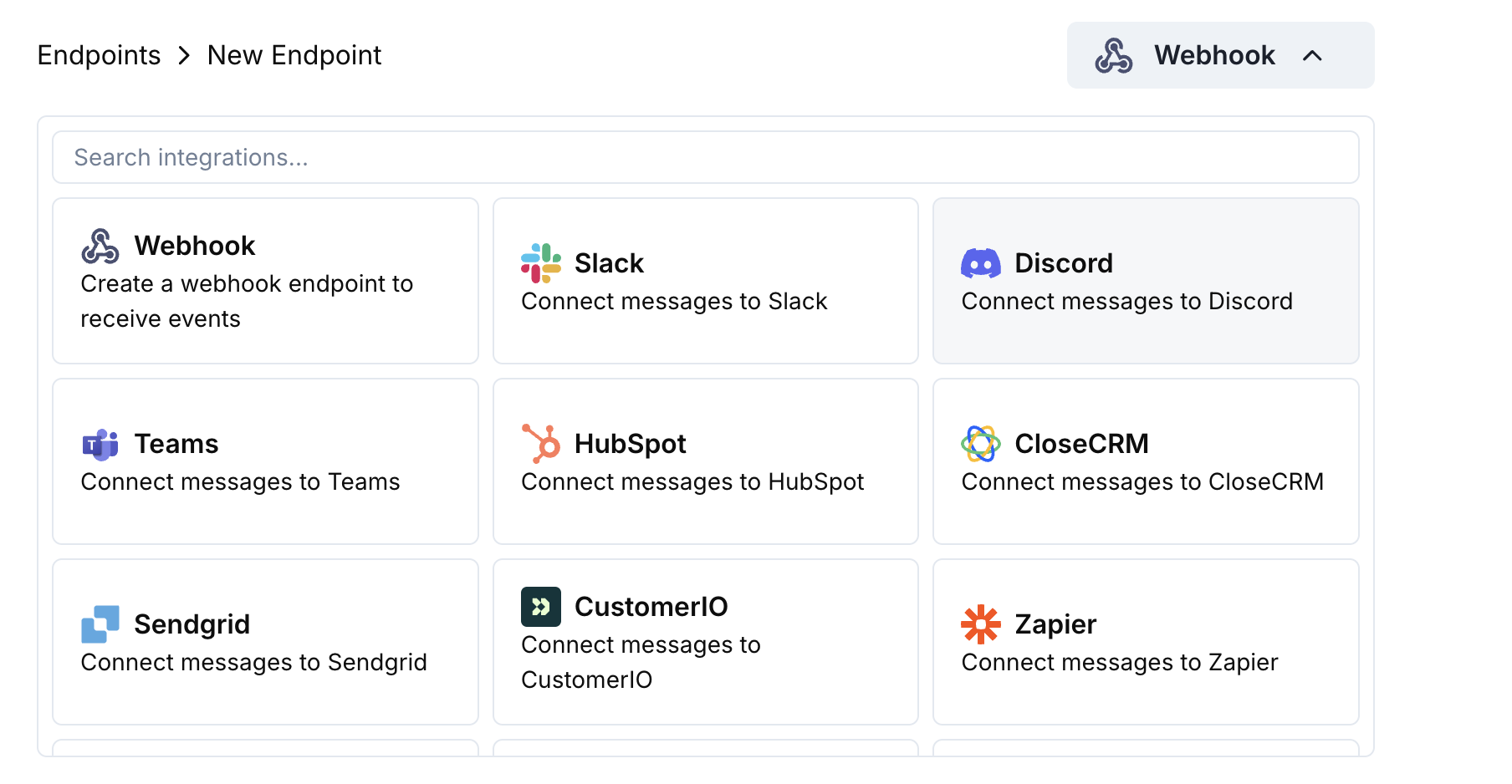 Wählen Sie die Discord-Karte und klicken Sie dann auf Verbinden Sie Ihren Discord-Arbeitsbereich.
Gewähren Sie die angeforderten Berechtigungen, damit der Bot Nachrichten in dem ausgewählten Kanal posten kann.
Passen Sie die Payload → Embed-Zuordnung an Ihre Bedürfnisse an – oder starten Sie mit den unten stehenden Vorlagen.
Verwenden Sie Beispiel-Payloads, um das Embed vorzuschauen, und klicken Sie dann auf Erstellen.
🎉 Ihr Discord-Kanal erhält jetzt Live-Updates von Dodo Payments.
## Beispiele für Transformation Codes
### Minimales Zahlungs-Embed
```javascript payment_embed.js icon="js" expandable theme={null}
function handler(webhook) {
if (webhook.eventType === "payment.succeeded") {
const p = webhook.payload.data;
webhook.payload = {
embeds: [{
title: "✅ Payment Successful",
description: `**Amount:** $${(p.total_amount / 100).toFixed(2)}\n**Customer:** ${p.customer.email}`,
color: 0x2ecc71 // green
}]
};
}
return webhook;
}
```
### Abonnementereignisse
```javascript subscription_embed.js icon="js" expandable theme={null}
function handler(webhook) {
const s = webhook.payload.data;
switch (webhook.eventType) {
case "subscription.active":
webhook.payload = {
embeds: [{
title: "📄 Subscription Activated",
fields: [
{ name: "Customer", value: s.customer.email, inline: true },
{ name: "Product", value: s.product_id, inline: true },
{ name: "Next Billing", value: new Date(s.next_billing_date).toLocaleDateString(), inline: true }
],
color: 0x2ecc71
}]
};
break;
case "subscription.cancelled":
webhook.payload = {
embeds: [{
title: "⚠️ Subscription Cancelled",
fields: [
{ name: "Customer", value: s.customer.email, inline: true },
{ name: "Product", value: s.product_id, inline: true }
],
color: 0xf1c40f
}]
};
break;
}
return webhook;
}
```
### Streitbenachrichtigungen
```javascript dispute_embed.js icon="js" expandable theme={null}
function handler(webhook) {
if (webhook.eventType.startsWith("dispute.")) {
const d = webhook.payload.data;
webhook.payload = {
embeds: [{
title: d.dispute_status === "won" ? "🏆 Dispute Won" : d.dispute_status === "lost" ? "❌ Dispute Lost" : "🚨 Dispute Update",
fields: [
{ name: "Payment ID", value: d.payment_id, inline: true },
{ name: "Amount", value: `$${(d.amount / 100).toFixed(2)}`, inline: true },
{ name: "Status", value: d.dispute_status, inline: true }
],
color: d.dispute_status === "won" ? 0x2ecc71 : d.dispute_status === "lost" ? 0xe74c3c : 0xe67e22
}]
};
}
return webhook;
}
```
## Tipps
* Bevorzugen Sie Embeds für reichhaltige Formatierung und Farben.
* Halten Sie Titel kurz; Details in Felder einfügen.
* Verwenden Sie intuitive Farben: grün (Erfolg), rot (Fehler), orange (Warnungen).
## Fehlersuche
* Bestätigen Sie, dass der Bot Zugriff auf den Kanal hat.
* Überprüfen Sie, dass die Transformation ein JSON-Objekt mit `embeds` zurückgibt.
* Validieren Sie Ihren Code im Editor – Syntaxfehler verhindern die Zustellung.
* Stellen Sie sicher, dass die Feldnamen der Struktur der Webhook-Payload entsprechen.
Wählen Sie die Discord-Karte und klicken Sie dann auf Verbinden Sie Ihren Discord-Arbeitsbereich.
Gewähren Sie die angeforderten Berechtigungen, damit der Bot Nachrichten in dem ausgewählten Kanal posten kann.
Passen Sie die Payload → Embed-Zuordnung an Ihre Bedürfnisse an – oder starten Sie mit den unten stehenden Vorlagen.
Verwenden Sie Beispiel-Payloads, um das Embed vorzuschauen, und klicken Sie dann auf Erstellen.
🎉 Ihr Discord-Kanal erhält jetzt Live-Updates von Dodo Payments.
## Beispiele für Transformation Codes
### Minimales Zahlungs-Embed
```javascript payment_embed.js icon="js" expandable theme={null}
function handler(webhook) {
if (webhook.eventType === "payment.succeeded") {
const p = webhook.payload.data;
webhook.payload = {
embeds: [{
title: "✅ Payment Successful",
description: `**Amount:** $${(p.total_amount / 100).toFixed(2)}\n**Customer:** ${p.customer.email}`,
color: 0x2ecc71 // green
}]
};
}
return webhook;
}
```
### Abonnementereignisse
```javascript subscription_embed.js icon="js" expandable theme={null}
function handler(webhook) {
const s = webhook.payload.data;
switch (webhook.eventType) {
case "subscription.active":
webhook.payload = {
embeds: [{
title: "📄 Subscription Activated",
fields: [
{ name: "Customer", value: s.customer.email, inline: true },
{ name: "Product", value: s.product_id, inline: true },
{ name: "Next Billing", value: new Date(s.next_billing_date).toLocaleDateString(), inline: true }
],
color: 0x2ecc71
}]
};
break;
case "subscription.cancelled":
webhook.payload = {
embeds: [{
title: "⚠️ Subscription Cancelled",
fields: [
{ name: "Customer", value: s.customer.email, inline: true },
{ name: "Product", value: s.product_id, inline: true }
],
color: 0xf1c40f
}]
};
break;
}
return webhook;
}
```
### Streitbenachrichtigungen
```javascript dispute_embed.js icon="js" expandable theme={null}
function handler(webhook) {
if (webhook.eventType.startsWith("dispute.")) {
const d = webhook.payload.data;
webhook.payload = {
embeds: [{
title: d.dispute_status === "won" ? "🏆 Dispute Won" : d.dispute_status === "lost" ? "❌ Dispute Lost" : "🚨 Dispute Update",
fields: [
{ name: "Payment ID", value: d.payment_id, inline: true },
{ name: "Amount", value: `$${(d.amount / 100).toFixed(2)}`, inline: true },
{ name: "Status", value: d.dispute_status, inline: true }
],
color: d.dispute_status === "won" ? 0x2ecc71 : d.dispute_status === "lost" ? 0xe74c3c : 0xe67e22
}]
};
}
return webhook;
}
```
## Tipps
* Bevorzugen Sie Embeds für reichhaltige Formatierung und Farben.
* Halten Sie Titel kurz; Details in Felder einfügen.
* Verwenden Sie intuitive Farben: grün (Erfolg), rot (Fehler), orange (Warnungen).
## Fehlersuche
* Bestätigen Sie, dass der Bot Zugriff auf den Kanal hat.
* Überprüfen Sie, dass die Transformation ein JSON-Objekt mit `embeds` zurückgibt.
* Validieren Sie Ihren Code im Editor – Syntaxfehler verhindern die Zustellung.
* Stellen Sie sicher, dass die Feldnamen der Struktur der Webhook-Payload entsprechen.