> ## Documentation Index
> Fetch the complete documentation index at: https://docs.dodopayments.com/llms.txt
> Use this file to discover all available pages before exploring further.
# MailerLite
> 根据 Dodo Payments 事件自动将客户添加到 MailerLite 订阅者列表并触发电子邮件自动化。
## 介绍
在支付事件发生时,自动将您的付费客户同步到 MailerLite 订阅者列表。将客户添加到特定组,触发自动化工作流,并使用真实的支付数据保持您的电子邮件营销列表的最新状态。
MailerLite 是一个强大的电子邮件营销平台,适用于新闻通讯、活动和自动化。此集成帮助您根据支付活动自动管理订阅者 - 非常适合入职序列、客户细分和有针对性的营销活动。
此集成需要您的 MailerLite API 密钥用于认证。您可以在[MailerLite 集成页面](https://dashboard.mailerlite.com/integrations/api)生成密钥。
## 开始使用
在您的 Dodo Payments 仪表板中,导航到 Webhooks + 添加端点 并展开集成下拉菜单。
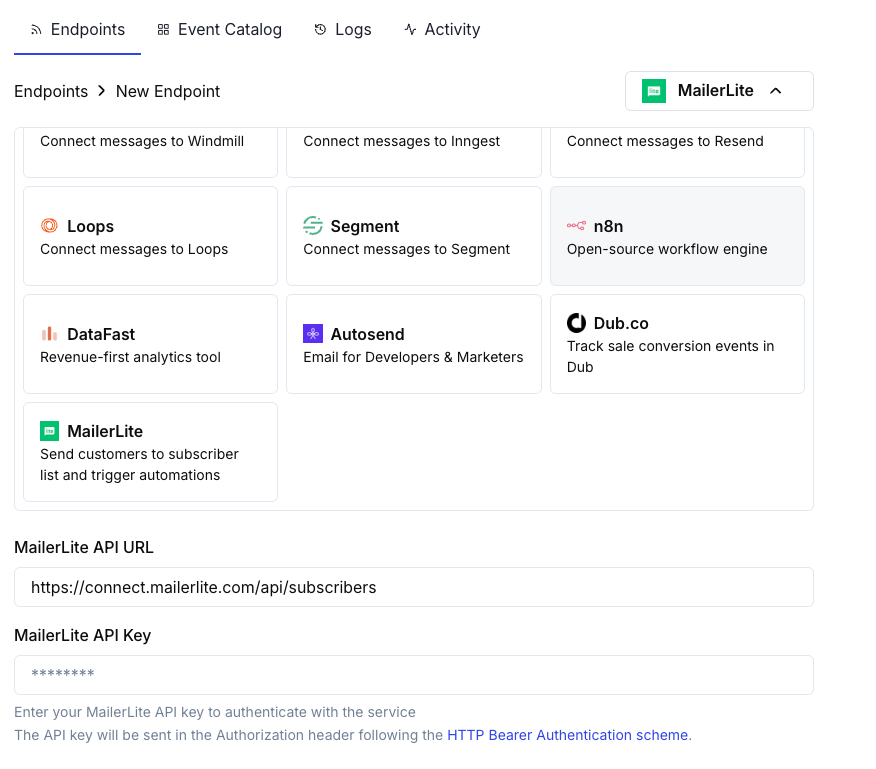 选择 MailerLite 集成卡片。
在配置中提供您的 MailerLite API 密钥。
编辑转换代码以将订阅者数据格式化为 MailerLite 的 API 所需格式。
使用示例有效负载进行测试,然后点击 Create 以激活订阅者同步。
付款事件现在将自动将客户同步到您的 MailerLite 列表。
## 转换代码示例
### 在成功支付时添加客户
```javascript add_customer.js icon="js" expandable theme={null}
function handler(webhook) {
if (webhook.eventType === "payment.succeeded") {
const p = webhook.payload.data;
webhook.url = "https://connect.mailerlite.com/api/subscribers";
webhook.payload = {
email: p.customer.email,
fields: {
name: p.customer.name,
company: p.customer.business_name || "",
last_name: ""
},
groups: ["your-group-id-here"],
status: "active"
};
}
return webhook;
}
```
### 根据产品将订阅者添加到多个组
```javascript product_segmentation.js icon="js" expandable theme={null}
function handler(webhook) {
if (webhook.eventType === "payment.succeeded") {
const p = webhook.payload.data;
// Determine groups based on product or amount
const groups = ["customers-group-id"];
// Add to premium group if high-value purchase
if (p.total_amount >= 10000) { // $100+
groups.push("premium-customers-group-id");
}
webhook.url = "https://connect.mailerlite.com/api/subscribers";
webhook.payload = {
email: p.customer.email,
fields: {
name: p.customer.name,
last_purchase_amount: (p.total_amount / 100).toFixed(2),
last_purchase_date: new Date(webhook.payload.timestamp).toISOString().split('T')[0],
payment_id: p.payment_id
},
groups: groups,
status: "active"
};
}
return webhook;
}
```
### 在订阅激活时添加新订阅者
```javascript subscription_subscriber.js icon="js" expandable theme={null}
function handler(webhook) {
if (webhook.eventType === "subscription.active") {
const s = webhook.payload.data;
webhook.url = "https://connect.mailerlite.com/api/subscribers";
webhook.payload = {
email: s.customer.email,
fields: {
name: s.customer.name,
subscription_plan: s.product_id,
subscription_amount: (s.recurring_pre_tax_amount / 100).toFixed(2),
billing_frequency: s.payment_frequency_interval,
subscription_start: new Date().toISOString().split('T')[0]
},
groups: ["subscribers-group-id", "active-subscriptions-group-id"],
status: "active"
};
}
return webhook;
}
```
### 在订阅取消时更新订阅者
```javascript subscription_cancelled.js icon="js" expandable theme={null}
function handler(webhook) {
if (webhook.eventType === "subscription.cancelled") {
const s = webhook.payload.data;
// Use PUT to update existing subscriber
webhook.url = "https://connect.mailerlite.com/api/subscribers/" + encodeURIComponent(s.customer.email);
webhook.method = "PUT";
webhook.payload = {
fields: {
subscription_status: "cancelled",
cancellation_date: new Date().toISOString().split('T')[0]
},
groups: ["churned-customers-group-id"]
};
}
return webhook;
}
```
### 使用自定义字段添加客户
```javascript custom_fields.js icon="js" expandable theme={null}
function handler(webhook) {
if (webhook.eventType === "payment.succeeded") {
const p = webhook.payload.data;
webhook.url = "https://connect.mailerlite.com/api/subscribers";
webhook.payload = {
email: p.customer.email,
fields: {
name: p.customer.name,
company: p.customer.business_name || "",
country: p.customer.country || "",
city: p.customer.city || "",
phone: p.customer.phone || "",
// Custom fields (must be created in MailerLite first)
total_spent: (p.total_amount / 100).toFixed(2),
customer_since: new Date().toISOString().split('T')[0],
payment_method: p.payment_method || "unknown",
currency: p.currency || "USD"
},
groups: ["paying-customers-group-id"],
status: "active",
subscribed_at: new Date().toISOString().replace('T', ' ').split('.')[0]
};
}
return webhook;
}
```
### 通过事件触发自动化
```javascript trigger_automation.js icon="js" expandable theme={null}
function handler(webhook) {
if (webhook.eventType === "payment.succeeded") {
const p = webhook.payload.data;
// First, ensure subscriber exists
webhook.url = "https://connect.mailerlite.com/api/subscribers";
webhook.payload = {
email: p.customer.email,
fields: {
name: p.customer.name,
// Add a trigger field that your automation watches
last_payment_trigger: new Date().toISOString(),
last_payment_amount: (p.total_amount / 100).toFixed(2)
},
status: "active"
};
// Tip: Create an automation in MailerLite that triggers
// when 'last_payment_trigger' field is updated
}
return webhook;
}
```
## 提示
* 在使用自定义字段之前,请在 MailerLite 中创建它们
* 使用组根据产品、计划级别或购买行为对客户进行细分
* 在 MailerLite 中设置在字段更新时触发的自动化工作流
* 使用 upsert 行为(POST 到 /subscribers)以避免重复订阅者错误
* 在自定义字段中存储支付元数据以获得更好的客户洞察
* 在为所有支付启用之前,先对小组进行测试
## 自定义字段设置
在使用自定义字段之前,您需要在 MailerLite 中创建它们:
1. 转到您的 MailerLite 仪表板
2. 转到 **Subscribers Fields**
3. 点击 **Create field** 并添加如下字段:
* `total_spent`(数字)
* `customer_since`(日期)
* `subscription_plan`(文本)
* `payment_method`(文本)
* `last_payment_amount`(数字)
## 故障排除
* 验证 API 密钥是否正确且处于激活状态
* 检查电子邮件地址是否有效(符合 RFC 2821)
* 确保组 ID 正确且在您的帐户中存在
* 注意:已取消订阅、弹回或被标记为垃圾邮件的订阅者无法通过 API 重新激活
* 在使用自定义字段前请先确保它们在 MailerLite 中已存在
* 检查字段名称完全匹配(区分大小写)
* 确保字段值匹配预期类型(文本、数字、日期)
* MailerLite API 的速率限制为每分钟 120 次请求
* 如果处理大量订阅者,请使用批量端点
* 在高并发场景中实施退避策略
* 验证组 ID 是数字字符串
* 检查这些组是否存在于您的 MailerLite 帐户中
* 注意:使用 PUT 更新组将把订阅者从未列出的组中移除
## API 参考
MailerLite 订阅者 API 接受以下关键参数:
| 参数 | 类型 | 是否必填 | 描述 |
| ------------------ | ------ | ---- | -------------------------------------------------- |
| `email` | string | 是 | 有效电子邮件地址(RFC 2821) |
| `fields` | object | 否 | 包含字段名/字段值对的对象 |
| `fields.name` | string | 否 | 订阅者的名字 |
| `fields.last_name` | string | 否 | 订阅者的姓氏 |
| `fields.company` | string | 否 | 公司名称 |
| `fields.country` | string | 否 | 国家/地区 |
| `fields.city` | string | 否 | 城市 |
| `fields.phone` | string | 否 | 电话号码 |
| `groups` | array | 否 | 要添加订阅者的组 ID 数组 |
| `status` | string | 否 | 可选值之一:active、unsubscribed、unconfirmed、bounced、junk |
| `subscribed_at` | string | 否 | 以 `yyyy-MM-dd HH:mm:ss` 格式表示的日期 |
| `ip_address` | string | 否 | 订阅者的 IP 地址 |
有关完整的 API 文档,请访问 [MailerLite 开发者](https://developers.mailerlite.com/docs/subscribers.html).
选择 MailerLite 集成卡片。
在配置中提供您的 MailerLite API 密钥。
编辑转换代码以将订阅者数据格式化为 MailerLite 的 API 所需格式。
使用示例有效负载进行测试,然后点击 Create 以激活订阅者同步。
付款事件现在将自动将客户同步到您的 MailerLite 列表。
## 转换代码示例
### 在成功支付时添加客户
```javascript add_customer.js icon="js" expandable theme={null}
function handler(webhook) {
if (webhook.eventType === "payment.succeeded") {
const p = webhook.payload.data;
webhook.url = "https://connect.mailerlite.com/api/subscribers";
webhook.payload = {
email: p.customer.email,
fields: {
name: p.customer.name,
company: p.customer.business_name || "",
last_name: ""
},
groups: ["your-group-id-here"],
status: "active"
};
}
return webhook;
}
```
### 根据产品将订阅者添加到多个组
```javascript product_segmentation.js icon="js" expandable theme={null}
function handler(webhook) {
if (webhook.eventType === "payment.succeeded") {
const p = webhook.payload.data;
// Determine groups based on product or amount
const groups = ["customers-group-id"];
// Add to premium group if high-value purchase
if (p.total_amount >= 10000) { // $100+
groups.push("premium-customers-group-id");
}
webhook.url = "https://connect.mailerlite.com/api/subscribers";
webhook.payload = {
email: p.customer.email,
fields: {
name: p.customer.name,
last_purchase_amount: (p.total_amount / 100).toFixed(2),
last_purchase_date: new Date(webhook.payload.timestamp).toISOString().split('T')[0],
payment_id: p.payment_id
},
groups: groups,
status: "active"
};
}
return webhook;
}
```
### 在订阅激活时添加新订阅者
```javascript subscription_subscriber.js icon="js" expandable theme={null}
function handler(webhook) {
if (webhook.eventType === "subscription.active") {
const s = webhook.payload.data;
webhook.url = "https://connect.mailerlite.com/api/subscribers";
webhook.payload = {
email: s.customer.email,
fields: {
name: s.customer.name,
subscription_plan: s.product_id,
subscription_amount: (s.recurring_pre_tax_amount / 100).toFixed(2),
billing_frequency: s.payment_frequency_interval,
subscription_start: new Date().toISOString().split('T')[0]
},
groups: ["subscribers-group-id", "active-subscriptions-group-id"],
status: "active"
};
}
return webhook;
}
```
### 在订阅取消时更新订阅者
```javascript subscription_cancelled.js icon="js" expandable theme={null}
function handler(webhook) {
if (webhook.eventType === "subscription.cancelled") {
const s = webhook.payload.data;
// Use PUT to update existing subscriber
webhook.url = "https://connect.mailerlite.com/api/subscribers/" + encodeURIComponent(s.customer.email);
webhook.method = "PUT";
webhook.payload = {
fields: {
subscription_status: "cancelled",
cancellation_date: new Date().toISOString().split('T')[0]
},
groups: ["churned-customers-group-id"]
};
}
return webhook;
}
```
### 使用自定义字段添加客户
```javascript custom_fields.js icon="js" expandable theme={null}
function handler(webhook) {
if (webhook.eventType === "payment.succeeded") {
const p = webhook.payload.data;
webhook.url = "https://connect.mailerlite.com/api/subscribers";
webhook.payload = {
email: p.customer.email,
fields: {
name: p.customer.name,
company: p.customer.business_name || "",
country: p.customer.country || "",
city: p.customer.city || "",
phone: p.customer.phone || "",
// Custom fields (must be created in MailerLite first)
total_spent: (p.total_amount / 100).toFixed(2),
customer_since: new Date().toISOString().split('T')[0],
payment_method: p.payment_method || "unknown",
currency: p.currency || "USD"
},
groups: ["paying-customers-group-id"],
status: "active",
subscribed_at: new Date().toISOString().replace('T', ' ').split('.')[0]
};
}
return webhook;
}
```
### 通过事件触发自动化
```javascript trigger_automation.js icon="js" expandable theme={null}
function handler(webhook) {
if (webhook.eventType === "payment.succeeded") {
const p = webhook.payload.data;
// First, ensure subscriber exists
webhook.url = "https://connect.mailerlite.com/api/subscribers";
webhook.payload = {
email: p.customer.email,
fields: {
name: p.customer.name,
// Add a trigger field that your automation watches
last_payment_trigger: new Date().toISOString(),
last_payment_amount: (p.total_amount / 100).toFixed(2)
},
status: "active"
};
// Tip: Create an automation in MailerLite that triggers
// when 'last_payment_trigger' field is updated
}
return webhook;
}
```
## 提示
* 在使用自定义字段之前,请在 MailerLite 中创建它们
* 使用组根据产品、计划级别或购买行为对客户进行细分
* 在 MailerLite 中设置在字段更新时触发的自动化工作流
* 使用 upsert 行为(POST 到 /subscribers)以避免重复订阅者错误
* 在自定义字段中存储支付元数据以获得更好的客户洞察
* 在为所有支付启用之前,先对小组进行测试
## 自定义字段设置
在使用自定义字段之前,您需要在 MailerLite 中创建它们:
1. 转到您的 MailerLite 仪表板
2. 转到 **Subscribers Fields**
3. 点击 **Create field** 并添加如下字段:
* `total_spent`(数字)
* `customer_since`(日期)
* `subscription_plan`(文本)
* `payment_method`(文本)
* `last_payment_amount`(数字)
## 故障排除
* 验证 API 密钥是否正确且处于激活状态
* 检查电子邮件地址是否有效(符合 RFC 2821)
* 确保组 ID 正确且在您的帐户中存在
* 注意:已取消订阅、弹回或被标记为垃圾邮件的订阅者无法通过 API 重新激活
* 在使用自定义字段前请先确保它们在 MailerLite 中已存在
* 检查字段名称完全匹配(区分大小写)
* 确保字段值匹配预期类型(文本、数字、日期)
* MailerLite API 的速率限制为每分钟 120 次请求
* 如果处理大量订阅者,请使用批量端点
* 在高并发场景中实施退避策略
* 验证组 ID 是数字字符串
* 检查这些组是否存在于您的 MailerLite 帐户中
* 注意:使用 PUT 更新组将把订阅者从未列出的组中移除
## API 参考
MailerLite 订阅者 API 接受以下关键参数:
| 参数 | 类型 | 是否必填 | 描述 |
| ------------------ | ------ | ---- | -------------------------------------------------- |
| `email` | string | 是 | 有效电子邮件地址(RFC 2821) |
| `fields` | object | 否 | 包含字段名/字段值对的对象 |
| `fields.name` | string | 否 | 订阅者的名字 |
| `fields.last_name` | string | 否 | 订阅者的姓氏 |
| `fields.company` | string | 否 | 公司名称 |
| `fields.country` | string | 否 | 国家/地区 |
| `fields.city` | string | 否 | 城市 |
| `fields.phone` | string | 否 | 电话号码 |
| `groups` | array | 否 | 要添加订阅者的组 ID 数组 |
| `status` | string | 否 | 可选值之一:active、unsubscribed、unconfirmed、bounced、junk |
| `subscribed_at` | string | 否 | 以 `yyyy-MM-dd HH:mm:ss` 格式表示的日期 |
| `ip_address` | string | 否 | 订阅者的 IP 地址 |
有关完整的 API 文档,请访问 [MailerLite 开发者](https://developers.mailerlite.com/docs/subscribers.html).