> ## Documentation Index
> Fetch the complete documentation index at: https://docs.dodopayments.com/llms.txt
> Use this file to discover all available pages before exploring further.
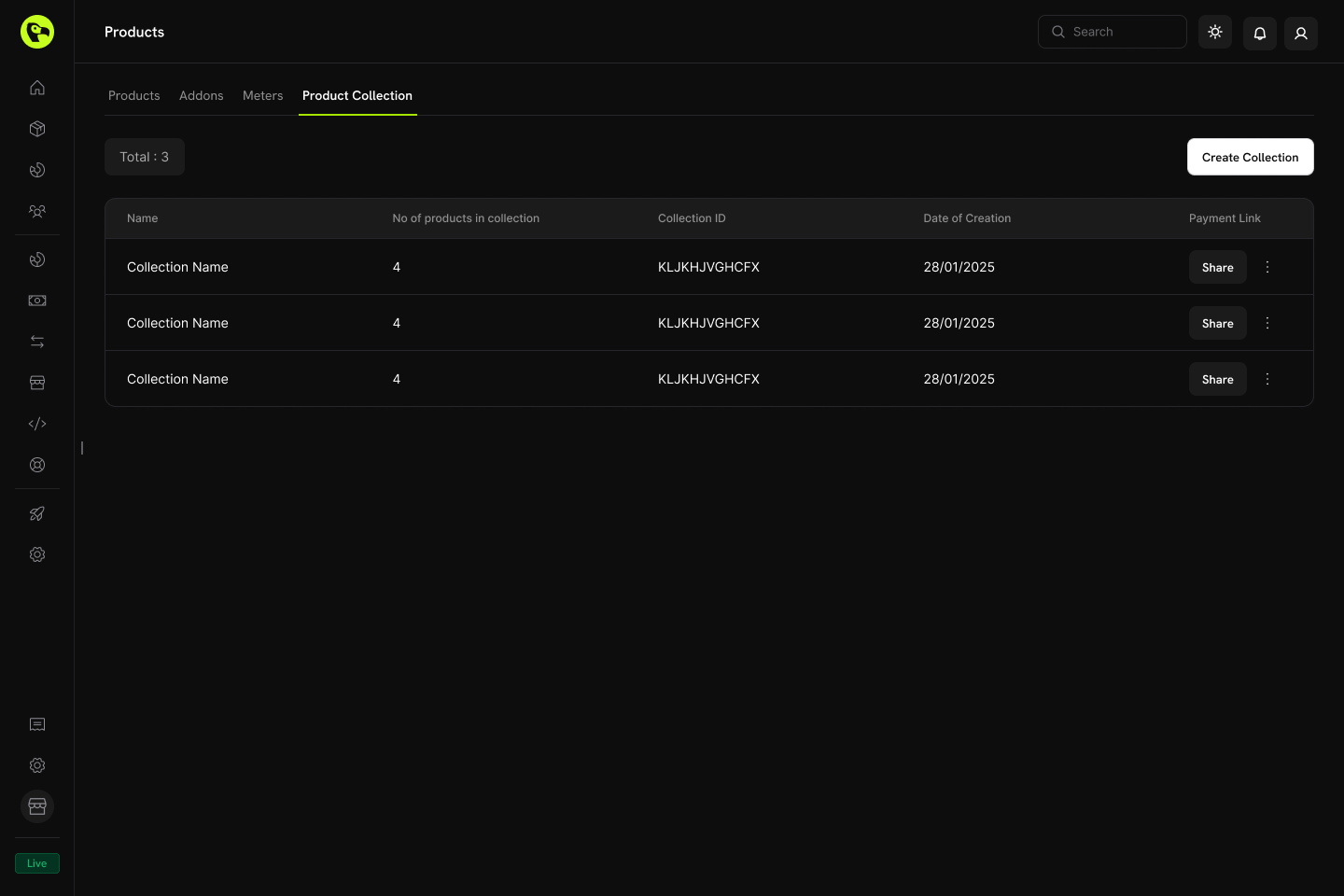
# Product Collections
> Group related products together for unified checkout experiences, plan selection, and seamless upgrade/downgrade paths within the Customer Portal.
Product Collections let you group related products (e.g., Starter, Pro, Enterprise plans) under one umbrella. Display all options in a single checkout, define upgrade/downgrade paths, and give customers the flexibility to switch plans directly from the Customer Portal.
 ## Key Highlights
* **Collection-based structure**: Group related products (plans, tiers, pricing options) under a single collection for organized management.
* **One collection, many products**: Include multiple products like Starter, Pro, Lifetime, etc., each with its own pricing model.
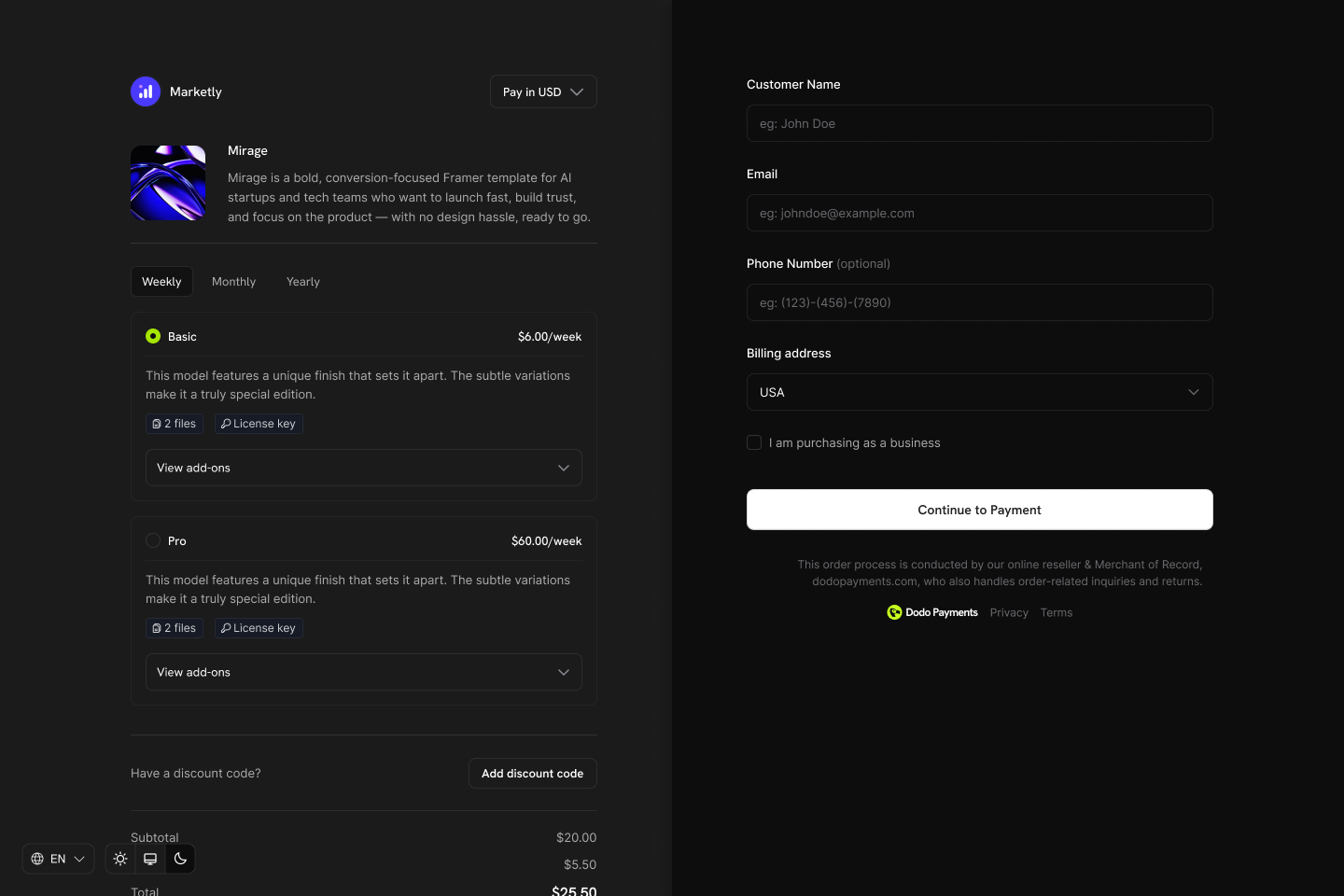
* **Dynamic checkout experience**: Display all products from a collection in one checkout view, letting customers choose their preferred plan.
* **Merchant-level control**: Enable, disable, and reorder products within each collection. The first product is automatically pre-selected at checkout.
* **Lifecycle awareness**: Enable customers to upgrade or downgrade between products in the same collection via the Customer Portal.
## Creating a Product Collection
Product Collections are created and managed from the dashboard or via API. Each collection acts as a container for related products.
Define the collection with a name and optional description. Upload an image to visually represent the collection in checkout.
## Key Highlights
* **Collection-based structure**: Group related products (plans, tiers, pricing options) under a single collection for organized management.
* **One collection, many products**: Include multiple products like Starter, Pro, Lifetime, etc., each with its own pricing model.
* **Dynamic checkout experience**: Display all products from a collection in one checkout view, letting customers choose their preferred plan.
* **Merchant-level control**: Enable, disable, and reorder products within each collection. The first product is automatically pre-selected at checkout.
* **Lifecycle awareness**: Enable customers to upgrade or downgrade between products in the same collection via the Customer Portal.
## Creating a Product Collection
Product Collections are created and managed from the dashboard or via API. Each collection acts as a container for related products.
Define the collection with a name and optional description. Upload an image to visually represent the collection in checkout.
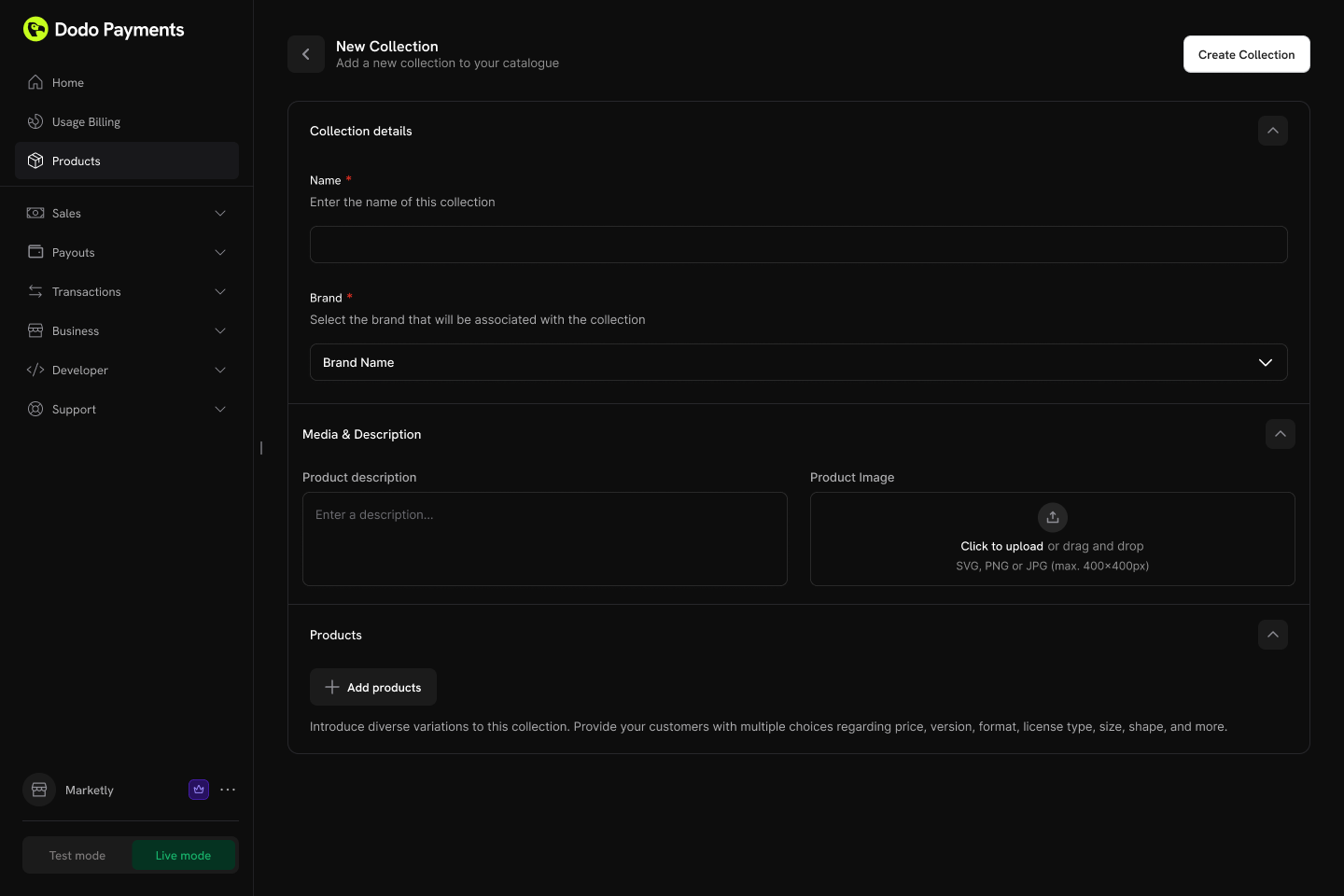 **Collection fields:**
* **Name** (required): Display name for the collection (e.g., "SaaS Plans", "License Tiers")
* **Description** (optional): Brief explanation shown in checkout
* **Image** (optional): Visual branding for the collection
Add existing products to your collection. Products can be organized into groups for better structure.
**Collection fields:**
* **Name** (required): Display name for the collection (e.g., "SaaS Plans", "License Tiers")
* **Description** (optional): Brief explanation shown in checkout
* **Image** (optional): Visual branding for the collection
Add existing products to your collection. Products can be organized into groups for better structure.
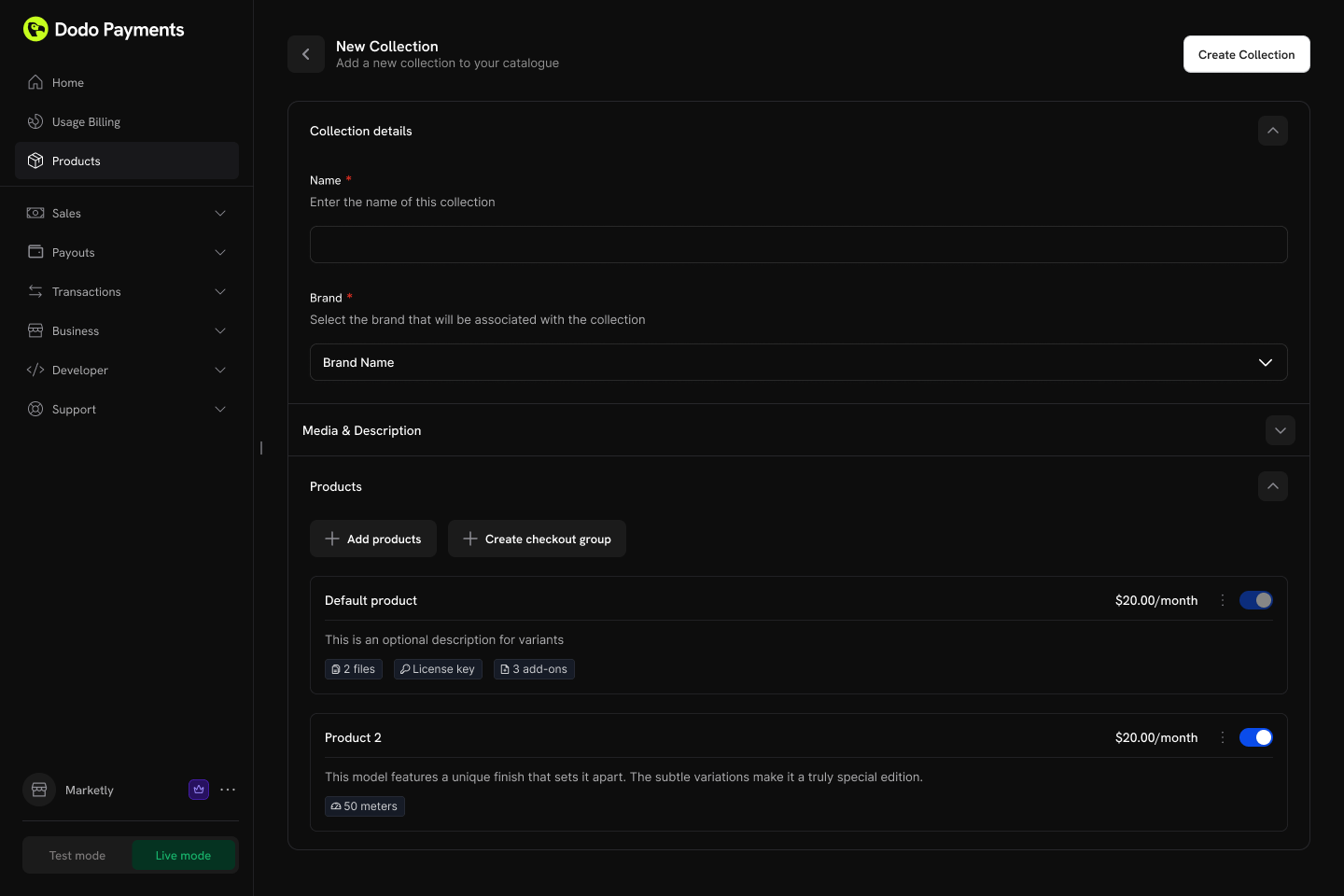 **Product organization:**
* **Groups**: Optionally organize products into named groups (e.g., "Monthly Plans", "Annual Plans")
* **Ungrouped products**: Products without a group appear at the collection level
* **Ordering**: Drag and drop to set the display order
Each product can only belong to one collection. If a product is already in another collection, you'll need to remove it first.
Control the display order and visibility of products within the collection.
**Configuration options:**
* **Product status**: Enable or disable individual products within the collection
* **Display order**: Drag and drop to set the sequence products appear in checkout
The first product in the collection is automatically pre-selected as the default at checkout. Reorder products to change which one is selected by default.
## Collection Checkout
Collections enable a unified checkout experience where customers can view and select from all available products in one place.
### Checkout Types
| Type | Description | Use Case |
| --------------------------- | ------------------------------------------------ | ------------------------------------------- |
| **Collection Checkout** | Displays all active products within a collection | Subscription plan selection, tiered pricing |
| **Single Product Checkout** | Displays only one specific product | Direct purchase, promotional links |
### Collection Checkout Experience
When using a collection checkout:
1. **All active products displayed**: Customers see every enabled product in the collection
2. **First product pre-selected**: The first product in the collection order is automatically selected
3. **Product details shown**: Each product displays its name, description, and pricing
4. **Single selection**: Customer selects one product to purchase
5. **Standard flow continues**: After selection, the checkout proceeds with the chosen product's pricing and billing settings
Collection checkout is ideal for subscription businesses where you want customers to compare plans side-by-side before purchasing.
### API Integration
Create a checkout session for a collection:
```typescript theme={null}
const session = await client.checkoutSessions.create({
product_collection_id: 'pdc_abc123',
product_cart: [], // Required: pass an empty array for collection checkout
return_url: 'https://yoursite.com/return'
});
// Redirect customer to the checkout
window.location.href = session.checkout_url;
```
When using `product_collection_id`, discount codes cannot be applied at session creation. Customers can still enter discount codes during checkout if enabled.
## Customer Portal Integration
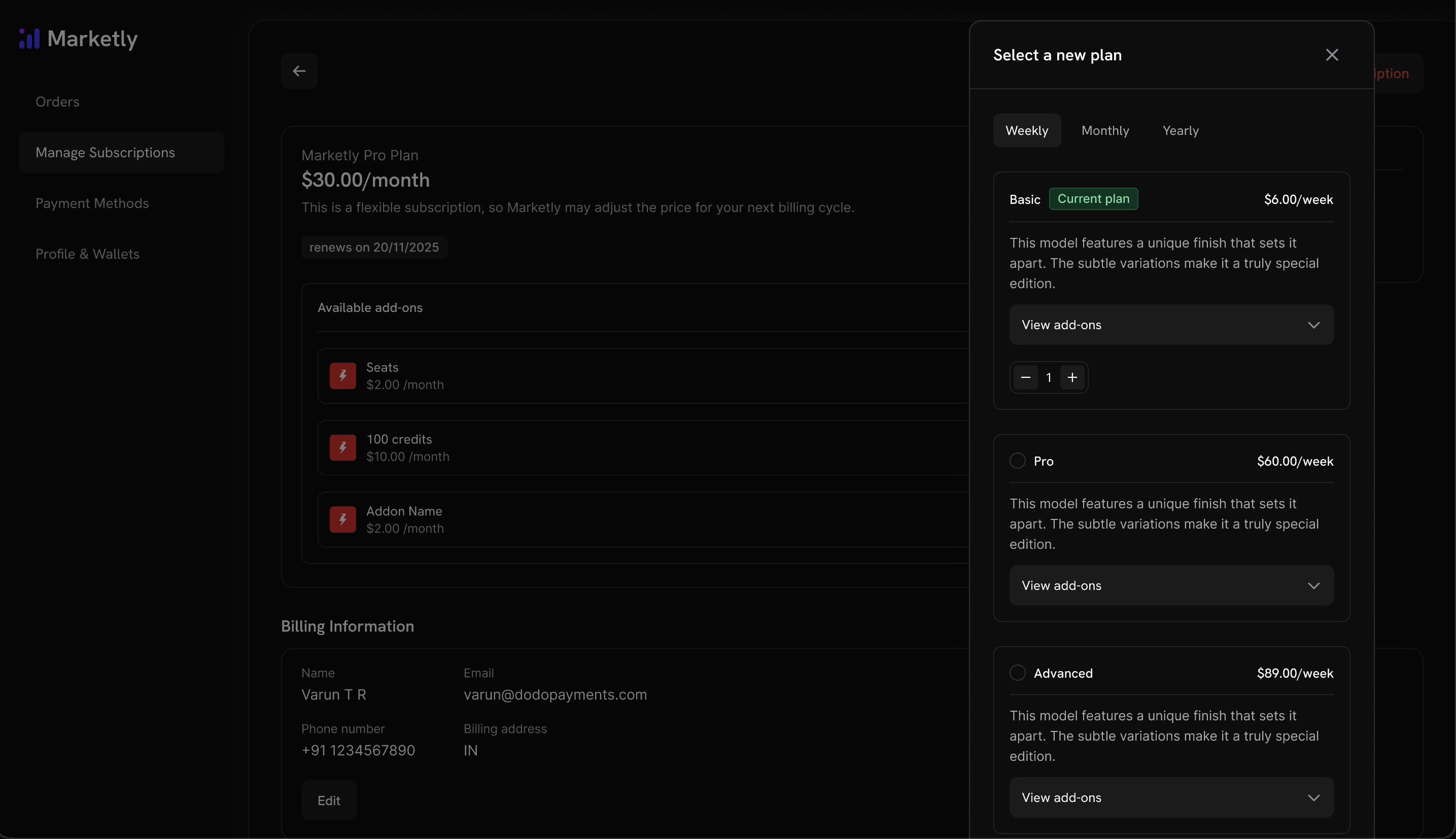
Customers can upgrade or downgrade between products within the same collection directly from the Customer Portal.
**Already have subscription products?** Simply add them to a Product Collection to enable upgrade/downgrade flows in the Customer Portal. No need to recreate your products.
### Plan Management Actions
| Action | Description | Merchant Control |
| --------------------- | ----------------------------------------------------- | ------------------------------- |
| **View Current Plan** | Display current product name, price, and renewal date | Always available |
| **Upgrade Plan** | Move to a higher-tier product in the same collection | Configurable (default: allowed) |
| **Downgrade Plan** | Move to a lower-tier product in the same collection | Configurable (default: allowed) |
| **Cancel** | Cancel the subscription entirely | Always available |
**Product organization:**
* **Groups**: Optionally organize products into named groups (e.g., "Monthly Plans", "Annual Plans")
* **Ungrouped products**: Products without a group appear at the collection level
* **Ordering**: Drag and drop to set the display order
Each product can only belong to one collection. If a product is already in another collection, you'll need to remove it first.
Control the display order and visibility of products within the collection.
**Configuration options:**
* **Product status**: Enable or disable individual products within the collection
* **Display order**: Drag and drop to set the sequence products appear in checkout
The first product in the collection is automatically pre-selected as the default at checkout. Reorder products to change which one is selected by default.
## Collection Checkout
Collections enable a unified checkout experience where customers can view and select from all available products in one place.
### Checkout Types
| Type | Description | Use Case |
| --------------------------- | ------------------------------------------------ | ------------------------------------------- |
| **Collection Checkout** | Displays all active products within a collection | Subscription plan selection, tiered pricing |
| **Single Product Checkout** | Displays only one specific product | Direct purchase, promotional links |
### Collection Checkout Experience
When using a collection checkout:
1. **All active products displayed**: Customers see every enabled product in the collection
2. **First product pre-selected**: The first product in the collection order is automatically selected
3. **Product details shown**: Each product displays its name, description, and pricing
4. **Single selection**: Customer selects one product to purchase
5. **Standard flow continues**: After selection, the checkout proceeds with the chosen product's pricing and billing settings
Collection checkout is ideal for subscription businesses where you want customers to compare plans side-by-side before purchasing.
### API Integration
Create a checkout session for a collection:
```typescript theme={null}
const session = await client.checkoutSessions.create({
product_collection_id: 'pdc_abc123',
product_cart: [], // Required: pass an empty array for collection checkout
return_url: 'https://yoursite.com/return'
});
// Redirect customer to the checkout
window.location.href = session.checkout_url;
```
When using `product_collection_id`, discount codes cannot be applied at session creation. Customers can still enter discount codes during checkout if enabled.
## Customer Portal Integration
Customers can upgrade or downgrade between products within the same collection directly from the Customer Portal.
**Already have subscription products?** Simply add them to a Product Collection to enable upgrade/downgrade flows in the Customer Portal. No need to recreate your products.
### Plan Management Actions
| Action | Description | Merchant Control |
| --------------------- | ----------------------------------------------------- | ------------------------------- |
| **View Current Plan** | Display current product name, price, and renewal date | Always available |
| **Upgrade Plan** | Move to a higher-tier product in the same collection | Configurable (default: allowed) |
| **Downgrade Plan** | Move to a lower-tier product in the same collection | Configurable (default: allowed) |
| **Cancel** | Cancel the subscription entirely | Always available |
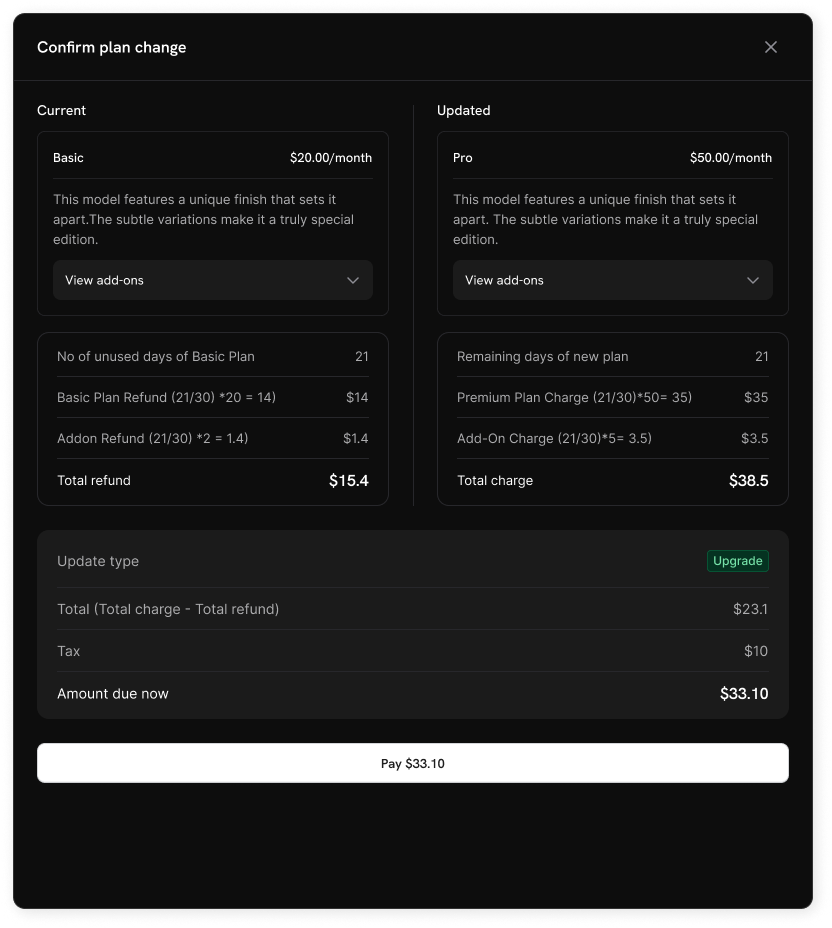
 ### Upgrade/Downgrade Rules
* Upgrades and downgrades are only available between products **within the same collection**
* Proration is applied based on your subscription settings
* Email notifications are sent to the business on every upgrade, downgrade, or cancellation
### Upgrade/Downgrade Rules
* Upgrades and downgrades are only available between products **within the same collection**
* Proration is applied based on your subscription settings
* Email notifications are sent to the business on every upgrade, downgrade, or cancellation
 Customers cannot change to products outside their current collection. Create separate collections for distinct product lines.
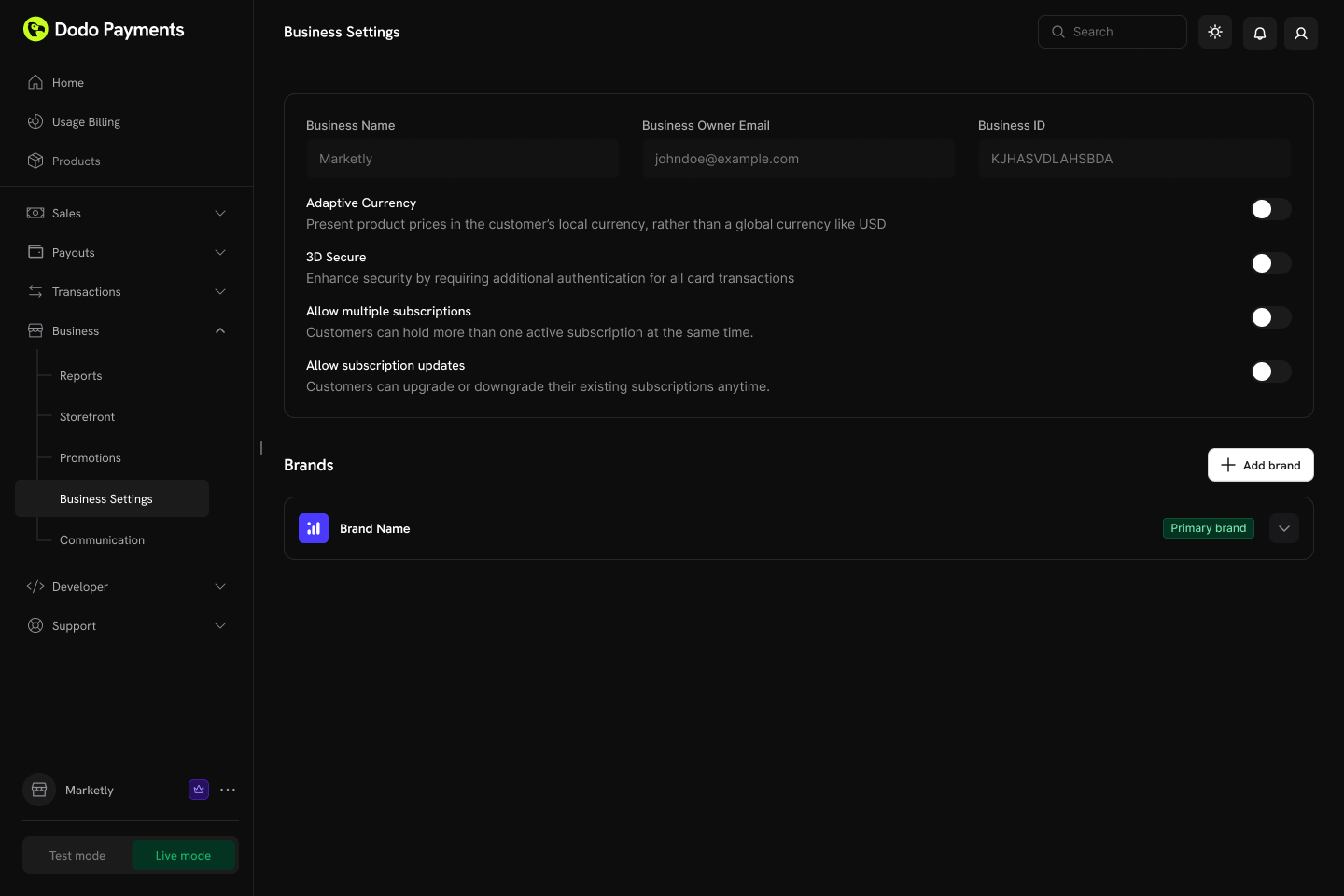
## Subscription Settings
在仪表板中的 **设置 → 订阅** 配置整个业务的订阅和计划更改功能。
Customers cannot change to products outside their current collection. Create separate collections for distinct product lines.
## Subscription Settings
在仪表板中的 **设置 → 订阅** 配置整个业务的订阅和计划更改功能。
 ### Available Settings
| Setting | Description | Default |
| -------------------------------- | ------------------------------------------------------------------------------------------- | -------- |
| **Allow Multiple Subscriptions** | Customers can hold more than one active subscription at the same time | Enabled |
| **Allow Subscription Updates** | Customers can upgrade or downgrade their existing subscriptions anytime via Customer Portal | Disabled |
客户门户的计划更改默认是禁用的。在 **设置 → 订阅** 中启用 "允许订阅更新",以便客户在同一集合中进行产品升级或降级。
Learn more about proration modes and plan change behavior.
## Managing Collections
产品集合可以通过 Dodo Payments 仪表板或通过 API 编程管理。API 提供对集合创建、更新、图片上传、归档以及管理嵌套组和产品的完全控制。
### 仪表板操作
* **创建**:设置带有产品和组的新集合
* **更新**:修改名称、描述、图片和产品组织
* **重新排序**:拖放以更改产品显示顺序
* **启用/禁用产品**:控制哪些产品出现在结账中
* **归档**:隐藏集合而不是永久删除它(以后可以取消归档)
### Available Settings
| Setting | Description | Default |
| -------------------------------- | ------------------------------------------------------------------------------------------- | -------- |
| **Allow Multiple Subscriptions** | Customers can hold more than one active subscription at the same time | Enabled |
| **Allow Subscription Updates** | Customers can upgrade or downgrade their existing subscriptions anytime via Customer Portal | Disabled |
客户门户的计划更改默认是禁用的。在 **设置 → 订阅** 中启用 "允许订阅更新",以便客户在同一集合中进行产品升级或降级。
Learn more about proration modes and plan change behavior.
## Managing Collections
产品集合可以通过 Dodo Payments 仪表板或通过 API 编程管理。API 提供对集合创建、更新、图片上传、归档以及管理嵌套组和产品的完全控制。
### 仪表板操作
* **创建**:设置带有产品和组的新集合
* **更新**:修改名称、描述、图片和产品组织
* **重新排序**:拖放以更改产品显示顺序
* **启用/禁用产品**:控制哪些产品出现在结账中
* **归档**:隐藏集合而不是永久删除它(以后可以取消归档)
 ### API 管理
以下端点允许您通过编程方式创建、更新、检索、归档和组织产品集合,包括管理嵌套组及其中的产品。
使用 `GET` 请求到 `/product-collections` 端点来获取与您的账户相关的所有产品集合。支持分页、按品牌过滤以及包括已归档的集合。
查看“列表产品集合”API 文档中的详细请求和响应结构。
通过发送 `POST` 请求到 `/product-collections` 端点来创建新的产品集合,并包含名称、描述和品牌等详细信息。
查看“创建产品集合”API 文档中的详细请求和响应结构。
使用 `GET` 请求到 `/product-collections/{id}` 端点获取有关特定产品集合的详细信息,包括其组和产品项。
查看“获取产品集合”API 文档中的详细请求和响应结构。
通过发送 `PATCH` 请求到 `/product-collections/{id}` 端点修改产品集合的详细信息(名称、描述、品牌等)。
查看“更新产品集合”API 文档中的详细请求和响应结构。
通过上传到预签名 URL 将图片与集合关联。从 `/product-collections/{id}/images` 端点请求上传 URL,然后在 60 秒内将图像 `PUT` 上传到返回的 URL。
预签名 URL 在 60 秒后过期,因此图像必须在该时间内上传。
查看“更新集合图片”API 文档中的详细请求和响应结构。
通过发送 `DELETE` 请求到 `/product-collections/{id}` 端点来归档一个集合。这样会将该集合隐藏起来,但不会永久删除。
查看“归档产品集合”API 文档中的详细请求和响应结构。
通过发送 `POST` 请求到 `/product-collections/{id}/unarchive` 端点恢复已归档的集合。
查看“取消归档产品集合”API 文档中的详细请求和响应结构。
组允许您在集合中组织产品(例如,“月度计划”与“年度计划”)。使用组端点在集合中添加、更新或删除组。
* **创建组**:`POST /product-collections/{id}/groups`
* **更新组**:`PATCH /product-collections/{id}/groups/{group_id}`
* **删除组**:`DELETE /product-collections/{id}/groups/{group_id}`
添加新的组到产品集合。修改组的名称或属性。删除集合中的组。
管理组内的各个产品项——添加新产品,更新现有项(如显示顺序),或完全删除它们。
* **向组中添加产品**:`POST /product-collections/{id}/groups/{group_id}/items`
* **更新组项**:`PATCH /product-collections/{id}/groups/{group_id}/items/{item_id}`
* **删除组项**:`DELETE /product-collections/{id}/groups/{group_id}/items/{item_id}`
向集合中的组中添加一个或多个产品。更新组中的产品项。删除组中的产品项。
## 最佳实践
* **逻辑分组**:按计费间隔(月度/年度)或功能等级(入门版/专业版/企业版)组织产品
* **策略性排序**:将最受欢迎或推荐的计划放在首位,因为它将在结账时被预选中
* **使用清晰的命名**:产品名称应清楚地传达价值差异
* **启用双向操作**:允许升级和降级,为客户提供灵活性
* **考虑分摊**:选择与您的商业模式相符的分摊模式
* **彻底测试**:在上线前验证结账和计划变更流程的测试模式
您已准备好创建产品集合并为客户提供统一的计划选择体验。
创建一次性、订阅或基于使用的产品以添加到集合中。
在统一的结账体验中显示集合产品。
允许客户在同一集合内升级或降级。
管理带有分摊和计划更改的经常性计划。
### API 管理
以下端点允许您通过编程方式创建、更新、检索、归档和组织产品集合,包括管理嵌套组及其中的产品。
使用 `GET` 请求到 `/product-collections` 端点来获取与您的账户相关的所有产品集合。支持分页、按品牌过滤以及包括已归档的集合。
查看“列表产品集合”API 文档中的详细请求和响应结构。
通过发送 `POST` 请求到 `/product-collections` 端点来创建新的产品集合,并包含名称、描述和品牌等详细信息。
查看“创建产品集合”API 文档中的详细请求和响应结构。
使用 `GET` 请求到 `/product-collections/{id}` 端点获取有关特定产品集合的详细信息,包括其组和产品项。
查看“获取产品集合”API 文档中的详细请求和响应结构。
通过发送 `PATCH` 请求到 `/product-collections/{id}` 端点修改产品集合的详细信息(名称、描述、品牌等)。
查看“更新产品集合”API 文档中的详细请求和响应结构。
通过上传到预签名 URL 将图片与集合关联。从 `/product-collections/{id}/images` 端点请求上传 URL,然后在 60 秒内将图像 `PUT` 上传到返回的 URL。
预签名 URL 在 60 秒后过期,因此图像必须在该时间内上传。
查看“更新集合图片”API 文档中的详细请求和响应结构。
通过发送 `DELETE` 请求到 `/product-collections/{id}` 端点来归档一个集合。这样会将该集合隐藏起来,但不会永久删除。
查看“归档产品集合”API 文档中的详细请求和响应结构。
通过发送 `POST` 请求到 `/product-collections/{id}/unarchive` 端点恢复已归档的集合。
查看“取消归档产品集合”API 文档中的详细请求和响应结构。
组允许您在集合中组织产品(例如,“月度计划”与“年度计划”)。使用组端点在集合中添加、更新或删除组。
* **创建组**:`POST /product-collections/{id}/groups`
* **更新组**:`PATCH /product-collections/{id}/groups/{group_id}`
* **删除组**:`DELETE /product-collections/{id}/groups/{group_id}`
添加新的组到产品集合。修改组的名称或属性。删除集合中的组。
管理组内的各个产品项——添加新产品,更新现有项(如显示顺序),或完全删除它们。
* **向组中添加产品**:`POST /product-collections/{id}/groups/{group_id}/items`
* **更新组项**:`PATCH /product-collections/{id}/groups/{group_id}/items/{item_id}`
* **删除组项**:`DELETE /product-collections/{id}/groups/{group_id}/items/{item_id}`
向集合中的组中添加一个或多个产品。更新组中的产品项。删除组中的产品项。
## 最佳实践
* **逻辑分组**:按计费间隔(月度/年度)或功能等级(入门版/专业版/企业版)组织产品
* **策略性排序**:将最受欢迎或推荐的计划放在首位,因为它将在结账时被预选中
* **使用清晰的命名**:产品名称应清楚地传达价值差异
* **启用双向操作**:允许升级和降级,为客户提供灵活性
* **考虑分摊**:选择与您的商业模式相符的分摊模式
* **彻底测试**:在上线前验证结账和计划变更流程的测试模式
您已准备好创建产品集合并为客户提供统一的计划选择体验。
创建一次性、订阅或基于使用的产品以添加到集合中。
在统一的结账体验中显示集合产品。
允许客户在同一集合内升级或降级。
管理带有分摊和计划更改的经常性计划。