> ## Documentation Index
> Fetch the complete documentation index at: https://docs.dodopayments.com/llms.txt
> Use this file to discover all available pages before exploring further.
# 本地化定价
> 为每种货币或国家设定自己的固定价格,而不是让汇率决定。收取整洁的、符合市场的价格,并进行按国家促销。
## 什么是本地化定价?
每个产品都有一个基础货币的基础价格。本地化定价允许您通过**为每种货币或国家设置的固定价格**来覆盖该基础价格。通过在产品上设置 `pricing_mode` 来开启此功能,然后为每个市场附加一条规则。
这是用于国际定价的三个独立杠杆之一,每个都解决不同的问题:
| 机制 | 它的作用 | 客户看到的金额 |
| :--------------------------------------- | :---------------- | :----------- |
| **本地化定价** | 您为每种货币或国家设置的固定价格 | 正是您设置的金额 |
| [**自适应货币**](/features/adaptive-currency) | 自动按实时外汇汇率转换您的基础价格 | 按当前汇率转换的基础价格 |
| [**折扣码**](/features/discount-codes) | 按基础价格的百分比折扣 | 基础价格减去折扣 |
本地化定价和自适应货币共同运作。当没有匹配的本地化规则时,产品会回落到其基础价格——如果客户已经使用您的基础货币,会直接收费,否则通过自适应货币转换。
***
## 用例
在价格敏感市场收取更低的费用,而不对本国市场打折。一个 `by_country` 规则可以让一款\$20的基础产品以 **₹999在印度** 销售——调整到当地购买力,而不是简单的FX转换。推荐的、本地化的PPP运行方式。
\$19.99的实时FX转换可能会落到一个不便的数字上,比如€18.43。一个 `by_currency` 规则可以将其设置为客户期望的整洁、心理价格——**€9.99**、**¥1000**、**₹499**——精确如您输入的那样。
在一个新的国家推出?添加一个 `by_country` 规则,设置促销价格,然后在促销结束后**归档它**,以回落到基础/自适应定价。规则会被归档,而不被删除,所以您可以保留一个清晰的记录,记下何时上线以及何时结束。
将单一市场的价格与本地竞争对手匹配。一个 `by_country` 规则可以让 **英国的价格为£9.00** 保持不变,而不受GBP/USD汇率变化的影响。
***
## 核心概念
* **定价模式** — 一个产品在任何时候都只处于一种模式,由其`pricing_mode`设置:
* `by_currency`:每种货币一个价格,与国家无关。所有使用欧元支付的人都看到€9.99。
* `by_country`:特定于一个国家的价格(印度₹999),即使多个国家使用同一种货币。
* **以最小单位固定金额** — 规则的`amount`是该货币最小单位的整数,与API其他地方相同:`99900`是₹999.00,`999`是€9.99。它是您设置的价格,而不是转换的值。
* **当没有规则匹配时** — 产品保持其现有行为:在您的基础货币中支付基础价格的客户;其他人通过[自适应货币](/features/adaptive-currency)转换。
* **费用在规则匹配时包含在内** — 客户支付您设定的**确切**金额。[自适应货币](/features/adaptive-currency#choose-who-bears-the-fee)外汇费用由您吸收(视为费用已包含在内),而不是加在上面,因此您声明的本地价格始终是收取的价格。
***
## 在仪表板中设置
在您的商家仪表板中,转到 **产品** 并创建一个产品(或打开现有产品进行编辑)。像往常一样设置基础**价格**和货币。
在 **定价** 部分勾选 **本地化定价**,然后选择 **按国家** 或 **按货币**。
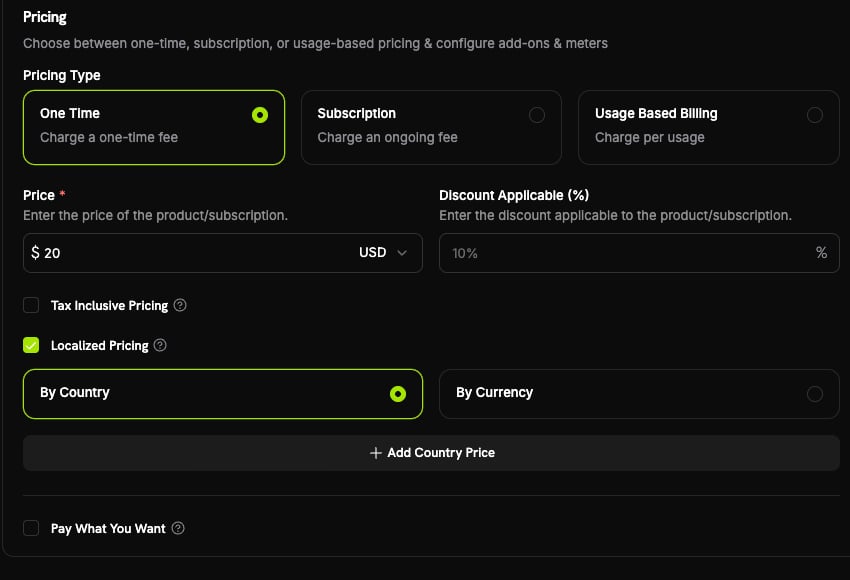 点击 **添加国家价格** 或 **添加货币价格**,填入 **本地化定价** 面板,然后点击 **添加**。您添加的每个市场都会出现在覆盖表中,您可以稍后编辑或删除它。
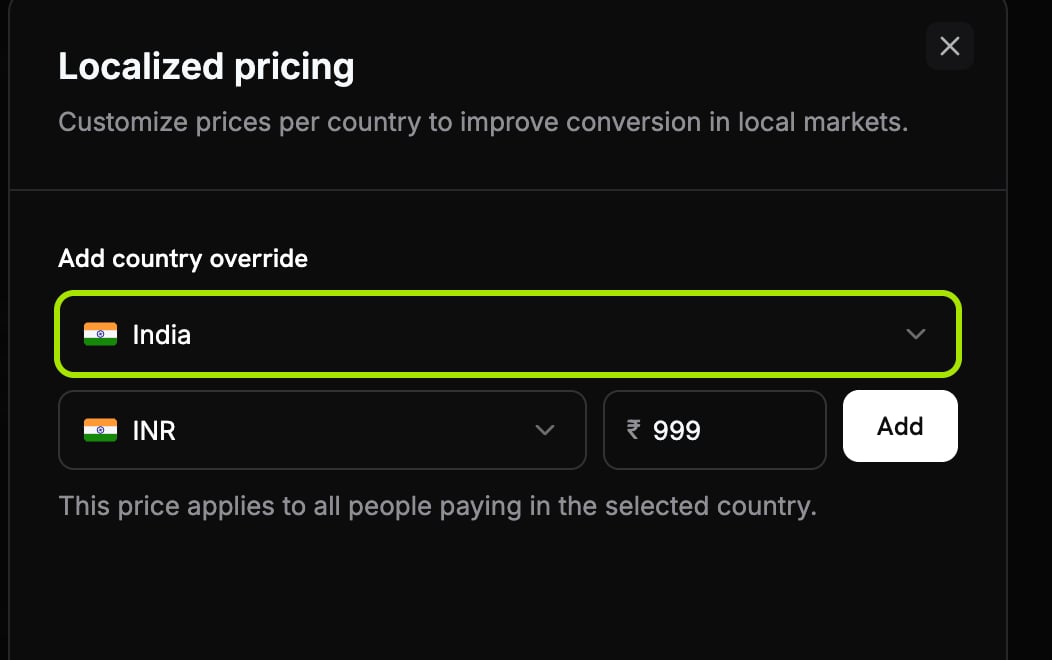
选择一个国家,选择货币,输入金额(例如印度的₹999),然后点击 **添加**。
点击 **添加国家价格** 或 **添加货币价格**,填入 **本地化定价** 面板,然后点击 **添加**。您添加的每个市场都会出现在覆盖表中,您可以稍后编辑或删除它。
选择一个国家,选择货币,输入金额(例如印度的₹999),然后点击 **添加**。
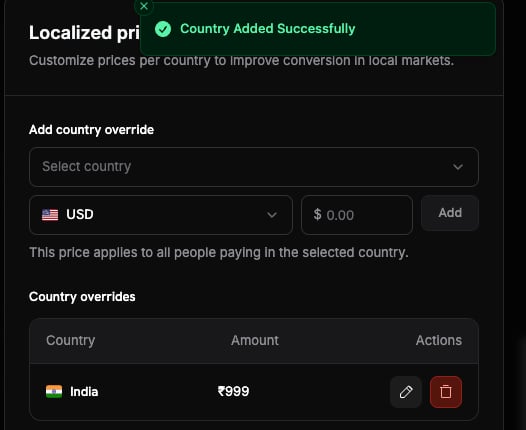
 该国家现在出现在 **国家覆盖** 表中,您可以在其中编辑或删除它。
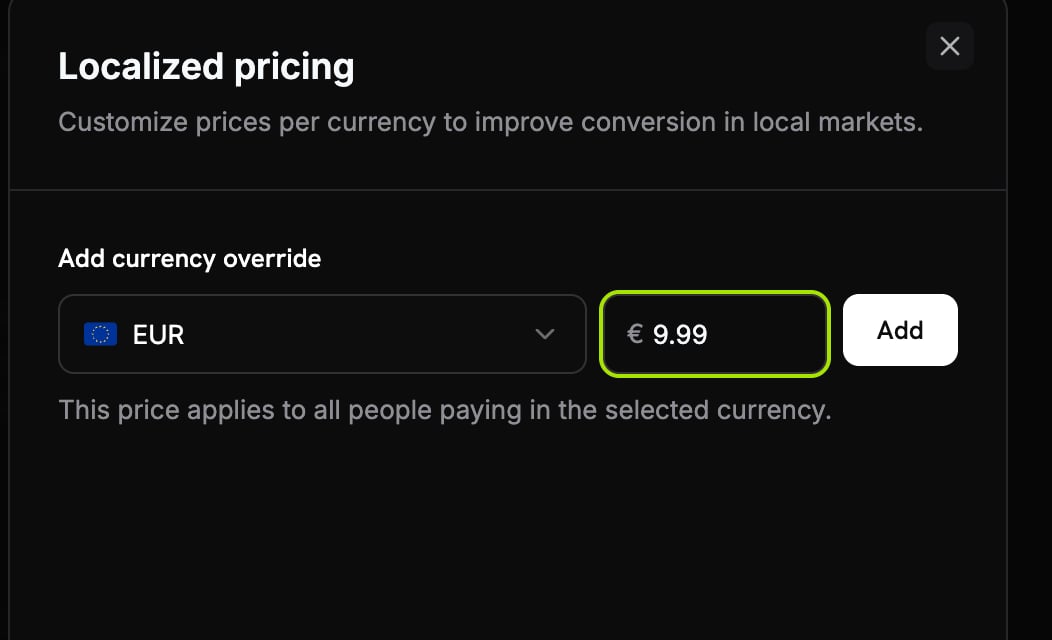
 选择货币并输入金额(例如EUR的€9.99),然后点击 **添加**。
 该货币现在出现在 **货币覆盖** 表中,您可以在其中编辑或删除它。
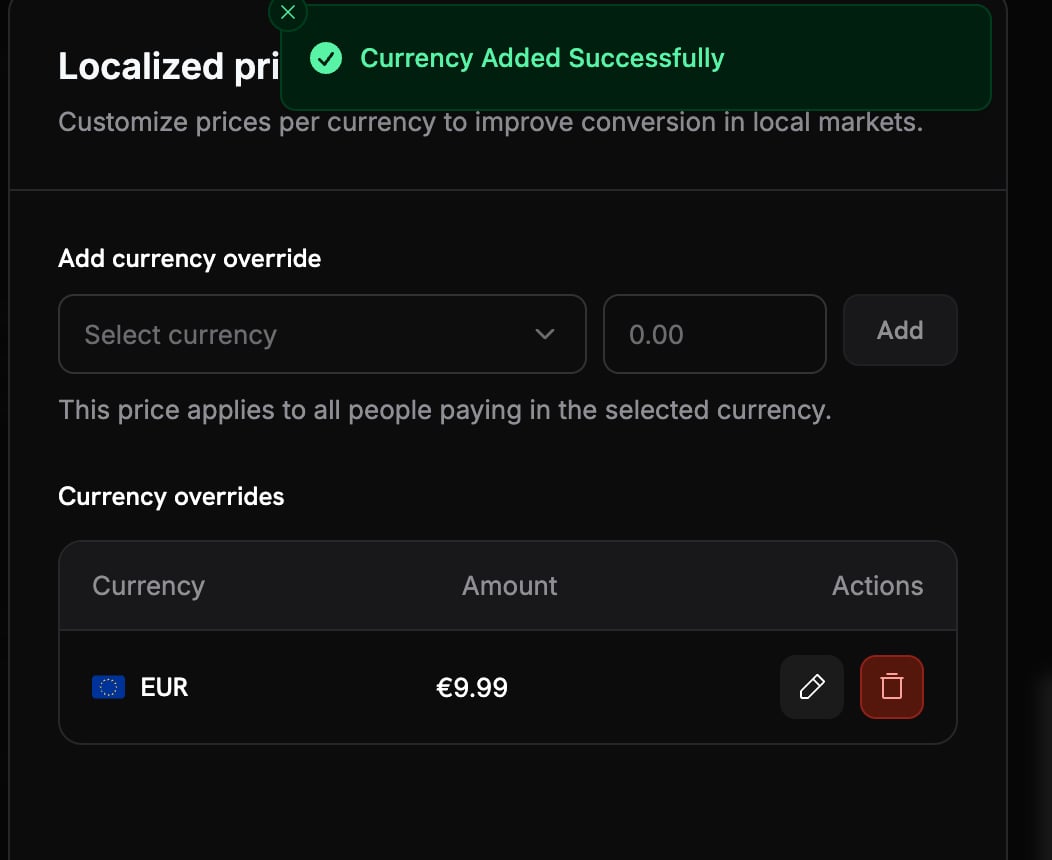 使用 **添加产品** 保存。本地化价格立即适用于未来的结账。
使用具有规则的计费国家进行测试结账,并确认显示了本地化金额。
***
## 通过API管理
本地化定价完全可通过API使用。首先设置产品的定价模式,然后附加规则。
### 设置定价模式
设置 `pricing_mode` 当您创建产品(或更新现有产品)时。`null` 意味着仅基础的现有行为。
```typescript theme={null} theme={null}
import DodoPayments from 'dodopayments';
const client = new DodoPayments({
bearerToken: process.env.DODO_PAYMENTS_API_KEY,
environment: 'test_mode',
});
const product = await client.products.update('pdt_premium_plan', {
pricing_mode: 'by_country',
});
```
```python theme={null} theme={null}
import os
from dodopayments import DodoPayments
client = DodoPayments(
bearer_token=os.environ.get("DODO_PAYMENTS_API_KEY"),
environment="test_mode",
)
product = client.products.update(
"pdt_premium_plan",
pricing_mode="by_country",
)
```
```go theme={null} theme={null}
package main
import (
"context"
"os"
"github.com/dodopayments/dodopayments-go"
"github.com/dodopayments/dodopayments-go/option"
)
func main() {
client := dodopayments.NewClient(
option.WithBearerToken(os.Getenv("DODO_PAYMENTS_API_KEY")),
)
_, err := client.Products.Update(
context.TODO(),
"pdt_premium_plan",
dodopayments.ProductUpdateParams{
PricingMode: dodopayments.F(dodopayments.PricingModeByCountry),
},
)
if err != nil {
panic(err)
}
}
```
### 添加本地化价格
给产品附加一条规则。在 `by_country` 模式下,需要 `country_code`;在 `by_currency` 模式下则必须省略此项。
```typescript theme={null} theme={null}
// ₹999.00 for customers in India
const localizedPrice = await client.products.localizedPrices.create('pdt_premium_plan', {
currency: 'INR',
country_code: 'IN',
amount: 99900,
});
```
```python theme={null} theme={null}
# ₹999.00 for customers in India
localized_price = client.products.localized_prices.create(
"pdt_premium_plan",
currency="INR",
country_code="IN",
amount=99900,
)
```
```go theme={null} theme={null}
// ₹999.00 for customers in India
localizedPrice, err := client.Products.LocalizedPrices.New(
context.TODO(),
"pdt_premium_plan",
dodopayments.ProductLocalizedPriceNewParams{
Currency: dodopayments.F(dodopayments.CurrencyInr),
CountryCode: dodopayments.F(dodopayments.CountryCodeIn),
Amount: dodopayments.F(int64(99900)),
},
)
```
对于 `by_currency` 产品,省略 `country_code`。例如,对所有使用EUR支付的人实行固定 `€9.99` (`currency: 'EUR'`,`amount: 999`)。
### 列出、更新和存档
您只能更新规则的`amount`;货币和国家一旦创建就固定。存档是一个幂等软删除,因此规则停止匹配但留在您的记录中。
```typescript theme={null} theme={null}
// List all active rules on a product
const rules = await client.products.localizedPrices.list('pdt_premium_plan');
// Change the amount (e.g. end a promo)
await client.products.localizedPrices.update('lcp_india_price', {
product_id: 'pdt_premium_plan',
amount: 119900,
});
// Archive a rule
await client.products.localizedPrices.archive('lcp_india_price', {
product_id: 'pdt_premium_plan',
});
```
```python theme={null} theme={null}
# List all active rules on a product
rules = client.products.localized_prices.list("pdt_premium_plan")
# Change the amount (e.g. end a promo)
client.products.localized_prices.update(
"lcp_india_price",
product_id="pdt_premium_plan",
amount=119900,
)
# Archive a rule
client.products.localized_prices.archive(
"lcp_india_price",
product_id="pdt_premium_plan",
)
```
```go theme={null} theme={null}
// List all active rules on a product
rules, err := client.Products.LocalizedPrices.List(context.TODO(), "pdt_premium_plan")
// Change the amount (e.g. end a promo)
_, err = client.Products.LocalizedPrices.Update(
context.TODO(),
"pdt_premium_plan",
"lcp_india_price",
dodopayments.ProductLocalizedPriceUpdateParams{
Amount: dodopayments.F(int64(119900)),
},
)
// Archive a rule
err = client.Products.LocalizedPrices.Archive(
context.TODO(),
"pdt_premium_plan",
"lcp_india_price",
)
```
查看完整的产品本地化价格端点:创建、列出、检索、更新和存档。
***
## 结账时如何应用
本地化定价会根据每个购物车行项目进行解析,仅适用于设置了`pricing_mode` 的产品。Dodo Payments从请求中读取两个信号:客户的**计费国家**,以及可选的\*\*`billing_currency`\*\*(如果省略,则根据计费国家推导出货币)。
* **按国家**:查找与计费国家匹配的规则。如果存在,该客户会按规则的货币收取该规则的金额。
* **按货币**:查找与客户货币匹配的规则(`billing_currency`,或根据其国家推导出的货币)。如果存在,该客户会按该货币收取规则的金额。
* **无匹配或无`pricing_mode`**:适用基础价格,当客户的货币等于基础货币时直接收费,否则通过[自适应货币](/features/adaptive-currency)转换。
每个购物车项目都会单独解析,因此您可以在同一次结账中将一个产品本地化,而将其他产品保持基础定价。如果任何项目匹配本地化规则,整个交易都将强制费用包含(见[核心概念](#core-concepts))。
***
## 重要行为
| 行为 | 详情 |
| :-------------- | :--------------------------------------------------------------------------------------- |
| **税前金额** | 本地化金额是税前价格。对于不含税的产品,税将在结账时添加,因此本地化金额不是最终总额。请参阅[税收包含定价](/features/tax-inclusive-pricing)。 |
| **不适用于您想支付的价款** | 本地化规则从不适用于[您想支付的价款](/features/pay-what-you-want)产品,顾客决定金额。 |
| **按货币与基础货币不同** | `by_currency` 规则必须使用不同于产品基础货币的货币。 |
| **每个市场只有一个规则** | 一个产品在每种货币(按货币计算)或每个国家(按国家计算)最多只能有一个活动规则。 |
| **所有产品类型** | 适用于一次性、订阅和按使用量计费的产品。 |
本地化规则更改不会发出自己的Webhook。解析后的金额在生成的付款或订阅中显示,与其他价格完全一样。
***
## 最佳实践
* **保持合理的基础价格。** 它是没有规则的每个市场的回退,通过自适应货币转换。
* **舍入为本地魅力价格。** 固定金额的全部意义在于整洁的数字,例如₹999,€9.99或¥1000,而不是FX结果。
* **为任务选择模式。** 对于购买力定价使用 `by_country`;对于每个货币区一个价格,使用 `by_currency`。
* **归档而不是重建,以进行促销。** 归档规则将市场恢复为基础/自适应,同时保留历史记录;根据需要稍后可重新创建或重新定价。
* **在广告总价前注意税额行。** 对于不含税的产品,客户支付本地化金额*加上*税,因此在广告中不要将其作为最终价格引用。
***
## 相关
本地化定价与基于位置的折扣码的原生对比。
自动FX转换及其费用处理,构建在本地化定价之上。
控制您的价格是否包含税费。
允许顾客选择金额。本地化规则不适用于此。
使用 **添加产品** 保存。本地化价格立即适用于未来的结账。
使用具有规则的计费国家进行测试结账,并确认显示了本地化金额。
***
## 通过API管理
本地化定价完全可通过API使用。首先设置产品的定价模式,然后附加规则。
### 设置定价模式
设置 `pricing_mode` 当您创建产品(或更新现有产品)时。`null` 意味着仅基础的现有行为。
```typescript theme={null} theme={null}
import DodoPayments from 'dodopayments';
const client = new DodoPayments({
bearerToken: process.env.DODO_PAYMENTS_API_KEY,
environment: 'test_mode',
});
const product = await client.products.update('pdt_premium_plan', {
pricing_mode: 'by_country',
});
```
```python theme={null} theme={null}
import os
from dodopayments import DodoPayments
client = DodoPayments(
bearer_token=os.environ.get("DODO_PAYMENTS_API_KEY"),
environment="test_mode",
)
product = client.products.update(
"pdt_premium_plan",
pricing_mode="by_country",
)
```
```go theme={null} theme={null}
package main
import (
"context"
"os"
"github.com/dodopayments/dodopayments-go"
"github.com/dodopayments/dodopayments-go/option"
)
func main() {
client := dodopayments.NewClient(
option.WithBearerToken(os.Getenv("DODO_PAYMENTS_API_KEY")),
)
_, err := client.Products.Update(
context.TODO(),
"pdt_premium_plan",
dodopayments.ProductUpdateParams{
PricingMode: dodopayments.F(dodopayments.PricingModeByCountry),
},
)
if err != nil {
panic(err)
}
}
```
### 添加本地化价格
给产品附加一条规则。在 `by_country` 模式下,需要 `country_code`;在 `by_currency` 模式下则必须省略此项。
```typescript theme={null} theme={null}
// ₹999.00 for customers in India
const localizedPrice = await client.products.localizedPrices.create('pdt_premium_plan', {
currency: 'INR',
country_code: 'IN',
amount: 99900,
});
```
```python theme={null} theme={null}
# ₹999.00 for customers in India
localized_price = client.products.localized_prices.create(
"pdt_premium_plan",
currency="INR",
country_code="IN",
amount=99900,
)
```
```go theme={null} theme={null}
// ₹999.00 for customers in India
localizedPrice, err := client.Products.LocalizedPrices.New(
context.TODO(),
"pdt_premium_plan",
dodopayments.ProductLocalizedPriceNewParams{
Currency: dodopayments.F(dodopayments.CurrencyInr),
CountryCode: dodopayments.F(dodopayments.CountryCodeIn),
Amount: dodopayments.F(int64(99900)),
},
)
```
对于 `by_currency` 产品,省略 `country_code`。例如,对所有使用EUR支付的人实行固定 `€9.99` (`currency: 'EUR'`,`amount: 999`)。
### 列出、更新和存档
您只能更新规则的`amount`;货币和国家一旦创建就固定。存档是一个幂等软删除,因此规则停止匹配但留在您的记录中。
```typescript theme={null} theme={null}
// List all active rules on a product
const rules = await client.products.localizedPrices.list('pdt_premium_plan');
// Change the amount (e.g. end a promo)
await client.products.localizedPrices.update('lcp_india_price', {
product_id: 'pdt_premium_plan',
amount: 119900,
});
// Archive a rule
await client.products.localizedPrices.archive('lcp_india_price', {
product_id: 'pdt_premium_plan',
});
```
```python theme={null} theme={null}
# List all active rules on a product
rules = client.products.localized_prices.list("pdt_premium_plan")
# Change the amount (e.g. end a promo)
client.products.localized_prices.update(
"lcp_india_price",
product_id="pdt_premium_plan",
amount=119900,
)
# Archive a rule
client.products.localized_prices.archive(
"lcp_india_price",
product_id="pdt_premium_plan",
)
```
```go theme={null} theme={null}
// List all active rules on a product
rules, err := client.Products.LocalizedPrices.List(context.TODO(), "pdt_premium_plan")
// Change the amount (e.g. end a promo)
_, err = client.Products.LocalizedPrices.Update(
context.TODO(),
"pdt_premium_plan",
"lcp_india_price",
dodopayments.ProductLocalizedPriceUpdateParams{
Amount: dodopayments.F(int64(119900)),
},
)
// Archive a rule
err = client.Products.LocalizedPrices.Archive(
context.TODO(),
"pdt_premium_plan",
"lcp_india_price",
)
```
查看完整的产品本地化价格端点:创建、列出、检索、更新和存档。
***
## 结账时如何应用
本地化定价会根据每个购物车行项目进行解析,仅适用于设置了`pricing_mode` 的产品。Dodo Payments从请求中读取两个信号:客户的**计费国家**,以及可选的\*\*`billing_currency`\*\*(如果省略,则根据计费国家推导出货币)。
* **按国家**:查找与计费国家匹配的规则。如果存在,该客户会按规则的货币收取该规则的金额。
* **按货币**:查找与客户货币匹配的规则(`billing_currency`,或根据其国家推导出的货币)。如果存在,该客户会按该货币收取规则的金额。
* **无匹配或无`pricing_mode`**:适用基础价格,当客户的货币等于基础货币时直接收费,否则通过[自适应货币](/features/adaptive-currency)转换。
每个购物车项目都会单独解析,因此您可以在同一次结账中将一个产品本地化,而将其他产品保持基础定价。如果任何项目匹配本地化规则,整个交易都将强制费用包含(见[核心概念](#core-concepts))。
***
## 重要行为
| 行为 | 详情 |
| :-------------- | :--------------------------------------------------------------------------------------- |
| **税前金额** | 本地化金额是税前价格。对于不含税的产品,税将在结账时添加,因此本地化金额不是最终总额。请参阅[税收包含定价](/features/tax-inclusive-pricing)。 |
| **不适用于您想支付的价款** | 本地化规则从不适用于[您想支付的价款](/features/pay-what-you-want)产品,顾客决定金额。 |
| **按货币与基础货币不同** | `by_currency` 规则必须使用不同于产品基础货币的货币。 |
| **每个市场只有一个规则** | 一个产品在每种货币(按货币计算)或每个国家(按国家计算)最多只能有一个活动规则。 |
| **所有产品类型** | 适用于一次性、订阅和按使用量计费的产品。 |
本地化规则更改不会发出自己的Webhook。解析后的金额在生成的付款或订阅中显示,与其他价格完全一样。
***
## 最佳实践
* **保持合理的基础价格。** 它是没有规则的每个市场的回退,通过自适应货币转换。
* **舍入为本地魅力价格。** 固定金额的全部意义在于整洁的数字,例如₹999,€9.99或¥1000,而不是FX结果。
* **为任务选择模式。** 对于购买力定价使用 `by_country`;对于每个货币区一个价格,使用 `by_currency`。
* **归档而不是重建,以进行促销。** 归档规则将市场恢复为基础/自适应,同时保留历史记录;根据需要稍后可重新创建或重新定价。
* **在广告总价前注意税额行。** 对于不含税的产品,客户支付本地化金额*加上*税,因此在广告中不要将其作为最终价格引用。
***
## 相关
本地化定价与基于位置的折扣码的原生对比。
自动FX转换及其费用处理,构建在本地化定价之上。
控制您的价格是否包含税费。
允许顾客选择金额。本地化规则不适用于此。