> ## Documentation Index
> Fetch the complete documentation index at: https://docs.dodopayments.com/llms.txt
> Use this file to discover all available pages before exploring further.
# 许可证密钥
> 生成和交付具有激活限制和到期时间的独特许可证密钥。许可证密钥是许可证密钥权限类型。它们在付款时自动发放,与订阅生命周期绑定,在取消或退款时撤销。
许可证密钥是许可证密钥权限类型。创建一次许可证密钥权限,设置所需的激活限制、到期时间和说明,将其附加到任何产品,Dodo Payments会为每次购买或订阅自动生成和交付密钥。
## 什么是许可证密钥?
许可证密钥是授权访问您产品的唯一令牌。它们非常适合:
* **软件许可**:桌面应用程序、插件和命令行工具
* **每用户控制**:限制每个用户或设备的激活次数
* **数字商品**:限制下载、更新或高级功能
在 Dodo Payments 内,许可证密钥通过[权限](/features/entitlements/introduction)系统进行管理,这意味着每个密钥的生命周期(创建、到期、撤销、重新授予)由与其他交付物相同的付款和订阅事件驱动。
## 创建许可证密钥权限
在 Dodo Payments 仪表盘上进入 **Entitlements**,点击 **+** 创建新的权限。
选择 **License Key** 作为集成。配置每个发放密钥的行为:
* **激活限制**:每个密钥的最大并发激活数(例如,`1` 对于单用户,`5` 对于团队许可证,留空为无限)。
* **持续时间**:密钥发放后保持有效的时间长度(例如,30 天,1 年)。对于订阅发放的密钥,留空;只要订阅有效,密钥仍然有效。
* **激活说明**:与密钥一起通过电子邮件发送给客户的说明。示例:`Paste the key in Settings → License` 或 `Run: mycli activate `。
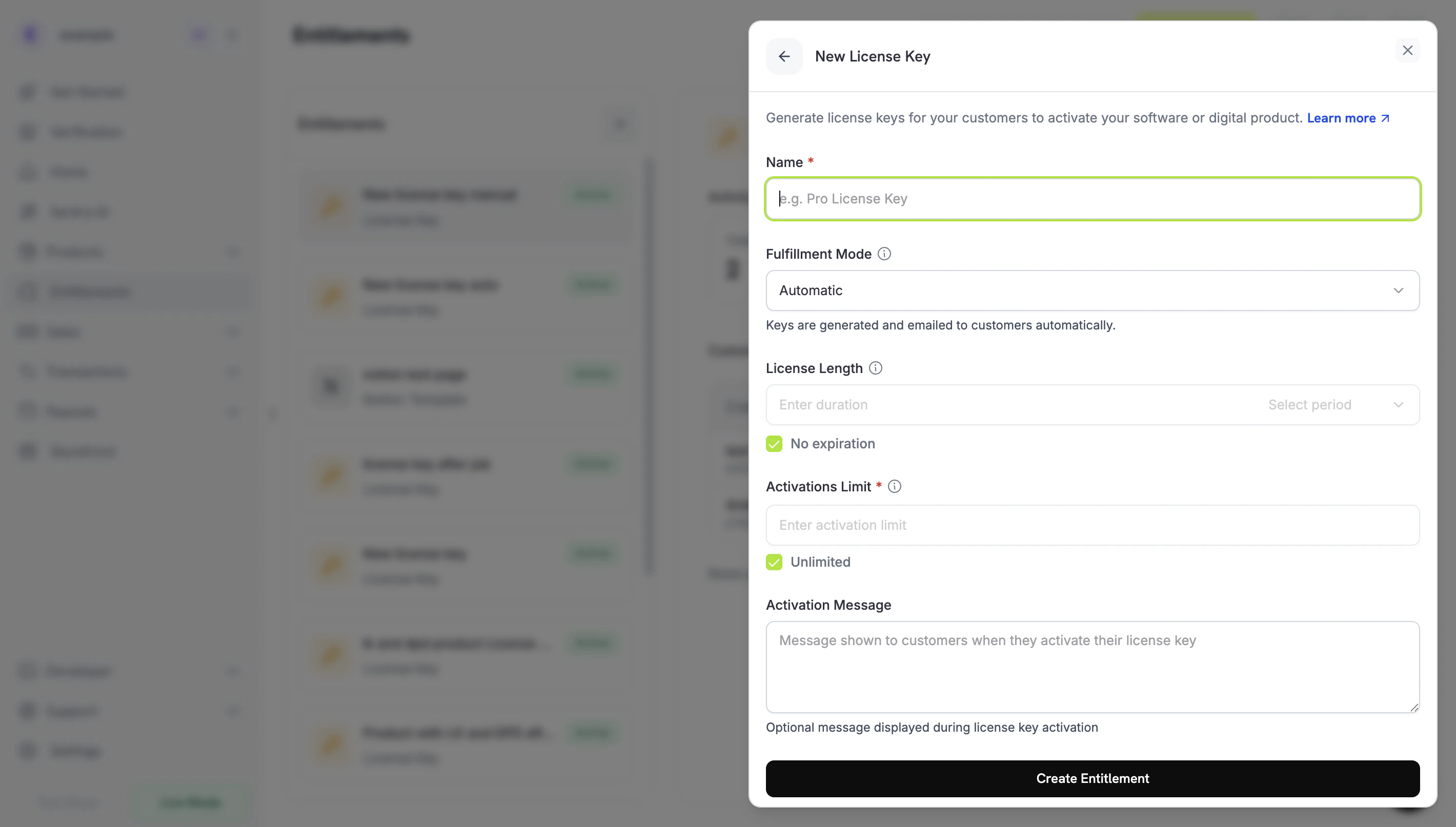 保存。该权限现在可附加到任何产品。
## 附加到产品
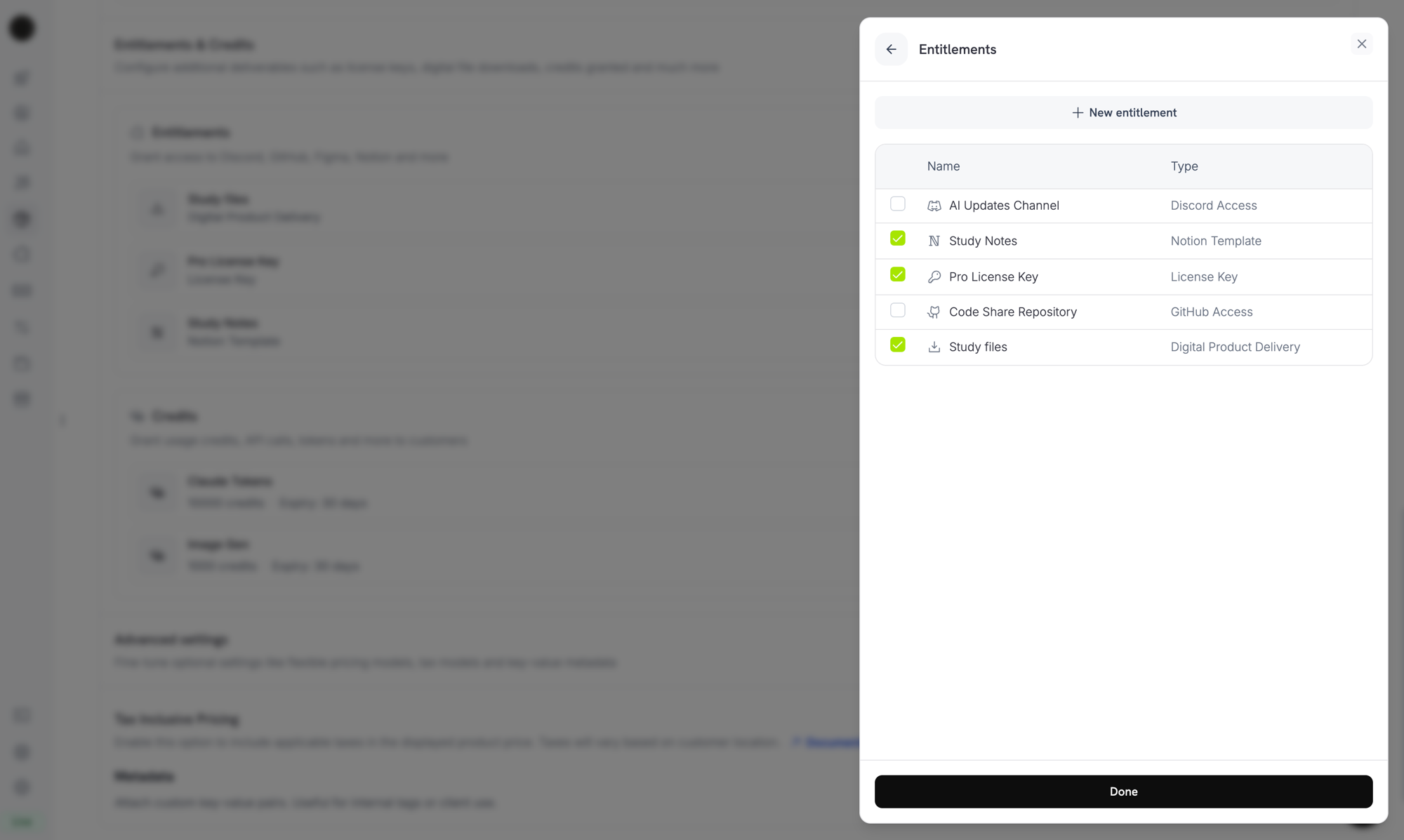
打开一个产品,展开 **高级设置 → 权限和积分**,然后选择您的许可证密钥权限。单个产品可以在同一购买中,与其他权限(Discord 访问、文件下载、GitHub 代码库访问等)一起交付许可证密钥。
保存。该权限现在可附加到任何产品。
## 附加到产品
打开一个产品,展开 **高级设置 → 权限和积分**,然后选择您的许可证密钥权限。单个产品可以在同一购买中,与其他权限(Discord 访问、文件下载、GitHub 代码库访问等)一起交付许可证密钥。
 ***
## 密钥如何发放
密钥的发放遵循标准的[授权生命周期](/features/entitlements/introduction#how-grants-work):
| 事件 | 行为 |
| ------------------------------------ | ------------------------------------------------------------------ |
| `payment.succeeded`(一次性) | 为每个购买的 `quantity` 生成一个密钥。密钥到期时间遵循权限的持续时间。 |
| `subscription.active` | 为每个订阅 `quantity`(席位)生成一个密钥。密钥没有到期时间;有效性与订阅状态相关。 |
| `subscription.renewed` | 无操作。现有密钥继续有效。 |
| `subscription.on_hold` | 禁用密钥。当订阅解除暂停时,它们会重新激活。 |
| `subscription.cancelled` / `expired` | 永久禁用密钥。 |
| `subscription.plan_changed` | 禁用旧密钥;为新计划发放新密钥。 |
| `refund.succeeded`(一次性) | 禁用密钥。 |
| 通过 API/仪表盘手动撤销 | 使用 `revocation_reason: manual` 禁用密钥。订阅续订时不会自动重新授予这些密钥。 |
| 直接禁用许可证密钥 | 使用 `revocation_reason: license_key_disabled` 撤销权限。重新启用密钥会自动重新激活权限。 |
### 数量行为
* **订阅产品** 每个席位发放一个密钥(`subscriptions.quantity`)。
* **一次性产品** 每个购物车商品行发放一个密钥(`product_cart.quantity`)。
* **手动 API 授权** 精确发放一个密钥。
## 激活、验证、停用
激活/验证/停用 API 端点是**公共的**,不需要 API 密钥。直接从桌面软件、CLI 或基于浏览器的客户端使用它们以在运行时验证密钥。
**公共端点**:激活、停用和验证许可证的端点是公共的,不需要 API 密钥。在您的客户端应用程序中直接调用它们,而不暴露您的 API 凭据。
### 激活许可证
```typescript TypeScript theme={null} theme={null}
import DodoPayments from 'dodopayments';
// No API key needed for public license endpoints
const client = new DodoPayments();
const response = await client.licenses.activate({
license_key: 'PRO-AAAA-BBBB-CCCC-DDDD',
name: 'Device Name',
});
console.log(response.id);
```
```python Python theme={null} theme={null}
client.licenses.activate(
license_key="PRO-AAAA-BBBB-CCCC-DDDD",
name="Device Name",
)
```
```bash cURL theme={null} theme={null}
curl -X POST https://test.dodopayments.com/licenses/activate \
-H "Content-Type: application/json" \
-d '{
"license_key": "PRO-AAAA-BBBB-CCCC-DDDD",
"name": "Device Name"
}'
```
### 验证许可证
```typescript TypeScript theme={null} theme={null}
const response = await client.licenses.validate({
license_key: 'PRO-AAAA-BBBB-CCCC-DDDD',
});
console.log(response.valid);
```
```bash cURL theme={null} theme={null}
curl -X POST https://test.dodopayments.com/licenses/validate \
-H "Content-Type: application/json" \
-d '{ "license_key": "PRO-AAAA-BBBB-CCCC-DDDD" }'
```
### 停用激活实例
```typescript theme={null} theme={null}
await client.licenses.deactivate({
license_key: 'PRO-AAAA-BBBB-CCCC-DDDD',
license_key_instance_id: 'instance_abc123',
});
```
***
## 管理密钥
当客户购买手动模式产品时,授权以 `pending` 状态创建,无密钥,并且 [`entitlement_grant.created`](/developer-resources/webhooks/intents/entitlement-grant) webhook 会以 `integration_type: "license_key"` 和 `status: "pending"` 触发。您可以对该 webhook 做出反应,或者使用 `integration_type` 和 `status` 过滤条件轮询 [List Customer Grants](/api-reference/entitlements/list-customer-grants) 端点:
```typescript theme={null} theme={null}
const pending = await client.customers.listEntitlementGrants('customer_id', {
integration_type: 'license_key',
status: 'Pending',
});
```
```typescript theme={null} theme={null}
const grants = await client.entitlements.grants.list('ent_license_key_id', {
status: 'delivered',
});
for (const grant of grants.items) {
console.log(grant.license_key.key, grant.license_key.activations_used);
}
```
## 通过 API 导入现有许可证密钥
已经在另一个系统中拥有许可证密钥?使用[创建许可证密钥](/api-reference/licenses/create-license-key)API 将其导入 Dodo Payments。这样可以迁移现有密钥而不打扰您的客户 — 他们可以继续使用相同的密钥串进行激活、验证和停用,而无需重新发放密钥。
通过 API 创建或更新的许可证密钥不会触发客户电子邮件通知。如果您需要通知客户有关导入密钥,请在您的应用程序中单独处理此问题。
```typescript theme={null} theme={null}
const licenseKey = await client.licenseKeys.create({
customer_id: 'cus_abc123',
product_id: 'prod_456',
key: 'YOUR-EXISTING-LICENSE-KEY',
activations_limit: 5,
expires_at: '2026-12-31T23:59:59Z',
});
```
### 导入的密钥与自动生成的密钥有何不同
| 字段 | 自动生成的密钥 | 导入的密钥 |
| ----------------- | ------------- | --------------------------- |
| `source` | `"auto"` | `"import"` |
| `payment_id` | 设置为原始支付 | `null`(没有 Dodo Payments 交易) |
| `subscription_id` | 如果密钥通过订阅发放则设置 | `null` 除非明确链接 |
| 客户电子邮件通知 | 在发放时发送 | 不发送 — 请单独处理 |
使用 `source` 字段在 `GET /license_keys` 响应中区分迁移的库存与有机发放的密钥,以便在对账或审核时使用。
从**Polar.sh**或**Lemon Squeezy**迁移?[`dodo-migrate` CLI](/migrate-to-dodo) 自动化批量导入产品、客户、折扣和许可证密钥,并自动映射外部 ID 到 Dodo ID。
***
## 返回 URL 中的许可证密钥
当客户完成带有许可证密钥权限的产品的购买时,生成的密钥会自动作为查询参数附加到您的 `return_url` 以显示在成功页面上,而无需额外的 API 调用。
```text theme={null} theme={null}
https://yoursite.com/return?payment_id=pay_xxx&status=succeeded&license_key=LK-001&email=customer%40example.com
```
如果购买生成多个密钥(数量 > 1),它们是逗号分隔的:
```text theme={null} theme={null}
https://yoursite.com/return?payment_id=pay_xxx&status=succeeded&license_key=LK-001,LK-002&email=customer%40example.com
```
对于订阅,使用 `subscription_id` 而不是 `payment_id`:
```text theme={null} theme={null}
https://yoursite.com/return?subscription_id=sub_xxx&status=active&license_key=LK-001&email=customer%40example.com
```
在您的返回页面上解析 `license_key` 参数,以立即显示密钥,改进购买后的体验。
***
## API 管理
激活、停用和验证都是公共的;无需 API 密钥。
创建或记录许可证密钥的激活实例。
撤销先前的激活以释放容量。
在授予访问权限之前检查真实性、状态和限制。
创建、列出、检索和更新单个许可证密钥记录。使用这些来导入现有密钥或获取使用详情。
创建一个新的许可证密钥或导入现有密钥。
```typescript theme={null} theme={null}
const grants = await client.entitlements.grants.list('ent_license_key_id', {
status: 'Delivered',
});
for (const grant of grants.items) {
console.log(grant.license_key.key, grant.license_key.activations_used);
}
```
检索特定密钥及其元数据。
修改到期时间、激活限制或启用/禁用密钥。
管理许可证密钥权限本身:其激活限制、持续时间和说明。
创建许可证密钥权限。
更新权限配置。
列出为权限发放的密钥。
手动撤销客户的密钥。
***
## Webhooks
许可证密钥的交付和撤销会触发四个[`entitlement_grant.*` webhook 事件](/developer-resources/webhooks/intents/entitlement-grant)。授权负载包含一个填充的 `license_key` 对象,其中包含密钥、到期时间、已用激活和限制。
遗留的 `license_key.*` 事件(`license_key.created`)继续针对底层许可证密钥记录生命周期触发;参见[许可证密钥 webhook 负载页面](/developer-resources/webhooks/intents/license-key)。
对于新的集成,监听 `entitlement_grant.delivered` 而不是 `license_key.created`。权限事件告诉您产品上的所有集成都完成了交付,而不仅仅是许可证密钥。
***
## 传统许可证密钥
使用早期 `license_key_enabled` 标志创建的产品已**自动迁移**到许可证密钥权限。迁移是透明的:现有客户的密钥继续正常工作,公共 `/licenses/activate`、`/licenses/validate`、`/licenses/deactivate` 端点继续运行,`/license_keys/*` API 端点继续读取和写入相同的密钥存储。
独立的**许可证密钥**仪表盘部分仍可用,显示所有已发放的密钥,适用于审核和搜索。新的配置(更改激活限制、持续时间或说明)应通过在**权限**下编辑迁移后的许可证密钥权限来完成。
***
## 最佳实践
* **保持激活限制明确**:选择合理的默认值(单用户应用程序为 1,团队许可证为 3-5),并记录它们。
* **提供精确的激活说明**:客户从电子邮件中粘贴这些说明,精确的路径和命令可减少支持请求。
* **服务器端验证密钥**:对于联网产品,通过 `/licenses/validate` 验证,而不是本地缓存激活。
* **使用 webhooks 进行撤销**:监听 `entitlement_grant.revoked`,以便在客户取消或退款时立即禁用应用程序内功能。
* **测试订阅和一次性购买**:许可证密钥的行为在两者之间略有不同,因此在上线前测试两种情况。
在您的返回页面上解析 `license_key` 参数,以立即显示密钥,提升购买后的体验。
***
## API 管理
激活、停用和验证是公开的;不需要 API 密钥。
为许可证密钥创建或记录激活实例。
撤销先前的激活以释放容量。
在授予访问权限之前检查真实性、状态和约束。
创建、列出、检索和更新个人许可证密钥记录。使用这些记录导入现有密钥或获取使用详情。
创建新许可证密钥或导入现有密钥。
浏览所有密钥及其状态和使用详情。
检索特定密钥及其元数据。
修改到期时间、激活限制或启用/禁用密钥。
管理许可证密钥权利本身:其激活限制、持续时间和说明。
创建许可证密钥权利。
更新权利配置。
列出为某个权利签发的密钥。
手动撤销客户的密钥。
***
## Webhooks
许可证密钥的交付和撤销触发四个 [`entitlement_grant.*` webhook 事件](/developer-resources/webhooks/intents/entitlement-grant)。授予的有效负载包括一个填充的 `license_key` 对象,其中包含密钥、到期、使用的激活和限制。
传统的 `license_key.*` 事件 (`license_key.created`) 继续触发底层许可证密钥记录生命周期;请参阅 [许可证密钥 webhook 有效负载页面](/developer-resources/webhooks/intents/license-key)。
对于新集成,监听 `entitlement_grant.delivered` 而不是 `license_key.created`。权利事件告诉您产品上所有集成的交付已完成,而不仅是许可证密钥。
***
## 传统许可证密钥
使用旧 `license_key_enabled` 标志创建的产品已被**自动迁移**到许可证密钥权利。迁移是透明的:现有客户的密钥继续正常使用,公共 `/licenses/activate`、`/licenses/validate`、`/licenses/deactivate` 端点继续运行,`/license_keys/*` API 端点继续读写相同的密钥存储。
独立的 **许可证密钥** 仪表板部分仍然可用,作为每个签发的密钥的平面列表,便于审计和搜索。新的配置(更改激活限制、持续时间或说明)应通过编辑**权利**下迁移的许可证密钥权利来完成。
***
## 最佳实践
* **保持激活限制清晰**:选择合理的默认值(单用户应用程序为 1,团队许可证为 3-5)并进行文档记录。
* **提供精确的激活说明**:客户会从电子邮件中粘贴这些信息,因此精确的路径和命令可以节省支持票。
* **服务器端验证密钥**:对于网络连接的产品,应该通过 `/licenses/validate` 验证,而不是本地缓存激活。
* **使用 webhook 进行撤销**:监听 `entitlement_grant.revoked` 以便在客户取消或退款时立即在应用中禁用功能。
* **测试订阅和一次性购买**:许可证密钥的行为在两者之间略有不同,因此在上线前应测试两者。
***
## 密钥如何发放
密钥的发放遵循标准的[授权生命周期](/features/entitlements/introduction#how-grants-work):
| 事件 | 行为 |
| ------------------------------------ | ------------------------------------------------------------------ |
| `payment.succeeded`(一次性) | 为每个购买的 `quantity` 生成一个密钥。密钥到期时间遵循权限的持续时间。 |
| `subscription.active` | 为每个订阅 `quantity`(席位)生成一个密钥。密钥没有到期时间;有效性与订阅状态相关。 |
| `subscription.renewed` | 无操作。现有密钥继续有效。 |
| `subscription.on_hold` | 禁用密钥。当订阅解除暂停时,它们会重新激活。 |
| `subscription.cancelled` / `expired` | 永久禁用密钥。 |
| `subscription.plan_changed` | 禁用旧密钥;为新计划发放新密钥。 |
| `refund.succeeded`(一次性) | 禁用密钥。 |
| 通过 API/仪表盘手动撤销 | 使用 `revocation_reason: manual` 禁用密钥。订阅续订时不会自动重新授予这些密钥。 |
| 直接禁用许可证密钥 | 使用 `revocation_reason: license_key_disabled` 撤销权限。重新启用密钥会自动重新激活权限。 |
### 数量行为
* **订阅产品** 每个席位发放一个密钥(`subscriptions.quantity`)。
* **一次性产品** 每个购物车商品行发放一个密钥(`product_cart.quantity`)。
* **手动 API 授权** 精确发放一个密钥。
## 激活、验证、停用
激活/验证/停用 API 端点是**公共的**,不需要 API 密钥。直接从桌面软件、CLI 或基于浏览器的客户端使用它们以在运行时验证密钥。
**公共端点**:激活、停用和验证许可证的端点是公共的,不需要 API 密钥。在您的客户端应用程序中直接调用它们,而不暴露您的 API 凭据。
### 激活许可证
```typescript TypeScript theme={null} theme={null}
import DodoPayments from 'dodopayments';
// No API key needed for public license endpoints
const client = new DodoPayments();
const response = await client.licenses.activate({
license_key: 'PRO-AAAA-BBBB-CCCC-DDDD',
name: 'Device Name',
});
console.log(response.id);
```
```python Python theme={null} theme={null}
client.licenses.activate(
license_key="PRO-AAAA-BBBB-CCCC-DDDD",
name="Device Name",
)
```
```bash cURL theme={null} theme={null}
curl -X POST https://test.dodopayments.com/licenses/activate \
-H "Content-Type: application/json" \
-d '{
"license_key": "PRO-AAAA-BBBB-CCCC-DDDD",
"name": "Device Name"
}'
```
### 验证许可证
```typescript TypeScript theme={null} theme={null}
const response = await client.licenses.validate({
license_key: 'PRO-AAAA-BBBB-CCCC-DDDD',
});
console.log(response.valid);
```
```bash cURL theme={null} theme={null}
curl -X POST https://test.dodopayments.com/licenses/validate \
-H "Content-Type: application/json" \
-d '{ "license_key": "PRO-AAAA-BBBB-CCCC-DDDD" }'
```
### 停用激活实例
```typescript theme={null} theme={null}
await client.licenses.deactivate({
license_key: 'PRO-AAAA-BBBB-CCCC-DDDD',
license_key_instance_id: 'instance_abc123',
});
```
***
## 管理密钥
当客户购买手动模式产品时,授权以 `pending` 状态创建,无密钥,并且 [`entitlement_grant.created`](/developer-resources/webhooks/intents/entitlement-grant) webhook 会以 `integration_type: "license_key"` 和 `status: "pending"` 触发。您可以对该 webhook 做出反应,或者使用 `integration_type` 和 `status` 过滤条件轮询 [List Customer Grants](/api-reference/entitlements/list-customer-grants) 端点:
```typescript theme={null} theme={null}
const pending = await client.customers.listEntitlementGrants('customer_id', {
integration_type: 'license_key',
status: 'Pending',
});
```
```typescript theme={null} theme={null}
const grants = await client.entitlements.grants.list('ent_license_key_id', {
status: 'delivered',
});
for (const grant of grants.items) {
console.log(grant.license_key.key, grant.license_key.activations_used);
}
```
## 通过 API 导入现有许可证密钥
已经在另一个系统中拥有许可证密钥?使用[创建许可证密钥](/api-reference/licenses/create-license-key)API 将其导入 Dodo Payments。这样可以迁移现有密钥而不打扰您的客户 — 他们可以继续使用相同的密钥串进行激活、验证和停用,而无需重新发放密钥。
通过 API 创建或更新的许可证密钥不会触发客户电子邮件通知。如果您需要通知客户有关导入密钥,请在您的应用程序中单独处理此问题。
```typescript theme={null} theme={null}
const licenseKey = await client.licenseKeys.create({
customer_id: 'cus_abc123',
product_id: 'prod_456',
key: 'YOUR-EXISTING-LICENSE-KEY',
activations_limit: 5,
expires_at: '2026-12-31T23:59:59Z',
});
```
### 导入的密钥与自动生成的密钥有何不同
| 字段 | 自动生成的密钥 | 导入的密钥 |
| ----------------- | ------------- | --------------------------- |
| `source` | `"auto"` | `"import"` |
| `payment_id` | 设置为原始支付 | `null`(没有 Dodo Payments 交易) |
| `subscription_id` | 如果密钥通过订阅发放则设置 | `null` 除非明确链接 |
| 客户电子邮件通知 | 在发放时发送 | 不发送 — 请单独处理 |
使用 `source` 字段在 `GET /license_keys` 响应中区分迁移的库存与有机发放的密钥,以便在对账或审核时使用。
从**Polar.sh**或**Lemon Squeezy**迁移?[`dodo-migrate` CLI](/migrate-to-dodo) 自动化批量导入产品、客户、折扣和许可证密钥,并自动映射外部 ID 到 Dodo ID。
***
## 返回 URL 中的许可证密钥
当客户完成带有许可证密钥权限的产品的购买时,生成的密钥会自动作为查询参数附加到您的 `return_url` 以显示在成功页面上,而无需额外的 API 调用。
```text theme={null} theme={null}
https://yoursite.com/return?payment_id=pay_xxx&status=succeeded&license_key=LK-001&email=customer%40example.com
```
如果购买生成多个密钥(数量 > 1),它们是逗号分隔的:
```text theme={null} theme={null}
https://yoursite.com/return?payment_id=pay_xxx&status=succeeded&license_key=LK-001,LK-002&email=customer%40example.com
```
对于订阅,使用 `subscription_id` 而不是 `payment_id`:
```text theme={null} theme={null}
https://yoursite.com/return?subscription_id=sub_xxx&status=active&license_key=LK-001&email=customer%40example.com
```
在您的返回页面上解析 `license_key` 参数,以立即显示密钥,改进购买后的体验。
***
## API 管理
激活、停用和验证都是公共的;无需 API 密钥。
创建或记录许可证密钥的激活实例。
撤销先前的激活以释放容量。
在授予访问权限之前检查真实性、状态和限制。
创建、列出、检索和更新单个许可证密钥记录。使用这些来导入现有密钥或获取使用详情。
创建一个新的许可证密钥或导入现有密钥。
```typescript theme={null} theme={null}
const grants = await client.entitlements.grants.list('ent_license_key_id', {
status: 'Delivered',
});
for (const grant of grants.items) {
console.log(grant.license_key.key, grant.license_key.activations_used);
}
```
检索特定密钥及其元数据。
修改到期时间、激活限制或启用/禁用密钥。
管理许可证密钥权限本身:其激活限制、持续时间和说明。
创建许可证密钥权限。
更新权限配置。
列出为权限发放的密钥。
手动撤销客户的密钥。
***
## Webhooks
许可证密钥的交付和撤销会触发四个[`entitlement_grant.*` webhook 事件](/developer-resources/webhooks/intents/entitlement-grant)。授权负载包含一个填充的 `license_key` 对象,其中包含密钥、到期时间、已用激活和限制。
遗留的 `license_key.*` 事件(`license_key.created`)继续针对底层许可证密钥记录生命周期触发;参见[许可证密钥 webhook 负载页面](/developer-resources/webhooks/intents/license-key)。
对于新的集成,监听 `entitlement_grant.delivered` 而不是 `license_key.created`。权限事件告诉您产品上的所有集成都完成了交付,而不仅仅是许可证密钥。
***
## 传统许可证密钥
使用早期 `license_key_enabled` 标志创建的产品已**自动迁移**到许可证密钥权限。迁移是透明的:现有客户的密钥继续正常工作,公共 `/licenses/activate`、`/licenses/validate`、`/licenses/deactivate` 端点继续运行,`/license_keys/*` API 端点继续读取和写入相同的密钥存储。
独立的**许可证密钥**仪表盘部分仍可用,显示所有已发放的密钥,适用于审核和搜索。新的配置(更改激活限制、持续时间或说明)应通过在**权限**下编辑迁移后的许可证密钥权限来完成。
***
## 最佳实践
* **保持激活限制明确**:选择合理的默认值(单用户应用程序为 1,团队许可证为 3-5),并记录它们。
* **提供精确的激活说明**:客户从电子邮件中粘贴这些说明,精确的路径和命令可减少支持请求。
* **服务器端验证密钥**:对于联网产品,通过 `/licenses/validate` 验证,而不是本地缓存激活。
* **使用 webhooks 进行撤销**:监听 `entitlement_grant.revoked`,以便在客户取消或退款时立即禁用应用程序内功能。
* **测试订阅和一次性购买**:许可证密钥的行为在两者之间略有不同,因此在上线前测试两种情况。
在您的返回页面上解析 `license_key` 参数,以立即显示密钥,提升购买后的体验。
***
## API 管理
激活、停用和验证是公开的;不需要 API 密钥。
为许可证密钥创建或记录激活实例。
撤销先前的激活以释放容量。
在授予访问权限之前检查真实性、状态和约束。
创建、列出、检索和更新个人许可证密钥记录。使用这些记录导入现有密钥或获取使用详情。
创建新许可证密钥或导入现有密钥。
浏览所有密钥及其状态和使用详情。
检索特定密钥及其元数据。
修改到期时间、激活限制或启用/禁用密钥。
管理许可证密钥权利本身:其激活限制、持续时间和说明。
创建许可证密钥权利。
更新权利配置。
列出为某个权利签发的密钥。
手动撤销客户的密钥。
***
## Webhooks
许可证密钥的交付和撤销触发四个 [`entitlement_grant.*` webhook 事件](/developer-resources/webhooks/intents/entitlement-grant)。授予的有效负载包括一个填充的 `license_key` 对象,其中包含密钥、到期、使用的激活和限制。
传统的 `license_key.*` 事件 (`license_key.created`) 继续触发底层许可证密钥记录生命周期;请参阅 [许可证密钥 webhook 有效负载页面](/developer-resources/webhooks/intents/license-key)。
对于新集成,监听 `entitlement_grant.delivered` 而不是 `license_key.created`。权利事件告诉您产品上所有集成的交付已完成,而不仅是许可证密钥。
***
## 传统许可证密钥
使用旧 `license_key_enabled` 标志创建的产品已被**自动迁移**到许可证密钥权利。迁移是透明的:现有客户的密钥继续正常使用,公共 `/licenses/activate`、`/licenses/validate`、`/licenses/deactivate` 端点继续运行,`/license_keys/*` API 端点继续读写相同的密钥存储。
独立的 **许可证密钥** 仪表板部分仍然可用,作为每个签发的密钥的平面列表,便于审计和搜索。新的配置(更改激活限制、持续时间或说明)应通过编辑**权利**下迁移的许可证密钥权利来完成。
***
## 最佳实践
* **保持激活限制清晰**:选择合理的默认值(单用户应用程序为 1,团队许可证为 3-5)并进行文档记录。
* **提供精确的激活说明**:客户会从电子邮件中粘贴这些信息,因此精确的路径和命令可以节省支持票。
* **服务器端验证密钥**:对于网络连接的产品,应该通过 `/licenses/validate` 验证,而不是本地缓存激活。
* **使用 webhook 进行撤销**:监听 `entitlement_grant.revoked` 以便在客户取消或退款时立即在应用中禁用功能。
* **测试订阅和一次性购买**:许可证密钥的行为在两者之间略有不同,因此在上线前应测试两者。