> ## Documentation Index
> Fetch the complete documentation index at: https://docs.dodopayments.com/llms.txt
> Use this file to discover all available pages before exploring further.
# Telegram 权限
> 当客户订阅或购买时,自动将付费用户添加到私人 Telegram 聊天或频道。
Telegram 权限为付费用户提供私人聊天或频道的访问权限。Dodo Payments 的 Telegram 机器人为每位客户生成一次性邀请链接,并在取消时将其移除。
## 交付内容
* 授权在 `pending` 创建,同时机器人准备邀请,然后在链接准备好后转换为 `delivered`。
* 客户会在交付邮件和客户门户中收到一次性 Telegram 邀请链接。
* 他们点击链接,机器人将他们添加到配置的聊天中。
* 在取消、退款或手动撤销时,机器人会将其从聊天中移除。
常见用途包括私人 Alpha 频道、付费信号群和社区层级特权。
## 连接 Telegram
在 Dodo Payments 仪表板中,转到 **Entitlements** 并单击 **+**,然后选择 **Telegram Access** 作为集成。仪表板要求输入您的 Telegram 用户 ID,以便机器人验证其管理的聊天的所有权。
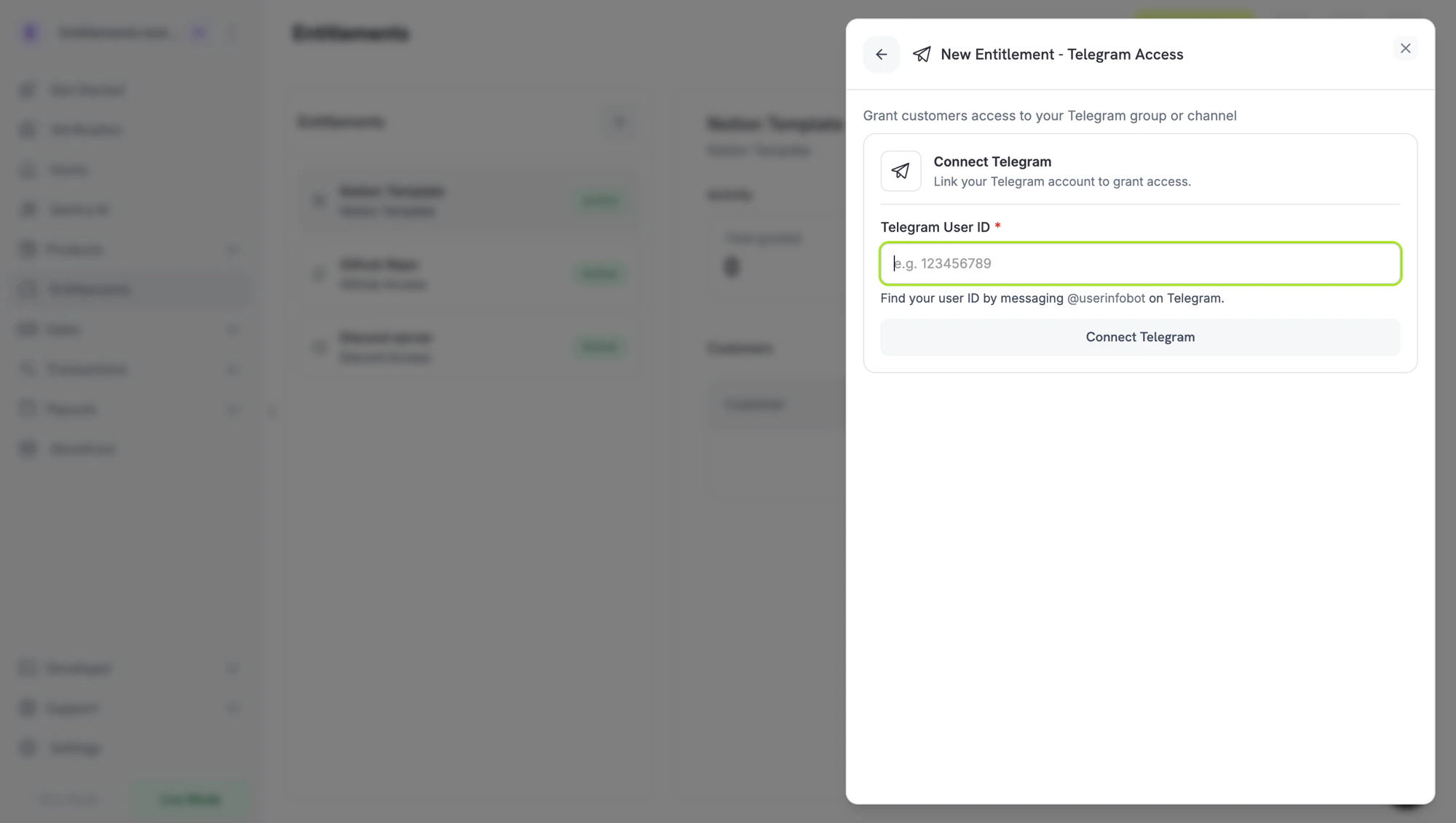 接下来的两个步骤是在 Telegram 上的设置任务,可以以任意顺序完成 — 获取您的用户 ID 并将机器人添加为聊天管理员。完成这两步后,返回仪表板进行最后一步。
在 Telegram 上,消息发送给 **`/start`**:
* **`@dodo_payments_bot`** 如果您在使用 **Live 模式**
* **`@DodoPaymentsTestBot`** 如果您在使用 **Test 模式**
机器人会回复您的数字 Telegram 用户 ID。复制它 — 在最后一步中粘贴到仪表板中。
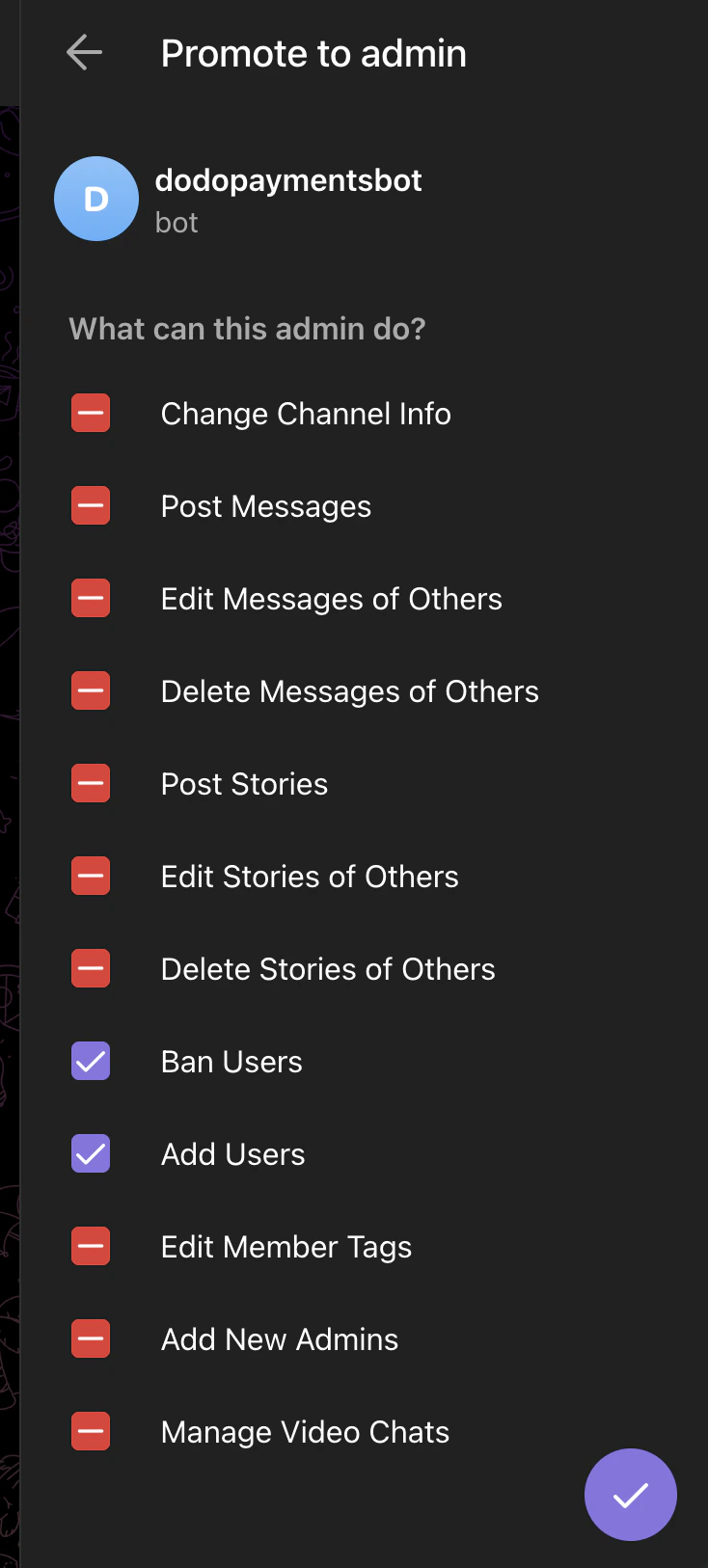
在您想要限制的 Telegram 群组或频道中,打开成员列表并将**同一机器人作为管理员**(`@dodo_payments_bot` 用于实际,`@DodoPaymentsTestBot` 用于测试),启用以下权限:
* **禁止用户** — 在撤销时必需删除成员
* **添加用户** — 邀请付费客户所需
关闭所有其他管理员权限。
接下来的两个步骤是在 Telegram 上的设置任务,可以以任意顺序完成 — 获取您的用户 ID 并将机器人添加为聊天管理员。完成这两步后,返回仪表板进行最后一步。
在 Telegram 上,消息发送给 **`/start`**:
* **`@dodo_payments_bot`** 如果您在使用 **Live 模式**
* **`@DodoPaymentsTestBot`** 如果您在使用 **Test 模式**
机器人会回复您的数字 Telegram 用户 ID。复制它 — 在最后一步中粘贴到仪表板中。
在您想要限制的 Telegram 群组或频道中,打开成员列表并将**同一机器人作为管理员**(`@dodo_payments_bot` 用于实际,`@DodoPaymentsTestBot` 用于测试),启用以下权限:
* **禁止用户** — 在撤销时必需删除成员
* **添加用户** — 邀请付费客户所需
关闭所有其他管理员权限。
 返回仪表板,将步骤 2 中的用户 ID 粘贴到 **Telegram 用户 ID**,然后单击 **Connect Telegram**。聊天选择器现在列出了机器人作为管理员的每个群组和频道 — 选择您要限制的那个,给权限命名,然后单击 **Create Entitlement**。
## 客户流程
1. 客户完成结账。
2. Dodo Payments 创建 `pending` 授权,并要求机器人生成一个一次性邀请链接到已配置的聊天。
3. 链接准备好后,授权转至 `delivered`,链接将在交付邮件和客户门户中包含。
4. 客户点击链接并加入聊天。
5. 在撤销时,机器人会将客户从聊天中移除。
邀请链接是一次性的,在客户加入后过期。如果他们在加入之前丢失了链接,可以通过重新发送交付邮件或从仪表板撤销并重新创建授权来重新生成。
## 配置要求
| 字段 | 必填 | 描述 |
| --------- | -- | -------------------------------------------- |
| `chat_id` | 是 | Telegram 聊天 ID(数字,群组/频道通常为负数)。仪表板选择器为您填充此内容。 |
## 通过 API 创建
```typescript TypeScript theme={null} theme={null}
const entitlement = await client.entitlements.create({
name: 'Premium Signals Group',
integration_type: 'telegram',
integration_config: {
chat_id: '-1001234567890',
},
});
```
```python Python theme={null} theme={null}
client.entitlements.create(
name="Premium Signals Group",
integration_type="telegram",
integration_config={"chat_id": "-1001234567890"},
)
```
```go Go theme={null} theme={null}
client.Entitlements.New(ctx, dodopayments.EntitlementNewParams{
Name: dodopayments.F("Premium Signals Group"),
IntegrationType: dodopayments.F(dodopayments.EntitlementIntegrationTypeTelegram),
IntegrationConfig: dodopayments.F[dodopayments.IntegrationConfigUnionParam](
dodopayments.IntegrationConfigTelegramConfigParam{
ChatID: dodopayments.F("-1001234567890"),
},
),
})
```
## Webhooks
参见 [`entitlement_grant.*` webhook 事件](/developer-resources/webhooks/intents/entitlement-grant)。Telegram 授予在 `pending` 到达,并在机器人发出邀请链接后转换为 `delivered`。
## 故障排除
Dodo Payments 机器人必须**作为管理员**添加到聊天中,并启用**添加用户**。选择器读取实时状态,因此一旦机器人成为管理员,聊天就会出现。
Telegram 一次性链接在首次使用后过期。如果客户在未登录设备上点击或丢失了链接,请撤销授权并重新发放。
机器人需要 **禁止用户** 管理权限来删除成员。打开聊天设置并确认在 Dodo Payments 机器人上勾选了 **禁止用户** 和 **添加用户**。
返回仪表板,将步骤 2 中的用户 ID 粘贴到 **Telegram 用户 ID**,然后单击 **Connect Telegram**。聊天选择器现在列出了机器人作为管理员的每个群组和频道 — 选择您要限制的那个,给权限命名,然后单击 **Create Entitlement**。
## 客户流程
1. 客户完成结账。
2. Dodo Payments 创建 `pending` 授权,并要求机器人生成一个一次性邀请链接到已配置的聊天。
3. 链接准备好后,授权转至 `delivered`,链接将在交付邮件和客户门户中包含。
4. 客户点击链接并加入聊天。
5. 在撤销时,机器人会将客户从聊天中移除。
邀请链接是一次性的,在客户加入后过期。如果他们在加入之前丢失了链接,可以通过重新发送交付邮件或从仪表板撤销并重新创建授权来重新生成。
## 配置要求
| 字段 | 必填 | 描述 |
| --------- | -- | -------------------------------------------- |
| `chat_id` | 是 | Telegram 聊天 ID(数字,群组/频道通常为负数)。仪表板选择器为您填充此内容。 |
## 通过 API 创建
```typescript TypeScript theme={null} theme={null}
const entitlement = await client.entitlements.create({
name: 'Premium Signals Group',
integration_type: 'telegram',
integration_config: {
chat_id: '-1001234567890',
},
});
```
```python Python theme={null} theme={null}
client.entitlements.create(
name="Premium Signals Group",
integration_type="telegram",
integration_config={"chat_id": "-1001234567890"},
)
```
```go Go theme={null} theme={null}
client.Entitlements.New(ctx, dodopayments.EntitlementNewParams{
Name: dodopayments.F("Premium Signals Group"),
IntegrationType: dodopayments.F(dodopayments.EntitlementIntegrationTypeTelegram),
IntegrationConfig: dodopayments.F[dodopayments.IntegrationConfigUnionParam](
dodopayments.IntegrationConfigTelegramConfigParam{
ChatID: dodopayments.F("-1001234567890"),
},
),
})
```
## Webhooks
参见 [`entitlement_grant.*` webhook 事件](/developer-resources/webhooks/intents/entitlement-grant)。Telegram 授予在 `pending` 到达,并在机器人发出邀请链接后转换为 `delivered`。
## 故障排除
Dodo Payments 机器人必须**作为管理员**添加到聊天中,并启用**添加用户**。选择器读取实时状态,因此一旦机器人成为管理员,聊天就会出现。
Telegram 一次性链接在首次使用后过期。如果客户在未登录设备上点击或丢失了链接,请撤销授权并重新发放。
机器人需要 **禁止用户** 管理权限来删除成员。打开聊天设置并确认在 Dodo Payments 机器人上勾选了 **禁止用户** 和 **添加用户**。