> ## Documentation Index
> Fetch the complete documentation index at: https://docs.dodopayments.com/llms.txt
> Use this file to discover all available pages before exploring further.
# 数字产品交付
> 当客户购买时,自动提供可下载的文件、外部链接和下载说明。数字产品交付是数字文件的权限类型。文件通过预签名下载 URL 发放,并在撤销访问权限时撤销。
## 概述
数字产品交付是**数字文件**的权限类型。您将文件上传到数字文件权限,附加到产品,Dodo Payments 会通过电子邮件和客户门户向每位付费客户提供预签名下载链接。
该权限支持:
* **托管文件上传**:在 Dodo Payments 中存储文件,并通过短期有效的预签名 URL 提供服务。
* **外部下载链接**:链接到托管在 Dropbox、Google Drive、S3 或任何 URL 上的文件。
* **下载说明**:在订单页面和交付电子邮件中显示给客户的自由格式文本。
您可以在单个权限中混合使用这三种。
## 关键功能
上传文件(PDF、ZIP、图片、视频等)最多至500 MiB。文件被有效地流式传输和存储。
将所需数量的文件附加到单个权限中。
提供外部下载链接(Dropbox、Google Drive、签名 S3 URL)作为替代或补充。
托管文件通过短期有效的预签名 URL 提供。每个下载 URL 大约在 15 分钟后自动过期。
***
## 设置数字产品交付
在 Dodo Payments 仪表板中转到**权限**,单击 **+** 创建新权限。
选择**数字产品交付**作为集成。
配置任意组合:
* **文件**:上传一个或多个文件。每次上传返回一个 `file_id`,并附加到权限上。
* **外部 URL**:一个可公开访问的 HTTPS 链接,与托管文件一起提供。
* **说明**:显示给客户的自由格式文本(例如,“解压缩并运行 setup.sh”)。
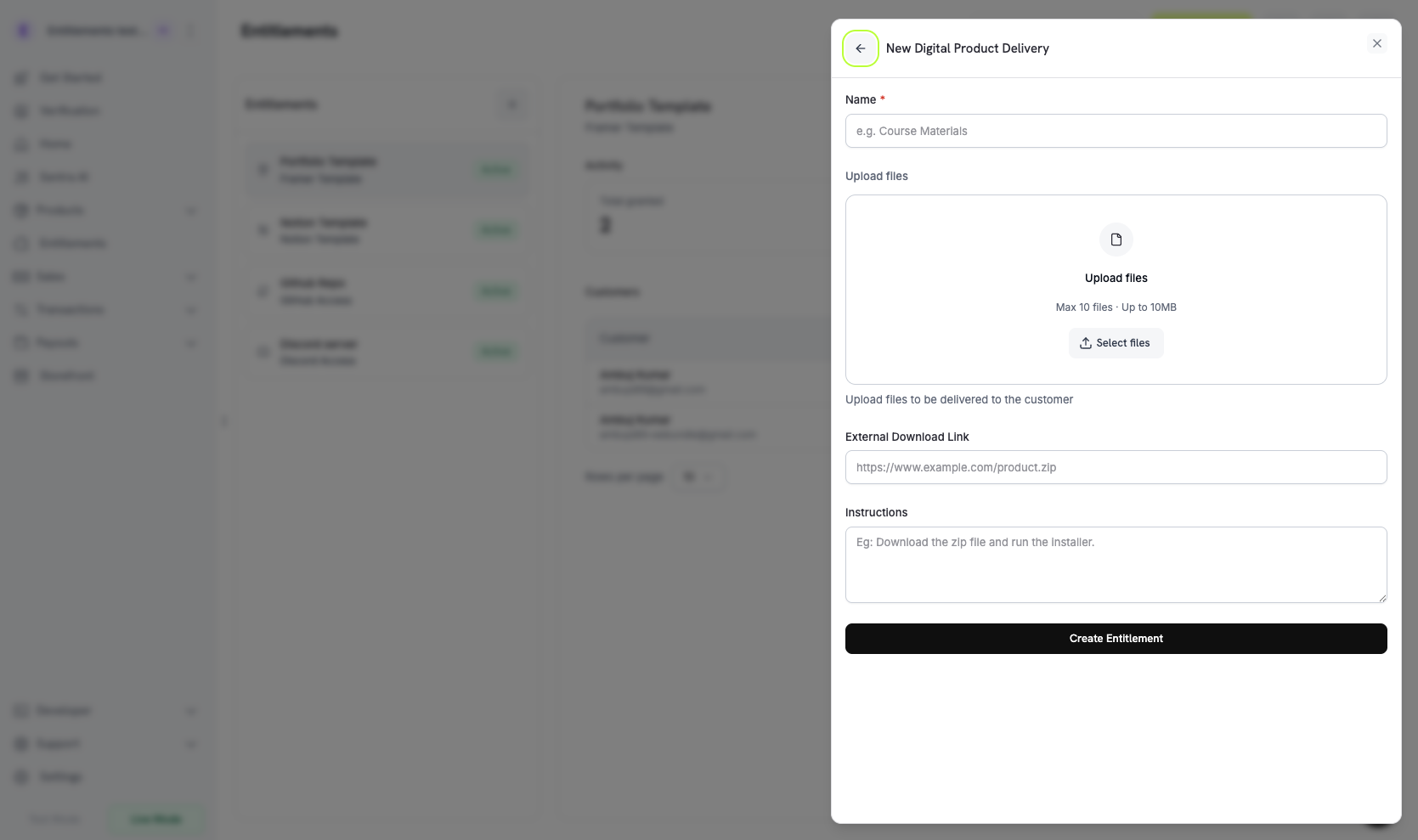 保存。现在可以将该权限附加到任何产品上。
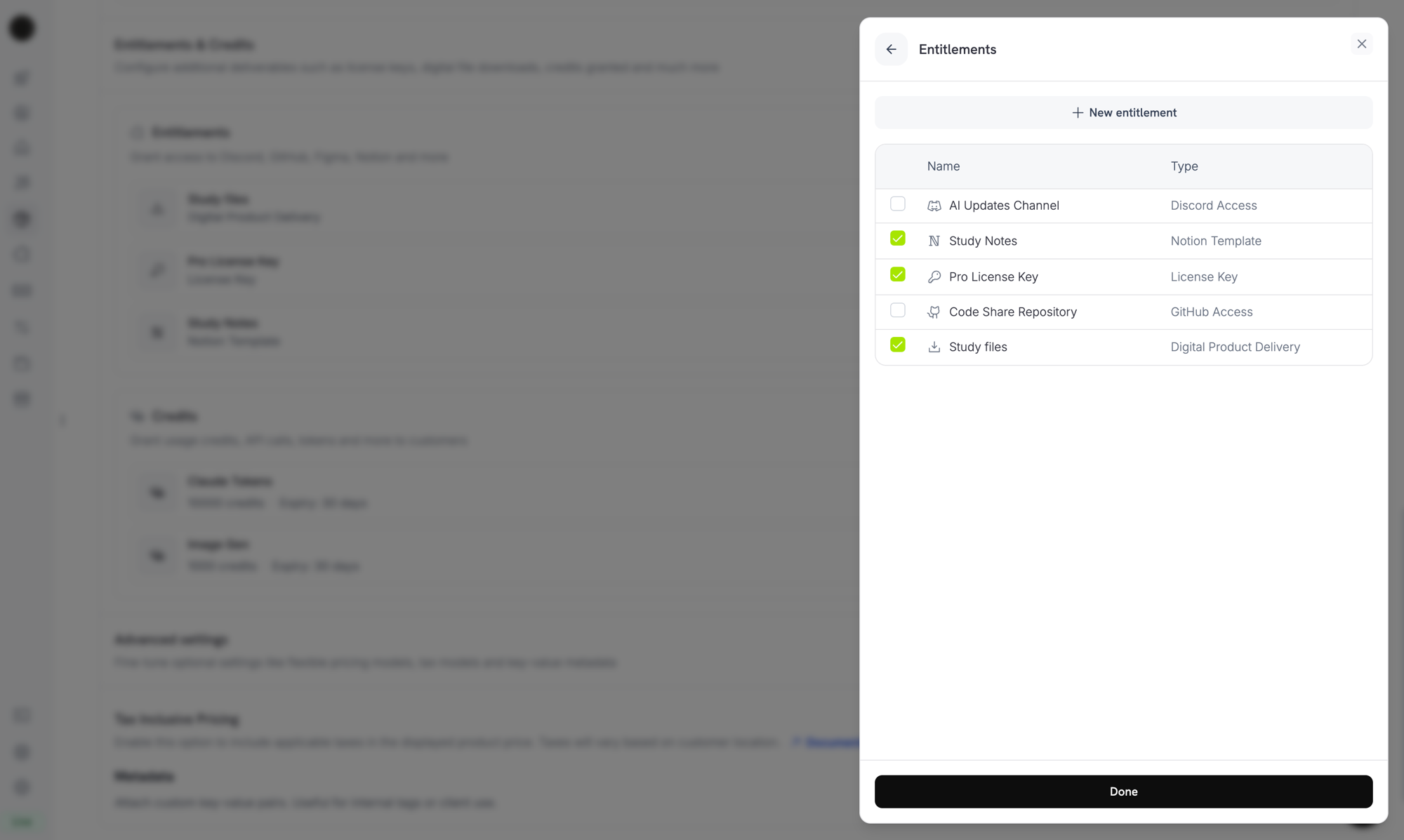
## 附加到产品
打开产品,展开**高级设置 → 权限和信用额**,选择您的数字文件权限。该权限在与该产品相关的每次成功购买或有效订阅时交付。
保存。现在可以将该权限附加到任何产品上。
## 附加到产品
打开产品,展开**高级设置 → 权限和信用额**,选择您的数字文件权限。该权限在与该产品相关的每次成功购买或有效订阅时交付。
 ***
## 交付工作原理
数字文件交付遵循标准的[授予生命周期](/features/entitlements/introduction#how-grants-work):
| 事件 | 行为 |
| ------------------------------------------------ | --------------------------------------------------------- |
| `payment.succeeded` (一次性) | 颁发授权。授权携带有效约 15 分钟的预签名下载 URL;客户可以通过重新打开电子邮件链接或客户门户页面刷新它们。 |
| `subscription.active` | 颁发授权。在订阅有效期间,文件保持可访问状态。 |
| `subscription.renewed` | 无操作。同一授权继续;每次获取时生成新的预签名 URL。 |
| `subscription.on_hold` / `cancelled` / `expired` | 撤销授权。不再发放新的预签名 URL。 |
| `subscription.plan_changed` | 撤销旧授权;为新计划的权限颁发新授权。 |
| `refund.succeeded` (一次性) | 撤销授权。 |
| 手动撤销 | 使用 `revocation_reason: manual` 撤销。 |
撤销停止 Dodo Payments 发放新的下载 URL,但不会使客户已下载的副本失效。将托管的文件下载视为“读取后交付”。
***
## 客户体验
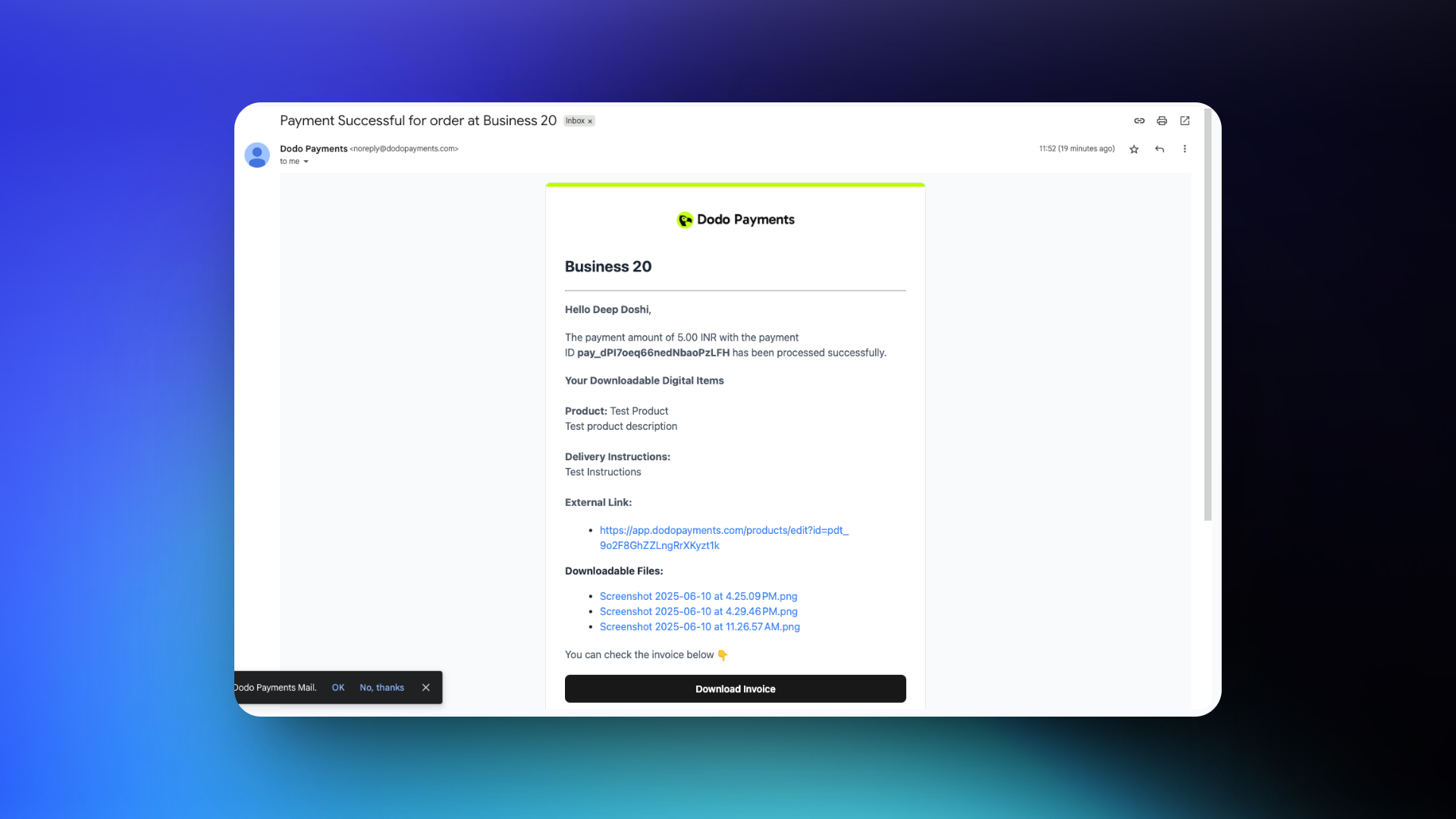
### 购买确认
交易成功后,客户会收到一封包含下载链接和您配置的任何说明的电子邮件。
***
## 交付工作原理
数字文件交付遵循标准的[授予生命周期](/features/entitlements/introduction#how-grants-work):
| 事件 | 行为 |
| ------------------------------------------------ | --------------------------------------------------------- |
| `payment.succeeded` (一次性) | 颁发授权。授权携带有效约 15 分钟的预签名下载 URL;客户可以通过重新打开电子邮件链接或客户门户页面刷新它们。 |
| `subscription.active` | 颁发授权。在订阅有效期间,文件保持可访问状态。 |
| `subscription.renewed` | 无操作。同一授权继续;每次获取时生成新的预签名 URL。 |
| `subscription.on_hold` / `cancelled` / `expired` | 撤销授权。不再发放新的预签名 URL。 |
| `subscription.plan_changed` | 撤销旧授权;为新计划的权限颁发新授权。 |
| `refund.succeeded` (一次性) | 撤销授权。 |
| 手动撤销 | 使用 `revocation_reason: manual` 撤销。 |
撤销停止 Dodo Payments 发放新的下载 URL,但不会使客户已下载的副本失效。将托管的文件下载视为“读取后交付”。
***
## 客户体验
### 购买确认
交易成功后,客户会收到一封包含下载链接和您配置的任何说明的电子邮件。
 ### 客户门户访问
客户可以随时从[客户门户](/features/customer-portal)重新获取下载链接。门户页面按需生成新的预签名 URL,因此即使在电子邮件的链接过期后,同一购买仍然有效。
### 客户门户访问
客户可以随时从[客户门户](/features/customer-portal)重新获取下载链接。门户页面按需生成新的预签名 URL,因此即使在电子邮件的链接过期后,同一购买仍然有效。
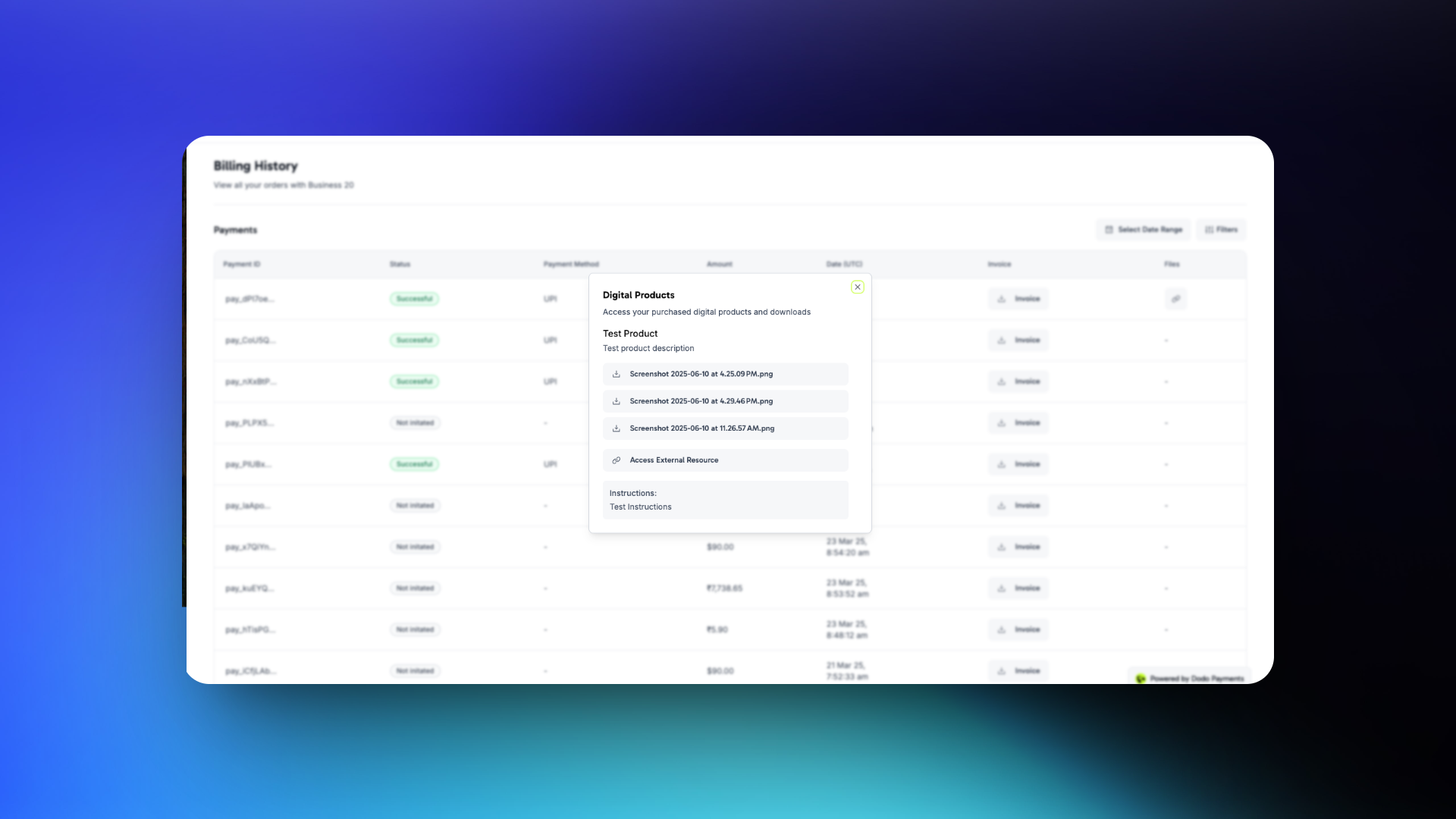 客户可以直接从确认电子邮件下载文件,或随时通过其门户访问。
***
## 程序化管理文件
### 向权限上传文件
```typescript TypeScript theme={null} theme={null}
import DodoPayments from 'dodopayments';
import fs from 'node:fs';
const client = new DodoPayments({
bearerToken: process.env['DODO_PAYMENTS_API_KEY'],
environment: 'test_mode',
});
await client.entitlements.files.upload('ent_files_abc', {
file: fs.createReadStream('./pro-bundle.zip'),
filename: 'pro-bundle.zip',
});
```
```bash cURL theme={null} theme={null}
curl -X POST "https://test.dodopayments.com/entitlements/ent_files_abc/files" \
-H "Authorization: Bearer YOUR_API_KEY" \
-F "file=@./pro-bundle.zip" \
-F "filename=pro-bundle.zip"
```
### 列出授权和解析下载 URL
```typescript theme={null} theme={null}
const grants = await client.entitlements.grants.list('ent_files_abc', {
customer_id: 'cus_abc123',
});
for (const grant of grants.items) {
for (const file of grant.digital_product_delivery.files) {
console.log(file.filename, file.download_url, `expires in ${file.expires_in}s`);
}
}
```
### 从权限中移除文件
```typescript theme={null} theme={null}
await client.entitlements.files.delete('ent_files_abc', 'df_a4f6c1de');
```
***
## 重要注意事项
* **预签名 URL 过期速度很快。** 授权负载或 webhook 事件中返回的下载 URL 有效期为约 15 分钟。不要存储它们;客户需要重新下载时重新获取。
* **更新文件仅影响未来购买。** 替换或移除文件不会溯及既往地改变已发放的下载。过去的客户仍然可以重新获取在授权创建时当前的版本。
* **退款不会使已下载的副本失效。** 已下载文件的客户保留该副本。对于可撤销的内容(许可证限制的媒体、时间有限的访问),将数字文件与[许可证密钥](/features/license-keys)配对并在运行时验证。
* **对于敏感内容,优选使用具有自身身份验证的外部 URL。** Dodo Payments 的预签名 URL 短期有效,但在其窗口内未经认证;任何拥有 URL 的人都可以在该窗口内下载。外部托管、账号限制的内容提供更强的保证。
***
## API 管理
创建一个数字文件许可,包含可选的外部URL和说明。
上传文件(最多500 MiB)并将其附加到许可中。
从许可中移除一个文件。
列出授权并读取已解析的下载URL。
更新说明、外部URL或替换文件。
手动撤销客户的访问权限。
***
## Webhooks
数字文件传递和撤销触发四个[`entitlement_grant.*` webhook 事件](/developer-resources/webhooks/intents/entitlement-grant)。对于数字文件授权,负载包括一个 `digital_product_delivery` 对象,其中包含解析的文件列表(预签名 URL、文件名、大小)、可选的 `instructions` 和可选的 `external_url`。
```json theme={null} theme={null}
"digital_product_delivery": {
"files": [
{
"file_id": "df_a4f6c1de",
"download_url": "https://files.dodopayments.com/.../pro-bundle.zip?Signature=...",
"filename": "pro-bundle.zip",
"content_type": "application/zip",
"file_size": 18742390,
"expires_in": 900
}
],
"instructions": "Unzip and run setup.sh from the project root.",
"external_url": null
}
```
***
## 旧版数字产品交付
配置了旧的 `digital_product_delivery` 块的产品已**自动迁移**到数字文件权限。旧版产品文件 API 下上传的现有文件已保存;它们仍然可以下载并在授权负载中显示,标记为 `source: "legacy"`。将来的更新(添加文件、更改说明、替换外部 URL)应该通过编辑**权限**下的迁移数字文件权限进行。
遗留的产品层级字段(`digital_product_delivery.external_url`、`digital_product_delivery.instructions`)继续在产品响应中填充以向后兼容,但权限是未来的真正数据源。
***
## 最佳实践
* **将下载视为一次性操作。** 客户会共享或丢失链接,因此应以他们下载的内容都是他们自己的假设来设计产品。
* **使用说明来设定期望。** 对于多个文件的包,添加一行`instructions`解释首先安装什么或如何组合文件。
* **注意500 MiB限制。** 更大的工件(多GB数据集、视频课程)应外部托管并通过`external_url`链接,而不是上传。
* **结合许可证密钥实现可撤销访问。** 如果需要在退款后撤销对产品内功能的访问,将数字文件许可与许可证密钥许可结合,并在运行时验证密钥。
* **测试客户门户的刷新流程。** 确认客户可以在一周后返回门户并仍然获得有效的下载链接。这是当电子邮件链接过期时的主要恢复路径。
客户可以直接从确认电子邮件下载文件,或随时通过其门户访问。
***
## 程序化管理文件
### 向权限上传文件
```typescript TypeScript theme={null} theme={null}
import DodoPayments from 'dodopayments';
import fs from 'node:fs';
const client = new DodoPayments({
bearerToken: process.env['DODO_PAYMENTS_API_KEY'],
environment: 'test_mode',
});
await client.entitlements.files.upload('ent_files_abc', {
file: fs.createReadStream('./pro-bundle.zip'),
filename: 'pro-bundle.zip',
});
```
```bash cURL theme={null} theme={null}
curl -X POST "https://test.dodopayments.com/entitlements/ent_files_abc/files" \
-H "Authorization: Bearer YOUR_API_KEY" \
-F "file=@./pro-bundle.zip" \
-F "filename=pro-bundle.zip"
```
### 列出授权和解析下载 URL
```typescript theme={null} theme={null}
const grants = await client.entitlements.grants.list('ent_files_abc', {
customer_id: 'cus_abc123',
});
for (const grant of grants.items) {
for (const file of grant.digital_product_delivery.files) {
console.log(file.filename, file.download_url, `expires in ${file.expires_in}s`);
}
}
```
### 从权限中移除文件
```typescript theme={null} theme={null}
await client.entitlements.files.delete('ent_files_abc', 'df_a4f6c1de');
```
***
## 重要注意事项
* **预签名 URL 过期速度很快。** 授权负载或 webhook 事件中返回的下载 URL 有效期为约 15 分钟。不要存储它们;客户需要重新下载时重新获取。
* **更新文件仅影响未来购买。** 替换或移除文件不会溯及既往地改变已发放的下载。过去的客户仍然可以重新获取在授权创建时当前的版本。
* **退款不会使已下载的副本失效。** 已下载文件的客户保留该副本。对于可撤销的内容(许可证限制的媒体、时间有限的访问),将数字文件与[许可证密钥](/features/license-keys)配对并在运行时验证。
* **对于敏感内容,优选使用具有自身身份验证的外部 URL。** Dodo Payments 的预签名 URL 短期有效,但在其窗口内未经认证;任何拥有 URL 的人都可以在该窗口内下载。外部托管、账号限制的内容提供更强的保证。
***
## API 管理
创建一个数字文件许可,包含可选的外部URL和说明。
上传文件(最多500 MiB)并将其附加到许可中。
从许可中移除一个文件。
列出授权并读取已解析的下载URL。
更新说明、外部URL或替换文件。
手动撤销客户的访问权限。
***
## Webhooks
数字文件传递和撤销触发四个[`entitlement_grant.*` webhook 事件](/developer-resources/webhooks/intents/entitlement-grant)。对于数字文件授权,负载包括一个 `digital_product_delivery` 对象,其中包含解析的文件列表(预签名 URL、文件名、大小)、可选的 `instructions` 和可选的 `external_url`。
```json theme={null} theme={null}
"digital_product_delivery": {
"files": [
{
"file_id": "df_a4f6c1de",
"download_url": "https://files.dodopayments.com/.../pro-bundle.zip?Signature=...",
"filename": "pro-bundle.zip",
"content_type": "application/zip",
"file_size": 18742390,
"expires_in": 900
}
],
"instructions": "Unzip and run setup.sh from the project root.",
"external_url": null
}
```
***
## 旧版数字产品交付
配置了旧的 `digital_product_delivery` 块的产品已**自动迁移**到数字文件权限。旧版产品文件 API 下上传的现有文件已保存;它们仍然可以下载并在授权负载中显示,标记为 `source: "legacy"`。将来的更新(添加文件、更改说明、替换外部 URL)应该通过编辑**权限**下的迁移数字文件权限进行。
遗留的产品层级字段(`digital_product_delivery.external_url`、`digital_product_delivery.instructions`)继续在产品响应中填充以向后兼容,但权限是未来的真正数据源。
***
## 最佳实践
* **将下载视为一次性操作。** 客户会共享或丢失链接,因此应以他们下载的内容都是他们自己的假设来设计产品。
* **使用说明来设定期望。** 对于多个文件的包,添加一行`instructions`解释首先安装什么或如何组合文件。
* **注意500 MiB限制。** 更大的工件(多GB数据集、视频课程)应外部托管并通过`external_url`链接,而不是上传。
* **结合许可证密钥实现可撤销访问。** 如果需要在退款后撤销对产品内功能的访问,将数字文件许可与许可证密钥许可结合,并在运行时验证密钥。
* **测试客户门户的刷新流程。** 确认客户可以在一周后返回门户并仍然获得有效的下载链接。这是当电子邮件链接过期时的主要恢复路径。