> ## Documentation Index
> Fetch the complete documentation index at: https://docs.dodopayments.com/llms.txt
> Use this file to discover all available pages before exploring further.
# 客户钱包
> 管理您的客户的预付货币余额。为钱包充值,将余额应用于订阅发票,将退款处理为钱包资金,并追踪交易历史。
跨币种查看客户的货币余额。
向客户钱包添加或扣除资金。
查看带分页的完整交易历史。
## 什么是客户钱包?
客户钱包是为您的用户保留实际资金的货币余额账户。每当您创建客户账户时,系统会自动为其创建一个钱包。您可以使用这些钱包来:
* **存储预付资金**以用于未来的订阅付款
* **以钱包余额形式处理退款**而非卡片退款
* **发放促销余额**,如欢迎奖励或忠诚度奖励
* **在计费期间自动将钱包资金应用于发票**
* **通过详细的账本历史追踪货币交易**
每位客户在您创建其账户时都会自动获得一个钱包。钱包支持 USD 和 INR 货币,并为每种货币提供独立的货币余额。
**客户钱包 ≠ 基于信用的计费**
客户钱包持有可应用于发票和订阅付款的**实际货币余额**(USD、INR)。
如果您希望跟踪虚拟使用单位(API 调用、令牌、计算小时等),请改为参阅[基于信用的计费](/features/credit-based-billing)。
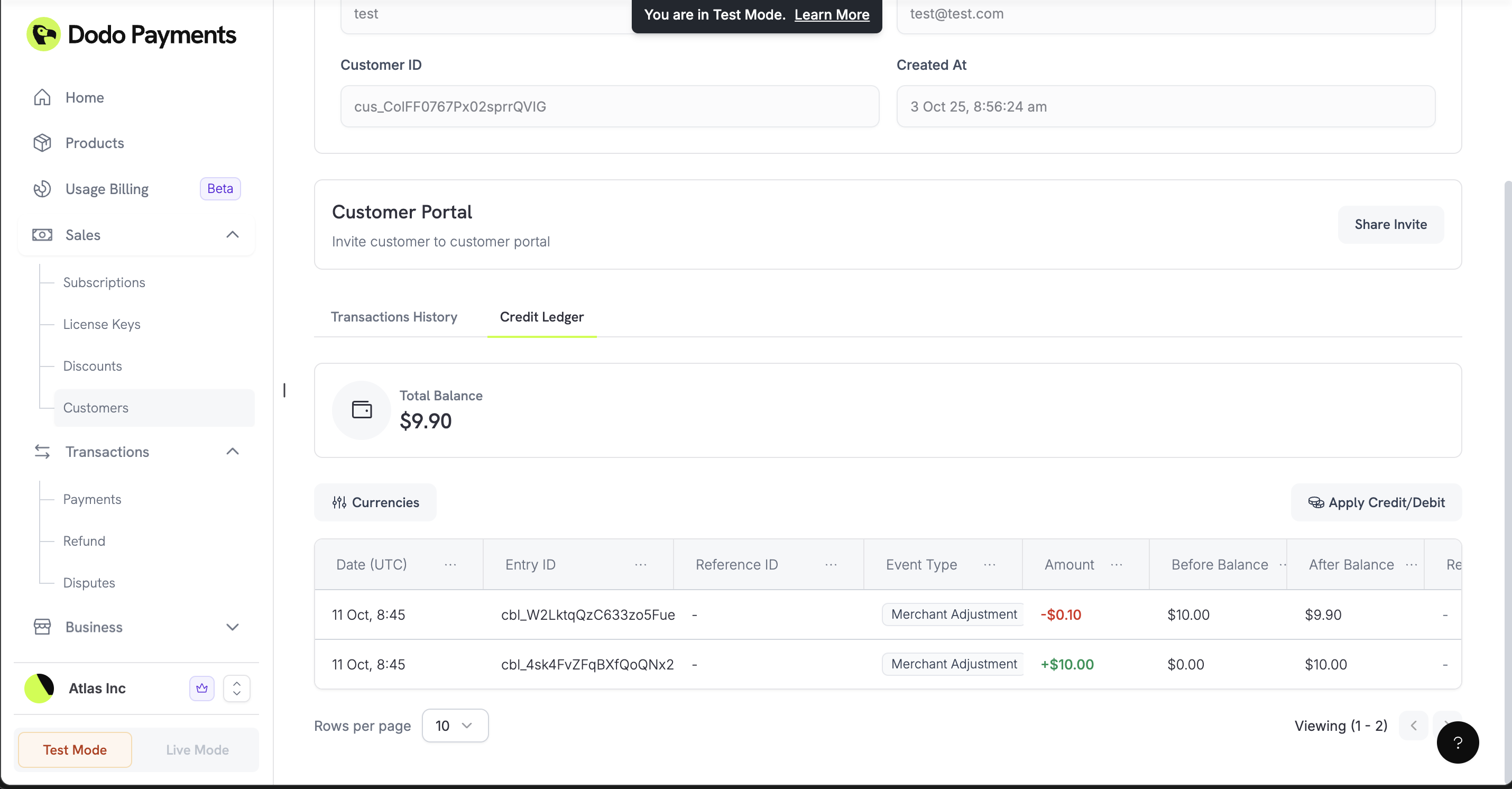 ## 工作原理
客户钱包持有的资金可供客户用于支付。当客户有发票或周期性订阅收费时,系统会先检查其钱包余额。在向其主要支付方式收费前,任何可用资金都会自动应用于发票。
### 自动设置
当您创建新客户时,Dodo Payments 会自动创建一个初始余额为零的钱包。通过我们的 API,钱包可以立即接收资金。
### 多币种支持
每个钱包可以持有不同货币的余额:
美元余额(以分为单位存储)
印度卢比余额(以派士为单位存储)
目前,仅支持 **USD** 和 **INR** 余额。更多币种即将上线。
## 使用钱包
### 检查客户余额
查看客户在所有币种中的资金余额。在处理购买前验证可用余额或在应用 UI 中显示余额时,这一点非常有用。
查看客户在所有受支持币种中的钱包货币余额。
### 添加或扣除资金
为客户钱包充值(例如欢迎奖励或退款余额)或扣除资金(例如订阅收费)。您可以为每笔交易提供原因,以保持清晰的审计记录。
`entry_type` 字段使用 `'credit'` 向钱包添加资金,并使用 `'debit'` 从钱包扣除资金。
向客户钱包添加或扣除资金。
### 查看交易历史
查看客户的每笔借贷交易。这个详细账本有助于您核对账户并为客户提供透明化信息。
查看客户的每笔货币交易。
## 真实案例
### 退款至钱包
当客户申请退款时,您可以将金额添加到其钱包余额,而不是执行传统的卡片退款。这样可以将资金保留在您的生态系统中以供未来购买。
```javascript theme={null}
async function refundToWallet(customerId, refundAmount, originalPaymentId) {
await client.customers.wallets.ledgerEntries.create(customerId, {
amount: refundAmount, // Amount in cents
currency: 'USD',
entry_type: 'credit',
reason: `Refund for payment ${originalPaymentId}`,
idempotency_key: `refund_${originalPaymentId}`
});
}
```
### 欢迎奖励 / 促销余额
为新客户提供货币欢迎奖励,鼓励他们首次购买。
```javascript theme={null}
async function addWelcomeBonus(customerId) {
await client.customers.wallets.ledgerEntries.create(customerId, {
amount: 1000, // $10.00 promotional balance
currency: 'USD',
entry_type: 'credit',
reason: 'Welcome bonus - $10 promotional balance',
idempotency_key: `welcome_${customerId}`
});
}
```
### 从钱包支付订阅
从钱包扣除资金以支付订阅费用或手动购买。
```javascript theme={null}
async function deductForPurchase(customerId, purchaseAmount, purchaseId) {
try {
await client.customers.wallets.ledgerEntries.create(customerId, {
amount: purchaseAmount,
currency: 'USD',
entry_type: 'debit',
reason: `Subscription charge - monthly billing`,
idempotency_key: `charge_${purchaseId}`
});
} catch (error) {
if (error.status === 400) {
console.log('Insufficient wallet balance');
}
}
}
```
### 预付计费系统
允许客户提前充值账户,并随着时间推移从该余额中扣费。
当客户存款时,将资金添加到其钱包中。
```javascript theme={null}
await client.customers.wallets.ledgerEntries.create(customerId, {
amount: 5000, // $50.00 deposit
currency: 'USD',
entry_type: 'credit',
reason: 'Account funding - prepaid deposit',
idempotency_key: `deposit_${paymentId}`
});
```
随着客户使用您的服务或续订订阅,从余额中扣除资金。
```javascript theme={null}
await client.customers.wallets.ledgerEntries.create(customerId, {
amount: 1500, // $15.00 charge
currency: 'USD',
entry_type: 'debit',
reason: 'Service purchase - monthly subscription',
idempotency_key: `purchase_${purchaseId}`
});
```
检查客户是否资金不足,以便提示充值。
```javascript theme={null}
const wallets = await client.customers.wallets.list(customerId);
const usdWallet = wallets.items.find(w => w.currency === 'USD');
const balance = usdWallet.balance;
if (balance < 1000) { // Less than $10.00
// Send low balance notification
await sendLowBalanceNotification(customerId, balance);
}
```
### 多币种支持
为不同地区的客户管理独立的货币余额。
管理美国客户的 USD 资金。
```javascript theme={null}
await client.customers.wallets.ledgerEntries.create(customerId, {
amount: 20000, // $200.00 in cents
currency: 'USD',
entry_type: 'credit',
reason: 'USD account funding',
idempotency_key: `usd_deposit_${paymentId}`
});
```
管理印度客户的 INR 资金。
```javascript theme={null}
await client.customers.wallets.ledgerEntries.create(customerId, {
amount: 1500000, // Rs 15,000 in paise
currency: 'INR',
entry_type: 'credit',
reason: 'INR account funding',
idempotency_key: `inr_deposit_${paymentId}`
});
```
## 最佳实践
### 防止重复交易
使用幂等密钥,确保不会因同一事件而意外重复添加或扣除资金。
```javascript theme={null}
async function addFundsSafely(customerId, amount, reason) {
const idempotencyKey = `${reason}_${customerId}_${Date.now()}`;
try {
const result = await client.customers.wallets.ledgerEntries.create(customerId, {
amount: amount,
currency: 'USD',
entry_type: 'credit',
reason: reason,
idempotency_key: idempotencyKey
});
return { success: true, wallet: result };
} catch (error) {
if (error.status === 409) {
// Transaction already processed
return { success: true, wallet: null, duplicate: true };
}
throw error;
}
}
```
### 计费前检查余额
在尝试从钱包处理大额交易前,验证客户是否有充足资金。
```javascript theme={null}
async function checkBalanceBeforeOperation(customerId, requiredAmount) {
const wallets = await client.customers.wallets.list(customerId);
const usdWallet = wallets.items.find(w => w.currency === 'USD');
if (!usdWallet || usdWallet.balance < requiredAmount) {
throw new Error('Insufficient funds for this operation');
}
return usdWallet.balance;
}
```
## 即将推出
以下功能计划在未来版本中推出:
* **余额过期**:设置资金在特定时间后过期
* **更好的分析**:详细的支出报告和余额趋势
* **更多 Webhooks**:提供余额变更和余额不足的实时通知
从基本的资金添加与扣除操作开始,随着您的业务增长,再集成更复杂的自动化计费工作流。
## 工作原理
客户钱包持有的资金可供客户用于支付。当客户有发票或周期性订阅收费时,系统会先检查其钱包余额。在向其主要支付方式收费前,任何可用资金都会自动应用于发票。
### 自动设置
当您创建新客户时,Dodo Payments 会自动创建一个初始余额为零的钱包。通过我们的 API,钱包可以立即接收资金。
### 多币种支持
每个钱包可以持有不同货币的余额:
美元余额(以分为单位存储)
印度卢比余额(以派士为单位存储)
目前,仅支持 **USD** 和 **INR** 余额。更多币种即将上线。
## 使用钱包
### 检查客户余额
查看客户在所有币种中的资金余额。在处理购买前验证可用余额或在应用 UI 中显示余额时,这一点非常有用。
查看客户在所有受支持币种中的钱包货币余额。
### 添加或扣除资金
为客户钱包充值(例如欢迎奖励或退款余额)或扣除资金(例如订阅收费)。您可以为每笔交易提供原因,以保持清晰的审计记录。
`entry_type` 字段使用 `'credit'` 向钱包添加资金,并使用 `'debit'` 从钱包扣除资金。
向客户钱包添加或扣除资金。
### 查看交易历史
查看客户的每笔借贷交易。这个详细账本有助于您核对账户并为客户提供透明化信息。
查看客户的每笔货币交易。
## 真实案例
### 退款至钱包
当客户申请退款时,您可以将金额添加到其钱包余额,而不是执行传统的卡片退款。这样可以将资金保留在您的生态系统中以供未来购买。
```javascript theme={null}
async function refundToWallet(customerId, refundAmount, originalPaymentId) {
await client.customers.wallets.ledgerEntries.create(customerId, {
amount: refundAmount, // Amount in cents
currency: 'USD',
entry_type: 'credit',
reason: `Refund for payment ${originalPaymentId}`,
idempotency_key: `refund_${originalPaymentId}`
});
}
```
### 欢迎奖励 / 促销余额
为新客户提供货币欢迎奖励,鼓励他们首次购买。
```javascript theme={null}
async function addWelcomeBonus(customerId) {
await client.customers.wallets.ledgerEntries.create(customerId, {
amount: 1000, // $10.00 promotional balance
currency: 'USD',
entry_type: 'credit',
reason: 'Welcome bonus - $10 promotional balance',
idempotency_key: `welcome_${customerId}`
});
}
```
### 从钱包支付订阅
从钱包扣除资金以支付订阅费用或手动购买。
```javascript theme={null}
async function deductForPurchase(customerId, purchaseAmount, purchaseId) {
try {
await client.customers.wallets.ledgerEntries.create(customerId, {
amount: purchaseAmount,
currency: 'USD',
entry_type: 'debit',
reason: `Subscription charge - monthly billing`,
idempotency_key: `charge_${purchaseId}`
});
} catch (error) {
if (error.status === 400) {
console.log('Insufficient wallet balance');
}
}
}
```
### 预付计费系统
允许客户提前充值账户,并随着时间推移从该余额中扣费。
当客户存款时,将资金添加到其钱包中。
```javascript theme={null}
await client.customers.wallets.ledgerEntries.create(customerId, {
amount: 5000, // $50.00 deposit
currency: 'USD',
entry_type: 'credit',
reason: 'Account funding - prepaid deposit',
idempotency_key: `deposit_${paymentId}`
});
```
随着客户使用您的服务或续订订阅,从余额中扣除资金。
```javascript theme={null}
await client.customers.wallets.ledgerEntries.create(customerId, {
amount: 1500, // $15.00 charge
currency: 'USD',
entry_type: 'debit',
reason: 'Service purchase - monthly subscription',
idempotency_key: `purchase_${purchaseId}`
});
```
检查客户是否资金不足,以便提示充值。
```javascript theme={null}
const wallets = await client.customers.wallets.list(customerId);
const usdWallet = wallets.items.find(w => w.currency === 'USD');
const balance = usdWallet.balance;
if (balance < 1000) { // Less than $10.00
// Send low balance notification
await sendLowBalanceNotification(customerId, balance);
}
```
### 多币种支持
为不同地区的客户管理独立的货币余额。
管理美国客户的 USD 资金。
```javascript theme={null}
await client.customers.wallets.ledgerEntries.create(customerId, {
amount: 20000, // $200.00 in cents
currency: 'USD',
entry_type: 'credit',
reason: 'USD account funding',
idempotency_key: `usd_deposit_${paymentId}`
});
```
管理印度客户的 INR 资金。
```javascript theme={null}
await client.customers.wallets.ledgerEntries.create(customerId, {
amount: 1500000, // Rs 15,000 in paise
currency: 'INR',
entry_type: 'credit',
reason: 'INR account funding',
idempotency_key: `inr_deposit_${paymentId}`
});
```
## 最佳实践
### 防止重复交易
使用幂等密钥,确保不会因同一事件而意外重复添加或扣除资金。
```javascript theme={null}
async function addFundsSafely(customerId, amount, reason) {
const idempotencyKey = `${reason}_${customerId}_${Date.now()}`;
try {
const result = await client.customers.wallets.ledgerEntries.create(customerId, {
amount: amount,
currency: 'USD',
entry_type: 'credit',
reason: reason,
idempotency_key: idempotencyKey
});
return { success: true, wallet: result };
} catch (error) {
if (error.status === 409) {
// Transaction already processed
return { success: true, wallet: null, duplicate: true };
}
throw error;
}
}
```
### 计费前检查余额
在尝试从钱包处理大额交易前,验证客户是否有充足资金。
```javascript theme={null}
async function checkBalanceBeforeOperation(customerId, requiredAmount) {
const wallets = await client.customers.wallets.list(customerId);
const usdWallet = wallets.items.find(w => w.currency === 'USD');
if (!usdWallet || usdWallet.balance < requiredAmount) {
throw new Error('Insufficient funds for this operation');
}
return usdWallet.balance;
}
```
## 即将推出
以下功能计划在未来版本中推出:
* **余额过期**:设置资金在特定时间后过期
* **更好的分析**:详细的支出报告和余额趋势
* **更多 Webhooks**:提供余额变更和余额不足的实时通知
从基本的资金添加与扣除操作开始,随着您的业务增长,再集成更复杂的自动化计费工作流。