> ## Documentation Index
> Fetch the complete documentation index at: https://docs.dodopayments.com/llms.txt
> Use this file to discover all available pages before exploring further.
# 结账功能
> 优化转化、全球合规的结账,支持多种货币和语言,自动税务计算,折扣码,附加功能和智能地址收集。
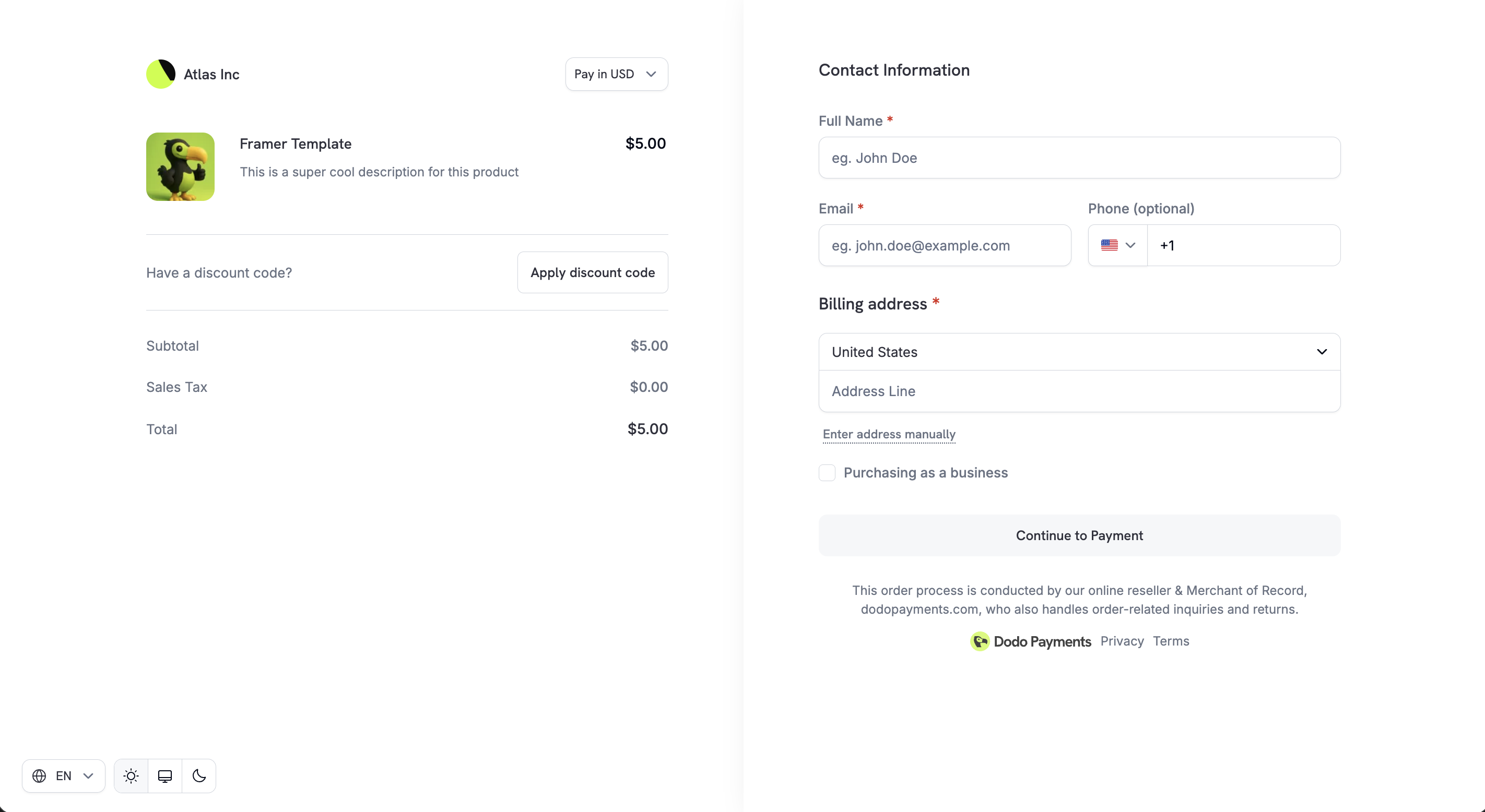 Dodo Payments 结账页面是面向数字产品和 SaaS 业务的转化优化、全球合规结账。它支持多种货币、语言、税费、折扣、附加项以及企业友好的合规模式。
通过编程方式创建托管结账会话。
在创建会话前计算价格和税费。
支持的支付方式和配置选项。
## 自适应货币
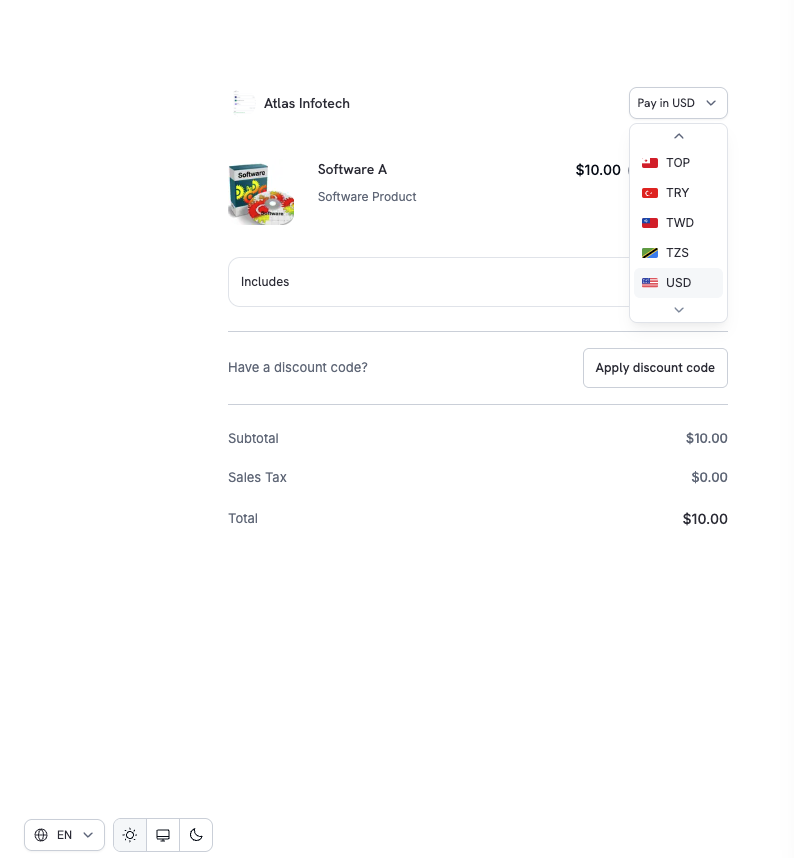
自适应货币允许客户以他们首选的本地货币付款,从而提高信任度和转化率。
### 工作原理
1. **启用**: 从 **设置 → 业务** 中启用自适应货币
2. **选择**: 客户可以直接在结账时切换货币
3. **转换**: 使用实时外汇汇率动态转换价格
4. **显示**: 付款前透明显示最终应付金额
Dodo Payments 结账页面是面向数字产品和 SaaS 业务的转化优化、全球合规结账。它支持多种货币、语言、税费、折扣、附加项以及企业友好的合规模式。
通过编程方式创建托管结账会话。
在创建会话前计算价格和税费。
支持的支付方式和配置选项。
## 自适应货币
自适应货币允许客户以他们首选的本地货币付款,从而提高信任度和转化率。
### 工作原理
1. **启用**: 从 **设置 → 业务** 中启用自适应货币
2. **选择**: 客户可以直接在结账时切换货币
3. **转换**: 使用实时外汇汇率动态转换价格
4. **显示**: 付款前透明显示最终应付金额
 了解更多支持的货币、兑换费用和退款处理。
## 多语言结账
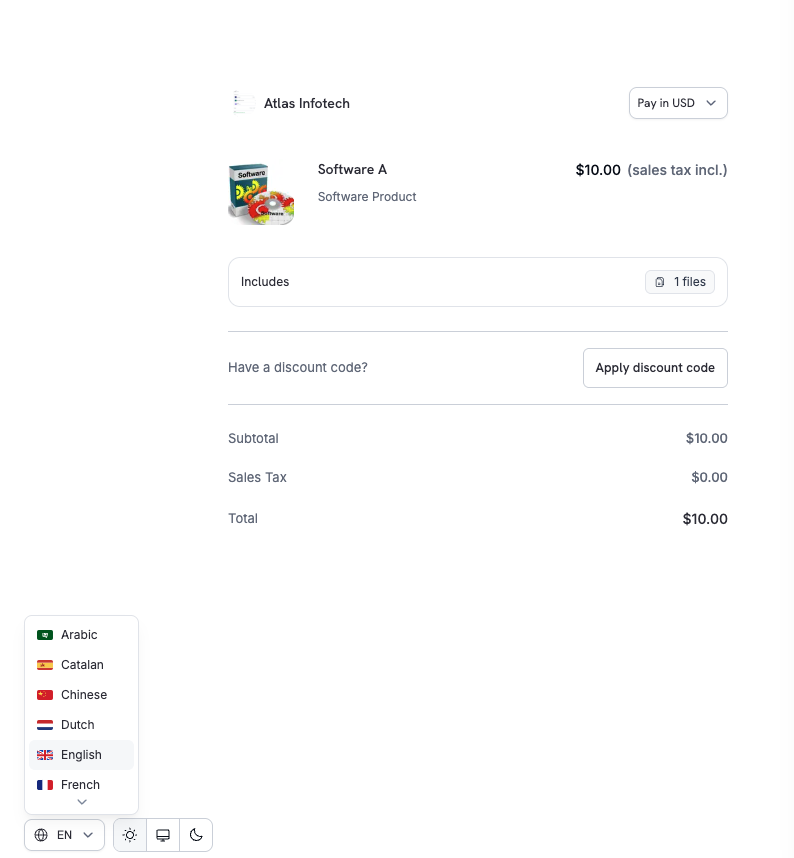
Dodo Payments 在结账页面支持多种语言,允许客户以他们熟悉的语言完成支付。
了解更多支持的货币、兑换费用和退款处理。
## 多语言结账
Dodo Payments 在结账页面支持多种语言,允许客户以他们熟悉的语言完成支付。
 ### 主要亮点
* 结账时直接提供语言选择器
* UI 文本、标签和系统消息已本地化
* 提高可访问性和国际转化率
### 支持的语言
结账页面支持 21 种语言:
| 语言 | 代码 |
| ------ | ---- |
| 阿拉伯语 | `ar` |
| 加泰罗尼亚语 | `ca` |
| 中文 | `zh` |
| 荷兰语 | `nl` |
| 英语 | `en` |
| 法语 | `fr` |
| 德语 | `de` |
| 希伯来语 | `he` |
| 印度尼西亚语 | `id` |
| 意大利语 | `it` |
| 日语 | `ja` |
| 韩语 | `ko` |
| 马来语 | `ms` |
| 波兰语 | `pl` |
| 葡萄牙语 | `pt` |
| 罗马尼亚语 | `ro` |
| 俄语 | `ru` |
| 西班牙语 | `es` |
| 瑞典语 | `sv` |
| 泰语 | `th` |
| 土耳其语 | `tr` |
您可以在创建结账会话时设置 `force_language` 参数强制使用特定语言。详情请参见 [Checkout Sessions API](/developer-resources/checkout-session#14-forcing-a-language) 。
## 自动税费计算
税费会根据客户的账单地址自动计算,确保符合 GST、VAT 和销售税要求,无需手动设置。
### 税费计算原理
税规则根据客户所在国家(及适用地区)应用。
税额会在以下情况下自动更新:
* 国家更改
* 地址更新
最终税费细目在付款前清晰展示。
税费计算完全自动化。标准数字商品和 SaaS 产品无需任何手动配置。
## 企业税号支持
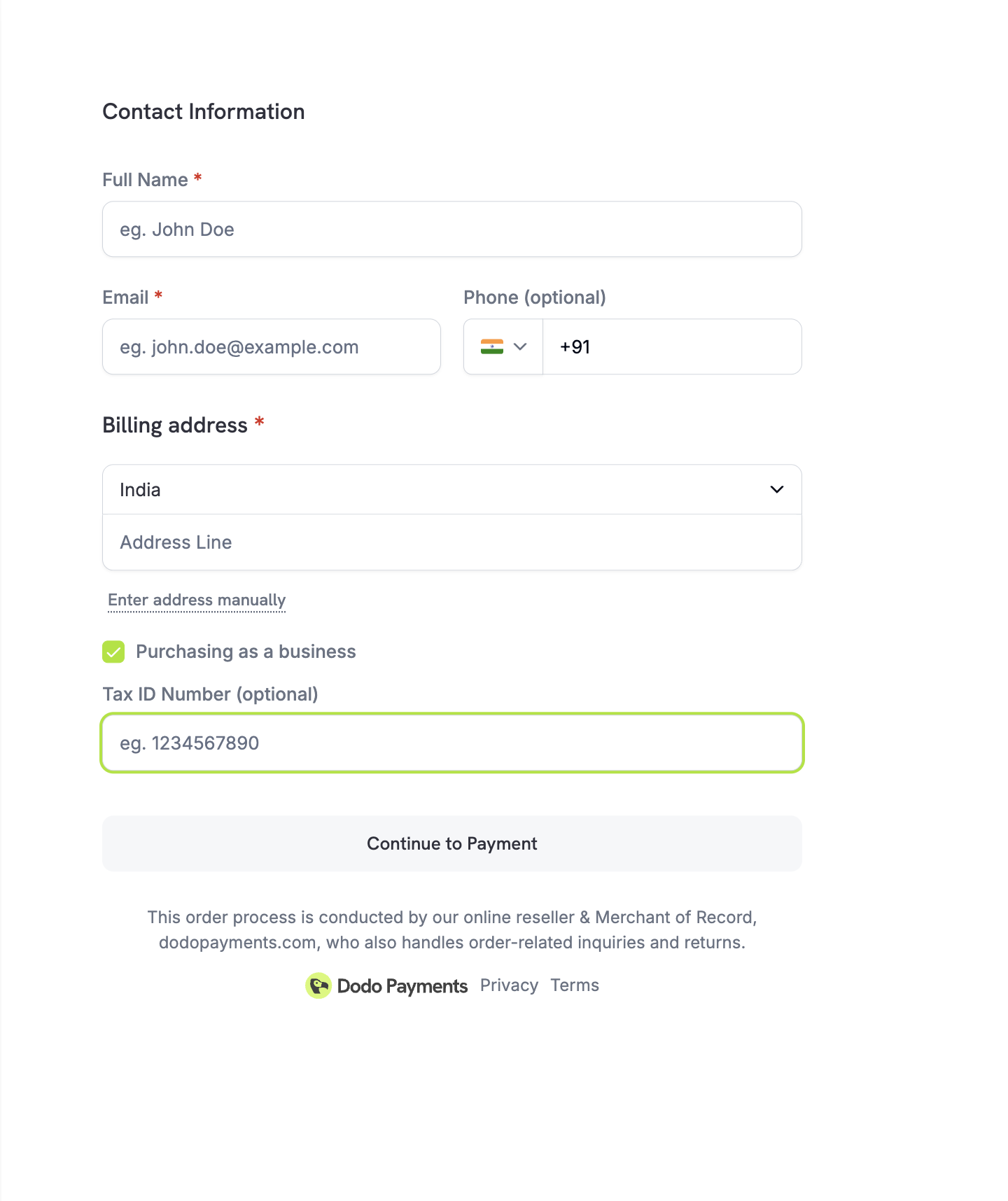
对于注册企业,结账允许客户输入其企业税号(例如 VAT/GST 号)。
### 输入税号后发生什么
* 实时验证税收资格
* 应用适用的免税或反向收费规则
* 结账时税额立即更新
### 主要亮点
* 结账时直接提供语言选择器
* UI 文本、标签和系统消息已本地化
* 提高可访问性和国际转化率
### 支持的语言
结账页面支持 21 种语言:
| 语言 | 代码 |
| ------ | ---- |
| 阿拉伯语 | `ar` |
| 加泰罗尼亚语 | `ca` |
| 中文 | `zh` |
| 荷兰语 | `nl` |
| 英语 | `en` |
| 法语 | `fr` |
| 德语 | `de` |
| 希伯来语 | `he` |
| 印度尼西亚语 | `id` |
| 意大利语 | `it` |
| 日语 | `ja` |
| 韩语 | `ko` |
| 马来语 | `ms` |
| 波兰语 | `pl` |
| 葡萄牙语 | `pt` |
| 罗马尼亚语 | `ro` |
| 俄语 | `ru` |
| 西班牙语 | `es` |
| 瑞典语 | `sv` |
| 泰语 | `th` |
| 土耳其语 | `tr` |
您可以在创建结账会话时设置 `force_language` 参数强制使用特定语言。详情请参见 [Checkout Sessions API](/developer-resources/checkout-session#14-forcing-a-language) 。
## 自动税费计算
税费会根据客户的账单地址自动计算,确保符合 GST、VAT 和销售税要求,无需手动设置。
### 税费计算原理
税规则根据客户所在国家(及适用地区)应用。
税额会在以下情况下自动更新:
* 国家更改
* 地址更新
最终税费细目在付款前清晰展示。
税费计算完全自动化。标准数字商品和 SaaS 产品无需任何手动配置。
## 企业税号支持
对于注册企业,结账允许客户输入其企业税号(例如 VAT/GST 号)。
### 输入税号后发生什么
* 实时验证税收资格
* 应用适用的免税或反向收费规则
* 结账时税额立即更新
 这对于 B2B SaaS 和数字服务尤其有用,那里的企业客户可能有资格享受税收减免。
## 折扣码
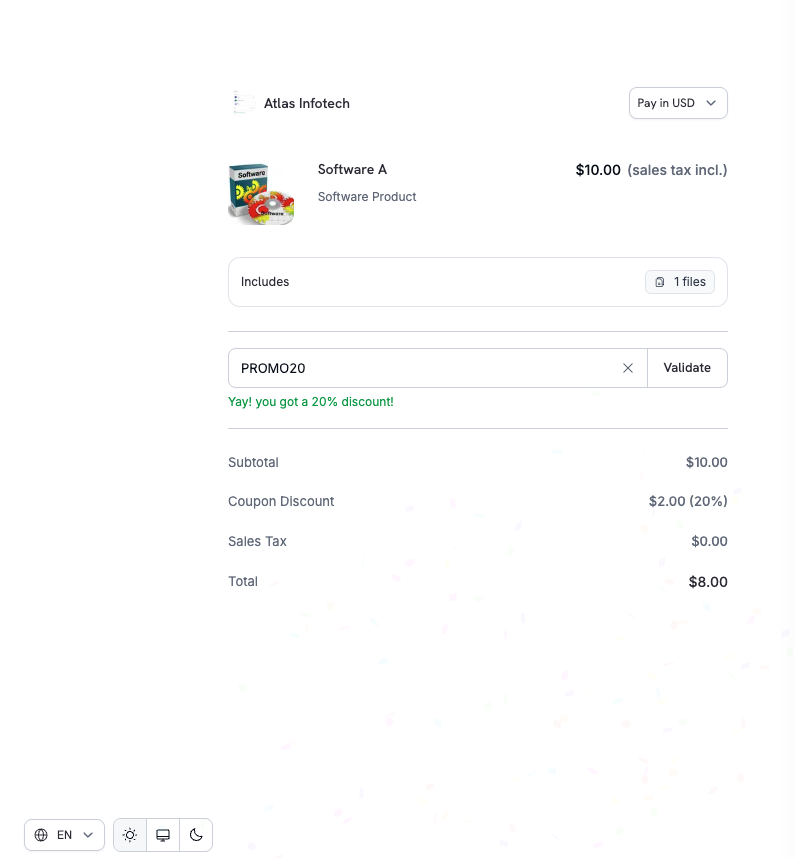
客户可以在结账页直接使用您在仪表板中创建的折扣或促销代码。
### 结账体验
1. 客户输入折扣码
2. 折扣即时验证
3. 清晰展示更新后的价格和节省金额
这对于 B2B SaaS 和数字服务尤其有用,那里的企业客户可能有资格享受税收减免。
## 折扣码
客户可以在结账页直接使用您在仪表板中创建的折扣或促销代码。
### 结账体验
1. 客户输入折扣码
2. 折扣即时验证
3. 清晰展示更新后的价格和节省金额
 ### API 集成
预先应用一个或多个叠加折扣码或启用折扣输入字段:
```typescript theme={null}
const session = await client.checkoutSessions.create({
product_cart: [
{ product_id: 'prod_abc', quantity: 1 }
],
discount_codes: ['WELCOME20'], // Pre-apply one or more codes (max 20, applied in order)
feature_flags: {
allow_discount_code: true // Show discount input field
},
return_url: 'https://yoursite.com/return'
});
```
`discount_codes` 接受最多20个按顺序叠加的代码。单一的 `discount_code` 字段已弃用但仍然有效—现有集成不需要立即更改。方便时迁移到 `discount_codes` 以使用叠加和更丰富的响应形态。
了解如何创建和管理折扣码。
使用代码名称查询和验证折扣。
## 智能地址采集
结账支持灵活的地址输入以更快地完成。
### 可用选项
| 选项 | 描述 |
| ------------ | --------- |
| **谷歌地址自动填充** | 自动完成快速选择 |
| **手动输入** | 完整地址的完全控制 |
| **国家选择** | 驱动税收和合规逻辑 |
地址采集在速度、准确性和全球覆盖之间取得平衡,以最大程度地提高转化率,同时确保合规。
## 电话号码采集
使用结账会话功能标志控制结账时电话号码字段是否出现以及是否必填。
| 标志 | 默认 | 行为 |
| ------------------------------- | ------- | ----------------------- |
| `allow_phone_number_collection` | `true` | 在结账表单上显示电话号码字段 |
| `require_phone_number` | `false` | 使电话号码字段成为必填项(表单验证强制为空值) |
```typescript theme={null}
const session = await client.checkoutSessions.create({
product_cart: [{ product_id: 'prod_abc', quantity: 1 }],
feature_flags: {
allow_phone_number_collection: true,
require_phone_number: true
},
return_url: 'https://yoursite.com/return'
});
```
`require_phone_number: true` 需要 `allow_phone_number_collection: true`。API 拒绝电话采集被禁用且电话号必需的会话。
在B2B SaaS、受监管行业或任何需要验证的联系渠道用于支持、欺诈审查或合规的流程中使用 `require_phone_number`。
## 自定义字段
通过定义自定义表单字段,在结账时收集来自客户的附加信息。这对于收集公司名称、团队规模、推荐来源或任何其他特定于业务的信息非常有用。
### 可用字段类型
| 类型 | 描述 |
| ---------- | ---------- |
| `text` | 单行文本输入 |
| `number` | 数字输入 |
| `email` | 带验证的电子邮件地址 |
| `url` | 带验证的URL |
| `date` | 日期选择器 |
| `dropdown` | 从预定义选项中选择 |
| `boolean` | 是/否 切换 |
### 示例
```typescript theme={null}
const session = await client.checkoutSessions.create({
product_cart: [
{ product_id: 'prod_abc', quantity: 1 }
],
custom_fields: [
{
key: 'company_name',
label: 'Company Name',
field_type: 'text',
required: true
},
{
key: 'team_size',
label: 'Team Size',
field_type: 'dropdown',
required: true,
options: ['1-10', '11-50', '51-200', '200+']
}
],
return_url: 'https://yoursite.com/return'
});
```
客户响应会自动包含在 webhook 负载 ( `payment.succeeded`, `subscription.active` ) 和 API 响应的 `custom_field_responses` 数组中。每个结账会话可定义最多 5 个自定义字段。
了解有关自定义字段配置和访问响应的更多信息。
## 隐私政策和条款接受
为确保法律和合规透明性:
* [隐私政策](https://dodopayments.com/privacy-policy) 和 [买家条款](https://dodopayments.com/buyer-terms) 链接在结账时清晰显示
* 客户在完成付款前明确确认这些内容
这有助于满足包括GDPR合规性在内的全球消费者保护和数据隐私要求。
## 集结账
产品集使客户能够在单一结账中查看和选择多个相关产品(例如,入门、专业、企业计划)以获得统一的结账体验。
### 运作原理
1. **显示所有产品**:客户看到集合中的每个活动产品
2. **预选第一个产品**:集合中的第一个产品自动被选中
3. **比较选项**:客户在选择之前可以比较价格和功能
4. **单一选择**:选择产品后,结账将按标准支付流程进行
### 创建集结账
```typescript theme={null}
const session = await client.checkoutSessions.create({
product_collection_id: 'pdc_abc123',
product_cart: [], // Required: pass an empty array for collection checkout
return_url: 'https://yoursite.com/return'
});
```
使用 `product_collection_id` 时,传递一个空的 `product_cart` 数组。折扣码无法在会话创建时预设应用。
了解如何创建和管理产品集合以实现统一的结账体验。
## 结账会话配置
使用结账会话 API 控制结账行为:
```typescript theme={null}
const session = await client.checkoutSessions.create({
product_cart: [
{ product_id: 'prod_abc', quantity: 1 }
],
customer: {
email: 'customer@example.com',
name: 'Jane Doe'
},
billing_currency: 'EUR', // Set specific currency
discount_codes: ['PROMO10'],
feature_flags: {
allow_discount_code: true
},
return_url: 'https://yoursite.com/return',
cancel_url: 'https://yoursite.com/pricing', // Optional: where to redirect on cancel
metadata: {
order_ref: 'ORD-12345'
}
});
```
付款后,客户自动带有查询参数重定向到您的 `return_url` — 其中包括 `payment_id` 或 `subscription_id`, `status`, `email` 和 `license_key`(如果适用)。查看 [结账会话指南](/developer-resources/checkout-session#request-body) 以获取完整列表。
完整的结账会话 API 参考。
集成结账的分步指南。
## 结账主题定制
使用创建结账会话的 API 时的 `customization.theme_config` 参数自定义结账页面的外观以匹配您的品牌。配置颜色、字体、边框半径和按钮文字以支持亮和暗模式。
### API 集成
预先应用一个或多个叠加折扣码或启用折扣输入字段:
```typescript theme={null}
const session = await client.checkoutSessions.create({
product_cart: [
{ product_id: 'prod_abc', quantity: 1 }
],
discount_codes: ['WELCOME20'], // Pre-apply one or more codes (max 20, applied in order)
feature_flags: {
allow_discount_code: true // Show discount input field
},
return_url: 'https://yoursite.com/return'
});
```
`discount_codes` 接受最多20个按顺序叠加的代码。单一的 `discount_code` 字段已弃用但仍然有效—现有集成不需要立即更改。方便时迁移到 `discount_codes` 以使用叠加和更丰富的响应形态。
了解如何创建和管理折扣码。
使用代码名称查询和验证折扣。
## 智能地址采集
结账支持灵活的地址输入以更快地完成。
### 可用选项
| 选项 | 描述 |
| ------------ | --------- |
| **谷歌地址自动填充** | 自动完成快速选择 |
| **手动输入** | 完整地址的完全控制 |
| **国家选择** | 驱动税收和合规逻辑 |
地址采集在速度、准确性和全球覆盖之间取得平衡,以最大程度地提高转化率,同时确保合规。
## 电话号码采集
使用结账会话功能标志控制结账时电话号码字段是否出现以及是否必填。
| 标志 | 默认 | 行为 |
| ------------------------------- | ------- | ----------------------- |
| `allow_phone_number_collection` | `true` | 在结账表单上显示电话号码字段 |
| `require_phone_number` | `false` | 使电话号码字段成为必填项(表单验证强制为空值) |
```typescript theme={null}
const session = await client.checkoutSessions.create({
product_cart: [{ product_id: 'prod_abc', quantity: 1 }],
feature_flags: {
allow_phone_number_collection: true,
require_phone_number: true
},
return_url: 'https://yoursite.com/return'
});
```
`require_phone_number: true` 需要 `allow_phone_number_collection: true`。API 拒绝电话采集被禁用且电话号必需的会话。
在B2B SaaS、受监管行业或任何需要验证的联系渠道用于支持、欺诈审查或合规的流程中使用 `require_phone_number`。
## 自定义字段
通过定义自定义表单字段,在结账时收集来自客户的附加信息。这对于收集公司名称、团队规模、推荐来源或任何其他特定于业务的信息非常有用。
### 可用字段类型
| 类型 | 描述 |
| ---------- | ---------- |
| `text` | 单行文本输入 |
| `number` | 数字输入 |
| `email` | 带验证的电子邮件地址 |
| `url` | 带验证的URL |
| `date` | 日期选择器 |
| `dropdown` | 从预定义选项中选择 |
| `boolean` | 是/否 切换 |
### 示例
```typescript theme={null}
const session = await client.checkoutSessions.create({
product_cart: [
{ product_id: 'prod_abc', quantity: 1 }
],
custom_fields: [
{
key: 'company_name',
label: 'Company Name',
field_type: 'text',
required: true
},
{
key: 'team_size',
label: 'Team Size',
field_type: 'dropdown',
required: true,
options: ['1-10', '11-50', '51-200', '200+']
}
],
return_url: 'https://yoursite.com/return'
});
```
客户响应会自动包含在 webhook 负载 ( `payment.succeeded`, `subscription.active` ) 和 API 响应的 `custom_field_responses` 数组中。每个结账会话可定义最多 5 个自定义字段。
了解有关自定义字段配置和访问响应的更多信息。
## 隐私政策和条款接受
为确保法律和合规透明性:
* [隐私政策](https://dodopayments.com/privacy-policy) 和 [买家条款](https://dodopayments.com/buyer-terms) 链接在结账时清晰显示
* 客户在完成付款前明确确认这些内容
这有助于满足包括GDPR合规性在内的全球消费者保护和数据隐私要求。
## 集结账
产品集使客户能够在单一结账中查看和选择多个相关产品(例如,入门、专业、企业计划)以获得统一的结账体验。
### 运作原理
1. **显示所有产品**:客户看到集合中的每个活动产品
2. **预选第一个产品**:集合中的第一个产品自动被选中
3. **比较选项**:客户在选择之前可以比较价格和功能
4. **单一选择**:选择产品后,结账将按标准支付流程进行
### 创建集结账
```typescript theme={null}
const session = await client.checkoutSessions.create({
product_collection_id: 'pdc_abc123',
product_cart: [], // Required: pass an empty array for collection checkout
return_url: 'https://yoursite.com/return'
});
```
使用 `product_collection_id` 时,传递一个空的 `product_cart` 数组。折扣码无法在会话创建时预设应用。
了解如何创建和管理产品集合以实现统一的结账体验。
## 结账会话配置
使用结账会话 API 控制结账行为:
```typescript theme={null}
const session = await client.checkoutSessions.create({
product_cart: [
{ product_id: 'prod_abc', quantity: 1 }
],
customer: {
email: 'customer@example.com',
name: 'Jane Doe'
},
billing_currency: 'EUR', // Set specific currency
discount_codes: ['PROMO10'],
feature_flags: {
allow_discount_code: true
},
return_url: 'https://yoursite.com/return',
cancel_url: 'https://yoursite.com/pricing', // Optional: where to redirect on cancel
metadata: {
order_ref: 'ORD-12345'
}
});
```
付款后,客户自动带有查询参数重定向到您的 `return_url` — 其中包括 `payment_id` 或 `subscription_id`, `status`, `email` 和 `license_key`(如果适用)。查看 [结账会话指南](/developer-resources/checkout-session#request-body) 以获取完整列表。
完整的结账会话 API 参考。
集成结账的分步指南。
## 结账主题定制
使用创建结账会话的 API 时的 `customization.theme_config` 参数自定义结账页面的外观以匹配您的品牌。配置颜色、字体、边框半径和按钮文字以支持亮和暗模式。
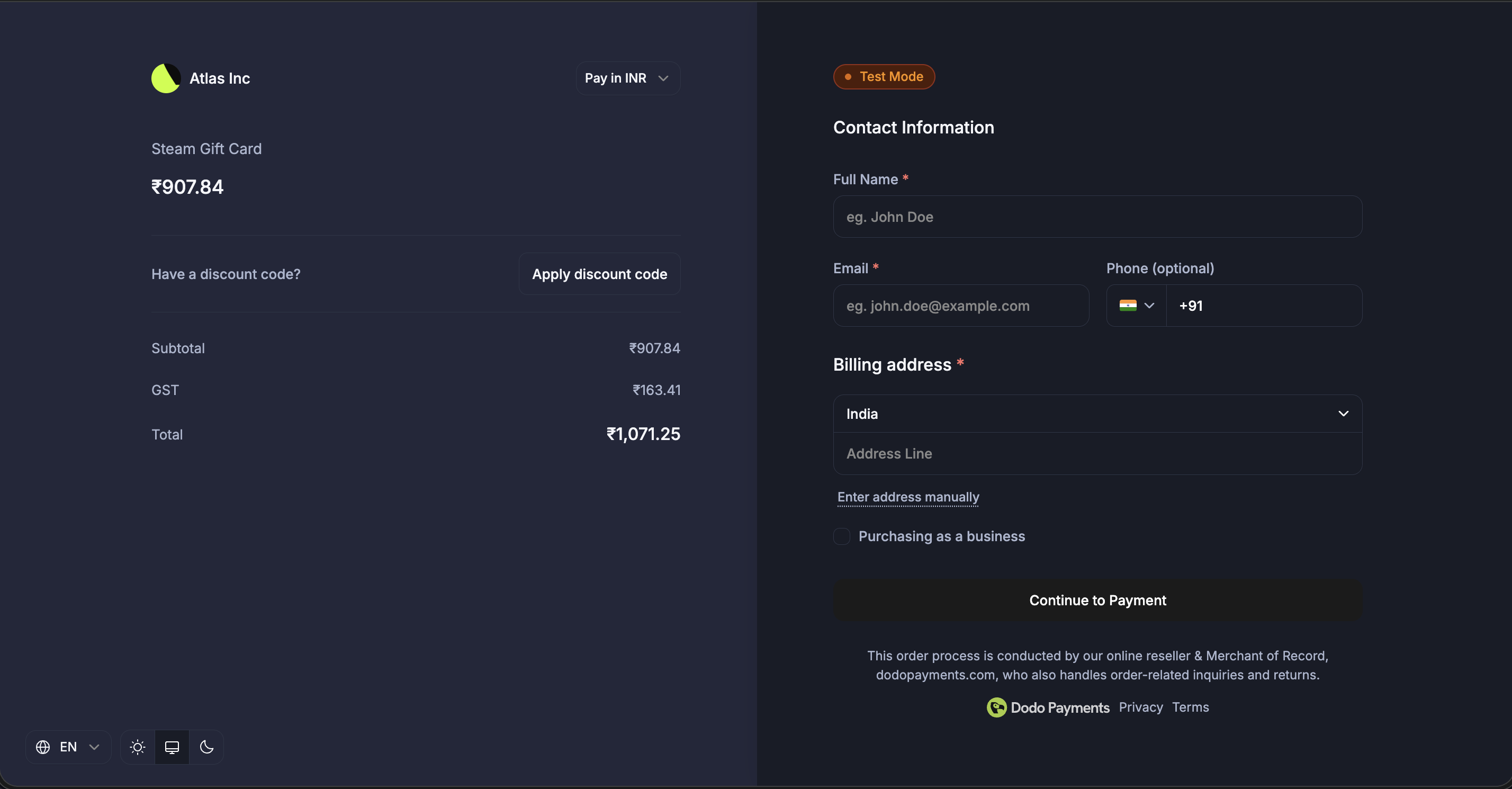 从仪表板中使用预构建主题、排版、颜色和实时预览进行可视化配置主题。
本节介绍使用 `customization.theme_config` 进行 **服务器端 API** 主题配置。如果您使用 **Checkout SDK**(覆盖或嵌入结账),请参见 [Overlay Checkout](/developer-resources/overlay-checkout#theme-customization) 或 [Inline Checkout](/developer-resources/inline-checkout#theme-customization) 的主题自定义部分,这些部分使用驼峰命名属性(例如,`bgPrimary` 而不是 `bg_primary`)。
### 主题配置选项
| 属性 | 描述 |
| -------------------- | --------------------------------------------- |
| `light` | 亮模式的颜色配置 |
| `dark` | 暗模式的颜色配置 |
| `font_primary_url` | 主要字体的URL |
| `font_secondary_url` | 次要字体的URL |
| `font_size` | 字体大小: `xs`, `sm`, `md`, `lg`, `xl`, `2xl` |
| `font_weight` | 字体粗细: `normal`, `medium`, `bold`, `extraBold` |
| `radius` | UI元素的边框半径 (例如,`4px`, `0.5rem`, `8px`) |
| `pay_button_text` | 支付按钮的自定义文字 (例如,“完成购买”, “现在订阅”) |
### 颜色配置(亮/暗模式)
每种模式 ( `light` 和 `dark` ) 支持以下颜色属性:
| 属性 | 描述 |
| ------------------------ | -------- |
| `bg_primary` | 背景主要颜色 |
| `bg_secondary` | 背景次要颜色 |
| `text_primary` | 文字主要颜色 |
| `text_secondary` | 文字次要颜色 |
| `text_placeholder` | 文字占位符颜色 |
| `text_error` | 文字错误颜色 |
| `text_success` | 文字成功颜色 |
| `border_primary` | 边框主要颜色 |
| `border_secondary` | 边框次要颜色 |
| `button_primary` | 主要按钮背景色 |
| `button_primary_hover` | 主要按钮悬停颜色 |
| `button_secondary` | 次要按钮背景色 |
| `button_secondary_hover` | 次要按钮悬停颜色 |
| `button_text_primary` | 主要按钮文字颜色 |
| `button_text_secondary` | 次要按钮文字颜色 |
| `input_focus_border` | 输入焦点边框颜色 |
所有颜色字段接受标准CSS颜色格式:
* 十六进制: `#fff`, `#ffffff`, `#ffffffff`
* RGB/RGBA: `rgb(255, 255, 255)`, `rgba(255, 255, 255, 0.5)`
* HSL/HSLA: `hsl(120, 100%, 50%)`, `hsla(120, 100%, 50%, 0.5)`
* 命名颜色: `red`, `blue`, `transparent`
### 示例
```typescript theme={null}
const session = await client.checkoutSessions.create({
product_cart: [
{ product_id: 'prod_abc', quantity: 1 }
],
customization: {
theme_config: {
// Custom fonts
font_primary_url: 'https://fonts.googleapis.com/css2?family=Inter:wght@400;500;600&display=swap',
font_size: 'md',
font_weight: 'medium',
radius: '8px',
pay_button_text: 'Complete Purchase',
// Light mode colors
light: {
bg_primary: '#ffffff',
bg_secondary: '#f5f5f5',
text_primary: '#1a1a1a',
text_secondary: '#666666',
button_primary: '#0066ff',
button_primary_hover: '#0052cc',
button_text_primary: '#ffffff',
border_primary: '#e0e0e0'
},
// Dark mode colors
dark: {
bg_primary: '#1a1a1a',
bg_secondary: '#2d2d2d',
text_primary: '#ffffff',
text_secondary: '#a0a0a0',
button_primary: '#3385ff',
button_primary_hover: '#4d99ff',
button_text_primary: '#ffffff',
border_primary: '#404040'
}
}
},
return_url: 'https://yoursite.com/return'
});
```
您无需指定所有颜色属性。任何未指定的属性将使用默认主题值。
从仪表板中使用预构建主题、排版、颜色和实时预览进行可视化配置主题。
本节介绍使用 `customization.theme_config` 进行 **服务器端 API** 主题配置。如果您使用 **Checkout SDK**(覆盖或嵌入结账),请参见 [Overlay Checkout](/developer-resources/overlay-checkout#theme-customization) 或 [Inline Checkout](/developer-resources/inline-checkout#theme-customization) 的主题自定义部分,这些部分使用驼峰命名属性(例如,`bgPrimary` 而不是 `bg_primary`)。
### 主题配置选项
| 属性 | 描述 |
| -------------------- | --------------------------------------------- |
| `light` | 亮模式的颜色配置 |
| `dark` | 暗模式的颜色配置 |
| `font_primary_url` | 主要字体的URL |
| `font_secondary_url` | 次要字体的URL |
| `font_size` | 字体大小: `xs`, `sm`, `md`, `lg`, `xl`, `2xl` |
| `font_weight` | 字体粗细: `normal`, `medium`, `bold`, `extraBold` |
| `radius` | UI元素的边框半径 (例如,`4px`, `0.5rem`, `8px`) |
| `pay_button_text` | 支付按钮的自定义文字 (例如,“完成购买”, “现在订阅”) |
### 颜色配置(亮/暗模式)
每种模式 ( `light` 和 `dark` ) 支持以下颜色属性:
| 属性 | 描述 |
| ------------------------ | -------- |
| `bg_primary` | 背景主要颜色 |
| `bg_secondary` | 背景次要颜色 |
| `text_primary` | 文字主要颜色 |
| `text_secondary` | 文字次要颜色 |
| `text_placeholder` | 文字占位符颜色 |
| `text_error` | 文字错误颜色 |
| `text_success` | 文字成功颜色 |
| `border_primary` | 边框主要颜色 |
| `border_secondary` | 边框次要颜色 |
| `button_primary` | 主要按钮背景色 |
| `button_primary_hover` | 主要按钮悬停颜色 |
| `button_secondary` | 次要按钮背景色 |
| `button_secondary_hover` | 次要按钮悬停颜色 |
| `button_text_primary` | 主要按钮文字颜色 |
| `button_text_secondary` | 次要按钮文字颜色 |
| `input_focus_border` | 输入焦点边框颜色 |
所有颜色字段接受标准CSS颜色格式:
* 十六进制: `#fff`, `#ffffff`, `#ffffffff`
* RGB/RGBA: `rgb(255, 255, 255)`, `rgba(255, 255, 255, 0.5)`
* HSL/HSLA: `hsl(120, 100%, 50%)`, `hsla(120, 100%, 50%, 0.5)`
* 命名颜色: `red`, `blue`, `transparent`
### 示例
```typescript theme={null}
const session = await client.checkoutSessions.create({
product_cart: [
{ product_id: 'prod_abc', quantity: 1 }
],
customization: {
theme_config: {
// Custom fonts
font_primary_url: 'https://fonts.googleapis.com/css2?family=Inter:wght@400;500;600&display=swap',
font_size: 'md',
font_weight: 'medium',
radius: '8px',
pay_button_text: 'Complete Purchase',
// Light mode colors
light: {
bg_primary: '#ffffff',
bg_secondary: '#f5f5f5',
text_primary: '#1a1a1a',
text_secondary: '#666666',
button_primary: '#0066ff',
button_primary_hover: '#0052cc',
button_text_primary: '#ffffff',
border_primary: '#e0e0e0'
},
// Dark mode colors
dark: {
bg_primary: '#1a1a1a',
bg_secondary: '#2d2d2d',
text_primary: '#ffffff',
text_secondary: '#a0a0a0',
button_primary: '#3385ff',
button_primary_hover: '#4d99ff',
button_text_primary: '#ffffff',
border_primary: '#404040'
}
}
},
return_url: 'https://yoursite.com/return'
});
```
您无需指定所有颜色属性。任何未指定的属性将使用默认主题值。