> ## Documentation Index
> Fetch the complete documentation index at: https://docs.dodopayments.com/llms.txt
> Use this file to discover all available pages before exploring further.
# 归档企业
> 永久停用您不再开展业务的企业。了解资格要求、确认流程以及归档后会发生什么。
## 简介
归档会停用您不再开展业务的企业。该企业会从您的控制面板中消失,其 API keys 将停止工作,checkout、payment links、storefront 和 Customer Portal 也将停止为您的客户提供服务。
归档并不等同于删除。Dodo Payments 是您的 [Merchant of Record](/features/mor-introduction),因此出于合规要求,即使您停止开展业务,您的 payments、refunds、invoices 和 tax records 仍必须长期保留。归档会阻止企业开展新活动,同时保留这些记录。
归档是永久性的。已归档的企业无法恢复,support 也无法代您撤销归档。如果您只想停用一个品牌,同时继续使用其他品牌开展业务,请改为归档该品牌。请参阅 [Multi-Brand Setup](/features/multi-brands)。
## 资格要求
只有在企业完成全部结算后,才能将其归档。在归档选项可用之前,Dodo Payments 会检查七项要求,并向您实时显示每项要求的清单。您可以使用日常使用的相同工具,自行完成未满足的项目。
| 要求 | 满足条件 | 如何满足 |
| --------------------- | --------------------------------- | ---------------------------------------------------------------------------------------- |
| **休眠期** | 企业在过去 180 天内没有任何 payment activity | 等待期限结束。清单会显示您符合资格的日期。 |
| **Payout Wallet** | 每种货币的余额均恰好为零 | 提取剩余资金。请参阅 [Account Summary and Payout Wallet](/features/account-summary-payout-wallet)。 |
| **Payouts** | 没有仍在处理、暂停或等待发起的 payout | 等待每笔 payout 完成结算。请参阅 [Payout Structure](/features/payouts/payout-structure)。 |
| **Disputes** | 没有未解决或正在申诉的 dispute | 解决或接受每项 dispute。请参阅 [Disputes](/features/transactions/disputes)。 |
| **Refunds** | 没有待处理或正在审核的 refund | 等待每笔 refund 完成。请参阅 [Refunds](/features/transactions/refunds)。 |
| **Subscriptions** | 没有待处理、活跃、暂停或已暂停的 subscription | 取消每项 subscription。请参阅 [Subscriptions](/features/subscription)。 |
| **Customer Balances** | 没有客户持有现金余额 | 通过 [Customer Wallet](/features/customer-wallet) ledger 将每个余额清零。 |
计划在下一计费日期取消的 subscription,在实际结束之前仍会阻止归档。Dodo Payments 不会代您取消 subscriptions,因此您始终可以控制向客户收取的费用。
无论 payment 的结果如何,每笔 payment 都会计入休眠期。失败或放弃的 payment attempt 与成功的 payment 一样,都会重新开始计算 180 天。
Customer credit grants 不会阻止归档,只有现金余额会阻止归档。Credits 会按照各自的时间表自动过期。
每次打开清单时,系统都会实时评估清单,因此完成某项后请刷新清单,以查看该要求变为绿色。
## 如何归档企业
只有企业的 **Owner** 可以将其归档。Editors 和 Viewers 即使可以查看清单,也无法执行归档。所有权无法转让,因此如果您不是 Owner,请让 Owner 完成此流程。
前往 **Settings → Business**,然后滚动到 **Danger Zone** 面板。选择状态行旁边的 **See Details**,展开清单。
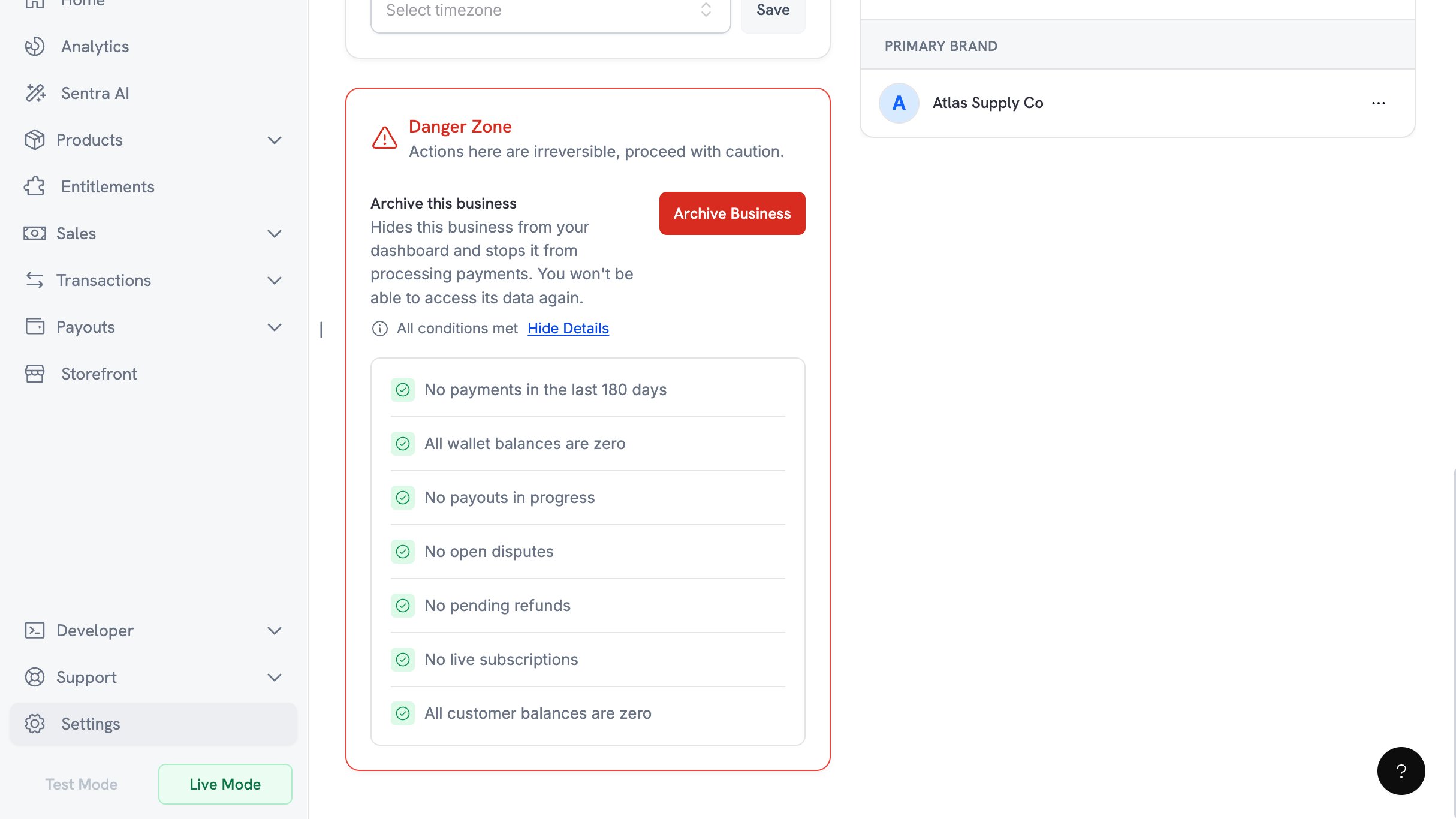 按照上表中的解决链接,处理尚未满足的项目。在此过程中返回面板,并再次展开清单。当没有任何待完成项目时,清单上方的状态行会显示 **All conditions met**。
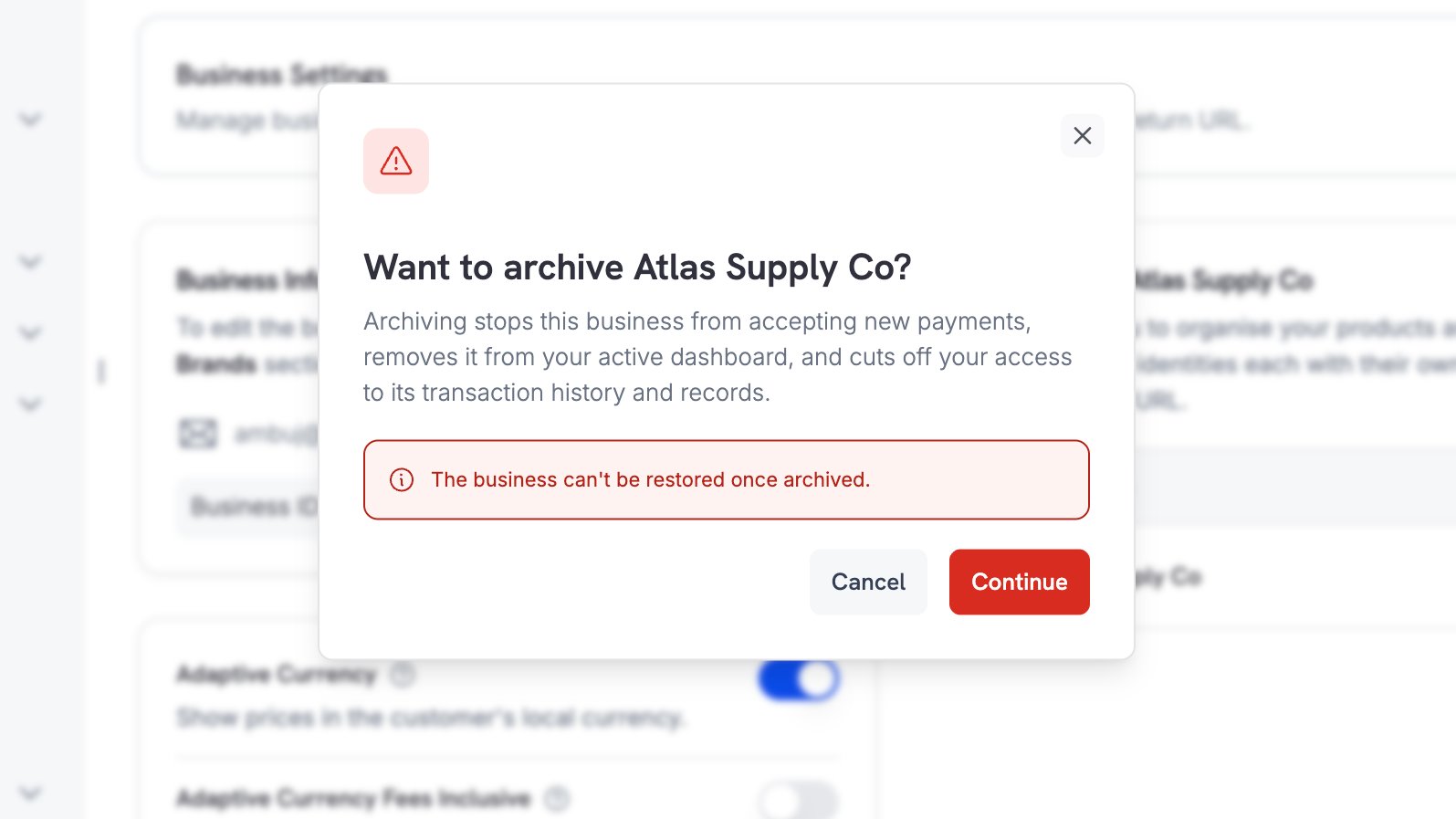
选择 **Archive Business** 并阅读确认对话框。选择 **Continue**,将确认代码发送到 Owner 的电子邮件地址。
按照上表中的解决链接,处理尚未满足的项目。在此过程中返回面板,并再次展开清单。当没有任何待完成项目时,清单上方的状态行会显示 **All conditions met**。
选择 **Archive Business** 并阅读确认对话框。选择 **Continue**,将确认代码发送到 Owner 的电子邮件地址。
 Dodo Payments 会向 Owner 的注册地址发送一个 6 位代码。代码将在 10 分钟后过期;您每 60 秒可以请求一个新代码,并且最多可以尝试 3 次,之后需要获取新代码。
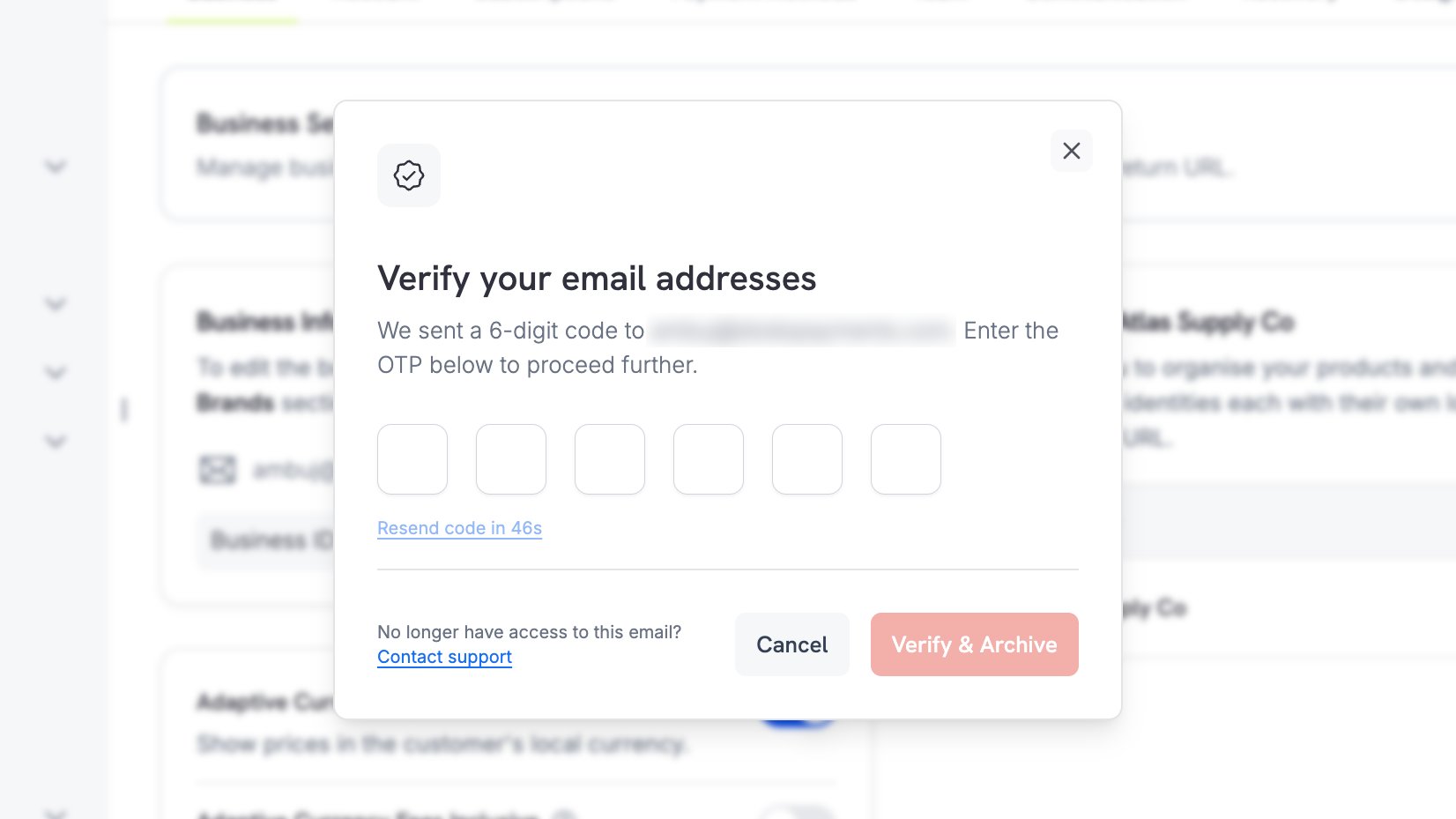 如果您不再能访问 Owner 的邮箱,请使用对话框中的 **Contact support** 链接。
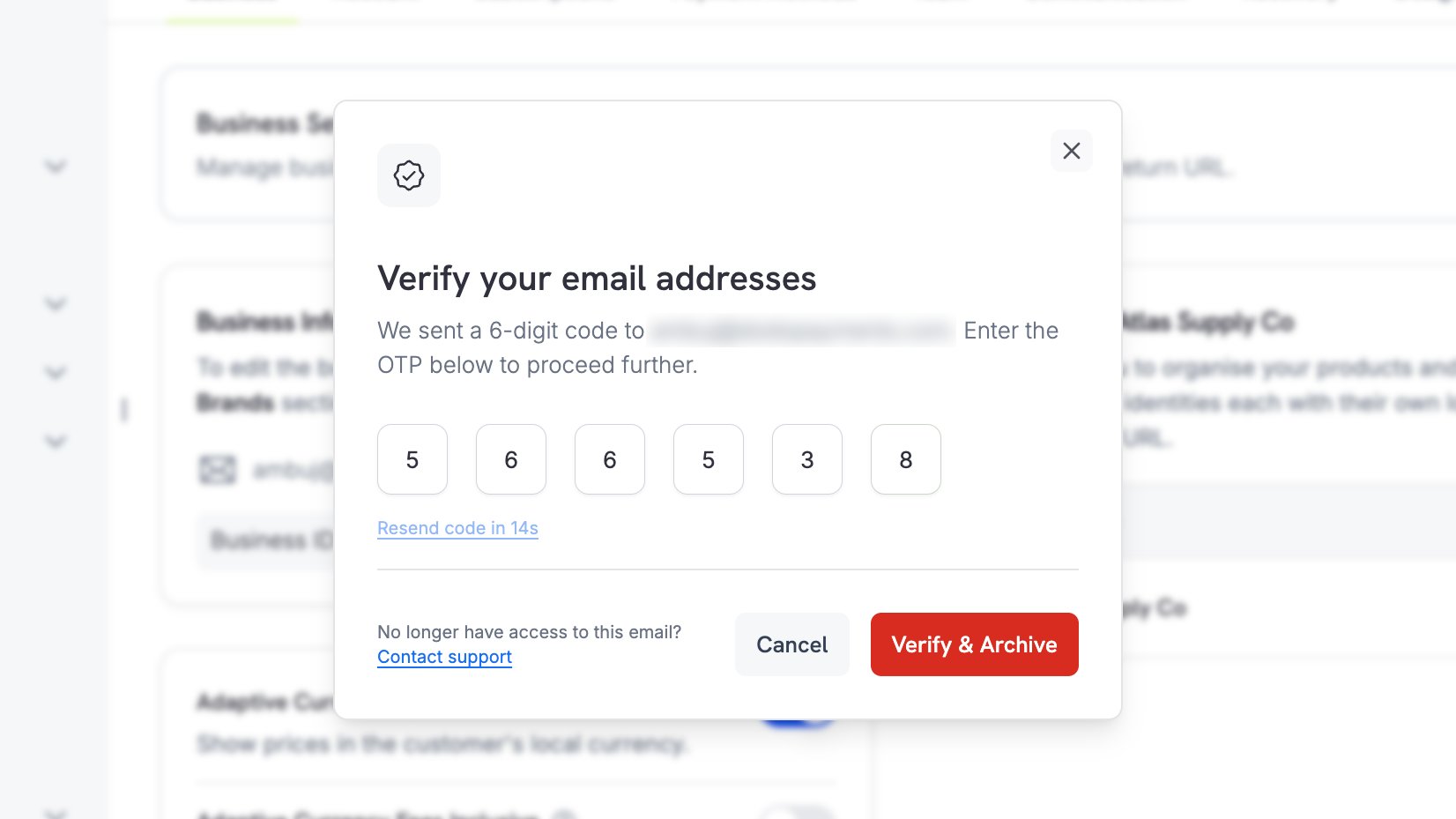
输入代码并选择 **Verify & Archive**。这是不可逆转的步骤:代码通过验证后,企业会立即归档。
如果您不再能访问 Owner 的邮箱,请使用对话框中的 **Contact support** 链接。
输入代码并选择 **Verify & Archive**。这是不可逆转的步骤:代码通过验证后,企业会立即归档。
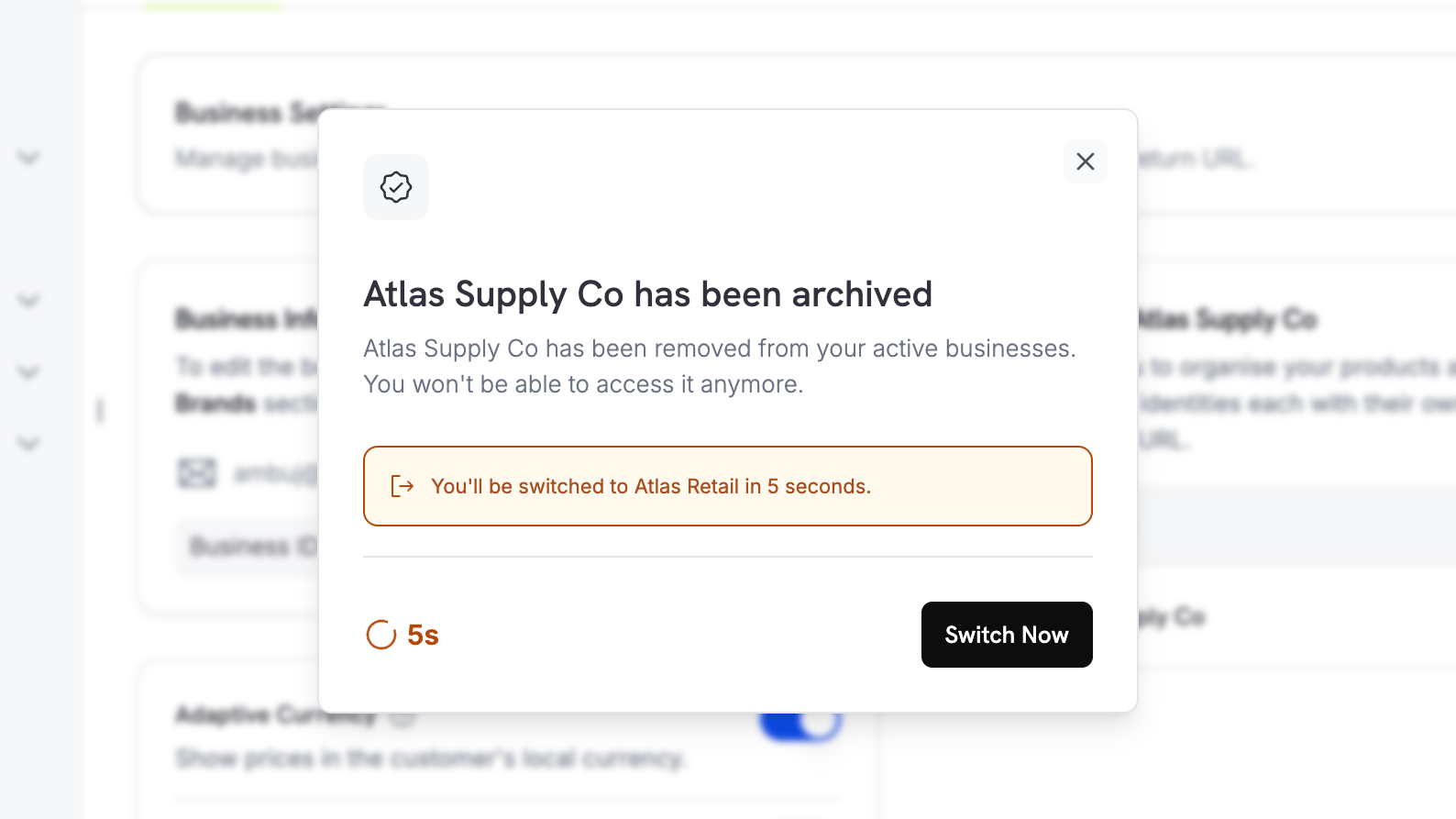
 Dodo Payments 会确认归档,并将您转到其他企业。选择 **Switch Now** 可立即前往该企业。
 ## 归档后会发生什么
**对您而言**
* 企业不再显示在您的控制面板或企业切换器中。归档后,Dodo Payments 会立即将您转到其他企业。
* Live mode 和 live payments 会被关闭。
* 企业的每个 API key 都会停止工作,包括 live mode 和 test mode。缓存的凭据可能需要几分钟才会过期,因此集成在归档后可能会短暂继续工作。
**对您的客户而言**
* Checkout sessions、payment links 和静态 checkout 页面将停止接受 payments。
* Storefront 将停止提供产品。
* Customer Portal sessions 将结束,客户将无法再登录以管理其购买记录。
* License key activation 和 deactivation 将停止。
请在归档前告知您的客户。企业归档后,客户将无法通过自助方式访问其购买历史,Dodo Payments 会返回终止错误,而不是允许重试。
**对您的记录而言**
Payments、refunds、invoices、payouts 和 tax filings 将被保留。请在归档前下载您希望保留的 invoices 和 reports,因为企业归档后,控制面板访问权限会立即终止。如果之后需要获取记录副本,请联系 [support](/miscellaneous/help-support)。
## 限制
* **归档无法撤销。** 对 merchants 和 support 而言,此操作都是永久性的。
* **无法通过此方式归档您的最后一个企业。** 如果该企业是您拥有的唯一企业,请联系 [support](/miscellaneous/help-support) 改为关闭账户。
* **归档是全有或全无的操作。** 如果您只想停用部分目录并继续开展业务,请归档品牌,而不是归档企业。
归档单个品牌,同时继续使用企业的其他部分开展业务。
在归档前提取剩余余额。
管理企业资料并在企业之间切换。
联系我们,咨询账户关闭或记录请求。
## 归档后会发生什么
**对您而言**
* 企业不再显示在您的控制面板或企业切换器中。归档后,Dodo Payments 会立即将您转到其他企业。
* Live mode 和 live payments 会被关闭。
* 企业的每个 API key 都会停止工作,包括 live mode 和 test mode。缓存的凭据可能需要几分钟才会过期,因此集成在归档后可能会短暂继续工作。
**对您的客户而言**
* Checkout sessions、payment links 和静态 checkout 页面将停止接受 payments。
* Storefront 将停止提供产品。
* Customer Portal sessions 将结束,客户将无法再登录以管理其购买记录。
* License key activation 和 deactivation 将停止。
请在归档前告知您的客户。企业归档后,客户将无法通过自助方式访问其购买历史,Dodo Payments 会返回终止错误,而不是允许重试。
**对您的记录而言**
Payments、refunds、invoices、payouts 和 tax filings 将被保留。请在归档前下载您希望保留的 invoices 和 reports,因为企业归档后,控制面板访问权限会立即终止。如果之后需要获取记录副本,请联系 [support](/miscellaneous/help-support)。
## 限制
* **归档无法撤销。** 对 merchants 和 support 而言,此操作都是永久性的。
* **无法通过此方式归档您的最后一个企业。** 如果该企业是您拥有的唯一企业,请联系 [support](/miscellaneous/help-support) 改为关闭账户。
* **归档是全有或全无的操作。** 如果您只想停用部分目录并继续开展业务,请归档品牌,而不是归档企业。
归档单个品牌,同时继续使用企业的其他部分开展业务。
在归档前提取剩余余额。
管理企业资料并在企业之间切换。
联系我们,咨询账户关闭或记录请求。