> ## Documentation Index
> Fetch the complete documentation index at: https://docs.dodopayments.com/llms.txt
> Use this file to discover all available pages before exploring further.
# 手动许可证密钥履行集成指南
> 构建一个端到端系统,以销售产品并允许您按需提供自己的许可证密钥:创建产品和授权,检测等待授予,并将密钥交付给客户。
本指南介绍了从头到尾构建一个**手动许可证密钥履行**系统。不同于 Dodo Payments 在付款时自动生成密钥,每次购买会创建一个`pending`授权并等待*您*从自己的系统、第三方供应商或有限的代码池中提供密钥值。
最后您将拥有:
* 一个产品的许可证密钥授权设置为`manual`履行。
* 一个 webhooks 监听器,用于检测客户何时等待密钥。
* 一个交付调用,用于传递密钥并自动通知客户。
完整的许可证密钥生命周期和`fulfillment_mode`设置。
您调用以交付密钥的端点的 API 参考。
## 工作原理
```mermaid theme={null}
sequenceDiagram
participant C as Customer
participant D as Dodo Payments
participant M as Your Backend
C->>D: Purchase (manual-mode License Key product)
D->>D: Create grant (status: pending, no key)
D->>M: entitlement_grant.created (integration_type: license_key, status: pending)
M->>M: Obtain key from own system / vendor
M->>D: POST /grants/{grant_id}/license-key { key }
D->>C: Deliver license key to customer
D->>M: entitlement_grant.delivered
```
手动履行仅改变了**发行**步骤。激活、验证、停用、过期和吊销的行为与交付后自动生成的密钥完全相同。
## 前提条件
要遵循本指南,您将需要:
* 一个 Dodo Payments 商户账户。
* 您的 API 密钥 (`DODO_PAYMENTS_API_KEY`) 和来自仪表板的 webhook 密钥。请参阅[API 密钥生成指南](/api-reference/introduction#api-key-generation)。
* 一个可以接收 webhooks 的后端端点。
使用`https://test.dodopayments.com`和测试模式凭证进行构建。在进入生产时切换到`https://live.dodopayments.com`和实时密钥。
## 第一步 — 在手动模式中创建许可证密钥授权
**授权**是您交付内容的可重用定义。创建许可证密钥授权并将其 `fulfillment_mode` 设置为 `manual`。
进入仪表板中的**授权**,然后单击\*\*+\*\*以创建新的授权。
选择**许可证密钥**作为集成并为其命名。表单将显示以下字段:
* **履行模式** — 默认情况下为 `Automatic`。这是启用手动履行的设置;您将在下一步中更改它。
* **许可证期限** — 每个发行的密钥保持有效的时间,或选择**无过期**。
* **激活限制** — 每个密钥的最大激活次数,或选择**无限制**。
* **激活信息** — 可选的客户展示信息,在他们激活密钥时显示。
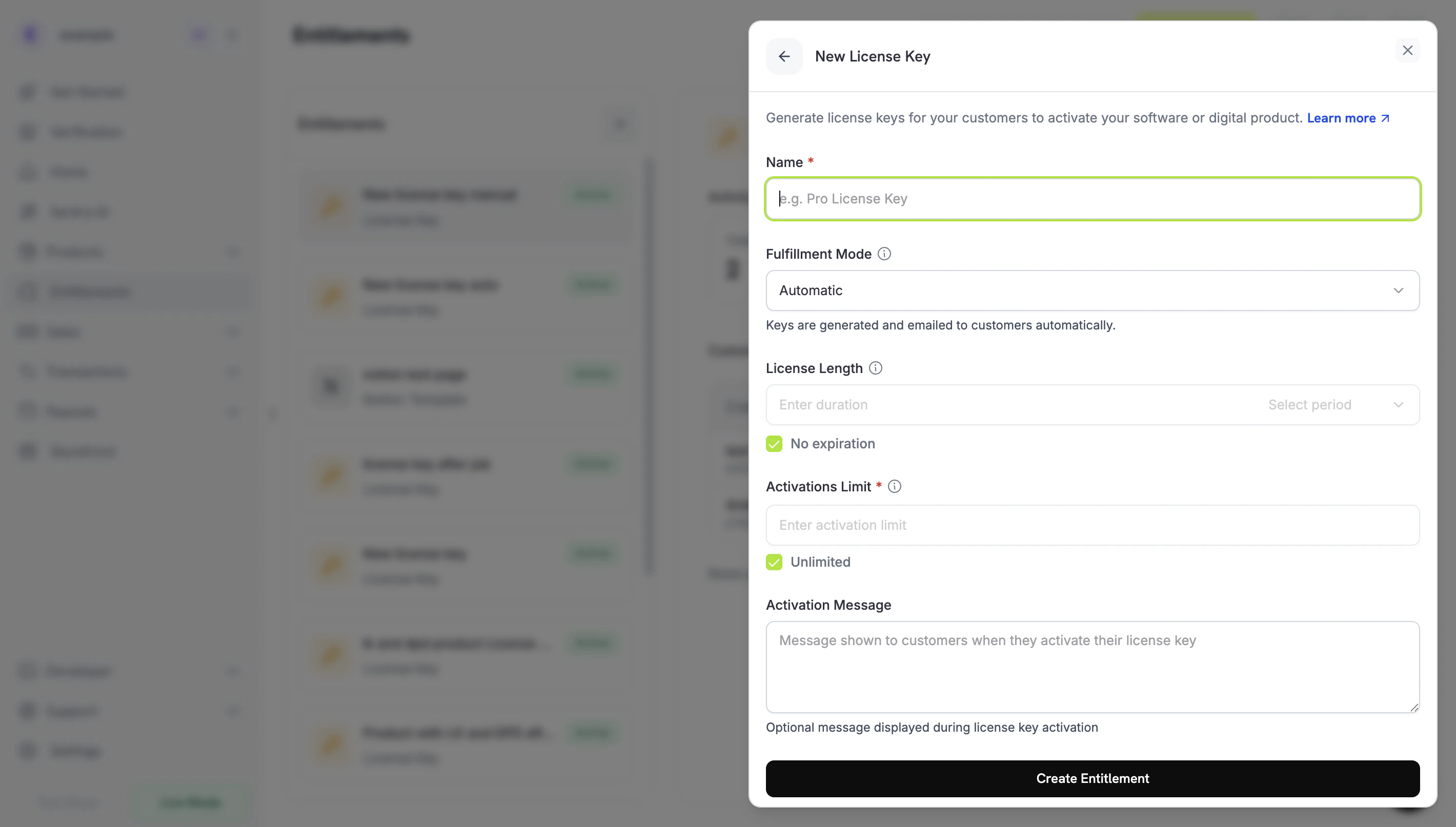 打开**履行模式**下拉菜单,将其从**自动**更改为**手动**。这是推动本指南的设置——没有它,密钥将自动生成并通过电子邮件发送,而不创建待处理的授权。选择**手动**后,每次购买都会为您创建一个`pending`授权进行履行。单击**创建授权**以保存。
创建具有`integration_config.fulfillment_mode` 设置为 `manual` 的授权。
```typescript Node.js theme={null} theme={null}
import DodoPayments from 'dodopayments';
const client = new DodoPayments({
bearerToken: process.env.DODO_PAYMENTS_API_KEY,
environment: 'test_mode', // defaults to 'live_mode'
});
const entitlement = await client.entitlements.create({
name: 'Pro License (Manual)',
integration_type: 'license_key',
integration_config: {
fulfillment_mode: 'manual',
activations_limit: 5,
duration_count: 1,
duration_interval: 'Year',
},
});
console.log(entitlement.id); // ent_...
```
```python Python theme={null} theme={null}
import os
from dodopayments import DodoPayments
client = DodoPayments(
bearer_token=os.environ.get("DODO_PAYMENTS_API_KEY"),
environment="test_mode", # defaults to "live_mode"
)
entitlement = client.entitlements.create(
name="Pro License (Manual)",
integration_type="license_key",
integration_config={
"fulfillment_mode": "manual",
"activations_limit": 5,
"duration_count": 1,
"duration_interval": "Year",
},
)
print(entitlement.id)
```
```bash cURL theme={null} theme={null}
curl -X POST https://test.dodopayments.com/entitlements \
-H "Authorization: Bearer $DODO_PAYMENTS_API_KEY" \
-H "Content-Type: application/json" \
-d '{
"name": "Pro License (Manual)",
"integration_type": "license_key",
"integration_config": {
"fulfillment_mode": "manual",
"activations_limit": 5,
"duration_count": 1,
"duration_interval": "Year"
}
}'
```
`fulfillment_mode` 默认设置为 `auto`。省略它或保持现有授权不变,将保留自动行为。只有明确设置为 `manual` 的授权会创建待处理的授权。
## 第二步 — 将授权附加到产品
打开您要销售的产品,展开**高级设置 → 授权与积分**,选择您在步骤 1 中设置为手动的**许可证密钥授权**。单个产品可以在同一购买中交付此许可证密钥和其他授权。
打开**履行模式**下拉菜单,将其从**自动**更改为**手动**。这是推动本指南的设置——没有它,密钥将自动生成并通过电子邮件发送,而不创建待处理的授权。选择**手动**后,每次购买都会为您创建一个`pending`授权进行履行。单击**创建授权**以保存。
创建具有`integration_config.fulfillment_mode` 设置为 `manual` 的授权。
```typescript Node.js theme={null} theme={null}
import DodoPayments from 'dodopayments';
const client = new DodoPayments({
bearerToken: process.env.DODO_PAYMENTS_API_KEY,
environment: 'test_mode', // defaults to 'live_mode'
});
const entitlement = await client.entitlements.create({
name: 'Pro License (Manual)',
integration_type: 'license_key',
integration_config: {
fulfillment_mode: 'manual',
activations_limit: 5,
duration_count: 1,
duration_interval: 'Year',
},
});
console.log(entitlement.id); // ent_...
```
```python Python theme={null} theme={null}
import os
from dodopayments import DodoPayments
client = DodoPayments(
bearer_token=os.environ.get("DODO_PAYMENTS_API_KEY"),
environment="test_mode", # defaults to "live_mode"
)
entitlement = client.entitlements.create(
name="Pro License (Manual)",
integration_type="license_key",
integration_config={
"fulfillment_mode": "manual",
"activations_limit": 5,
"duration_count": 1,
"duration_interval": "Year",
},
)
print(entitlement.id)
```
```bash cURL theme={null} theme={null}
curl -X POST https://test.dodopayments.com/entitlements \
-H "Authorization: Bearer $DODO_PAYMENTS_API_KEY" \
-H "Content-Type: application/json" \
-d '{
"name": "Pro License (Manual)",
"integration_type": "license_key",
"integration_config": {
"fulfillment_mode": "manual",
"activations_limit": 5,
"duration_count": 1,
"duration_interval": "Year"
}
}'
```
`fulfillment_mode` 默认设置为 `auto`。省略它或保持现有授权不变,将保留自动行为。只有明确设置为 `manual` 的授权会创建待处理的授权。
## 第二步 — 将授权附加到产品
打开您要销售的产品,展开**高级设置 → 授权与积分**,选择您在步骤 1 中设置为手动的**许可证密钥授权**。单个产品可以在同一购买中交付此许可证密钥和其他授权。
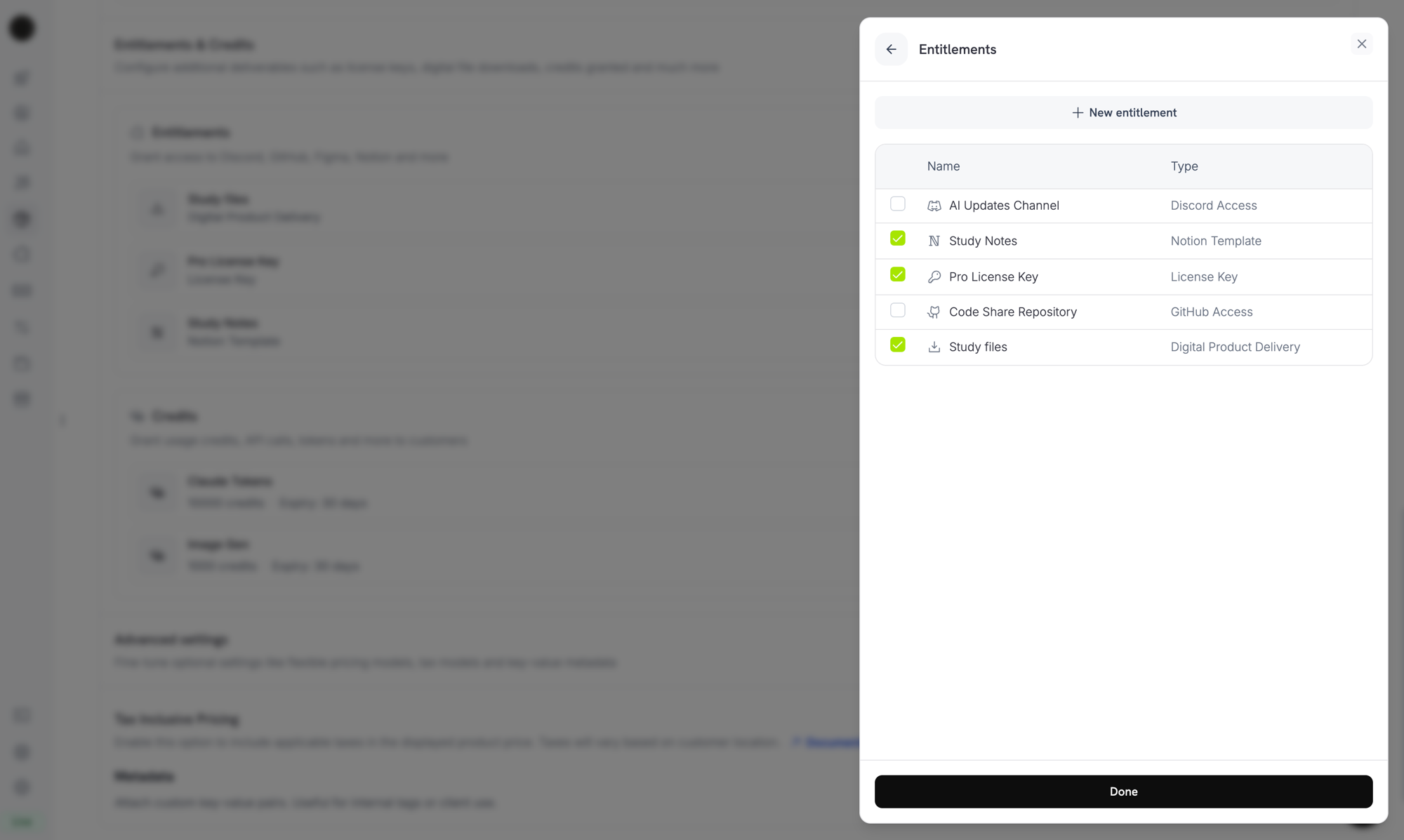 履行模式是**授权**的属性,而不是产品的属性。因为您在步骤 1 中将其设置为**手动**,所以每个附加此授权的产品在购买时都会创建 `pending` 许可证密钥授权 — 这里无需额外配置。
如果您还没有产品,首先创建一个(一次性或订阅)。有关通过结账销售产品的信息,请参阅[一次性付款集成指南](/developer-resources/integration-guide)。
## 第三步 — 检测待处理的授权
当客户购买产品后,Dodo Payments 会创建一个状态为 `pending` 的授权,并触发 `entitlement_grant.created` webhook。这个信号表明客户正在等待一个密钥。
### 监听 webhook
设置一个 webhook 端点(开发者 → 仪表板中的 Webhooks),并对待处理的许可证密钥授权采取操作。实施遵循 [标准 Webhooks](https://standardwebhooks.com/) 规范。
```typescript theme={null} theme={null}
import { Webhook } from 'standardwebhooks';
const webhook = new Webhook(process.env.DODO_WEBHOOK_KEY!);
export async function POST(request: Request) {
const rawBody = await request.text();
const headers = {
'webhook-id': request.headers.get('webhook-id') || '',
'webhook-signature': request.headers.get('webhook-signature') || '',
'webhook-timestamp': request.headers.get('webhook-timestamp') || '',
};
await webhook.verify(rawBody, headers);
const event = JSON.parse(rawBody);
// A customer bought a manual-mode license key and is waiting for it.
if (
event.type === 'entitlement_grant.created' &&
event.data.integration_type === 'license_key' &&
event.data.status === 'pending'
) {
await queueLicenseKeyFulfillment({
grantId: event.data.id,
customerId: event.data.customer_id,
});
}
return new Response('ok');
}
```
授权负载携带 `integration_type: "license_key"`,因此您可以在无需额外查找的情况下识别许可证密钥授权。有关完整负载,请参阅[授权授权 webhook 引用](/developer-resources/webhooks/intents/entitlement-grant)。
### 或轮询列表授权 API
如果您不想依赖 webhooks,可以列出授权然后按 `integration_type` 和 `status` 进行筛选:
```typescript Node.js theme={null} theme={null}
const pending = await client.entitlements.grants.list('ent_license_key_id', {
integration_type: 'license_key',
status: 'pending',
});
for (const grant of pending.items) {
console.log(`Grant ${grant.id} for customer ${grant.customer_id} needs a key`);
}
```
```bash cURL theme={null} theme={null}
curl -G https://test.dodopayments.com/entitlements/ent_license_key_id/grants \
-H "Authorization: Bearer $DODO_PAYMENTS_API_KEY" \
--data-urlencode "integration_type=license_key" \
--data-urlencode "status=pending"
```
## 第四步 — 提供密钥
从您自己的系统获取密钥值,然后使用 [履行许可证密钥授权](/api-reference/entitlements/fulfill-license-key) 端点提交它。这需要您的秘密 API 密钥(编辑权限);它不是公共许可证端点之一。
```typescript Node.js theme={null} theme={null}
async function fulfill(grantId: string, key: string) {
const res = await fetch(
`https://test.dodopayments.com/grants/${grantId}/license-key`,
{
method: 'POST',
headers: {
'Content-Type': 'application/json',
Authorization: `Bearer ${process.env.DODO_PAYMENTS_API_KEY}`,
},
body: JSON.stringify({
key,
// Optional — fall back to the entitlement config when omitted
activations_limit: 5,
expires_at: '2027-05-01T00:00:00Z',
}),
},
);
if (!res.ok) {
// See the status code table below for handling
throw new Error(`Fulfillment failed: ${res.status}`);
}
return res.json(); // updated grant, now status: "delivered"
}
```
```bash cURL theme={null} theme={null}
curl -X POST https://test.dodopayments.com/grants/grant_8VbC6JDZ/license-key \
-H "Authorization: Bearer $DODO_PAYMENTS_API_KEY" \
-H "Content-Type: application/json" \
-d '{
"key": "PRO-AAAA-BBBB-CCCC-DDDD",
"activations_limit": 5,
"expires_at": "2027-05-01T00:00:00Z"
}'
```
### 请求字段
要提供给客户的许可证密钥字符串。空白被去除;空或只有空白的值将被拒绝。
每个密钥的激活限制。如果省略,将以授权配置为默认。
每个密钥的过期时间(ISO 8601)。如果省略,将以授权配置的持续时间为默认。对于订阅发布的授权,效力仍然与订阅保持联系。
成功后,授权将移动到 `delivered`,客户会自动收到密钥(与自动履行时收到的电子邮件相同),并触发 `entitlement_grant.delivered`。
客户会收到一封电子邮件,包含许可证密钥、产品、激活限制、到期时间和您的激活说明:
履行模式是**授权**的属性,而不是产品的属性。因为您在步骤 1 中将其设置为**手动**,所以每个附加此授权的产品在购买时都会创建 `pending` 许可证密钥授权 — 这里无需额外配置。
如果您还没有产品,首先创建一个(一次性或订阅)。有关通过结账销售产品的信息,请参阅[一次性付款集成指南](/developer-resources/integration-guide)。
## 第三步 — 检测待处理的授权
当客户购买产品后,Dodo Payments 会创建一个状态为 `pending` 的授权,并触发 `entitlement_grant.created` webhook。这个信号表明客户正在等待一个密钥。
### 监听 webhook
设置一个 webhook 端点(开发者 → 仪表板中的 Webhooks),并对待处理的许可证密钥授权采取操作。实施遵循 [标准 Webhooks](https://standardwebhooks.com/) 规范。
```typescript theme={null} theme={null}
import { Webhook } from 'standardwebhooks';
const webhook = new Webhook(process.env.DODO_WEBHOOK_KEY!);
export async function POST(request: Request) {
const rawBody = await request.text();
const headers = {
'webhook-id': request.headers.get('webhook-id') || '',
'webhook-signature': request.headers.get('webhook-signature') || '',
'webhook-timestamp': request.headers.get('webhook-timestamp') || '',
};
await webhook.verify(rawBody, headers);
const event = JSON.parse(rawBody);
// A customer bought a manual-mode license key and is waiting for it.
if (
event.type === 'entitlement_grant.created' &&
event.data.integration_type === 'license_key' &&
event.data.status === 'pending'
) {
await queueLicenseKeyFulfillment({
grantId: event.data.id,
customerId: event.data.customer_id,
});
}
return new Response('ok');
}
```
授权负载携带 `integration_type: "license_key"`,因此您可以在无需额外查找的情况下识别许可证密钥授权。有关完整负载,请参阅[授权授权 webhook 引用](/developer-resources/webhooks/intents/entitlement-grant)。
### 或轮询列表授权 API
如果您不想依赖 webhooks,可以列出授权然后按 `integration_type` 和 `status` 进行筛选:
```typescript Node.js theme={null} theme={null}
const pending = await client.entitlements.grants.list('ent_license_key_id', {
integration_type: 'license_key',
status: 'pending',
});
for (const grant of pending.items) {
console.log(`Grant ${grant.id} for customer ${grant.customer_id} needs a key`);
}
```
```bash cURL theme={null} theme={null}
curl -G https://test.dodopayments.com/entitlements/ent_license_key_id/grants \
-H "Authorization: Bearer $DODO_PAYMENTS_API_KEY" \
--data-urlencode "integration_type=license_key" \
--data-urlencode "status=pending"
```
## 第四步 — 提供密钥
从您自己的系统获取密钥值,然后使用 [履行许可证密钥授权](/api-reference/entitlements/fulfill-license-key) 端点提交它。这需要您的秘密 API 密钥(编辑权限);它不是公共许可证端点之一。
```typescript Node.js theme={null} theme={null}
async function fulfill(grantId: string, key: string) {
const res = await fetch(
`https://test.dodopayments.com/grants/${grantId}/license-key`,
{
method: 'POST',
headers: {
'Content-Type': 'application/json',
Authorization: `Bearer ${process.env.DODO_PAYMENTS_API_KEY}`,
},
body: JSON.stringify({
key,
// Optional — fall back to the entitlement config when omitted
activations_limit: 5,
expires_at: '2027-05-01T00:00:00Z',
}),
},
);
if (!res.ok) {
// See the status code table below for handling
throw new Error(`Fulfillment failed: ${res.status}`);
}
return res.json(); // updated grant, now status: "delivered"
}
```
```bash cURL theme={null} theme={null}
curl -X POST https://test.dodopayments.com/grants/grant_8VbC6JDZ/license-key \
-H "Authorization: Bearer $DODO_PAYMENTS_API_KEY" \
-H "Content-Type: application/json" \
-d '{
"key": "PRO-AAAA-BBBB-CCCC-DDDD",
"activations_limit": 5,
"expires_at": "2027-05-01T00:00:00Z"
}'
```
### 请求字段
要提供给客户的许可证密钥字符串。空白被去除;空或只有空白的值将被拒绝。
每个密钥的激活限制。如果省略,将以授权配置为默认。
每个密钥的过期时间(ISO 8601)。如果省略,将以授权配置的持续时间为默认。对于订阅发布的授权,效力仍然与订阅保持联系。
成功后,授权将移动到 `delivered`,客户会自动收到密钥(与自动履行时收到的电子邮件相同),并触发 `entitlement_grant.delivered`。
客户会收到一封电子邮件,包含许可证密钥、产品、激活限制、到期时间和您的激活说明:
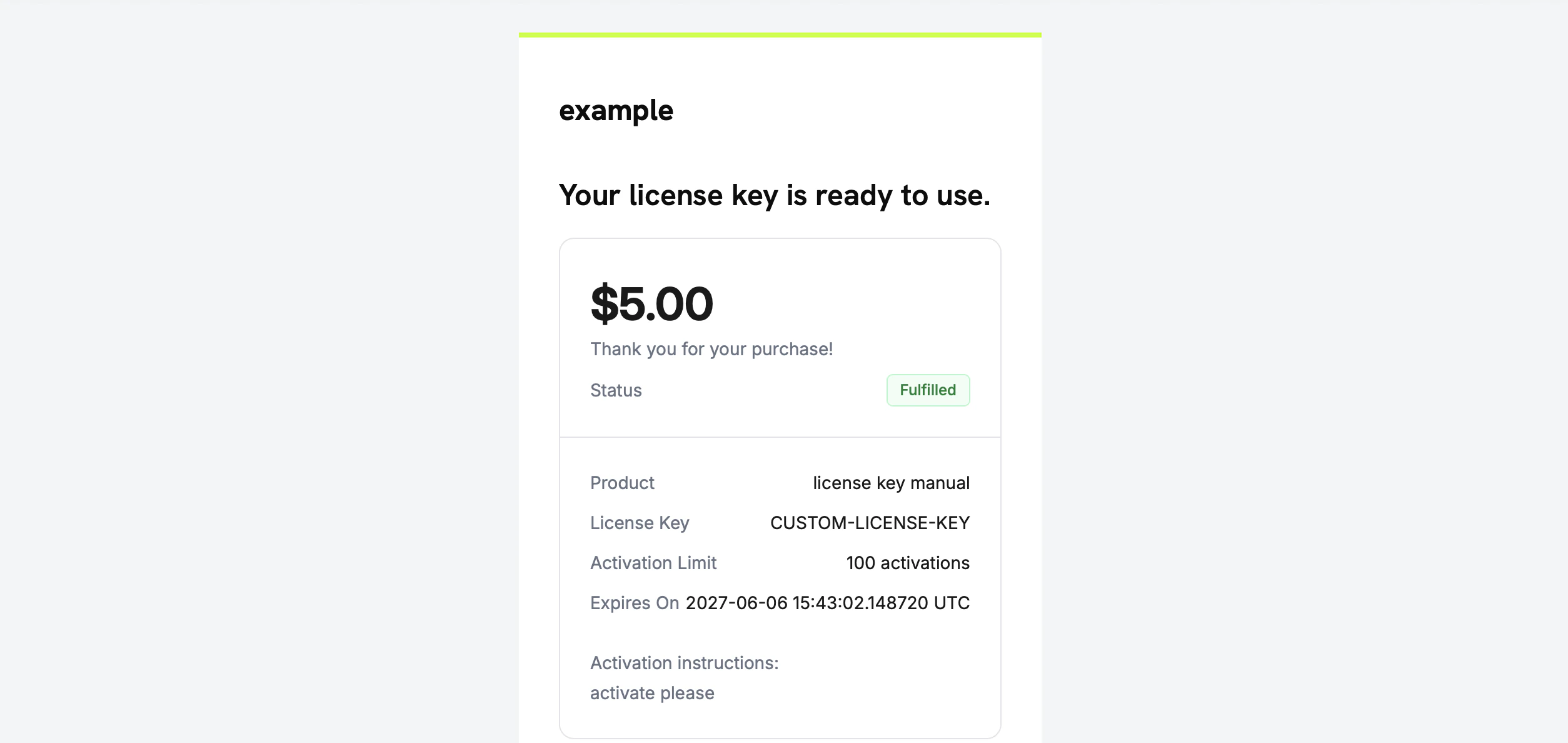 您不需要自己通过电子邮件发送密钥—履行后会自动完成交付。
## 第五步 — 处理错误和重试
端点在交付任何内容之前验证授权。处理这些响应:
| 状态 | 含义 | 处理措施 |
| ----- | ----------------------------------- | ----------------------------- |
| `200` | 密钥已交付,授权目前为 `delivered` | 完成。 |
| `400` | 不是许可证密钥授权,或密钥为空/只有空白 | 修复请求;不要原样重试。 |
| `404` | 您的业务没有此 ID 的授权 | 验证 `grant_id`。 |
| `409` | 授权不在等待履行状态(已交付或已有密钥)**或**密钥值已存在 | 如果已经交付,视为成功。如果是重复密钥,请提供不同的密钥。 |
| `422` | 请求体验证失败(例如 `activations_limit < 1`) | 更正字段并重试。 |
在瞬态错误(超时,`5xx`)上重试是安全的。每个授权只能履行一次,因此成功但未确认的调用后重试将返回`409`,而不是发放第二个密钥或发送重复的电子邮件。使用授权 `id` 作为幂等键。
## 验证流程
1. 在测试模式下购买产品(请参阅[结账指南](/developer-resources/integration-guide))。
2. 确认您的 webhook 接收到 `entitlement_grant.created`,包含 `status: "pending"` 和 `integration_type: "license_key"`,或者确认授权显示在列表授权响应中并使用这些筛选器。
3. 使用测试密钥调用履行端点。
4. 确认响应显示 `status: "delivered"`,并填充 `license_key`,客户收到密钥电子邮件,并触发 `entitlement_grant.delivered`。
一旦交付,客户就可以像自动生成的密钥一样,[激活和验证](/features/license-keys#activation-validation-deactivation)密钥。
## 相关 API 参考
使用 `fulfillment_mode: manual` 创建许可证密钥授权。
按 `integration_type` 和 `status` 筛选以查找待处理的授权。
提供密钥值并将授权转换为已交付。
`entitlement_grant.*` 事件标志待处理和已交付的授权。
Create the License Key entitlement with `fulfillment_mode: manual`.
Filter by `integration_type` and `status` to find pending grants.
Deliver the key value and transition the grant to delivered.
The `entitlement_grant.*` events that signal pending and delivered grants.
您不需要自己通过电子邮件发送密钥—履行后会自动完成交付。
## 第五步 — 处理错误和重试
端点在交付任何内容之前验证授权。处理这些响应:
| 状态 | 含义 | 处理措施 |
| ----- | ----------------------------------- | ----------------------------- |
| `200` | 密钥已交付,授权目前为 `delivered` | 完成。 |
| `400` | 不是许可证密钥授权,或密钥为空/只有空白 | 修复请求;不要原样重试。 |
| `404` | 您的业务没有此 ID 的授权 | 验证 `grant_id`。 |
| `409` | 授权不在等待履行状态(已交付或已有密钥)**或**密钥值已存在 | 如果已经交付,视为成功。如果是重复密钥,请提供不同的密钥。 |
| `422` | 请求体验证失败(例如 `activations_limit < 1`) | 更正字段并重试。 |
在瞬态错误(超时,`5xx`)上重试是安全的。每个授权只能履行一次,因此成功但未确认的调用后重试将返回`409`,而不是发放第二个密钥或发送重复的电子邮件。使用授权 `id` 作为幂等键。
## 验证流程
1. 在测试模式下购买产品(请参阅[结账指南](/developer-resources/integration-guide))。
2. 确认您的 webhook 接收到 `entitlement_grant.created`,包含 `status: "pending"` 和 `integration_type: "license_key"`,或者确认授权显示在列表授权响应中并使用这些筛选器。
3. 使用测试密钥调用履行端点。
4. 确认响应显示 `status: "delivered"`,并填充 `license_key`,客户收到密钥电子邮件,并触发 `entitlement_grant.delivered`。
一旦交付,客户就可以像自动生成的密钥一样,[激活和验证](/features/license-keys#activation-validation-deactivation)密钥。
## 相关 API 参考
使用 `fulfillment_mode: manual` 创建许可证密钥授权。
按 `integration_type` 和 `status` 筛选以查找待处理的授权。
提供密钥值并将授权转换为已交付。
`entitlement_grant.*` 事件标志待处理和已交付的授权。
Create the License Key entitlement with `fulfillment_mode: manual`.
Filter by `integration_type` and `status` to find pending grants.
Deliver the key value and transition the grant to delivered.
The `entitlement_grant.*` events that signal pending and delivered grants.