> ## Documentation Index
> Fetch the complete documentation index at: https://docs.dodopayments.com/llms.txt
> Use this file to discover all available pages before exploring further.
# v1.75.0(2026 年 1 月 23 日)
> 产品集合、RevolutPay 和 Billie 针对英镑一次性支付的支付方式、结账会话预览、更改计划请求中的元数据、invoice_url 字段、折扣验证端点,以及增强的仪表盘筛选
## 新功能
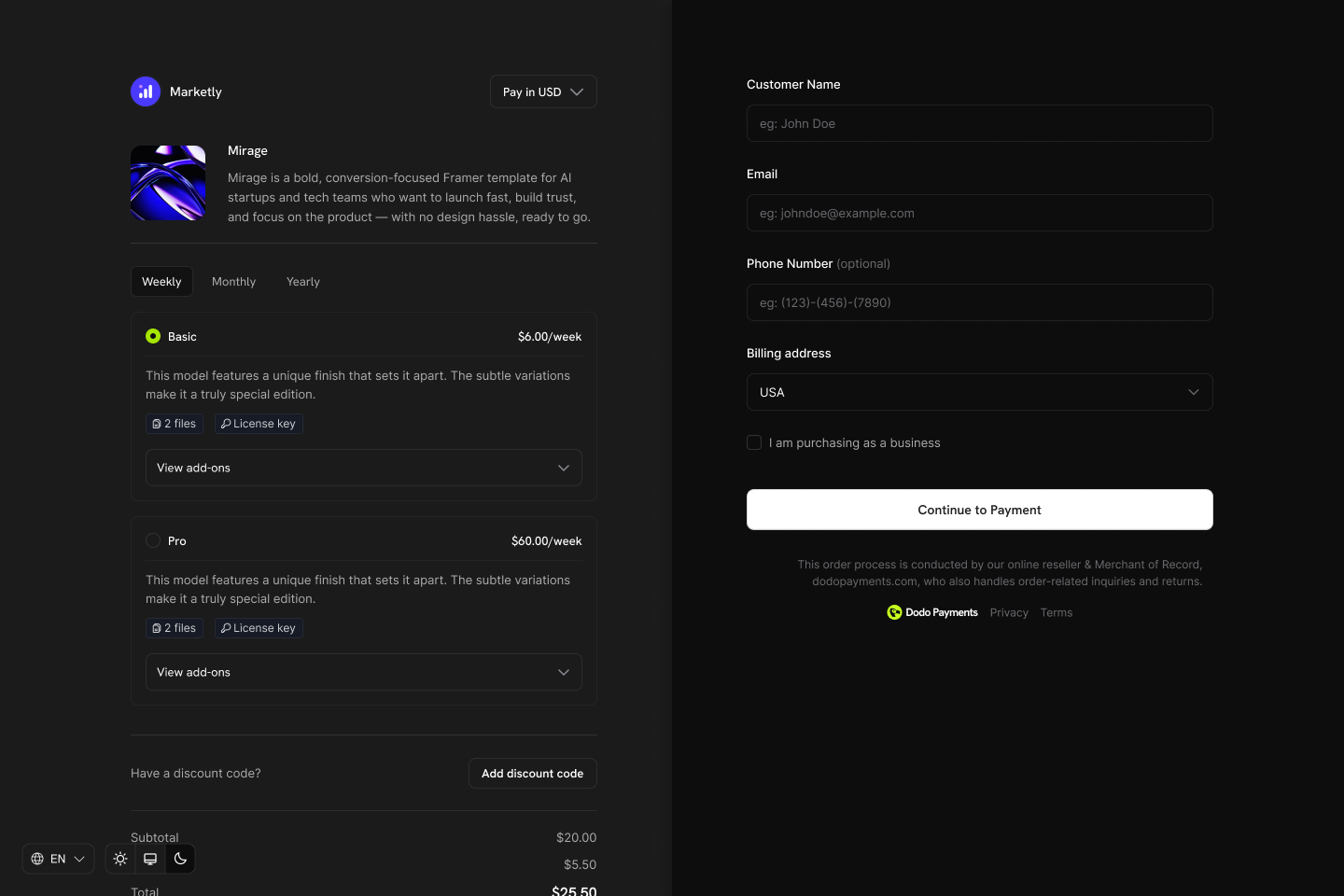
### 1. **产品集合**
在客户门户中将相关产品组合在一起,以实现统一的结账体验、计划选择以及无缝的升级/降级路径。
 **主要优势**
* **基于集合的结账**:在一个结账视图中展示集合中的所有产品,让客户比较并选择他们偏好的计划
* **有序的产品管理**:将相关产品(如 Starter、Pro、Enterprise)归类在单个集合下
* **客户门户集成**:允许客户在同一集合内升级或降级产品
* **商户控制**:启用、禁用并重新排序每个集合中的产品
**工作原理**
为某个集合创建结账会话:
```typescript theme={null}
const session = await client.checkoutSessions.create({
product_collection_id: 'pdc_abc123',
product_cart: [], // Required: pass an empty array for collection checkout
return_url: 'https://yoursite.com/return'
});
// Redirect customer to the checkout
window.location.href = session.checkout_url;
```
结果:客户可以在一个统一的结账体验中查看并选择集合中的所有可用产品。
集合结账非常适合希望客户在购买前并排比较计划的订阅型业务。
了解更多:[产品集合指南](/features/product-collections)
### 2. **RevolutPay & Billie 面向 GBP 货币的一次性支付方式**
RevolutPay 和 Billie 的支付选项已在全球范围内扩展至英镑一次性支付,为客户提供更多支付灵活性。
**新支付方式**
| 支付方式 | 支持国家 | 货币 | 订阅支持 |
| -------------- | ------ | --- | ------------------ |
| **RevolutPay** | Global | GBP | No (one-time only) |
| **Billie** | Global | GBP | No (one-time only) |
* **RevolutPay** – 为全球 Revolut 用户提供快速、无缝的支付体验
* **Billie** – 面向企业的先买后付解决方案,使企业能够为客户提供灵活的支付条件
这些支付方式会自动用于英镑交易,无需额外配置。
了解更多:[支付方式](/features/payment-methods)
### 3. **结账会话预览**
在创建结账会话前预览,以计算准确的定价、税费、折扣和总额。向客户展示真实价格,帮助他们在进入结账前了解费用。
**工作原理**
```typescript theme={null}
const preview = await client.checkoutSessions.preview({
product_cart: [
{ product_id: 'prod_123', quantity: 1 }
],
billing_address: {
country: 'US',
state: 'CA',
zipcode: '94102'
},
discount_code: 'SAVE20'
});
console.log('Subtotal:', preview.subtotal);
console.log('Tax:', preview.tax);
console.log('Discount:', preview.discount);
console.log('Total:', preview.total);
```
**应用场景**
* **自定义定价展示**:在结账前显示包括税费在内的准确总额
* **折扣验证**:验证折扣码并向客户显示节省金额
* **多货币支持**:预览不同货币下的价格
* **购物车摘要**:构建具有实时定价的自定义购物车界面
查看完整的预览端点文档。
### 4. **更改计划请求中的元数据支持**
在更改订阅计划时传递自定义元数据,以便在计划转换过程中更好地跟踪并与内部系统集成。
```javascript theme={null}
// Adding metadata when changing a subscription plan
await client.subscriptions.changePlan('sub_123', {
product_id: 'prod_premium',
proration_billing_mode: 'prorated_immediately',
quantity: 1,
metadata: {
upgrade_reason: 'feature_request',
previous_plan: 'basic',
sales_rep: 'john@company.com'
}
});
```
**应用场景**
* **记录升级/降级原因**:存储客户更改计划的原因
* **关联 CRM 记录**:将计划变更与销售活动关联
* **内部分类**:为报告和分析对计划变更打标签
* **审计跟踪**:保留谁发起计划更改的记录
元数据包含在 webhook 事件中,方便使用自定义数据处理计划变更。
了解更多:[元数据指南](/api-reference/metadata) | [更改计划 API](/api-reference/subscriptions/change-plan)
### 5. **`invoice_url` 字段在支付响应和支付链接响应中的支持**
支付响应和支付链接响应现在包含 `invoice_url` 字段,可直接访问与每笔支付关联的发票。
```json theme={null}
{
"payment_id": "pay_2IjeQm4hqU6RA4Z4kwDee",
"status": "succeeded",
"invoice_url": "https://dodopayments.com/invoices/inv_2IsUnWGtRKFLxk7xAQeyt",
"amount": 9900,
"currency": "USD",
// ... other fields
}
```
**应用场景**
* **客户沟通**:直接向客户发送发票链接
* **会计集成**:在会计软件中将支付与发票关联
* **自助服务门户**:让客户轻松访问其发票
* **记录保存**:维护与发票文档的直接引用
查看支付响应模式。
### 6. **按代码名验证折扣端点**
新的 API 端点可根据代码名(例如 “SAVE20”)验证并检索折扣码,而无需使用内部折扣 ID。在结账前验证折扣是否适用。
```javascript theme={null}
// Validate a discount code before checkout
const discount = await client.discounts.retrieveByCode('SAVE20');
console.log('Discount type:', discount.type);
console.log('Discount value:', discount.amount);
console.log('Valid until:', discount.expires_at);
```
**优势**
* **结账前验证**:在创建结账会话之前验证折扣码
* **实时反馈**:向客户展示其代码是否有效
* **错误处理**:及早捕捉无效或过期的代码
* **自定义折扣界面**:构建具有即时验证功能的折扣码输入框
查看完整的端点文档。
### 7. **面向客户、折扣和许可证密钥的增强筛选能力**
针对列出客户、折扣和许可证密钥的 API 提供新的筛选器,使以编程方式查找和管理数据更轻松。
**客户 API 筛选器**
| 筛选器 | 说明 |
| ---------------- | ------------------- |
| `email` | 按客户邮箱过滤 |
| `name` | 按客户姓名过滤(部分匹配,忽略大小写) |
| `created_at_gte` | 过滤在该时间戳或之后创建的客户 |
| `created_at_lte` | 过滤在该时间戳或之前创建的客户 |
```javascript theme={null}
// Find customers by name created in the last 30 days
const customers = await client.customers.list({
name: 'John',
created_at_gte: '2026-01-01T00:00:00Z'
});
```
**折扣 API 筛选器**
| 筛选器 | 说明 |
| --------------- | ------------------------------- |
| `code` | 按折扣码过滤(部分匹配,忽略大小写) |
| `discount_type` | 按折扣类型过滤(百分比) |
| `active` | 按激活状态过滤(true = 未过期,false = 已过期) |
| `product_id` | 按产品限制过滤(仅适用于该产品的折扣) |
```javascript theme={null}
// Find active percentage discounts for a specific product
const discounts = await client.discounts.list({
active: true,
discount_type: 'percentage',
product_id: 'prod_123'
});
```
**许可证密钥 API 筛选器**
| 筛选器 | 说明 |
| ---------------- | ----------------------------------------- |
| `customer_id` | 按客户 ID 过滤 |
| `status` | 按许可证密钥状态过滤(`active`、`expired`、`disabled`) |
| `product_id` | 按产品 ID 过滤 |
| `created_at_gte` | 过滤在该时间戳或之后创建的许可证密钥 |
| `created_at_lte` | 过滤在该时间戳或之前创建的许可证密钥 |
```javascript theme={null}
// Find active license keys for a specific product
const licenseKeys = await client.licenseKeys.list({
status: 'active',
product_id: 'prod_123'
});
```
查看完整的客户 API 文档。
查看完整的折扣 API 文档。
查看完整的许可证密钥 API 文档。
### 8. **仪表盘的 UI/UX 改进**
本次发布在仪表盘中引入了多项 UI/UX 改进,提升直观性和精致度。
**亮点**
* 改进的导航与布局一致性
* 强化的数据表交互
* 更好的加载状态和反馈
* 精细化的视觉设计元素
* 改善的移动端响应能力
**主要优势**
* **基于集合的结账**:在一个结账视图中展示集合中的所有产品,让客户比较并选择他们偏好的计划
* **有序的产品管理**:将相关产品(如 Starter、Pro、Enterprise)归类在单个集合下
* **客户门户集成**:允许客户在同一集合内升级或降级产品
* **商户控制**:启用、禁用并重新排序每个集合中的产品
**工作原理**
为某个集合创建结账会话:
```typescript theme={null}
const session = await client.checkoutSessions.create({
product_collection_id: 'pdc_abc123',
product_cart: [], // Required: pass an empty array for collection checkout
return_url: 'https://yoursite.com/return'
});
// Redirect customer to the checkout
window.location.href = session.checkout_url;
```
结果:客户可以在一个统一的结账体验中查看并选择集合中的所有可用产品。
集合结账非常适合希望客户在购买前并排比较计划的订阅型业务。
了解更多:[产品集合指南](/features/product-collections)
### 2. **RevolutPay & Billie 面向 GBP 货币的一次性支付方式**
RevolutPay 和 Billie 的支付选项已在全球范围内扩展至英镑一次性支付,为客户提供更多支付灵活性。
**新支付方式**
| 支付方式 | 支持国家 | 货币 | 订阅支持 |
| -------------- | ------ | --- | ------------------ |
| **RevolutPay** | Global | GBP | No (one-time only) |
| **Billie** | Global | GBP | No (one-time only) |
* **RevolutPay** – 为全球 Revolut 用户提供快速、无缝的支付体验
* **Billie** – 面向企业的先买后付解决方案,使企业能够为客户提供灵活的支付条件
这些支付方式会自动用于英镑交易,无需额外配置。
了解更多:[支付方式](/features/payment-methods)
### 3. **结账会话预览**
在创建结账会话前预览,以计算准确的定价、税费、折扣和总额。向客户展示真实价格,帮助他们在进入结账前了解费用。
**工作原理**
```typescript theme={null}
const preview = await client.checkoutSessions.preview({
product_cart: [
{ product_id: 'prod_123', quantity: 1 }
],
billing_address: {
country: 'US',
state: 'CA',
zipcode: '94102'
},
discount_code: 'SAVE20'
});
console.log('Subtotal:', preview.subtotal);
console.log('Tax:', preview.tax);
console.log('Discount:', preview.discount);
console.log('Total:', preview.total);
```
**应用场景**
* **自定义定价展示**:在结账前显示包括税费在内的准确总额
* **折扣验证**:验证折扣码并向客户显示节省金额
* **多货币支持**:预览不同货币下的价格
* **购物车摘要**:构建具有实时定价的自定义购物车界面
查看完整的预览端点文档。
### 4. **更改计划请求中的元数据支持**
在更改订阅计划时传递自定义元数据,以便在计划转换过程中更好地跟踪并与内部系统集成。
```javascript theme={null}
// Adding metadata when changing a subscription plan
await client.subscriptions.changePlan('sub_123', {
product_id: 'prod_premium',
proration_billing_mode: 'prorated_immediately',
quantity: 1,
metadata: {
upgrade_reason: 'feature_request',
previous_plan: 'basic',
sales_rep: 'john@company.com'
}
});
```
**应用场景**
* **记录升级/降级原因**:存储客户更改计划的原因
* **关联 CRM 记录**:将计划变更与销售活动关联
* **内部分类**:为报告和分析对计划变更打标签
* **审计跟踪**:保留谁发起计划更改的记录
元数据包含在 webhook 事件中,方便使用自定义数据处理计划变更。
了解更多:[元数据指南](/api-reference/metadata) | [更改计划 API](/api-reference/subscriptions/change-plan)
### 5. **`invoice_url` 字段在支付响应和支付链接响应中的支持**
支付响应和支付链接响应现在包含 `invoice_url` 字段,可直接访问与每笔支付关联的发票。
```json theme={null}
{
"payment_id": "pay_2IjeQm4hqU6RA4Z4kwDee",
"status": "succeeded",
"invoice_url": "https://dodopayments.com/invoices/inv_2IsUnWGtRKFLxk7xAQeyt",
"amount": 9900,
"currency": "USD",
// ... other fields
}
```
**应用场景**
* **客户沟通**:直接向客户发送发票链接
* **会计集成**:在会计软件中将支付与发票关联
* **自助服务门户**:让客户轻松访问其发票
* **记录保存**:维护与发票文档的直接引用
查看支付响应模式。
### 6. **按代码名验证折扣端点**
新的 API 端点可根据代码名(例如 “SAVE20”)验证并检索折扣码,而无需使用内部折扣 ID。在结账前验证折扣是否适用。
```javascript theme={null}
// Validate a discount code before checkout
const discount = await client.discounts.retrieveByCode('SAVE20');
console.log('Discount type:', discount.type);
console.log('Discount value:', discount.amount);
console.log('Valid until:', discount.expires_at);
```
**优势**
* **结账前验证**:在创建结账会话之前验证折扣码
* **实时反馈**:向客户展示其代码是否有效
* **错误处理**:及早捕捉无效或过期的代码
* **自定义折扣界面**:构建具有即时验证功能的折扣码输入框
查看完整的端点文档。
### 7. **面向客户、折扣和许可证密钥的增强筛选能力**
针对列出客户、折扣和许可证密钥的 API 提供新的筛选器,使以编程方式查找和管理数据更轻松。
**客户 API 筛选器**
| 筛选器 | 说明 |
| ---------------- | ------------------- |
| `email` | 按客户邮箱过滤 |
| `name` | 按客户姓名过滤(部分匹配,忽略大小写) |
| `created_at_gte` | 过滤在该时间戳或之后创建的客户 |
| `created_at_lte` | 过滤在该时间戳或之前创建的客户 |
```javascript theme={null}
// Find customers by name created in the last 30 days
const customers = await client.customers.list({
name: 'John',
created_at_gte: '2026-01-01T00:00:00Z'
});
```
**折扣 API 筛选器**
| 筛选器 | 说明 |
| --------------- | ------------------------------- |
| `code` | 按折扣码过滤(部分匹配,忽略大小写) |
| `discount_type` | 按折扣类型过滤(百分比) |
| `active` | 按激活状态过滤(true = 未过期,false = 已过期) |
| `product_id` | 按产品限制过滤(仅适用于该产品的折扣) |
```javascript theme={null}
// Find active percentage discounts for a specific product
const discounts = await client.discounts.list({
active: true,
discount_type: 'percentage',
product_id: 'prod_123'
});
```
**许可证密钥 API 筛选器**
| 筛选器 | 说明 |
| ---------------- | ----------------------------------------- |
| `customer_id` | 按客户 ID 过滤 |
| `status` | 按许可证密钥状态过滤(`active`、`expired`、`disabled`) |
| `product_id` | 按产品 ID 过滤 |
| `created_at_gte` | 过滤在该时间戳或之后创建的许可证密钥 |
| `created_at_lte` | 过滤在该时间戳或之前创建的许可证密钥 |
```javascript theme={null}
// Find active license keys for a specific product
const licenseKeys = await client.licenseKeys.list({
status: 'active',
product_id: 'prod_123'
});
```
查看完整的客户 API 文档。
查看完整的折扣 API 文档。
查看完整的许可证密钥 API 文档。
### 8. **仪表盘的 UI/UX 改进**
本次发布在仪表盘中引入了多项 UI/UX 改进,提升直观性和精致度。
**亮点**
* 改进的导航与布局一致性
* 强化的数据表交互
* 更好的加载状态和反馈
* 精细化的视觉设计元素
* 改善的移动端响应能力