> ## Documentation Index
> Fetch the complete documentation index at: https://docs.dodopayments.com/llms.txt
> Use this file to discover all available pages before exploring further.
# v1.70.0 (2025年12月24日)
> 支持内嵌结账,使用现有支付方式进行即时结账,从仪表板管理订阅计划,生成短支付链接,跳过成功页面并立即重定向,以及为所有企业启用按需订阅
## 新功能 🚀
1. **内嵌结账 - 完全嵌入式结账体验(测试版)**
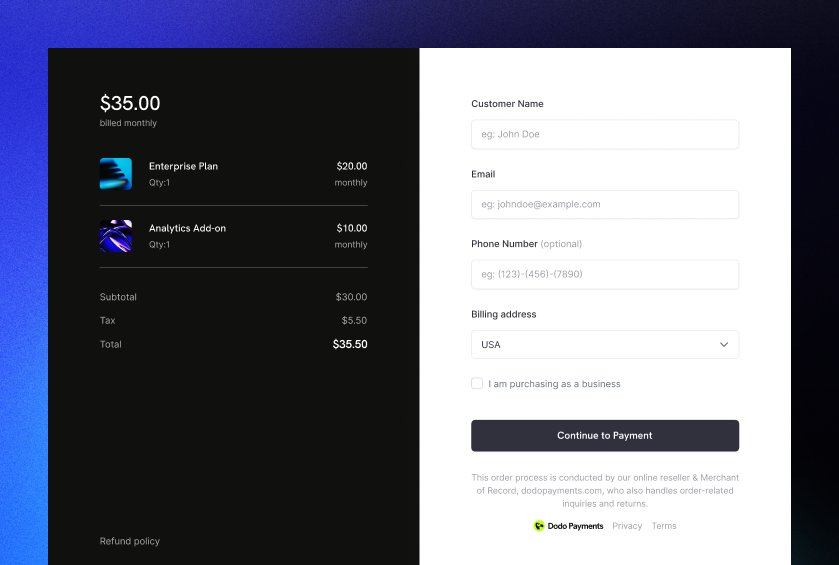
将Dodo Payments结账直接嵌入到您的网站中,以实现无缝的品牌支付体验。与作为模态窗口打开的覆盖结账不同,内嵌结账将支付表单直接嵌入到您的页面布局中。
 ### 优势
* **完全集成**:创建与您的网站无缝融合的结账体验
* **自定义订单摘要**:构建与结账实时同步的自定义UI
* **最大控制**:完全控制结账布局和设计
* **符合PCI标准**:Dodo Payments安全处理所有敏感支付信息
* **实时同步**:使用SDK事件保持您的UI与结账状态同步
### 工作原理
使用 `displayType: 'inline'` 初始化 SDK,并在容器元素中嵌入结账:
```typescript theme={null}
import { DodoPayments } from "dodopayments-checkout";
// Initialize the SDK for inline mode
DodoPayments.Initialize({
mode: "test",
displayType: "inline",
onEvent: (event) => {
if (event.event_type === "checkout.breakdown") {
// Update your UI with real-time tax and total calculations
const breakdown = event.data?.message;
}
},
});
// Open checkout in a specific container
DodoPayments.Checkout.open({
checkoutUrl: "https://test.checkout.dodopayments.com/session/cks_123",
elementId: "dodo-inline-checkout" // ID of the container element
});
```
### 主要特性
* **实时明细事件**:在客户输入其信息时接收 `checkout.breakdown` 事件
* **自定义订单摘要**:构建自己的定价展示,并实时更新
* **无缝集成**:结账框架负责收款,而您掌控布局
* **SDK 方法**:使用 `open()`、`close()` 和 `isOpen()` 以编程方式控制结账流程
结果:与品牌完全匹配的完整集成结账体验,最大程度掌控支付流程。
当您希望完全控制结账设计时使用 inline checkout。如需快速集成并尽可能少地更改现有页面,请使用 [overlay checkout](/developer-resources/overlay-checkout)。
了解更多:[内嵌结账指南](/developer-resources/inline-checkout)
2. **使用现有支付方式创建支付、订阅和结账**\
通过使用现有客户保存的支付方式来简化结账流程。新的 `payment_method_id` 参数允许您使用客户之前保存的支付方式创建支付、订阅或结账会话。
### 优势
* **更快的结账**:跳过回头客户的支付方式收集
* **一键购买**:使用保存的支付方式启用即时购买
* **订阅管理**:轻松使用现有支付方式创建订阅
* **提高转化率**:减少回头客户的结账摩擦
### 工作原理
在创建结账会话、支付或订阅时使用 `payment_method_id`:
```javascript theme={null}
const session = await client.checkoutSessions.create({
product_cart: [{ product_id: 'pdt_123', quantity: 1 }],
customer: {
customer_id: 'cus_123'
},
payment_method_id: 'pm_abc123',
confirm: true
});
```
```javascript theme={null}
const payment = await client.payments.create({
product_cart: [{ product_id: 'pdt_123', quantity: 1 }],
customer: { customer_id: 'cus_123' },
billing: { country: 'US' },
payment_method_id: 'pm_abc123'
});
```
```javascript theme={null}
const subscription = await client.subscriptions.create({
customer: { customer_id: 'cus_123' },
billing: { country: 'US' },
product_id: 'pdt_subscription',
quantity: 1,
payment_method_id: 'pm_abc123'
});
```
在结账会话中使用 `payment_method_id` 时,`confirm` 必须设置为 `true`,并且必须提供现有的 `customer_id`。支付方式会根据支付的货币进行有效性验证。
支付方式必须属于该客户,并与支付货币兼容。如果验证失败,请求将返回错误。
3. **仪表板中的订阅计划变更及下次账单日期更新**
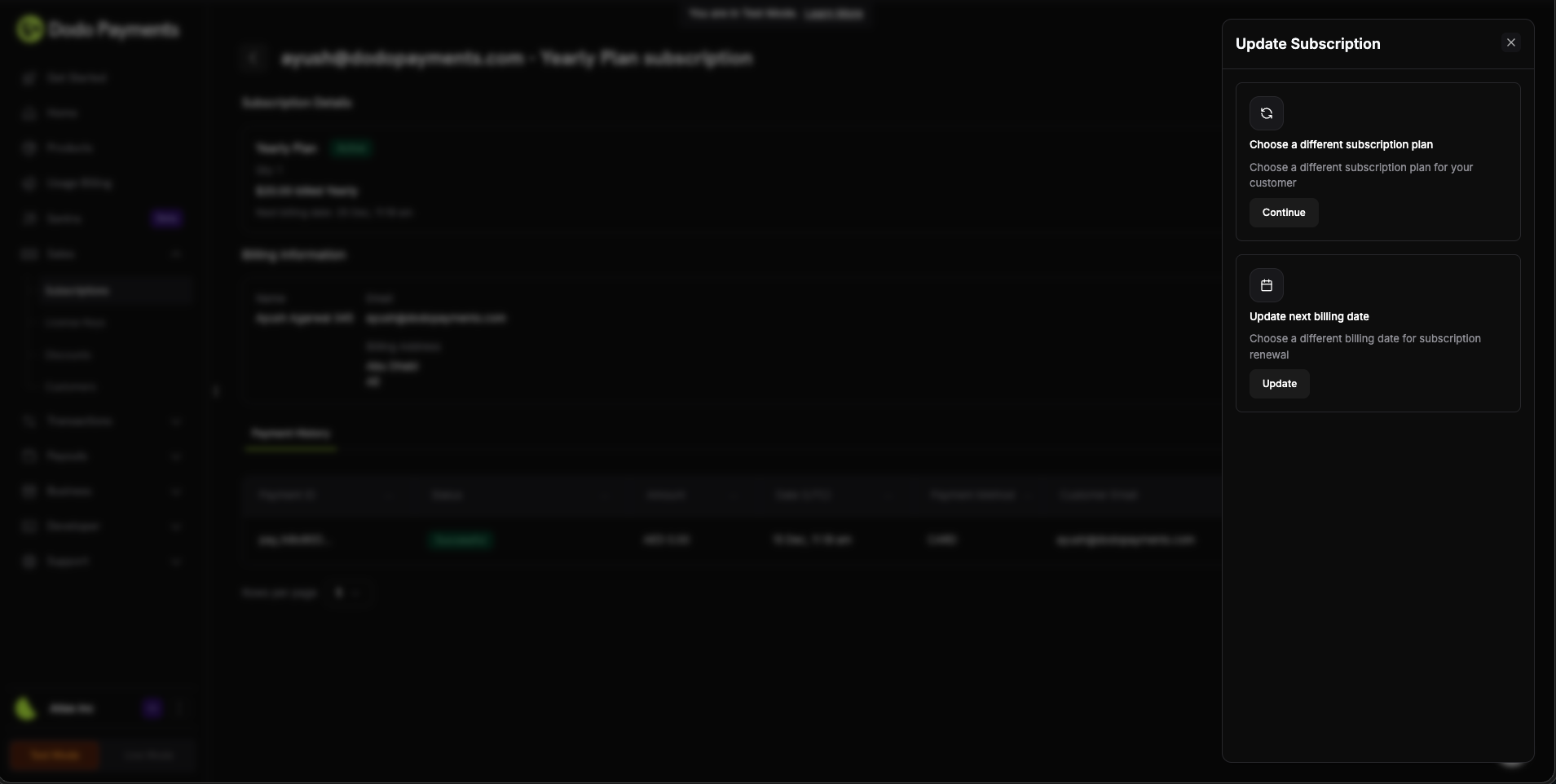
直接从仪表板管理订阅计划,增强控制。您现在可以在单个操作中更改订阅计划并更新下次账单日期,给予您对订阅管理的完全灵活性。
### 优势
* **完全集成**:创建与您的网站无缝融合的结账体验
* **自定义订单摘要**:构建与结账实时同步的自定义UI
* **最大控制**:完全控制结账布局和设计
* **符合PCI标准**:Dodo Payments安全处理所有敏感支付信息
* **实时同步**:使用SDK事件保持您的UI与结账状态同步
### 工作原理
使用 `displayType: 'inline'` 初始化 SDK,并在容器元素中嵌入结账:
```typescript theme={null}
import { DodoPayments } from "dodopayments-checkout";
// Initialize the SDK for inline mode
DodoPayments.Initialize({
mode: "test",
displayType: "inline",
onEvent: (event) => {
if (event.event_type === "checkout.breakdown") {
// Update your UI with real-time tax and total calculations
const breakdown = event.data?.message;
}
},
});
// Open checkout in a specific container
DodoPayments.Checkout.open({
checkoutUrl: "https://test.checkout.dodopayments.com/session/cks_123",
elementId: "dodo-inline-checkout" // ID of the container element
});
```
### 主要特性
* **实时明细事件**:在客户输入其信息时接收 `checkout.breakdown` 事件
* **自定义订单摘要**:构建自己的定价展示,并实时更新
* **无缝集成**:结账框架负责收款,而您掌控布局
* **SDK 方法**:使用 `open()`、`close()` 和 `isOpen()` 以编程方式控制结账流程
结果:与品牌完全匹配的完整集成结账体验,最大程度掌控支付流程。
当您希望完全控制结账设计时使用 inline checkout。如需快速集成并尽可能少地更改现有页面,请使用 [overlay checkout](/developer-resources/overlay-checkout)。
了解更多:[内嵌结账指南](/developer-resources/inline-checkout)
2. **使用现有支付方式创建支付、订阅和结账**\
通过使用现有客户保存的支付方式来简化结账流程。新的 `payment_method_id` 参数允许您使用客户之前保存的支付方式创建支付、订阅或结账会话。
### 优势
* **更快的结账**:跳过回头客户的支付方式收集
* **一键购买**:使用保存的支付方式启用即时购买
* **订阅管理**:轻松使用现有支付方式创建订阅
* **提高转化率**:减少回头客户的结账摩擦
### 工作原理
在创建结账会话、支付或订阅时使用 `payment_method_id`:
```javascript theme={null}
const session = await client.checkoutSessions.create({
product_cart: [{ product_id: 'pdt_123', quantity: 1 }],
customer: {
customer_id: 'cus_123'
},
payment_method_id: 'pm_abc123',
confirm: true
});
```
```javascript theme={null}
const payment = await client.payments.create({
product_cart: [{ product_id: 'pdt_123', quantity: 1 }],
customer: { customer_id: 'cus_123' },
billing: { country: 'US' },
payment_method_id: 'pm_abc123'
});
```
```javascript theme={null}
const subscription = await client.subscriptions.create({
customer: { customer_id: 'cus_123' },
billing: { country: 'US' },
product_id: 'pdt_subscription',
quantity: 1,
payment_method_id: 'pm_abc123'
});
```
在结账会话中使用 `payment_method_id` 时,`confirm` 必须设置为 `true`,并且必须提供现有的 `customer_id`。支付方式会根据支付的货币进行有效性验证。
支付方式必须属于该客户,并与支付货币兼容。如果验证失败,请求将返回错误。
3. **仪表板中的订阅计划变更及下次账单日期更新**
直接从仪表板管理订阅计划,增强控制。您现在可以在单个操作中更改订阅计划并更新下次账单日期,给予您对订阅管理的完全灵活性。
 ### 仪表板功能
* **计划变更**:单击即可升级或降级订阅
* **账单日期控制**:更改计划时更新下次账单日期
* **按比例选项**:选择在更改计划时如何处理按比例计算
* **可视化预览**:在确认之前准确查看计划变更如何影响账单
### 用例
* **客户支持**:快速调整客户请求的订阅计划
* **促销升级**:临时升级具有特定账单日期的客户
* **计划迁移**:顺利过渡客户之间的订阅层级
* **账单对齐**:对齐多个订阅的账单日期
结果:通过仪表板实现完整的订阅管理控制,减少常见订阅调整所需的 API 调用。
使用仪表板快速更改订阅计划,并在您的应用中使用 API 进行程序化订阅管理。
4. **支付URL的短链接**\
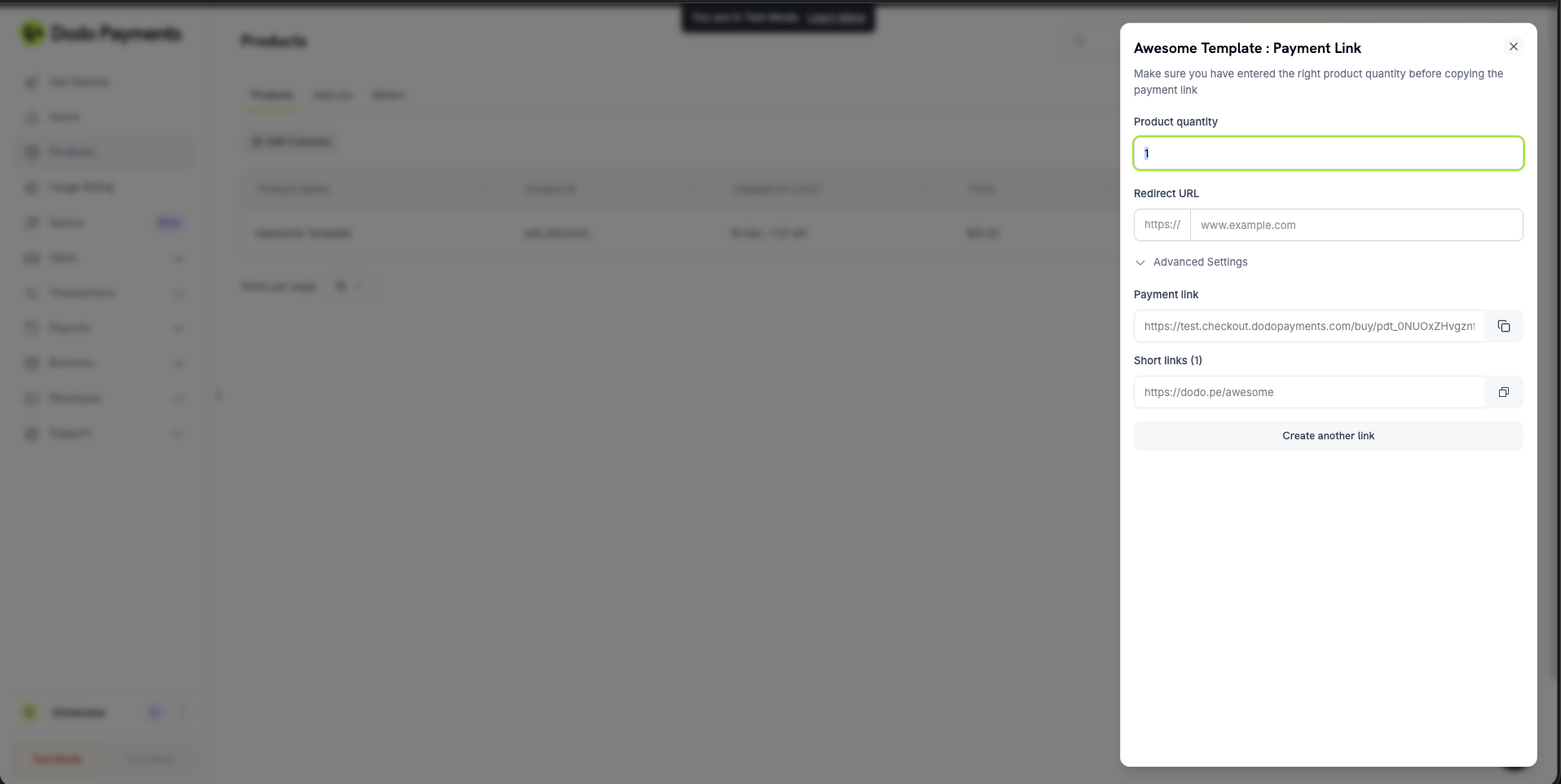
通过我们的新短链接功能生成更简洁、更易分享的支付链接。短链接提供带有自定义短语的缩短结账URL,使其更易于与客户分享或嵌入到您的网站中。
### 仪表板功能
* **计划变更**:单击即可升级或降级订阅
* **账单日期控制**:更改计划时更新下次账单日期
* **按比例选项**:选择在更改计划时如何处理按比例计算
* **可视化预览**:在确认之前准确查看计划变更如何影响账单
### 用例
* **客户支持**:快速调整客户请求的订阅计划
* **促销升级**:临时升级具有特定账单日期的客户
* **计划迁移**:顺利过渡客户之间的订阅层级
* **账单对齐**:对齐多个订阅的账单日期
结果:通过仪表板实现完整的订阅管理控制,减少常见订阅调整所需的 API 调用。
使用仪表板快速更改订阅计划,并在您的应用中使用 API 进行程序化订阅管理。
4. **支付URL的短链接**\
通过我们的新短链接功能生成更简洁、更易分享的支付链接。短链接提供带有自定义短语的缩短结账URL,使其更易于与客户分享或嵌入到您的网站中。
 ### 优势
* **更简洁的URL**:用短的品牌链接替换长的支付URL
* **更好的信任**:专业外观的链接,增强客户信心
* **更易分享**:简化的URL非常适合短信、电子邮件或社交媒体
* **自定义短语**:为您的产品创建易记的品牌短链接
### 工作原理
在创建结账会话或支付链接时启用短链接:
```javascript theme={null}
const session = await client.checkoutSessions.create({
product_cart: [{ product_id: 'pdt_123', quantity: 1 }],
short_link: true,
return_url: 'https://yourapp.com/success'
});
```
```javascript theme={null}
const payment = await client.payments.create({
product_cart: [{ product_id: 'pdt_123', quantity: 1 }],
short_link: true,
return_url: 'https://yourapp.com/success'
});
```
结果:缩短的支付链接更易分享,外观更专业,提升转化率与客户信任。
短链接在您的仪表板中管理,并可通过 [List Short Links API](/api-reference/products/get-products-short-links) 查看。
5. **`redirect_immediately` 标志 - 跳过支付成功页**\
使用新的 `redirect_immediately` 标志控制结账流程。启用后,客户在付款完成后会立即被重定向,绕过默认的成功页,提供更快速、更顺畅的体验。
### 用例
* **更快的结账流程**:通过跳过中间页面减少摩擦
* **自定义成功页面**:直接重定向到您的品牌成功页面
* **移动优化**:通过即时重定向改善移动结账体验
* **嵌入式结账**:与覆盖或嵌入式结账流程无缝集成
### 工作原理
在结账会话、支付或订阅中启用即时重定向:
```javascript theme={null}
const session = await client.checkoutSessions.create({
product_cart: [{ product_id: 'pdt_123', quantity: 1 }],
feature_flags: {
redirect_immediately: true
},
return_url: 'https://yourapp.com/success'
});
```
```javascript theme={null}
const payment = await client.payments.create({
product_cart: [{ product_id: 'pdt_123', quantity: 1 }],
redirect_immediately: true,
return_url: 'https://yourapp.com/success'
});
```
```javascript theme={null}
const subscription = await client.subscriptions.create({
customer: { customer_id: 'cus_123' },
billing: { country: 'US' },
product_id: 'pdt_subscription',
quantity: 1,
redirect_immediately: true,
return_url: 'https://yourapp.com/success'
});
```
当您拥有比默认支付成功页更能提升用户体验的自定义成功页时,请使用 `redirect_immediately: true`。
当启用 `redirect_immediately` 时,客户将在付款完成后立即被重定向到您的 `return_url`,完全跳过默认成功页。
6. **按需订阅 - 适用于所有企业**\
现在所有企业都启用了按需订阅,为基于使用和计量的服务提供灵活的计费控制。
### 这使得什么成为可能
* **基于使用的计费**:创建订阅并根据实际使用向客户收费
* **灵活的计费周期**:按需向客户收费,而不是固定间隔
* **计量服务**:非常适合API使用、存储、计算时间和其他计量资源
* **手动收费控制**:在需要时手动创建收费,给予您对计费时机的完全控制
### 工作原理
创建按需订阅并根据需要向客户收费:
```javascript theme={null}
// Create an on-demand subscription
const subscription = await client.subscriptions.create({
customer: { customer_id: 'cus_123' },
billing: { country: 'US' },
product_id: 'pdt_api_access',
quantity: 1,
on_demand: { mandate_only: true }
});
// Charge the customer when usage occurs
await client.subscriptions.charge(subscription.subscription_id, {
product_price: 4900,
product_currency: 'USD',
product_description: 'API usage for September: 1,000 requests'
});
```
结果:完全掌控何时以及向客户收取多少费用,非常适合基于使用量的商业模式。
了解更多:[按需订阅](/developer-resources/ondemand-subscriptions)
7. **常规错误修复和增强**\
此版本包括性能改进、UI优化,并解决了小错误,以提供更可靠、流畅的体验。
### 优势
* **更简洁的URL**:用短的品牌链接替换长的支付URL
* **更好的信任**:专业外观的链接,增强客户信心
* **更易分享**:简化的URL非常适合短信、电子邮件或社交媒体
* **自定义短语**:为您的产品创建易记的品牌短链接
### 工作原理
在创建结账会话或支付链接时启用短链接:
```javascript theme={null}
const session = await client.checkoutSessions.create({
product_cart: [{ product_id: 'pdt_123', quantity: 1 }],
short_link: true,
return_url: 'https://yourapp.com/success'
});
```
```javascript theme={null}
const payment = await client.payments.create({
product_cart: [{ product_id: 'pdt_123', quantity: 1 }],
short_link: true,
return_url: 'https://yourapp.com/success'
});
```
结果:缩短的支付链接更易分享,外观更专业,提升转化率与客户信任。
短链接在您的仪表板中管理,并可通过 [List Short Links API](/api-reference/products/get-products-short-links) 查看。
5. **`redirect_immediately` 标志 - 跳过支付成功页**\
使用新的 `redirect_immediately` 标志控制结账流程。启用后,客户在付款完成后会立即被重定向,绕过默认的成功页,提供更快速、更顺畅的体验。
### 用例
* **更快的结账流程**:通过跳过中间页面减少摩擦
* **自定义成功页面**:直接重定向到您的品牌成功页面
* **移动优化**:通过即时重定向改善移动结账体验
* **嵌入式结账**:与覆盖或嵌入式结账流程无缝集成
### 工作原理
在结账会话、支付或订阅中启用即时重定向:
```javascript theme={null}
const session = await client.checkoutSessions.create({
product_cart: [{ product_id: 'pdt_123', quantity: 1 }],
feature_flags: {
redirect_immediately: true
},
return_url: 'https://yourapp.com/success'
});
```
```javascript theme={null}
const payment = await client.payments.create({
product_cart: [{ product_id: 'pdt_123', quantity: 1 }],
redirect_immediately: true,
return_url: 'https://yourapp.com/success'
});
```
```javascript theme={null}
const subscription = await client.subscriptions.create({
customer: { customer_id: 'cus_123' },
billing: { country: 'US' },
product_id: 'pdt_subscription',
quantity: 1,
redirect_immediately: true,
return_url: 'https://yourapp.com/success'
});
```
当您拥有比默认支付成功页更能提升用户体验的自定义成功页时,请使用 `redirect_immediately: true`。
当启用 `redirect_immediately` 时,客户将在付款完成后立即被重定向到您的 `return_url`,完全跳过默认成功页。
6. **按需订阅 - 适用于所有企业**\
现在所有企业都启用了按需订阅,为基于使用和计量的服务提供灵活的计费控制。
### 这使得什么成为可能
* **基于使用的计费**:创建订阅并根据实际使用向客户收费
* **灵活的计费周期**:按需向客户收费,而不是固定间隔
* **计量服务**:非常适合API使用、存储、计算时间和其他计量资源
* **手动收费控制**:在需要时手动创建收费,给予您对计费时机的完全控制
### 工作原理
创建按需订阅并根据需要向客户收费:
```javascript theme={null}
// Create an on-demand subscription
const subscription = await client.subscriptions.create({
customer: { customer_id: 'cus_123' },
billing: { country: 'US' },
product_id: 'pdt_api_access',
quantity: 1,
on_demand: { mandate_only: true }
});
// Charge the customer when usage occurs
await client.subscriptions.charge(subscription.subscription_id, {
product_price: 4900,
product_currency: 'USD',
product_description: 'API usage for September: 1,000 requests'
});
```
结果:完全掌控何时以及向客户收取多少费用,非常适合基于使用量的商业模式。
了解更多:[按需订阅](/developer-resources/ondemand-subscriptions)
7. **常规错误修复和增强**\
此版本包括性能改进、UI优化,并解决了小错误,以提供更可靠、流畅的体验。