> ## Documentation Index
> Fetch the complete documentation index at: https://docs.dodopayments.com/llms.txt
> Use this file to discover all available pages before exploring further.
# v1.113.6(2026年8月22日)
> 通过 status 字段暂停和恢复订阅,以替代已移除的 pause 字段;新增原生 Purchasing Power Parity(支持按国家设置百分比)、Charm Pricing、归档企业和品牌、Milestones 页面,以及引导式设置体验。
## 破坏性变更
**`PATCH /subscriptions/{subscription_id}` 上的布尔 `pause` 字段已被移除。** 现在使用该字段会始终返回 `422`,而不是静默无效,因此仍在发送该字段的集成会收到明确错误,不会再出现订阅始终无法暂停的情况。
暂停和恢复操作已移至 `status` 字段:发送 `{"status": "paused"}` 以暂停,发送 `{"status": "active"}` 以恢复。现在没有单独的暂停 endpoint。该字段必须单独发送——如果与任何其他字段组合发送,也会被拒绝并返回 `422`。
如果你是按照之前的文档接入暂停 API 的,请在升级前更新这些调用。
了解更多:[暂停和恢复订阅](/features/subscription#pausing-and-resuming-subscriptions)
## 新功能
### 1. **订阅暂停和恢复**
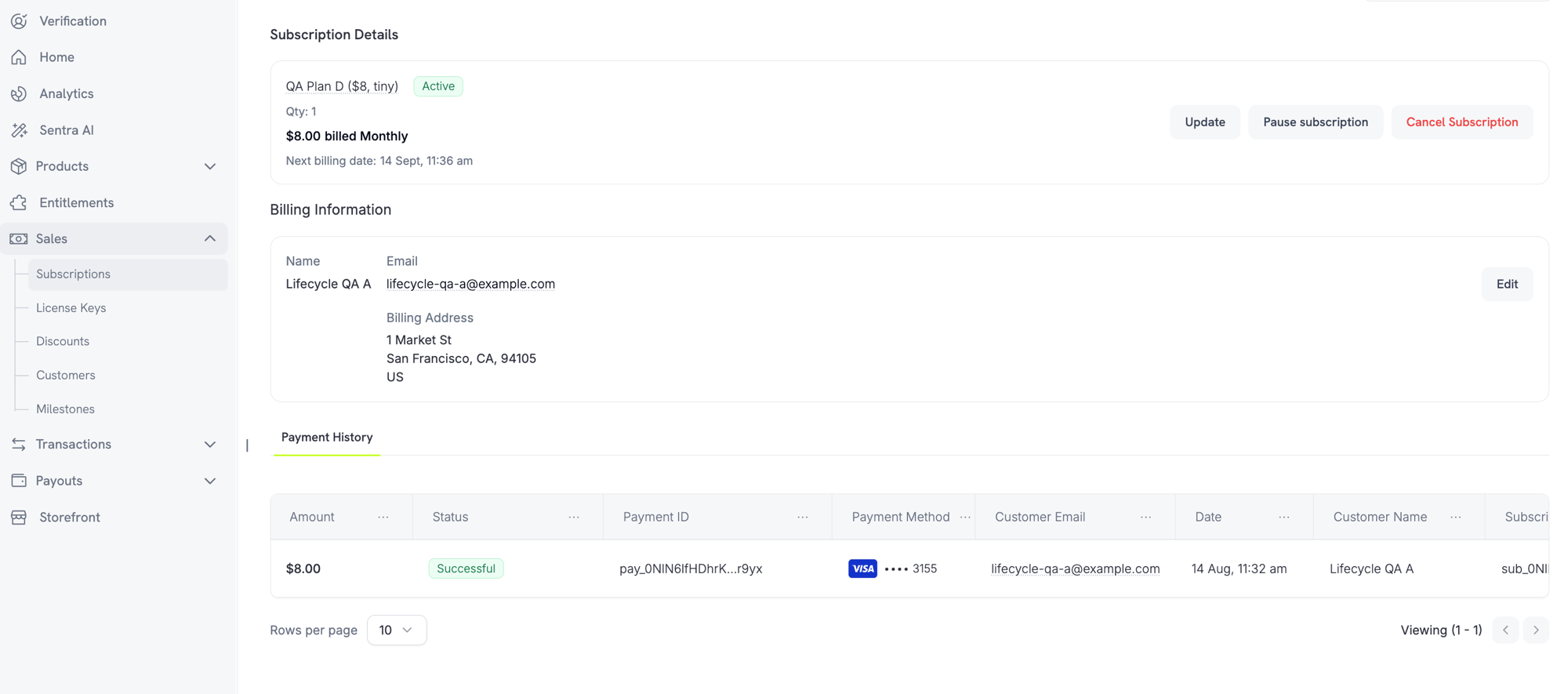
现在,商户可以直接在 dashboard 的订阅详情页面暂停和恢复订阅。如果你的企业设置允许,客户也可以从 Customer Portal 暂停订阅。
**商户控制**
在订阅详情页面上使用 **Pause subscription** 或 **Resume subscription** 按钮暂停或恢复订阅。
 **企业设置**
**Settings → Subscriptions** 下会显示两个新设置:
* **Allow Subscription Pause** — "允许客户随时从 customer portal 暂停和恢复其订阅"
* **Bill Usage at Pause** — "在基于用量的订阅暂停时,立即结算其应付用量"
**客户体验**
客户从 Customer Portal 暂停订阅时,会看到一条警告:暂停会立即撤销访问权限。在恢复订阅之前,功能、下载内容和 license keys 都将停止工作。
了解更多:[订阅](/features/subscription) | [Customer Portal](/features/customer-portal)
### 2. **Purchasing Power Parity**
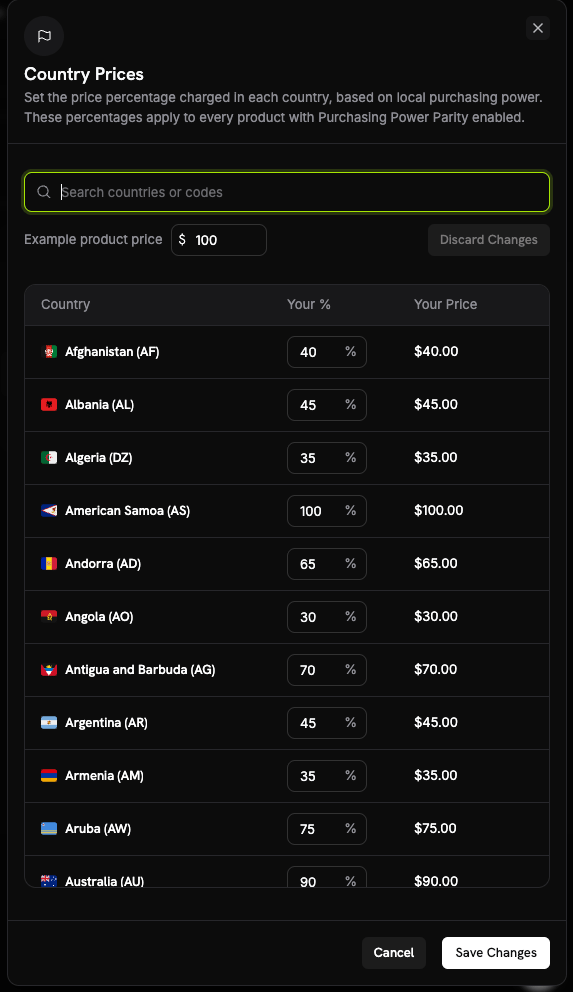
原生 PPP 取代了对第三方工具的依赖。在 **Business Settings** 的 **Country Prices** 表格中为每个国家设置百分比,即可应用于整个企业。这些百分比会应用于所有启用了 PPP 的产品。
**工作原理**
* 每个产品都需要在其定价部分单独勾选 **Purchasing Power Parity** 复选框以启用该功能。
* PPP 要求启用 Adaptive Currency。如果企业关闭了 Adaptive Currency,则无法为产品启用 PPP。
**企业设置**
**Settings → Subscriptions** 下会显示两个新设置:
* **Allow Subscription Pause** — "允许客户随时从 customer portal 暂停和恢复其订阅"
* **Bill Usage at Pause** — "在基于用量的订阅暂停时,立即结算其应付用量"
**客户体验**
客户从 Customer Portal 暂停订阅时,会看到一条警告:暂停会立即撤销访问权限。在恢复订阅之前,功能、下载内容和 license keys 都将停止工作。
了解更多:[订阅](/features/subscription) | [Customer Portal](/features/customer-portal)
### 2. **Purchasing Power Parity**
原生 PPP 取代了对第三方工具的依赖。在 **Business Settings** 的 **Country Prices** 表格中为每个国家设置百分比,即可应用于整个企业。这些百分比会应用于所有启用了 PPP 的产品。
**工作原理**
* 每个产品都需要在其定价部分单独勾选 **Purchasing Power Parity** 复选框以启用该功能。
* PPP 要求启用 Adaptive Currency。如果企业关闭了 Adaptive Currency,则无法为产品启用 PPP。
 了解更多:[Purchasing Power Parity](/features/purchasing-power-parity)
### 3. **Charm Pricing**
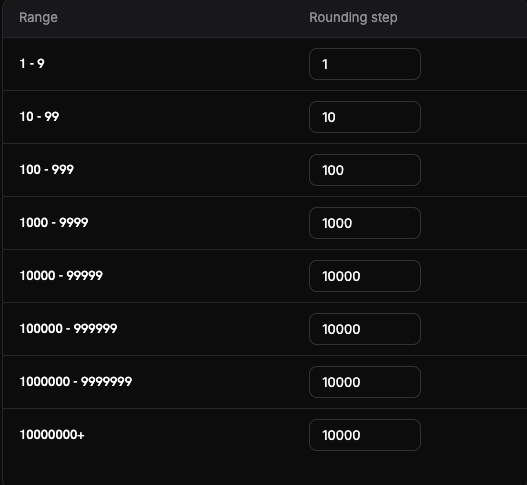
将换算后的价格四舍五入为更具心理吸引力的数值,可在 **Business Settings** 的 **Set up Charm Pricing** 表格中进行配置。每个价格范围(区间)都可以设置一个舍入步长,因此小额和大额价格会采用不同的舍入方式。
**舍入类型**
可选择四种舍入类型(建议从 Nearest 开始):
* **Nearest** — 舍入到最近的步长
* **Floor** — 向下舍入
* **Ceiling** — 向上舍入
* **Whole** — 舍入为整数
**Try it** 预览会在保存前显示给定金额的舍入结果。
了解更多:[Purchasing Power Parity](/features/purchasing-power-parity)
### 3. **Charm Pricing**
将换算后的价格四舍五入为更具心理吸引力的数值,可在 **Business Settings** 的 **Set up Charm Pricing** 表格中进行配置。每个价格范围(区间)都可以设置一个舍入步长,因此小额和大额价格会采用不同的舍入方式。
**舍入类型**
可选择四种舍入类型(建议从 Nearest 开始):
* **Nearest** — 舍入到最近的步长
* **Floor** — 向下舍入
* **Ceiling** — 向上舍入
* **Whole** — 舍入为整数
**Try it** 预览会在保存前显示给定金额的舍入结果。
 了解更多:[Charm Pricing](/features/charm-pricing)
### 4. **归档企业和品牌**
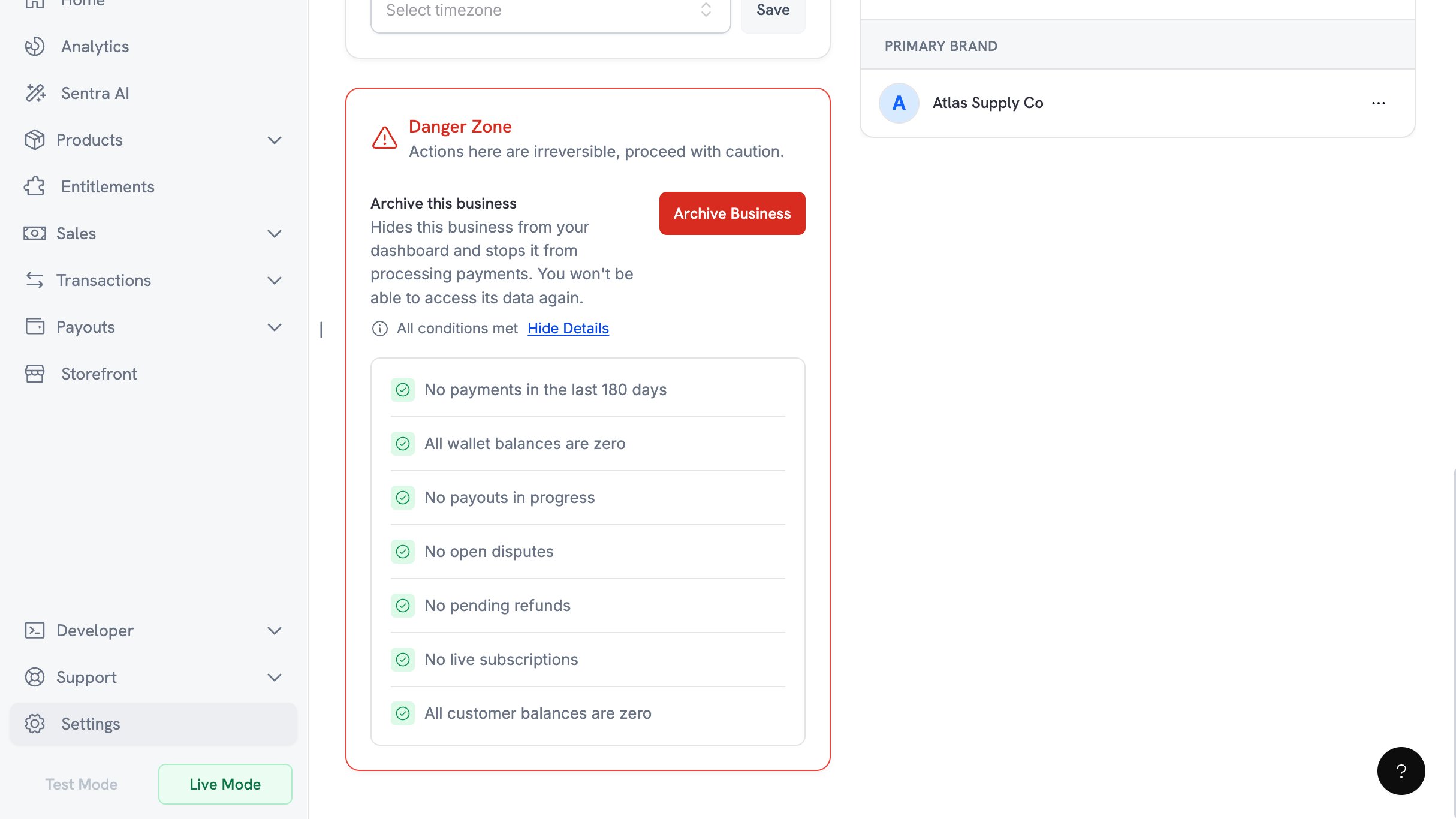
如果你不再以某个企业开展业务,可以从 **Business Settings → Danger Zone → Archive Business** 归档该企业。此操作仅限所有者执行,且无法撤销。
**资格检查清单**
归档前必须同时满足以下七个条件:
* 过去 180 天内没有付款
* 所有 wallet 余额均为零
* 没有进行中的 payouts
* 没有未解决的 disputes
* 没有待处理的 refunds
* 没有有效订阅
* 所有客户余额均为零
了解更多:[Charm Pricing](/features/charm-pricing)
### 4. **归档企业和品牌**
如果你不再以某个企业开展业务,可以从 **Business Settings → Danger Zone → Archive Business** 归档该企业。此操作仅限所有者执行,且无法撤销。
**资格检查清单**
归档前必须同时满足以下七个条件:
* 过去 180 天内没有付款
* 所有 wallet 余额均为零
* 没有进行中的 payouts
* 没有未解决的 disputes
* 没有待处理的 refunds
* 没有有效订阅
* 所有客户余额均为零
 **确认流程**
确认需要向所有者发送包含 6 位数代码的电子邮件。你有三次尝试机会,代码将在 10 分钟后过期。
品牌可以独立于企业进行归档。
了解更多:[归档企业](/features/archive-business)
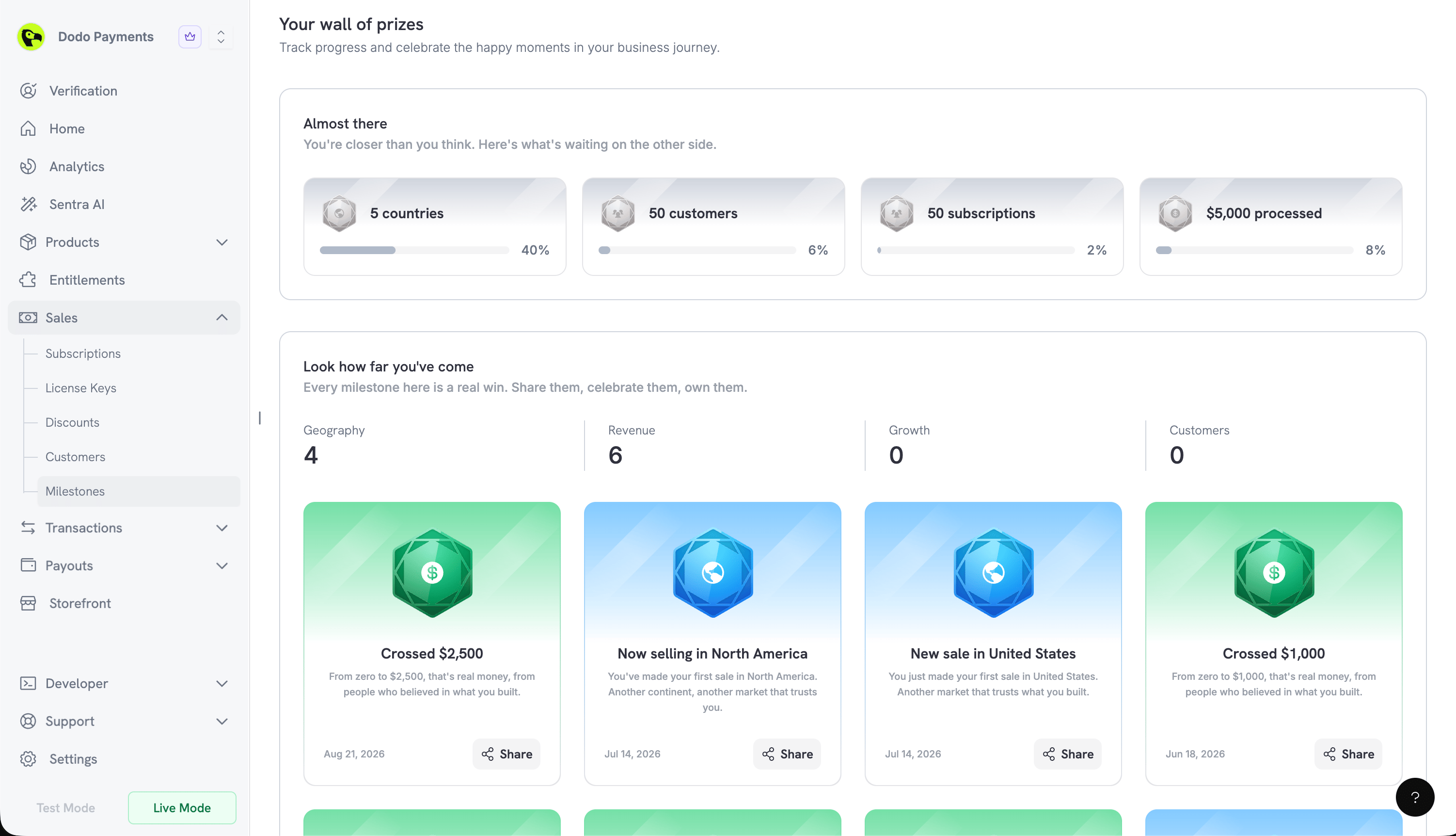
### 5. **Milestones**
新的 **Milestones** 页面用于展示企业的成长情况,位于 dashboard 的 **Sales → Milestones**。该页面通过四个类别跟踪进展:**Geography**、**Revenue**、**Growth** 和 **Customers**。
**进度和成就卡片**
* **Almost there** 显示即将达成的里程碑,并为每个里程碑显示完成百分比
* **Look how far you've come** 用于展示你已经达成的里程碑
达成的里程碑会生成可分享的卡片。点击 **Share** 可打开预览,其中包含 **Include business & logo** 开关,以及用于将卡片保存为图片的 **Download** 按钮。
**确认流程**
确认需要向所有者发送包含 6 位数代码的电子邮件。你有三次尝试机会,代码将在 10 分钟后过期。
品牌可以独立于企业进行归档。
了解更多:[归档企业](/features/archive-business)
### 5. **Milestones**
新的 **Milestones** 页面用于展示企业的成长情况,位于 dashboard 的 **Sales → Milestones**。该页面通过四个类别跟踪进展:**Geography**、**Revenue**、**Growth** 和 **Customers**。
**进度和成就卡片**
* **Almost there** 显示即将达成的里程碑,并为每个里程碑显示完成百分比
* **Look how far you've come** 用于展示你已经达成的里程碑
达成的里程碑会生成可分享的卡片。点击 **Share** 可打开预览,其中包含 **Include business & logo** 开关,以及用于将卡片保存为图片的 **Download** 按钮。
 ### 6. **引导式设置体验**
现在,所有注册路径都会进入同一个 onboarding 对话框,之后也可以通过 dashboard 标题栏中的 **Setup guide** 按钮再次打开。进度会自动保存,因此指南会从你上次离开的位置继续。上线时会显示庆祝页面。
在 test mode 中创建的产品可以在 Products 页面通过 **Import from Test** 复制到 live。
### 6. **引导式设置体验**
现在,所有注册路径都会进入同一个 onboarding 对话框,之后也可以通过 dashboard 标题栏中的 **Setup guide** 按钮再次打开。进度会自动保存,因此指南会从你上次离开的位置继续。上线时会显示庆祝页面。
在 test mode 中创建的产品可以在 Products 页面通过 **Import from Test** 复制到 live。