> ## Documentation Index
> Fetch the complete documentation index at: https://docs.dodopayments.com/llms.txt
> Use this file to discover all available pages before exploring further.
# v1.113.28(2026 年 9 月 10 日)
> 新增 Reports 标签页,支持余额、费用和对账导出;新增订阅宽限期、Customer Blocklist、手动重试支付、每笔支付的活动日志、重制版折扣表单、分离的取消控制项、今日无需付款时可选银行卡的订阅、B2B 结账时的必填 Tax ID 标记,以及 Georgian 结账页面。
## 新功能
### 1. **Reports**
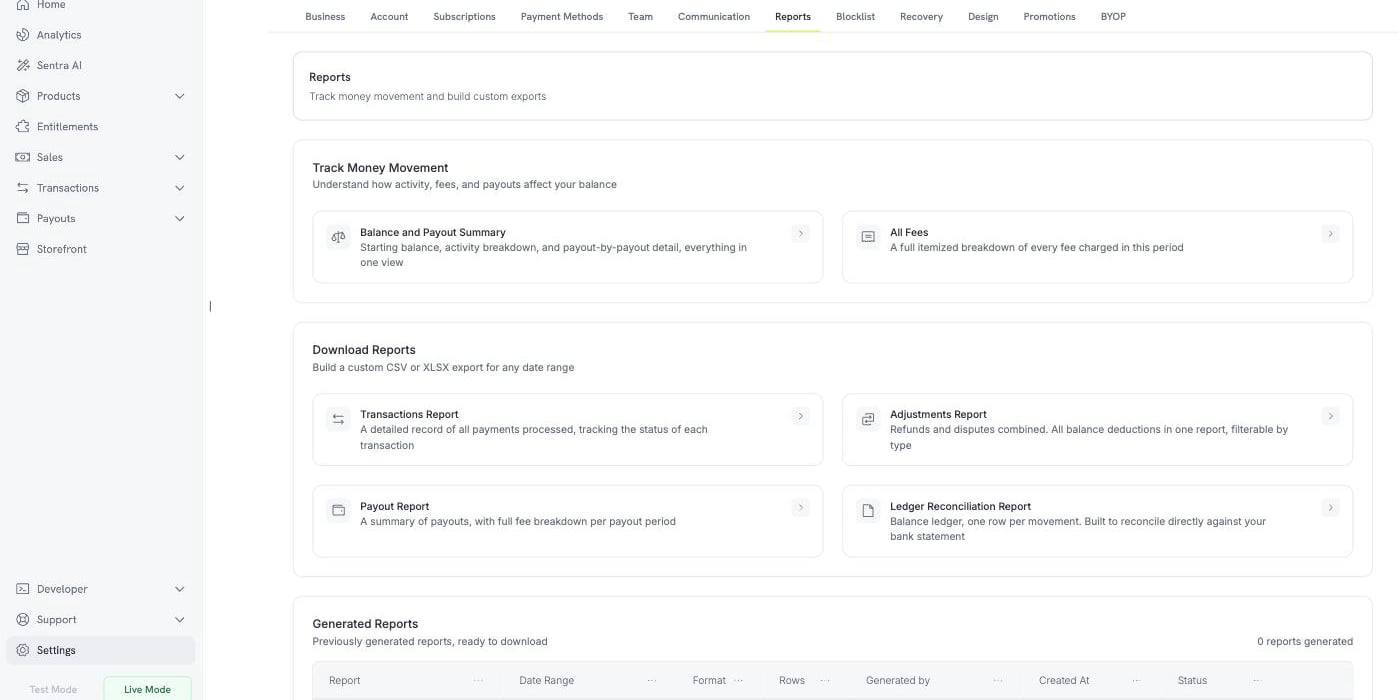
**Settings** 下新增的 **Reports** 标签页,将余额、费用和对账报告集中到了一处。
**跟踪资金流动**
提供两个始终保持最新的视图,说明为“了解活动、费用和打款如何影响您的余额”:
* **余额和打款摘要** — 在一个视图中查看期初余额、活动明细以及逐笔打款详情
* **所有费用** — 完整列出该期间收取的每笔费用
**下载报告**
从四种报告类型中选择:**Transactions Report**、**Adjustments Report**、**Payout Report** 和 **Ledger Reconciliation Report**,即可针对任意日期范围生成自定义 CSV 或 XLSX 导出文件。Ledger Reconciliation Report 按每笔余额变动生成一行,用于与银行对账单进行核对。
**已生成的报告**
您导出的所有内容都会列在 **Generated Reports** 下,其中包含日期范围、格式、行数、生成者和下载操作。
 了解更多:[Reports](/features/reports)
### 2. **Subscription Grace Period**
续订失败的订阅现在可以在可配置的时间窗口内继续运行,而不是立即进入暂停状态。
在 **Settings → Subscriptions** 下启用 **Subscription Grace Period**,并设置 **Number of days of grace period**,可选择 1 到 30 天。宽限期默认关闭。
在此窗口期间,订阅会进入新的 `past_due` 状态:保留访问权限并继续累积用量,因此如果客户只是银行卡过期,他们可以在处理问题期间继续使用服务。窗口开启时会触发新的 `subscription.past_due` webhook。
通过 **Status of subscription after grace period** 选择窗口结束时仍未付款的处理方式:**On Hold**(与当前行为一致)或 **Cancel Subscription**。
了解更多:[Reports](/features/reports)
### 2. **Subscription Grace Period**
续订失败的订阅现在可以在可配置的时间窗口内继续运行,而不是立即进入暂停状态。
在 **Settings → Subscriptions** 下启用 **Subscription Grace Period**,并设置 **Number of days of grace period**,可选择 1 到 30 天。宽限期默认关闭。
在此窗口期间,订阅会进入新的 `past_due` 状态:保留访问权限并继续累积用量,因此如果客户只是银行卡过期,他们可以在处理问题期间继续使用服务。窗口开启时会触发新的 `subscription.past_due` webhook。
通过 **Status of subscription after grace period** 选择窗口结束时仍未付款的处理方式:**On Hold**(与当前行为一致)或 **Cancel Subscription**。
 了解更多:[Grace Period](/features/subscription#grace-period)
### 3. **Customer Blocklist**
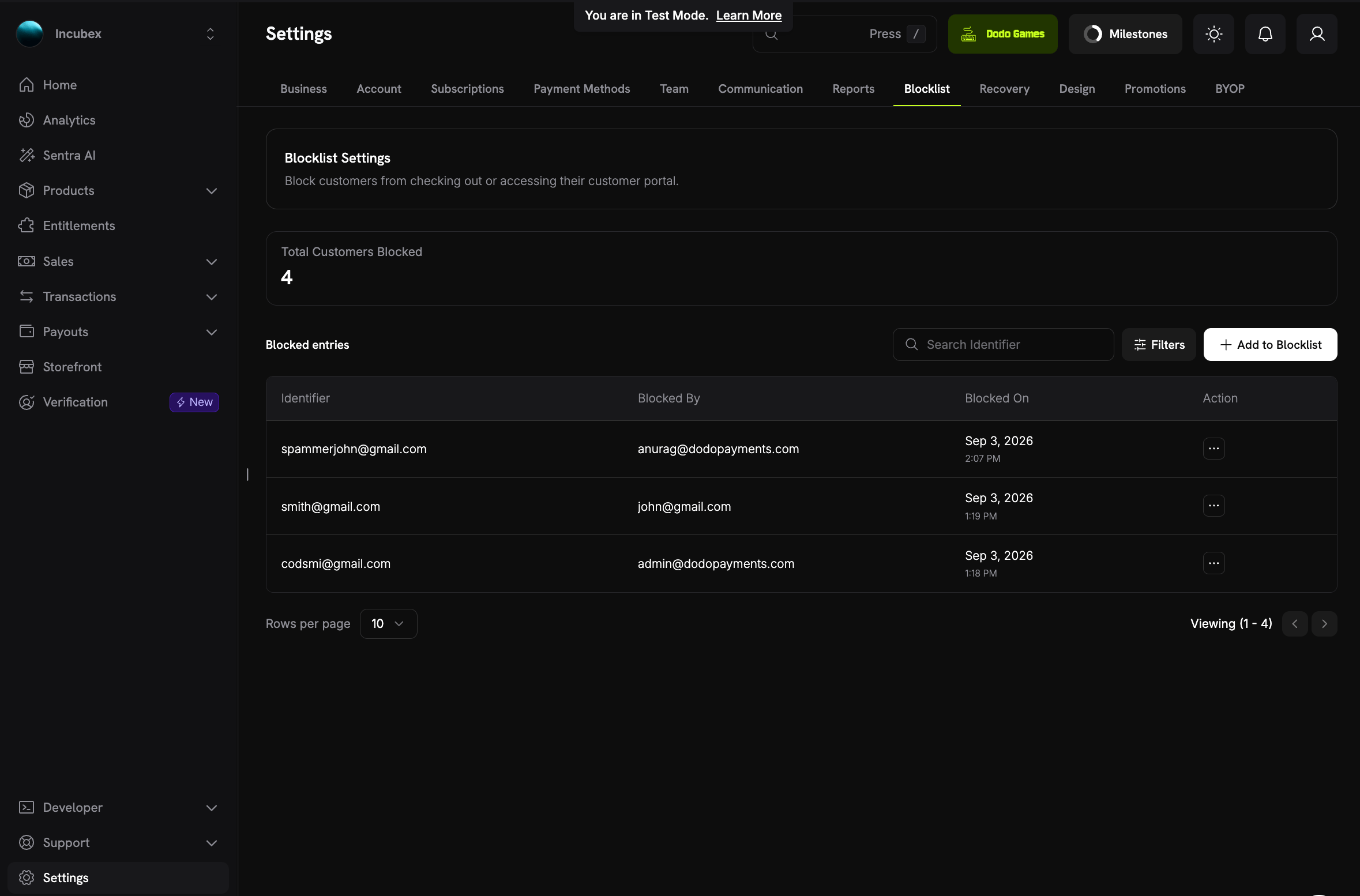
您可以按客户 ID 或电子邮件地址,阻止不应再次向您购买的客户。
阻止客户会取消其有效订阅、停止未来的结账会话和直接支付,并将其 Customer Portal 设为只读。由于条目按电子邮件地址匹配,客户使用相同电子邮件再次注册时仍会被拦截。
阻止列表条目支持备注,因此您可以记录阻止某人的原因。
了解更多:[Grace Period](/features/subscription#grace-period)
### 3. **Customer Blocklist**
您可以按客户 ID 或电子邮件地址,阻止不应再次向您购买的客户。
阻止客户会取消其有效订阅、停止未来的结账会话和直接支付,并将其 Customer Portal 设为只读。由于条目按电子邮件地址匹配,客户使用相同电子邮件再次注册时仍会被拦截。
阻止列表条目支持备注,因此您可以记录阻止某人的原因。
 了解更多:[Customer Blocklist](/features/customer-blocklist)
### 4. **Manual Payment Retry**
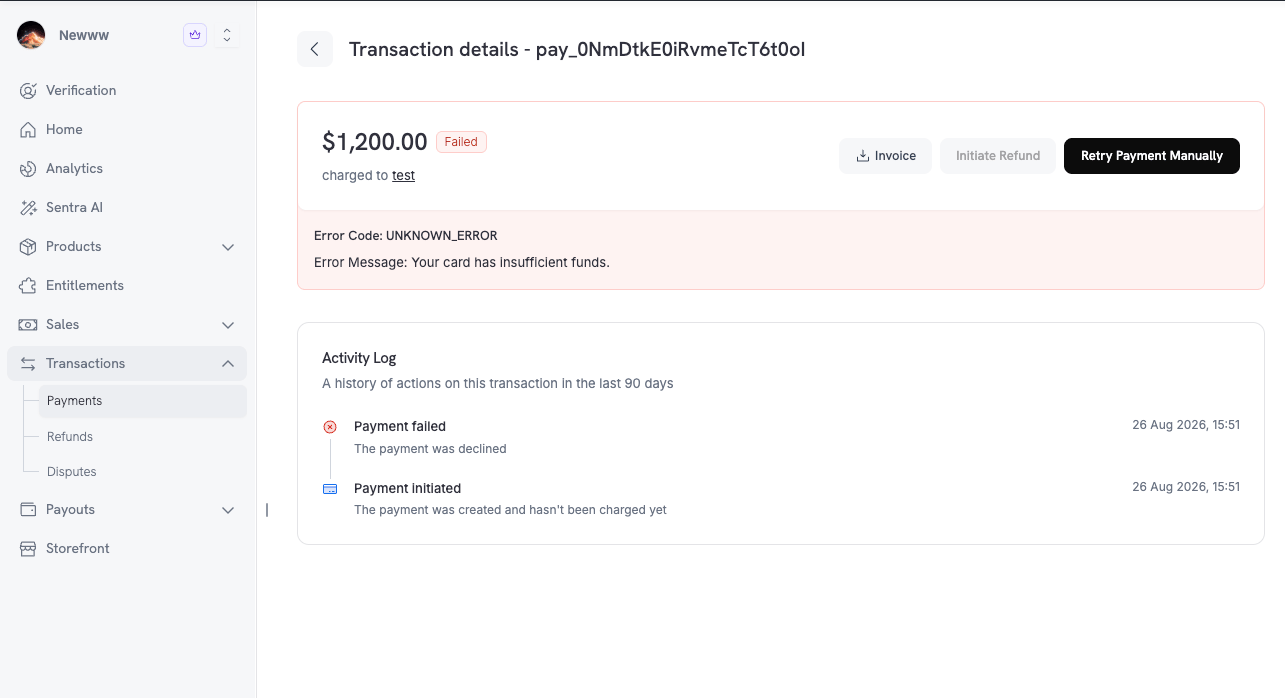
您可以在支付详情页使用 **Retry Payment Manually**,自行重试失败的订阅续订,而不必等待自动重试计划。扣款会使用订阅中已保存的支付方式,因此客户无需执行任何操作,并且不会消耗自动计划中的一次尝试机会。
每张续订发票最多允许三次手动重试,且重试之间设有冷却时间:第二次前为一小时,第三次前为三小时,以避免反复拒付影响您的授权率。
了解更多:[Customer Blocklist](/features/customer-blocklist)
### 4. **Manual Payment Retry**
您可以在支付详情页使用 **Retry Payment Manually**,自行重试失败的订阅续订,而不必等待自动重试计划。扣款会使用订阅中已保存的支付方式,因此客户无需执行任何操作,并且不会消耗自动计划中的一次尝试机会。
每张续订发票最多允许三次手动重试,且重试之间设有冷却时间:第二次前为一小时,第三次前为三小时,以避免反复拒付影响您的授权率。
 了解更多:[Manual Payment Retry](/features/recovery/manual-retry)
### 5. **支付活动日志**
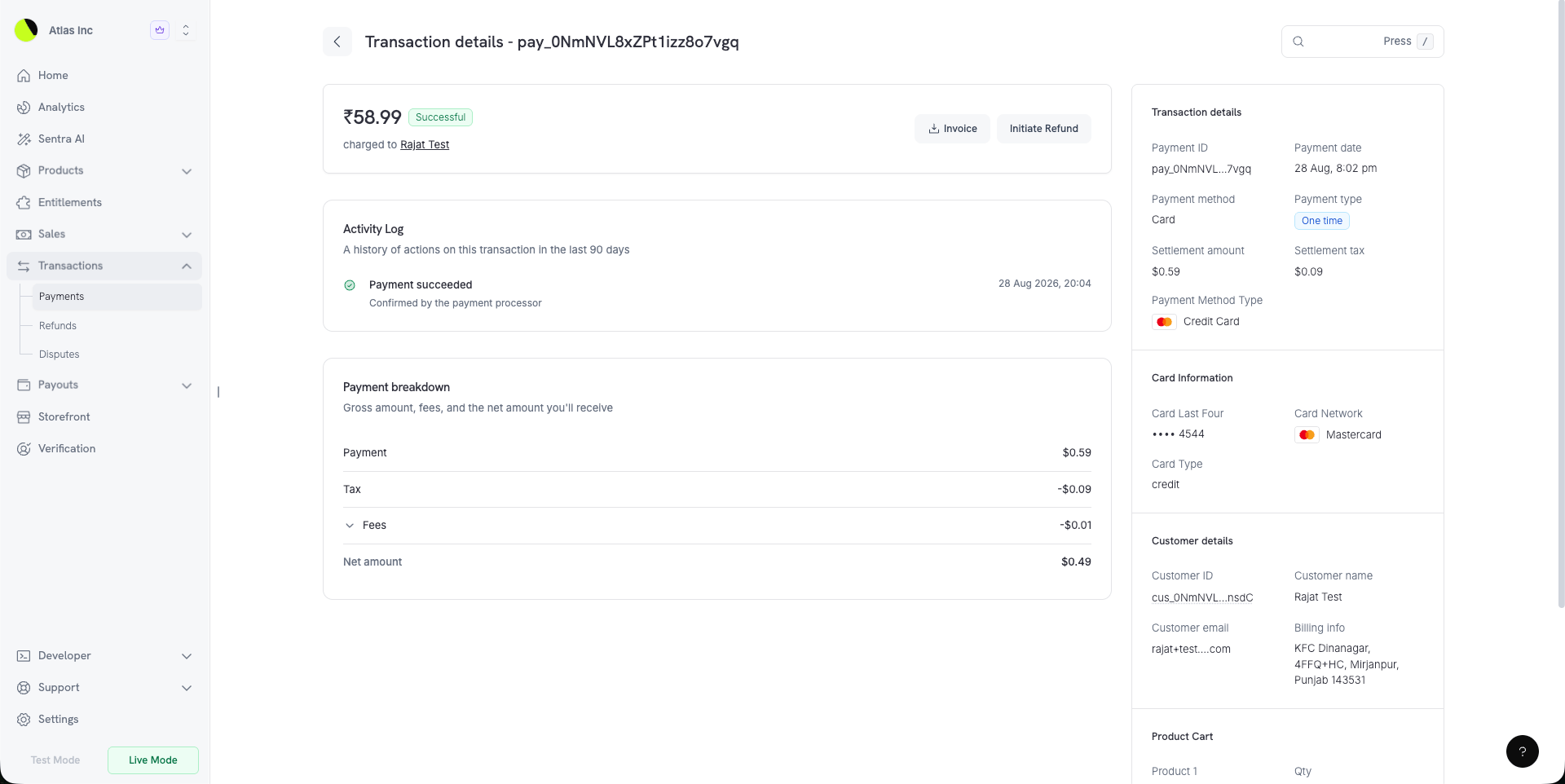
现在,每个支付详情页都包含 **Activity Log**——“该交易过去 90 天内的操作历史”。
日志按顺序记录完整生命周期,从 **Payment initiated**、身份验证和扣款,到 **Payment succeeded**,并继续记录退款和争议。因此,有争议的支付会呈现为一个完整故事,而不是几条互不相连的记录。
了解更多:[Manual Payment Retry](/features/recovery/manual-retry)
### 5. **支付活动日志**
现在,每个支付详情页都包含 **Activity Log**——“该交易过去 90 天内的操作历史”。
日志按顺序记录完整生命周期,从 **Payment initiated**、身份验证和扣款,到 **Payment succeeded**,并继续记录退款和争议。因此,有争议的支付会呈现为一个完整故事,而不是几条互不相连的记录。
 ### 6. **重制版折扣表单**
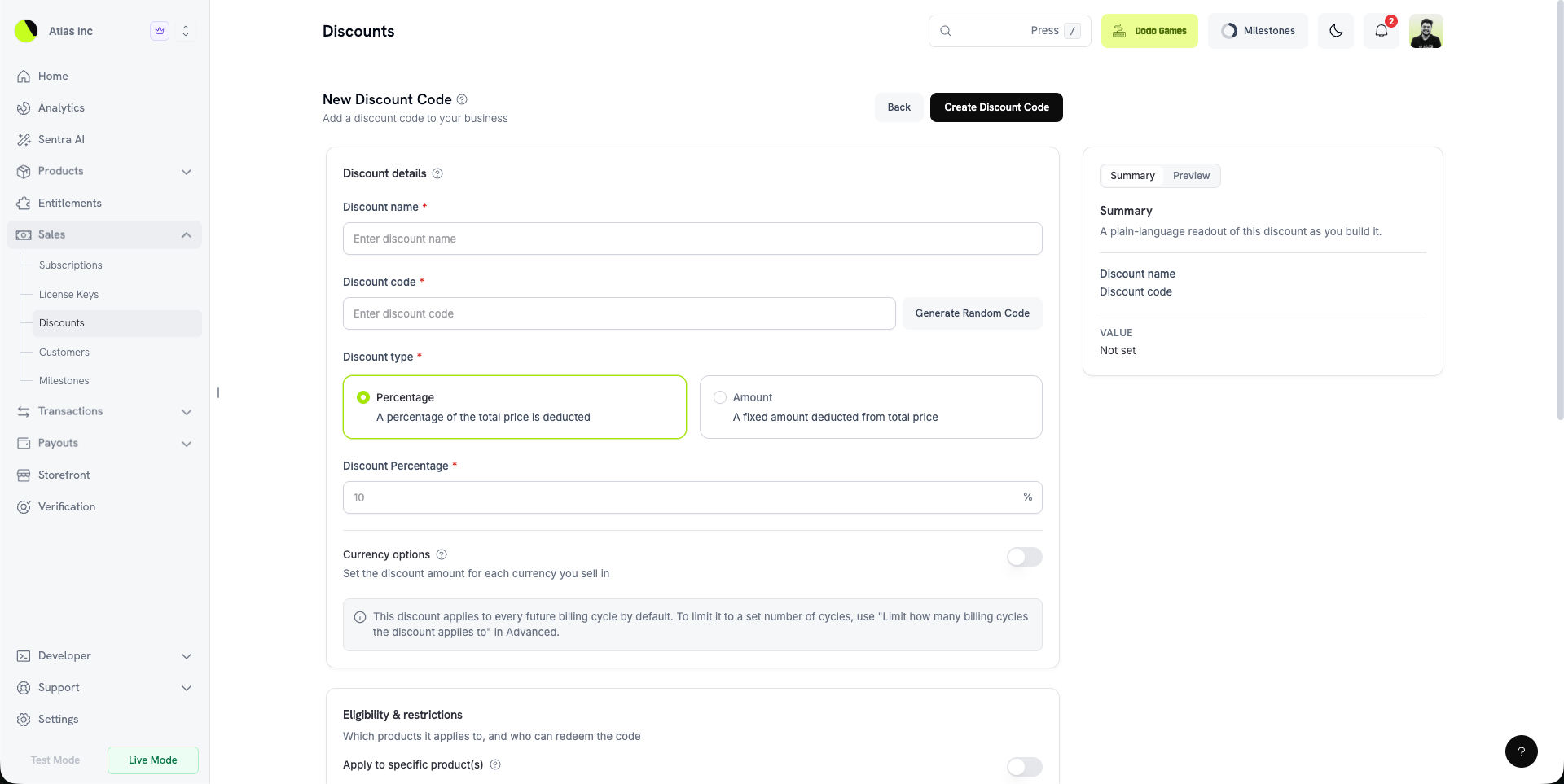
现在,创建折扣代码时,您可以在创建过程中实时查看所构建的内容。侧边面板可在 **Summary**(以通俗语言说明折扣)和 **Preview**(按照客户在结账时看到的方式呈现折扣)之间切换。
**Currency options** 允许您为所销售的每种货币设置折扣金额。**Eligibility & restrictions** 将产品和客户规则集中在一起。
兑换次数限制、计费周期限制和 **Require a minimum order value**(按货币执行的最低购物车金额)现在位于 **Advanced** 下。
### 6. **重制版折扣表单**
现在,创建折扣代码时,您可以在创建过程中实时查看所构建的内容。侧边面板可在 **Summary**(以通俗语言说明折扣)和 **Preview**(按照客户在结账时看到的方式呈现折扣)之间切换。
**Currency options** 允许您为所销售的每种货币设置折扣金额。**Eligibility & restrictions** 将产品和客户规则集中在一起。
兑换次数限制、计费周期限制和 **Require a minimum order value**(按货币执行的最低购物车金额)现在位于 **Advanced** 下。
 了解更多:[Discount Codes](/features/discount-codes)
### 7. **分离的取消控制项**
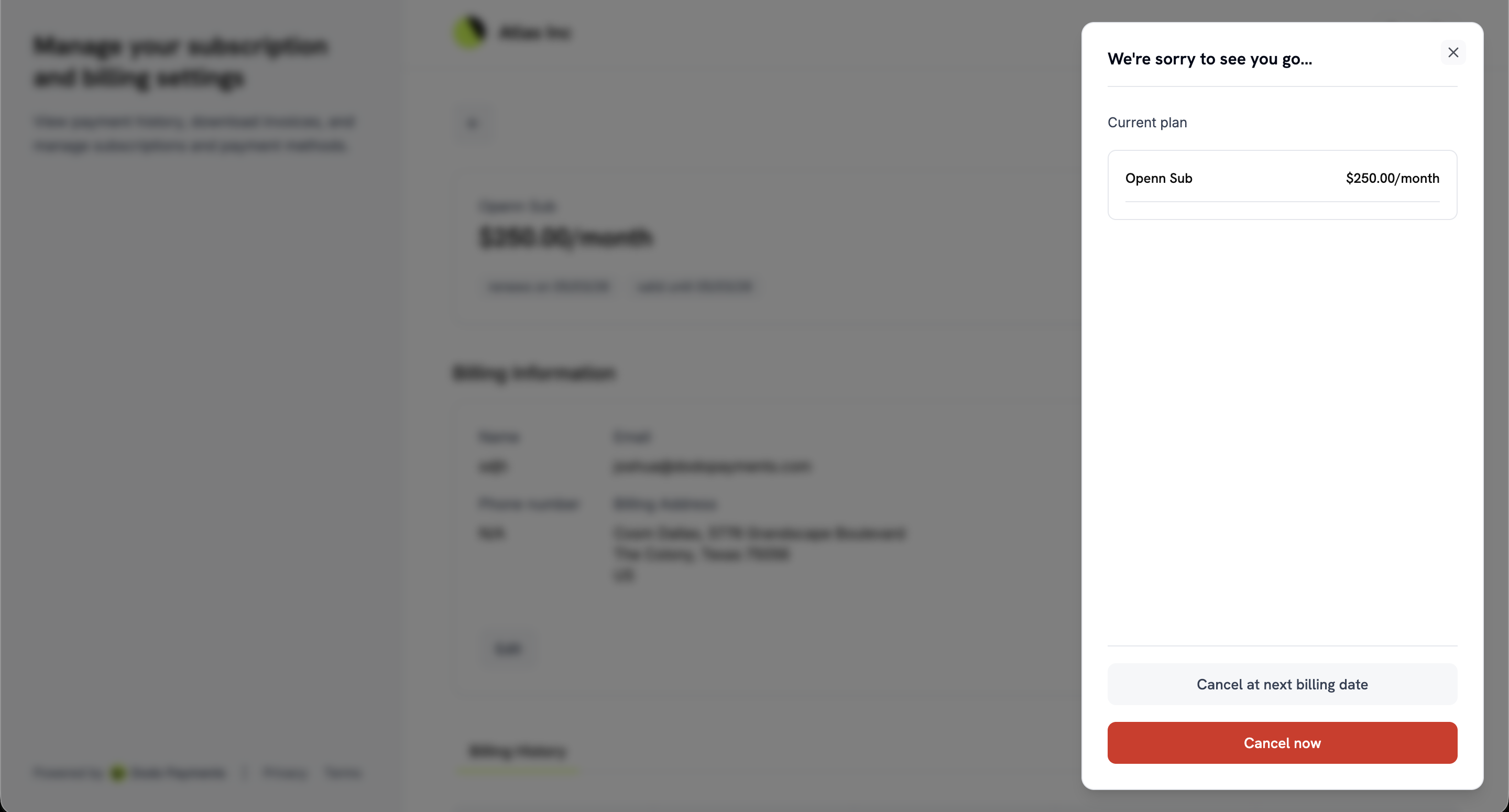
以前,自助取消只有一个开关。现在,**Settings → Subscriptions** 下提供两个独立设置:
* **Allow Immediate Cancellation** —“允许客户结束订阅并立即失去访问权限。”
* **Allow Cancellation at Next Billing Date** —“允许客户在已付款周期结束时取消订阅。”
因此,您可以允许客户使用完已付款的周期,同时保留即时取消选项;也可以反过来设置。
在 Customer Portal 中,这两个选项会显示为独立操作:**Cancel now** 和 **Cancel at next billing date**。取消已安排后,门户会改为提供撤销取消的选项,同时显示 **Cancel immediately**——该操作与 **Cancel now** 相同,只是针对当前状态更换了标签。
了解更多:[Discount Codes](/features/discount-codes)
### 7. **分离的取消控制项**
以前,自助取消只有一个开关。现在,**Settings → Subscriptions** 下提供两个独立设置:
* **Allow Immediate Cancellation** —“允许客户结束订阅并立即失去访问权限。”
* **Allow Cancellation at Next Billing Date** —“允许客户在已付款周期结束时取消订阅。”
因此,您可以允许客户使用完已付款的周期,同时保留即时取消选项;也可以反过来设置。
在 Customer Portal 中,这两个选项会显示为独立操作:**Cancel now** 和 **Cancel at next billing date**。取消已安排后,门户会改为提供撤销取消的选项,同时显示 **Cancel immediately**——该操作与 **Cancel now** 相同,只是针对当前状态更换了标签。
 了解更多:[Cancelling a Subscription](/features/customer-portal#cancelling-a-subscription)
### 8. **在结账页支付计划变更费用**
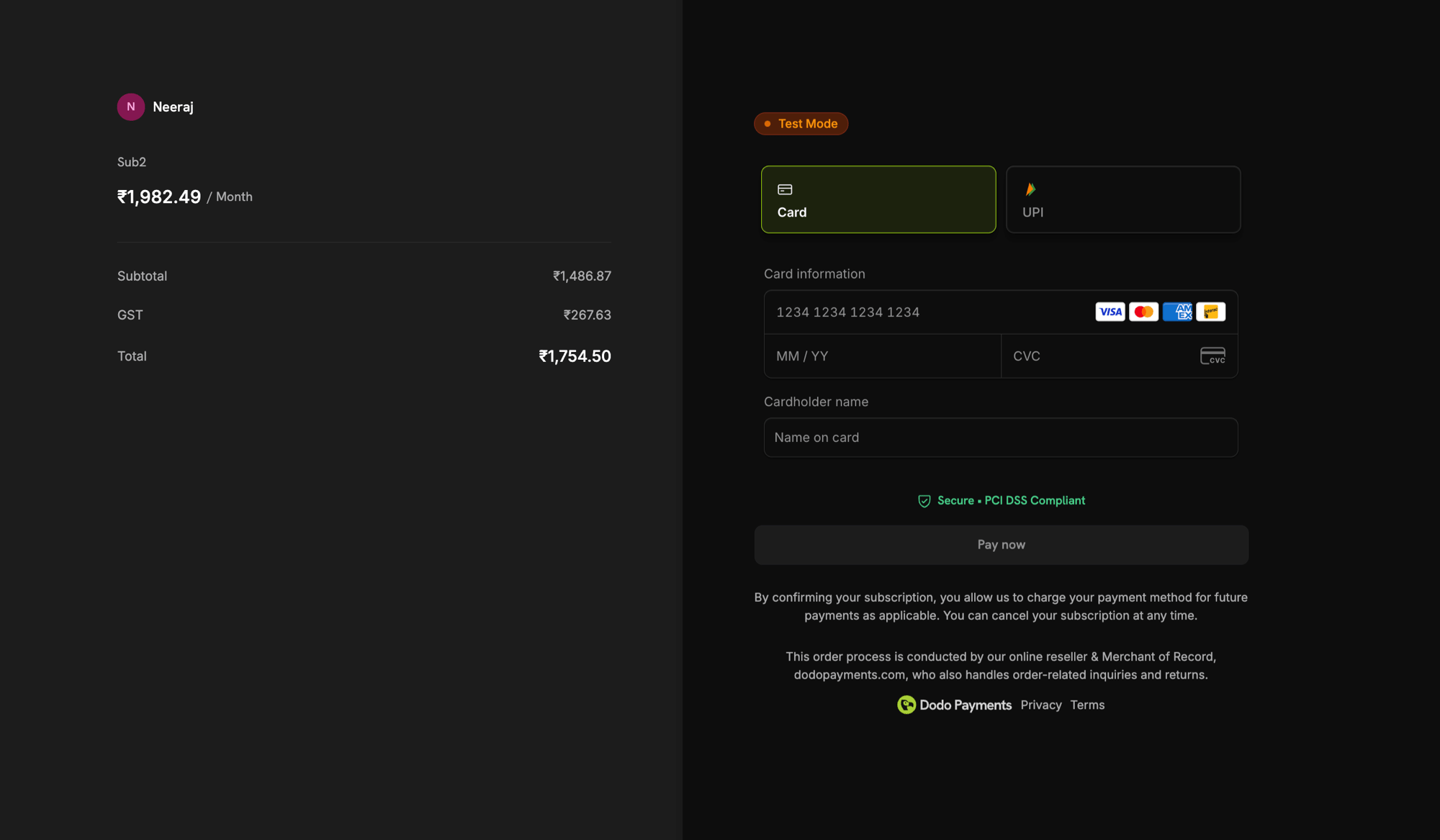
在 **Settings → Subscriptions** 下启用 **Collect Plan Change Payments by Payment Link** 后,客户在 Customer Portal 中升级时,会在托管结账页支付变更费用,而不是通过已存储的 mandate 扣款。
确认按钮会显示应付金额。结账页打开后,客户会看到:“请在新标签页中完成付款。当前计划会在付款成功前保持有效。”在付款成功前,订阅会继续使用旧计划;如果付款被拒,客户可以通过同一链接重试。
Customer Portal 现在还会了解您是否允许取消已安排的计划变更,因此会显示或隐藏相应控制项,而不会提供会被拒绝的操作。
了解更多:[Cancelling a Subscription](/features/customer-portal#cancelling-a-subscription)
### 8. **在结账页支付计划变更费用**
在 **Settings → Subscriptions** 下启用 **Collect Plan Change Payments by Payment Link** 后,客户在 Customer Portal 中升级时,会在托管结账页支付变更费用,而不是通过已存储的 mandate 扣款。
确认按钮会显示应付金额。结账页打开后,客户会看到:“请在新标签页中完成付款。当前计划会在付款成功前保持有效。”在付款成功前,订阅会继续使用旧计划;如果付款被拒,客户可以通过同一链接重试。
Customer Portal 现在还会了解您是否允许取消已安排的计划变更,因此会显示或隐藏相应控制项,而不会提供会被拒绝的操作。
 了解更多:[Plan Changes](/features/customer-portal#plan-changes-upgradedowngrade)
### 9. **KYC 重试额度**
身份验证失败时,现在会说明失败原因以及剩余尝试次数,而不只是简单报告失败。
每位用户有三次尝试机会,提示会显示“剩余尝试次数:2/3”,并提供验证服务商返回的实际原因。只要仍有尝试次数,按钮就会显示为 **Try again**。如果三次机会全部用完,提示会说明支持团队可以重新开启验证。
了解更多:[Account Verification](/miscellaneous/verification-process)
### 10. **Georgian 结账**
现在支持 Georgian 结账,使支持的语言总数达到 22 种。与其他受支持语言一样,Georgian 会根据客户的浏览器自动检测;您也可以使用 `force_language` 参数强制指定。
了解更多:[Supported Languages](/features/checkout#supported-languages)
### 11. **\$0 价格时可选银行卡**
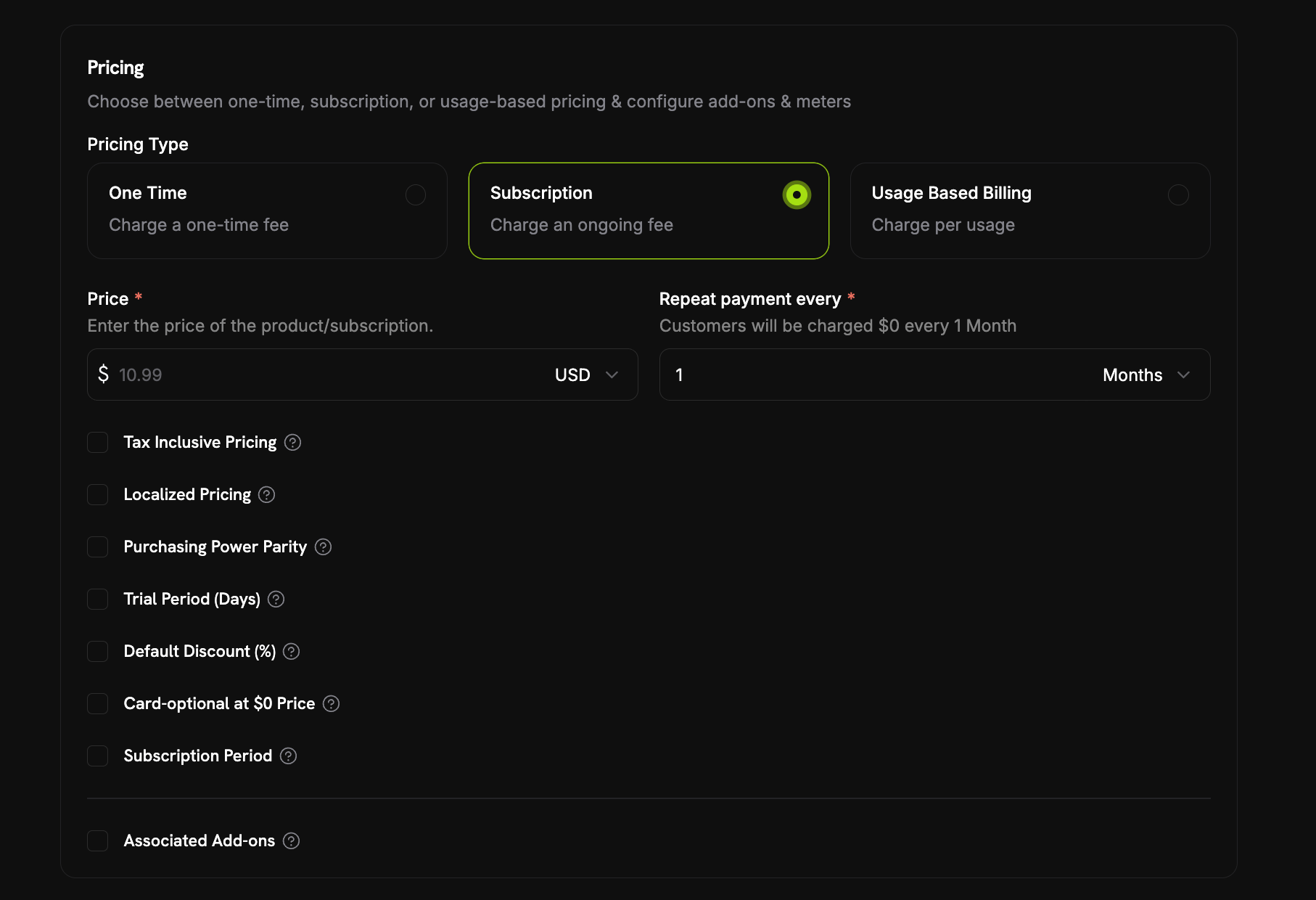
当今天无需付款时,订阅现在可以在没有支付方式的情况下开始。启用产品定价部分中的 **Card-Optional at \$0 Price** 复选框,该选项位于 **Trial Period (Days)** 和 **Default Discount (%)** 旁边。
今天无需付款有两种情况,一个复选框即可覆盖两者:
* **免费试用** — 不含试用金额的试用期,因此试用期间的首次扣款为 `0`。
* **\$0 周期性价格** — 价格本身为 `0`,或折扣将价格降至该金额,包括产品自身的 **Default Discount (%)**,或结账时叠加折扣代码达到 100% 折扣。
付费试用仍需要银行卡,因为试用金额意味着存在应付款项。
即使没有保存银行卡,订阅也会激活并返回 `payment_method_required: false`。实际计费开始前,系统会发送提醒电子邮件;提前时间由 **Settings → Subscriptions** 下的 **Payment Method Reminder** 设置,可选择 1 到 30 天,默认为 3 天。如果银行卡始终未添加,订阅会在首次实际扣款到期时变为 `on_hold`;添加支付方式后即可重新激活。与此相关的两封客户电子邮件默认均已开启:**Add Payment Method Reminder** 和 **Subscription On Hold, No Payment Method**。
通过 API 时,一个复选框会映射到两个独立的价格字段:`trial_payment_method_optional` 和 `zero_amount_payment_method_optional`。因此,如果您直接管理产品,也可以单独启用其中一种情况。
了解更多:[Plan Changes](/features/customer-portal#plan-changes-upgradedowngrade)
### 9. **KYC 重试额度**
身份验证失败时,现在会说明失败原因以及剩余尝试次数,而不只是简单报告失败。
每位用户有三次尝试机会,提示会显示“剩余尝试次数:2/3”,并提供验证服务商返回的实际原因。只要仍有尝试次数,按钮就会显示为 **Try again**。如果三次机会全部用完,提示会说明支持团队可以重新开启验证。
了解更多:[Account Verification](/miscellaneous/verification-process)
### 10. **Georgian 结账**
现在支持 Georgian 结账,使支持的语言总数达到 22 种。与其他受支持语言一样,Georgian 会根据客户的浏览器自动检测;您也可以使用 `force_language` 参数强制指定。
了解更多:[Supported Languages](/features/checkout#supported-languages)
### 11. **\$0 价格时可选银行卡**
当今天无需付款时,订阅现在可以在没有支付方式的情况下开始。启用产品定价部分中的 **Card-Optional at \$0 Price** 复选框,该选项位于 **Trial Period (Days)** 和 **Default Discount (%)** 旁边。
今天无需付款有两种情况,一个复选框即可覆盖两者:
* **免费试用** — 不含试用金额的试用期,因此试用期间的首次扣款为 `0`。
* **\$0 周期性价格** — 价格本身为 `0`,或折扣将价格降至该金额,包括产品自身的 **Default Discount (%)**,或结账时叠加折扣代码达到 100% 折扣。
付费试用仍需要银行卡,因为试用金额意味着存在应付款项。
即使没有保存银行卡,订阅也会激活并返回 `payment_method_required: false`。实际计费开始前,系统会发送提醒电子邮件;提前时间由 **Settings → Subscriptions** 下的 **Payment Method Reminder** 设置,可选择 1 到 30 天,默认为 3 天。如果银行卡始终未添加,订阅会在首次实际扣款到期时变为 `on_hold`;添加支付方式后即可重新激活。与此相关的两封客户电子邮件默认均已开启:**Add Payment Method Reminder** 和 **Subscription On Hold, No Payment Method**。
通过 API 时,一个复选框会映射到两个独立的价格字段:`trial_payment_method_optional` 和 `zero_amount_payment_method_optional`。因此,如果您直接管理产品,也可以单独启用其中一种情况。
 了解更多:[Card-Optional at Zero Price](/features/subscription#card-optional-at-zero-price)
### 12. **结账时强制要求 Tax ID**
结账会话现在接受新的 `require_tax_id` feature flag,适用于只向已注册企业销售的商家。该标记默认为 `false`,因此除非您主动启用,否则不会发生任何变化。
启用该标记后,结账页会预先选中并锁定 **Purchasing as a business**,**Business Name** 和 **Tax ID Number** 都会变为必填项;当任一字段为空或 Tax ID 未通过验证时,**Continue to Payment** 会保持灰显。Tax ID 验证仍采用 fail-open 机制,因此查询服务中断不会直接阻止客户。
`allow_tax_id` 还必须为 `true`,否则请求会被拒绝并返回 `400`;使用 `confirm: true` 创建的会话必须携带 `tax_id`,因为它会完全跳过结账页。
该要求在结账页上执行,而不是在服务器端执行——直接发送到 API 的确认请求仍可以省略 `tax_id`。因此,应将此标记视为结账体验控制项,而不是保证。
了解更多:[Making the Tax ID Mandatory](/features/b2b-payments#making-the-tax-id-mandatory)
### 13. **订阅暂停和恢复通知**
现在,暂停和恢复订阅会分别触发通知,通知对象包括您的团队和客户。
团队通知会在 **Subscriptions** 下新增 **Subscription Paused** 和 **Subscription Resumed**,两者默认均关闭——这是此处首批默认不启用的订阅事件;如果您需要,请手动开启。对应的客户电子邮件默认开启,与其他客户电子邮件一致。
了解更多:[Communication Preferences](/features/communication-preferences#subscriptions)
了解更多:[Card-Optional at Zero Price](/features/subscription#card-optional-at-zero-price)
### 12. **结账时强制要求 Tax ID**
结账会话现在接受新的 `require_tax_id` feature flag,适用于只向已注册企业销售的商家。该标记默认为 `false`,因此除非您主动启用,否则不会发生任何变化。
启用该标记后,结账页会预先选中并锁定 **Purchasing as a business**,**Business Name** 和 **Tax ID Number** 都会变为必填项;当任一字段为空或 Tax ID 未通过验证时,**Continue to Payment** 会保持灰显。Tax ID 验证仍采用 fail-open 机制,因此查询服务中断不会直接阻止客户。
`allow_tax_id` 还必须为 `true`,否则请求会被拒绝并返回 `400`;使用 `confirm: true` 创建的会话必须携带 `tax_id`,因为它会完全跳过结账页。
该要求在结账页上执行,而不是在服务器端执行——直接发送到 API 的确认请求仍可以省略 `tax_id`。因此,应将此标记视为结账体验控制项,而不是保证。
了解更多:[Making the Tax ID Mandatory](/features/b2b-payments#making-the-tax-id-mandatory)
### 13. **订阅暂停和恢复通知**
现在,暂停和恢复订阅会分别触发通知,通知对象包括您的团队和客户。
团队通知会在 **Subscriptions** 下新增 **Subscription Paused** 和 **Subscription Resumed**,两者默认均关闭——这是此处首批默认不启用的订阅事件;如果您需要,请手动开启。对应的客户电子邮件默认开启,与其他客户电子邮件一致。
了解更多:[Communication Preferences](/features/communication-preferences#subscriptions)