> ## Documentation Index
> Fetch the complete documentation index at: https://docs.dodopayments.com/llms.txt
> Use this file to discover all available pages before exploring further.
# v1.84.0 (February 20, 2026)
> Product-level analytics, Verifi RDR dispute prevention, DodoPayments CLI, customer portal UI revamp, inline checkout payment method updates, Tax ID prefill, return URL query params, customer email update API, and Bun adapter
## New Features
### 1. **Product-Level Analytics**
Every product now has its own **dedicated analytics dashboard**. Navigate to **Products > \[Select a Product]** to access detailed metrics specific to that product, organized across five tabs:
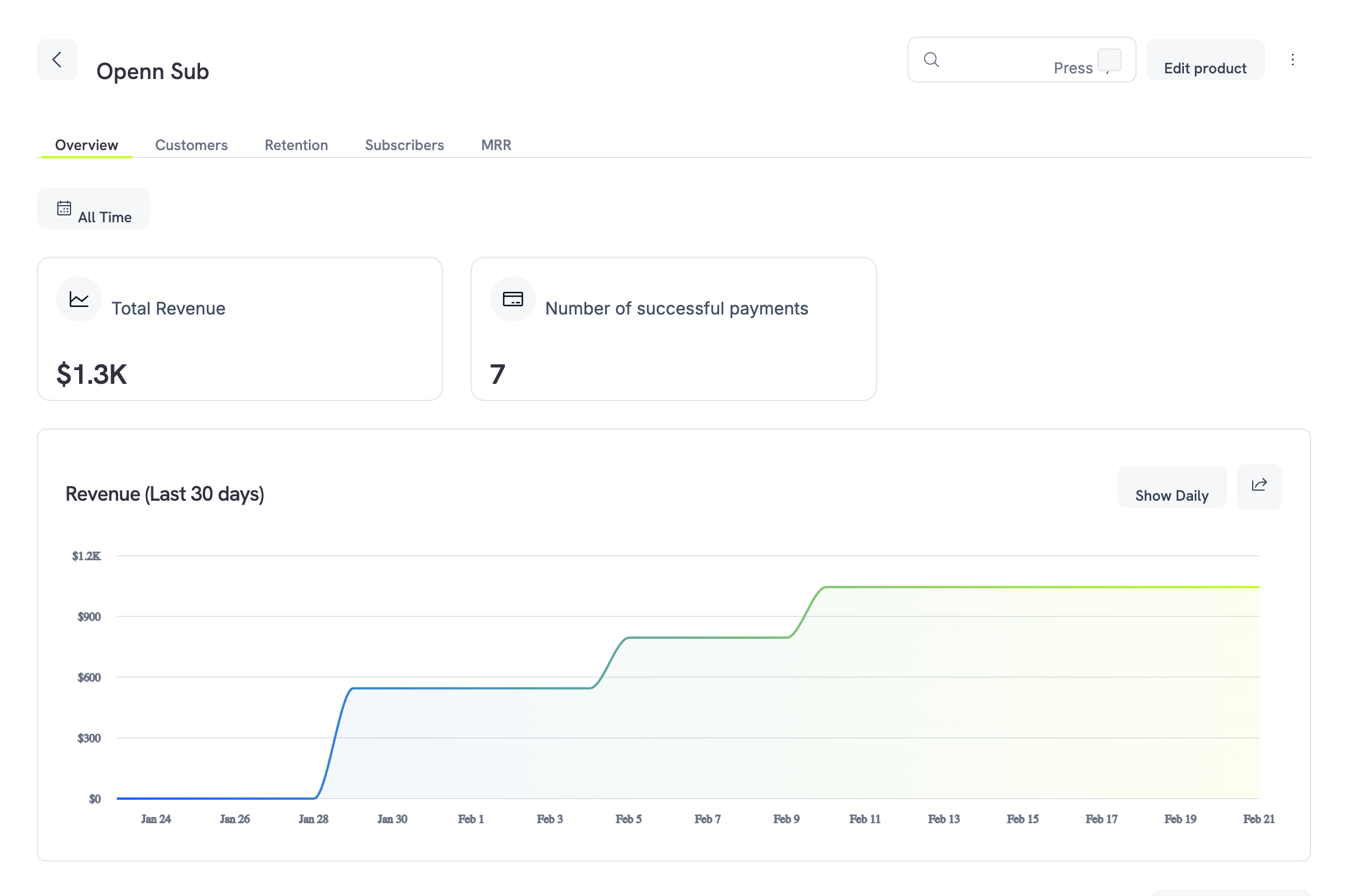 | Tab | What You Get |
| --------------- | ------------------------------------------------------------------------------------------------------------------------------ |
| **Overview** | Total revenue, successful payment count, 30-day revenue trend chart (daily or cumulative), and a filterable transactions table |
| **Customers** | Top 3 customers ranked by spend with a podium view, plus a full customer breakdown table |
| **Retention** | Customer churn rate, revenue churn rate, and a dual-line trend chart to spot patterns |
| **Subscribers** | All subscriptions for the product with status, start date, next billing date, and amount |
| **MRR** | Monthly Recurring Revenue stacked bar chart with New MRR, Expansion MRR, Churned MRR, and Net New MRR breakdowns |
All tabs support a **date filter** (defaults to All Time) so you can drill into any time period.
Use the Retention tab to identify products with high churn early, and the MRR tab to track whether expansion revenue is outpacing churned revenue month over month.
Learn more: [Product-Level Analytics](/features/analytics-and-reporting#product-level-analytics)
### 2. **Verifi RDR Support on Dodo Payments**
Dodo Payments now supports **Visa Rapid Dispute Resolution (RDR)** powered by Verifi -- an automated dispute prevention tool that resolves eligible Visa disputes **before they become formal chargebacks**. When a cardholder initiates a dispute, RDR intercepts it and automatically issues a refund if the transaction is below your configured USD threshold.
**Why It Matters**
| Benefit | Impact |
| ------------------------------ | -------------------------------------------------------------------------------------------------------------------------- |
| **Lower dispute rate** | RDR-resolved disputes don't count toward Visa's 0.9% threshold |
| **Dispute fee still applies** | A dispute fee is still charged on RDR-resolved transactions -- this covers the cost of contesting with Visa on your behalf |
| **Zero operational overhead** | No evidence gathering or response deadlines |
| **Better customer experience** | Cardholders get instant refunds |
| **Account protection** | Stay out of Visa's Dispute Monitoring Program (VDMP) |
Exceeding Visa's 0.9% dispute rate or 100 disputes/month triggers the VDMP, with escalating fines up to \$50,000+/month. RDR helps you stay well below these thresholds.
**How It Works**
1. Cardholder initiates a dispute with their bank
2. RDR intercepts the dispute before it becomes a formal chargeback
3. If the transaction amount is at or below your threshold, a refund is automatically issued
4. The dispute is resolved instantly and **does not count** against your dispute rate
Transactions auto-refunded through RDR appear as a **lost dispute** in your Dodo Payments dashboard. This is expected -- the refund was issued automatically to prevent a formal chargeback.
To enable Verifi RDR on your account, contact **[support@dodopayments.com](mailto:support@dodopayments.com)** to configure your threshold.
Learn more: [Visa RDR Documentation](/features/transactions/disputes#visa-rapid-dispute-resolution-rdr)
### 3. **DodoPayments CLI**
Introducing the brand new **DodoPayments CLI** (`dodopayments-cli`) -- manage your entire Dodo Payments workflow directly from the terminal. Built for developers who prefer the command line, the CLI lets you manage products, payments, customers, discounts, licenses, addons, refunds, and even create checkout sessions without leaving your editor.
**Installation**
```bash npm (Recommended) theme={null}
npm install -g dodopayments-cli
```
```bash Bun theme={null}
bun install -g dodopayments-cli
```
**Key Commands**
| Command | Description |
| ----------------------- | ------------------------------------------------------------- |
| `dodo login` | Authenticate with your API key (opens browser) |
| `dodo products list` | List all products |
| `dodo payments list` | List all payments |
| `dodo customers create` | Create a new customer |
| `dodo checkout new` | Create a checkout session and get the URL |
| `dodo wh listen` | Forward live test webhooks to your local server via WebSocket |
| `dodo wh trigger` | Send mock webhook payloads to any endpoint |
**Webhook Testing**
The CLI includes two powerful tools for development:
* **`dodo wh listen`** -- Opens a WebSocket connection to forward real-time test webhooks to your local server, preserving original headers for signature verification testing
* **`dodo wh trigger`** -- Sends mock webhook payloads interactively, supporting all 22 event types across subscriptions, payments, refunds, disputes, and licenses
The webhook listener only works with a **test mode** API key. Make sure you're logged in with a test mode key before using `dodo wh listen`.
Learn more: [CLI Documentation](/developer-resources/sdks/cli)
### 4. **Customer Portal UI Revamp**
The Customer Portal has been completely redesigned with a clean, unified interface. The revamped portal features a left sidebar navigation and organized sections, providing customers with a more intuitive self-service experience.
| Tab | What You Get |
| --------------- | ------------------------------------------------------------------------------------------------------------------------------ |
| **Overview** | Total revenue, successful payment count, 30-day revenue trend chart (daily or cumulative), and a filterable transactions table |
| **Customers** | Top 3 customers ranked by spend with a podium view, plus a full customer breakdown table |
| **Retention** | Customer churn rate, revenue churn rate, and a dual-line trend chart to spot patterns |
| **Subscribers** | All subscriptions for the product with status, start date, next billing date, and amount |
| **MRR** | Monthly Recurring Revenue stacked bar chart with New MRR, Expansion MRR, Churned MRR, and Net New MRR breakdowns |
All tabs support a **date filter** (defaults to All Time) so you can drill into any time period.
Use the Retention tab to identify products with high churn early, and the MRR tab to track whether expansion revenue is outpacing churned revenue month over month.
Learn more: [Product-Level Analytics](/features/analytics-and-reporting#product-level-analytics)
### 2. **Verifi RDR Support on Dodo Payments**
Dodo Payments now supports **Visa Rapid Dispute Resolution (RDR)** powered by Verifi -- an automated dispute prevention tool that resolves eligible Visa disputes **before they become formal chargebacks**. When a cardholder initiates a dispute, RDR intercepts it and automatically issues a refund if the transaction is below your configured USD threshold.
**Why It Matters**
| Benefit | Impact |
| ------------------------------ | -------------------------------------------------------------------------------------------------------------------------- |
| **Lower dispute rate** | RDR-resolved disputes don't count toward Visa's 0.9% threshold |
| **Dispute fee still applies** | A dispute fee is still charged on RDR-resolved transactions -- this covers the cost of contesting with Visa on your behalf |
| **Zero operational overhead** | No evidence gathering or response deadlines |
| **Better customer experience** | Cardholders get instant refunds |
| **Account protection** | Stay out of Visa's Dispute Monitoring Program (VDMP) |
Exceeding Visa's 0.9% dispute rate or 100 disputes/month triggers the VDMP, with escalating fines up to \$50,000+/month. RDR helps you stay well below these thresholds.
**How It Works**
1. Cardholder initiates a dispute with their bank
2. RDR intercepts the dispute before it becomes a formal chargeback
3. If the transaction amount is at or below your threshold, a refund is automatically issued
4. The dispute is resolved instantly and **does not count** against your dispute rate
Transactions auto-refunded through RDR appear as a **lost dispute** in your Dodo Payments dashboard. This is expected -- the refund was issued automatically to prevent a formal chargeback.
To enable Verifi RDR on your account, contact **[support@dodopayments.com](mailto:support@dodopayments.com)** to configure your threshold.
Learn more: [Visa RDR Documentation](/features/transactions/disputes#visa-rapid-dispute-resolution-rdr)
### 3. **DodoPayments CLI**
Introducing the brand new **DodoPayments CLI** (`dodopayments-cli`) -- manage your entire Dodo Payments workflow directly from the terminal. Built for developers who prefer the command line, the CLI lets you manage products, payments, customers, discounts, licenses, addons, refunds, and even create checkout sessions without leaving your editor.
**Installation**
```bash npm (Recommended) theme={null}
npm install -g dodopayments-cli
```
```bash Bun theme={null}
bun install -g dodopayments-cli
```
**Key Commands**
| Command | Description |
| ----------------------- | ------------------------------------------------------------- |
| `dodo login` | Authenticate with your API key (opens browser) |
| `dodo products list` | List all products |
| `dodo payments list` | List all payments |
| `dodo customers create` | Create a new customer |
| `dodo checkout new` | Create a checkout session and get the URL |
| `dodo wh listen` | Forward live test webhooks to your local server via WebSocket |
| `dodo wh trigger` | Send mock webhook payloads to any endpoint |
**Webhook Testing**
The CLI includes two powerful tools for development:
* **`dodo wh listen`** -- Opens a WebSocket connection to forward real-time test webhooks to your local server, preserving original headers for signature verification testing
* **`dodo wh trigger`** -- Sends mock webhook payloads interactively, supporting all 22 event types across subscriptions, payments, refunds, disputes, and licenses
The webhook listener only works with a **test mode** API key. Make sure you're logged in with a test mode key before using `dodo wh listen`.
Learn more: [CLI Documentation](/developer-resources/sdks/cli)
### 4. **Customer Portal UI Revamp**
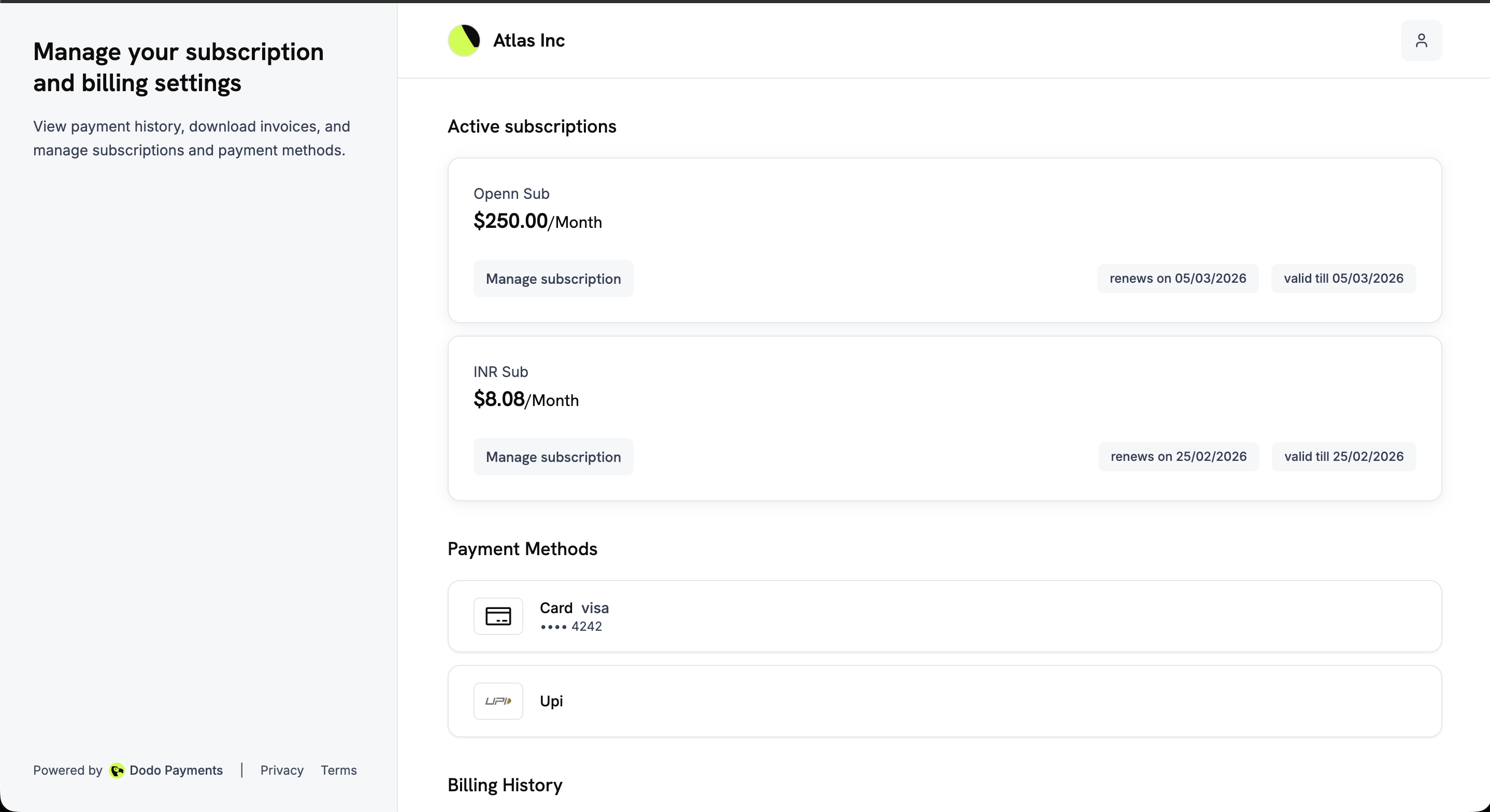
The Customer Portal has been completely redesigned with a clean, unified interface. The revamped portal features a left sidebar navigation and organized sections, providing customers with a more intuitive self-service experience.
 **What's New**
| Section | Features |
| ------------------------ | ------------------------------------------------------------------------------------- |
| **Active Subscriptions** | View all active subscriptions with plan details, billing cycle, and next payment date |
| **Payment Methods** | Manage saved payment methods, add new cards, and update payment details |
| **Billing History** | View past invoices with downloadable PDF receipts |
| **Billing Information** | Edit name, email, phone number, and billing address |
| **Subscription Details** | View detailed subscription info with options to cancel or change plan |
| **Plan Changes** | Upgrade or downgrade via Product Collections directly in the portal |
Customers can also update payment methods for active subscriptions or reactivate subscriptions that went on hold due to failed payments -- all from the revamped portal.
The revamped portal is available at `https://customer.dodopayments.com/login/{business_id}` for live mode and `https://test.customer.dodopayments.com/login/{business_id}` for test mode.
Learn more: [Customer Portal](/features/customer-portal)
### 5. **Update Payment Method in Inline Checkout**
The [inline checkout](/developer-resources/inline-checkout) now supports **payment method updates** for subscriptions. When a customer needs to update their payment method (for an active subscription or to reactivate an on-hold subscription), the update payment method flow can now be rendered directly within your page layout using inline checkout -- providing a seamless, embedded experience.
**How It Works**
1. Call the Update Payment Method API to get a `payment_link`:
```typescript theme={null}
const response = await client.subscriptions.updatePaymentMethod('sub_123', {
type: 'new',
return_url: 'https://example.com/return'
});
```
2. Use the returned `payment_link` as the `checkoutUrl` in inline checkout:
```typescript theme={null}
DodoPayments.Checkout.open({
checkoutUrl: response.payment_link,
elementId: "dodo-inline-checkout"
});
```
The inline frame renders only the payment method collection form, allowing customers to enter new card details or select a saved payment method without leaving your page.
For on-hold subscriptions, the update payment method flow automatically creates a charge for remaining dues. Monitor the `payment.succeeded` and `subscription.active` webhooks to confirm reactivation.
Learn more: [Inline Checkout](/developer-resources/inline-checkout) | [Subscription Payment Method Updates](/features/subscription#update-payment-method-for-active-subscription)
### 6. **Tax ID Prefill Support for Checkout Sessions**
You can now **prefill the Tax ID** (e.g., VAT number, GST number) when creating a checkout session using the `tax_id` parameter. This is ideal for B2B transactions where you already know the customer's tax identification number. When a Tax ID is prefilled, the field is pre-populated and locked on the checkout form.
```typescript theme={null}
const session = await client.checkoutSessions.create({
product_cart: [{ product_id: 'prod_123', quantity: 1 }],
customer: { customer_id: 'cus_123' },
billing_address: { country: 'DE' },
tax_id: 'DE999999999',
return_url: 'https://yoursite.com/return'
});
```
The `tax_id` parameter requires a `billing_address` with at least a `country` field. Tax eligibility is validated in real-time, and reverse-charge rules are applied automatically for qualifying B2B transactions.
Use the `allow_customer_editing_tax_id` feature flag to control whether customers can modify the prefilled Tax ID, and `allow_tax_id` to toggle Tax ID visibility on checkout.
Learn more: [Checkout Sessions - Tax ID](/developer-resources/checkout-session) | [B2B Payments](/features/b2b-payments)
### 7. **License Key and Email in Return URL Redirect**
After a customer completes checkout, Dodo Payments now appends `license_key` and `email` as query parameters to your `return_url` redirect, in addition to the existing `payment_id`/`subscription_id` and `status` parameters.
**Appended Query Parameters**
| Parameter | Type | Condition |
| ----------------- | -------- | ------------------------------------------------------------------------------ |
| `payment_id` | `string` | Always present for one-time payments |
| `subscription_id` | `string` | Always present for subscription payments |
| `status` | `string` | Always present |
| `license_key` | `string` | Present if the product has license keys enabled (comma-separated for multiple) |
| `email` | `string` | Present if the customer has an email on record |
**Example redirect URLs:**
```text theme={null}
# One-time payment with license key
https://yoursite.com/return?payment_id=pay_xxx&status=succeeded&license_key=LK-001&email=customer%40example.com
# Subscription with multiple license keys
https://yoursite.com/return?subscription_id=sub_xxx&status=active&license_key=LK-001,LK-002&email=customer%40example.com
```
Use these query parameters to display license keys or send a confirmation email immediately on your return page, without needing an extra API call.
Learn more: [Checkout Sessions - Return URL](/developer-resources/checkout-session) | [License Keys in Return URL](/features/license-keys#license-keys-in-return-url)
### 8. **Customer Email Update API**
The `PATCH /customers/{customer_id}` endpoint now supports updating customer email addresses programmatically. Update email along with name, phone number, and metadata in a single API call.
```typescript theme={null}
await client.customers.update('cus_123', {
email: 'newemail@example.com',
name: 'Updated Name'
});
```
**Updatable Fields**
| Field | Type | Description |
| -------------- | ---------------- | ------------------------------------ |
| `email` | `string \| null` | Customer's email address |
| `name` | `string \| null` | Customer's display name |
| `phone_number` | `string \| null` | Phone number in international format |
| `metadata` | `object \| null` | Custom key-value pairs |
Customer email updates are also available through the Customer Portal (self-service), the dashboard, and the CLI via `dodo customers update`.
Learn more: [Customer Update API](/api-reference/customers/patch-customer) | [Customer Management](/features/customers)
### 9. **Bun Adapter Release**
Introducing `@dodopayments/bun` -- a dedicated framework adapter for [Bun's](https://bun.sh) native server (`Bun.serve()`). Integrate checkout, customer portal, and webhooks with Bun in just a few lines of code.
**Installation**
```bash theme={null}
bun add @dodopayments/bun
```
**Quick Setup**
```typescript theme={null}
import { Checkout, CustomerPortal, Webhooks } from "@dodopayments/bun";
Bun.serve({
routes: {
"/api/checkout": Checkout({
bearerToken: process.env.DODO_PAYMENTS_API_KEY!,
returnUrl: process.env.DODO_PAYMENTS_RETURN_URL!,
environment: process.env.DODO_PAYMENTS_ENVIRONMENT!,
}),
"/api/customer-portal": CustomerPortal({
bearerToken: process.env.DODO_PAYMENTS_API_KEY!,
environment: process.env.DODO_PAYMENTS_ENVIRONMENT!,
}),
"/api/webhooks": Webhooks({
webhookKey: process.env.DODO_PAYMENTS_WEBHOOK_KEY!,
onPaymentSucceeded: async (payload) => {
console.log("Payment succeeded:", payload.data.payment_id);
},
onSubscriptionActive: async (payload) => {
console.log("Subscription active:", payload.data.subscription_id);
},
}),
},
});
```
The Bun adapter supports all three checkout flows (static, dynamic, and session-based), customer portal session generation, and secure webhook handling with signature verification and Zod validation across 22 event types.
The Bun adapter joins our family of 11 framework adapters including Next.js, Nuxt, Express, Fastify, Hono, Astro, SvelteKit, Remix, TanStack Start, Better Auth, and Convex.
Learn more: [Bun Adapter Documentation](/developer-resources/bun-adaptor) | [Framework Adapters Overview](/developer-resources/framework-adaptors)
**What's New**
| Section | Features |
| ------------------------ | ------------------------------------------------------------------------------------- |
| **Active Subscriptions** | View all active subscriptions with plan details, billing cycle, and next payment date |
| **Payment Methods** | Manage saved payment methods, add new cards, and update payment details |
| **Billing History** | View past invoices with downloadable PDF receipts |
| **Billing Information** | Edit name, email, phone number, and billing address |
| **Subscription Details** | View detailed subscription info with options to cancel or change plan |
| **Plan Changes** | Upgrade or downgrade via Product Collections directly in the portal |
Customers can also update payment methods for active subscriptions or reactivate subscriptions that went on hold due to failed payments -- all from the revamped portal.
The revamped portal is available at `https://customer.dodopayments.com/login/{business_id}` for live mode and `https://test.customer.dodopayments.com/login/{business_id}` for test mode.
Learn more: [Customer Portal](/features/customer-portal)
### 5. **Update Payment Method in Inline Checkout**
The [inline checkout](/developer-resources/inline-checkout) now supports **payment method updates** for subscriptions. When a customer needs to update their payment method (for an active subscription or to reactivate an on-hold subscription), the update payment method flow can now be rendered directly within your page layout using inline checkout -- providing a seamless, embedded experience.
**How It Works**
1. Call the Update Payment Method API to get a `payment_link`:
```typescript theme={null}
const response = await client.subscriptions.updatePaymentMethod('sub_123', {
type: 'new',
return_url: 'https://example.com/return'
});
```
2. Use the returned `payment_link` as the `checkoutUrl` in inline checkout:
```typescript theme={null}
DodoPayments.Checkout.open({
checkoutUrl: response.payment_link,
elementId: "dodo-inline-checkout"
});
```
The inline frame renders only the payment method collection form, allowing customers to enter new card details or select a saved payment method without leaving your page.
For on-hold subscriptions, the update payment method flow automatically creates a charge for remaining dues. Monitor the `payment.succeeded` and `subscription.active` webhooks to confirm reactivation.
Learn more: [Inline Checkout](/developer-resources/inline-checkout) | [Subscription Payment Method Updates](/features/subscription#update-payment-method-for-active-subscription)
### 6. **Tax ID Prefill Support for Checkout Sessions**
You can now **prefill the Tax ID** (e.g., VAT number, GST number) when creating a checkout session using the `tax_id` parameter. This is ideal for B2B transactions where you already know the customer's tax identification number. When a Tax ID is prefilled, the field is pre-populated and locked on the checkout form.
```typescript theme={null}
const session = await client.checkoutSessions.create({
product_cart: [{ product_id: 'prod_123', quantity: 1 }],
customer: { customer_id: 'cus_123' },
billing_address: { country: 'DE' },
tax_id: 'DE999999999',
return_url: 'https://yoursite.com/return'
});
```
The `tax_id` parameter requires a `billing_address` with at least a `country` field. Tax eligibility is validated in real-time, and reverse-charge rules are applied automatically for qualifying B2B transactions.
Use the `allow_customer_editing_tax_id` feature flag to control whether customers can modify the prefilled Tax ID, and `allow_tax_id` to toggle Tax ID visibility on checkout.
Learn more: [Checkout Sessions - Tax ID](/developer-resources/checkout-session) | [B2B Payments](/features/b2b-payments)
### 7. **License Key and Email in Return URL Redirect**
After a customer completes checkout, Dodo Payments now appends `license_key` and `email` as query parameters to your `return_url` redirect, in addition to the existing `payment_id`/`subscription_id` and `status` parameters.
**Appended Query Parameters**
| Parameter | Type | Condition |
| ----------------- | -------- | ------------------------------------------------------------------------------ |
| `payment_id` | `string` | Always present for one-time payments |
| `subscription_id` | `string` | Always present for subscription payments |
| `status` | `string` | Always present |
| `license_key` | `string` | Present if the product has license keys enabled (comma-separated for multiple) |
| `email` | `string` | Present if the customer has an email on record |
**Example redirect URLs:**
```text theme={null}
# One-time payment with license key
https://yoursite.com/return?payment_id=pay_xxx&status=succeeded&license_key=LK-001&email=customer%40example.com
# Subscription with multiple license keys
https://yoursite.com/return?subscription_id=sub_xxx&status=active&license_key=LK-001,LK-002&email=customer%40example.com
```
Use these query parameters to display license keys or send a confirmation email immediately on your return page, without needing an extra API call.
Learn more: [Checkout Sessions - Return URL](/developer-resources/checkout-session) | [License Keys in Return URL](/features/license-keys#license-keys-in-return-url)
### 8. **Customer Email Update API**
The `PATCH /customers/{customer_id}` endpoint now supports updating customer email addresses programmatically. Update email along with name, phone number, and metadata in a single API call.
```typescript theme={null}
await client.customers.update('cus_123', {
email: 'newemail@example.com',
name: 'Updated Name'
});
```
**Updatable Fields**
| Field | Type | Description |
| -------------- | ---------------- | ------------------------------------ |
| `email` | `string \| null` | Customer's email address |
| `name` | `string \| null` | Customer's display name |
| `phone_number` | `string \| null` | Phone number in international format |
| `metadata` | `object \| null` | Custom key-value pairs |
Customer email updates are also available through the Customer Portal (self-service), the dashboard, and the CLI via `dodo customers update`.
Learn more: [Customer Update API](/api-reference/customers/patch-customer) | [Customer Management](/features/customers)
### 9. **Bun Adapter Release**
Introducing `@dodopayments/bun` -- a dedicated framework adapter for [Bun's](https://bun.sh) native server (`Bun.serve()`). Integrate checkout, customer portal, and webhooks with Bun in just a few lines of code.
**Installation**
```bash theme={null}
bun add @dodopayments/bun
```
**Quick Setup**
```typescript theme={null}
import { Checkout, CustomerPortal, Webhooks } from "@dodopayments/bun";
Bun.serve({
routes: {
"/api/checkout": Checkout({
bearerToken: process.env.DODO_PAYMENTS_API_KEY!,
returnUrl: process.env.DODO_PAYMENTS_RETURN_URL!,
environment: process.env.DODO_PAYMENTS_ENVIRONMENT!,
}),
"/api/customer-portal": CustomerPortal({
bearerToken: process.env.DODO_PAYMENTS_API_KEY!,
environment: process.env.DODO_PAYMENTS_ENVIRONMENT!,
}),
"/api/webhooks": Webhooks({
webhookKey: process.env.DODO_PAYMENTS_WEBHOOK_KEY!,
onPaymentSucceeded: async (payload) => {
console.log("Payment succeeded:", payload.data.payment_id);
},
onSubscriptionActive: async (payload) => {
console.log("Subscription active:", payload.data.subscription_id);
},
}),
},
});
```
The Bun adapter supports all three checkout flows (static, dynamic, and session-based), customer portal session generation, and secure webhook handling with signature verification and Zod validation across 22 event types.
The Bun adapter joins our family of 11 framework adapters including Next.js, Nuxt, Express, Fastify, Hono, Astro, SvelteKit, Remix, TanStack Start, Better Auth, and Convex.
Learn more: [Bun Adapter Documentation](/developer-resources/bun-adaptor) | [Framework Adapters Overview](/developer-resources/framework-adaptors)