> ## Documentation Index
> Fetch the complete documentation index at: https://docs.dodopayments.com/llms.txt
> Use this file to discover all available pages before exploring further.
# v1.70.0 (December 24, 2025)
> Inline checkout support, use existing payment methods for instant checkouts, manage subscription plans from dashboard, generate short payment links, skip success pages with redirect_immediately, and enable on-demand subscriptions for all businesses
## New Features 🚀
1. **Inline Checkout - Fully Embedded Checkout Experiences (BETA)**
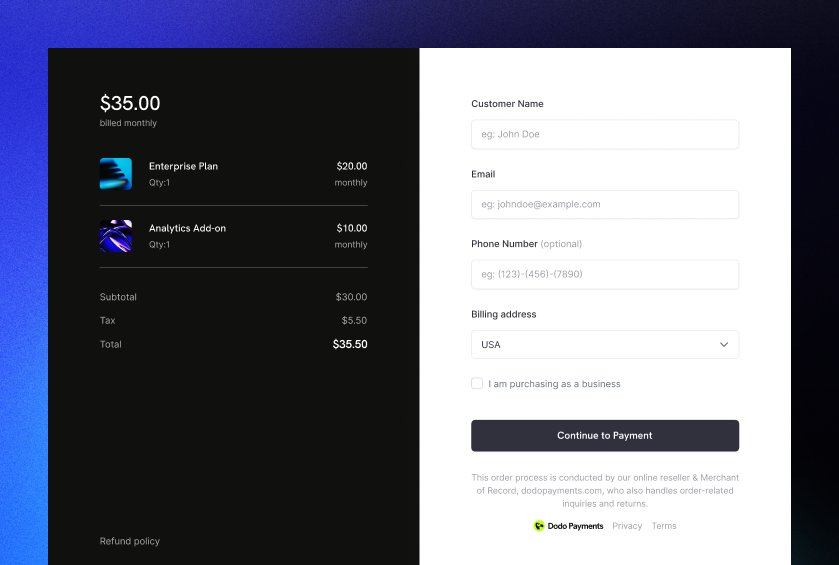
Embed Dodo Payments checkout directly into your website for a seamless, branded payment experience. Unlike overlay checkout which opens as a modal, inline checkout embeds the payment form directly into your page layout.
 ### Benefits
* **Fully integrated**: Create checkout experiences that blend seamlessly with your website
* **Custom order summaries**: Build custom UI that syncs with checkout in real-time
* **Maximum control**: Full control over checkout layout and design
* **PCI compliant**: Dodo Payments securely handles all sensitive payment information
* **Real-time sync**: Use SDK events to keep your UI in sync with checkout state
### How It Works
Initialize the SDK with `displayType: 'inline'` and embed checkout in a container element:
```typescript theme={null}
import { DodoPayments } from "dodopayments-checkout";
// Initialize the SDK for inline mode
DodoPayments.Initialize({
mode: "test",
displayType: "inline",
onEvent: (event) => {
if (event.event_type === "checkout.breakdown") {
// Update your UI with real-time tax and total calculations
const breakdown = event.data?.message;
}
},
});
// Open checkout in a specific container
DodoPayments.Checkout.open({
checkoutUrl: "https://test.checkout.dodopayments.com/session/cks_123",
elementId: "dodo-inline-checkout" // ID of the container element
});
```
### Key Features
* **Real-time breakdown events**: Receive `checkout.breakdown` events as customers enter their details
* **Custom order summaries**: Build your own pricing display that updates in real-time
* **Seamless integration**: Checkout frame handles payment collection while you control the layout
* **SDK methods**: Use `open()`, `close()`, and `isOpen()` to control checkout programmatically
Result: Fully integrated checkout experiences that match your brand and provide maximum control over the payment flow.
Use inline checkout when you want maximum control over checkout design. Use [overlay checkout](/developer-resources/overlay-checkout) for faster integration with minimal changes to existing pages.
Learn more: [Inline Checkout Guide](/developer-resources/inline-checkout)
2. **Create Payments, Subscriptions, and Checkouts Using Existing Payment Methods**\
Streamline checkout flows by using saved payment methods from existing customers. The new `payment_method_id` parameter allows you to create payments, subscriptions, or checkout sessions using a customer's previously saved payment method.
### Benefits
* **Faster checkout**: Skip payment method collection for returning customers
* **One-click purchases**: Enable instant purchases with saved payment methods
* **Subscription management**: Easily create subscriptions using existing payment methods
* **Improved conversion**: Reduce checkout friction for repeat customers
### How It Works
Use `payment_method_id` when creating checkout sessions, payments, or subscriptions:
```javascript theme={null}
const session = await client.checkoutSessions.create({
product_cart: [{ product_id: 'pdt_123', quantity: 1 }],
customer: {
customer_id: 'cus_123'
},
payment_method_id: 'pm_abc123',
confirm: true
});
```
```javascript theme={null}
const payment = await client.payments.create({
product_cart: [{ product_id: 'pdt_123', quantity: 1 }],
customer: { customer_id: 'cus_123' },
billing: { country: 'US' },
payment_method_id: 'pm_abc123'
});
```
```javascript theme={null}
const subscription = await client.subscriptions.create({
customer: { customer_id: 'cus_123' },
billing: { country: 'US' },
product_id: 'pdt_subscription',
quantity: 1,
payment_method_id: 'pm_abc123'
});
```
When using `payment_method_id` in checkout sessions, `confirm` must be set to `true`, and an existing `customer_id` must be provided. The payment method will be validated for eligibility with the payment's currency.
The payment method must belong to the customer and be compatible with the payment currency. If validation fails, the request will return an error.
3. **Subscription Plan Changes in Dashboard with Next Billing Date Updates**
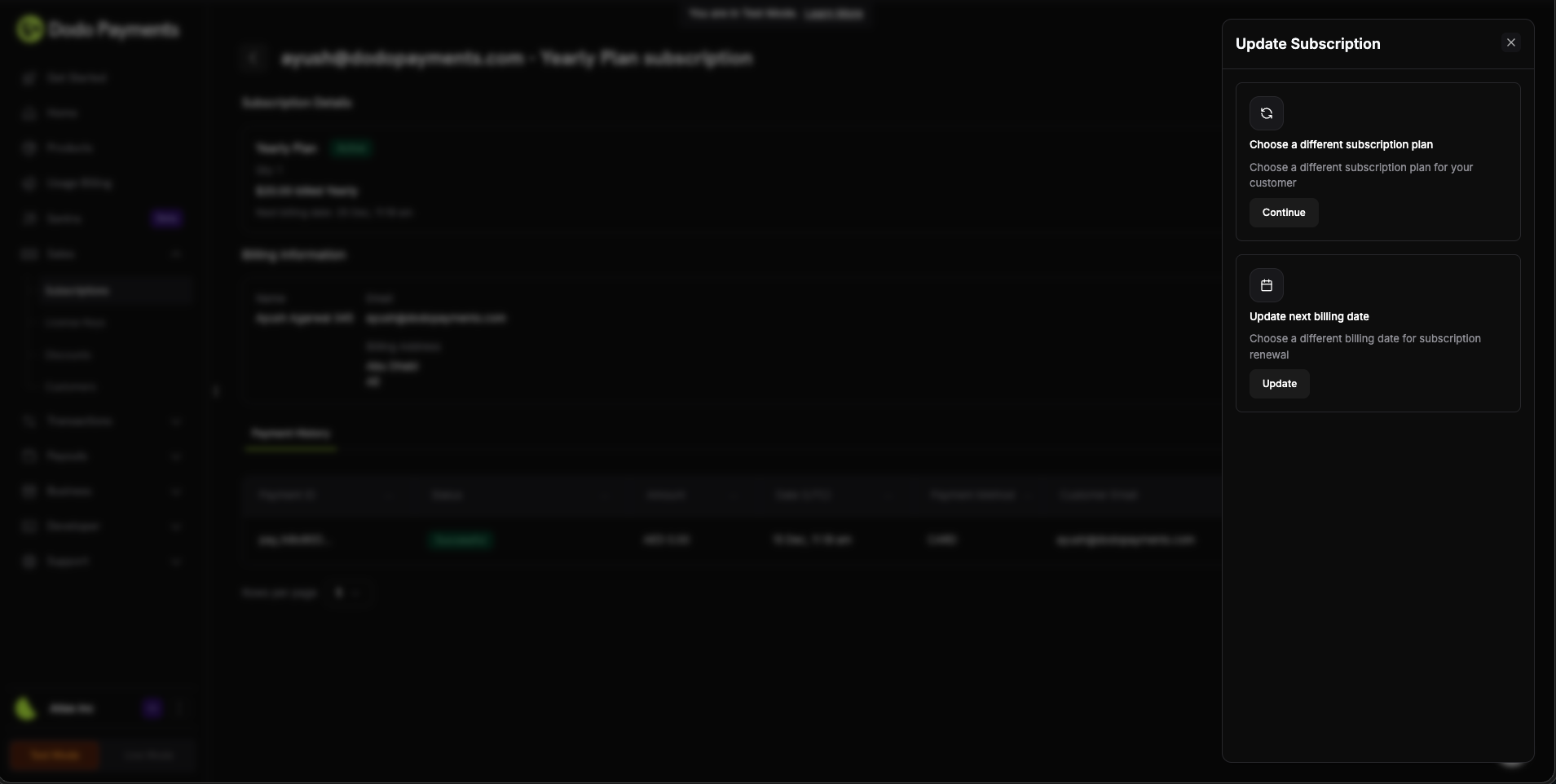
Manage subscription plans directly from the dashboard with enhanced control. You can now change subscription plans and update the next billing date in a single action, giving you complete flexibility over subscription management.
### Benefits
* **Fully integrated**: Create checkout experiences that blend seamlessly with your website
* **Custom order summaries**: Build custom UI that syncs with checkout in real-time
* **Maximum control**: Full control over checkout layout and design
* **PCI compliant**: Dodo Payments securely handles all sensitive payment information
* **Real-time sync**: Use SDK events to keep your UI in sync with checkout state
### How It Works
Initialize the SDK with `displayType: 'inline'` and embed checkout in a container element:
```typescript theme={null}
import { DodoPayments } from "dodopayments-checkout";
// Initialize the SDK for inline mode
DodoPayments.Initialize({
mode: "test",
displayType: "inline",
onEvent: (event) => {
if (event.event_type === "checkout.breakdown") {
// Update your UI with real-time tax and total calculations
const breakdown = event.data?.message;
}
},
});
// Open checkout in a specific container
DodoPayments.Checkout.open({
checkoutUrl: "https://test.checkout.dodopayments.com/session/cks_123",
elementId: "dodo-inline-checkout" // ID of the container element
});
```
### Key Features
* **Real-time breakdown events**: Receive `checkout.breakdown` events as customers enter their details
* **Custom order summaries**: Build your own pricing display that updates in real-time
* **Seamless integration**: Checkout frame handles payment collection while you control the layout
* **SDK methods**: Use `open()`, `close()`, and `isOpen()` to control checkout programmatically
Result: Fully integrated checkout experiences that match your brand and provide maximum control over the payment flow.
Use inline checkout when you want maximum control over checkout design. Use [overlay checkout](/developer-resources/overlay-checkout) for faster integration with minimal changes to existing pages.
Learn more: [Inline Checkout Guide](/developer-resources/inline-checkout)
2. **Create Payments, Subscriptions, and Checkouts Using Existing Payment Methods**\
Streamline checkout flows by using saved payment methods from existing customers. The new `payment_method_id` parameter allows you to create payments, subscriptions, or checkout sessions using a customer's previously saved payment method.
### Benefits
* **Faster checkout**: Skip payment method collection for returning customers
* **One-click purchases**: Enable instant purchases with saved payment methods
* **Subscription management**: Easily create subscriptions using existing payment methods
* **Improved conversion**: Reduce checkout friction for repeat customers
### How It Works
Use `payment_method_id` when creating checkout sessions, payments, or subscriptions:
```javascript theme={null}
const session = await client.checkoutSessions.create({
product_cart: [{ product_id: 'pdt_123', quantity: 1 }],
customer: {
customer_id: 'cus_123'
},
payment_method_id: 'pm_abc123',
confirm: true
});
```
```javascript theme={null}
const payment = await client.payments.create({
product_cart: [{ product_id: 'pdt_123', quantity: 1 }],
customer: { customer_id: 'cus_123' },
billing: { country: 'US' },
payment_method_id: 'pm_abc123'
});
```
```javascript theme={null}
const subscription = await client.subscriptions.create({
customer: { customer_id: 'cus_123' },
billing: { country: 'US' },
product_id: 'pdt_subscription',
quantity: 1,
payment_method_id: 'pm_abc123'
});
```
When using `payment_method_id` in checkout sessions, `confirm` must be set to `true`, and an existing `customer_id` must be provided. The payment method will be validated for eligibility with the payment's currency.
The payment method must belong to the customer and be compatible with the payment currency. If validation fails, the request will return an error.
3. **Subscription Plan Changes in Dashboard with Next Billing Date Updates**
Manage subscription plans directly from the dashboard with enhanced control. You can now change subscription plans and update the next billing date in a single action, giving you complete flexibility over subscription management.
 ### Dashboard Features
* **Plan changes**: Upgrade or downgrade subscriptions with a single click
* **Billing date control**: Update the next billing date when changing plans
* **Proration options**: Choose how to handle proration when changing plans
* **Visual preview**: See exactly how plan changes affect billing before confirming
### Use Cases
* **Customer support**: Quickly adjust subscription plans for customer requests
* **Promotional upgrades**: Temporarily upgrade customers with specific billing dates
* **Plan migrations**: Smoothly transition customers between subscription tiers
* **Billing alignment**: Align billing dates across multiple subscriptions
Result: Complete subscription management control from the dashboard, reducing the need for API calls for common subscription adjustments.
Use the dashboard for quick subscription plan changes, and the API for programmatic subscription management in your application.
4. **Short Links for Payment URLs**\
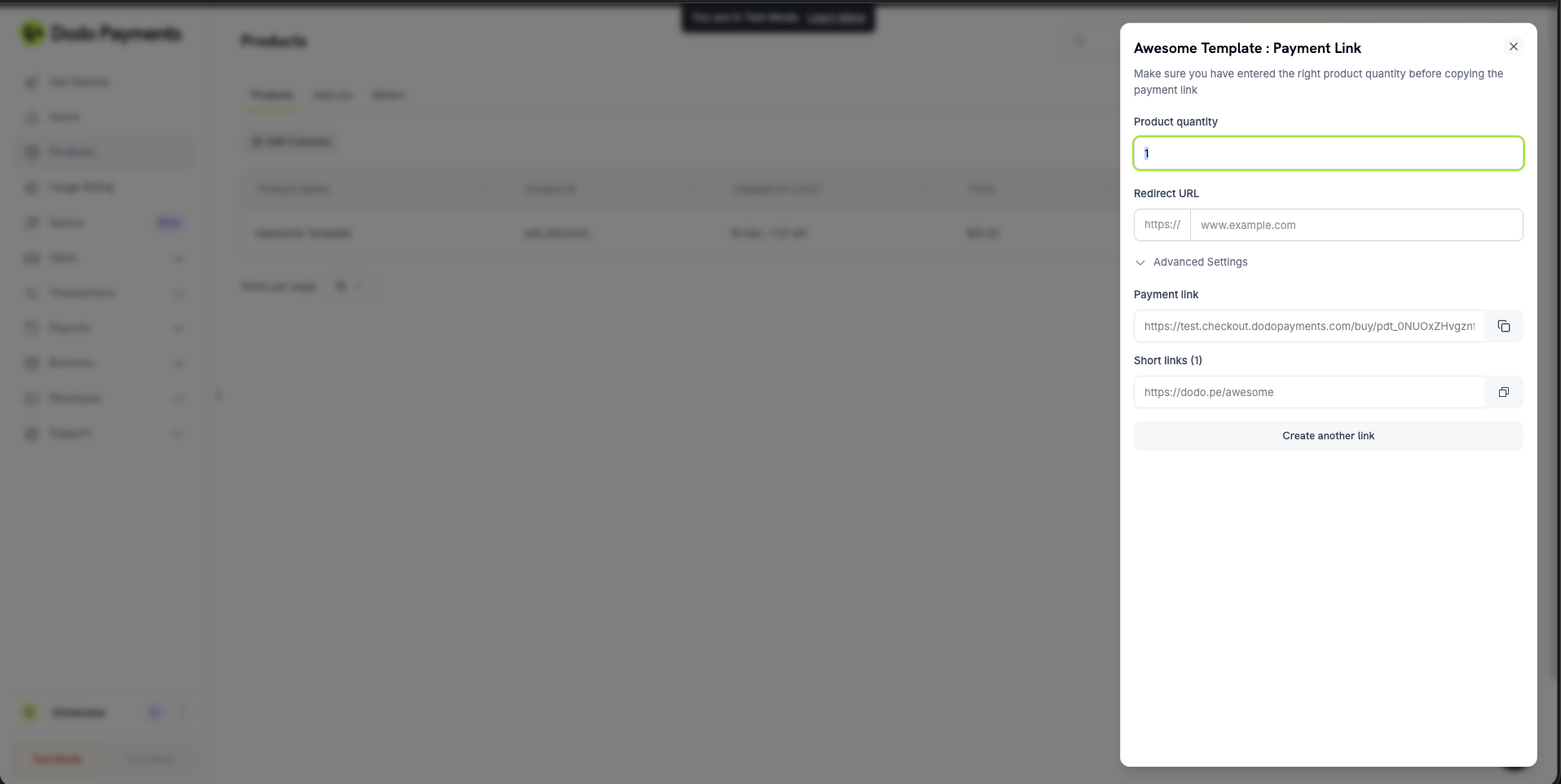
Generate cleaner, more shareable payment links with our new short link feature. Short links provide shortened checkout URLs with custom slugs, making them easier to share with customers or embed on your website.
### Dashboard Features
* **Plan changes**: Upgrade or downgrade subscriptions with a single click
* **Billing date control**: Update the next billing date when changing plans
* **Proration options**: Choose how to handle proration when changing plans
* **Visual preview**: See exactly how plan changes affect billing before confirming
### Use Cases
* **Customer support**: Quickly adjust subscription plans for customer requests
* **Promotional upgrades**: Temporarily upgrade customers with specific billing dates
* **Plan migrations**: Smoothly transition customers between subscription tiers
* **Billing alignment**: Align billing dates across multiple subscriptions
Result: Complete subscription management control from the dashboard, reducing the need for API calls for common subscription adjustments.
Use the dashboard for quick subscription plan changes, and the API for programmatic subscription management in your application.
4. **Short Links for Payment URLs**\
Generate cleaner, more shareable payment links with our new short link feature. Short links provide shortened checkout URLs with custom slugs, making them easier to share with customers or embed on your website.
 ### Benefits
* **Cleaner URLs**: Replace long payment URLs with short, branded links
* **Better trust**: Professional-looking links that build customer confidence
* **Easier sharing**: Simplified URLs perfect for SMS, email, or social media
* **Custom slugs**: Create memorable, branded short links for your products
### How It Works
Enable short links when creating checkout sessions or payment links:
```javascript theme={null}
const session = await client.checkoutSessions.create({
product_cart: [{ product_id: 'pdt_123', quantity: 1 }],
short_link: true,
return_url: 'https://yourapp.com/success'
});
```
```javascript theme={null}
const payment = await client.payments.create({
product_cart: [{ product_id: 'pdt_123', quantity: 1 }],
short_link: true,
return_url: 'https://yourapp.com/success'
});
```
Result: A shortened payment link that's easier to share and more professional-looking, improving conversion rates and customer trust.
Short links are managed in your dashboard and can be viewed via the [List Short Links API](/api-reference/products/get-products-short-links).
5. **`redirect_immediately` Flag - Skip Payment Success Page**\
Control the checkout flow with the new `redirect_immediately` flag. When enabled, customers are redirected immediately after payment completion, bypassing the default success page for a faster, more streamlined experience.
### Use Cases
* **Faster checkout flow**: Reduce friction by skipping intermediate pages
* **Custom success pages**: Redirect directly to your branded success page
* **Mobile optimization**: Improve mobile checkout experience with immediate redirects
* **Embedded checkouts**: Seamlessly integrate with overlay or embedded checkout flows
### How It Works
Enable immediate redirects in checkout sessions, payments, or subscriptions:
```javascript theme={null}
const session = await client.checkoutSessions.create({
product_cart: [{ product_id: 'pdt_123', quantity: 1 }],
feature_flags: {
redirect_immediately: true
},
return_url: 'https://yourapp.com/success'
});
```
```javascript theme={null}
const payment = await client.payments.create({
product_cart: [{ product_id: 'pdt_123', quantity: 1 }],
redirect_immediately: true,
return_url: 'https://yourapp.com/success'
});
```
```javascript theme={null}
const subscription = await client.subscriptions.create({
customer: { customer_id: 'cus_123' },
billing: { country: 'US' },
product_id: 'pdt_subscription',
quantity: 1,
redirect_immediately: true,
return_url: 'https://yourapp.com/success'
});
```
Use `redirect_immediately: true` when you have a custom success page that provides better user experience than the default payment success page.
When `redirect_immediately` is enabled, customers are redirected to your `return_url` immediately after payment completion, skipping the default success page entirely.
6. **On-Demand Subscriptions - Available for All Businesses**\
On-demand subscriptions are now enabled for all businesses, giving you flexible billing control for usage-based and metered services.
### What This Enables
* **Usage-based billing**: Create subscriptions and charge customers based on actual usage
* **Flexible billing cycles**: Charge customers on-demand rather than fixed intervals
* **Metered services**: Perfect for API usage, storage, compute time, and other metered resources
* **Manual charge control**: Create charges manually when needed, giving you full control over billing timing
### How It Works
Create an on-demand subscription and charge customers as needed:
```javascript theme={null}
// Create an on-demand subscription
const subscription = await client.subscriptions.create({
customer: { customer_id: 'cus_123' },
billing: { country: 'US' },
product_id: 'pdt_api_access',
quantity: 1,
on_demand: { mandate_only: true }
});
// Charge the customer when usage occurs
await client.subscriptions.charge(subscription.subscription_id, {
product_price: 4900,
product_currency: 'USD',
product_description: 'API usage for September: 1,000 requests'
});
```
Result: Full control over when and how much to charge customers, perfect for usage-based business models.
Learn more: [On-Demand Subscriptions](/developer-resources/ondemand-subscriptions)
7. **General Bug Fixes and Enhancements**\
This release includes performance improvements, UI polish, and resolves minor bugs for a more reliable, streamlined experience.
### Benefits
* **Cleaner URLs**: Replace long payment URLs with short, branded links
* **Better trust**: Professional-looking links that build customer confidence
* **Easier sharing**: Simplified URLs perfect for SMS, email, or social media
* **Custom slugs**: Create memorable, branded short links for your products
### How It Works
Enable short links when creating checkout sessions or payment links:
```javascript theme={null}
const session = await client.checkoutSessions.create({
product_cart: [{ product_id: 'pdt_123', quantity: 1 }],
short_link: true,
return_url: 'https://yourapp.com/success'
});
```
```javascript theme={null}
const payment = await client.payments.create({
product_cart: [{ product_id: 'pdt_123', quantity: 1 }],
short_link: true,
return_url: 'https://yourapp.com/success'
});
```
Result: A shortened payment link that's easier to share and more professional-looking, improving conversion rates and customer trust.
Short links are managed in your dashboard and can be viewed via the [List Short Links API](/api-reference/products/get-products-short-links).
5. **`redirect_immediately` Flag - Skip Payment Success Page**\
Control the checkout flow with the new `redirect_immediately` flag. When enabled, customers are redirected immediately after payment completion, bypassing the default success page for a faster, more streamlined experience.
### Use Cases
* **Faster checkout flow**: Reduce friction by skipping intermediate pages
* **Custom success pages**: Redirect directly to your branded success page
* **Mobile optimization**: Improve mobile checkout experience with immediate redirects
* **Embedded checkouts**: Seamlessly integrate with overlay or embedded checkout flows
### How It Works
Enable immediate redirects in checkout sessions, payments, or subscriptions:
```javascript theme={null}
const session = await client.checkoutSessions.create({
product_cart: [{ product_id: 'pdt_123', quantity: 1 }],
feature_flags: {
redirect_immediately: true
},
return_url: 'https://yourapp.com/success'
});
```
```javascript theme={null}
const payment = await client.payments.create({
product_cart: [{ product_id: 'pdt_123', quantity: 1 }],
redirect_immediately: true,
return_url: 'https://yourapp.com/success'
});
```
```javascript theme={null}
const subscription = await client.subscriptions.create({
customer: { customer_id: 'cus_123' },
billing: { country: 'US' },
product_id: 'pdt_subscription',
quantity: 1,
redirect_immediately: true,
return_url: 'https://yourapp.com/success'
});
```
Use `redirect_immediately: true` when you have a custom success page that provides better user experience than the default payment success page.
When `redirect_immediately` is enabled, customers are redirected to your `return_url` immediately after payment completion, skipping the default success page entirely.
6. **On-Demand Subscriptions - Available for All Businesses**\
On-demand subscriptions are now enabled for all businesses, giving you flexible billing control for usage-based and metered services.
### What This Enables
* **Usage-based billing**: Create subscriptions and charge customers based on actual usage
* **Flexible billing cycles**: Charge customers on-demand rather than fixed intervals
* **Metered services**: Perfect for API usage, storage, compute time, and other metered resources
* **Manual charge control**: Create charges manually when needed, giving you full control over billing timing
### How It Works
Create an on-demand subscription and charge customers as needed:
```javascript theme={null}
// Create an on-demand subscription
const subscription = await client.subscriptions.create({
customer: { customer_id: 'cus_123' },
billing: { country: 'US' },
product_id: 'pdt_api_access',
quantity: 1,
on_demand: { mandate_only: true }
});
// Charge the customer when usage occurs
await client.subscriptions.charge(subscription.subscription_id, {
product_price: 4900,
product_currency: 'USD',
product_description: 'API usage for September: 1,000 requests'
});
```
Result: Full control over when and how much to charge customers, perfect for usage-based business models.
Learn more: [On-Demand Subscriptions](/developer-resources/ondemand-subscriptions)
7. **General Bug Fixes and Enhancements**\
This release includes performance improvements, UI polish, and resolves minor bugs for a more reliable, streamlined experience.