> ## Documentation Index
> Fetch the complete documentation index at: https://docs.dodopayments.com/llms.txt
> Use this file to discover all available pages before exploring further.
# v1.67.0 (December 17, 2025)
> Mixed cart checkout for one-time and subscription products, Unified Customer Portal, invoice_id in Payment Response
## New Features 🚀
1. **Mixed Cart Checkout: One-Time and Subscription Products in a Single Cart**\
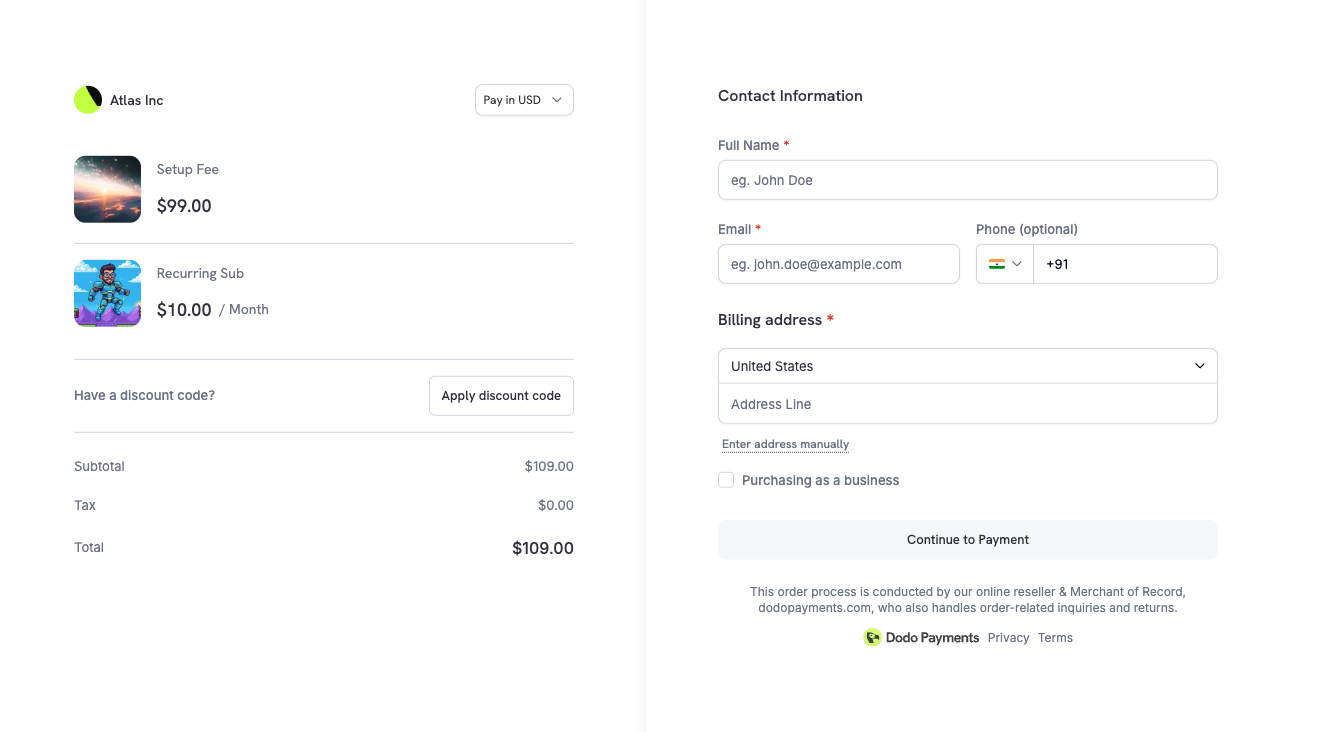
Checkout now supports combining both one-time payment products and subscription products in a single cart, unlocking powerful new billing use cases.
 ### What This Enables
* **Setup fees + subscriptions**: Charge a one-time setup fee alongside a recurring subscription in a single checkout
* **Bundles with recurring components**: Sell a product (one-time) bundled with ongoing service access (subscription)
* **Course + membership combos**: Offer a course purchase with an optional community membership subscription
* **Lifetime + add-on subscriptions**: Combine lifetime product access with optional recurring premium features
### How It Works
Simply add both one-time and subscription products to your checkout session:
```javascript theme={null}
const session = await client.checkoutSessions.create({
product_cart: [
// One-time setup fee
{ product_id: 'prod_setup_fee', quantity: 1 },
// Monthly subscription
{ product_id: 'prod_monthly_plan', quantity: 1 }
],
customer: {
email: 'customer@example.com',
name: 'Jane Doe'
},
return_url: 'https://yourapp.com/success'
});
```
Result: A single checkout flow that processes the one-time payment and initiates the subscription — reducing friction and increasing conversion rates.
When mixing product types, the one-time payment is charged immediately while the subscription follows its configured billing cycle (including any trial period you've set).
Learn more: [Checkout Sessions](/developer-resources/checkout-session)
2. **Unified Customer Portal**
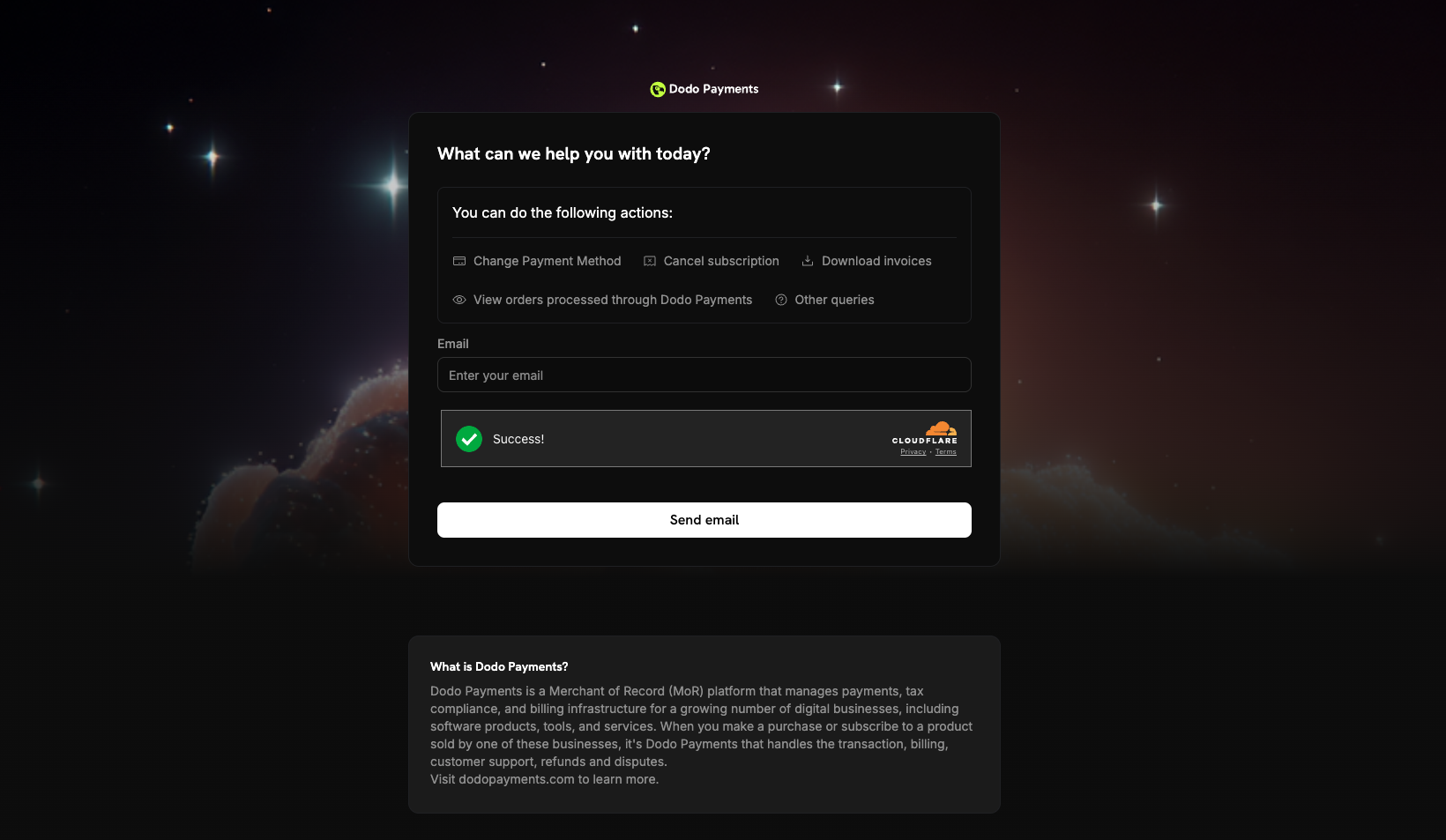
A new centralized customer portal at [customer.dodopayments.com](https://customer.dodopayments.com) where customers can view and manage all their purchases and subscriptions across different businesses on Dodo Payments.
### What This Enables
* **Setup fees + subscriptions**: Charge a one-time setup fee alongside a recurring subscription in a single checkout
* **Bundles with recurring components**: Sell a product (one-time) bundled with ongoing service access (subscription)
* **Course + membership combos**: Offer a course purchase with an optional community membership subscription
* **Lifetime + add-on subscriptions**: Combine lifetime product access with optional recurring premium features
### How It Works
Simply add both one-time and subscription products to your checkout session:
```javascript theme={null}
const session = await client.checkoutSessions.create({
product_cart: [
// One-time setup fee
{ product_id: 'prod_setup_fee', quantity: 1 },
// Monthly subscription
{ product_id: 'prod_monthly_plan', quantity: 1 }
],
customer: {
email: 'customer@example.com',
name: 'Jane Doe'
},
return_url: 'https://yourapp.com/success'
});
```
Result: A single checkout flow that processes the one-time payment and initiates the subscription — reducing friction and increasing conversion rates.
When mixing product types, the one-time payment is charged immediately while the subscription follows its configured billing cycle (including any trial period you've set).
Learn more: [Checkout Sessions](/developer-resources/checkout-session)
2. **Unified Customer Portal**
A new centralized customer portal at [customer.dodopayments.com](https://customer.dodopayments.com) where customers can view and manage all their purchases and subscriptions across different businesses on Dodo Payments.
 ### Portal Features
* **Cross-business visibility**: View all purchases and subscriptions from any business using Dodo Payments in one place
* **Centralized subscription management**: Manage subscriptions across different merchants from a single dashboard
* **Unified billing history**: Access invoices and payment history from all your purchases
* **Single sign-on experience**: Log in once with your email to access purchases from all Dodo Payments merchants
### How It Works
Customers simply visit [customer.dodopayments.com](https://customer.dodopayments.com) and enter their email address. They'll receive a secure login link that grants access to all their purchases across the Dodo Payments ecosystem.
The Unified Customer Portal complements business-specific customer portals. Customers can still access individual merchant portals for a branded experience, or use the unified portal for a consolidated view.
The unified portal uses the same email-based authentication as business-specific portals, ensuring a consistent and secure experience.
3. **Invoice ID in Payment Response**\
The Payment response now includes an `invoice_id` field, making it easier to reconcile payments with invoices and integrate with accounting systems.
```json theme={null}
{
"payment_id": "pay_2IjeQm4hqU6RA4Z4kwDee",
"status": "succeeded",
"invoice_id": "inv_2IsUnWGtRKFLxk7xAQeyt",
"amount": 9900,
"currency": "USD",
// ... other fields
}
```
### Use Cases
* **Accounting integration**: Directly link payments to invoices in your accounting software
* **Customer support**: Quickly find the invoice associated with a payment when handling support requests
* **Reconciliation**: Simplify financial reconciliation by matching payments to invoices programmatically
* **Compliance**: Maintain accurate records linking payments to their corresponding tax invoices
The `invoice_id` field uses India-specific invoice IDs when available, ensuring compliance with local invoicing requirements.
Learn more: [Get Payment Detail API](/api-reference/payments/get-payments-1)
4. **General Bug Fixes and Enhancements**\
This release includes performance improvements, UI polish, and resolves minor bugs for a more reliable, streamlined experience.
### Portal Features
* **Cross-business visibility**: View all purchases and subscriptions from any business using Dodo Payments in one place
* **Centralized subscription management**: Manage subscriptions across different merchants from a single dashboard
* **Unified billing history**: Access invoices and payment history from all your purchases
* **Single sign-on experience**: Log in once with your email to access purchases from all Dodo Payments merchants
### How It Works
Customers simply visit [customer.dodopayments.com](https://customer.dodopayments.com) and enter their email address. They'll receive a secure login link that grants access to all their purchases across the Dodo Payments ecosystem.
The Unified Customer Portal complements business-specific customer portals. Customers can still access individual merchant portals for a branded experience, or use the unified portal for a consolidated view.
The unified portal uses the same email-based authentication as business-specific portals, ensuring a consistent and secure experience.
3. **Invoice ID in Payment Response**\
The Payment response now includes an `invoice_id` field, making it easier to reconcile payments with invoices and integrate with accounting systems.
```json theme={null}
{
"payment_id": "pay_2IjeQm4hqU6RA4Z4kwDee",
"status": "succeeded",
"invoice_id": "inv_2IsUnWGtRKFLxk7xAQeyt",
"amount": 9900,
"currency": "USD",
// ... other fields
}
```
### Use Cases
* **Accounting integration**: Directly link payments to invoices in your accounting software
* **Customer support**: Quickly find the invoice associated with a payment when handling support requests
* **Reconciliation**: Simplify financial reconciliation by matching payments to invoices programmatically
* **Compliance**: Maintain accurate records linking payments to their corresponding tax invoices
The `invoice_id` field uses India-specific invoice IDs when available, ensuring compliance with local invoicing requirements.
Learn more: [Get Payment Detail API](/api-reference/payments/get-payments-1)
4. **General Bug Fixes and Enhancements**\
This release includes performance improvements, UI polish, and resolves minor bugs for a more reliable, streamlined experience.