> ## Documentation Index
> Fetch the complete documentation index at: https://docs.dodopayments.com/llms.txt
> Use this file to discover all available pages before exploring further.
# v1.118.3 (October 6, 2026)
> Multi-subscription checkout, the Moderation API, GCash, AlipayHK, FPS and Touch 'n Go, Apple Pay in India, Ethoca alerts, a customer email log, test mode emails, right-to-left checkout, a redesigned dashboard, and Dodo Sync 1.0.
## New Features
### 1. **Multi-Subscription Checkout**
One checkout can now sell several subscriptions at once. Add two or more subscription products to `product_cart` and the customer pays for all of them in a single payment, with one invoice.
Each product becomes its own subscription and renews on its own schedule, so plans with different billing intervals or trials can share a cart. The checkout page shows a **Total due today**, then one row per subscription with its trial, its renewal amount, and the next billing date.
A cart holds at most 20 products. A cart with more than one subscription can't also hold one-time products.
The payment records the whole purchase: `is_multi_subscription` is `true` and `subscription_ids` lists every subscription created, while `subscription_id` is `null`.
Learn more: [Multi-Subscription Cart](/developer-resources/checkout-session#multi-subscription-cart)
### 2. **Moderation API**
Screen text and images before they reach your product. Send content to `POST /moderation/screen` and get back a verdict of `allow`, `flag`, or `deny`, with the categories that triggered it.
Requests accept up to 8,000 characters of text, an image of up to 5 MiB, or both. Track what you have screened with `GET /moderation/usage`. Screens in test mode are free and return mock verdicts you can trigger on demand, so you can test every branch of your integration.
Learn more: [Moderation API](/features/moderation)
### 3. **GCash, AlipayHK, FPS, and Touch 'n Go**
Four new local payment methods reach customers in Southeast Asia and Hong Kong:
| Method | Country | Currency |
| - | - | - |
| **GCash** | Philippines | PHP |
| **AlipayHK** | Hong Kong | HKD |
| **FPS** | Hong Kong | HKD, CNY |
| **Touch 'n Go** | Malaysia | MYR |
The customer scans a QR code in their wallet or banking app to pay. All four are on by default and can be turned off under **Settings → Payment Methods**. They work for one-time payments only and don't appear on subscription checkouts. Each method appears only when the billing country and currency match and [Adaptive Currency](/features/adaptive-currency) is enabled.
Learn more: [Asia-Pacific Payment Methods](/features/payment-methods/asia-pacific)
### 4. **Apple Pay in India**
Customers in India can now pay with Apple Pay. Apple Pay subscriptions billed in INR run on RBI mandates, like other Indian-issued cards.
Learn more: [Apple Pay in India](/features/payment-methods/digital-wallets#apple-pay-in-india)
### 5. **Ethoca Alerts**
Stop chargebacks on Mastercard and other non-Visa cards before they are filed. When a card issuer sends an Ethoca alert, Dodo Payments refunds the payment automatically, so the dispute never becomes a chargeback and does not count against your chargeback ratio.
Ethoca alerts are opt-in. Enroll from the **Ethoca Alerts** card under **Settings → Dispute Resolution**, next to Visa RDR. Your business needs live payments and a statement descriptor first, and a fee applies for each alert. Enrollment takes 2 to 4 business days to confirm.
Learn more: [Ethoca Alerts](/features/transactions/disputes#ethoca-alerts)
### 6. **Customer Email Log**
Every customer now has a **Sent Emails** tab under **Sales → Customers**, listing the emails Dodo Payments sent them in the last 180 days. Each entry shows the subject, category, and delivery status — **Sent**, **Delivered**, **Failed**, **Marked as spam**, or **Not sent** — and a failed email tells you why it failed.
Open any email to read exactly what the customer received, and send it again, to the original address or a new one, up to three times. The same log is available over the API at `GET /customers/{customer_id}/emails`.
Learn more: [Email Logs](/features/email-logs)
### 7. **Test Mode Emails**
Customer emails now send in test mode, so you can check the full email experience before going live. Test emails go to the real recipient, and every subject starts with `[TEST MODE]`.
The **Test Mode Emails** switch under **Settings → Communication → Email** controls this, and it is on by default. A business can send up to 100 test mode emails per week. Live mode emails are not affected.
Learn more: [Test Mode Emails](/features/communication-preferences#test-mode-emails)
### 8. **Right-to-Left Checkout**
Checkout now renders right to left in Arabic and Hebrew. The whole page mirrors — layout, navigation, and the order summary — while email addresses, codes, and phone numbers keep their natural reading order.
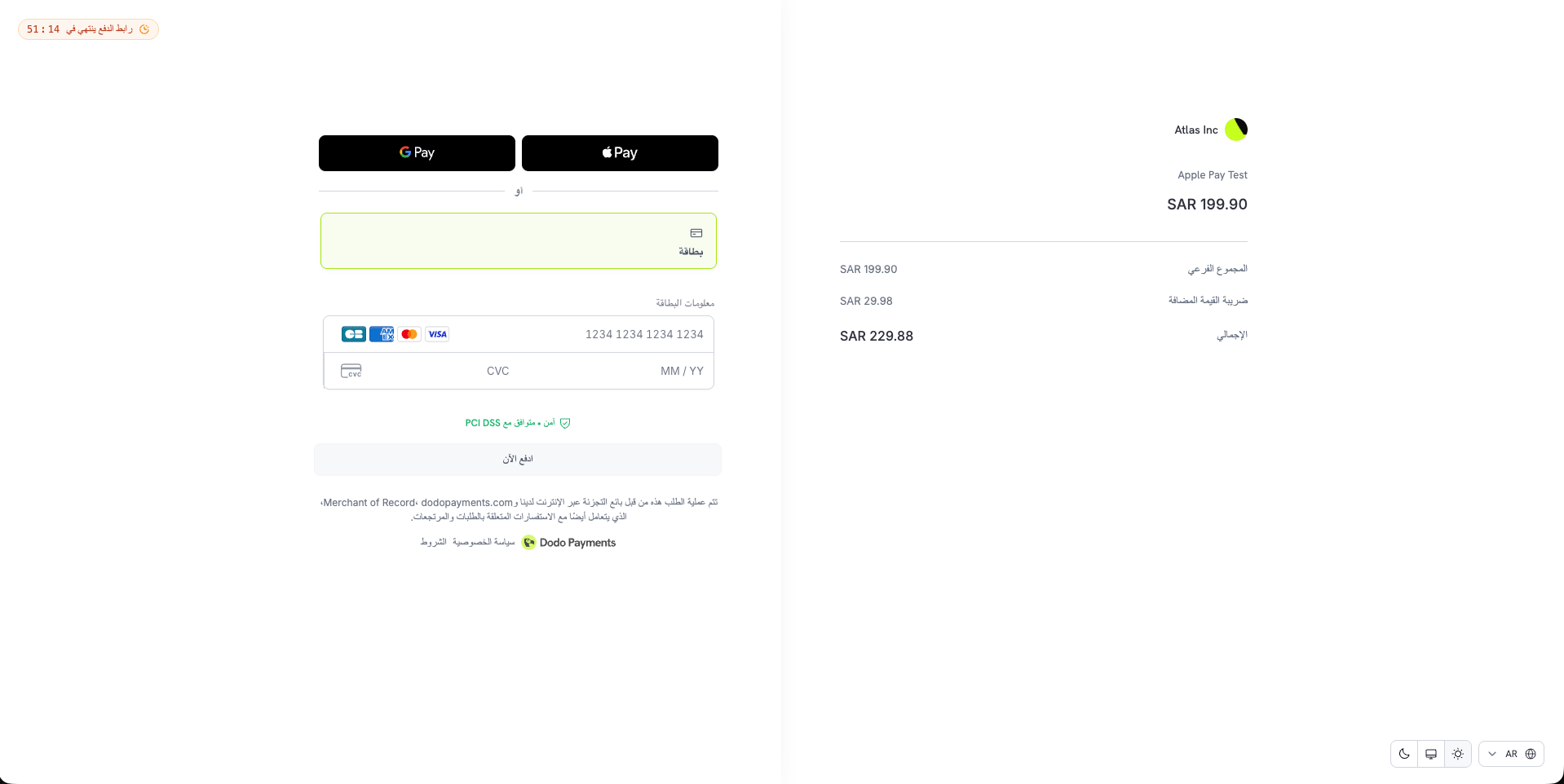 Learn more: [Multi-Language Checkout](/features/checkout#multi-language-checkout)
### 9. **Required Cardholder Name**
Set `feature_flags.require_cardholder_name` to `true` on a checkout session to make customers enter the name on their card. The field appears above the card number. The flag defaults to `false`. Other payment methods ignore it, though Apple Pay and Google Pay already collect the payer name.
Learn more: [Checkout Sessions](/developer-resources/checkout-session)
### 10. **Who Cancelled a Subscription**
Subscriptions now carry a `cancelled_by` object that records who cancelled them. Its `actor_type` is one of `customer`, `merchant_user`, `api_key`, or `dodo_team`, and for a customer or a dashboard user it also includes their `name` and `email`.
The field appears on the subscription in API responses and in every `subscription.*` webhook payload. It covers both immediate and scheduled cancellations, and is `null` when no caller is known, such as a cancellation made by the system.
Learn more: [Get Subscription](/api-reference/subscriptions/get-subscriptions)
### 11. **Payout Settings and Reserved Balance**
Payouts have a new home under **Settings → Payouts**, reached from **Manage** on the **Payouts** page. Change your payout frequency to a less frequent cycle, set your minimum payout, and manage your linked bank accounts in one place.
The **Payouts** page now shows the actual next payout date, which skips weekends and bank holidays, and tells you when a payout date moves. If part of your settled payments is held as a reserve, a **Reserved** row appears on the **Payout Balance** card. That amount is still yours and is released back into your balance automatically.
Learn more: [Payout Structure](/features/payouts/payout-structure)
### 12. **A Simpler Verification Flow**
Account verification is now one checklist with a single button that moves you forward — **Start Verification**, **Continue Verification**, or **Submit for Review**.
Each form saves as a draft when you click **Save and Continue**, so you can fill everything in at your own pace and submit all your forms for review together. Identity verification opens in a secure window on the same page. When the team needs more information, an **Action required** banner shows what is needed and by when.
Learn more: [Account Verification](/miscellaneous/verification-process)
### 13. **A Redesigned Dashboard**
**Settings** is now a single page of cards grouped into **Your Profile**, **Business Settings**, and **Payments & Commerce**, each opening its own section. **Tracking Integrations**, **Pricing**, **Dispute Resolution**, and **Payouts** have their own pages, and **Storefront** moved from the sidebar into Settings. Old links redirect to the new pages.
Search now sits in the header, along with a support chat icon. Sign out moves to the business switcher.
Every country, phone number, and currency dropdown in the dashboard is now searchable — by name, ISO code, or dialing code.
### 14. **Dodo Sync 1.0**
[Dodo Sync](/developer-resources/dodo-sync), the open-source package that copies your payments, customers, subscriptions, and licenses into your own database, reaches version 1.0.
* **Faster syncs.** Each page of records is now written in one batch operation instead of one query per record, on MongoDB, PostgreSQL, MySQL, and ClickHouse.
* **Safe on serverless.** `run()` now waits for every database write before it resolves, so a sync on Vercel or AWS Lambda no longer loses records when the function ends. Call the new `disconnect()` method in a `finally` block to close the database connection.
* **Your own MongoDB database.** Records are written to the database named in your connection URI. If the URI names no database, Dodo Sync uses `dodopayments_sync` as before.
* **Masked secrets in the CLI.** Interactive mode now masks your database URI and API key as you type them.
Version 1.0 has three breaking changes for anyone upgrading from `0.x`:
* **MongoDB database name**: The database now comes from your connection URI instead of always being `dodopayments_sync`. If your URI names a database, your data moves there.
* **MongoDB license IDs**: License documents are now stored by license `id` instead of `subscription_id`, matching the other databases. Drop your existing `licences` collection before upgrading, and the next sync repopulates it.
* **MySQL version**: MySQL 8.0.20 or later is required.
Learn more: [Sync with Your Database](/developer-resources/dodo-sync)
This documentation is built and hosted on [Mintlify](https://mintlify.com), a developer documentation platform.
Learn more: [Multi-Language Checkout](/features/checkout#multi-language-checkout)
### 9. **Required Cardholder Name**
Set `feature_flags.require_cardholder_name` to `true` on a checkout session to make customers enter the name on their card. The field appears above the card number. The flag defaults to `false`. Other payment methods ignore it, though Apple Pay and Google Pay already collect the payer name.
Learn more: [Checkout Sessions](/developer-resources/checkout-session)
### 10. **Who Cancelled a Subscription**
Subscriptions now carry a `cancelled_by` object that records who cancelled them. Its `actor_type` is one of `customer`, `merchant_user`, `api_key`, or `dodo_team`, and for a customer or a dashboard user it also includes their `name` and `email`.
The field appears on the subscription in API responses and in every `subscription.*` webhook payload. It covers both immediate and scheduled cancellations, and is `null` when no caller is known, such as a cancellation made by the system.
Learn more: [Get Subscription](/api-reference/subscriptions/get-subscriptions)
### 11. **Payout Settings and Reserved Balance**
Payouts have a new home under **Settings → Payouts**, reached from **Manage** on the **Payouts** page. Change your payout frequency to a less frequent cycle, set your minimum payout, and manage your linked bank accounts in one place.
The **Payouts** page now shows the actual next payout date, which skips weekends and bank holidays, and tells you when a payout date moves. If part of your settled payments is held as a reserve, a **Reserved** row appears on the **Payout Balance** card. That amount is still yours and is released back into your balance automatically.
Learn more: [Payout Structure](/features/payouts/payout-structure)
### 12. **A Simpler Verification Flow**
Account verification is now one checklist with a single button that moves you forward — **Start Verification**, **Continue Verification**, or **Submit for Review**.
Each form saves as a draft when you click **Save and Continue**, so you can fill everything in at your own pace and submit all your forms for review together. Identity verification opens in a secure window on the same page. When the team needs more information, an **Action required** banner shows what is needed and by when.
Learn more: [Account Verification](/miscellaneous/verification-process)
### 13. **A Redesigned Dashboard**
**Settings** is now a single page of cards grouped into **Your Profile**, **Business Settings**, and **Payments & Commerce**, each opening its own section. **Tracking Integrations**, **Pricing**, **Dispute Resolution**, and **Payouts** have their own pages, and **Storefront** moved from the sidebar into Settings. Old links redirect to the new pages.
Search now sits in the header, along with a support chat icon. Sign out moves to the business switcher.
Every country, phone number, and currency dropdown in the dashboard is now searchable — by name, ISO code, or dialing code.
### 14. **Dodo Sync 1.0**
[Dodo Sync](/developer-resources/dodo-sync), the open-source package that copies your payments, customers, subscriptions, and licenses into your own database, reaches version 1.0.
* **Faster syncs.** Each page of records is now written in one batch operation instead of one query per record, on MongoDB, PostgreSQL, MySQL, and ClickHouse.
* **Safe on serverless.** `run()` now waits for every database write before it resolves, so a sync on Vercel or AWS Lambda no longer loses records when the function ends. Call the new `disconnect()` method in a `finally` block to close the database connection.
* **Your own MongoDB database.** Records are written to the database named in your connection URI. If the URI names no database, Dodo Sync uses `dodopayments_sync` as before.
* **Masked secrets in the CLI.** Interactive mode now masks your database URI and API key as you type them.
Version 1.0 has three breaking changes for anyone upgrading from `0.x`:
* **MongoDB database name**: The database now comes from your connection URI instead of always being `dodopayments_sync`. If your URI names a database, your data moves there.
* **MongoDB license IDs**: License documents are now stored by license `id` instead of `subscription_id`, matching the other databases. Drop your existing `licences` collection before upgrading, and the next sync repopulates it.
* **MySQL version**: MySQL 8.0.20 or later is required.
Learn more: [Sync with Your Database](/developer-resources/dodo-sync)
This documentation is built and hosted on [Mintlify](https://mintlify.com), a developer documentation platform.