> ## Documentation Index
> Fetch the complete documentation index at: https://docs.dodopayments.com/llms.txt
> Use this file to discover all available pages before exploring further.
# v1.113.6 (August 22, 2026)
> Subscription pause and resume through the status field, replacing the removed pause field, plus native Purchasing Power Parity with per-country percentages, Charm Pricing, archive businesses and brands, a Milestones page, and a guided setup experience.
## Breaking Changes
**The boolean `pause` field on `PATCH /subscriptions/{subscription_id}` has been removed.** It now always fails with `422` instead of silently doing nothing, so an integration still sending it gets a loud error rather than a subscription that never pauses.
Pause and resume moved to the `status` field: send `{"status": "paused"}` to pause and `{"status": "active"}` to resume. There is no separate pause endpoint. Either value must be sent on its own — combining it with any other field is also rejected with `422`.
If you integrated against the pause API as previously documented, update those calls before upgrading.
Learn more: [Pausing and Resuming Subscriptions](/features/subscription#pausing-and-resuming-subscriptions)
## New Features
### 1. **Subscription Pause & Resume**
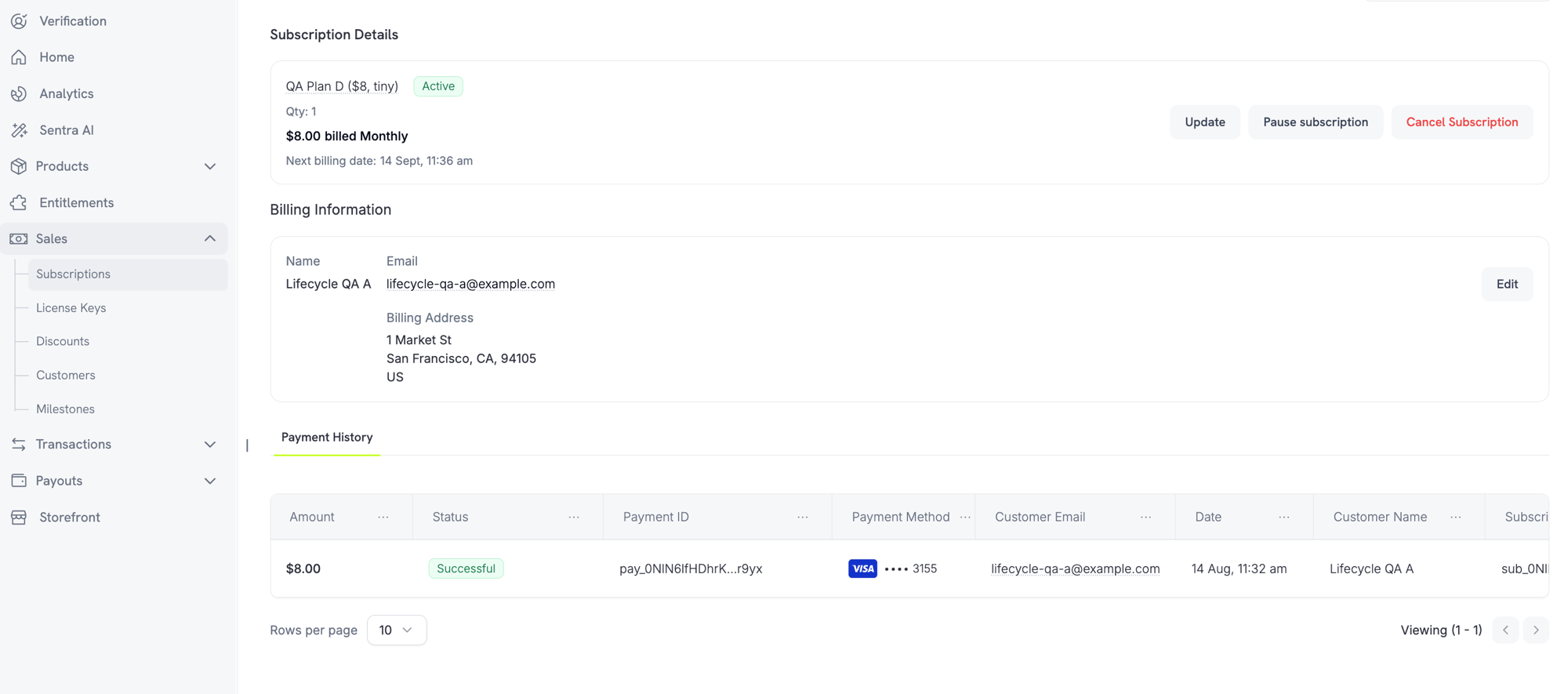
Merchants can now pause and resume subscriptions directly from the subscription detail page in the dashboard. Customers can pause from the Customer Portal when allowed by your business settings.
**Merchant controls**
Pause or resume a subscription using the **Pause subscription** or **Resume subscription** button on the subscription detail page.
 **Business settings**
Two new settings appear under **Settings → Subscriptions**:
* **Allow Subscription Pause** — "Let customers pause and resume their subscription anytime from the customer portal"
* **Bill Usage at Pause** — "Bill a usage-based subscription for its owed usage the moment it is paused"
**Customer experience**
When a customer pauses from the Customer Portal, they see a warning: pausing revokes access immediately. Features, downloads, and license keys stop working until the subscription is resumed.
Learn more: [Subscriptions](/features/subscription) | [Customer Portal](/features/customer-portal)
### 2. **Purchasing Power Parity**
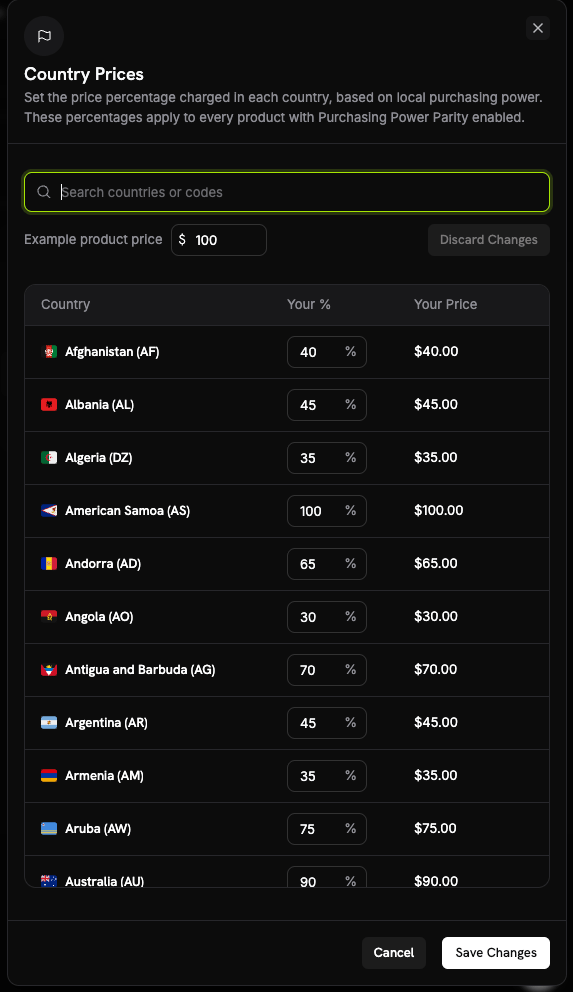
Native PPP replaces relying on third-party tools. Set a percentage per country, business-wide, from the **Country Prices** sheet in **Business Settings**. Those percentages apply to every product with PPP enabled.
**How it works**
* Each product opts in individually via a **Purchasing Power Parity** checkbox in the product's pricing section.
* PPP requires Adaptive Currency to be enabled. If Adaptive Currency is off for the business, product opt-in is rejected.
**Business settings**
Two new settings appear under **Settings → Subscriptions**:
* **Allow Subscription Pause** — "Let customers pause and resume their subscription anytime from the customer portal"
* **Bill Usage at Pause** — "Bill a usage-based subscription for its owed usage the moment it is paused"
**Customer experience**
When a customer pauses from the Customer Portal, they see a warning: pausing revokes access immediately. Features, downloads, and license keys stop working until the subscription is resumed.
Learn more: [Subscriptions](/features/subscription) | [Customer Portal](/features/customer-portal)
### 2. **Purchasing Power Parity**
Native PPP replaces relying on third-party tools. Set a percentage per country, business-wide, from the **Country Prices** sheet in **Business Settings**. Those percentages apply to every product with PPP enabled.
**How it works**
* Each product opts in individually via a **Purchasing Power Parity** checkbox in the product's pricing section.
* PPP requires Adaptive Currency to be enabled. If Adaptive Currency is off for the business, product opt-in is rejected.
 Learn more: [Purchasing Power Parity](/features/purchasing-power-parity)
### 3. **Charm Pricing**
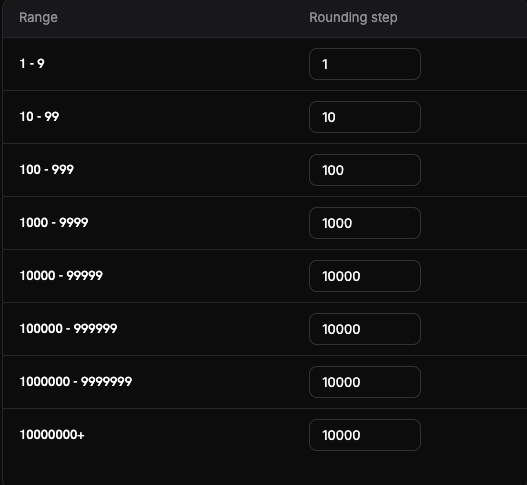
Round converted prices to psychologically appealing values, configured from the **Set up Charm Pricing** sheet in Business Settings. A rounding step is set per price range (band), so small and large prices round differently.
**Rounding types**
Choose from four rounding types (Nearest is the recommended starting point):
* **Nearest** — round to the nearest step
* **Floor** — round down
* **Ceiling** — round up
* **Whole** — round to whole numbers
A **Try it** preview shows how a given amount rounds before you save.
Learn more: [Purchasing Power Parity](/features/purchasing-power-parity)
### 3. **Charm Pricing**
Round converted prices to psychologically appealing values, configured from the **Set up Charm Pricing** sheet in Business Settings. A rounding step is set per price range (band), so small and large prices round differently.
**Rounding types**
Choose from four rounding types (Nearest is the recommended starting point):
* **Nearest** — round to the nearest step
* **Floor** — round down
* **Ceiling** — round up
* **Whole** — round to whole numbers
A **Try it** preview shows how a given amount rounds before you save.
 Learn more: [Charm Pricing](/features/charm-pricing)
### 4. **Archive Businesses & Brands**
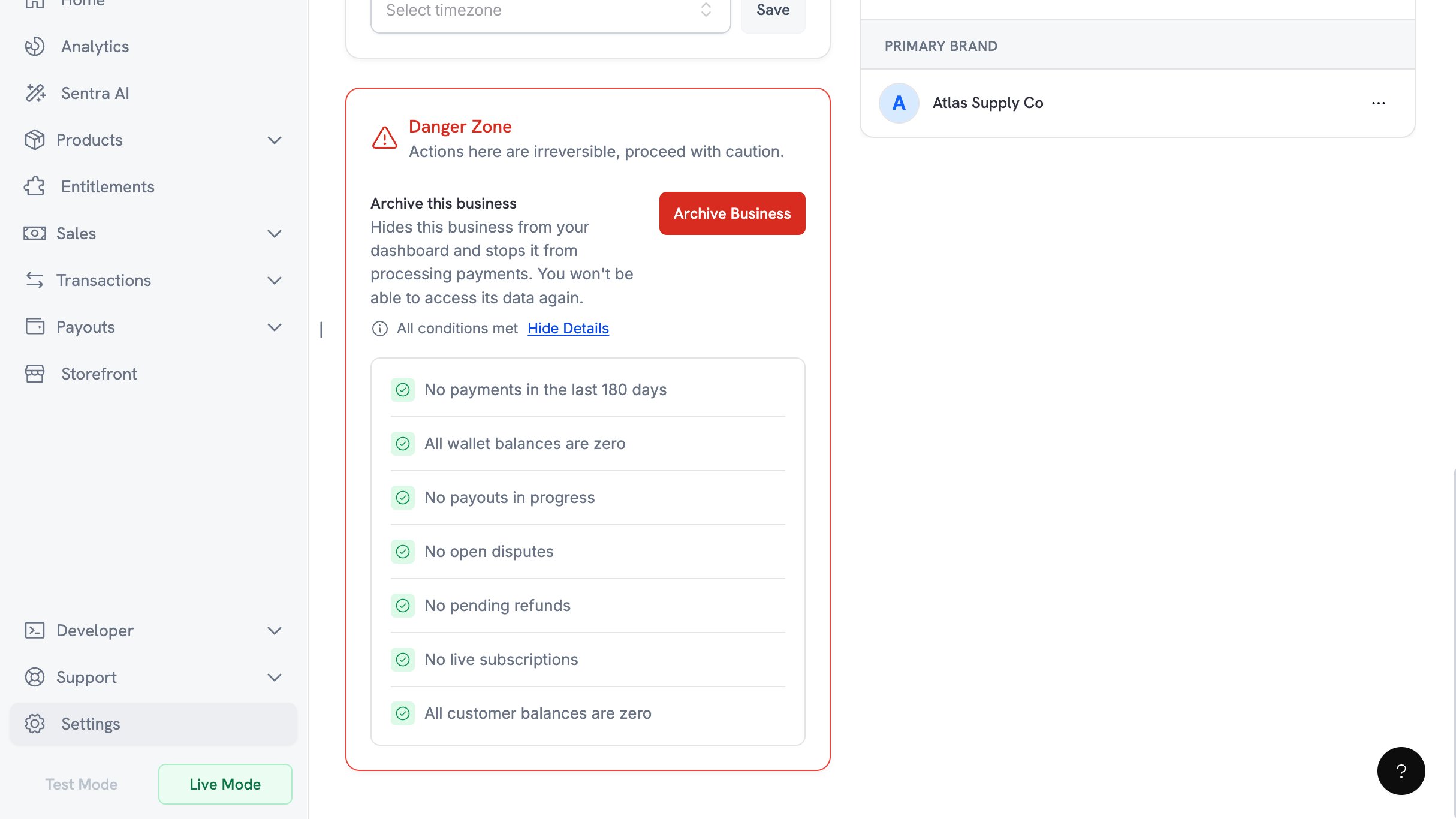
Archive a business you no longer trade under, from **Business Settings → Danger Zone → Archive Business**. This action is owner-only and cannot be undone.
**Eligibility checklist**
Seven conditions must all pass before archiving is allowed:
* No payments in the last 180 days
* All wallet balances are zero
* No payouts in progress
* No open disputes
* No pending refunds
* No live subscriptions
* All customer balances are zero
Learn more: [Charm Pricing](/features/charm-pricing)
### 4. **Archive Businesses & Brands**
Archive a business you no longer trade under, from **Business Settings → Danger Zone → Archive Business**. This action is owner-only and cannot be undone.
**Eligibility checklist**
Seven conditions must all pass before archiving is allowed:
* No payments in the last 180 days
* All wallet balances are zero
* No payouts in progress
* No open disputes
* No pending refunds
* No live subscriptions
* All customer balances are zero
 **Confirmation flow**
Confirmation requires a 6-digit code emailed to the owner. You have three attempts, and the code expires after 10 minutes.
Brands can be archived separately from businesses.
Learn more: [Archive Business](/features/archive-business)
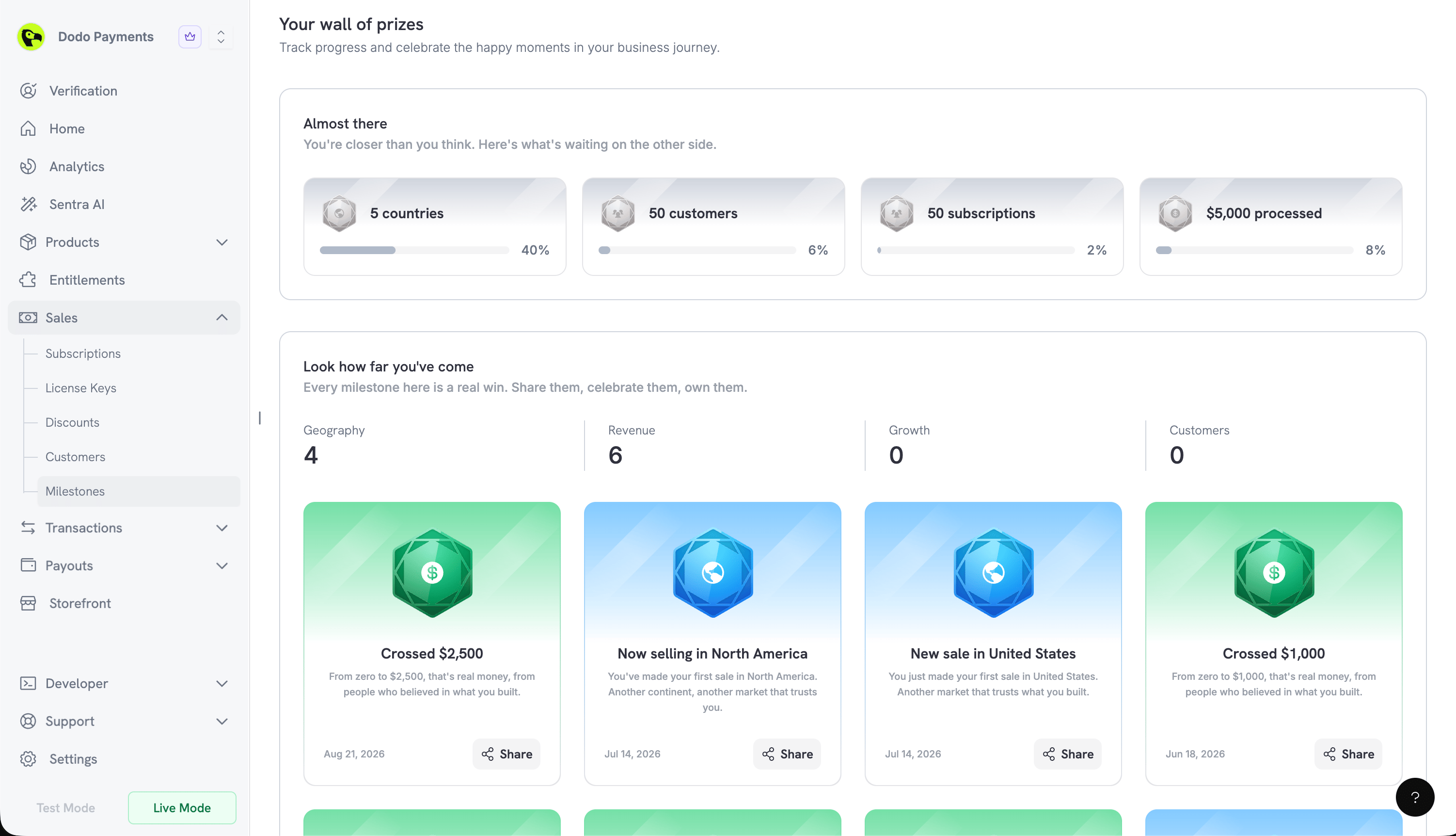
### 5. **Milestones**
A new **Milestones** page celebrates your business growth, at **Sales → Milestones** in the dashboard. Four categories track your progress: **Geography**, **Revenue**, **Growth**, and **Customers**.
**Progress and achievement cards**
* **Almost there** shows the milestones within reach, each with a percentage complete
* **Look how far you've come** celebrates the ones you have already earned
Earned milestones produce a shareable card. **Share** opens a preview with an **Include business & logo** toggle and a **Download** button to save it as an image.
**Confirmation flow**
Confirmation requires a 6-digit code emailed to the owner. You have three attempts, and the code expires after 10 minutes.
Brands can be archived separately from businesses.
Learn more: [Archive Business](/features/archive-business)
### 5. **Milestones**
A new **Milestones** page celebrates your business growth, at **Sales → Milestones** in the dashboard. Four categories track your progress: **Geography**, **Revenue**, **Growth**, and **Customers**.
**Progress and achievement cards**
* **Almost there** shows the milestones within reach, each with a percentage complete
* **Look how far you've come** celebrates the ones you have already earned
Earned milestones produce a shareable card. **Share** opens a preview with an **Include business & logo** toggle and a **Download** button to save it as an image.
 ### 6. **A Guided Setup Experience**
Every signup path now funnels into one onboarding dialog, reachable later from the **Setup guide** button in the dashboard header. Progress is saved, so the guide resumes where you left off. Going live is marked with a celebration screen.
Products created in test mode can be copied to live with **Import from Test** on the Products page.
### 6. **A Guided Setup Experience**
Every signup path now funnels into one onboarding dialog, reachable later from the **Setup guide** button in the dashboard header. Progress is saved, so the guide resumes where you left off. Going live is marked with a celebration screen.
Products created in test mode can be copied to live with **Import from Test** on the Products page.