> ## Documentation Index
> Fetch the complete documentation index at: https://docs.dodopayments.com/llms.txt
> Use this file to discover all available pages before exploring further.
# v1.112.0 (August 5, 2026)
> Discount codes gain Amount discounts, scheduling, customer eligibility rules, and per-currency options, alongside a rebuilt native webhooks experience with email alerting — plus Cash App Pay for subscriptions, SEPA Direct Debit for one-time EUR payments, customer-friendly payment failure messages, payout webhooks, a self-service login email change, a setting that lets customers cancel their own subscriptions, and a currency filter on list payments.
## New Features
### 1. **Discount Codes: Amount Discounts, Scheduling & Eligibility Rules**
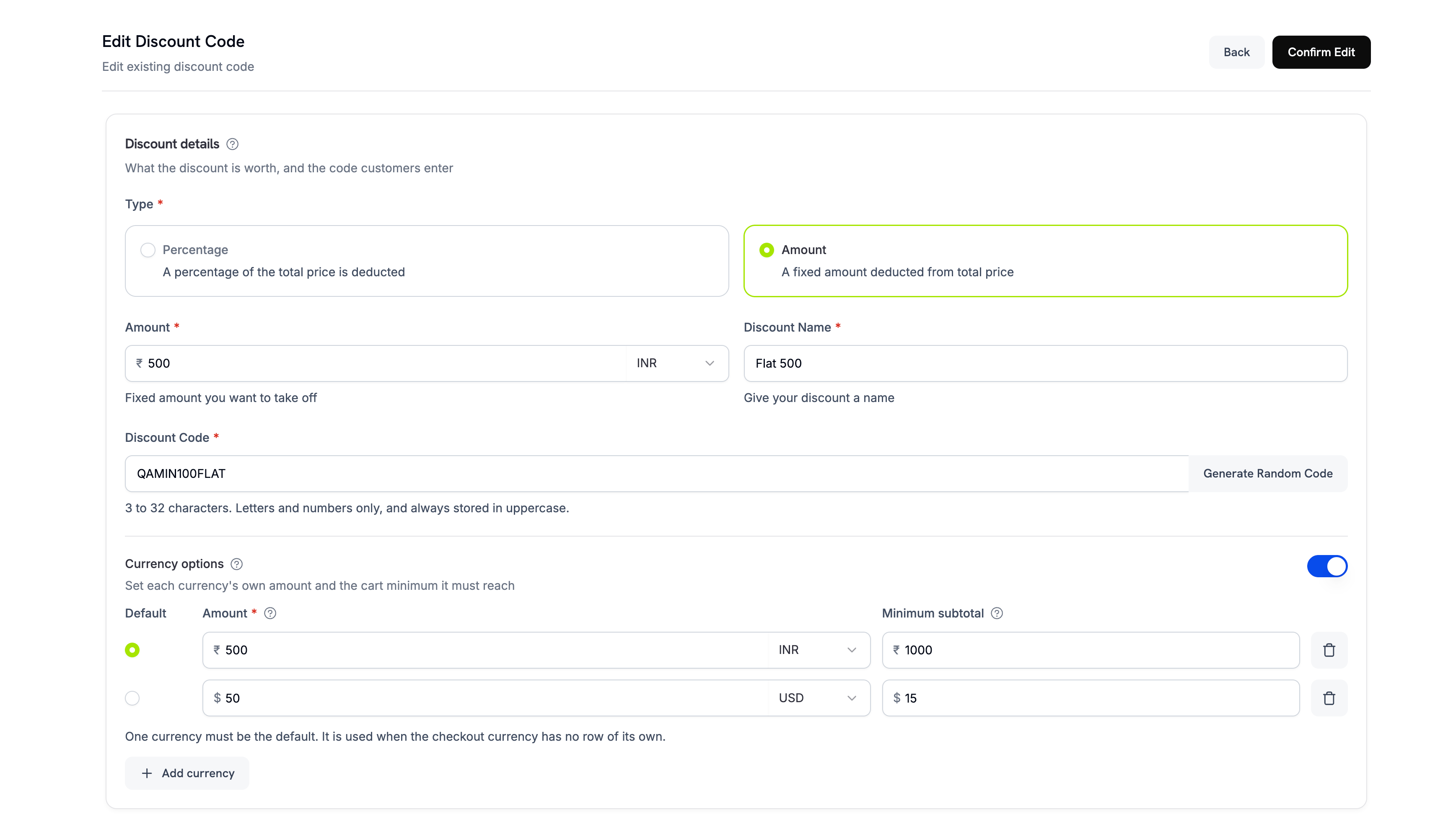
Discount codes are no longer percentage-only. A code can now deduct a fixed amount, start on a schedule, price itself differently per currency, and restrict who is allowed to redeem it.
**Amount discounts**
Set `type` to `flat` to deduct a fixed amount instead of a percentage. The deduction is pooled across the whole cart rather than applied per line item.
| Type | API value | Behavior |
| ---------- | ------------ | -------------------------------------------------------------- |
| Percentage | `percentage` | Reduces the price by a percent, optionally capped per currency |
| Amount | `flat` | Deducts a fixed amount, pooled across the cart |
 **Per-currency options**
`currency_options` lets one code behave correctly across every currency you sell in. Each entry sets, for a single currency, the maximum discount (the deduction itself for an Amount code, a cap for a Percentage code) and the minimum cart value. An Amount discount requires at least one currency option with a resolvable default; currency options stay optional for Percentage discounts.
**Customer eligibility**
`customer_eligibility` controls who may redeem a code:
| Value | Who can redeem |
| ------------ | --------------------------------------------------- |
| `any` | Any customer. This is the default. |
| `first_time` | Customers who have not purchased from you before. |
| `existing` | Customers who have purchased from you before. |
| `specific` | Only customers you attach to the code's allow list. |
**Per-currency options**
`currency_options` lets one code behave correctly across every currency you sell in. Each entry sets, for a single currency, the maximum discount (the deduction itself for an Amount code, a cap for a Percentage code) and the minimum cart value. An Amount discount requires at least one currency option with a resolvable default; currency options stay optional for Percentage discounts.
**Customer eligibility**
`customer_eligibility` controls who may redeem a code:
| Value | Who can redeem |
| ------------ | --------------------------------------------------- |
| `any` | Any customer. This is the default. |
| `first_time` | Customers who have not purchased from you before. |
| `existing` | Customers who have purchased from you before. |
| `specific` | Only customers you attach to the code's allow list. |
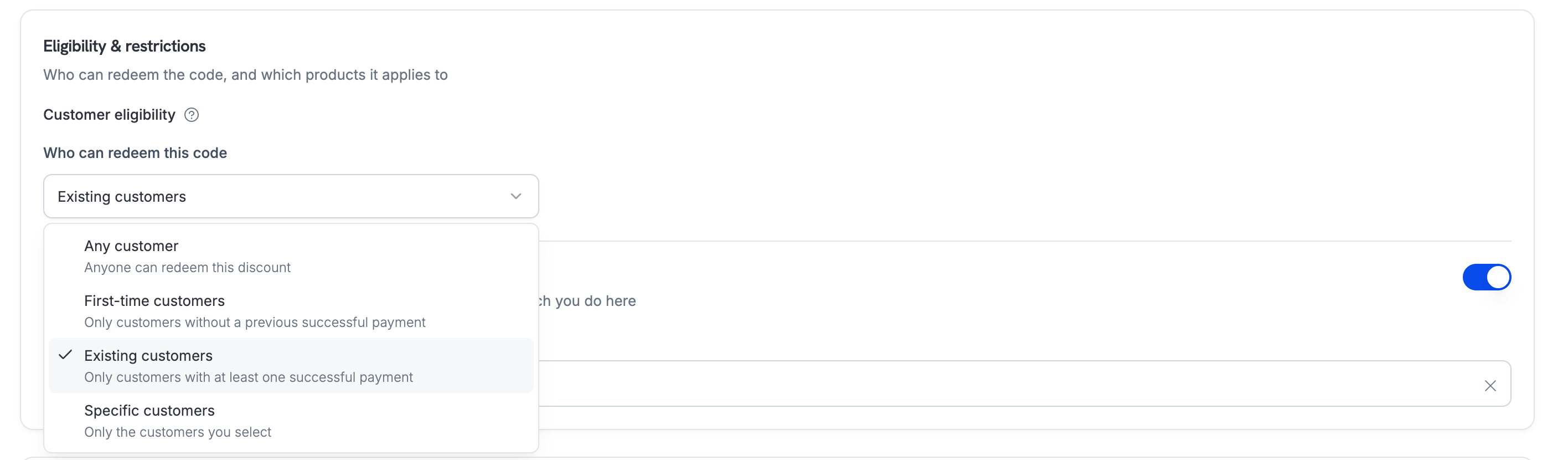 Manage the allow list from the dashboard, or with the new endpoints: `GET /discounts/{discount_id}/customers` to list the attached customers, `POST /discounts/{discount_id}/customers` to attach them, and `DELETE /discounts/{discount_id}/customers/{customer_id}` to detach one.
A `specific` code starts with **zero** eligible customers and rejects every redemption until you attach customers to it.
**Scheduling and per-customer limits**
Set `starts_at` to schedule a code for a future launch — leaving it unset keeps the code active immediately, and it must fall strictly before `expires_at`. Use `per_customer_usage_limit` to cap how often a single customer can redeem a code, as a separate cap that cannot exceed the overall `usage_limit`.
A minimum cart value is always measured against the cart's original prices, never the running total part-way through a stack. Stacking order therefore never changes whether a minimum is met.
Learn more: [Discounts](/features/discount-codes) | [Create Discount](/api-reference/discounts/create-discount)
### 2. **A Rebuilt Webhooks Experience**
The webhooks section of the dashboard has been rebuilt as a native experience, replacing the embedded portal. Everything now lives inside the dashboard with consistent tables, filters, and navigation, and it works properly on mobile.
* **Endpoints** — create and edit endpoints in a side sheet, pick event types from a searchable tree, and view the error rate for the last 24 hours at a glance.
* **Activity and logs** — watch delivery attempts over time on the **Delivery activity** chart, browse delivered messages, and open a **message detail** page to inspect the payload and every delivery attempt with its response code and duration. Each attempt can be replayed from there.
* **Event catalog** — browse every event type Dodo Payments sends, with its schema and an example payload.
* **Endpoint overview** — delivery stats for the last 24 hours, the signing secret to view or rotate, and **Replay history**.
* **Testing** — send an example event to an endpoint to verify your receiver before you go live.
* **Advanced** — throttle delivery, manage the custom headers sent with every request to that endpoint, and edit its transformation.
* **Bulk replay** — on an endpoint, recover failed messages, replay ones that were never dispatched, or replay a filtered range.
* **Email alerting** — a new **Settings** tab where you can list the addresses that should be emailed when deliveries to an endpoint start failing. Separate multiple addresses with commas, and leave it empty to turn alerts off.
This is a dashboard change only. Your existing endpoints, signing secrets, signature verification, event names, and payloads are all unchanged — no integration work is required.
Learn more: [Webhooks](/developer-resources/webhooks) | [Webhook Events](/developer-resources/webhooks/intents/webhook-events-guide)
### 3. **Cash App Pay for Subscriptions**
Cash App Pay can now back a recurring subscription, not just a one-time payment. It is available on US checkouts billed in USD, alongside the existing card options.
Learn more: [Digital Wallets](/features/payment-methods/digital-wallets)
### 4. **SEPA Direct Debit**
SEPA Direct Debit is now available across the Eurozone, letting customers pay directly from their bank account instead of using a card. It is offered on EUR checkouts for one-time payments.
SEPA Direct Debit is not instant. A payment takes **6 business days** to confirm, so do not treat authorization as settlement — fulfill only once the payment reaches a succeeded state.
Learn more: [European Payment Methods](/features/payment-methods/europe)
### 5. **Clearer Payment Failure Messages**
When a payment fails, you and your customer now see purpose-written copy instead of raw processor text. Every failure resolves through a taxonomy of **46 unified error codes**, each mapped to two audiences:
* **You** see a headline plus a recommended action on the payment, so you know whether to ask the customer to retry, contact their bank, or use another card. `error_message` on the Payment object now carries this copy whenever `error_code` is a recognized unified code.
* **Your customer** sees a plain-language explanation on the checkout failure screen, in the Customer Portal, and in dunning emails — for example, *"Your card's security code (CVC) doesn't look right. Please re-enter it and try again."*
For fraud-sensitive declines — `FRAUDULENT`, `LOST_CARD`, `STOLEN_CARD`, and `PICKUP_CARD` — the customer always sees a generic message so the real reason is never leaked. You still see the true reason, flagged with a warning not to share it.
Learn more: [Transaction Failures](/api-reference/transaction-failures) | [Payments](/features/transactions/payments) | [Get Payment Detail](/api-reference/payments/get-payments-1)
### 6. **Let Customers Cancel Their Own Subscriptions**
**Allow Subscription Cancellation** is now a first-class setting under the **Subscriptions** tab in dashboard settings, and it is enforced end to end. When you turn it off, the Customer Portal disables the cancel button and the API rejects customer-initiated cancellation with a `403` — both the immediate cancel and the "cancel at next billing date" flow. Previously the setting only hid the button, so a determined customer could still cancel through the API.
The setting is **enabled by default**. Your own cancellations through the merchant API and dashboard are never affected, and a customer can always revoke a cancellation they already scheduled.
Learn more: [Customer Portal](/features/customer-portal) | [Subscriptions](/features/subscription)
### 7. **Payout Webhooks**
You now receive webhooks for your own payouts, so you can reconcile them in your accounting systems without polling.
| Event | Fires when |
| -------------------- | -------------------------------------------------------------------------- |
| `payout.created` | A payout is created, by the automatic payout cycle or off-cycle |
| `payout.in_progress` | The payout due date arrives and processing starts |
| `payout.on_hold` | The payout is paused or placed under review |
| `payout.success` | The payout to your bank account settles |
| `payout.failed` | The payout fails, and the amount and fees are credited back to your wallet |
`payout.created` was previously emitted as `payout.not_initiated`. If an existing endpoint filters on `payout.not_initiated`, update the filter to `payout.created` so it keeps matching. The `status` field on the payload still reports `not_initiated` at this stage.
Learn more: [Payout Webhooks](/developer-resources/webhooks/intents/payout) | [Payouts Process](/features/payouts/payout-structure)
### 8. **Change Your Login Email From the Dashboard**
You can now change the email address you sign in with, without contacting support. The Account tab has been redesigned and includes a new **Change Email** section, with a **Change email** button that starts the flow.
Verification runs in two steps: we email a code to your **current** address to confirm it is you, then a second code to your **new** address to confirm you control it. Once both are verified:
* Sign in with the new address from then on. The previous address stops working for passwords, magic links, and emailed codes.
* Any linked identity providers, such as Google or GitHub sign-in, are unlinked and must be reconnected.
* Your password, businesses, team access, and verification status are unchanged.
* A notification goes to your previous address so an unexpected change is never silent.
Learn more: [My Account](/miscellaneous/accounts)
### 9. **Analytics: New Widgets and Refinements**
Building on the Analytics v3 rebuild, this release adds new visualizations and sharpens the existing ones.
* **Revenue by country is now a full-width choropleth map**, with the ranked country list beside it, and the card is shareable like the rest.
* **Redrawn trend charts** with crosshair hover, a rolling date pill on the x-axis, and a compact tooltip.
* **New date presets** — **Last 30 days** replaces Last 4 weeks, and **Last 6 months** joins the list.
* **Your filters stick.** The date preset and comparison mode now persist per business and follow you across devices, instead of resetting to the defaults every session.
* **Top customers are identified by name**, falling back to email.
* Revenue by country now returns up to the **top 150** countries.
Learn more: [Dashboard Analytics](/features/analytics-and-reporting)
## Improvements & Bug Fixes
### 10. **Filter Payments by Currency**
`GET /payments` accepts an optional **`currency`** query parameter, so you can list only the payments settled in a given currency — for example `GET /payments?currency=EUR`. The same filter is available on the Payments table in the dashboard.
Learn more: [List Payments](/api-reference/payments/get-payments)
### 11. **Dispute Response Window Extended to 10 Days**
You now have **10 days** to respond to a dispute after it is created, up from 4. The countdown on the dispute in your dashboard and the response deadline returned by the API both reflect the longer window.
Learn more: [Disputes](/features/transactions/disputes)
### 12. **Clearer Payout Bank Account Forms**
Adding a payout bank account is less ambiguous. Field labels, descriptions, and tooltips now adapt to your business type, so account holder and beneficiary name stop reading as duplicates for sole proprietors. Choosing **Other** as your bank lets you type the name freely, the China domestic bank code is labeled as **CNAPS**, and the payouts page stays visible in test mode so you can reach your linked accounts from either mode.
Learn more: [Payouts Process](/features/payouts/payout-structure)
### Other Fixes & Improvements
* **Plan-change credits are reversed when a payment fails.** Proration credits issued during a subscription plan change are no longer left behind if the resulting payment does not succeed.
* **Paid-trial invoices show the trial charge**, not the regular recurring price.
* **Percentage discounts honor the minimum cart value**, measured against the base price rather than the running total, and a discount lock timeout now returns a distinct error code instead of a generic `503`.
* **Deleting an already-removed payment method now succeeds** instead of returning an error, making the call safely idempotent.
* **Fixed the currency used for the India mandate floor** when updating a subscription's payment method.
* **Credit ledger entries beyond the allowed bounds** are rejected with a typed `400` instead of failing later.
* **Pay-what-you-want products support a fixed amount** in shared checkout links, and entitlement IDs are shown in the entitlement detail panel.
* Analytics fixes: lifetime-value series, add-ons included in MRR, no period comparison on all-time ranges, series that stop at the current bucket, and clearer range and comparison labels.
* Minor bug fixes and stability improvements across the platform.
Manage the allow list from the dashboard, or with the new endpoints: `GET /discounts/{discount_id}/customers` to list the attached customers, `POST /discounts/{discount_id}/customers` to attach them, and `DELETE /discounts/{discount_id}/customers/{customer_id}` to detach one.
A `specific` code starts with **zero** eligible customers and rejects every redemption until you attach customers to it.
**Scheduling and per-customer limits**
Set `starts_at` to schedule a code for a future launch — leaving it unset keeps the code active immediately, and it must fall strictly before `expires_at`. Use `per_customer_usage_limit` to cap how often a single customer can redeem a code, as a separate cap that cannot exceed the overall `usage_limit`.
A minimum cart value is always measured against the cart's original prices, never the running total part-way through a stack. Stacking order therefore never changes whether a minimum is met.
Learn more: [Discounts](/features/discount-codes) | [Create Discount](/api-reference/discounts/create-discount)
### 2. **A Rebuilt Webhooks Experience**
The webhooks section of the dashboard has been rebuilt as a native experience, replacing the embedded portal. Everything now lives inside the dashboard with consistent tables, filters, and navigation, and it works properly on mobile.
* **Endpoints** — create and edit endpoints in a side sheet, pick event types from a searchable tree, and view the error rate for the last 24 hours at a glance.
* **Activity and logs** — watch delivery attempts over time on the **Delivery activity** chart, browse delivered messages, and open a **message detail** page to inspect the payload and every delivery attempt with its response code and duration. Each attempt can be replayed from there.
* **Event catalog** — browse every event type Dodo Payments sends, with its schema and an example payload.
* **Endpoint overview** — delivery stats for the last 24 hours, the signing secret to view or rotate, and **Replay history**.
* **Testing** — send an example event to an endpoint to verify your receiver before you go live.
* **Advanced** — throttle delivery, manage the custom headers sent with every request to that endpoint, and edit its transformation.
* **Bulk replay** — on an endpoint, recover failed messages, replay ones that were never dispatched, or replay a filtered range.
* **Email alerting** — a new **Settings** tab where you can list the addresses that should be emailed when deliveries to an endpoint start failing. Separate multiple addresses with commas, and leave it empty to turn alerts off.
This is a dashboard change only. Your existing endpoints, signing secrets, signature verification, event names, and payloads are all unchanged — no integration work is required.
Learn more: [Webhooks](/developer-resources/webhooks) | [Webhook Events](/developer-resources/webhooks/intents/webhook-events-guide)
### 3. **Cash App Pay for Subscriptions**
Cash App Pay can now back a recurring subscription, not just a one-time payment. It is available on US checkouts billed in USD, alongside the existing card options.
Learn more: [Digital Wallets](/features/payment-methods/digital-wallets)
### 4. **SEPA Direct Debit**
SEPA Direct Debit is now available across the Eurozone, letting customers pay directly from their bank account instead of using a card. It is offered on EUR checkouts for one-time payments.
SEPA Direct Debit is not instant. A payment takes **6 business days** to confirm, so do not treat authorization as settlement — fulfill only once the payment reaches a succeeded state.
Learn more: [European Payment Methods](/features/payment-methods/europe)
### 5. **Clearer Payment Failure Messages**
When a payment fails, you and your customer now see purpose-written copy instead of raw processor text. Every failure resolves through a taxonomy of **46 unified error codes**, each mapped to two audiences:
* **You** see a headline plus a recommended action on the payment, so you know whether to ask the customer to retry, contact their bank, or use another card. `error_message` on the Payment object now carries this copy whenever `error_code` is a recognized unified code.
* **Your customer** sees a plain-language explanation on the checkout failure screen, in the Customer Portal, and in dunning emails — for example, *"Your card's security code (CVC) doesn't look right. Please re-enter it and try again."*
For fraud-sensitive declines — `FRAUDULENT`, `LOST_CARD`, `STOLEN_CARD`, and `PICKUP_CARD` — the customer always sees a generic message so the real reason is never leaked. You still see the true reason, flagged with a warning not to share it.
Learn more: [Transaction Failures](/api-reference/transaction-failures) | [Payments](/features/transactions/payments) | [Get Payment Detail](/api-reference/payments/get-payments-1)
### 6. **Let Customers Cancel Their Own Subscriptions**
**Allow Subscription Cancellation** is now a first-class setting under the **Subscriptions** tab in dashboard settings, and it is enforced end to end. When you turn it off, the Customer Portal disables the cancel button and the API rejects customer-initiated cancellation with a `403` — both the immediate cancel and the "cancel at next billing date" flow. Previously the setting only hid the button, so a determined customer could still cancel through the API.
The setting is **enabled by default**. Your own cancellations through the merchant API and dashboard are never affected, and a customer can always revoke a cancellation they already scheduled.
Learn more: [Customer Portal](/features/customer-portal) | [Subscriptions](/features/subscription)
### 7. **Payout Webhooks**
You now receive webhooks for your own payouts, so you can reconcile them in your accounting systems without polling.
| Event | Fires when |
| -------------------- | -------------------------------------------------------------------------- |
| `payout.created` | A payout is created, by the automatic payout cycle or off-cycle |
| `payout.in_progress` | The payout due date arrives and processing starts |
| `payout.on_hold` | The payout is paused or placed under review |
| `payout.success` | The payout to your bank account settles |
| `payout.failed` | The payout fails, and the amount and fees are credited back to your wallet |
`payout.created` was previously emitted as `payout.not_initiated`. If an existing endpoint filters on `payout.not_initiated`, update the filter to `payout.created` so it keeps matching. The `status` field on the payload still reports `not_initiated` at this stage.
Learn more: [Payout Webhooks](/developer-resources/webhooks/intents/payout) | [Payouts Process](/features/payouts/payout-structure)
### 8. **Change Your Login Email From the Dashboard**
You can now change the email address you sign in with, without contacting support. The Account tab has been redesigned and includes a new **Change Email** section, with a **Change email** button that starts the flow.
Verification runs in two steps: we email a code to your **current** address to confirm it is you, then a second code to your **new** address to confirm you control it. Once both are verified:
* Sign in with the new address from then on. The previous address stops working for passwords, magic links, and emailed codes.
* Any linked identity providers, such as Google or GitHub sign-in, are unlinked and must be reconnected.
* Your password, businesses, team access, and verification status are unchanged.
* A notification goes to your previous address so an unexpected change is never silent.
Learn more: [My Account](/miscellaneous/accounts)
### 9. **Analytics: New Widgets and Refinements**
Building on the Analytics v3 rebuild, this release adds new visualizations and sharpens the existing ones.
* **Revenue by country is now a full-width choropleth map**, with the ranked country list beside it, and the card is shareable like the rest.
* **Redrawn trend charts** with crosshair hover, a rolling date pill on the x-axis, and a compact tooltip.
* **New date presets** — **Last 30 days** replaces Last 4 weeks, and **Last 6 months** joins the list.
* **Your filters stick.** The date preset and comparison mode now persist per business and follow you across devices, instead of resetting to the defaults every session.
* **Top customers are identified by name**, falling back to email.
* Revenue by country now returns up to the **top 150** countries.
Learn more: [Dashboard Analytics](/features/analytics-and-reporting)
## Improvements & Bug Fixes
### 10. **Filter Payments by Currency**
`GET /payments` accepts an optional **`currency`** query parameter, so you can list only the payments settled in a given currency — for example `GET /payments?currency=EUR`. The same filter is available on the Payments table in the dashboard.
Learn more: [List Payments](/api-reference/payments/get-payments)
### 11. **Dispute Response Window Extended to 10 Days**
You now have **10 days** to respond to a dispute after it is created, up from 4. The countdown on the dispute in your dashboard and the response deadline returned by the API both reflect the longer window.
Learn more: [Disputes](/features/transactions/disputes)
### 12. **Clearer Payout Bank Account Forms**
Adding a payout bank account is less ambiguous. Field labels, descriptions, and tooltips now adapt to your business type, so account holder and beneficiary name stop reading as duplicates for sole proprietors. Choosing **Other** as your bank lets you type the name freely, the China domestic bank code is labeled as **CNAPS**, and the payouts page stays visible in test mode so you can reach your linked accounts from either mode.
Learn more: [Payouts Process](/features/payouts/payout-structure)
### Other Fixes & Improvements
* **Plan-change credits are reversed when a payment fails.** Proration credits issued during a subscription plan change are no longer left behind if the resulting payment does not succeed.
* **Paid-trial invoices show the trial charge**, not the regular recurring price.
* **Percentage discounts honor the minimum cart value**, measured against the base price rather than the running total, and a discount lock timeout now returns a distinct error code instead of a generic `503`.
* **Deleting an already-removed payment method now succeeds** instead of returning an error, making the call safely idempotent.
* **Fixed the currency used for the India mandate floor** when updating a subscription's payment method.
* **Credit ledger entries beyond the allowed bounds** are rejected with a typed `400` instead of failing later.
* **Pay-what-you-want products support a fixed amount** in shared checkout links, and entitlement IDs are shown in the entitlement detail panel.
* Analytics fixes: lifetime-value series, add-ons included in MRR, no period comparison on all-time ranges, series that stop at the current bucket, and clearer range and comparison labels.
* Minor bug fixes and stability improvements across the platform.